
0xCipherLink
Secure File Transfer Tool
0xCipherLink, a secure file transfer tool designed by 0x4m4. This tool ensures your files are transferred safely and confidentially over the network using strong encryption methods.
Features
- AES-256 Encryption: Ensures that your files are encrypted with one of the strongest encryption standards.
- PBKDF2 Key Derivation: Uses a robust key derivation function with salt and multiple iterations to protect your password.
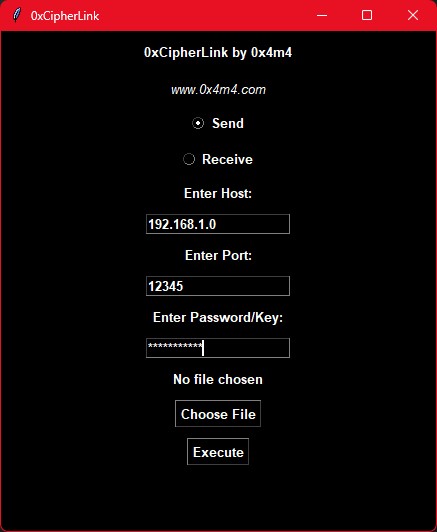
- User-Friendly Interface: Simple and intuitive GUI built with Tkinter.
- File Integrity: Maintains file name and integrity during transfer.
Why 0xCipherLink?
Unlike other online file sharing tools that might expose your files to security vulnerabilities or data breaches, 0xCipherLink ensures end-to-end encryption. Your files are encrypted locally on your machine before being sent over the network, ensuring that only the intended recipient can decrypt and access them. It also works on all platforms, weather its an windows machine, linux, mac, or an android phone.
Requirements
To run 0xCipherLink, you need to have the following installed:
- Python 3.x
- Required Python libraries:
tkintersocketcryptography
Installation
-
Clone the Repository:
git clone https://github.com/0x4m4/0xCipherLink.git cd 0xCipherLink -
Install the Required Libraries:
pip install cryptographypip install socketpip install tkinter
Usage
-
Run the Tool:
python 0xCipherLink.py -
Sending a File:
- Open 0xCipherLink and select "Send".
- Enter the recipient's host address and port.
- Choose the file you want to send.
- Enter a secure password.
- Click "Execute" to send the file.
-
Receiving a File:
- Open 0xCipherLink and select "Receive".
- Enter the port to listen on.
- Enter the password that the sender will use.
- Click "Execute" to start listening for incoming files.
Example Usage
Sending a File:
- Start the 0xCipherLink tool.
- Select "Send".
- Enter the recipient's host (e.g.,
192.168.1.4). - Enter the port (e.g.,
12345). - Choose the file you want to send.
- Enter a secure password (e.g.,
mypassword). - Click "Execute".
Receiving a File:
- Start the 0xCipherLink tool.
- Select "Receive".
- Enter the port (e.g.,
12345). - Enter the same password used by the sender (e.g.,
mypassword). - Click "Execute".
Security
0xCipherLink employs several security mechanisms to ensure your files are safe:
- AES-256 Encryption: Strong encryption standard to protect your files.
- PBKDF2 with HMAC-SHA256: Robust key derivation function to secure your password.
- IV (Initialization Vector): Random IV for each encryption session to ensure uniqueness.
Screenshot
Disclaimer
While 0xCipherLink provides strong encryption, it is essential to use a strong, unique password and ensure that the password is shared securely between sender and receiver. The security of the file transfer relies on the secrecy and complexity of the password used.
Contact
For any issues, suggestions, or contributions, feel free to reach out or create an issue in the GitHub repository.
Thank you for using 0xCipherLink. Secure your file transfers with confidence!