
8mb.local – Self-Hosted GPU Video Compressor
8mb.local is a self-hosted, fire-and-forget video compressor. Drop a file, choose a target size (e.g., 8 MB, 25 MB, 50 MB, 100 MB), and let GPU-accelerated encoding produce compact outputs with AV1/HEVC/H.264. Supports NVIDIA NVENC hardware encoding with automatic CPU fallback. The stack includes a SvelteKit UI, FastAPI backend, Celery worker, Redis broker, and real-time progress via Server-Sent Events (SSE).
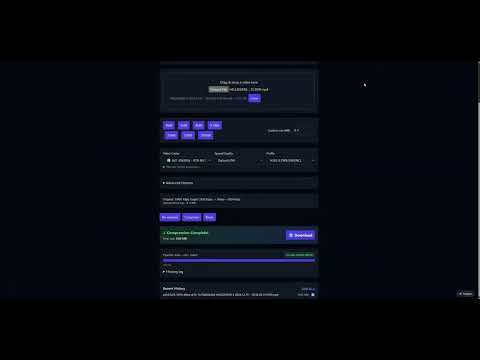
Video Demo
Table of Contents
- Features
- Screenshots
- Projects
- Architecture
- Installation
- Usage
- Configuration
- Performance & Concurrency
- Reverse Proxy Configuration
- Troubleshooting
- License
Features
- NVIDIA NVENC hardware encoding with automatic CPU fallback when no GPU is available
- Robust encoder validation at startup — tests actual encoder initialization, not just availability
- AV1, HEVC (H.265), and H.264 encoding via NVENC or CPU software encoders
- Drag-and-drop UI with helpful presets and advanced options (codec, container, tune, audio bitrate)
- Configurable codec visibility — enable/disable specific codecs in the Settings page
- Resolution control — set max width/height while maintaining aspect ratio
- Video trimming — specify start/end times (seconds or HH:MM:SS format)
- Real-time progress tracking using output size, time processed, bitrate, and wall-clock estimates
- Real-time FFmpeg logs streamed during compression
- Live queue management — view all active jobs with real-time progress, cancel individual jobs, or clear entire queue
- Automatic file size optimization — re-encodes with adjusted bitrate if output exceeds target by >2%
- Batch processing — compress multiple files in a single operation
- Job history enabled by default
- Auto-download enabled by default
- Output container choice: MP4 or MKV, with compatibility safeguards
- Version tracking — UI displays current version, backend provides
/api/version
Screenshots
Main Interface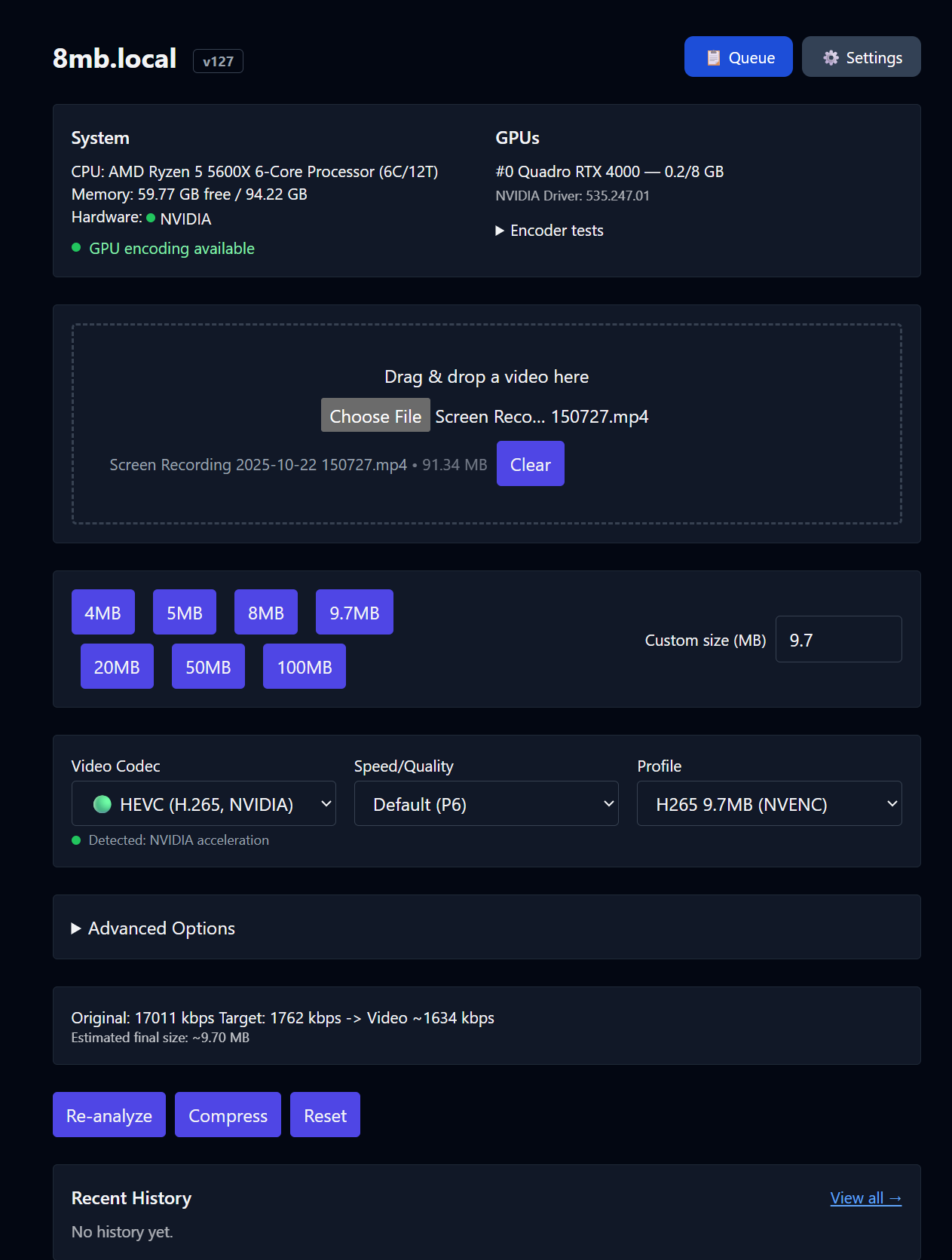
|
GPU Support List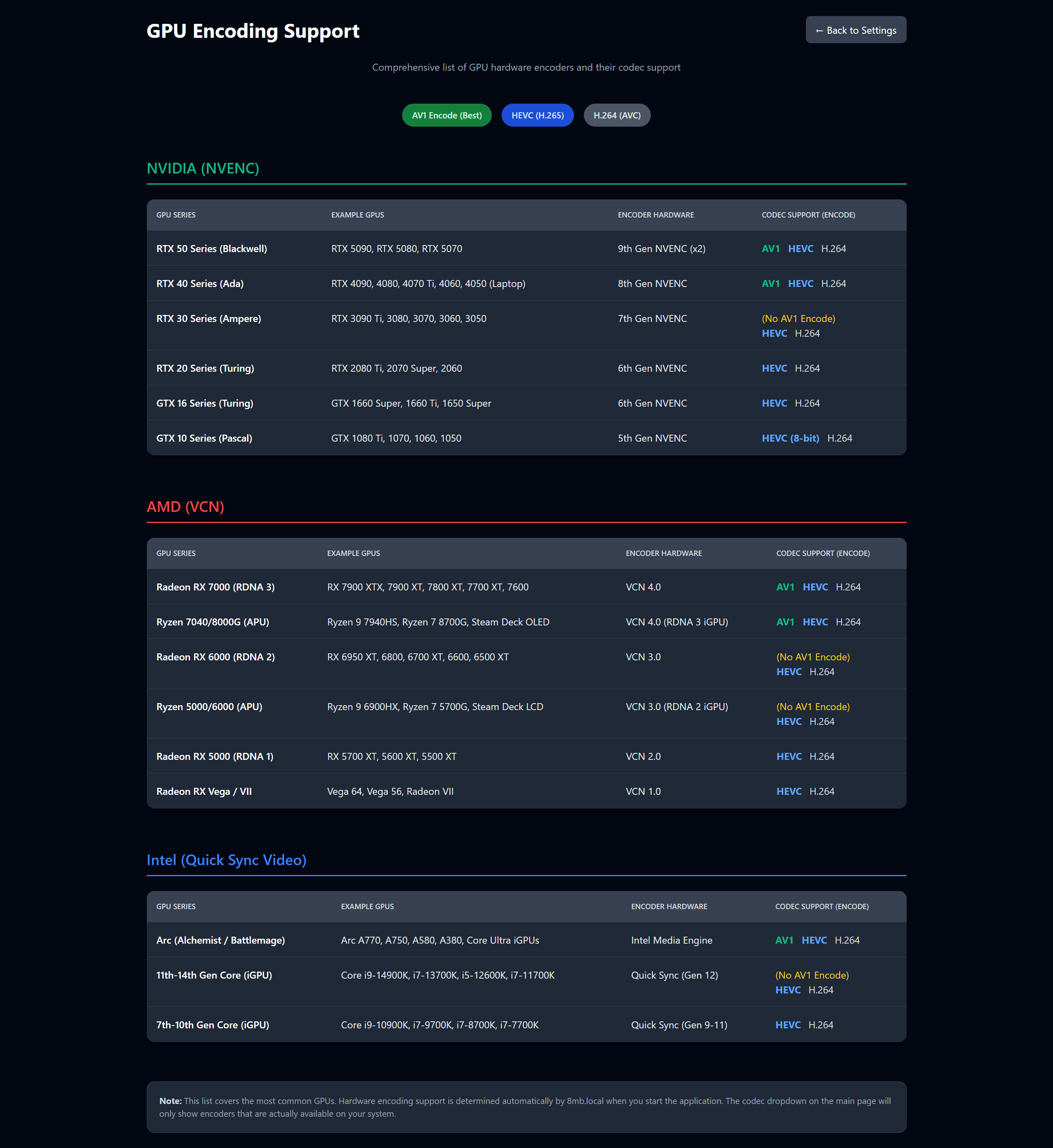
|
Settings Panel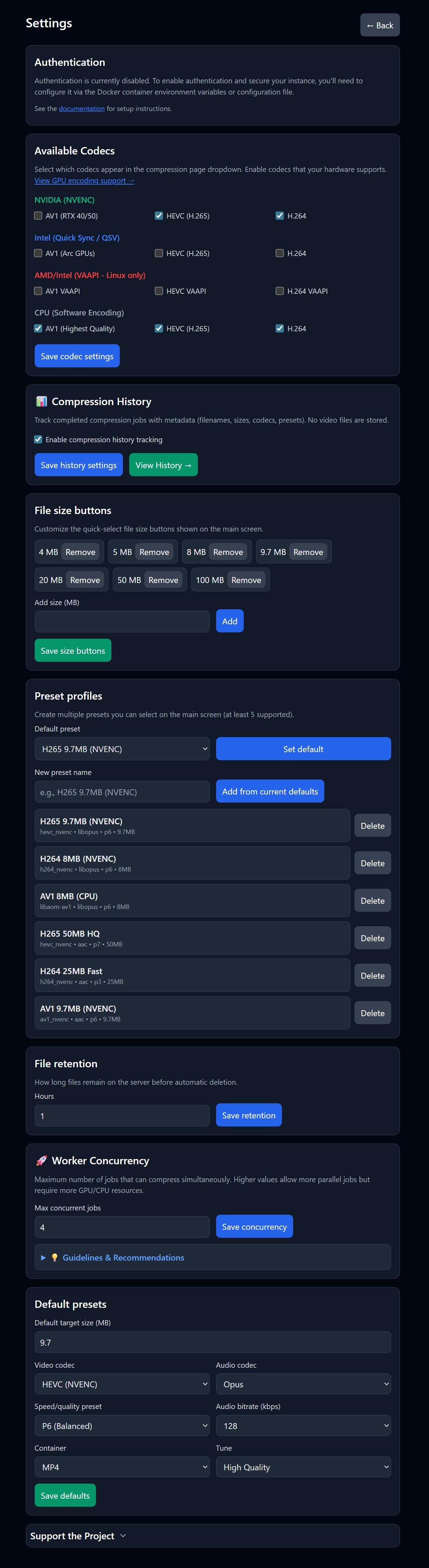
|
Live Queue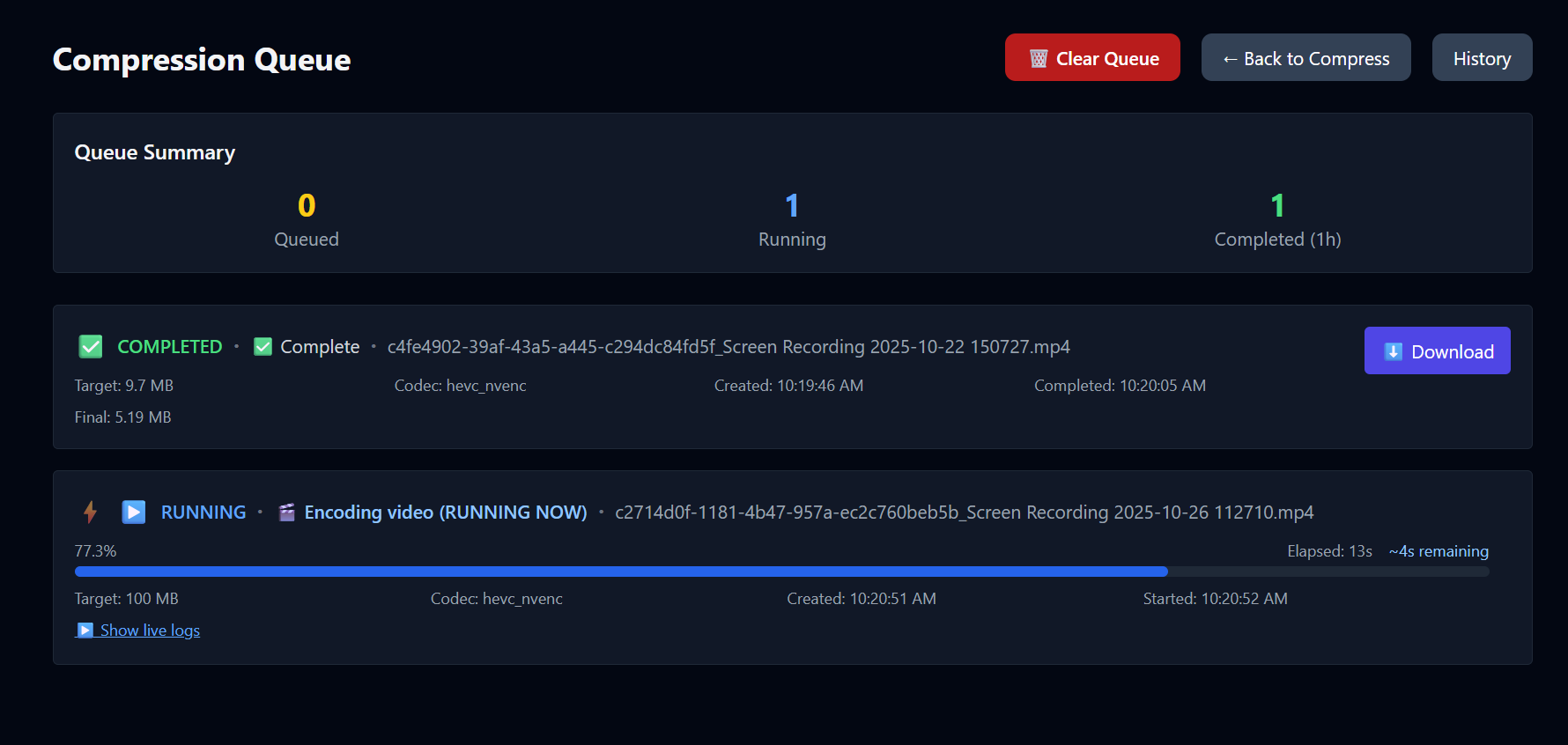
|
Compressing (Real-time Logs)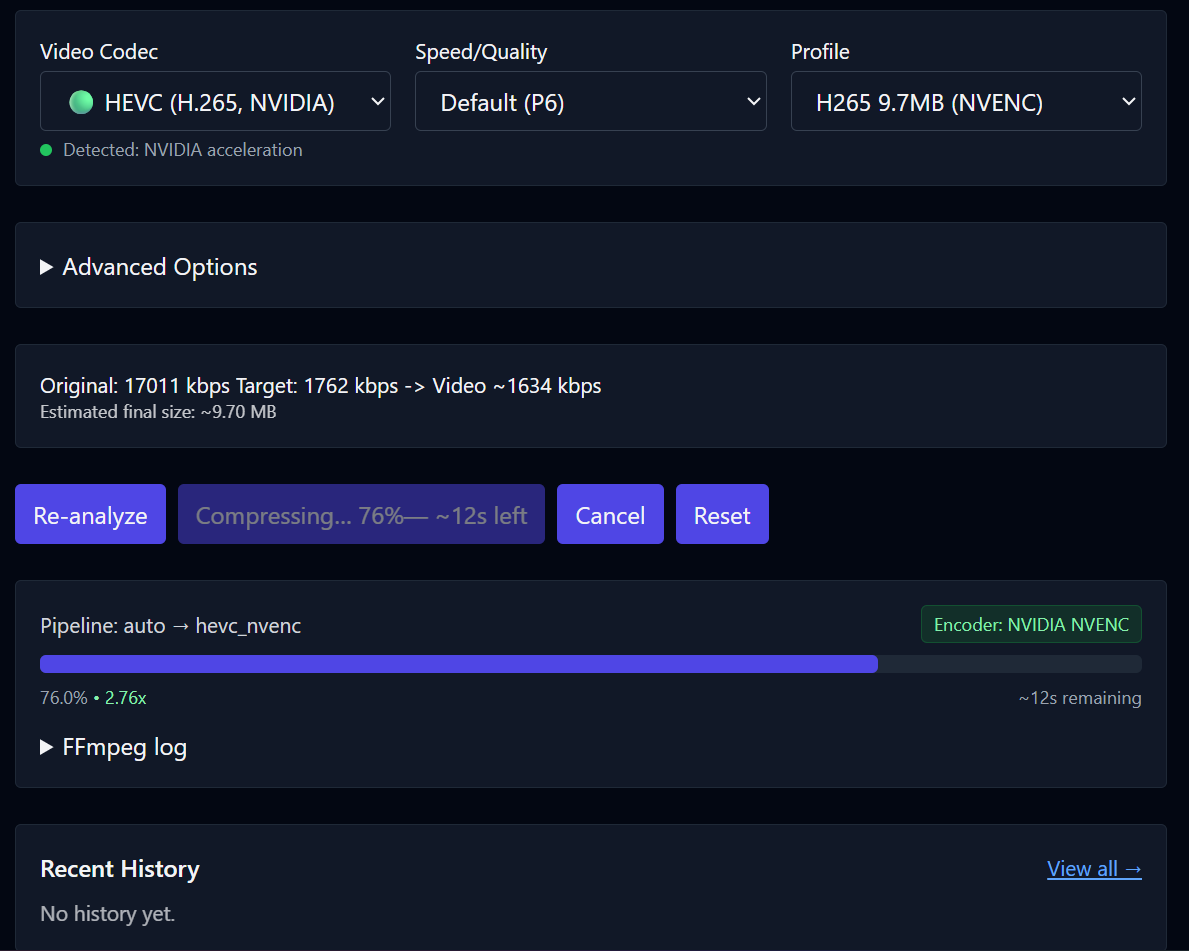
|
Encoder Validation Tests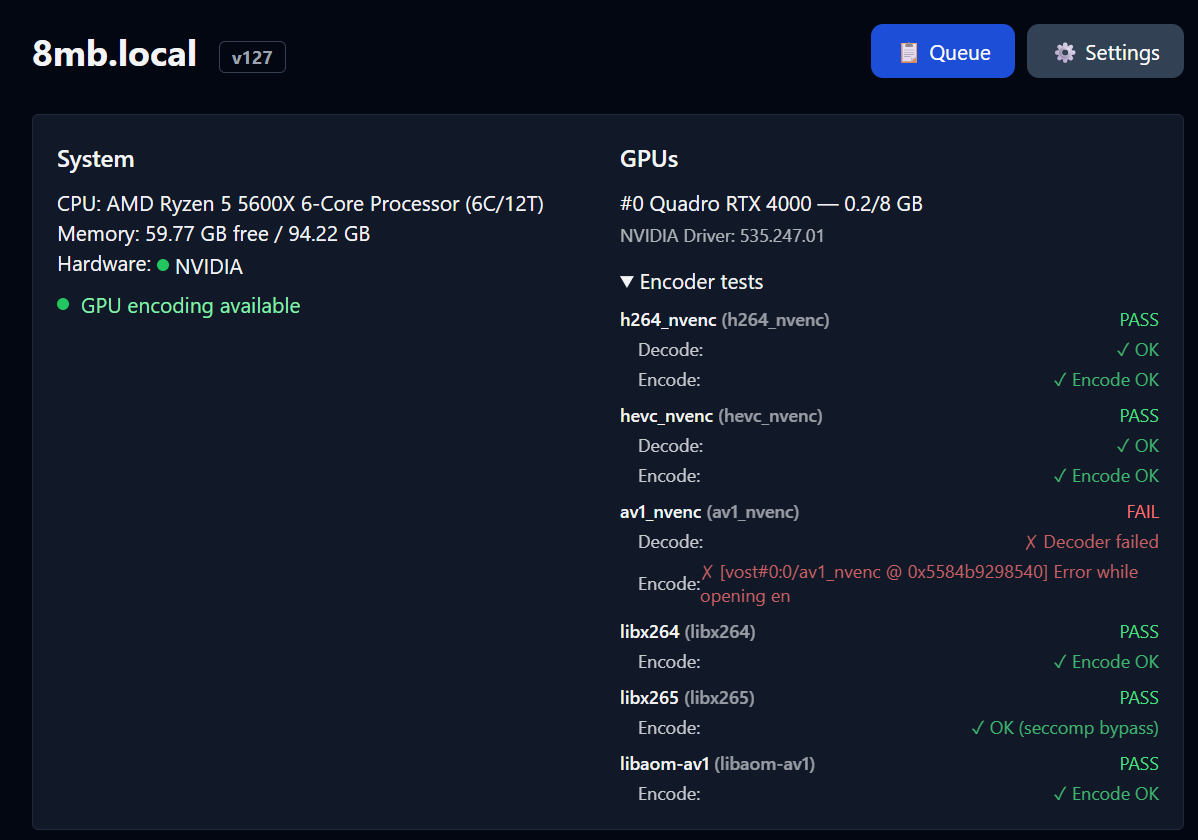
|
Job History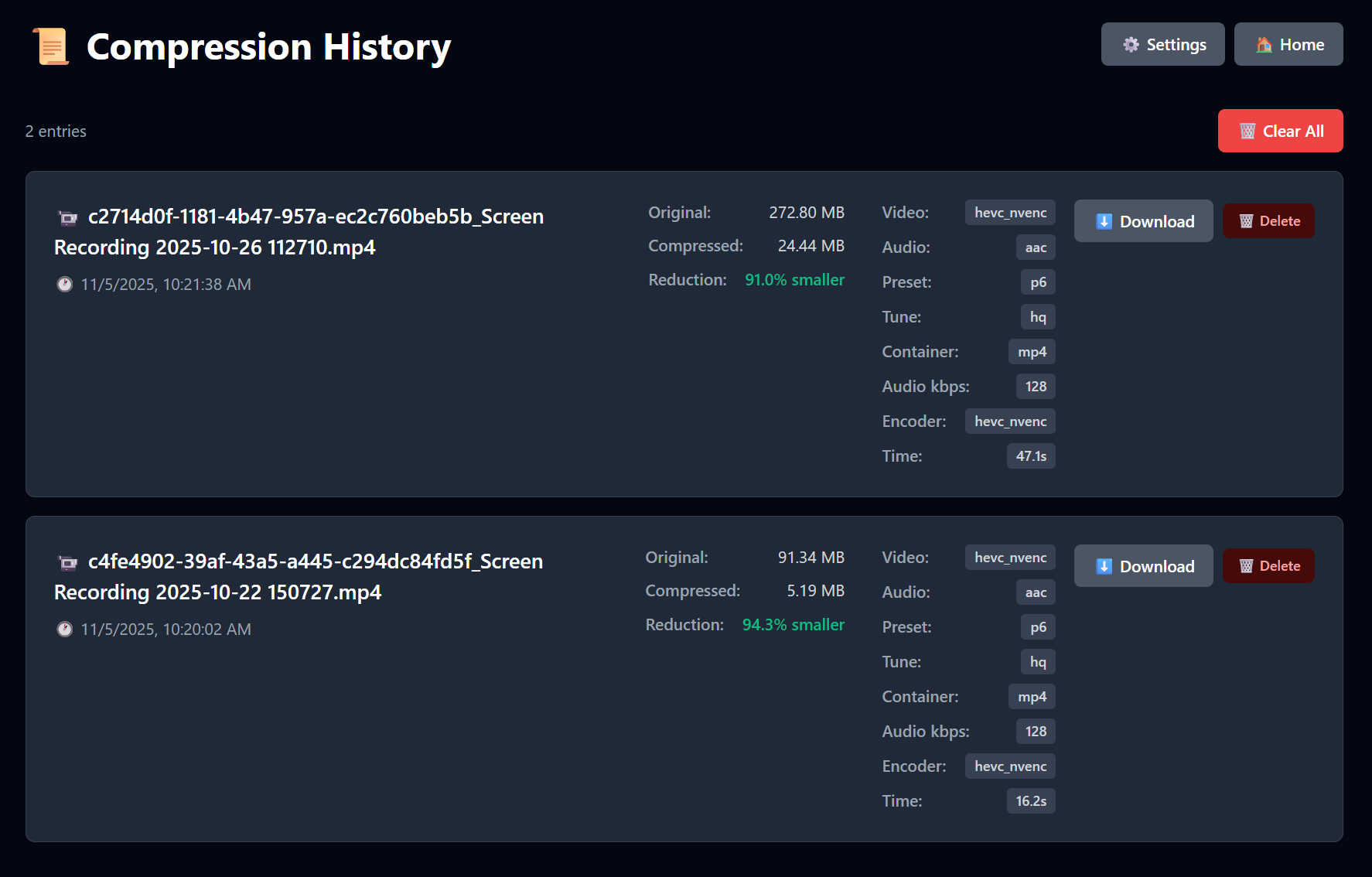
|
Advanced Options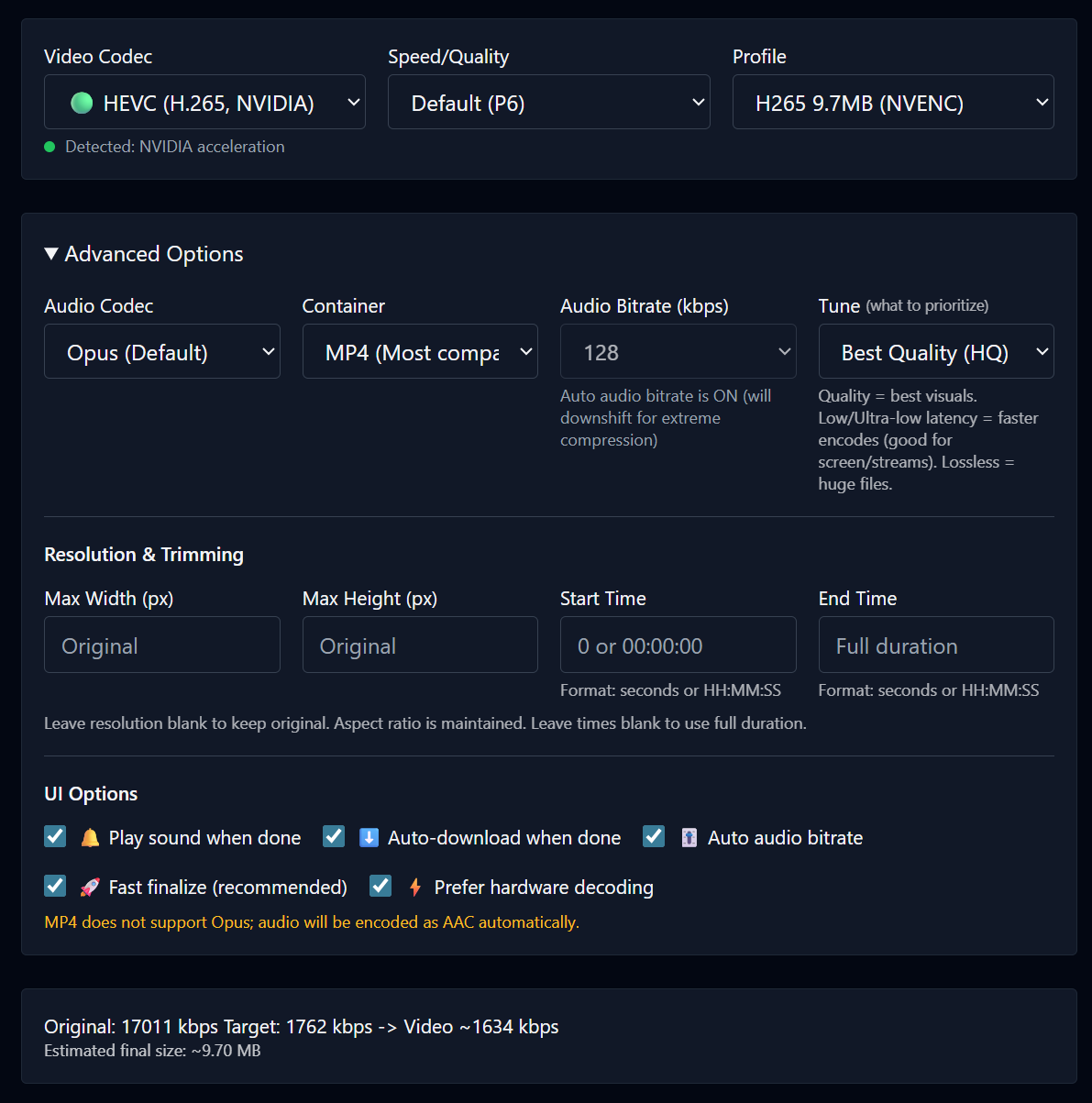
|
Projects
Public instances run by people who offer their 8mb.local install for anyone to use (community compressors, demos, mirrors). If you run a public deployment and want it listed here, open a pull request that adds a row to this section.
| Site | Notes |
|---|---|
| fits.video | Online compressor (free and open source) |
Architecture
flowchart LR
  A[Browser / SvelteKit UI] -- Upload / SSE --> B(FastAPI Backend)
  B -- Enqueue --> C[Redis]
  D[Celery Worker + FFmpeg NVENC] -- Progress / Logs --> C
  B -- Pub/Sub relay --> A
  D -- Files --> E[outputs/]
  A -- Download --> B
Components
| Layer | Technology | Role |
|---|---|---|
| Frontend | SvelteKit + Vite | Drag-and-drop UI, size estimates, SSE progress/logs, download |
| Backend API | FastAPI | Accepts uploads, runs ffprobe, relays SSE, serves downloads |
| Worker | Celery + FFmpeg 6.1.1 | Compression with NVENC or CPU; parses ffmpeg -progress |
| Broker | Redis | Celery broker and pub/sub transport for progress events |
Data & files
uploads/— incoming files (cleaned up afterFILE_RETENTION_HOURS)outputs/— compressed results (cleaned up on the same schedule)
All components run in a single container via supervisord.
Installation
Quick Start (Docker Hub)
NVIDIA GPU
docker run -d \
  --name 8mblocal \
  --gpus all \
  -e NVIDIA_DRIVER_CAPABILITIES=compute,video,utility \
  -p 8001:8001 \
  -v ./uploads:/app/uploads \
  -v ./outputs:/app/outputs \
  jms1717/8mblocal:latest
The
-e NVIDIA_DRIVER_CAPABILITIES=compute,video,utilityflag is required — it tells the NVIDIA Container Toolkit to mount NVENC libraries into the container.
CPU Only (No GPU)
docker run -d \
  --name 8mblocal \
  -p 8001:8001 \
  -v ./uploads:/app/uploads \
  -v ./outputs:/app/outputs \
  jms1717/8mblocal:latest
Access the web UI at http://localhost:8001.
Docker Compose
NVIDIA GPU
services:
  8mblocal:
    image: jms1717/8mblocal:latest
    container_name: 8mblocal
    ports:
      - "8001:8001"
    volumes:
      - ./uploads:/app/uploads
      - ./outputs:/app/outputs
      - ./.env:/app/.env  # optional
    gpus: all
    environment:
      - NVIDIA_DRIVER_CAPABILITIES=compute,video,utility
    restart: unless-stopped
CPU Only
services:
  8mblocal:
    image: jms1717/8mblocal:latest
    container_name: 8mblocal
    ports:
      - "8001:8001"
    volumes:
      - ./uploads:/app/uploads
      - ./outputs:/app/outputs
      - ./.env:/app/.env  # optional
    restart: unless-stopped
Then run:
docker compose up -d
Building from Source
Default (NVIDIA GPU): requires NVIDIA Container Toolkit and a working docker run --rm --gpus all nvidia/cuda:12.2.0-base-ubuntu22.04 nvidia-smi on the host.
git clone https://github.com/JMS1717/8mb.local.git
cd 8mb.local
docker compose up -d --build
CPU only (no GPU passthrough — e.g. macOS or machine without NVIDIA toolkit):
docker compose -f docker-compose.cpu.yml up -d --build
Platform Notes
| Platform | GPU Support | Notes |
|---|---|---|
| Windows | NVIDIA via WSL2 | Install Docker Desktop, enable WSL2 GPU support, install NVIDIA drivers |
| Linux | NVIDIA native | Install NVIDIA drivers + Container Toolkit |
| macOS | CPU only | Docker runs in a Linux VM without GPU passthrough |
Verify Installation
# Check container status
docker ps | grep 8mblocal

# Check NVIDIA GPU access
docker exec 8mblocal nvidia-smi

# List available encoders
docker exec 8mblocal bash -c "ffmpeg -hide_banner -encoders | grep -E 'nvenc|264|265|av1'"

# View startup logs
docker logs 8mblocal
Update to Latest Version
docker compose pull
docker compose up -d
Or with docker run:
docker pull jms1717/8mblocal:latest
docker stop 8mblocal && docker rm 8mblocal
# Re-run your docker run command
Usage
- Drop a video — drag and drop or click Choose File. Analysis runs automatically.
- Pick a target size — click a preset button or enter a custom MB value.
- Optional: open Advanced Options
- Video Codec: AV1 (best quality, RTX 40/50), HEVC (H.265), or H.264 (widest compatibility)
- Audio Codec: Opus (default) or AAC — MP4 containers auto-switch to AAC
- Speed/Quality: NVENC presets P1 (fastest) through P7 (best quality), default P6
- Container: MP4 (most compatible) or MKV (best with Opus audio)
- Tune: HQ (default), Low Latency, Ultra-Low Latency, or Lossless
- Resolution: Set max width/height to downscale while preserving aspect ratio
- Trimming: Set start/end times to compress only a portion
- Click Compress and watch progress/logs in real time. Cancel anytime. Download starts automatically.
Tips
- For very small targets, prefer AV1 or HEVC and keep audio around 96–128 kbps.
- For speed, try Low Latency tune with a faster preset (P1–P4).
- MP4 + Opus is not supported; the worker auto-switches to AAC for MP4 containers.
- MP4 outputs include
+faststartfor better web/streaming playback.
Configuration
Environment Variables
Create a .env file and mount it at /app/.env:
# Authentication (also configurable via Settings UI)
AUTH_ENABLED=false
AUTH_USER=admin
AUTH_PASS=changeme

# File retention
FILE_RETENTION_HOURS=1

# Worker concurrency (max parallel jobs)
WORKER_CONCURRENCY=4

# Codec visibility (all default to true)
CODEC_H264_NVENC=true
CODEC_HEVC_NVENC=true
CODEC_AV1_NVENC=true
CODEC_LIBX264=true
CODEC_LIBX265=true
CODEC_LIBAOM_AV1=true

# Redis / backend (usually no need to change)
REDIS_URL=redis://127.0.0.1:6379/0
BACKEND_HOST=0.0.0.0
BACKEND_PORT=8001
Settings UI
Manage settings at /settings with no container restart required:
- Authentication — enable/disable, manage credentials
- Default Presets — target size, codec, quality, container defaults
- Codec Visibility — enable/disable NVIDIA and CPU codecs
- Preset Profiles — create named presets for quick access
- Worker Concurrency — adjust parallel job limit
- Size Buttons — customize the target size quick-pick buttons
- GPU Support Reference — hardware encoding compatibility at
/gpu-support
Performance & Concurrency
8mb.local supports multiple parallel compression jobs. Configure via Settings UI or WORKER_CONCURRENCY env var.
| GPU | Recommended Concurrency | Notes |
|---|---|---|
| RTX 5090 / 5080 / 5070 Ti | 8–12 jobs | 9th gen NVENC (x2), top tier |
| RTX 4090 / 4080 / 4070 Ti | 8–12 jobs | 8th gen NVENC, excellent throughput |
| RTX 3090 / 3080 / 3070 | 6–10 jobs | 7th gen NVENC (no AV1) |
| RTX 2080 Ti / 2070 / 2060 | 3–5 jobs | 6th gen NVENC |
| GTX 1660 / 1650 | 2–4 jobs | Entry-level NVENC |
| CPU only | 1–2 per 4 cores | High CPU usage, much slower |
Considerations
- Most consumer NVIDIA GPUs support 2–3 native NVENC sessions; driver patches or Pro GPUs allow more.
- Each job uses ~200–500 MB RAM and ~100–200 MB VRAM.
- SSD recommended for 6+ concurrent jobs (disk I/O becomes a bottleneck).
- Monitor GPU temps — sustained load above 80 °C may cause throttling.
- Start with 4 concurrent jobs and increase while monitoring utilization.
Container restart required after changing worker concurrency.
Reverse Proxy Configuration
SSE (Server-Sent Events) requires special proxy configuration to prevent buffering.
Nginx / Nginx Proxy Manager
location /api/stream/ {
    proxy_pass http://backend:8001;
    proxy_buffering off;
    proxy_cache off;
    proxy_set_header Connection '';
    chunked_transfer_encoding on;
}
In Nginx Proxy Manager: Edit Proxy Host → Advanced tab → Custom Nginx Configuration.
Traefik
labels:
  - "traefik.http.middlewares.no-buffer.buffering.maxRequestBodyBytes=0"
  - "traefik.http.middlewares.no-buffer.buffering.maxResponseBodyBytes=0"
  - "traefik.http.routers.8mblocal.middlewares=no-buffer"
Apache
<Location /api/stream/>
    ProxyPass http://backend:8001/api/stream/
    ProxyPassReverse http://backend:8001/api/stream/
    SetEnv proxy-sendchunked 1
    SetEnv proxy-interim-response RFC
</Location>
Why this matters: Without proxy_buffering off, your proxy buffers the entire SSE stream and delivers all progress events at once when the job completes — progress appears stuck at 0% until done.
Troubleshooting
Container won't start with --gpus all
If the host has no NVIDIA GPU, Docker's NVIDIA runtime hook will abort:
nvidia-container-cli: initialization error: WSL environment detected but no adapters were found
Fix: Remove --gpus all and any NVIDIA_* environment variables. The app will start in CPU mode automatically.
NVENC not working
1. Missing NVIDIA_DRIVER_CAPABILITIES
Symptom: Cannot load libnvidia-encode.so.1
Fix: Add the environment variable to your docker run or compose:
-e NVIDIA_DRIVER_CAPABILITIES=compute,video,utility
This tells the Container Toolkit to mount NVENC libraries into the container.
2. Driver too old (NVENC API mismatch)
Symptom: Driver does not support the required nvenc API version. Required: 13.0 Found: 12.1
This means your NVIDIA driver is 535.x or older. You need driver 550+.
# Debian 12
wget https://developer.download.nvidia.com/compute/cuda/repos/debian12/x86_64/cuda-keyring_1.1-1_all.deb
sudo dpkg -i cuda-keyring_1.1-1_all.deb
sudo apt update && sudo apt install nvidia-driver
sudo reboot

# Ubuntu
sudo add-apt-repository ppa:graphics-drivers/ppa
sudo apt update && sudo apt install nvidia-driver-550
sudo reboot
Verify after reboot: nvidia-smi should show driver 550+.
3. Missing NVIDIA Container Toolkit
# Install (Debian/Ubuntu)
curl -fsSL https://nvidia.github.io/libnvidia-container/gpgkey \
  | sudo gpg --dearmor -o /usr/share/keyrings/nvidia-container-toolkit-keyring.gpg
distribution=$(. /etc/os-release; echo $ID$VERSION_ID)
curl -s -L https://nvidia.github.io/libnvidia-container/$distribution/libnvidia-container.list \
  | sed 's#deb https://#deb [signed-by=/usr/share/keyrings/nvidia-container-toolkit-keyring.gpg] https://#g' \
  | sudo tee /etc/apt/sources.list.d/nvidia-container-toolkit.list
sudo apt-get update && sudo apt-get install -y nvidia-container-toolkit
sudo systemctl restart docker
If you can't upgrade the driver, the system will automatically fall back to CPU encoding. Your videos will still compress — just slower.
Progress bar stuck at 0%
Cause: Reverse proxy buffering SSE responses.
Fix: Add proxy_buffering off; for the /api/stream/ location. See Reverse Proxy Configuration.
File slightly over target size
This is handled automatically. If the output exceeds the target by more than 2%, the system re-encodes with a reduced bitrate (up to 2 retries). You'll see a notification and hear an audio alert.
General issues
| Problem | Solution |
|---|---|
| Permission denied on uploads/outputs | chmod 777 uploads outputs or chown $USER:$USER uploads outputs |
| Port already in use | Change mapping: -p 8080:8001 |
| Container won't start | docker logs 8mblocal to check errors; docker rm -f 8mblocal and retry |
| FFmpeg errors | Check logs in the UI; try CPU-only codecs (libx264/libx265/libaom-av1) |
Quick Diagnostic Commands
docker ps | grep 8mblocal              # Is it running?
docker logs 8mblocal                   # Startup and runtime logs
docker exec 8mblocal nvidia-smi        # GPU visible?
docker exec 8mblocal ffmpeg -hide_banner -encoders 2>&1 | grep nvenc  # NVENC available?
docker restart 8mblocal                # Restart
docker logs -f 8mblocal               # Live log tail
License
Creative Commons Attribution-NonCommercial 4.0 International (CC BY-NC 4.0)
You are free to use, share, and adapt this project for non-commercial purposes with appropriate attribution. Commercial use requires a separate license — please contact me directly.
Contributing
Pull requests welcome! Please ensure Docker builds succeed and test with your GPU hardware.
Support
For issues, questions, or feature requests, please open an issue on GitHub.