
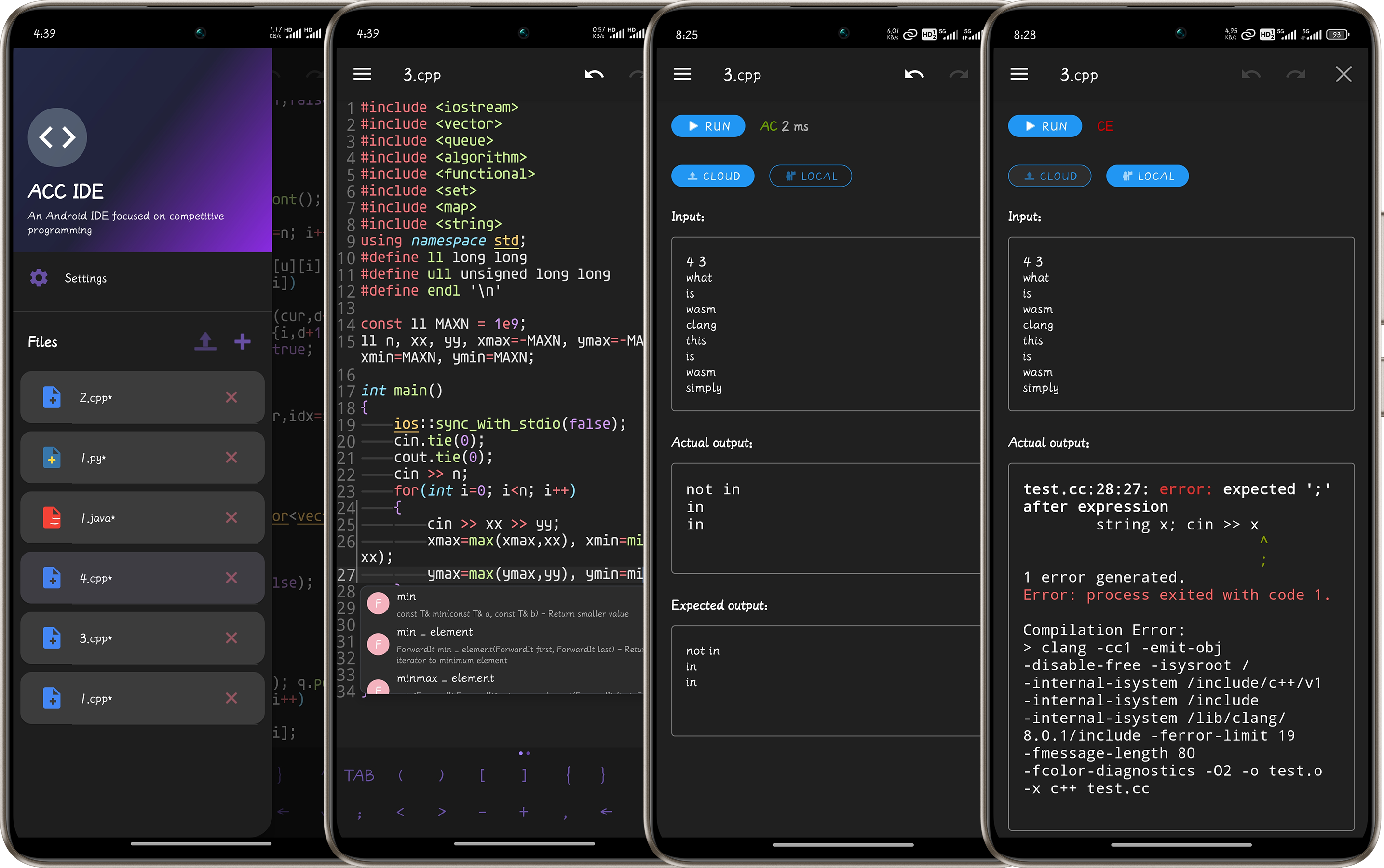
ACC IDE
If you're tired of OJ platforms with their mobile-unfriendly IDEs, or if you've ever wanted to jot down a brilliant algorithm idea on your phone, then ACC IDE is just what you need 🤗.
ACC IDE is a native Android integrated development environment designed specifically for algorithm competitions. It aims to enhance the competitive programming experience on mobile devices by providing a feature-rich environment for writing, testing, and submitting algorithmic solutions 😋.
Project Structure
The project is built with native Android and includes the following main components:
Core Structure
acc_ide/
├── app/                          # Main application module
│   ├── src/main/
│   │   ├── java/com/acc_ide/    # Kotlin source code
│   │   │   ├── completion/      # Code completion system
│   │   │   ├── ui/              # UI components
│   │   │   ├── util/            # Utility classes
│   │   │   └── view/            # Custom views
│   │   ├── cpp/                 # Tree-sitter JNI
│   │   ├── res/                 # Resources
│   │   └── assets/              # Static assets
│   └── build.gradle
├── executor-library/             # Code executor library
│   ├── src/main/
│   │   ├── java/                # Executor implementation
│   │   └── assets/wasm/         # WASM resources
│   └── build.gradle
├── treesitter-build/             # Tree-sitter build scripts
├── wasmClang-build/              # WASM Clang build scripts
└── gradle/                       # Gradle configuration
Implemented Features
Editor Capabilities
- Syntax highlighting: Use
textmatefor syntax highlighting - Code completion: Code completion based on
CST (tree-siiter) - Theme Support: Dark and light modes with appropriate syntax coloring
- Gesture Controls: Adjust font size through zoom gestures
- Line Numbers and Block Indentation: Visual aids for code structure
File Management
- File Browser: Side drawer with a list of available files
- Rename and Delete: File management tools with confirmation dialogs
- Automatic Saving: Changes are automatically saved to prevent data loss, with temporary files stored at
/storage/emulated/0/Android/data/com.acc_ide/filesand templates at/template
Customization
- Language Selection: Interface language can be changed in settings
- Theme Selection: Toggle between dark and light themes
- Font Size Control: Adjust editor font size from settings or with gestures
- Editor Preferences: Customize editor behavior through settings, such as cursor width and symbol panel display
Input/Output Panel
- Input/Output Panel: Manual input and output viewing
- GitHub Action Backend: Free runtime via GitHub Actions repository, supports C/C++, Java, and Python
- WASM-based Local Environment: WebAssembly-based compilation environment, though C++ may have some issues as there's no pre-compiled WASM
- Memory and Time Limits: Execution time (2s) and memory (512MB) restrictions via backend
- Execution Status Display: Shows code execution status and runtime (AC, WA, TLE, MLE, RE, CE, RS - Run Successful when no expected output provided), with highlighted compilation errors
Planned Features
Feature Improvements
- Android Error Lens: Highlight compilation errors in the editor
- LSP: Plan to adopt
tree-sitter+LSPfor precise syntax highlighting and semantic-level code completion - Maintain/Optimize wasm-clang
competitive-companion Integration
- Android version of competitive-companion
- Import test cases directly from problem statements
- Support for major competitive programming platforms:
- Codeforces
- AtCoder
- Luogu
- Niuke
Installation
- Download the latest version from releases
- Or
clonethe repository locally, open it with Android Studio, and run the project
Contributing
If you find any problems or feature requests during use, you are welcome to submit an issue or a pull request.
Acknowledgements
- Sora Editor for code editing capabilities
- VSCode TextMate for syntax highlighting support
- Tree-sitter for
CSTbuild support - wasm-clang for
wasm-clangdemo - pyodide for out-of-the-box
wasm-python