
AgentDesk
English | 简体中文
An open-source AI Agent customer support system with knowledge-based answers, human handoff, ticket workflows, and self-hosted deployment.
Built for teams that need online support, knowledge-base Q&A, human collaboration, and service tracking in one system. It is not just an LLM inside a chat box; it is an AI Helpdesk foundation designed around real support operations.
Product Preview
Customer chat, agent workspace, knowledge base, model configuration, and AI Agent orchestration are managed in one system.
Customer Chat
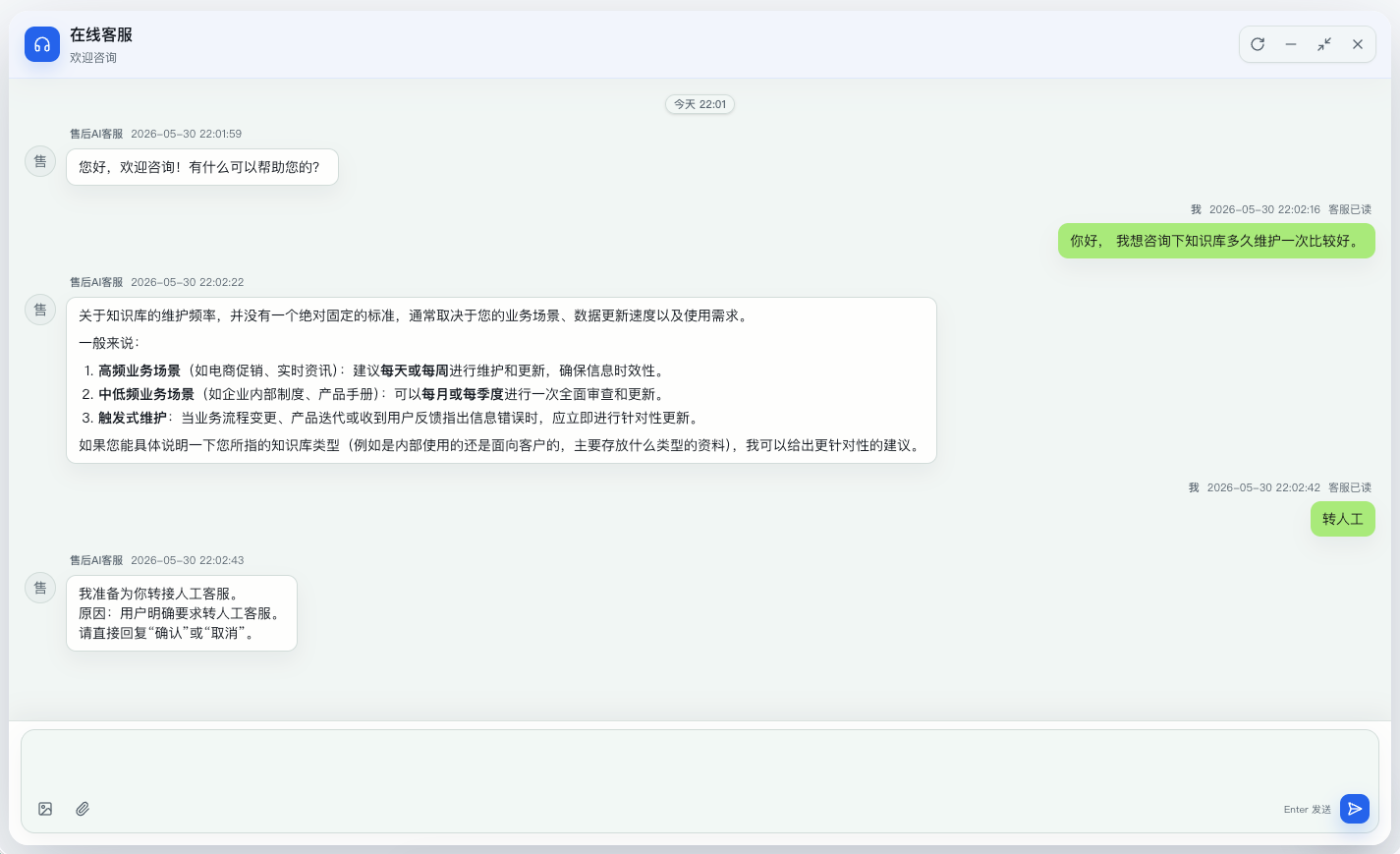
Customers can start a conversation from the web chat page. The AI Agent responds first with knowledge-grounded answers. When the user explicitly asks for a human, the system can start a handoff confirmation flow.
Agent Workspace
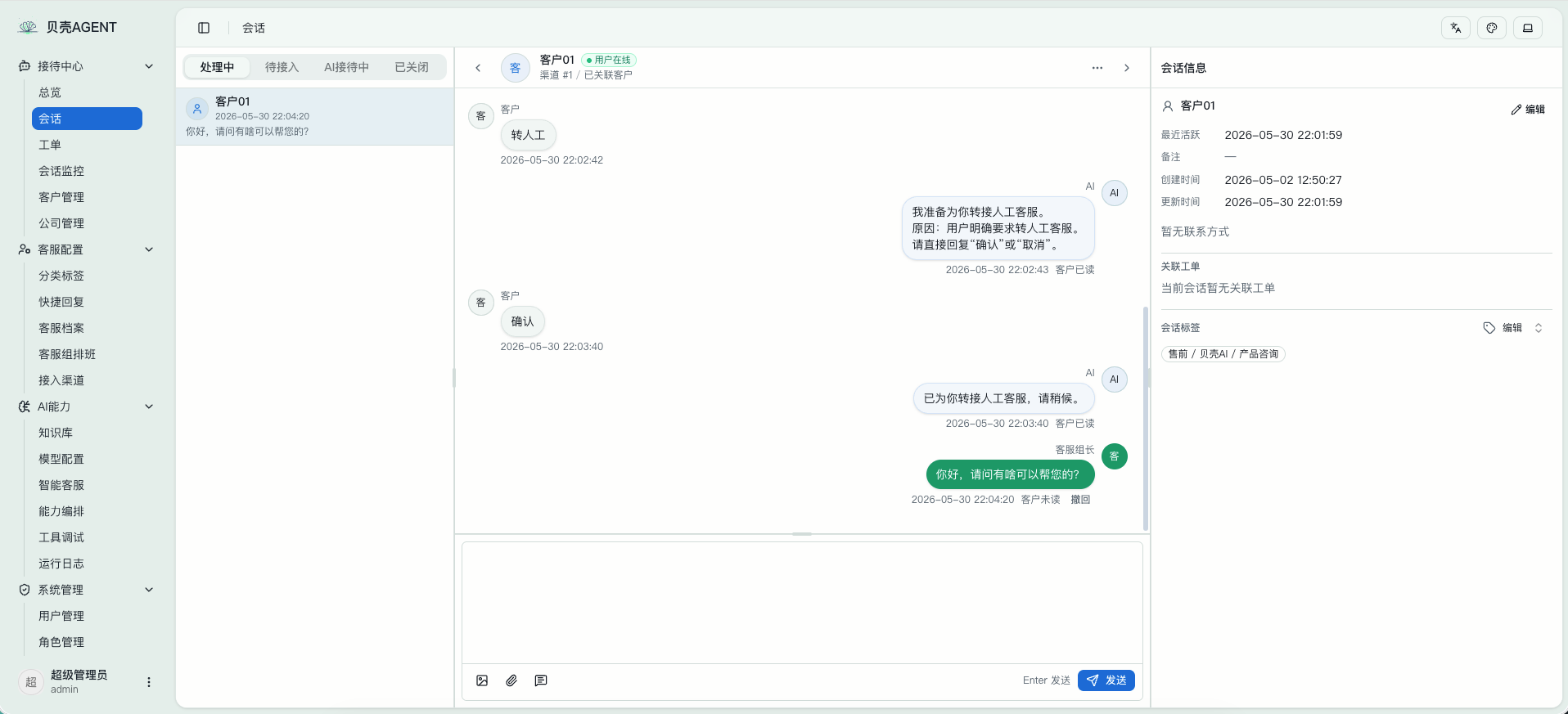
The support workspace includes conversation lists, message handling, AI-to-human handoff, agent replies, conversation tags, linked customers, and ticket context for daily support work.
Knowledge Base and AI Agent Configuration
| Knowledge Base FAQ | AI Agent Configuration |
|---|---|
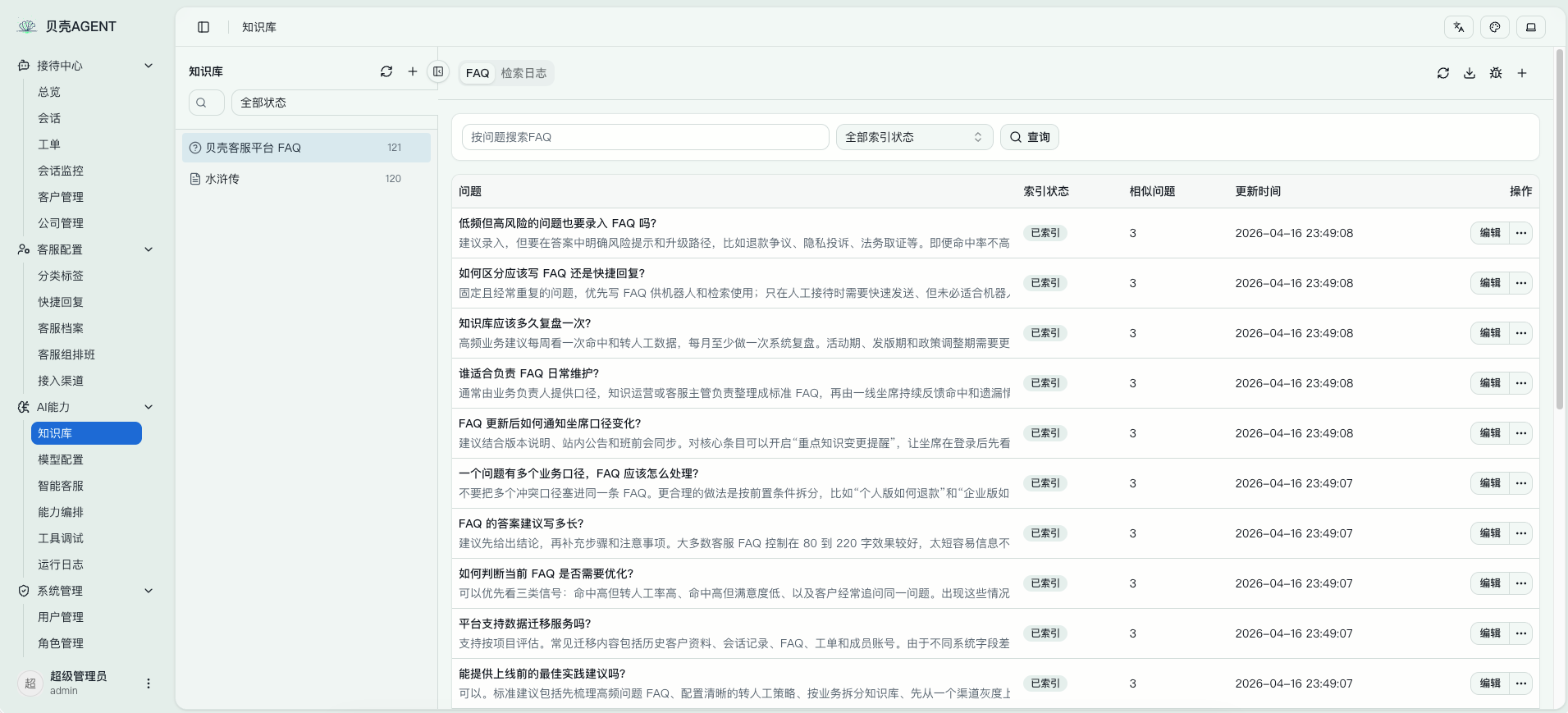 |
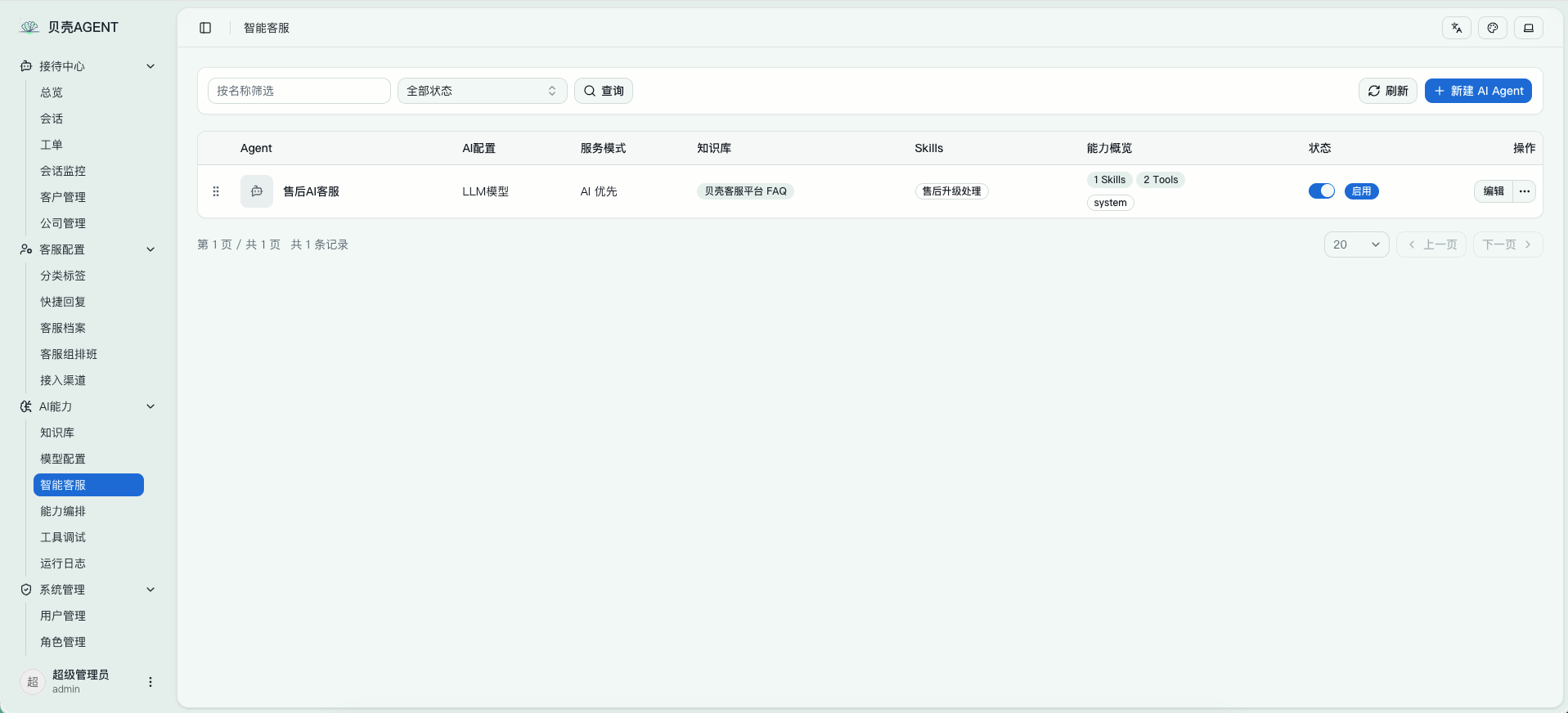 |
The knowledge base stores FAQs, documents, and retrievable content. AI Agents can be bound to model configurations, knowledge bases, Skills, and tools to create support agents for specific scenarios.
Model Configuration
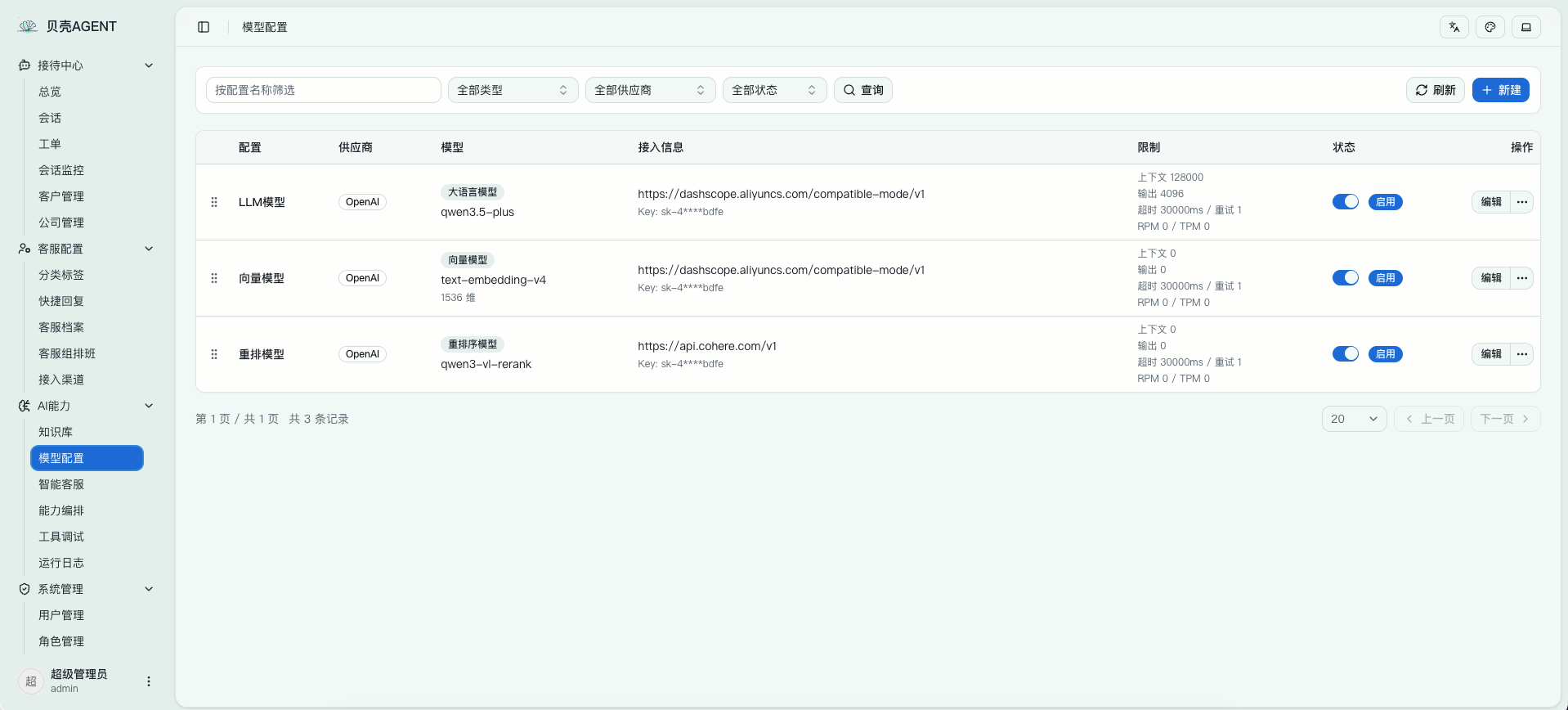
Model configuration supports OpenAI-compatible providers. You can configure LLMs, embedding models, rerank models, context limits, output settings, timeout, retry behavior, and enablement state.
Why Use It
- AI-first support: Let AI Agents handle common questions, standard procedures, and knowledge-base answers first.
- Knowledge-constrained replies: Use RAG and the Answerability Gate to decide whether retrieved knowledge is strong enough to answer, reducing unsupported responses.
- Natural human handoff: Move to human agents when knowledge is insufficient, the user asks for help, or a workflow requires human confirmation.
- Conversation-to-ticket loop: Online chat, support handling, ticket creation, status flow, and progress records stay in one system.
- Built for extension: The backend uses Go, the frontend uses Next.js, and the runtime supports Skills, MCP, and OpenAI-compatible model access.
- Self-host friendly: Supports SQLite / MySQL and Qdrant for local trials, intranet deployment, and enterprise self-hosting.
Core Capabilities
- AI Agent support: AI replies first, with fallback, confirmation, tool calling, and human collaboration.
- Online conversation system: Visitor sessions, message send/receive, unread status, assignment, transfer, and close flows.
- Agent workspace: Agents can take over conversations, reply to users, transfer teammates, link customers, and create tickets.
- Knowledge-base RAG: Knowledge bases, documents, FAQs, chunking, vector retrieval, retrieval logs, and quality analysis.
- Answerability Gate: Checks whether retrieved content can support an answer; otherwise returns a fallback and recommends human support.
- Ticket system: Create tickets from conversations, categorize, assign, move through status flows, record progress, and close the loop.
- Support organization management: Agent profiles, teams, schedules, and automatic assignment.
- AI extensibility: Skills, MCP debugging, and external tool integration.
- Multiple entry points: Admin dashboard, agent workspace, customer-facing web pages, and embeddable SDK.
Use Cases
- Website live support
- SaaS product support
- AI + human hybrid support
- Internal enterprise service desk
- After-sales service, incident reporting, complaints, and operations support
- Support teams that need knowledge-base Q&A with human collaboration
Quick Start
The fastest way to try the full stack is Docker Compose:
docker compose up -d --build
For the full English setup guide, see Docker Compose Quick Start.
To embed customer support on your website, see Web Widget Integration.
To connect OpenAI-compatible model providers, see Model Provider Configuration.
Compose starts:
agent-desk: application service on port8083mysql: MySQL 8.4 with themysql-datavolumeqdrant: vector database with theqdrant-datavolume, ports6333/6334
After startup, open:
- Admin dashboard:
http://localhost:8083/dashboard - Agent workspace:
http://localhost:8083/dashboard/conversations - Customer web integration demo:
http://localhost:8083/support/demo - Customer chat page:
http://localhost:8083/support/chat
Default administrator account:
- Username:
admin - Password:
ChangeMe123!
Before exposing the system to the public internet or a team environment, change the default administrator password and configure independent authentication, session, and model secrets.
Local Development
Requirements
- Go
1.26+ - Node.js
20+ pnpm- Qdrant
Prepare Configuration
cp config/config.example.yaml config/config.yaml
The default configuration uses:
- SQLite:
data/app.db - Backend:
http://127.0.0.1:8083 - Qdrant gRPC:
127.0.0.1:6334
If Qdrant is not running locally, start it with Docker:
docker run -p 6333:6333 -p 6334:6334 qdrant/qdrant
Install frontend dependencies:
cd web
pnpm install
cd ..
Start backend and frontend development servers together:
make dev
Default development URLs:
- Admin dashboard:
http://localhost:3000/dashboard - Agent workspace:
http://localhost:3000/dashboard/conversations - Customer web integration demo:
http://localhost:3000/support/demo - Customer chat page:
http://localhost:3000/support/chat
Tech Stack
- Backend: Golang + Gin + GORM +
github.com/mlogclub/simple - Frontend: Next.js 16 + React 19 + shadcn/ui + Tailwind CSS
- Database: SQLite / MySQL
- Vector DB: Qdrant
- AI: OpenAI-compatible LLM / Embedding + RAG + Skills + MCP
Project Structure
.
├── cmd/                    # server / migration / generator / testdata
├── internal/
│   ├── bootstrap/          # startup, routes, database, and migration initialization
│   ├── builders/           # model / aggregate result to response DTO mapping
│   ├── handlers/           # dashboard / api / third HTTP handlers
│   ├── middleware/         # Gin middleware
│   ├── migration/          # idempotent data migrations
│   ├── models/             # GORM models
│   ├── repositories/       # data access layer
│   ├── services/           # business orchestration and transaction boundaries
│   ├── ai/                 # LLM / RAG / Runtime / Skills / MCP
│   └── pkg/                # config / dto / enums / httpx / utils and shared packages
├── web/                    # Next.js frontend project
│   ├── app/dashboard/      # admin dashboard and agent workspace
│   ├── app/support/        # customer integration and chat pages
│   ├── components/         # React components
│   ├── lib/                # API client, SDK source, and utilities
│   └── public/sdk/         # built embeddable SDK
├── config/                 # configuration files
├── docker/                 # Docker configuration
└── docs/                   # documentation site
Common Commands
make dev        # start backend and frontend development servers
make build      # build the frontend SPA and current-platform Go binary into dist/
make build LANCEDB=1  # build the current-platform LanceDB binary into dist/
make release    # build linux/darwin/windows release binaries into dist/
make release LANCEDB=1  # build LanceDB release binaries into dist/
make generator  # run code generation
make enums      # generate frontend enums
make help       # show available make targets
AI Agent Workflow
flowchart TD
    A[User starts a support request<br/>Web support entry / Open API] --> B[Create or match a conversation]
    B --> C[Customer sends a message]
    C --> D[Trigger AI Reply Runtime]
    D --> E[Load conversation history / AI configuration]
    E --> F[Retrieve from bound knowledge bases]
    F --> G{Are retrieved chunks enough to answer?}
    G -- No --> Z[Return knowledge fallback<br/>and recommend human support]
    G -- Yes --> H[Prepare Skills / MCP Tools]
    H --> I[Pass trusted knowledge context to the Agent]
    I --> J{Direct reply?}
    J -- Yes --> K[LLM generates a knowledge-grounded reply]
    J -- No --> N{Call Graph / MCP Tool?}
    N -- Yes --> O[Run Skill / Graph / MCP Tool]
    O --> P{Need user confirmation?}
    P -- No --> I
    P -- Yes --> Q[Ask the user to confirm]
    Q --> R{Confirmation result}
    R -- Confirm handoff --> S[Move conversation to human handoff pool]
    S --> T[Automatic or manual assignment]
    T --> U[Agent workspace takeover]
    U --> V{Need ticket tracking?}
    V -- Yes --> W[Create or link a ticket]
    V -- No --> X[Human agent continues handling]
    W --> X
    X --> Y[Resolve and close]
    R -- Confirm ticket --> AA[Create a ticket from the current conversation]
    AA --> I
    R -- Cancel --> K
    N -- No --> K
Support Loop
flowchart LR
    A[Customer request] --> B[AI Agent handles first]
    B --> C{Can the knowledge base answer?}
    C -- Yes --> D[AI replies with trusted knowledge]
    C -- No --> E[Fallback / recommend human support]
    D --> F{Need a human?}
    E --> G[Human takeover]
    F -- No --> H[Conversation ends or data is retained]
    F -- Yes --> G
    G --> I[Agent workspace handles the case]
    I --> J{Need follow-up tracking?}
    J -- Yes --> K[Create / link a ticket]
    J -- No --> L[Resolve directly]
    K --> M[Ticket status flow and progress records]
    M --> N[Complete]
    L --> N
Docker Image
If you only need to build the application image, prepare MySQL and Qdrant yourself and mount a configuration file:
docker build -t mlogclub/agent-desk .
docker run --rm -p 8083:8083 \
  -v $(pwd)/docker/agent-desk.yaml:/app/config/config.yaml:ro \
  -v agent-desk-data:/app/data \
  mlogclub/agent-desk
Compose uses docker/agent-desk.yaml as the in-container configuration. The application reaches mysql and qdrant through Docker service names.
Open-source Positioning
AgentDesk is useful as an open-source foundation for:
- AI customer support systems
- AI Helpdesk / AI Support Platform projects
- RAG answerability + human handoff implementation references
- Enterprise AI Agent application frameworks
If you are looking for a customer support system centered on AI Agents rather than a simple LLM chat box, this project is designed for that purpose.