
🎬 AI Video Factory Automator





🚀 Overview
The AI Video Factory is a modular, production-ready automation workflow that:
- Generates AI videos via Veo3 (Google Vertex AI)
- Automatically creates captions, hashtags, and titles using Gemini (PaLM)
- Uploads results to Google Drive
- Logs metadata in Google Sheets
- Publishes to YouTube automatically
- Sends Succesfully Created emails via Gmail
🧩 Key Features
| Feature | Description |
|---|---|
| 🎥 AI Video Generation | Generates unique, cinematic videos from text prompts using Google Veo3. |
| 🧠 AI Caption & Title Builder | Uses Gemini / PaLM to generate optimized YouTube titles, tags, and hashtags. |
| ☁️ Drive & Sheet Integration | Stores videos and logs metadata automatically. |
| 📊 Smart Wait & Retry Logic | Adaptive retry mechanism for long-running API operations. |
| 🔐 Secure Credential System | Built with environment variables or OAuth2 best practices. |
| 🎬 Youtube Upload | Uploads “Video” to a social platform with preview links. |
| 📧 Email Notifications | Sends creative “Video Ready” messages with preview links. |
⚙️ Workflow Architecture
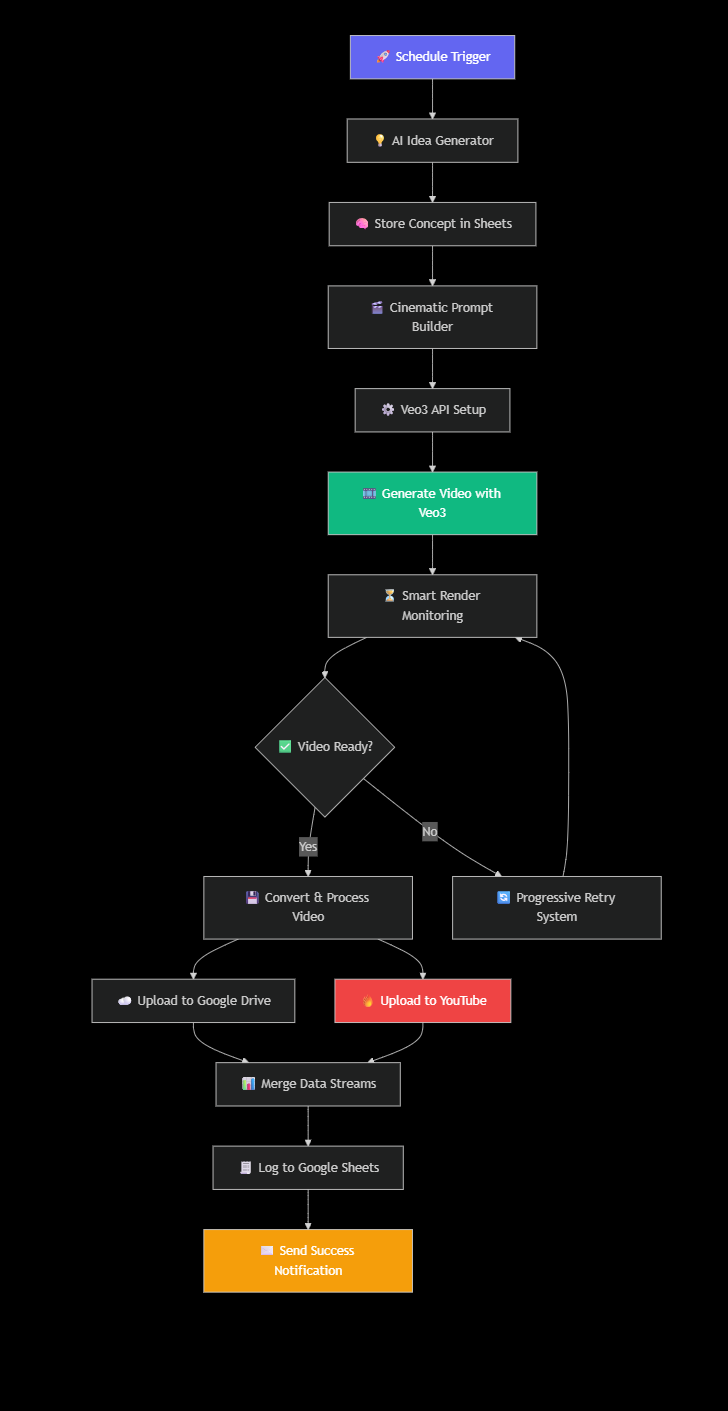
End-to-End Automated Video Production Pipeline
🖼️ Workflow Demo
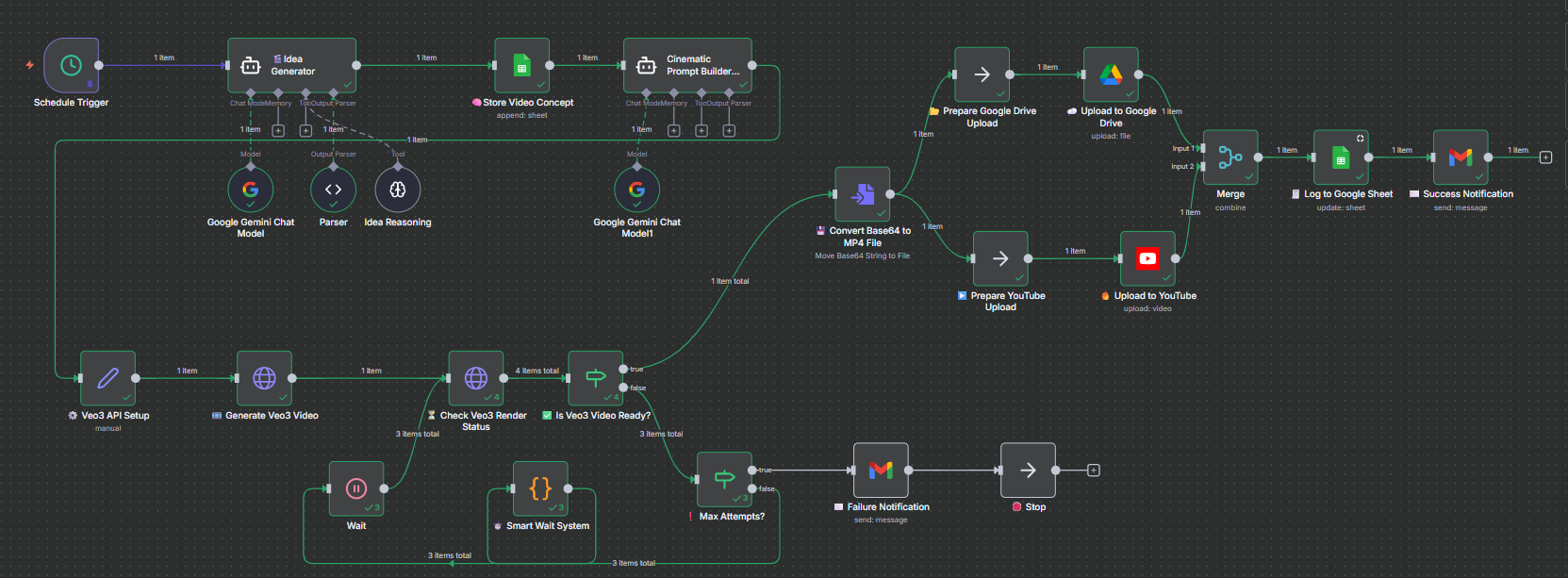 Complete n8n workflow showing the end-to-end automation pipeline
🧭 Workflow Path: Schedule Trigger → Idea Generator → Gemini → Veo3 API → Drive → YouTube → Sheets → Gmail
1. Idea Generation Pipeline
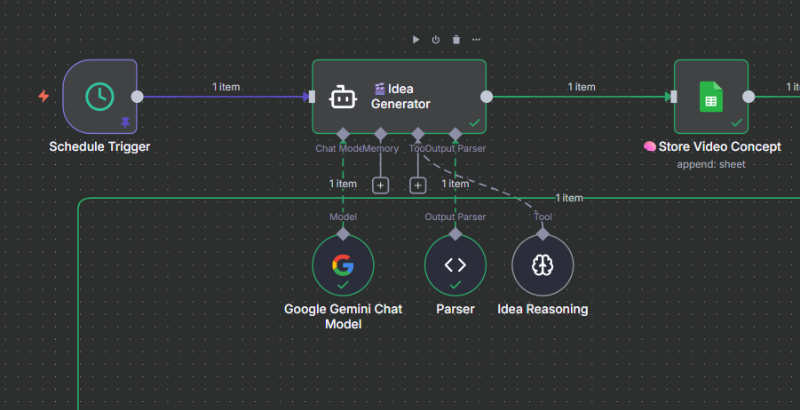
AI-powered creative concept generation
↓ Output ↓
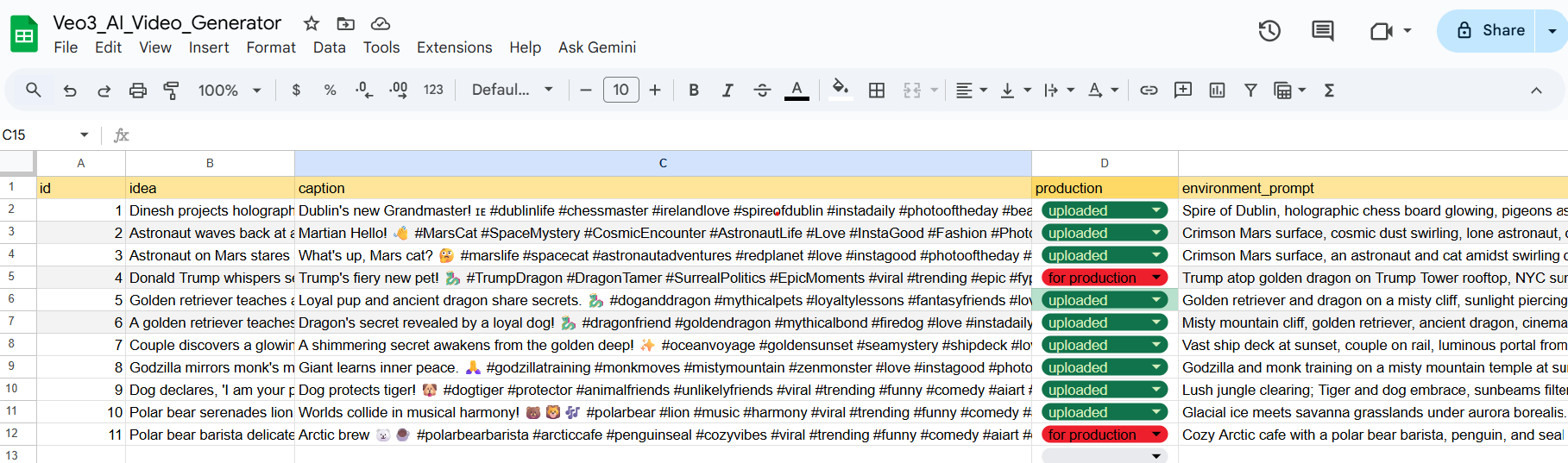
Structured Data in Google Sheets
Generated Fields:
- Caption: Viral-ready title with emoji and hashtags
- Idea: Concise concept under 13 words
- Environment: Visual setting description
- Status: "for production" flag
2. 🎬 Veo3 Video Generation Core
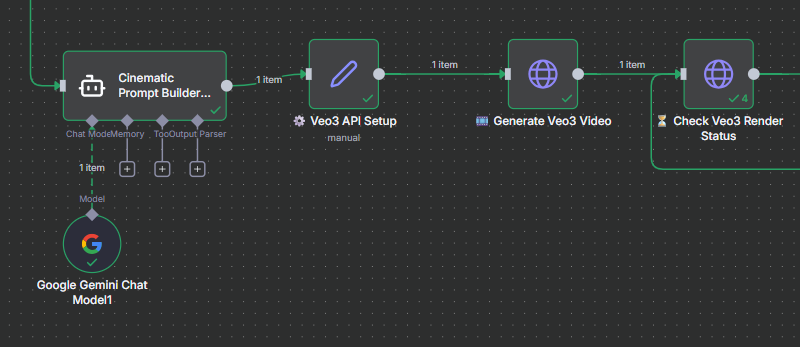
🧩 Connected workflow — Cinematic Prompt Builder → Veo3 API Setup → Generate Veo3 Video → Render Status Check
⚙️ Output 1 — Prompt Generation & API Setup
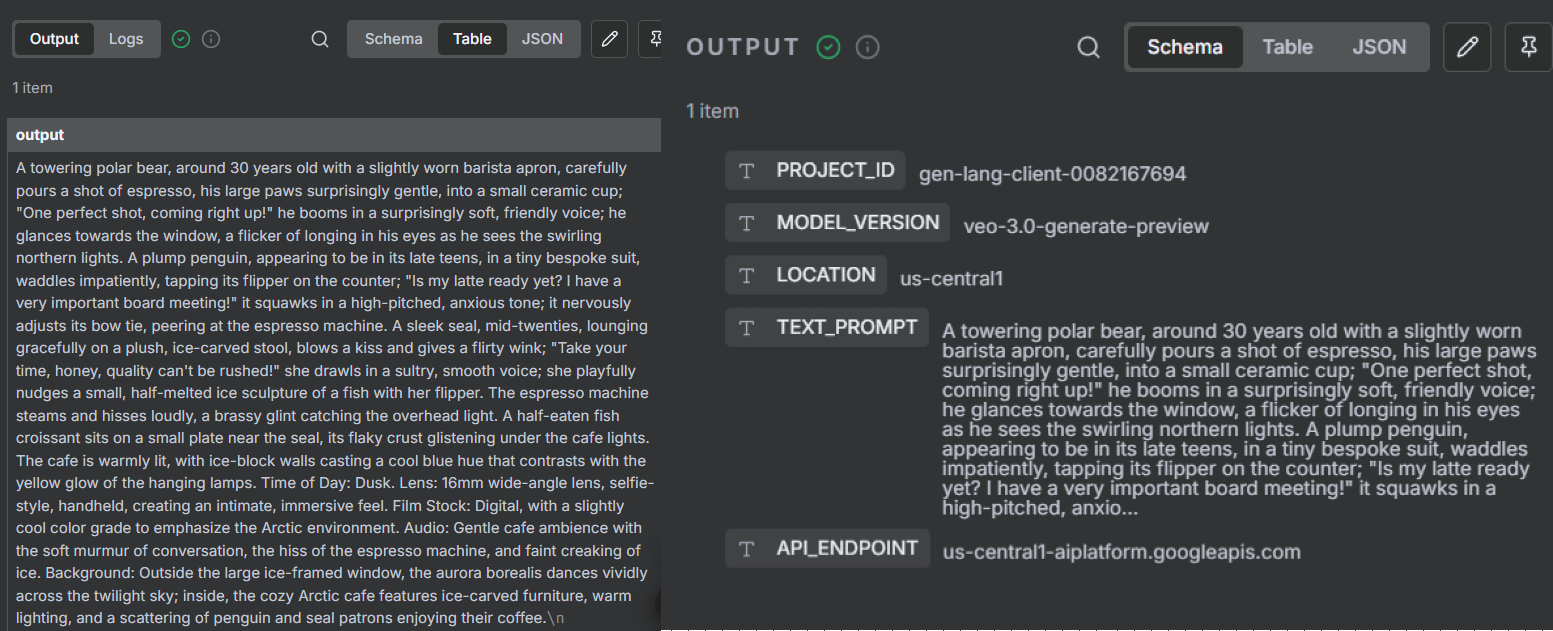
🧠 Cinematic Prompt Builder crafts rich, story-driven prompts.
⚙️ API Setup defines project_id, region, and endpoint — preparing Veo3 for the magic.
⚡ Output 2 — Video Generation & Render Status
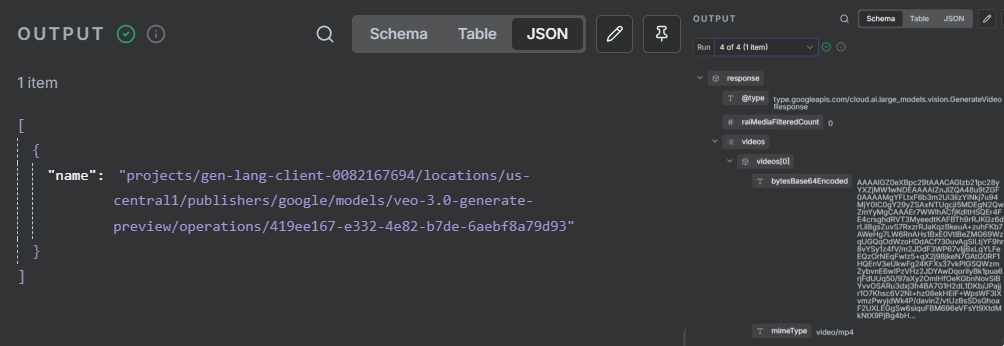
🎬 Generate Veo3 Video submits your cinematic prompt to Vertex AI.
⏳ Render Status Check tracks progress until your AI video is fully generated.
💡 This two-step visualization clearly shows the transition from creative AI prompt → API configuration → real-time video generation and render completion.
3. 🔁 Smart Retry System & Failure Handling
Resilient automation built to recover from API delays and failures — ensuring every Veo3 render completes or gracefully notifies you.
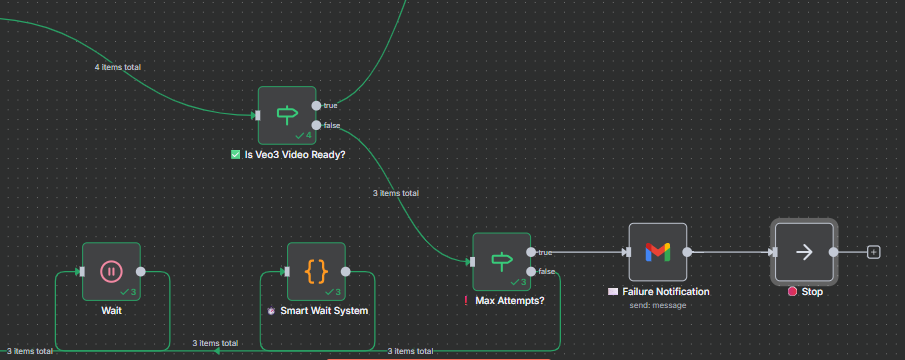
🧩 Workflow Segment — Max Retry Counter → Wait Node → Veo3 Status Check → Failure Email
⏳ Output 1 — Retry Logic in Action
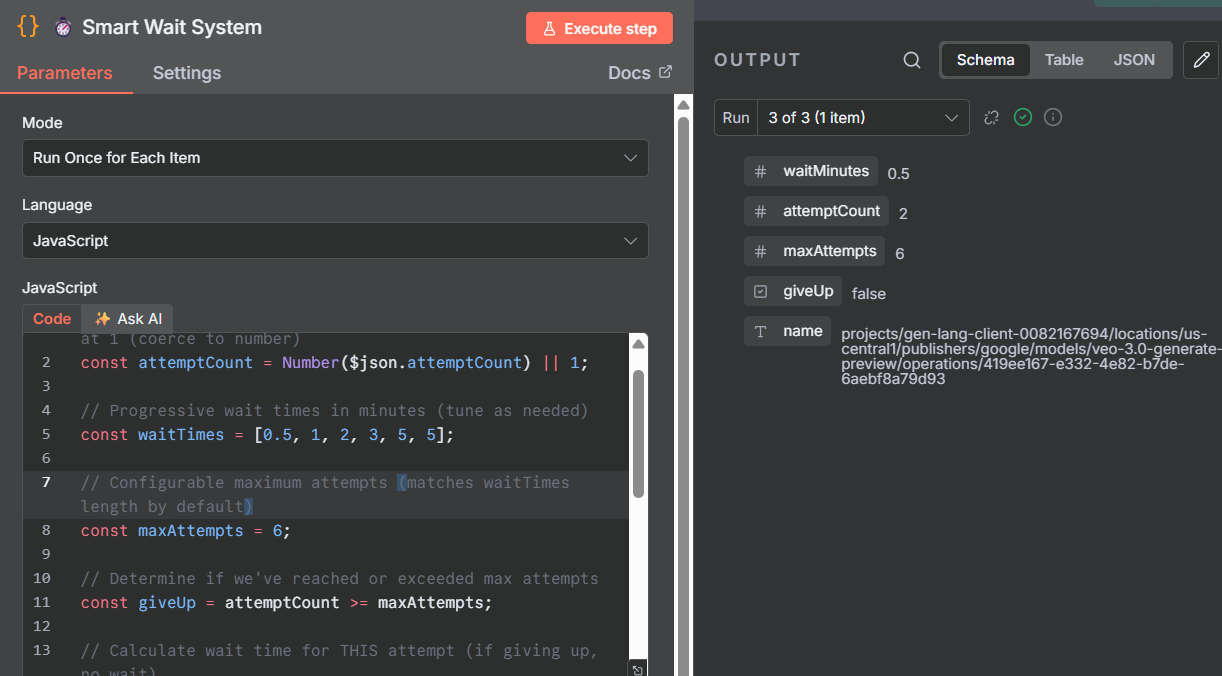
🔄 Retry Counter tracks the number of render attempts.
⏱️ Wait Node introduces smart intervals (e.g., 30s → 60s → 120s).
🧠 This adaptive delay ensures Veo3 has enough time to process large video jobs.
📧 Output 2 — Failure Notification Alert
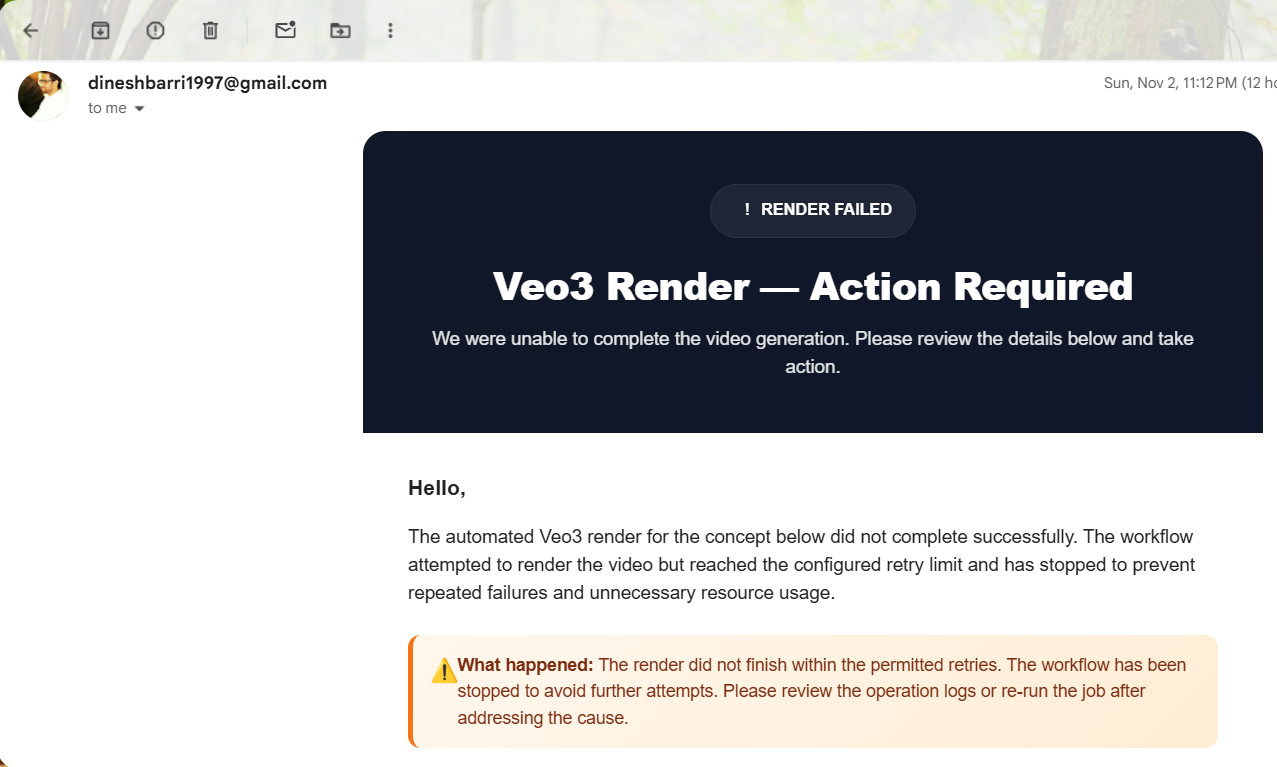
🚨 After Max Retries are reached, the workflow triggers a Failure Email Notification.
📩 The message includes Idea Name, Operation ID, Retry Count, and Timestamp — making debugging effortless.
⚖️ Success vs Failure Flow
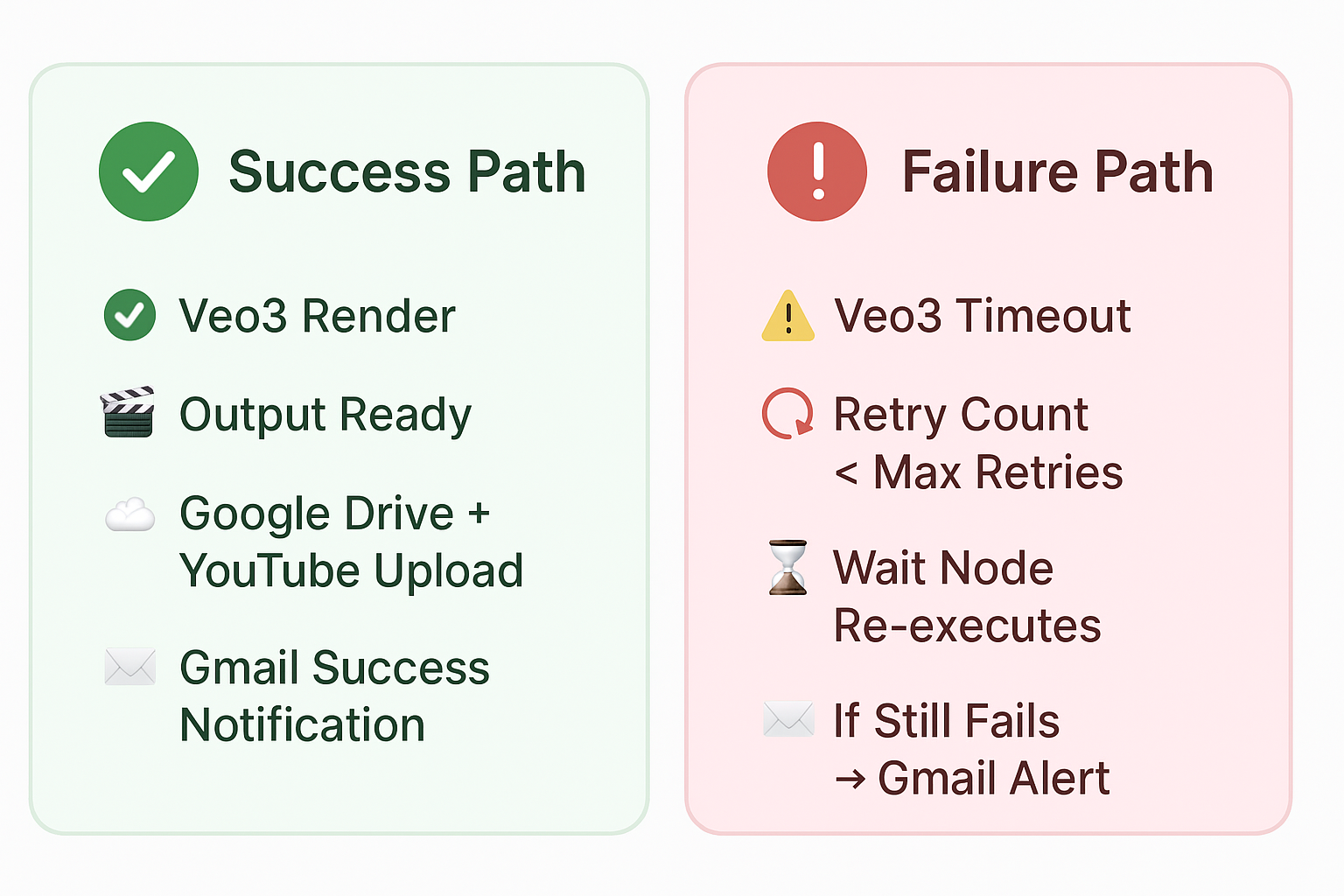
This visual clearly differentiates the two possible outcomes of the Smart Retry System.
🟢 Success Path — smooth render completion, uploads, and success notifications.
🔴 Failure Path — intelligent retries followed by a Gmail alert if the job fails.
4. ☁️ File Processing & Upload
From AI-rendered data to published content — this segment converts, uploads, and organizes your video files seamlessly across Google services.
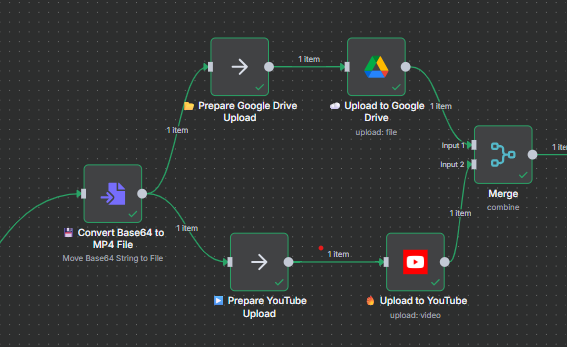
🧩 Workflow Segment — Base64 → MP4 Conversion → Drive Upload → YouTube Upload → Data Merge for Logging
🎞️ Output 1 — Base64 to MP4 Conversion
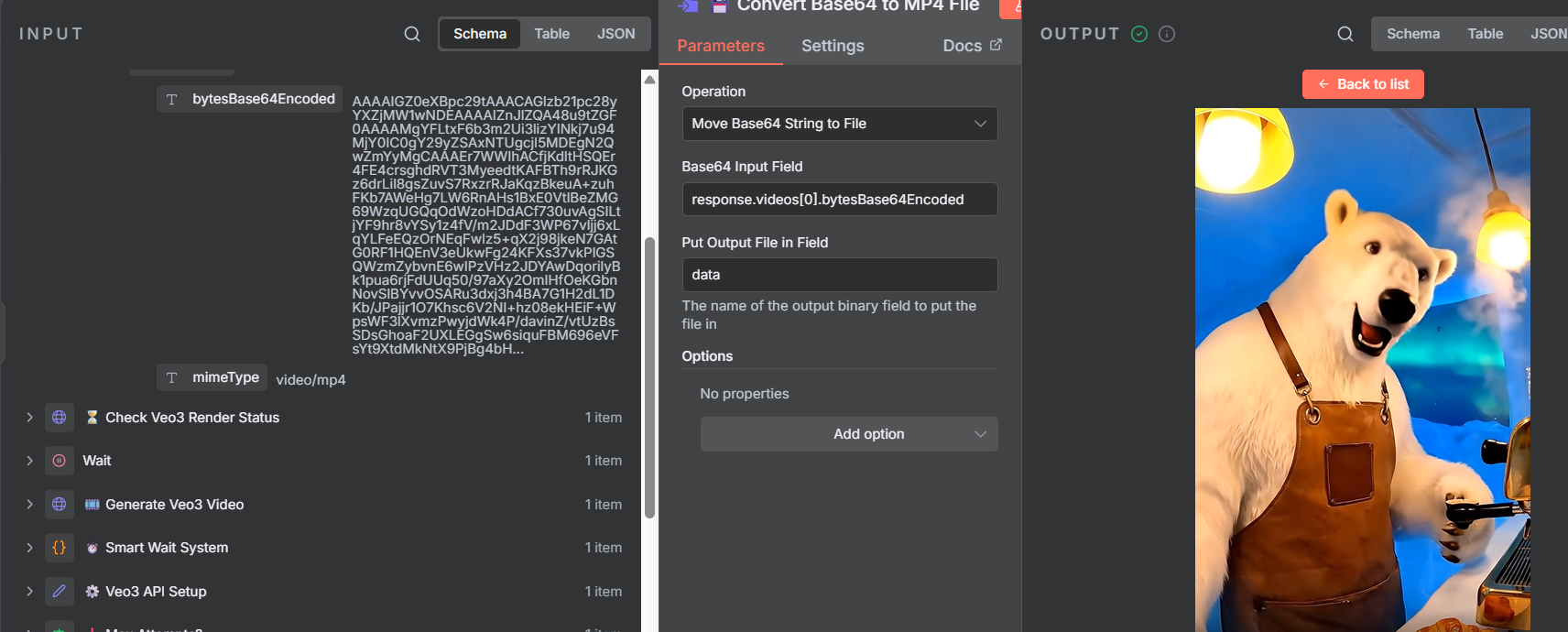
💾 The Base64 → MP4 Converter node decodes raw Veo3 output into a playable video file.
🧱 Prepares the final media for parallel uploads and metadata handling.
☁️ Output 2 — Google Drive Upload
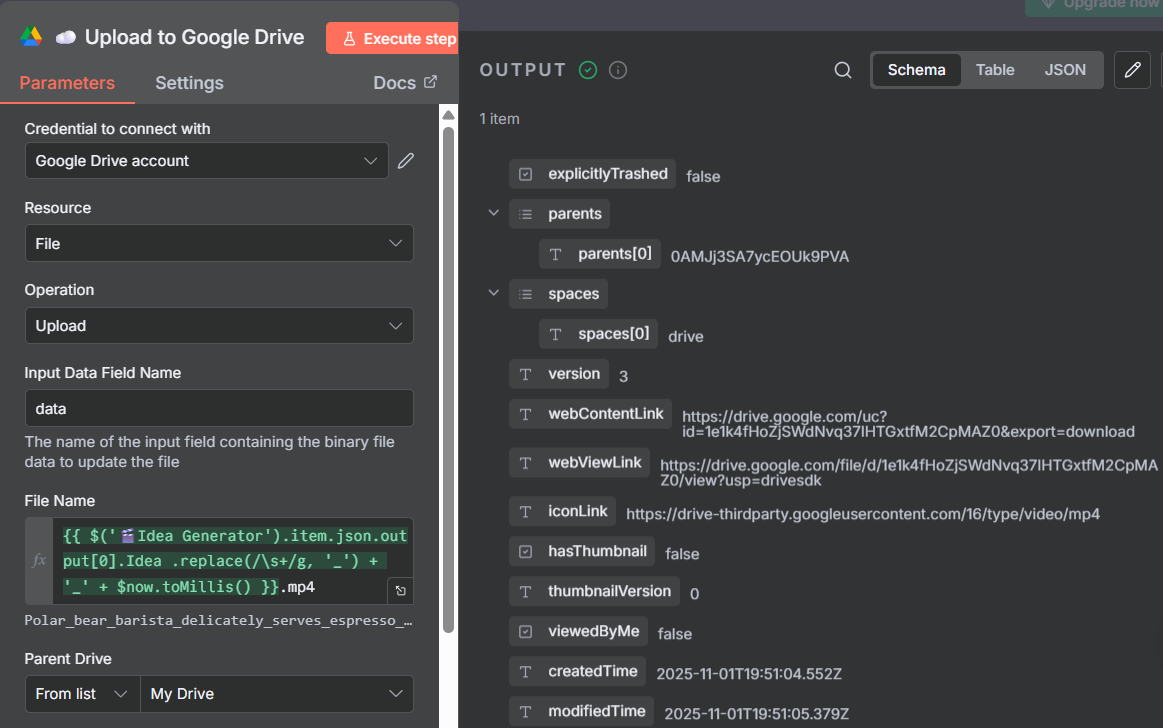
📂 The Google Drive Upload node stores the generated MP4 in your designated Drive folder.
✅ Automatically assigns file names with timestamps and project tags.
📺 Output 3 — YouTube Upload with Metadata
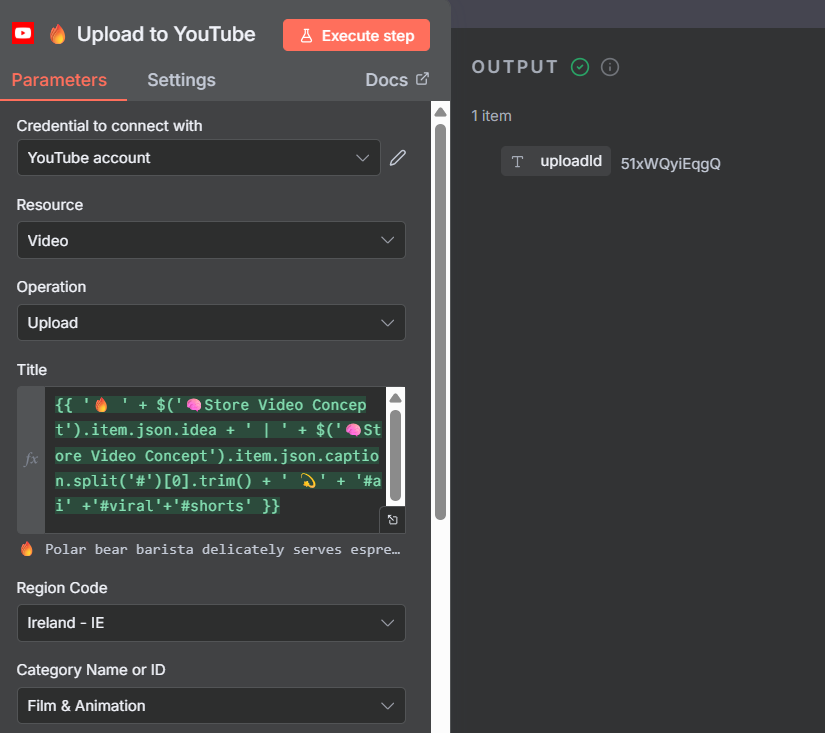
🎬 The YouTube Upload node publishes videos directly with AI-generated title, description, hashtags, and thumbnail.
🚀 End-to-end automated publishing in one click.
5. 🧾 Data Logging & Success Notification
Every successful video is logged, tracked, and celebrated — with automated data entry and a personalized success email.
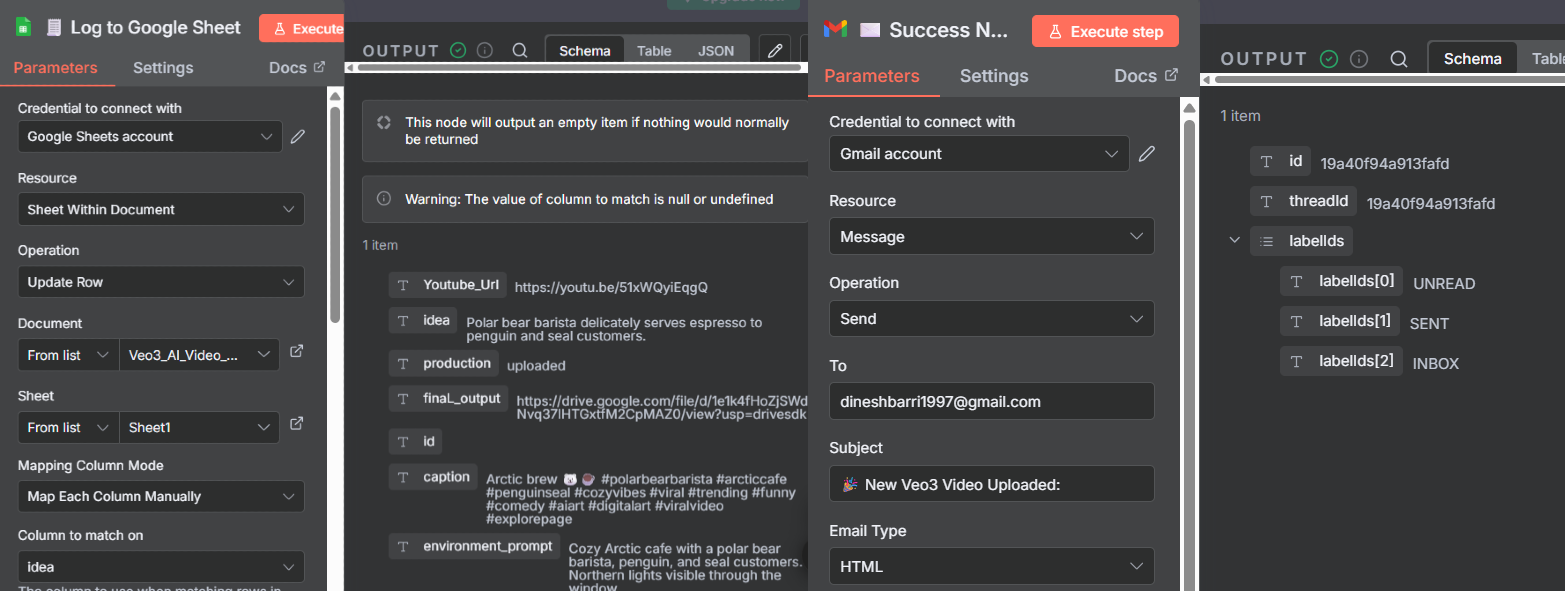
🧩 Data Merge → Google Sheets Log → Gmail Success Notification
🎥 Output — YouTube Upload & Gmail Success
✉️ Gmail Success Notification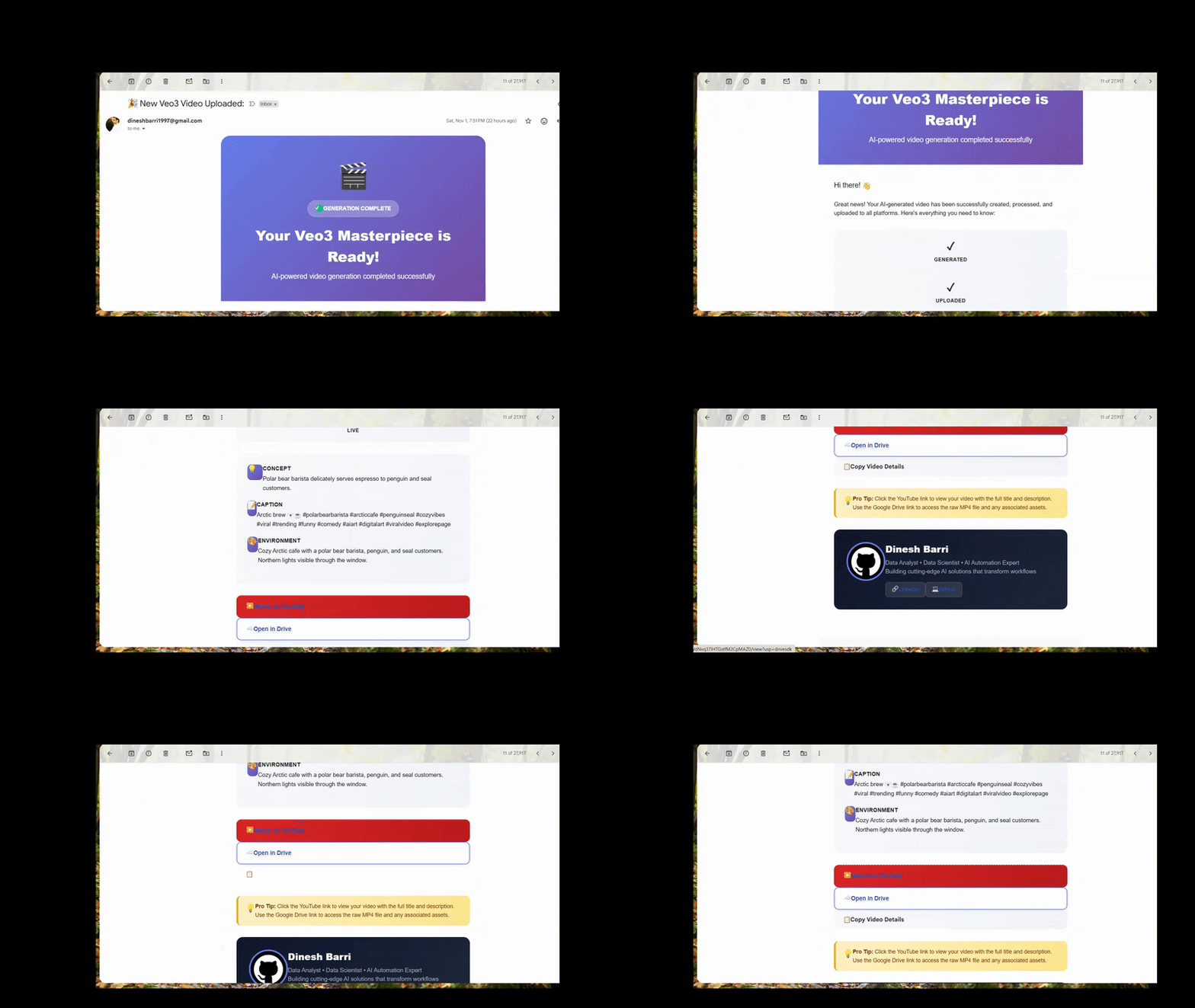
Automated success email with video details and preview links. |
📺 YouTube Upload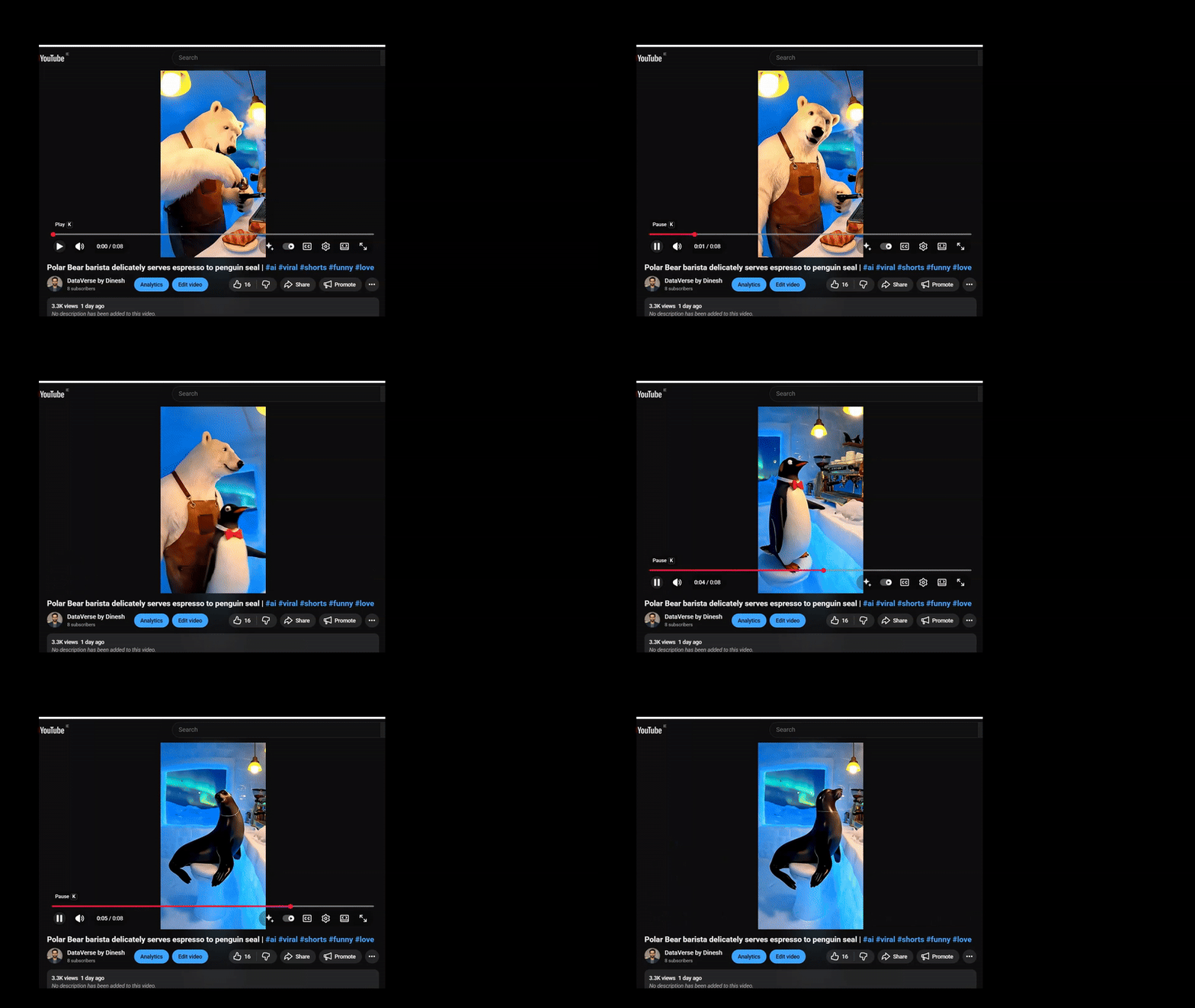
Seamless AI-to-YouTube upload — fully automated with title, caption, and tags. |

🔧 Core Modules & Nodes
| Module | Purpose | Key Nodes |
|---|---|---|
| 💡 Idea Input | Accepts text prompts or creative ideas. | Google Sheets Trigger / Manual Input |
| 🧠 Gemini Caption Generator | Uses Gemini / PaLM to generate titles, captions, and hashtags. | Gemini Text Generation Node |
| 🎬 Veo3 Video Generation | Sends requests to Google Vertex AI’s Veo3 model. | HTTP Request Node (POST → Vertex AI Endpoint) |
| ⏳ Smart Wait & Retry System | Waits for operationName completion from Vertex AI. |
Function Node + Wait Node |
| 💾 Google Drive Upload | Uploads final MP4 from Veo3 response to Drive. | Google Drive Upload Node |
| 📺 YouTube Upload | Publishes approved videos directly to YouTube with metadata. | YouTube Upload Node |
| 📋 Google Sheets Logger | Logs metadata: idea, caption, operationName, links, timestamps. | Google Sheets Append Row Node |
| ✉️ Gmail Notification | Sends a success email with video preview, title, and review buttons. | Gmail Send Email Node |
🧩 Client Setup Guide
-
Before running the workflow, configure your API credentials securely.
-
Use the interactive Client Setup Guide 🌐 to walk through the step-by-step onboarding process and securely link your API credentials with n8n.

🧱 All credentials should be created within the n8n Credentials Manager — never hardcode secrets in the workflow.
🗂 Repository Structure
AI-Video-Factory-Veo3-Automation-Pipeline/
│
├── 📄 README.md                              # Main project documentation
├── 🧠 AI Video Factory Automator-Veo3.json   # Import-ready n8n workflow
├── 📊 Veo3_AI_Video_Generator.xlsx           # Client-side input/log sheet
├── ⚙️ LICENSE
├── 🧩 assets/
│   ├── banner.png                        # Main banner / cover
│   ├── workflow-overview.png             # Overall workflow view
│   ├── idea_generator.png                # Idea generator section
│   ├── veo3_video_generation.png         # Veo3 generation overview
│   ├── veo3_output.png                   # Veo3 prompt + API setup output
│   ├── veo3_rendered_output.png          # Veo3 rendered video output
│   ├── file_processing_upload.png        # File conversion + upload flow
│   ├── drive_upload_output.png           # Drive upload result
│   ├── youtube_upload_output.png         # YouTube upload result
│   ├── gmail_success.gif                 # Gmail success demo (animated)
│   ├── youtube_upload.gif                # YouTube upload demo (animated)
│   ├── logging_notification.png          # Sheets + notification section
│   ├── success_failure_flow.png          # Smart wait & retry visualization
│   ├── failure_mail.png                  # Email fail alert
│   └── ...                               # (other supporting images consolidated here)
└── 📁 docs/
├── client_setup_guide.html
├── package.json
└── Troubleshooting.md
🛠️ Installation
Follow these steps to set up and run the AI Video Factory — Veo3 Automation Pipeline on your system:
1️⃣ Clone the Repository
- Clone the repository to your local environment and navigate into the project folder.
    git clone https://github.com/dineshbarri/AI-Video-Factory-Veo3-Automation-Pipeline.git
    cd AI-Video-Factory-Veo3-Automation-Pipeline
2️⃣ Import the Workflow into n8n
- Open your n8n instance (Cloud or Local).
- Click Import Workflow → Upload JSON, and select the file:
AI Video Factory Automator-Veo3.json - Once imported, the workflow nodes and credentials structure will load automatically into your n8n dashboard.
3️⃣ Configure Credentials

4️⃣ Test & Verify
✅ All credentials connected
✅ Google Sheets logging active
✅ Drive uploads working
✅ YouTube publishing live
✅ Email notifications sending
💰 Cost Optimization
🎯 Performance Metrics
- ⚡ Generation Time: 2-5 minutes per video
- ✅ Success Rate: 95%+ with smart retry logic
- 📊 Monthly Capacity: 500+ videos
- 🔄 Retry Attempts: 0-2 average with progressive backoff
- 📱 Output Quality: 9:16 HD mobile-optimized format
📈 Estimated Costs
| Service | Cost per Video | Monthly (100 videos) |
|---|---|---|
| Veo3 API | ~$0.20 | $20.00 |
| Gemini API | ~$0.01 | $1.00 |
| Storage | ~$0.05 | $5.00 |
| Total | ~$0.26 | $26.00 |
📞 Need Help?

📜 License
This project is licensed under the MIT License - see the LICENSE file for complete details.
MIT License © 2025 Dinesh Barri
👤 Author
Dinesh Barri


⭐ Feedback & Contributions
- 🐛 Report Bugs - Create detailed issue reports
- 💡 Suggest Features - Share your ideas for improvement
- 🔧 Submit PRs - Code improvements and new features
- 📚 Improve Docs - Better documentation and examples