
AlertTicker Card for Home Assistant
A custom Lovelace card to display alerts and notifications based on entity states. Supports 52 visual themes (including 4 dedicated timer themes, 8 spectacular 3D themes, and 2 weather forecast themes), 12 transition animations, card interactions, entity filter, device class auto-discovery, grouped alerts with expand/collapse, alert history, snooze, secondary entity values, timer countdown, full Jinja2 template support, vertical layout, HA global theme adaptation, global overlay/toast notifications visible from any dashboard view, per-alert time windows, per-alert user visibility, manual alert navigation, animated weather/clock clear widget, 7-day weather forecast widget, media player mode with album art and playback controls, Text-to-Speech announcements (standard TTS, Alexa, Google Home), mobile push notifications, live camera snapshots in the overlay banner, and a complete visual editor — all without writing a single line of YAML.




☕ If you enjoy this card and it saves you time, consider buying me a coffee — it keeps the updates coming!

Community Contributors
A special thank you to @edwardtich1 for contributing the full Russian (RU) language translation — covering all card labels, editor UI, theme defaults, and operator names. (#53)
A special thank you to @vdt2210 for contributing the Vietnamese (VI) language translation. (#12)
A special thank you to @kgn3400 for contributing the full Danish (DA) language translation — covering all card labels, editor UI, theme defaults, operator names, and overlay strings. (#57)
A special thank you to @feixm1 for contributing the full Czech (CS) language translation — covering all card labels, editor UI, theme defaults, operator names, and overlay strings. (#74)
A special thank you to @Bsector for contributing the Portuguese / pt-BR language translation — providing the core card runtime strings that formed the basis of the full pt-BR support now included in the card. (#90)
A special thank you to @yunusuztr for contributing the full Turkish (TR) language translation — covering all card labels, editor UI, theme defaults, TTS prefixes, operator names, and overlay strings. (#134)
Video Tutorial
A big thank you to SmartHomeJunkie for making a dedicated video about AlertTicker Card!

Features at a Glance
| Feature | Details |
|---|---|
| Themes | 50 visual themes in 6 categories (including 4 timer themes and 8 new 3D spectacular themes) |
| Animations | 12 selectable transition animations between alerts |
| Per-alert theme | Each alert has its own independent theme |
| Multiple entities | Unlimited alerts per card |
| Priority system | 4 levels — Critical, Warning, Info, Low |
| tap / hold / double-tap | Standard Lovelace card interactions per alert |
| Attribute triggers | Trigger on any entity attribute (e.g. battery_level) |
| AND / OR conditions | Multiple entities must match (all or at least one) |
| Numeric conditions | Trigger on >, <, >=, <=, != for sensor values |
| on_change | Trigger on any state change regardless of condition — with optional auto-dismiss |
| time_range | Restrict any alert to a specific time window (e.g. 22:00–07:00, midnight crossing supported) |
| visible_to | Restrict alert visibility to specific HA users (admin, non_admin, or by display name) |
| secondary_entity | Live entity value shown below the message |
| Jinja2 templates | Full HA template syntax in messages — rendered server-side with live updates |
Jinja2 in state |
Trigger threshold driven by a helper entity via {{ states(...) }} template |
| entity_filter | Text filter — one alert per matched entity, with exclude list and wildcard * support |
| device_class | Auto-discover all entities with a given HA device class (e.g. smoke, battery, motion) |
| Auto-icon | Automatically uses the entity's HA icon when no icon is set |
| Custom icon namespaces | Any icon namespace works: mdi:, hass:, hue:, phu:, cil: and more |
| Alert navigation | ◀ ▶ buttons + left/right swipe to jump between active alerts |
| Snooze | Suspend any alert — fixed duration or menu — persisted in localStorage |
| snooze_action | Execute a Lovelace action when the 💤 button is tapped |
| Alert history | 📋 button flips the card to a timestamped event log |
| Timer themes | 4 animated themes for timer.* entities with live countdown |
| HA icons | Use any mdi: icon per alert via native icon picker |
| Sound notifications | Per-alert audio — auto-generated tones or custom URL |
| 🔊 TTS announcements | Read alerts aloud via HA TTS, Alexa, or any notify service. Multilingual fallback messages auto-generated from alert theme (12 languages) |
| 📱 Push notifications | Send a push notification to any notify.* service when an alert fires. Full Jinja2 support for title and message. Global master toggle. |
| 📷 Camera snapshot | Attach a live camera frame to the overlay banner, scaled proportionally with overlay zoom |
| 📹 Camera live stream | NEW — camera_live: true shows a live HLS/WebRTC stream in the overlay banner instead of a static snapshot |
| 🖼️ Camera card background | NEW — camera_in_card: true uses the camera image as a full-bleed background layer behind any alert card slide |
| Overlay scale | Enlarge the overlay banner up to 3× for wall-mounted displays |
| 🎵 Music player mode | NEW — media_player entity shown as a cinematic player card with album art, equalizer, and controls |
| 🌤 7-day forecast widget | NEW — full forecast grid or alternating weather+forecast display mode |
| Weather/time in cycle | Insert the clock/weather widget as a slide in the alert rotation |
| Large buttons | Always-visible pill-shaped 💤 and 📋 buttons |
| Persistent alerts | persistent: true — alert stays visible after sensor clears, requires manual ✕ dismiss |
| Swipe to snooze | Swipe left on the card to snooze (or dismiss if persistent: true) — no conflict with tap_action |
| Invisible touch zone | Right-side tap zone shows action buttons on mobile without interfering with tap_action |
| Vertical layout | Stack icon on top, message below, centered — all 50 themes |
| HA theme adaptation | ha_theme: true adapts colors to any active HA global theme |
| Overlay notification | Global floating banner — fires from any dashboard view, with top / center / bottom position and auto-dismiss |
| Clear widget | Animated clock or weather display (condition + temp + wind + humidity) when no alerts are active |
| 6 new clear styles | Clock: aurora, gold, matrix — Weather badge: stage, split, cinematic |
| Card border | Toggle to show the standard HA border around the card — always visible, off by default |
| Test mode | Force-preview all alerts in the editor regardless of conditions |
| Visual editor | Full GUI — no YAML required |
| Languages | Italian, English, French, German, Dutch, Vietnamese, Russian, Danish, Czech, Portuguese (pt-BR), Spanish, Turkish — 12 languages |
| Performance | Signature-based dirty check — no unnecessary re-renders |
🔊 Text-to-Speech Announcements (new in 1.2.2)
Make Home Assistant read your alerts aloud the moment they trigger — on any speaker, Alexa Echo device, or Google Home.
# Standard HA TTS (media_player + TTS engine)
alerts:
  - entity: binary_sensor.smoke_detector
    state: "on"
    message: "Smoke detected!"
    theme: fire
    tts: true                            # enable TTS for this alert
    tts_entity: media_player.living_room # speaker to use
    # tts_engine: tts.google_en_com      # auto-detected if omitted
# Alexa Echo (via notify service)
alerts:
  - entity: binary_sensor.front_door
    state: "on"
    message: "Front door open"
    tts: true
    tts_notify_service: alexa_media_echo_dot_kitchen
    tts_message: "Attention — the front door is open"   # optional custom sentence
How it works
- Enable
tts: trueon any individual alert. - If no
tts_messageis set, the card auto-generates a natural sentence from a built-in dictionary in 10 languages, based on the alert's theme category. For example, acriticaltheme in Italian produces "Allarme critico: Sensore fumo cucina". - The spoken language is read from
hass.languageand falls back to English automatically. - Set a global master toggle (
tts_enabled: false) in the General tab to disable all TTS at once without losing per-alert settings.
TTS service options
| Method | When to use | Config |
|---|---|---|
| Standard TTS | HA media players, Sonos, Chromecast | tts_entity (speaker) + optional tts_engine |
| notify service | Alexa, Google Home via notify, mobile push | tts_notify_service (any notify.* service) |
Per-alert fields override global card-level defaults, so you can have one speaker for most alerts and a different one for critical alerts.
Card-level TTS options
| Option | Type | Default | Description |
|---|---|---|---|
tts_enabled |
boolean |
true |
Master toggle — set false to silence all TTS globally |
tts_entity |
string |
— | Default media_player.* speaker entity |
tts_engine |
string |
(auto) | TTS engine entity (auto-detected from first tts.* state) |
tts_notify_service |
string |
— | Default notify service for Alexa / push |
tts_language |
string |
— | Language code passed to tts.speak (e.g. it-IT) |
Per-alert TTS options
| Option | Type | Description |
|---|---|---|
tts |
boolean |
Enable TTS for this alert |
tts_entity |
string |
Override the global speaker for this alert |
tts_engine |
string |
Override the global TTS engine |
tts_notify_service |
string |
Override the global notify service |
tts_message |
string |
Custom spoken text (supports {name}, {state}, Jinja2) |
📱 Mobile Push Notifications (new in 1.3)
Send a push notification to any Home Assistant notify.* service the moment an alert fires — works with the HA Companion App, Telegram, Pushover, and any other notify integration.
alerts:
  - entity: binary_sensor.front_door
    state: "on"
    theme: door
    message: "Front door open"
    push_notify: true
    push_notify_service: mobile_app_my_phone         # required
    push_notify_title: "🚪 Door Alert"               # optional, Jinja2
    push_notify_message: "Door opened — {state}"     # optional, Jinja2
How it works
- Enable
push_notify: trueon any individual alert. - If no
push_notify_titleis set, the card uses the alert's badge label (ornameif set). - If no
push_notify_messageis set, the card uses the alert's display message (same text shown in the ticker). - Both fields support
{state},{name},{entity},{device}placeholders and full Jinja2 templates. - Set a global master toggle (
push_notify_enabled: false) in the General tab → 📱 Push Notifications to disable all push notifications at once without touching individual alerts.
Per-alert push notification options
| Option | Type | Description |
|---|---|---|
push_notify |
boolean |
Enable push notification for this alert |
push_notify_service |
string |
notify.* service name (e.g. mobile_app_my_phone, notify.telegram) |
push_notify_title |
string |
Notification title — Jinja2, defaults to badge label |
push_notify_message |
string |
Notification message — Jinja2, defaults to alert message |
🎵 Music Player Mode (new in 1.2.6)
Turn any media_player.* entity into a full graphical player card. When show_player_controls: true is set and the entity is a media player, the music theme renders a cinematic player UI instead of the default floating notes.
alerts:
  - entity: media_player.spotify_davide
    theme: music
    show_player_controls: true
    music_player_color: "#e040fb"   # optional accent color
What the player shows
| Element | Description |
|---|---|
| Album art background | Blurred, saturated backdrop pulled from entity_picture |
| Spinning vinyl | Circular album art thumbnail on the right — spins while playing, stops on pause |
| Equalizer bars | 3 animated bars pulse next to "NOW PLAYING" when playing; ◼ pause dot when paused |
| Track info | media_title as title, media_artist below |
| Playback controls | ⏮ previous · ⏸/▶ play-pause · ⏭ next |
| Mute toggle | 🔇/🔊 — highlights in accent color when muted |
| Volume slider | Live range slider — gradient fills to current level, updates in real time while dragging |
| Accent line | Animated gradient line at the bottom, pulses in the accent color |
Accent color
All colors in the player UI (buttons, glow, equalizer, vinyl ring, accent line) are driven by a single --mu-accent CSS custom property, set from music_player_color. Change it from the editor's color picker to instantly retheme the entire player:
music_player_color: "#00e5ff"   # cyan
music_player_color: "#69f0ae"   # green
music_player_color: "#ff4081"   # pink
Auto-setup in the editor
Selecting a media_player.* entity in the visual editor automatically:
- Sets theme to
music - Enables
show_player_controls - Sets
state: playingandoperator: =
Switching back to a non-media-player entity reverts to emergency.
Player-mode options
| Option | Type | Default | Description |
|---|---|---|---|
show_player_controls |
boolean |
false |
Enable the graphical player UI (requires media_player.* entity) |
music_player_color |
string |
#e040fb |
Accent color for all player UI elements — any CSS color |
📷 Camera in Overlay Banner & Card Background (snapshot: 1.2.2 · live stream + card bg: 1.3.1)
Attach a camera image to an alert — either as a snapshot in the overlay banner, a live stream in the banner, or a background layer behind the alert card slide.
alerts:
  - entity: binary_sensor.front_door_motion
    state: "on"
    message: "Motion at front door"
    theme: intruder
    camera_entity: camera.front_door     # required for all camera features
    overlay_mode: true                   # show overlay banner at card level
    camera_live: true                    # live stream in banner (default: false = snapshot)
    camera_in_card: true                 # camera background in the card slide
| Option | Description |
|---|---|
camera_entity |
Camera entity whose image is used |
camera_live |
true = live HLS/WebRTC stream in the overlay banner; false (default) = static snapshot |
camera_in_card |
true = camera image shown as a background layer behind the alert card slide on every rotation |
- The snapshot/stream appears below the alert header row inside the overlay toast. Its height scales proportionally with
overlay_scale. camera_in_carduses the entity'sentity_pictureattribute as a CSS background image, visible across the full card behind a semi-transparent overlay. Works with all 50 themes.- If a snapshot fails to load, the image is silently removed and the banner stays intact.
camera_liverequires a camera entity with HLS or WebRTC stream support. Falls back to static snapshot when the<ha-camera-stream>component is not yet loaded.
Themes
🚨 Critical
| Theme | Icon | Visual style |
|---|---|---|
emergency |
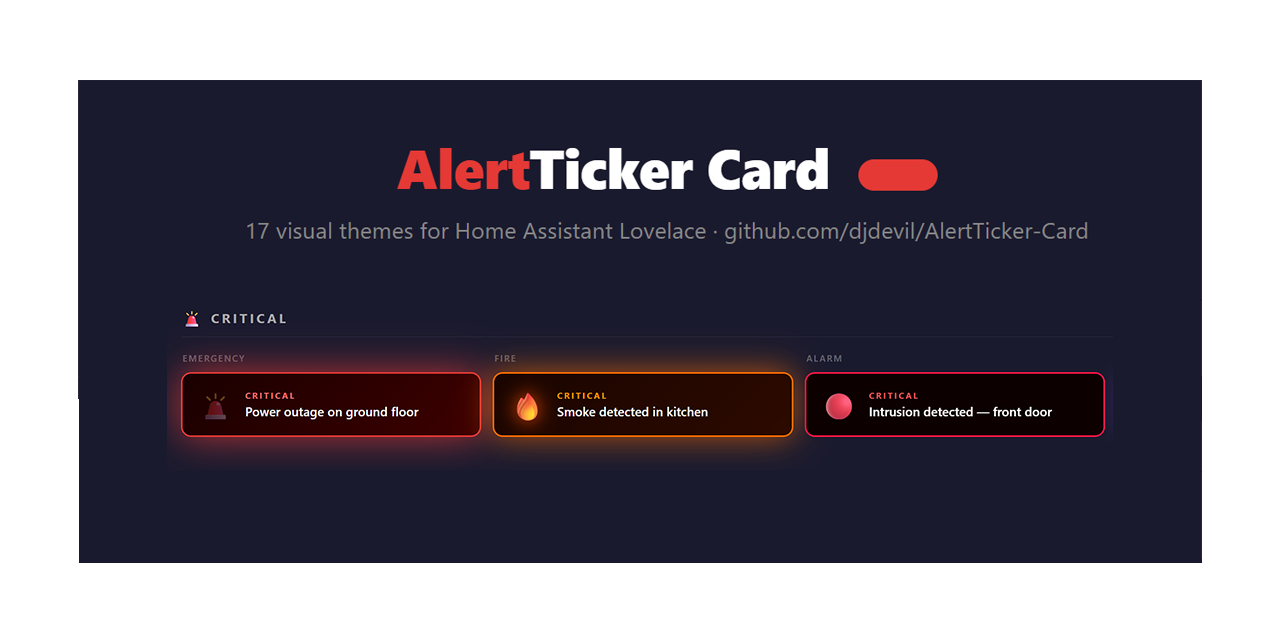
🚨 | Dark red card with pulsing red glow and flashing siren icon |
fire |
🔥 | Deep orange card with flame flicker animation |
alarm |
🔴 | Black card with rapid red strobe effect |
lightning |
🌩️ | Dark purple card with electric glow and lightning flash |
nuclear |
☢️ | Dark amber card with slowly rotating radiation symbol and radial glow pulse |
flood |
🌊 | Deep blue card with animated horizontal water waves |
motion |
👁️ | Dark green night-vision infrared scan effect |
intruder |
🚷 | Black card with red siren flash and rotating warning icon |
toxic |
☠️ | Black/green card with rising poison bubbles |
⚠️ Warning
| Theme | Icon | Visual style |
|---|---|---|
warning |
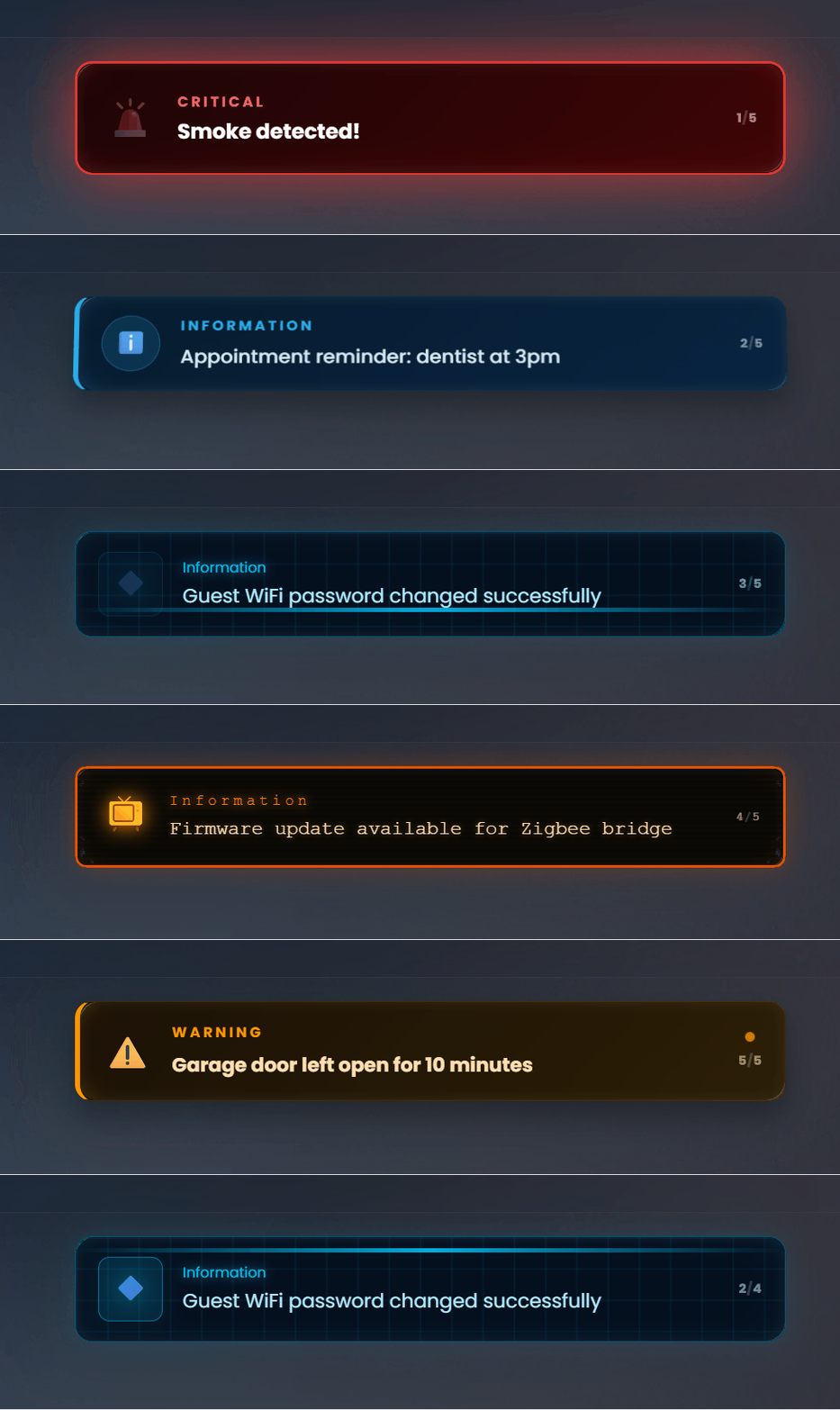
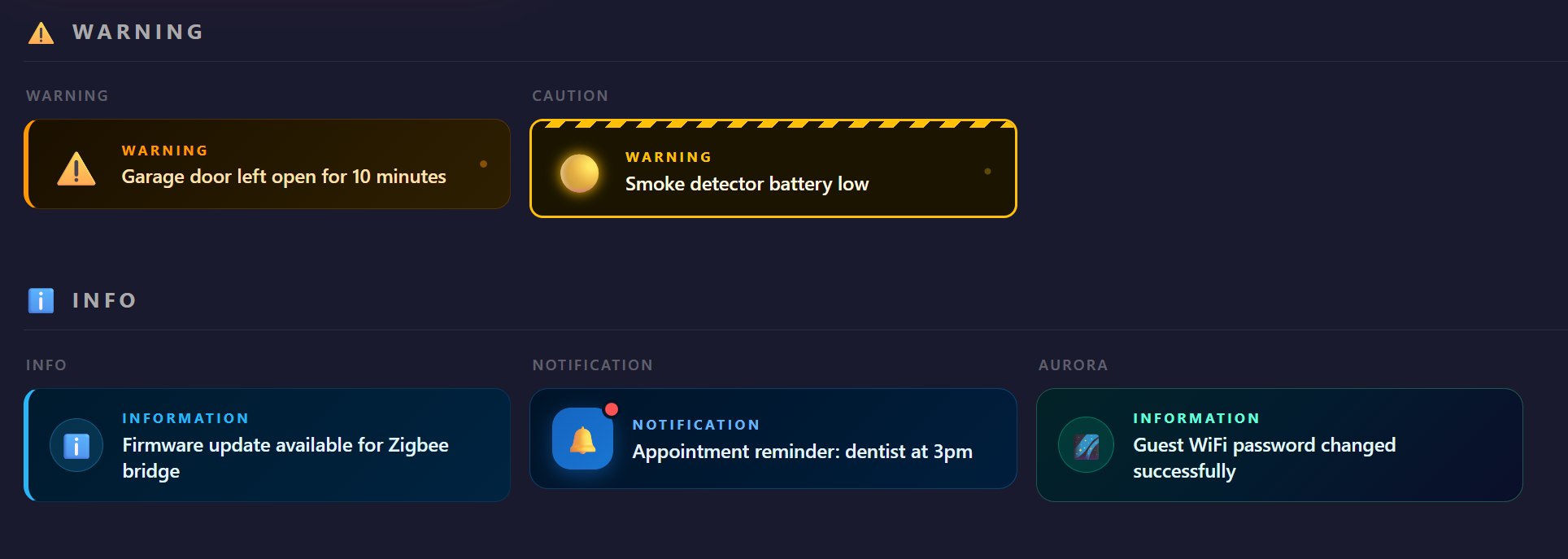
⚠️ | Dark amber card with orange left border and pulsing dot |
caution |
🟡 | Black/yellow card with diagonal stripe bar and blinking dot |
radar |
🎯 | Dark green card with circular sonar display, sweeping cone and concentric rings |
temperature |
🌡️ | Dark orange card with shaking thermometer and animated fill bar |
battery |
🔋 | Dark card with blinking battery drain animation |
door |
🚪 | Dark card with animated mdi:door-open icon that pivots on its hinge (CSS perspective rotateY) |
window |
🪟 | Dark card with mdi:window-open-variant swinging on a top-pivot (rotateX) |
smoke |
🌫️ | Dark grey card with drifting smoke puff animation |
wind |
💨 | Dark card with fast horizontal streak lines |
leak |
💧 | Dark blue card with animated drip effect |
ℹ️ Info
| Theme | Icon | Visual style |
|---|---|---|
info |
ℹ️ | Dark blue card with blue left border and circular icon wrap |
notification |
🔔 | Deep navy card with blue app-icon bubble and pulsing red badge |
aurora |
🌌 | Dark card with shifting aurora gradient background |
hologram |
🔷 | Holographic card with grid lines, horizontal scan beam and glitch flicker |
presence |
🏠 | Dark cyan card with expanding ping rings radiating from icon |
update |
🔄 | Dark card with spinning double progress ring |
cloud |
☁️ | Soft floating cloud pulse |
satellite |
📡 | Radiating signal waves |
tips |
💡 | Amber lightbulb glow |
light |
🔆 | Warm incandescent glow with conical light beam fanning out from icon; bulb flares on pulse |
music |
🎵 | Dark purple/magenta card with musical notes (♪ ♫ ♩ ♬) floating upward and pulsing icon glow |
✅ OK / All Clear
| Theme | Icon | Visual style |
|---|---|---|
success |
✅ | Dark green card with green left border |
check |
🟢 | Dark green card with pulsing ring around icon |
confetti |
🎉 | Dark green card with floating coloured particles |
heartbeat |
💓 | Dark card with scrolling ECG line at the bottom and beating pulse ring |
shield |
🛡️ | Dark teal card with rotating scan wave and glow pulse |
power |
⚡ | Dark green card with energy surge lines and lightning zap |
sunrise |
🌅 | Warm golden rising light |
plant |
🌱 | Green growing pulse |
lock |
🔒 | Deep blue secure pulse |
🎨 Style
| Theme | Icon | Visual style |
|---|---|---|
ticker |
📰 | Full-width scrolling news ticker bar with all active alerts |
neon |
⚡ | Cyberpunk black card with cyan/magenta glow and scanning line |
glass |
🔮 | Glassmorphism card with purple/pink gradient and frosted border |
matrix |
💻 | Terminal-style green-on-black monospace card with blinking cursor |
minimal |
📋 | Clean light card with dynamic accent left border |
retro |
📺 | CRT amber phosphor card with scanlines, screen flicker and warm glow |
cyberpunk |
🤖 | Neon purple/cyan diagonal stripes with glitch bar |
vapor |
🌸 | Vaporwave perspective grid with pink/cyan gradient |
lava |
🌋 | Black card with floating orange lava blobs |
⏱️ Timer (available for timer.* entities and sensors with device_class: timestamp)
| Theme | Icon | Visual style |
|---|---|---|
countdown |
⏱️ | Horizontal progress bar at the bottom that shrinks as time passes. Pulses red when < 20% remaining. |
hourglass |
⏳ | Background vertical fill that drains from top to bottom, like sand in an hourglass. |
timer_pulse |
💥 | Card glows with a pulsing halo — pulse speed increases as time runs out. |
timer_ring |
🔵 | SVG circular ring on the right side with the countdown in the center. |
All timer themes transition green → orange → red as the remaining time decreases. When using a device_class: timestamp sensor (e.g. an Alexa/Echo timer sensor), the progress bar is hidden since no total duration is known — the countdown still shows.
Note: The
clear_themeaccepts any theme from the ✅ OK category:success,check,confetti,heartbeat,shield,power,sunrise,plant,lock.
How It Works
Alert lifecycle
- Configure one or more alerts, each linked to an entity + condition
- When an entity matches the condition (and any extra
conditionsrules), the alert becomes active - Active alerts are sorted by priority (1=most critical)
- The card displays the current alert and auto-cycles through multiple active alerts
- Use ◀ / ▶ buttons (or swipe) to jump between alerts manually
- Tap or hold the card to execute configured actions
- Snooze any alert with 💤 — one tap for fixed duration, or choose from the menu
- 📋 opens the alert history with timestamps
- When no alerts are active and
show_when_clear: true, the card shows the all-clear state (message, clock, or weather)
Transition animations
When multiple alerts are active, the card cycles using the selected animation:
| Animation | Description |
|---|---|
fold (default) |
3D page-turn along the X axis |
slide |
Horizontal push left/right |
fade |
Cross-dissolve opacity fade |
flip |
RotateY card flip |
zoom |
Scale punch in/out |
glitch |
Clip-path jitter digital noise |
bounce |
Elastic spring from below |
swing |
RotateZ pendulum |
blur |
Gaussian dissolve |
split |
Vertical split (top up, bottom down) |
roll |
RotateY + translateX combined roll |
curtain |
Opens from center (theater curtain) |
Manual alert navigation
When 2 or more alerts are active, ◀ and ▶ buttons appear on the left/right edges on hover (first touch on mobile). Clicking jumps to the previous/next alert and resets the auto-cycle timer. On mobile, left/right swipe also navigates (if swipe_to_snooze is enabled, left-swipe keeps its snooze behaviour and only right-swipe navigates).
Secondary entity value
Display a live entity value as a second line below the alert message:
- entity: sensor.open_zones
  operator: "!="
  state: "0"
  message: "Zones open"
  secondary_entity: sensor.open_zones_list
  secondary_attribute: zone_names   # optional — read an attribute instead of state
tap_action / hold_action / double_tap_action
Standard Lovelace interactions — tap, hold (500 ms), or double-tap the whole card to trigger any action:
- entity: binary_sensor.front_door
  state: "on"
  message: "Front door open"
  tap_action:
    action: more-info
    entity_id: binary_sensor.front_door
  hold_action:
    action: navigate
    navigation_path: /lovelace/security
  double_tap_action:
    action: call-service
    service: lock.lock
    target:
      entity_id: lock.front_door
When
double_tap_actionis set, a single tap waits 300 ms to distinguish the two gestures.
Supported action types: call-service, navigate, more-info, url, none.
on_change — trigger on any state change
Fire an alert whenever an entity changes state, regardless of the operator/state condition. The alert stays visible until the next state change, or auto-dismisses after auto_dismiss_after seconds:
- entity: media_player.living_room
  on_change: true
  auto_dismiss_after: 15
  message: "Now playing: {state}"
  theme: notification
time_range — restrict to a time window
Show an alert only within a specific time window. Supports midnight crossing:
- entity: binary_sensor.front_door
  state: "on"
  message: "Door open at night!"
  time_range:
    from: "22:00"
    to: "07:00"
  theme: intruder
The card re-evaluates at each minute boundary so alerts appear and disappear on time without any entity state change. Leave both fields empty for always-active.
visible_to — per-alert user filter
Restrict an alert to specific Home Assistant users without separate cards or conditional wrappers:
- entity: sensor.server_load
  state: "high"
  message: "Server load critical"
  visible_to: admin          # admin | non_admin | "John" | ["John", "Maria"]
| Value | Effect |
|---|---|
admin |
Admins only |
non_admin |
Non-admin users only |
"Display Name" |
Single user by display name |
["Name1", "Name2"] |
Multiple users by display name |
| (omit) | Shown to everyone |
device_class — auto-discover by device class
Instead of listing individual entities or writing a text filter, specify a HA device class. The card auto-discovers every entity with that class and creates one alert per match:
- device_class: smoke
  state: "on"
  message: "Smoke detected: {name}"
  theme: fire
  priority: 1

- device_class: battery
  attribute: battery_level
  operator: "<="
  state: "15"
  message: "Low battery: {name} ({state}%)"
  theme: battery
  device_class_exclude:
    - sensor.battery_test_device
Supports the same include/exclude panel as entity_filter and all the same message placeholders ({name}, {state}, {entity}, {device}).
Jinja2 in the state trigger field
The trigger threshold itself can be a Jinja2 template — useful when the threshold is stored in a helper entity:
- entity: sensor.outdoor_temperature
  operator: ">"
  state: "{{ states('input_number.temp_alert_threshold') }}"
  message: "Temperature too high: {state}°"
Any HA template that evaluates to a string or number works here.
All-clear widget (clock / weather / forecast)
When show_when_clear: true is set and no alerts are active, the card can show an animated clock, live weather display, or 7-day forecast instead of a plain text message:
show_when_clear: true
clear_display_mode: weather_forecast   # see modes below
clear_weather_entity: weather.home
| Mode | Display |
|---|---|
message |
Standard all-clear text message (default) |
clock |
Animated digital clock with date, deep navy background and blue glow |
weather |
Animated weather background with condition, temperature, wind speed, humidity |
weather_clock |
Weather background + clock badge in top-right corner |
forecast |
NEW — full 7-day forecast grid: emoji, high/low temp, precipitation bars, today highlighted |
weather_forecast |
NEW — alternates every 5 s between current weather + clock and 7-day forecast |
Weather modes show full animated particle backgrounds (sun rays, stars/moon/aurora, floating clouds, fog, wind streaks, rain, snow, hail, lightning, exceptional). All weather info and the clock are rendered as frosted-glass corner badges so the animated sky stays fully visible.
🗓️ 7-day forecast widget
The forecast and weather_forecast modes display a full-width daily forecast grid sourced from HA's weather/subscribe_forecast WebSocket API (HA 2023.9+):
- Weather emoji and condition label for each day
- High / low temperatures color-coded: blue (cold) → amber (warm) → red (hot)
- Precipitation probability bar visible when ≥20%
- Today's column elevated with frosted glass, floating emoji animation, and accent glow
- Day labels auto-localized via
Intl.DateTimeFormatin all 11 supported languages
When used with show_widget_in_cycle: true, the card ensures both the weather panel and forecast panel have been shown before advancing to the next alert.
Clock styles (clear_display_mode: clock)
| Style | Visual |
|---|---|
| (default) | Deep navy background, blue glow digits |
aurora |
Animated northern-lights gradient background, green glow |
gold |
Warm golden hue, thin weight digits |
matrix |
Black background, monospace green digits with scanline glow |
Weather badge styles (all weather modes)
| Style | Layout |
|---|---|
| (default) | Animated sky, frosted corner badges |
stage |
Large centered clock on top; weather compacted into a single horizontal frosted pill below |
split |
Card divided into two equal full-height panels — left: weather icon + temperature, right: clock |
cinematic |
Animated weather background fills the entire card; all info condensed into a transparent caption bar pinned to the bottom |
The
splitstyle works with all weather modes includingweather_forecast— the first panel shows weather + clock side by side, then alternates with the 7-day forecast.
Configure these in the editor (All Clear tab). Use clear_clock_show_date to toggle the date display, and clear_clock_date_position (above / below) to choose its position relative to the time.
Weather/time as a slide in the alert cycle
Insert the configured clear widget (clock / weather / weather+clock) as an extra slide in the alert rotation — displayed between alerts like any other:
show_widget_in_cycle: true
clear_display_mode: weather_clock
clear_weather_entity: weather.home
The widget uses the same cycle_animation and cycle_interval as alerts. Enable this in the editor (Cycling & Animation section), visible only when clear_display_mode is already configured.
Overlay / toast notification
Enable a global floating banner that fires when a new alert triggers — visible from any dashboard view, not just the one where the card lives:
overlay_mode: true
overlay_position: top     # top | center | bottom
overlay_duration: 8       # seconds before auto-dismiss (0 = manual close only)
overlay_scale: 1.5        # 1 | 1.5 | 2 | 3 — enlarge for wall displays
How it works:
- When the card's view is currently visible, the banner is suppressed (no redundant notification — the card itself already shows the alert).
- When you navigate away to another view (or the card is off-screen), an independent watcher reads entity states from the always-present
<home-assistant>element every 2 seconds and fires the banner automatically. - A 10-second deduplication window prevents the same alert from firing twice.
- The banner is styled according to the alert category (Critical / Warning / Info / OK / Style / Timer) and dismisses automatically after
overlay_durationseconds, or manually via the × button.
Overlay scale
Use overlay_scale to enlarge the entire banner for wall-mounted tablets or TVs:
| Value | Effect |
|---|---|
1 |
Default size |
1.5 |
50% larger — font, icon, padding, border-radius all scale |
2 |
Double size — ideal for wall tablets |
3 |
Triple size — for TV or kiosk displays |
The max-width grows with the scale while staying within the viewport. Camera snapshot images (if set) also scale proportionally.
Position options:
| Value | Behavior |
|---|---|
top |
Slides in from the top of the screen |
center |
Pops in at the center of the screen (scale animation) |
bottom |
Slides in from the bottom of the screen |
Snooze
Tap 💤 on any active alert to snooze it. Two modes (configurable in General tab):
- Menu (default) — choose 1h / 4h / 8h / 24h from a menu on the card
- Fixed duration — configure 30min / 1h / 4h / 8h / 24h for immediate one-tap snooze
Snoozed alerts persist in localStorage and the card restores them automatically when the duration expires. A small amber 💤 pill appears when some alerts are snoozed while others remain active — tap it to resume all.
snooze_action
Execute a Lovelace action when the 💤 button is tapped, in addition to snoozing. Useful for resetting sensors:
- entity: binary_sensor.mailbox
  state: "on"
  message: "Mail arrived"
  snooze_action:
    action: call-service
    service: input_boolean.turn_off
    target:
      entity_id: input_boolean.mailbox_flag
Alert history
Tap 📋 to flip the card and view a timestamped log of every alert that became active. Includes a Clear button. History is stored in localStorage (configurable max: 25 / 50 / 100 / 200 events).
entity_filter
Instead of specifying a single entity, write a text filter. The card finds all entities whose ID or friendly name contains the filter text and creates one alert per match:
- entity_filter: "battery"
  attribute: battery_level
  operator: "<="
  state: "20"
  message: "Low battery: {name} ({state}%)"
  theme: battery
  entity_filter_exclude:
    - sensor.battery_test_device
Message placeholders:
| Placeholder | Replaced with |
|---|---|
{name} |
Entity friendly name |
{entity} |
Entity ID |
{state} |
Current state value (translated) |
{device} |
HA device name from the device registry |
{timer} |
Live countdown for timer.* entities (mm:ss / h:mm:ss) |
The matched entity's friendly name is also automatically shown below the message so you always know which device triggered the alert.
HA template syntax in messages
The message field (and secondary_text) supports full Jinja2 template syntax — rendered server-side by Home Assistant via the WebSocket API, with live updates whenever entities change.
# Simple sensor value
- entity: sensor.co2_ppm
  operator: ">"
  state: "1000"
  message: "CO₂: {{ states('sensor.co2_ppm') }} ppm"

# Attribute value
- entity: climate.hvac
  state: heating
  message: "Heating — room: {{ state_attr('climate.hvac', 'current_temperature') }}°"

# Conditional logic
- entity: sensor.battery_phone
  operator: "<"
  state: "20"
  message: >
    {% if states('sensor.battery_phone') | int < 10 %}
      Critical: {{ states('sensor.battery_phone') }}%
    {% else %}
      Low battery: {{ states('sensor.battery_phone') }}%
    {% endif %}

# Time / date
- entity: binary_sensor.night_mode
  state: "on"
  message: "Night mode active since {{ now().strftime('%H:%M') }}"

# Math / unit conversion
- entity: sensor.power_consumption
  operator: ">"
  state: "2000"
  message: "High consumption: {{ (states('sensor.power_consumption') | float / 1000) | round(2) }} kW"
Any template that works in HA automations and template sensors works here too.
Editor preview: type a filter text and a live counter shows how many entities match. Click the counter to expand a full list with names, entity IDs and current states. Click any entity to exclude it (✗) or re-include it (✓).
Timer themes
Select a timer.* entity and use one of the 4 dedicated timer themes. The card reads finishes_at from the timer attributes and updates the display every second:
- entity: timer.ad_blocker_paused
  state: active
  message: "Ad blocking disabled for {timer}"
  theme: countdown
Use {timer} in the message to display the live countdown (mm:ss or h:mm:ss).
When a timer entity is selected in the editor, state is automatically set to active and the theme switches to countdown.
Numeric / comparison conditions
- entity: sensor.co2_ppm
  operator: ">"
  state: "1000"
  message: "CO₂ level critical!"
Supported operators: = (default), !=, >, <, >=, <=, contains, not_contains.
Attribute-based triggers
- entity: sensor.phone
  attribute: battery_level
  operator: "<"
  state: "20"
  message: "Phone battery critical"
  theme: battery
AND / OR multi-entity conditions
- entity: binary_sensor.front_door
  state: "on"
  conditions_logic: "and"
  conditions:
    - entity: input_boolean.night_mode
      operator: "="
      state: "on"
  message: "Door open at night"
  theme: intruder
and— all conditions must match (default)or— at least one condition must match
HA icons (mdi:)
Enable the use_ha_icon toggle per alert to use a native HA icon instead of an emoji. When enabled, the card first reads the entity's icon from the HA entity registry — so you get the correct icon automatically without setting it manually. You can also pick any mdi: or hass: icon from the native HA icon picker in the editor. Combine with icon_color to tint the icon with any CSS color.
Any icon namespace is accepted — not just mdi: and hass:. Icons from hue:, phu:, cil:, and any other custom set registered via extra_module_url work automatically.
Message placeholders
{state}, {name}, {entity}, and {device} work in the message field of any alert that has an entity set — not just entity_filter alerts:
- entity: sensor.meter_abe4
  operator: "<="
  state: "20"
  message: "Battery low: {state}%"
  secondary_text: "Device: {device}"
secondary_text
A static second line displayed below the message. Supports placeholders. Does not require a secondary entity:
secondary_text: "Zone: {name} — Current: {state}"
Badge customization
Hide the category badge or replace its text:
show_badge: false        # hide completely
badge_label: "URGENT"   # or use a custom label
Sound notifications
Play an audio tone when an alert becomes active. Uses the Web Audio API — no files required for the default tones:
- entity: binary_sensor.smoke_detector
  state: "on"
  message: "Smoke detected!"
  sound: true
  sound_url: "https://example.com/alarm.mp3"  # optional custom sound
Default tones by category: Critical = double high beep · Warning = medium beep · Info = soft beep · OK = rising chime.
Note: requires browser autoplay permission. Works out of the box on wall-mounted tablets with HA Companion.
Large buttons
Always-visible pill-shaped 💤 and 📋 buttons — useful for wall-mounted tablets where hover is not available:
large_buttons: true
Swipe to snooze
Enable a left-swipe gesture to snooze the current alert on touch devices. Works independently of tap_action and hold_action — no conflict:
swipe_to_snooze: true
Swipe at least 60 px horizontally to trigger. Uses the configured snooze_duration (or 1 h if none is set).
Invisible touch zone (mobile)
A 22%-wide invisible zone on the right side of the card reveals the action buttons (snooze / history / nav arrows) on the first tap. The buttons auto-hide after 4 seconds. Never interferes with tap_action, hold_action, or double_tap_action.
Vertical layout
Stack the icon on top and the message below, centered — useful for narrow columns or square card grids:
vertical: true
Works with all 50 themes. The Ticker theme keeps its horizontal scrolling. Can be combined with ha_theme: true and large_buttons: true.
HA theme adaptation
Adapt the card's color palette to the active Home Assistant global theme:
ha_theme: true
When enabled:
- Card background →
--card-background-color - Text →
--primary-text-color/--secondary-text-color - Critical badges/borders →
--error-color - Warning badges/borders →
--warning-color - Info badges/borders →
--info-color - OK badges/borders →
--success-color
All 50 visual themes retain their animations and layouts — only the color palette adapts. Compatible with Mushroom, Material, iOS, and any custom HA theme.
Card border
Enable a persistent visible border around the card using the standard HA border style:
card_border: true
Default: false (off). Uses --ha-card-border-width and --ha-card-border-color from the active HA theme. When card_border is on and the card is otherwise hidden (no alerts, show_when_clear off), a subtle dashed placeholder with a 🔔 icon is shown so the card remains discoverable and editable.
Test mode
Force all configured alerts to display as active — useful for previewing the card appearance without waiting for real conditions:
test_mode: true
Remember to remove
test_modebefore going live. A yellow banner is shown on the card as a reminder.
In the visual editor, open the Alerts tab → enable Test mode at the bottom → expand any alert to instantly preview it on the card.
Installation
Via HACS (recommended)
- Click the button above or open HACS → Frontend
- Click ⋮ → Custom repositories
- Add
https://github.com/djdevil/AlertTicker-Cardas type Lovelace - Find AlertTicker Card and click Download
- Reload your browser
Manual
- Download
alert-ticker-card.jsandalert-ticker-card-editor.jsfrom the latest release - Copy both files to
/config/www/ - Go to Settings → Dashboards → Resources
- Add
/local/alert-ticker-card.jsas a JavaScript module - Reload the browser
Visual Editor
No YAML knowledge required. The editor uses a hub-and-spoke layout: the main menu shows all sections as tiles; click any tile to open it.
🔔 Alerts tab
For each alert:
| Field | Description |
|---|---|
| Name | Optional display label for this alert in the editor panel (e.g. "Motion sensor floor 1") |
| Entity filter | Text filter with wildcard * — auto-expands to one alert per matched entity |
| Device class | Auto-discover all entities with a given HA device class |
| Entity | Single entity from your HA instance (hidden when filter is active) |
| Attribute | Optional — check attribute instead of entity state (dot-notation supported) |
| Condition | Operator + trigger value (supports Jinja2 templates) |
| on_change | Trigger on any state change (ignores condition fields) |
| auto_dismiss_after | Auto-hide the alert N seconds after it fires |
| time_range | Show alert only within a time window (from/to in HH:MM) |
| visible_to | Restrict visibility to specific HA users |
| Priority | 1 (Critical) → 4 (Low) |
| Message | Text shown when active — supports {name}, {entity}, {state}, {timer}, {device} |
| Secondary text | Static second line — supports placeholders, no entity required |
| Secondary entity | Live value shown below the message |
| Theme | Visual theme — timer entities see only timer themes |
| Icon | Emoji override, or native mdi: icon picker via toggle |
| Icon color | CSS color for the MDI icon (hex, named, or variable) |
| Badge | Show/hide category badge or set a custom label |
| Snooze duration | Per-alert override of global snooze setting |
| Sound | Enable audio notification + optional custom URL |
| TTS | Enable voice announcement — speaker, engine, notify service, custom message |
| Camera | Camera entity; toggle camera_live for live stream in overlay; toggle camera_in_card for camera background in the card slide |
| Secondary value position | below (default) or right — position the secondary value on the same row as the title |
| History message | Custom text recorded in the history log (overrides message for history entries) |
| Extra conditions | AND/OR additional entity conditions |
| Tap action | Action executed on tap (native service control) |
| Hold action | Action executed on hold (500 ms) |
| Double-tap action | Action executed on double-tap (single tap waits 300 ms) |
| Snooze action | Action executed when 💤 is tapped |
You can reorder alerts with ↑ / ↓ buttons.
⚙️ General tab
| Field | Description |
|---|---|
| Cycle interval | Seconds between alerts when multiple are active (default: 5) |
| Transition animation | Animation played when switching alerts (12 options) — preview plays on change |
| Show widget in cycle | Insert the clear widget as a slide in the alert rotation |
| Snooze behaviour | Fixed duration or menu (30min / 1h / 4h / 8h / 24h) |
| Show snooze bar | Toggle the amber snooze reactivation bar |
| History max events | How many history entries to keep (25 / 50 / 100 / 200) |
| TTS enabled | Master toggle to enable or disable all TTS announcements |
| Show history button | Toggle to show or hide the 📋 history button |
| Show snooze button | Toggle to show or hide the 💤 snooze button |
🖼️ Layout & Appearance tab
| Field | Description |
|---|---|
| Adapt to HA theme | Adapt colors to the active HA global theme |
| Vertical layout | Stack icon on top, message below, centered |
| Text align center | Center the message text — useful in wide Panel layouts |
| Large buttons | Always-visible pill-shaped 💤 and 📋 buttons |
| Fixed card height | Lock the card height in px to prevent layout shifts |
| Card border | Toggle to show the standard HA border around the card (off by default) |
🔔 Overlay tab
| Field | Description |
|---|---|
| Enable overlay | Toggle the global floating banner notification |
| Position | Top / Center / Bottom — where the banner appears on screen |
| Duration | Seconds before auto-dismiss (0 = manual close only) |
| Scale | 1 / 1.5 / 2 / 3 — enlarge the banner for wall displays |
The tab shows an ON badge when overlay mode is active.
✅ All Clear tab
| Field | Description |
|---|---|
| Show when no alerts | Toggle to keep the card visible when everything is OK |
| Display mode | Message · Clock · Weather · Weather + Clock |
| Clock style | Style variant for clock-only mode (aurora, gold, matrix) |
| Weather badge style | Layout variant for weather modes (stage, split, cinematic) |
| Show date | Toggle date display in clock / weather+clock mode |
| Date position | Above or Below the time digits |
| Weather entity | weather.* entity (shown when mode is Weather or Weather + Clock) |
| Message when clear | Text to show in message mode |
| Theme for all-clear | Visual theme for the all-clear card (OK themes only) |
| Badge label | Custom badge text on the all-clear card |
| Tap / Hold / Double-tap action | Actions for the all-clear card |
YAML Configuration
Card-level options
| Option | Type | Default | Description |
|---|---|---|---|
cycle_interval |
number |
5 |
Seconds between alerts when cycling |
cycle_animation |
string |
fold |
Transition animation |
show_when_clear |
boolean |
false |
Show card when no alerts are active |
clear_message |
string |
"" |
Message shown in all-clear state (message mode) |
clear_theme |
string |
success |
Theme for all-clear (success, check, confetti, …) |
clear_display_mode |
string |
message |
All-clear widget: message, clock, weather, weather_clock, forecast, weather_forecast |
clear_clock_style |
string |
— | Clock style: aurora, gold, matrix |
clear_weather_style |
string |
— | Weather badge style: stage, split, cinematic |
clear_clock_show_date |
boolean |
true |
Show or hide the date in clock / weather+clock mode |
clear_clock_date_position |
string |
below |
Date position relative to time: above or below |
clear_weather_entity |
string |
null |
weather.* entity for weather/weather_clock modes |
clear_badge_label |
string |
"Resolved" |
Badge text on the all-clear card |
clear_tap_action |
object |
— | Tap action for the all-clear card |
clear_hold_action |
object |
— | Hold action for the all-clear card |
clear_double_tap_action |
object |
— | Double-tap action for the all-clear card |
show_widget_in_cycle |
boolean |
false |
Insert the clear widget as a slide in the alert cycle |
snooze_default_duration |
number |
(menu) | Fixed snooze duration in hours (0.5, 1, 4, 8, 24). Omit for menu. |
show_snooze_bar |
boolean |
true |
Set false to hide the amber snooze reactivation bar and pill |
large_buttons |
boolean |
false |
Always-visible pill-shaped 💤 and 📋 buttons |
swipe_to_snooze |
boolean |
false |
Left-swipe gesture to snooze on touch devices |
vertical |
boolean |
false |
Vertical layout — icon on top, message centered below |
text_align |
string |
left |
center to center message text (useful in wide Panel layouts) |
ha_theme |
boolean |
false |
Adapt card colors to the active HA global theme |
history_max_events |
number |
50 |
Max history entries to keep |
card_height |
number |
(auto) | Fixed card height in px — prevents layout shifts when cycling |
card_border |
boolean |
false |
Show the standard HA border around the card at all times |
overlay_mode |
boolean |
false |
Show a floating banner when a new alert triggers — visible from any dashboard view |
overlay_position |
string |
top |
Banner position: top, center, or bottom |
overlay_duration |
number |
8 |
Seconds before auto-dismiss (0 = manual close only) |
overlay_scale |
number |
1 |
Banner zoom factor: 1, 1.5, 2, or 3 |
tts_enabled |
boolean |
true |
Master toggle — set false to silence all TTS globally |
tts_entity |
string |
— | Default media_player.* speaker entity |
tts_engine |
string |
(auto) | TTS engine entity (auto-detected from first tts.* state if omitted) |
tts_notify_service |
string |
— | Default notify service for Alexa / push (e.g. alexa_media_echo_dot) |
tts_language |
string |
— | Language code passed to tts.speak (e.g. it-IT) |
notify_push_enabled |
boolean |
true |
Master toggle — set false to disable all push notifications globally |
clear_weather_temperature_entity |
string |
— | Override weather temperature with a local sensor entity |
clear_weather_humidity_entity |
string |
— | Override weather humidity with a local sensor entity |
clear_weather_temp_high_entity |
string |
— | Override today's high temperature with a sensor |
clear_weather_temp_low_entity |
string |
— | Override today's low temperature with a sensor |
clear_weather_aqi_entity |
string |
— | Show air quality / PM2.5 from a sensor in the weather badge |
show_history_button |
boolean |
true |
Set false to hide the 📋 history button completely |
show_snooze_button |
boolean |
true |
Set false to hide the 💤 snooze button completely |
test_mode |
boolean |
false |
Show all alerts as active (ignore conditions) — for editor preview only |
alerts |
list |
[] |
List of alert objects |
Alert-level options
| Option | Type | Required | Description |
|---|---|---|---|
name |
string |
❌ | Editor display label for this alert panel |
entity |
string |
✅* | Entity ID |
entity_filter |
string |
✅* | Text filter — supports * wildcard (replaces entity) |
entity_filter_exclude |
list |
❌ | Entity IDs to exclude from filter |
device_class |
string |
✅* | HA device class (e.g. smoke, battery, motion) — auto-discovers all matching entities |
device_class_exclude |
list |
❌ | Entity IDs to exclude from device class match |
show_filter_name |
boolean |
true |
Set false to hide the entity friendly name below the message |
attribute |
string |
❌ | Attribute to check instead of state — supports dot-notation (e.g. activity.0.forecast) |
operator |
string |
❌ | = != > < >= <= contains not_contains (default: =) |
state |
string |
✅ | Trigger value — supports Jinja2 templates (e.g. {{ states('input_number.threshold') }}) |
on_change |
boolean |
false |
Trigger on any state change — ignores operator/state |
auto_dismiss_after |
number |
❌ | Auto-hide after N seconds. For on_change: starts on trigger. For condition alerts: starts when condition first becomes true. |
time_range |
object |
❌ | {from: "HH:MM", to: "HH:MM"} — restrict to a time window (midnight crossing supported) |
visible_to |
string|list |
❌ | admin, non_admin, a display-name string, or a list of names |
message |
string |
✅ | Text shown when active — supports {name}, {entity}, {state}, {timer}, {device} |
secondary_text |
string |
❌ | Static second line below the message — supports {state}, {name}, {entity} |
theme |
string |
❌ | Visual theme (default: emergency) |
priority |
number |
❌ | 1–4 (default: 1) |
icon |
string |
❌ | Emoji or mdi: icon override |
use_ha_icon |
boolean |
❌ | Use HA native icon (auto-read from entity, or pick via icon picker) |
icon_color |
string |
❌ | CSS color for the MDI icon (requires use_ha_icon: true) |
show_badge |
boolean |
true |
Set false to hide the category badge |
badge_label |
string |
❌ | Custom text for the category badge |
secondary_entity |
string |
❌ | Entity whose live value appears below the message |
secondary_attribute |
string |
❌ | Attribute of secondary_entity to show — supports dot-notation |
show_secondary_name |
boolean |
false |
Show the entity friendly name next to the secondary value |
show_filter_state |
boolean |
false |
Show translated entity state next to the entity name (entity_filter only) |
snooze_duration |
number|null |
❌ | Override global snooze: hours, null for menu, omit to use global |
sound |
boolean |
false |
Play a sound when this alert becomes active |
sound_url |
string |
❌ | Custom .mp3/.wav URL — omit for auto-generated tone |
tts |
boolean |
false |
Read the alert aloud when it becomes active |
tts_entity |
string |
❌ | Override the global media_player.* speaker for this alert |
tts_engine |
string |
❌ | Override the global TTS engine entity |
tts_notify_service |
string |
❌ | Override the global notify service (for Alexa / push) |
tts_notify_type |
string |
tts |
Notify type sent to the service — use announce for Alexa speaker groups |
tts_message |
string |
❌ | Custom spoken text — omit for auto-generated multilingual sentence |
notify_push |
boolean |
false |
Send a push notification when this alert becomes active |
notify_push_service |
string |
❌ | Target notify.* service (without prefix, e.g. mobile_app_iphone) |
notify_push_title |
string |
❌ | Notification title — supports {name}, {state}, {entity}, {device}, Jinja2 |
notify_push_message |
string |
❌ | Notification body — same placeholders; falls back to message if empty |
show_player_controls |
boolean |
❌ | Enable graphical music player UI for media_player.* entities (requires theme: music) |
music_player_color |
string |
❌ | Accent color for the music player UI — any CSS color (default #e040fb) |
camera_entity |
string |
❌ | Camera entity for overlay banner and card background |
camera_live |
boolean |
false |
Show a live HLS/WebRTC stream in the overlay banner instead of a static snapshot (requires camera_entity) |
camera_in_card |
boolean |
false |
Show the camera image as a background layer behind the alert card slide (requires camera_entity) |
history_message |
string |
❌ | Custom text recorded in the history log — overrides message for history entries; supports {name}, {state}, {entity} |
secondary_value_align |
string |
below |
Position of the secondary value: below (default, shown under the message) or right (shown on the same row as the title) |
conditions_logic |
string |
❌ | and or or for extra conditions |
conditions |
list |
❌ | Extra entity conditions |
tap_action |
object |
❌ | Action on tap |
hold_action |
object |
❌ | Action on hold (500 ms) |
double_tap_action |
object |
❌ | Action on double-tap (single tap waits 300 ms to distinguish) |
snooze_action |
object |
❌ | Action executed when 💤 is tapped |
*One of entity, entity_filter, or device_class is required.
Action object (tap_action, hold_action, double_tap_action, snooze_action, clear_*_action)
| Field | Description |
|---|---|
action |
call-service · navigate · more-info · url · none |
service |
HA service in domain.service format |
target |
{entity_id: "..."} |
service_data |
Extra service parameters (object) |
navigation_path |
Path for navigate action |
url_path |
URL for url action |
entity_id |
Entity for more-info action |
Examples
Battery monitor with entity filter
type: custom:alert-ticker-card
cycle_animation: slide
alerts:
  - entity_filter: "battery"
    attribute: battery_level
    operator: "<="
    state: "20"
    message: "Low battery: {name} ({state}%)"
    theme: battery
    priority: 2
    entity_filter_exclude:
      - sensor.battery_test_device
Smoke detector with TTS + camera snapshot
type: custom:alert-ticker-card
overlay_mode: true
overlay_scale: 1.5
tts_entity: media_player.living_room
alerts:
  - entity: binary_sensor.smoke_detector
    state: "on"
    message: "Smoke detected!"
    theme: fire
    priority: 1
    tts: true
    camera_entity: camera.kitchen
Alexa TTS announcement on door open
type: custom:alert-ticker-card
alerts:
  - entity: binary_sensor.front_door
    state: "on"
    message: "Front door is open"
    theme: door
    tts: true
    tts_notify_service: alexa_media_echo_dot_hallway
    tts_message: "Attention — the front door has been opened"
All smoke detectors via device_class
type: custom:alert-ticker-card
alerts:
  - device_class: smoke
    state: "on"
    message: "Smoke detected: {name}"
    theme: fire
    priority: 1
    tts: true
    tts_entity: media_player.all_speakers
Dynamic threshold from helper entity
type: custom:alert-ticker-card
alerts:
  - entity: sensor.outdoor_temperature
    operator: ">"
    state: "{{ states('input_number.temp_alert_threshold') }}"
    message: "Temperature too high: {state}°"
    theme: temperature
Timer with countdown
type: custom:alert-ticker-card
alerts:
  - entity: timer.ad_blocker_paused
    state: active
    message: "Ad blocking disabled for {timer}"
    theme: countdown
    priority: 2
Alarm with tap_action
type: custom:alert-ticker-card
alerts:
  - entity: alarm_control_panel.home
    state: "triggered"
    message: "ALARM TRIGGERED"
    priority: 1
    theme: emergency
    tap_action:
      action: call-service
      service: alarm_control_panel.alarm_disarm
      target:
        entity_id: alarm_control_panel.home
      service_data:
        code: "1234"
Smart snooze (resets the sensor)
type: custom:alert-ticker-card
alerts:
  - entity: binary_sensor.mailbox
    state: "on"
    message: "Mail arrived"
    theme: notification
    snooze_action:
      action: call-service
      service: input_boolean.turn_off
      target:
        entity_id: input_boolean.mailbox_flag
Night-time door alert (AND condition + time_range)
type: custom:alert-ticker-card
alerts:
  - entity: binary_sensor.front_door
    state: "on"
    time_range:
      from: "22:00"
      to: "07:00"
    message: "Front door open at night!"
    priority: 1
    theme: intruder
    hold_action:
      action: navigate
      navigation_path: /lovelace/security
Alert visible only to admins
type: custom:alert-ticker-card
alerts:
  - entity: sensor.server_load
    operator: ">"
    state: "90"
    message: "Server CPU at {state}%"
    visible_to: admin
    theme: warning
Push notification on door open
type: custom:alert-ticker-card
alerts:
  - entity: binary_sensor.front_door
    state: "on"
    message: "Front door open"
    theme: door
    notify_push: true
    notify_push_service: mobile_app_iphone_di_mario
    notify_push_title: "Door Alert"
    notify_push_message: "{name} opened at {{ now().strftime('%H:%M') }}"
Music player with custom accent color
type: custom:alert-ticker-card
alerts:
  - entity: media_player.spotify_davide
    theme: music
    show_player_controls: true
    music_player_color: "#00e5ff"
    operator: "="
    state: playing
Weather + 7-day forecast alternating
type: custom:alert-ticker-card
show_when_clear: true
clear_display_mode: weather_forecast
clear_weather_entity: weather.home
clear_weather_style: default
show_widget_in_cycle: true
alerts:
  - entity: binary_sensor.smoke_detector
    state: "on"
    message: "Smoke detected!"
    theme: fire
All-clear with animated weather + widget in cycle
type: custom:alert-ticker-card
show_when_clear: true
clear_display_mode: weather_clock
clear_weather_entity: weather.home
show_widget_in_cycle: true
alerts:
  - entity: binary_sensor.smoke_detector
    state: "on"
    message: "Smoke detected!"
    theme: fire
Multiple warnings cycling
type: custom:alert-ticker-card
cycle_interval: 8
cycle_animation: slide
show_when_clear: true
clear_message: "All systems normal"
clear_theme: success
alerts:
  - entity: binary_sensor.smoke_detector
    state: "on"
    message: "Smoke detected in kitchen!"
    priority: 1
    theme: fire
  - entity: binary_sensor.water_leak
    state: "on"
    message: "Water leak under sink"
    priority: 2
    theme: flood
  - entity: sensor.co2_ppm
    operator: ">"
    state: "1000"
    message: "CO₂ level too high — {state} ppm"
    priority: 2
    theme: toxic
  - entity: binary_sensor.window_contact
    state: "on"
    message: "Living room window open"
    priority: 3
    theme: window
    secondary_entity: sensor.outdoor_temperature
Languages
The card automatically detects the language from your Home Assistant settings.
| Language | Code | Fallback |
|---|---|---|
| Italian | it |
— |
| English | en |
✅ default |
| French | fr |
— |
| German | de |
— |
| Dutch | nl |
— |
| Vietnamese | vi |
— |
| Russian | ru |
— |
| Danish | da |
— |
| Czech | cs |
— |
| Portuguese | pt |
— |
| Spanish | es |
— |
| Turkish | tr |
— |
TTS fallback messages (auto-generated when no tts_message is set) are available in all 12 languages and adapt automatically to the alert's theme category (critical / warning / info / ok / timer).
Troubleshooting
Card not appearing after installation
- Add
alert-ticker-card.jsas a JavaScript module in Settings → Dashboards → Resources - Hard-reload the browser (Ctrl+Shift+R / Cmd+Shift+R)
Features not working after update (secondary text, templates, new options)
- HA and browsers cache custom card files aggressively. After updating, always do a hard-reload (
Ctrl+Shift+R/Cmd+Shift+R) or go to Settings → System → Restart → Clear cache and restart. You can verify the running version by searching forCARD_VERSIONin the JS file via browser DevTools.
Entity picker not showing in editor
- Known HA lazy-loading issue. The card handles it automatically. If it still doesn't appear, close and reopen the editor.
Card disappears when alerts resolve
- Set
show_when_clear: trueto keep the card visible.
Trigger state not matching
- State values are case-sensitive exact strings. Use the live Current state hint in the editor or check Developer Tools → States.
Timer not updating
- Ensure the timer entity state is
active. The card readsfinishes_atfrom the timer attributes. Iffinishes_atis missing, the countdown shows--:--.
entity_filter matching too many entities
- Use a more specific filter text, or click individual entities in the editor preview list to exclude them.
Weather widget shows placeholder but entity is configured
- Make sure
clear_display_modeis set toweatherorweather_clockANDclear_weather_entitypoints to a validweather.*entity.
TTS not playing
- Check that
tts_enabledis notfalse. For standard TTS, ensuretts_entityis a validmedia_player.*. For Alexa, settts_notify_serviceto the correctalexa_media_*service name (visible in Developer Tools → Services). The TTS engine is auto-detected from the firsttts.*state — if none is found, settts_engineexplicitly. - TTS (and push notifications) fired from the browser tab only work while the dashboard is open. To receive alerts when the browser is closed, the card automatically creates server-side HA automations (
[AlertTicker] TTSand[AlertTicker] Push Notifications) via the REST API when the config is saved — check Settings → Automations to verify they exist.
Push notifications not arriving
- Verify
notify_push_enabledis notfalse. Check thatnotify_push_servicematches the service name exactly (without thenotify.prefix). The card sends push via HA WebSocket when the dashboard is open; for 24/7 delivery, the auto-created[AlertTicker] Push Notificationsautomation in Settings → Automations must be present and enabled.
Camera image not appearing in overlay
- Verify the
camera_entityentity exists and has anentity_pictureattribute in Developer Tools → States. The image is loaded directly from the HA proxied URL — no extra authentication needed on the local network.
Contributing
See CONTRIBUTING.md for guidelines on reporting bugs, suggesting features, and contributing code.
License
MIT License — see LICENSE for details.
Support
If you find this card useful, consider buying me a coffee ☕