
AllCodeRelay
Universal code scanner with webhook integration.
Developed by Grapph
Download on Google Play
Download on App Store
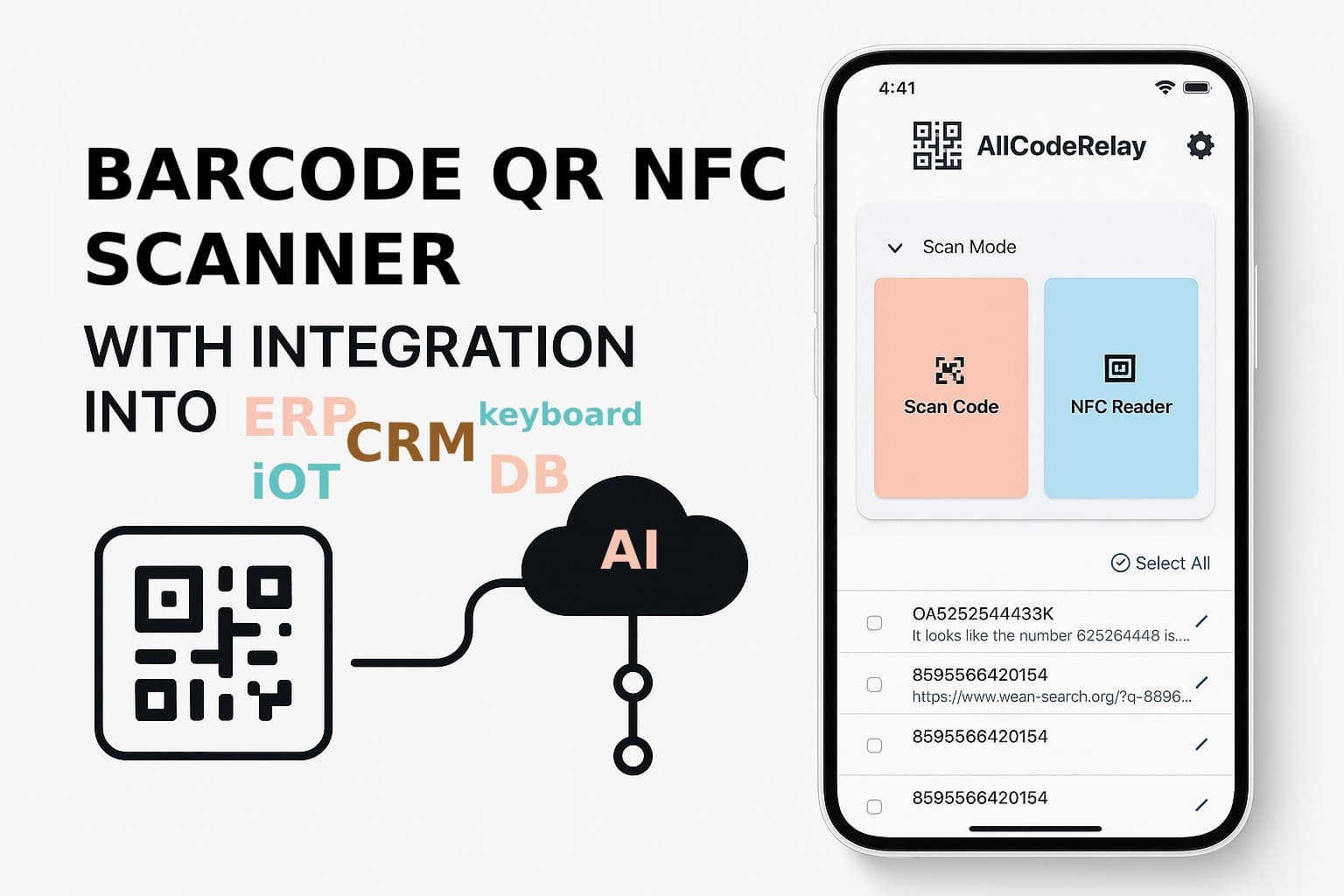
AllCodeRelay is a Flutter mobile application that serves as a universal code scanner with webhook integration capabilities.
Features
- Multi-format, QR Code and Barcode scanning
- NFC tag reading
- Webhook integration for sending scanned data
- Secure storage of webhook URLs
- Customizable settings
Webhook integration: Automatically sends scanned data to configured endpoints via HTTP POST
Secure configuration: Uses Flutter Secure Storage for webhook URLs and supports custom headers
Flexible settings: Continuous scanning, scan delays, audio feedback, dark mode
Local storage: SQLite database for storing scan history when webhooks fail
Architecture: Built with Flutter 3.24+ using modern state management (BLoC pattern)
Navigation handled by go_router
Modular design with separate screens for home, settings, and about
Workflow
- User scans codes using the camera or NFC
- App sends scan data to configured webhook endpoint
- Server processes and returns structured response
- App displays results or stores locally if webhook fails
- The app is designed for enterprise/automation use cases where scanned codes need to be processed by external systems in real-time.
Getting Started
This Flutter application requires Flutter 3.24 or higher.
Prerequisites
- Flutter SDK (3.24+)
- Dart SDK (3.7.2+)
- Android Studio / Xcode for mobile deployment
Installation
- Clone the repository
- Run
flutter pub getto install dependencies - Connect a device or start an emulator
- Run
flutter runto start the application
Dependencies
- mobile_scanner: For 2D/3D code scanning
- nfc_manager: For NFC reading
- http: For webhook communication
- flutter_bloc: For state management
- go_router: For navigation
- flutter_secure_storage: For secure storage of webhook URLs
- And more (see pubspec.yaml for complete list)
Usage
Scan QR codes, barcodes, or NFC tags and relay the data to configured webhook endpoints.
Webhook Integration
AllCodeRelay sends scanned data to your configured webhook endpoint via HTTP POST requests.
Configuration
You can configure webhook settings in the app:
- Webhook URL: The endpoint that will receive scan data
- Webhook Title: A friendly name for your endpoint
- Custom Headers: Add authentication tokens or other required headers
QR Code Configuration
Configure the app by scanning a special QR code with this format:
allcoderelay://setwebhookurl?url=https://your-webhook.com&title=My%20Webhook&headers={"Authorization":"Bearer%20token","Content-Type":"application/json"}
Use our webhook configuration tool to easily generate these QR codes.
POST Request Format
When a code is scanned, the app sends a POST request with this structure:
{
  "code": "SCANNED_CODE_VALUE"
}
Expected Response
Your webhook should return a JSON response with this structure:
{
  "code": "SCANNED_CODE_TYPE",
  "codevalue": "PROCESSED_VALUE"
}
Where:
code: Type of code scanned (e.g., "QR", "BARCODE", "NFC")codevalue: The processed value or meaning of the code
If the server returns a non-200 status code or the response cannot be parsed, the app will store the scan locally.
Default Webhook
The app comes with a default webhook URL set to https://n8n.grapph.com/webhook/allcoderelay. This webhook is designed to work out-of-the-box and can be used for testing purposes.
This n8n workflow provides several intelligent responses based on the scanned code:
- EAN 13 Barcodes: Returns a link to product information
- NFC Door Tags: Returns a link to open the door
- Other QR, Aztec, or Data Matrix Codes: Uses AI to analyze and provide information about the scanned code
The workflow includes:
- code type detection
- integration with OpenAI for AI analysis
- SerpAPI for product information lookup
- conditionals for different code types
You can view an example of this workflow in the n8n workflow file included with this documentation.
To use this workflow, you need to:
- Import the workflow into n8n
- Set the OpenAI and SerpAPI API keys in the workflow
- Update the webhook URL in the app to point to your n8n instance
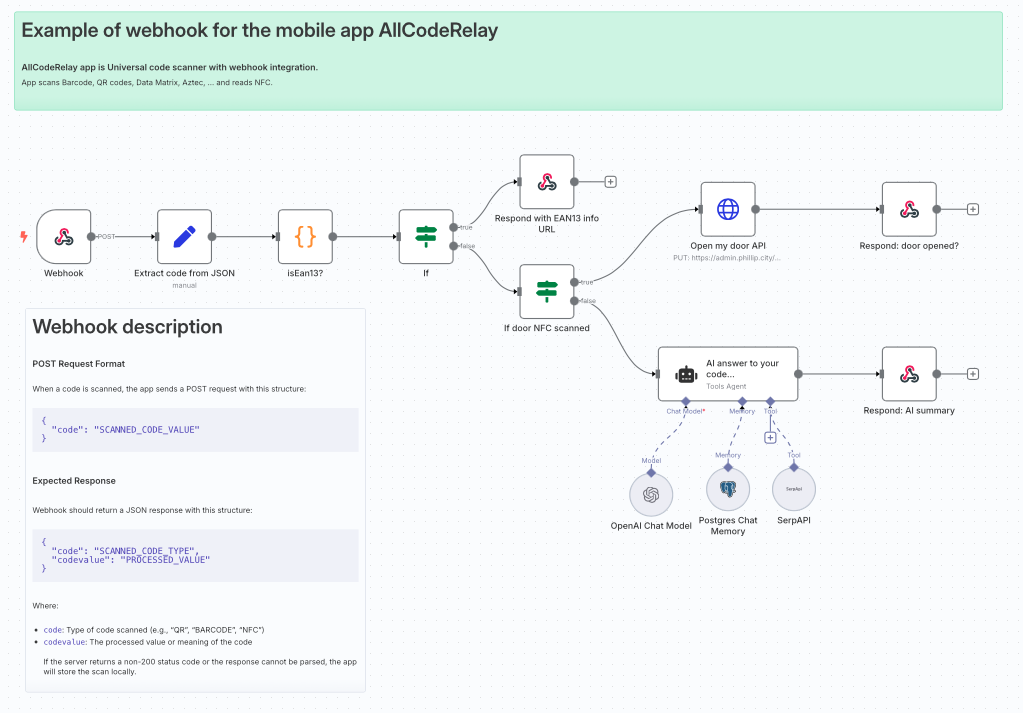
Another funny webhook worth to test
Example Implementation
A simple PHP webhook endpoint:
<?php
header('Content-Type: application/json');

// Get the POST data
$input = file_get_contents('php://input');
$data = json_decode($input, true);

// Process the scanned code
$scannedCode = $data['code'] ?? '';

// Return the processed data
echo json_encode([
  'code' => 'QR',
  'codevalue' => 'Processed: ' . $scannedCode
]);
?>
GALLERY
See interesting gallery of webhook examples and use cases. Feel free to contribute!
Contact
Email: [email protected]