
Amytis
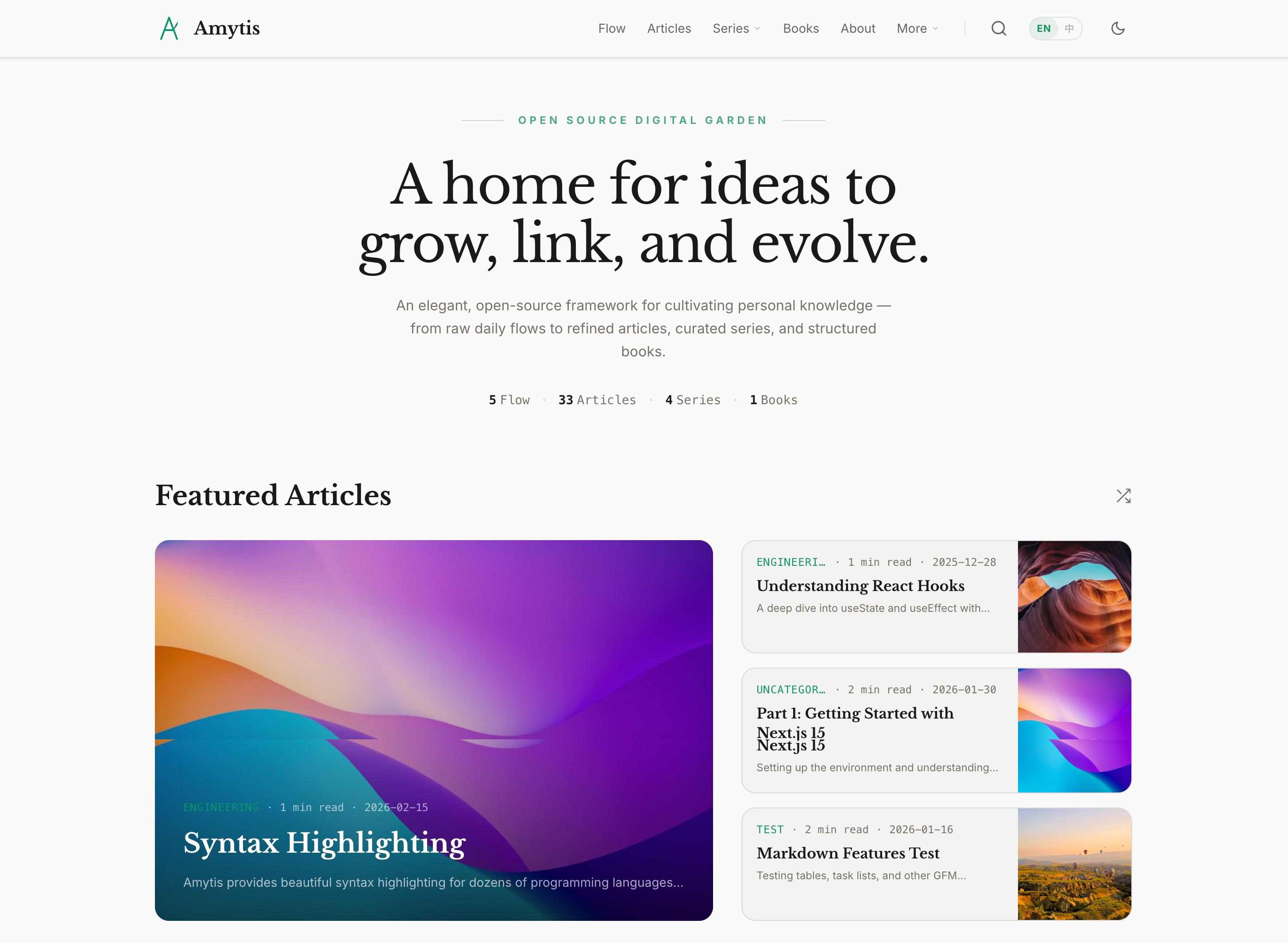
Amytis is a powerful, elegant, and user-friendly open-source digital garden framework for building knowledge spaces, blogs, showcase sites, or internal knowledge bases. It is built with Next.js 16, Tailwind CSS v4, and Bun, emphasizing a Markdown-first, plain-text-first workflow that preserves long-term content ownership while pursuing simplicity, elegance, and performance.
Why Amytis?
I have been blogging for twenty years, starting from early blogging platforms such as MSN Space (MS Live Space) and Sina Blog, then moving to self-hosted WordPress and Drupal, and later fully adopting static blogging frameworks after GitHub Pages became available. I tried Jekyll, Hugo, and several of their themes, but none of them truly satisfied me. The feature-rich ones were often not simple or elegant enough, while the elegant ones usually lacked flexibility and customization. I kept wondering whether a blogging or knowledge platform framework could balance functionality, performance, aesthetics, and UX. That idea stayed with me for years. When I finally decided to build one myself, I found it much harder than I had expected.
Fortunately, AI coding changed that equation. With the help of Claude Code, Gemini CLI, and Codex, it became much easier than before to turn the idea into reality. After more than 700 commits of iteration, Amytis finally took shape as the idealized knowledge platform framework I had been aiming for. It was first used in the geek community platform I built at work, and I also replaced the framework behind my Hutusi blog with it. Amytis is now open source. Independent bloggers and knowledge managers are welcome to use it, and contributions, bug reports, and pull requests are all appreciated. If you are using Amytis, feel free to leave a note in this issue.
The Knowledge Ladder
Amytis is built around a path from fragmented thoughts to refined knowledge, helping individuals or teams build a complete digital garden system:
- Flow: Capture daily thoughts and brainstorming fragments.
- Articles: Refine a single idea into a clear article.
- Series: Connect related articles into a thematic narrative.
- Books: Distill mature knowledge into structured, chapter-based books.
Each stage builds on the one before it, so the garden can grow naturally.
Design Philosophy
- Elegance by default: Typography, spacing, and color should feel polished out of the box and remain visually consistent.
- Content and plain text first: Writing and publishing should happen through file-based workflows rather than a heavyweight CMS. Content lives in Markdown/MDX, can be versioned with Git, and remains portable over time.
- Markdown-first, not markdown-limited: Markdown and common extensions are supported by default, while math, diagrams, code, and bidirectional links remain first-class.
- Ship what you need:
site.config.tsprovides modular switches so you only enable the capabilities you actually need.
Further reading: How to Get AI to Write Better Code (Chinese)
Features
- Digital Garden Philosophy: Non-linear navigation through tags, series, authors, books, flows, and chronological archives.
- Interconnected Knowledge:
- Wiki-links: Bidirectional linking (
[[Slug]]) between all content types. - Backlinks: Automatic "Linked References" display on notes.
- Knowledge Graph: Interactive visual map of your content connections.
- Wiki-links: Bidirectional linking (
- Full-text Search: Fast, static client-side search across all content (Cmd/Ctrl+K) powered by Pagefind.
- Structured Content:
- Series: Multi-part content organization with manual or automatic ordering.
- Legacy rST Series: A series can opt into reStructuredText by using
index.rstorREADME.rst; mixed Markdown and rST files in the same series fail the build. - Docutils-backed rST Rendering: When
docutilsis available, rST series render through the Python/docutils path instead of the lightweight fallback parser. - Books: Long-form content with explicit chapters, parts, and a dedicated reading interface.
- Notes: Atomic, evergreen concepts for personal knowledge management.
- Flows: Stream-style daily notes or micro-blogging for quick thoughts.
- Rich MDX Content:
- GitHub Flavored Markdown (tables, task lists, strikethrough).
- Syntax-highlighted code blocks.
- Mermaid diagrams (flowcharts, sequence diagrams, etc.).
- LaTeX math via KaTeX.
- Raw HTML support for custom layouts.
- Elegant Design:
- Minimalist aesthetic with high-contrast typography.
- Light/Dark mode with automatic system detection.
- Four color palettes: default (emerald), blue, rose, amber.
- Responsive layout optimized for reading.
- Clean Selection: UI elements are non-selectable to ensure high-fidelity copy-pasting of article content.
- Horizontal scrolling for featured content on the homepage.
- Table of Contents: Sticky TOC with scroll tracking, reading progress indicator, and active heading highlight.
- Flexible Content Structure:
- Flat files (
post.mdx) or nested folders (post/index.mdx). - Co-located assets: keep images inside post folders (
./images/). - Date-prefixed filenames:
2026-01-01-my-post.mdx. - Draft support for posts, series, books, and flows.
- Flat files (
- Author Ecosystem: Per-author profile pages with bio, avatar, and social links. Posts are filterable by author; an optional author card appears at the end of each post.
- Performance & SEO:
- Fully static export with optimized WebP images.
- Open Graph and Twitter card metadata for every content type.
- JSON-LD structured data (
BlogPosting,Book,Article) for Google rich results. - RSS/Atom feeds including a main curated feed (
feed.xml), plus type-specific feeds (/posts/feed.xml,/flows/feed.xml,/all.xml). Configurable format (rss|atom|both) and content depth (full|excerpt). - Feed auto-discovery links in
<head>, native sitemap generation. - Multilingual reading time estimate (supports Latin and CJK).
- Integrations:
- Analytics: Umami, Plausible, or Google Analytics.
- Comments: Giscus (GitHub Discussions) or Disqus.
- Internationalization: multi-language support (en, zh) with localized
site.config.ts.
- Content CLI Tools: Create posts, series, and import from PDFs or image folders.
- Modern Stack: Next.js 16, React 19, Tailwind CSS v4, TypeScript 5, Bun.
Quick Start
New Project (Recommended)
Scaffold a new Amytis site with one command:
bun create amytis my-garden
cd my-garden
bun dev
The scaffold command downloads the latest tagged Amytis release, installs dependencies, and patches site.config.ts and package.json with your project metadata.
Clone & Run
-
Install Dependencies:
bun install -
Start Development Server:
bun devVisit http://localhost:3000.
Search in dev: the Pagefind index is generated during
bun run build:dev. Run it once before testing Cmd/Ctrl+K locally, and re-run it after content changes. -
Build for Production (Static Export):
bun run buildThe static site will be generated in the
out/directory with optimized images. -
Development Build (faster, no image optimization):
bun run build:dev
CLI Commands
## Core
bun dev
bun run lint
bun run build:graph
bun run validate

## Build & Deploy
bun run build
bun run build:dev
bun run clean
bun run deploy                 # Deploy to Linux/nginx server (requires .env.local)

## Test
bun test
bun run test:unit
bun run test:int
bun run test:e2e
bun run test:mobile

## Create Content
bun run new "Post Title"
bun run new-weekly "Weekly Topic"
bun run new-series "Series Name"
bun run new-note "Concept"
bun run new-flow

## Import / Maintain
bun run new-from-pdf ./doc.pdf
bun run new-from-images ./photos
bun run new-flow-from-chat
bun run import-obsidian
bun run import-book
bun run sync-book
bun run series-draft "series-slug"
bun run add-series-redirects --dry-run
Importing Chat Logs to Flows
Drop .txt or .log files into imports/chats/, then run:
bun run new-flow-from-chat
Common flags: --all, --dry-run, --author "Name", --append, --timestamp.
Import history is stored in imports/chats/.imported.
Configuration
Primary site settings live in site.config.ts. site.config.example.ts is the reference template used by the scaffold and is useful when reviewing new options:
export const siteConfig = {
  // ...
  nav: [
    { name: "Home", url: "/", weight: 1 },
    { name: "Flow", url: "/flows", weight: 1.1 }, // Add Flows to nav
    { name: "Series", url: "/series", weight: 1.5 },
    { name: "Books", url: "/books", weight: 1.7 },
    { name: "Archive", url: "/archive", weight: 2 },
    // ...
  ],
  // ...
  flows: {
    recentCount: 5,
  },
};
High-impact areas to customize first:
- Site identity:
title,description,baseUrl,ogImage,logo - Navigation and footer:
nav,footer,subscribe,social - Content behavior:
posts.basePath,posts.includeDateInUrl,series.autoPaths,series.customPaths - Homepage composition:
hero,homepage.sections - Integrations:
analytics,comments,feed,i18n
For static hosting behind nginx, start from nginx.conf.example.
Static Export Routing Rules
Amytis is built around Next.js static export with output: "export" and trailingSlash: true.
- In
generateStaticParams(), return raw segment values. Do not pre-encode withencodeURIComponent. - Link to concrete URLs such as
/posts/中文测试文章, not route placeholders like/posts/[slug]. - Posts default to
/<posts.basePath>/<slug>andposts.basePathdefaults to/posts. - If
series.autoPathsis enabled, series posts move to/<series-slug>/<post-slug>. - If
series.customPathsis configured, those custom prefixes overrideautoPaths. - Frontmatter
redirectFromentries are exported as static redirect pages so legacy URLs can keep working. - Prefer URL helpers over hardcoded post paths, because a canonical post URL may live under
/posts, a series slug, or a custom prefix depending on config. - Before moving series posts off the default posts path, run
bun run add-series-redirects --dry-runand thenbun run add-series-redirectsso legacy URLs still resolve.
Writing Content
Posts
Create .md or .mdx files in content/posts/.
- Flat file:
content/posts/my-post.mdx - Date-prefixed file:
content/posts/2026-01-01-my-post.mdx - Folder post with co-located media:
content/posts/my-post/index.mdxpluscontent/posts/my-post/images/* - CLI:
bun run new "Post Title"orbun run new "Post Title" --folder
Flows
Create daily notes in content/flows/YYYY/MM/DD.md or .mdx.
- CLI:
bun run new-flowcreates today’s entry - Chat import: put exports in
imports/chats/and runbun run new-flow-from-chat - Optional Title: Set
titlein frontmatter or use an# Headingin the content to display a title alongside the date.
Series
Create a directory in content/series/<slug>/ with either:
index.mdxorindex.mdfor a Markdown seriesindex.rstorREADME.rstfor an rST series
README.mdx and README.md are also accepted as Markdown series indexes. Then add posts as sibling files or folders using the same format as the series index. Mixed Markdown and rST files in one series are rejected at build time.
- CLI:
bun run new-series "Series Name" - You can also create a post directly inside an existing series with
bun run new "Post Title" --series <series-slug>
rST / docutils workflow
For full-fidelity rST rendering, install docutils in a Python environment that the project can execute:
python3 -m pip install docutils pygments
If you want Amytis to use a specific interpreter, point AMYTIS_RST_PYTHON at it:
export AMYTIS_RST_PYTHON=/absolute/path/to/python
Current behavior:
index.rstorREADME.rstmakes the whole series rST-only.- For rST series ordering, explicit
:posts:metadata takes precedence. If:posts:is absent, Amytis uses simple local.. toctree::entry order from the series index. If neither exists, the series falls back to the existing date-based sort. - rST assets such as
.. image::and.. figure::are resolved relative to the source file and rewritten to the site asset paths. - Supported legacy roles such as
:doc:,:ref:,:numref:,:math:, and:dtag:are either rendered directly or degraded into readable inline output instead of docutils error blocks. - Top-of-file docinfo metadata is parsed into Amytis metadata, but it is not rendered at the top of blog-style article HTML.
- If Python/docutils is unavailable, Amytis falls back to the lightweight built-in rST compatibility path. That path keeps series loading working, but it has lower fidelity than the docutils-backed renderer.
Books
Books are long-form structured content under content/books/<slug>/.
- Keep book metadata in
index.mdx - Add chapter files beside it, for example
introduction.mdxorsetup.mdx - Use
bun run import-bookandbun run sync-bookfor book-oriented workflows
Notes
Create evergreen notes in content/notes/ (for example concept.mdx). Use [[wiki-links]] to connect them.
- CLI:
bun run new-note "Concept" - Unicode slugs are supported intentionally for notes and posts where needed
Project Structure
amytis/
  content/
    posts/              # Blog posts
    series/             # Series collections
    books/              # Long-form books
    notes/              # Digital garden notes
    flows/              # Daily notes (YYYY/MM/DD)
    about.mdx           # Static pages
  docs/                 # Architecture, deployment, troubleshooting
  imports/              # Local-only input files for import scripts
  public/               # Static assets
  scripts/              # Bun authoring/build/import tooling
  src/
    app/                # Next.js App Router pages
      books/            # Book routes
      notes/            # Note routes
      graph/            # Knowledge graph
      flows/            # Flow routes
    components/         # React components
    lib/
      markdown.ts       # Data access layer
  tests/                # Unit, integration, e2e, tooling tests
  packages/
    create-amytis/      # `bun create amytis` scaffold CLI
  site.config.ts        # Site configuration
Documentation
License
MIT