
Applaud
A self-hosted local server that mirrors your Plaud recordings to disk and fires webhooks when new recordings or transcripts arrive, so you can easily hook it up to n8n (or any other custom integration). Runs on your machine, uses your existing Plaud browser session for auth, and ships with a web UI for setup and browsing.
Applaud is not affiliated with Plaud. It talks to the same undocumented web API that the Plaud web app uses, via your own logged-in session.
[!NOTE]
Want more features without the complexity of self-hosting? Check out the professionally managed version at cordari.ai. It includes everything in Applaud plus additional destinations — Google Drive, Notion, Obsidian, reMarkable tablet, Google Calendar, Todoist, and email (in addition to webhooks / n8n) — and supports multiple AI summaries per recording.

Features
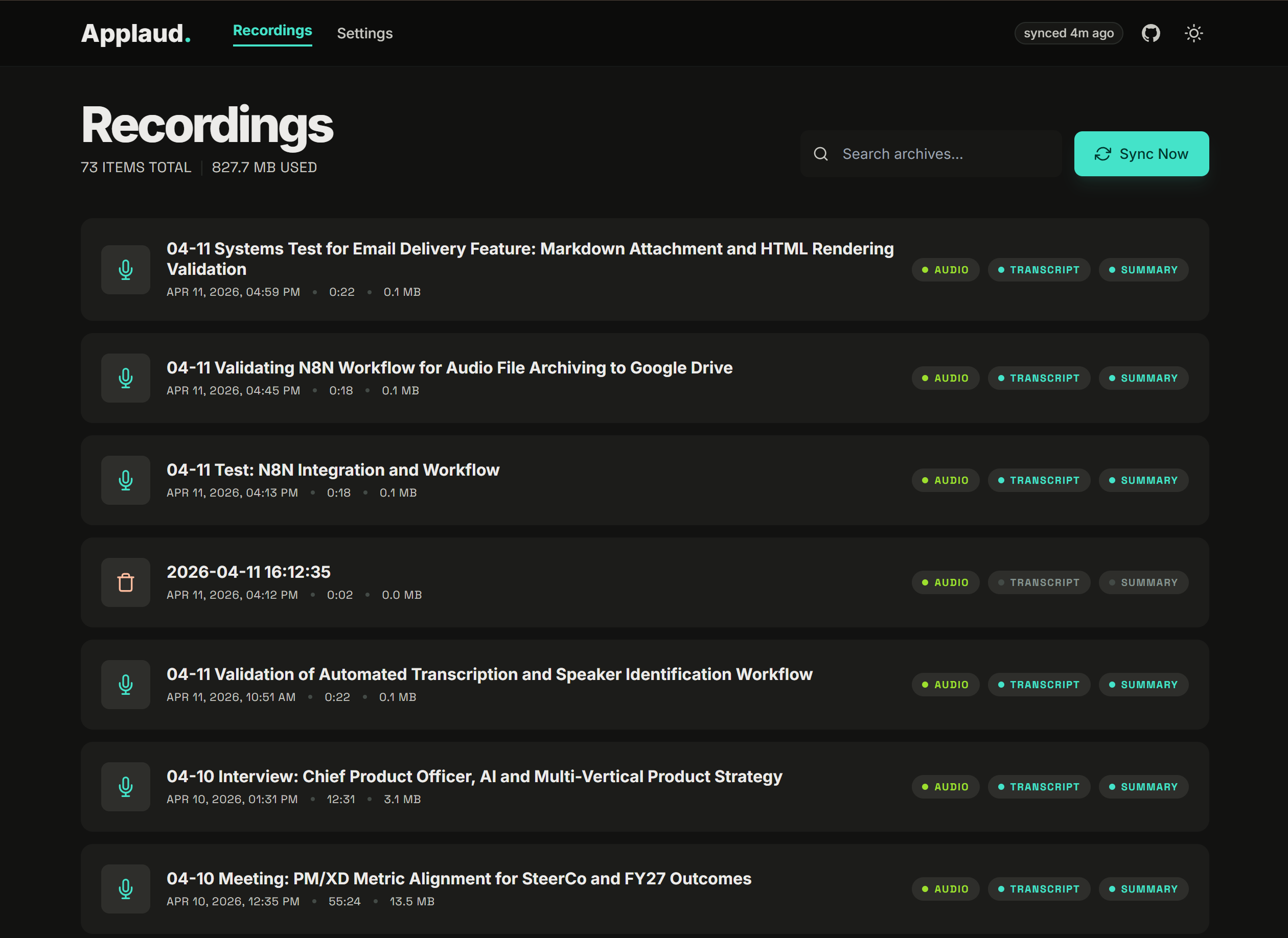
- Automatic sync — polls Plaud every 10 minutes (configurable) and downloads audio, transcripts, and AI summaries to local disk
- Full-text search — search recordings by filename or transcript content
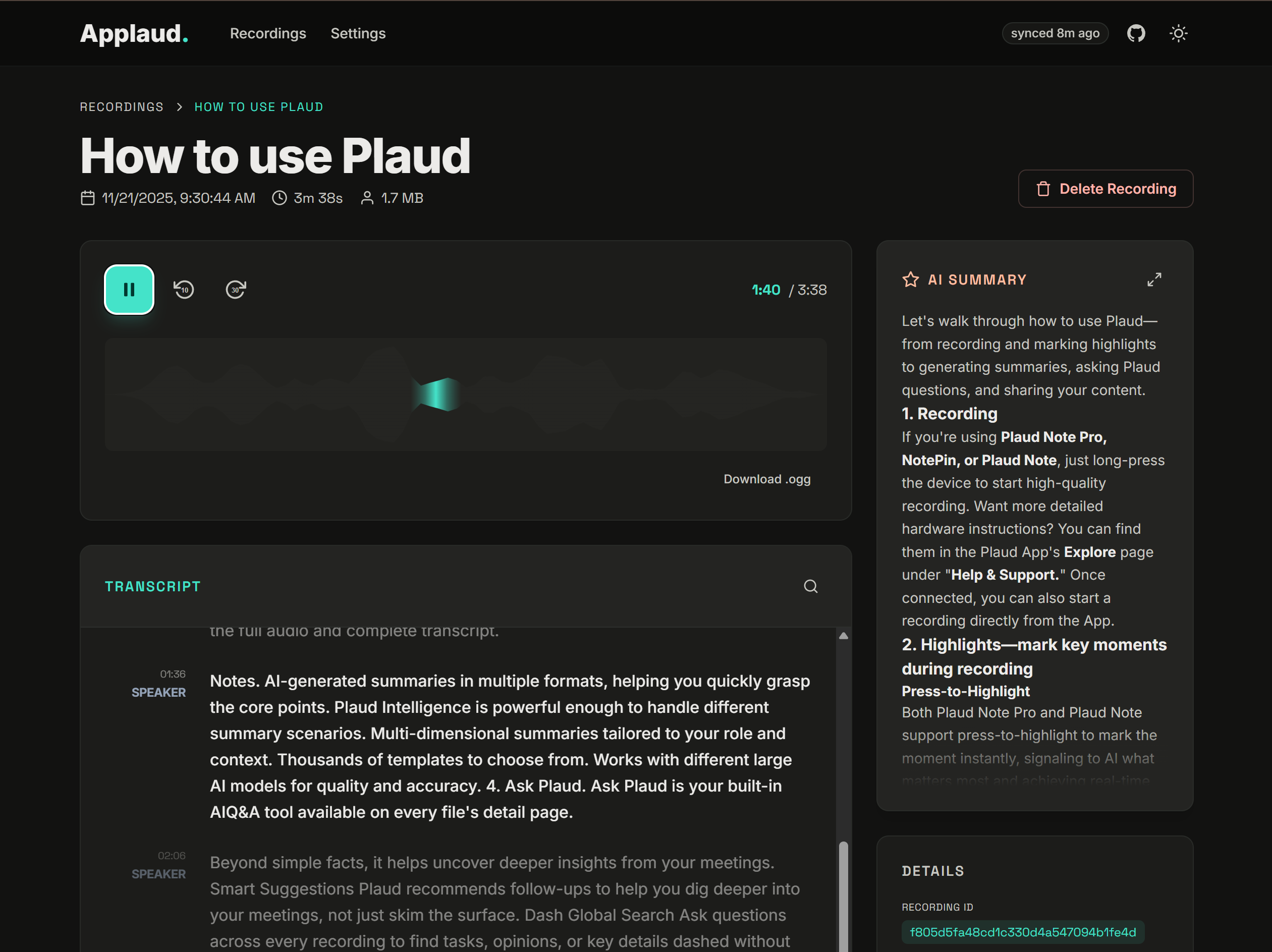
- Audio player — custom player with waveform visualization, play/pause, skip -10s/+30s, click-to-seek
- Transcript viewer — speaker-labeled, timestamped, color-coded blocks with auto-scroll during playback, click-to-seek, and full-text search within transcripts
- AI summaries — rendered markdown with expandable full-screen modal for long summaries
- Webhooks — POST JSON payloads on
audio_readyandtranscript_readyevents for n8n, Zapier, or custom integrations - Dark & light mode — toggle between themes, defaults to system preference
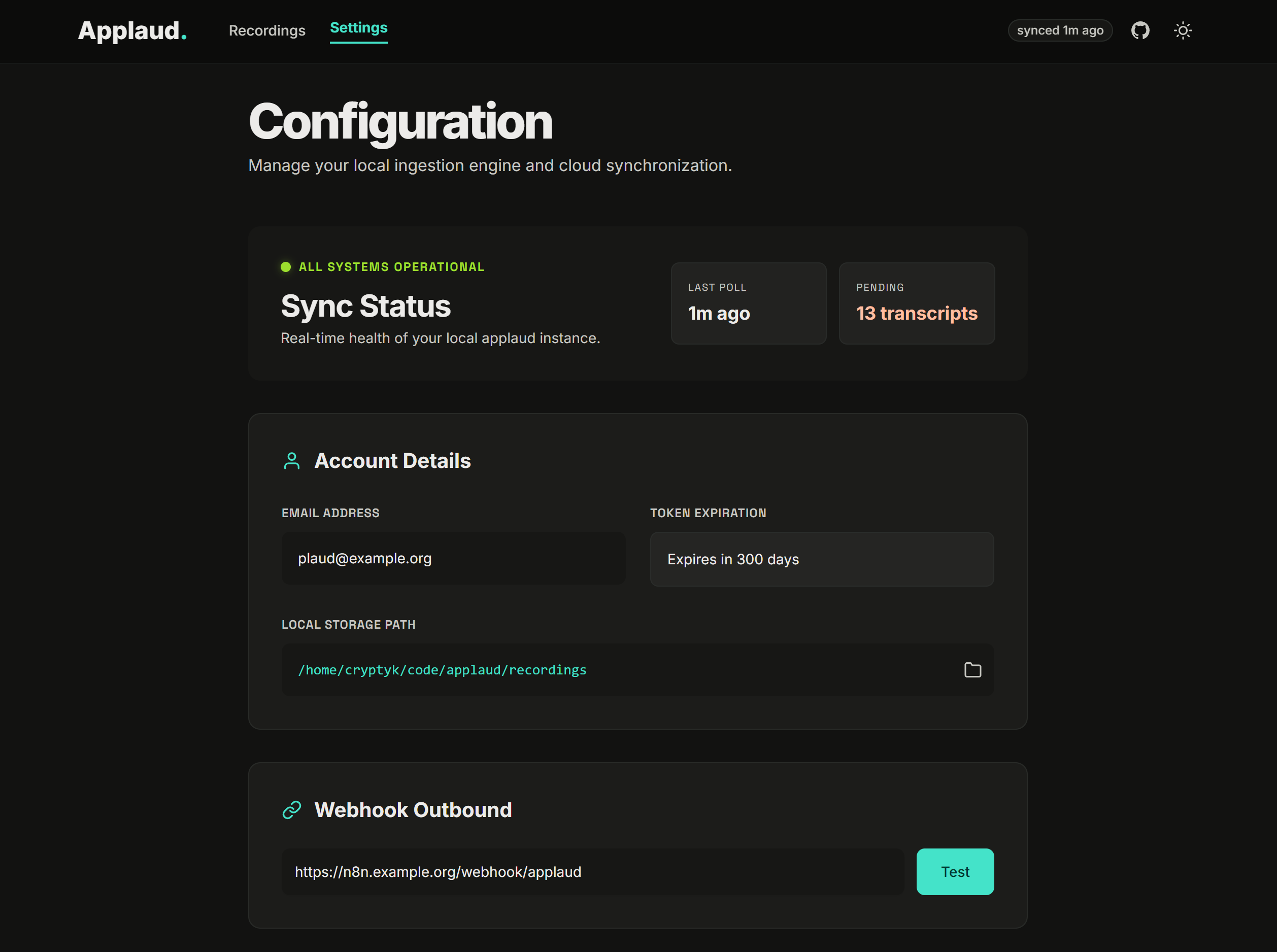
- Setup wizard — guided 5-step onboarding (auth, folder, webhook, review)
Install
First, you should never run commands you find on the internet that end in | sh. With that said, here's the easiest way to install Applaud:
macOS / Linux / WSL:
curl -fsSL https://raw.githubusercontent.com/rsteckler/applaud/v0.5.10/install.sh | sh
Windows (PowerShell):
irm https://raw.githubusercontent.com/rsteckler/applaud/v0.5.10/install.ps1 | iex
The installer does everything needed to install Applaud into a subfolder named ./applaud. To run it:
cd applaud
pnpm start
Your browser will open to http://127.0.0.1:44471/setup. Walk through the 5-step wizard and you're done.
Manual install
git clone https://github.com/rsteckler/applaud.git
cd applaud
pnpm install
pnpm build
pnpm start
Requires Node.js >= 20 and pnpm >= 9.
How it works
-
Auth: Applaud reads your existing Plaud session from Chrome (or Edge / Brave / Arc / Vivaldi) by copying the browser's
Local Storage/leveldbdirectory to a temp path (which sidesteps Chrome's file lock) and pulling the JWT bearer from thetokenstrkey forweb.plaud.ai. No passwords, no OAuth, no Playwright — just your existing session. Tokens are good for ~10 months. -
Sync: every 10 minutes (configurable), the server calls
/file/simple/webonapi.plaud.aito list your latest recordings. New ones get a per-recording subfolder, their audio streamed down from S3, and — once Plaud finishes transcribing — transcript + summary pulled via/ai/transsumm/(with S3 fallback for older recordings). -
Webhook: if configured, Applaud POSTs a JSON payload to your URL whenever a new
audio_readyortranscript_readyevent happens. Includes file paths (relative to your recordings dir) plus ready-to-fetch HTTP URLs that the local media server serves, and — ontranscript_ready— the flattened transcript text and summary markdown inline so n8n-style workflows don't need a second fetch.
Folder layout
Each recording gets its own folder under your chosen recordings directory:
<recordings-dir>/
  2026-04-11_My_meeting_title__74560101/
    audio.ogg
    transcript.json     # raw Plaud transcript segments (with speaker embeddings)
    transcript.txt      # speaker-labeled, timestamped plaintext
    summary.md          # Plaud's AI-generated summary (when available)
    metadata.json       # full /file/detail response
Webhook payload
{
  "event": "audio_ready | transcript_ready",
  "recording": {
    "id": "74560101636422f79bacd66696bab17b",
    "filename": "04-11 Validation of Automated Transcription...",
    "start_time_ms": 1775929909000,
    "duration_ms": 22000,
    "filesize_bytes": 95744,
    "serial_number": "8810B30227298497"
  },
  "files": {
    "folder": "2026-04-11_...__74560101",
    "audio": "2026-04-11_...__74560101/audio.ogg",
    "transcript": "2026-04-11_...__74560101/transcript.json",
    "summary": "2026-04-11_...__74560101/summary.md"
  },
  "http_urls": {
    "audio": "http://127.0.0.1:44471/media/2026-04-11_...__74560101/audio.ogg",
    "transcript": "http://127.0.0.1:44471/media/2026-04-11_...__74560101/transcript.json",
    "summary": "http://127.0.0.1:44471/media/2026-04-11_...__74560101/summary.md"
  },
  "content": {
    "transcript_text": "[00:01] Speaker: ...",
    "summary_markdown": "## Core Synopsis\n\n..."
  }
}
contentis only present ontranscript_readyevents. Both fields are nullable — if Plaud didn't generate a summary for a recording,summary_markdownwill benull.- Webhook consumers should treat
(id, event)as idempotent.audio_readyalways fires beforetranscript_ready; on recordings that are already fully transcribed when first seen, both fire back-to-back in the same poll cycle. - Custom headers on every webhook:
User-Agent: applaud/0.1.0andX-Applaud-Event: audio_ready|transcript_ready.
Verifying the signature
If you set a signing secret on the Settings page, every outgoing webhook (including the test one from the Settings Test button) includes an extra header:
X-Applaud-Signature: sha256=<hex>
where the hex is the HMAC-SHA256 of the exact raw request body, keyed with your secret. The header is absent entirely when no secret is configured, so receivers can distinguish "signing not configured" from "signing failed."
Node.js example (Express):
import crypto from "node:crypto";
import express from "express";

const SECRET = process.env.APPLAUD_WEBHOOK_SECRET;
const app = express();

app.post("/ingest", express.raw({ type: "application/json" }), (req, res) => {
  const header = req.get("x-applaud-signature") ?? "";
  const expected = "sha256=" + crypto.createHmac("sha256", SECRET).update(req.body).digest("hex");
  const a = Buffer.from(header);
  const b = Buffer.from(expected);
  if (a.length !== b.length || !crypto.timingSafeEqual(a, b)) {
    return res.status(401).send("bad signature");
  }
  const payload = JSON.parse(req.body.toString("utf8"));
  // ... handle payload
  res.sendStatus(200);
});
Python example (Flask):
import hmac, hashlib, os
from flask import Flask, request, abort

SECRET = os.environ["APPLAUD_WEBHOOK_SECRET"].encode()
app = Flask(__name__)

@app.post("/ingest")
def ingest():
    header = request.headers.get("X-Applaud-Signature", "")
    expected = "sha256=" + hmac.new(SECRET, request.get_data(), hashlib.sha256).hexdigest()
    if not hmac.compare_digest(header, expected):
        abort(401)
    payload = request.get_json(force=True)
    # ... handle payload
    return "", 200
Both snippets verify against the raw request bytes — don't re-serialize the JSON before signing, or the hash won't match.
n8n workflows
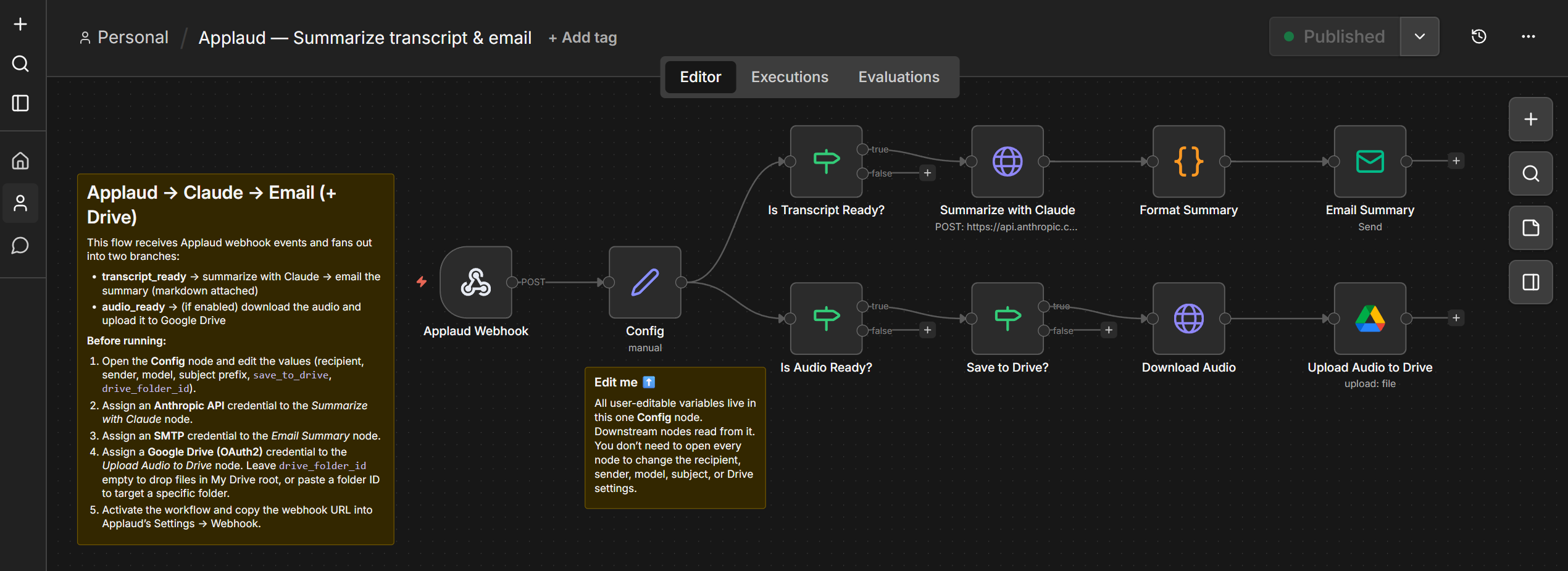
The n8n/ folder contains importable n8n workflow templates. To use one, open n8n, create a new workflow, then Import from File and select the JSON file. See n8n/README.md for setup details.
Docker
Pull the pre-built image and run:
docker run -d \
  --name applaud \
  -p 44471:44471 \
  -v applaud-config:/data/config \
  -v applaud-recordings:/data/recordings \
  ghcr.io/rsteckler/applaud:latest
Or build from source:
docker build -t applaud .
docker run -d \
  --name applaud \
  -p 44471:44471 \
  -v applaud-config:/data/config \
  -v applaud-recordings:/data/recordings \
  applaud
Open http://localhost:44471/setup to configure. On first run, the setup wizard will ask you to paste your Plaud token manually (browser auto-detect doesn't work inside a container).
Running in the background
Applaud is a foreground process. To keep it running without a terminal:
macOS (launchd): create ~/Library/LaunchAgents/dev.applaud.plist pointing to pnpm start in the install dir.
Linux (systemd user): create ~/.config/systemd/user/applaud.service with ExecStart=pnpm --dir=%h/applaud start.
Both platforms: or just run it inside tmux / screen.
Config
Settings live in ~/.config/applaud/settings.json (or ~/Library/Application Support/applaud/ on macOS, %APPDATA%\applaud\ on Windows). Recording state is in state.sqlite alongside. Both are managed through the web UI — you shouldn't need to edit them by hand.
The bearer token is stored as plaintext in settings.json (with chmod 600). The file lives in a user-only directory, and the token's scope is equivalent to "read this user's own Plaud data." OS keychain integration is a future enhancement.
Development
pnpm dev
Runs the Vite dev server on port 44470 with a proxy for /api and /media to the Express server on port 44471. The server runs in tsx watch mode. Hot reload works on both sides.
License
MIT see LICENSE