
arkiv



Open-source AI metadata layer for DIT workflows — Resolve-native, CJK-first.
🌐 English | 繁體中文
arkiv sits between your media drive and DaVinci Resolve: it ingests your footage, attaches AI-generated metadata (transcript, vision tags, atmosphere, energy, edit position), and surfaces clips via semantic search in any language — Chinese, Japanese, or English. The Resolve plugin lets you search, import with clip color, and drop frame markers without leaving the NLE.
Designed for solo DITs and small crews who own their data: local-first, self-hosted, MIT license, no cloud dependency.
Architecture
┌─────────────┐    ┌──────────────┐    ┌─────────────┐
│  index.html │◄──►│  server.py   │◄──►│   db.py      │
│  (Tailwind) │    │  (FastAPI)   │    │  (SQLite)    │
└─────────────┘    └──────┬───────┘    └─────────────┘
                          │
                   ┌──────┴───────┐
                   │  embed.py    │◄──► ChromaDB
                   │  (Ollama)    │     (bge-m3)
                   └──────────────┘

  ═══════════════ Ingest Pipeline (2-Phase) ═══════════════

  Phase 1: Probe + Transcribe + LLM Polish
  ┌───────────┐ ┌─────────────┐ ┌──────────────┐
  │ ingest.py │→│transcribe.py│→│ qwen2.5:14b  │
  │ (FFmpeg)  │ │(Whisper+VAD)│ │ (LLM polish) │
  └───────────┘ └─────────────┘ └──────────────┘
       │              ↑
       │         Silero VAD
       │        (silence filter)
       ▼
  Phase 2: Vision (after unloading LLM from VRAM)
  ┌─────────┐  ┌──────────────┐
  │frames.py│→ │  vision.py   │
  │(extract)│  │(qwen3-vl:8b) │
  └─────────┘  └──────────────┘
→ Full pipeline (4 stages, storage layout, exit codes, maintenance modes): docs/pipeline.md
Screenshots
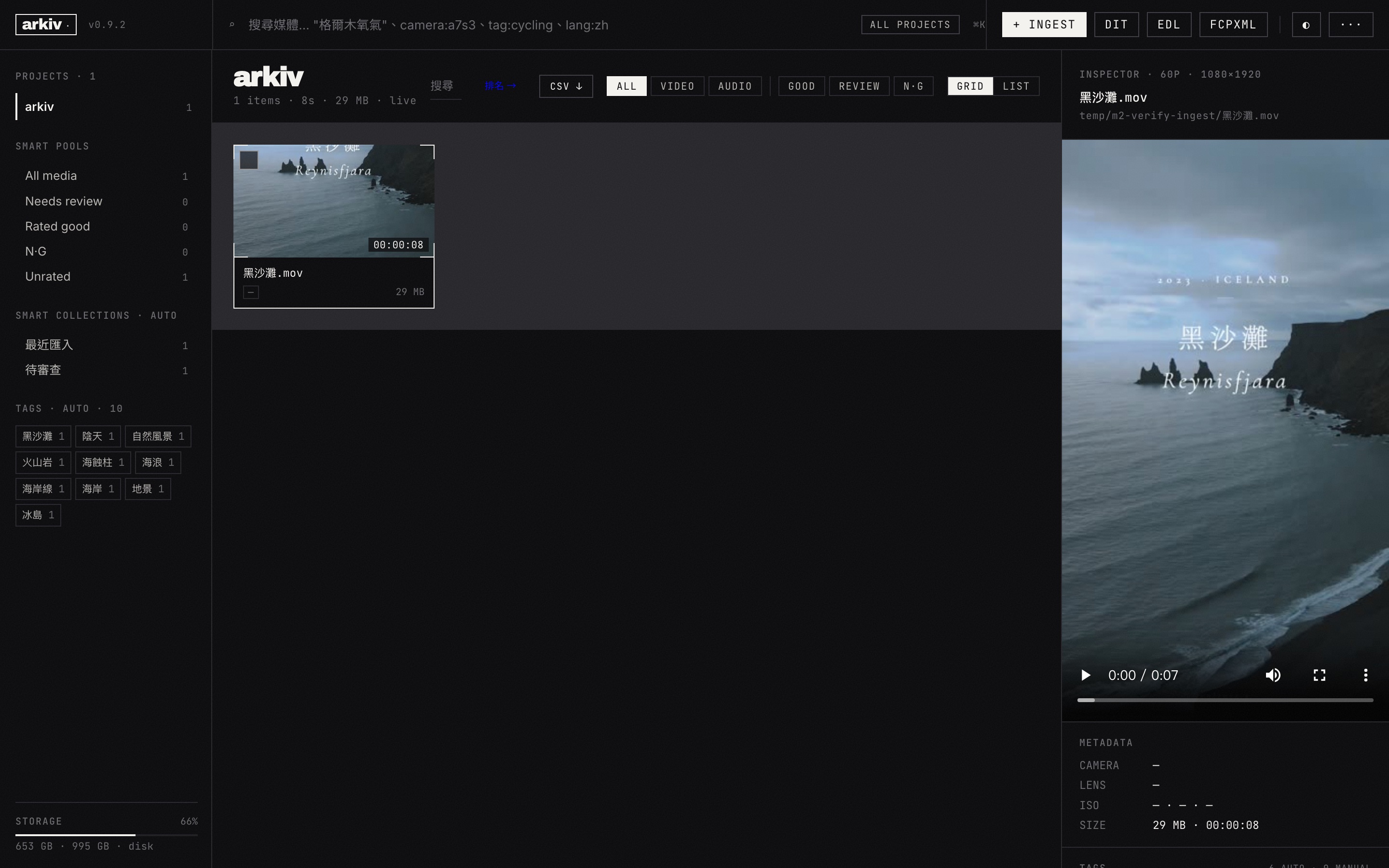
Features
- Semantic search — query in natural language (Chinese/English/Japanese)
- Chat RAG over your video library — 5-intent assistant for compilation searches, refinement, similarity, analytics, and general questions with persisted conversation memory
- AI transcription — Whisper large-v3-turbo + Silero VAD + LLM polish (Apple Silicon MLX / NVIDIA CUDA)
- 4-layer anti-hallucination guard — VAD silence filter → no_speech threshold → blank/repeat filter → LLM correction
- Frame analysis — qwen3-vl:8b vision descriptions with brand/object recognition
- 2-phase pipeline — transcribe first, unload LLM, then vision (avoids VRAM conflict on 12GB GPUs)
- Rating system — GOOD / NG / Review with notes + clip color in Resolve
- Tag system — auto (AI) + manual tags with autocomplete
- DaVinci Resolve UI — dark theme, 3-panel layout, filmstrip, waveform
- Export — SRT, VTT, TXT, EDL (drop-frame TC), FCPXML 1.8 (FCPX + DaVinci compatible)
- DaVinci Resolve metadata CSV —
/api/export/metadata-csvendpoint exports clip metadata (Camera/Lens/ISO/Shutter/Aperture/GPS/CreateDate) ready for Resolve'sFile → Import Metadata from CSV. Plugin auto-prompts after import - ExifTool integration — auto-extracts 12 fields per clip (Make/Model/LensModel/GPS/ColorSpace/ISO/Shutter/Aperture/FocalLength/CreateDate). Sidecar-aware for Sony XAVC
.XML, iPhone Keys group, Blackmagic Cam app per-vendor lens tags. Auto-detects exiftool binary on Windows (winget/scoop/chocolatey/Program Files) - EDL reel name — uses ExifTool ReelName with safe fallback to filename stem (8-char CMX3600 compat, control-char sanitized)
- HEVC/ProRes browser proxy — auto-builds H.264 proxy on demand for browser playback (Phase 7.7g)
- Tauri native app — desktop app with native file/folder dialogs (Windows panic hook surfaces Rust crashes to stderr)
- DaVinci Resolve plugin — search, import with clip color, add frame markers
- ASC MHL v2 hash manifests —
mhl.py create/verifyCLI emits realurn:ASC:MHL:v2.0withxxh3/md5/sha1/sha256/c4, directory + structure root hashes, chainedascmhl_chain.xml. Interop-verified with ASC reference impl 1.2 — drop-in for Silverstack / MediaVerify / Hedge / YoYotta workflows - Multi-destination offload —
offload.py --src <SD> --dst <A> --dst <B>does chunked parallel copy + per-file hash verify + 3× retry on mismatch + atomic rename + sidecar-aware (XAVC / ARRI / RED / iPhone Live Photo). Resumable JSON state file — kill mid-copy and pending files pick up exactly where they stopped. Emits per-dst MHL v2 - Camera report CSV —
camera_report.pywrites 20-col DIT-spec CSV (Reel / TC / Camera / Lens / ISO / Shutter / Aperture / WB / FPS / Codec / ...) for Resolve'sFile → Import Metadata from CSV. Day-summary footer aggregates clip count + runtime by camera / by card
API Authentication
All /api/* endpoints require a Bearer token with the correct scope. Scope-based tokens let you split a fleet by machine role: read-only review stations can use videos_read or media_read, ingest machines can use ingest_write, and admin machines can manage tokens.
First-time bootstrap:
export ARKIV_ADMIN_BOOTSTRAP_TOKEN=$(openssl rand -base64 32)
python server.py
On first startup, the server seeds a single admin token from that env var. Use it once to create per-machine tokens, then unset it and revoke the bootstrap token.
Create and manage tokens directly with the CLI:
python arkiv_token.py create --name "PC-dev" --scopes videos_read,videos_write --ip-allowlist 127.0.0.1/32,100.64.0.0/10 --expires-in 90
python arkiv_token.py list
python arkiv_token.py show <token-id>
python arkiv_token.py revoke <token-id>
Use the token in requests:
curl -H "Authorization: Bearer <token>" http://localhost:8501/api/media
Available scopes: videos_read, videos_write, media_read, collections_read, collections_write, projects_read, projects_write, ingest_write, chat_read, chat_write, admin
Chat API — RAG over your video library
Ask natural-language questions about your archive. The classifier routes each prompt to one of five handlers:
| Intent | Example | What it does |
|---|---|---|
compilation |
"Give me all sunset shots from May" | Semantic search → ranked scene list |
refinement |
"Only the indoor ones" | Filters the previous result, in-conversation |
similarity |
"Similar to scene 42" | Vector nearest-neighbours to a reference clip |
analytics |
"How many hours did I shoot this month?" | Aggregate query over the library |
general |
"What can you help me with?" | Plain LLM chat, no search |
Conversation history (last 10 messages) is threaded into each follow-up, so refinement acts on what the previous turn returned.
Model requirement: chat uses ARKIV_CHAT_MODEL (default qwen2.5:14b) for both intent classification and answers — a single ollama pull qwen2.5:14b covers it. Only set ARKIV_INTENT_MODEL to a smaller model (e.g. qwen2.5:7b-instruct) if that model is actually installed on the Ollama host. If the model is missing, /api/chat returns a clear "run ollama pull …" message instead of a 500.
Prerequisite — ingest + index first: chat queries your indexed library, not a standalone chatbot. Ingest media (Step 1) and build the index with python embed.py (Step 2) before chatting. compilation / refinement / similarity need the vector index; analytics needs ingested media only; general is the only intent that works on an empty library. On an empty/unindexed library chat does not error — it just returns "0 results".
# Create a conversation
curl -X POST http://localhost:8501/api/chat \
  -H "Authorization: Bearer $ARKIV_TOKEN" \
  -H "Content-Type: application/json" \
  -d '{"prompt": "Give me all sunset shots"}'
# → {"conversation_id":"…", "assistant_text":"…", "scene_ids":[…], "intent":"compilation", "tokens_used":…, "latency_ms":…}

# Continue the same conversation — refinement acts on the prior result
curl -X POST http://localhost:8501/api/chat \
  -H "Authorization: Bearer $ARKIV_TOKEN" \
  -H "Content-Type: application/json" \
  -d '{"prompt": "Only indoor ones", "conversation_id": "abc123"}'

# Scope a conversation to specific projects
curl -X POST http://localhost:8501/api/chat -H "Authorization: Bearer $ARKIV_TOKEN" \
  -H "Content-Type: application/json" \
  -d '{"prompt": "wide establishing shots", "project_scope": ["client-acme"]}'
Read history with GET /api/chat/history/{conversation_id} and list conversations with GET /api/chat/conversations (both need chat_read).
Quick Start
Prerequisites
| Dependency | macOS (brew) | Linux (apt) | Windows |
|---|---|---|---|
| Python 3.9+ | brew install python |
sudo apt install python3 python3-venv |
python.org |
| FFmpeg 6.0+ | brew install ffmpeg |
sudo apt install ffmpeg |
ffmpeg.org |
| Ollama | brew install ollama |
ollama.com/download | ollama.com/download |
DaVinci Resolve Plugin extra (macOS): Resolve requires the official Python 3.10 Framework installer (.pkg) from python.org — Homebrew Python is not recognized. Install path:
/Library/Frameworks/Python.framework/Versions/3.10/. Restart Resolve after install; Py3 should appear in Console and scripts load via Workspace > Scripts.
Install — macOS (brew + pip)
brew install python ffmpeg ollama
git clone https://github.com/vulture-s/arkiv.git
cd arkiv
python3 -m venv .venv && source .venv/bin/activate
pip install -r requirements.txt
pip install mlx-whisper          # Apple Silicon (Metal GPU)
ollama pull bge-m3 && ollama pull qwen3-vl:8b && ollama pull qwen2.5:14b
python health.py
Install — Linux (pip)
sudo apt install python3 python3-venv ffmpeg
git clone https://github.com/vulture-s/arkiv.git
cd arkiv
python3 -m venv .venv && source .venv/bin/activate
pip install -r requirements.txt
pip install faster-whisper torch  # NVIDIA CUDA GPU
# pip install faster-whisper      # CPU fallback
ollama pull bge-m3 && ollama pull qwen3-vl:8b && ollama pull qwen2.5:14b
python health.py
Install — Windows (pip, PowerShell)
# Install Python 3.9+, FFmpeg, and Ollama manually first, then:
git clone https://github.com/vulture-s/arkiv.git
cd arkiv
python -m venv .venv
.\.venv\Scripts\activate
pip install -r requirements.txt
pip install faster-whisper torch  # NVIDIA CUDA GPU
# pip install faster-whisper      # CPU fallback
ollama pull bge-m3; ollama pull qwen3-vl:8b; ollama pull qwen2.5:14b
$env:PYTHONUTF8=1; python health.py
Install — Docker (all platforms)
git clone https://github.com/vulture-s/arkiv.git
cd arkiv
docker compose up -d
# Open http://localhost:8501
Models are pulled automatically inside the Ollama container on first run (may take a few minutes).
Upgrading from v0.3.0 → v0.3.1
v0.3.1 changes the default storage layout (artifacts now live in BASE_DIR/.arkiv/ — see Phase 8.0c). One-shot migration:
cd ~/.arkiv && git pull && python ingest.py --migrate-storage
Full SOP (backup, rollback, per-project layout): docs/pipeline.md#upgrading-from-v030 · CHANGELOG v0.3.1
Option A: Web UI — browse, search, rate, and tag in the browser
# macOS / Linux
uvicorn server:app --host 0.0.0.0 --port 8501

# Windows (PowerShell) — UTF-8 required for CJK search
$env:PYTHONUTF8=1; uvicorn server:app --host 0.0.0.0 --port 8501

# Open http://localhost:8501 → click + to ingest media
Option B: CLI only — ingest and search without opening a browser
Both options use the same database. You can mix and match — ingest via CLI, then browse in Web UI, or vice versa.
Note: Do not run CLI and Web UI ingest at the same time. SQLite does not support concurrent writes — run one at a time.
# Step 1 — Ingest your media
python ingest.py --dir /path/to/media

# Step 2 — Build search index
python embed.py

# Step 3 — Search
python embed.py --search "interview outdoor"
Advanced CLI options
# Ingest options
python ingest.py --dir ./media --limit 10   # process first 10 files only
python ingest.py --dir ./media --skip-vision # skip AI frame descriptions
python ingest.py --dir ./media --refresh     # re-process already-indexed files

# Index options
python embed.py --rebuild                    # drop and rebuild from scratch

# Auto-watch a folder for new media
python watch.py /path/to/footage
python watch.py ~/Movies/rushes --interval 10

# API search (requires server running)
# Linux / macOS / Git Bash
curl "http://localhost:8501/api/media?q=keyword&limit=5"
# Windows PowerShell
Invoke-RestMethod "http://localhost:8501/api/media?q=keyword&limit=5"
Configuration
Copy .env.example to .env and customize:
| Variable | Default | Description |
|---|---|---|
ARKIV_DB_PATH |
./media.db |
SQLite database path |
ARKIV_CHROMA_PATH |
./chroma_db |
ChromaDB vector store |
ARKIV_THUMBNAILS_DIR |
./thumbnails |
Thumbnail output dir |
ARKIV_OLLAMA_URL |
http://localhost:11434 |
Ollama API endpoint |
ARKIV_EMBED_MODEL |
bge-m3 |
Embedding model — do not change after indexing (see note below) |
ARKIV_VISION_MODEL |
qwen3-vl:8b |
Vision model for frame descriptions |
ARKIV_CHAT_MODEL |
qwen2.5:14b |
Chat model — answers and (by default) intent classification |
ARKIV_INTENT_MODEL |
(= ARKIV_CHAT_MODEL) |
Optional faster model for intent classification only; must be installed |
ARKIV_WHISPER_MODEL |
mlx-community/whisper-large-v3-turbo (macOS) / large-v3-turbo (other) |
Whisper model |
ARKIV_CUSTOM_VOCABULARY |
(empty) | Comma-separated hotwords (names/jargon) fed to Whisper's initial_prompt |
ARKIV_VOCABULARY_FILE |
(empty → .arkiv/vocabulary.txt if present) |
Newline-delimited hotword file (one term/line, # comments); merged with the above |
ARKIV_EXIFTOOL_PATH |
(empty — auto-detect) | Path to exiftool binary (optional) |
ARKIV_FFMPEG_PATH |
(empty — auto-detect) | Path to ffmpeg binary (optional; set on headless Windows where only a WinGet alias shim is on PATH) |
ARKIV_FFPROBE_PATH |
(empty — auto-detect) | Path to ffprobe binary (optional; same as above) |
ARKIV_HOST |
0.0.0.0 |
Server bind address |
ARKIV_PORT |
8501 |
Server port |
Embedding model is locked to your index. The vector store is built with one embedding model (
bge-m3, 1024-dim). ChangingARKIV_EMBED_MODELafter you have indexed media makes new query vectors incompatible with stored ones — search results degrade silently. To switch models, re-index from scratch.Hardware floor for chat:
qwen2.5:14bneeds ~9 GB and runs alongside the embedding model. Plan for ~12–16 GB free RAM/VRAM on the Ollama host. On tighter machines, setARKIV_CHAT_MODEL=qwen2.5:7b(~4.7 GB) for a lighter default.
Tech Stack
| Layer | Technology |
|---|---|
| Frontend | Tailwind CSS + vanilla JS |
| Backend | FastAPI + Uvicorn |
| Database | SQLite (metadata) + ChromaDB (vectors) |
| Embedding | Ollama bge-m3 (1024d, cosine) |
| Transcription | mlx-whisper / faster-whisper (large-v3-turbo) |
| VAD | Silero VAD (silence filter before Whisper) |
| LLM Polish + Chat | Ollama qwen2.5:14b (transcript polish + 5-intent chat RAG) |
| Vision | Ollama qwen3-vl:8b (brand/object recognition) |
| Media | FFmpeg (probe, thumbnails, frame extraction) |
| Metadata | ExifTool (12 fields, sidecar-aware, cross-platform auto-detect) |
| Export | SRT, VTT, TXT, EDL (DF/NDF), FCPXML 1.8 |
| Desktop | Tauri (native app wrapper) |
| NLE Plugin | DaVinci Resolve (import + clip color + markers) |
FAQ
Q: Which Whisper backend should I use?
- macOS with Apple Silicon:
mlx-whisper(fastest, uses Metal GPU) - NVIDIA GPU:
faster-whisper+torch(CUDA acceleration) - CPU only:
faster-whisper(slower but works everywhere)
Q: Do I need Ollama running?
Yes, for semantic search (embedding) and optional frame descriptions. Run ollama serve before starting arkiv.
Q: How do I add media?
Use the + button in the Media Pool sidebar, or run python ingest.py --dir /path/to/media from CLI.
Q: Can I use this without Docker? Yes — the native Python install is the primary workflow. Docker is optional for deployment.
Q: What file formats are supported?
Video: .mp4, .mov, .mkv, .avi, .webm, .m4v, .mts
Audio: .wav, .mp3, .m4a, .aac, .flac, .ogg
Smoke Test
Run the built-in smoke test to verify your setup:
# PC (Windows/macOS)
bash smoke-test.sh --platform pc

# Docker
docker exec arkiv-arkiv-1 bash smoke-test.sh --platform docker
The test has two phases: Health Check (environment) and API Smoke Test (server endpoints).
What SKIP means
SKIP items are optional dependencies — they do not affect functionality. A passing result is 0 FAIL, regardless of SKIP count.
| Check | PC (Windows) | PC (macOS) | Docker | Notes |
|---|---|---|---|---|
| Python >= 3.9 | Required | Required | Required | |
| FFmpeg / ffprobe | Required | Required | Required | |
| Ollama server | Required | Required | Required | |
| bge-m3 | Required | Required | Required | |
| qwen3-vl:8b | Optional | Optional | Optional | For frame descriptions |
| qwen2.5:14b | Optional | Optional | Optional | Transcript polish + chat (required for /api/chat) |
| ExifTool | Optional | Optional | Optional | For rich metadata |
| faster-whisper | Required | Optional | Required | CUDA/CPU whisper |
| mlx-whisper | — | Required | — | Apple Silicon only |
| NVIDIA GPU | Optional | — | — | |
| Apple Silicon | — | Required | — | |
| fastapi + uvicorn | Required | Required | Required |
Latest Results (v0.3.0)
| Platform | Health Check | Smoke Test | Date |
|---|---|---|---|
| macOS M2 Max | TBD | TBD | 2026-05-22 |
| Windows 11 (RTX 4070) | 19/19 PASS, 0 FAIL, 0 SKIP | 9/9 PASS | 2026-05-22 |
| Linux (Docker) | 14/17 PASS, 0 FAIL, 3 SKIP | 9/9 PASS | 2026-05-22 |
License
MIT