

Self-hosted file infrastructure in Rust for small teams that need storage control, reliable large-file uploads, WebDAV/WOPI, and operations visibility without adopting a full private-cloud suite.
Route files across local, S3-compatible, and remote-node backends with one MIT-licensed Rust + React service built for deployment, auditability, and modification.







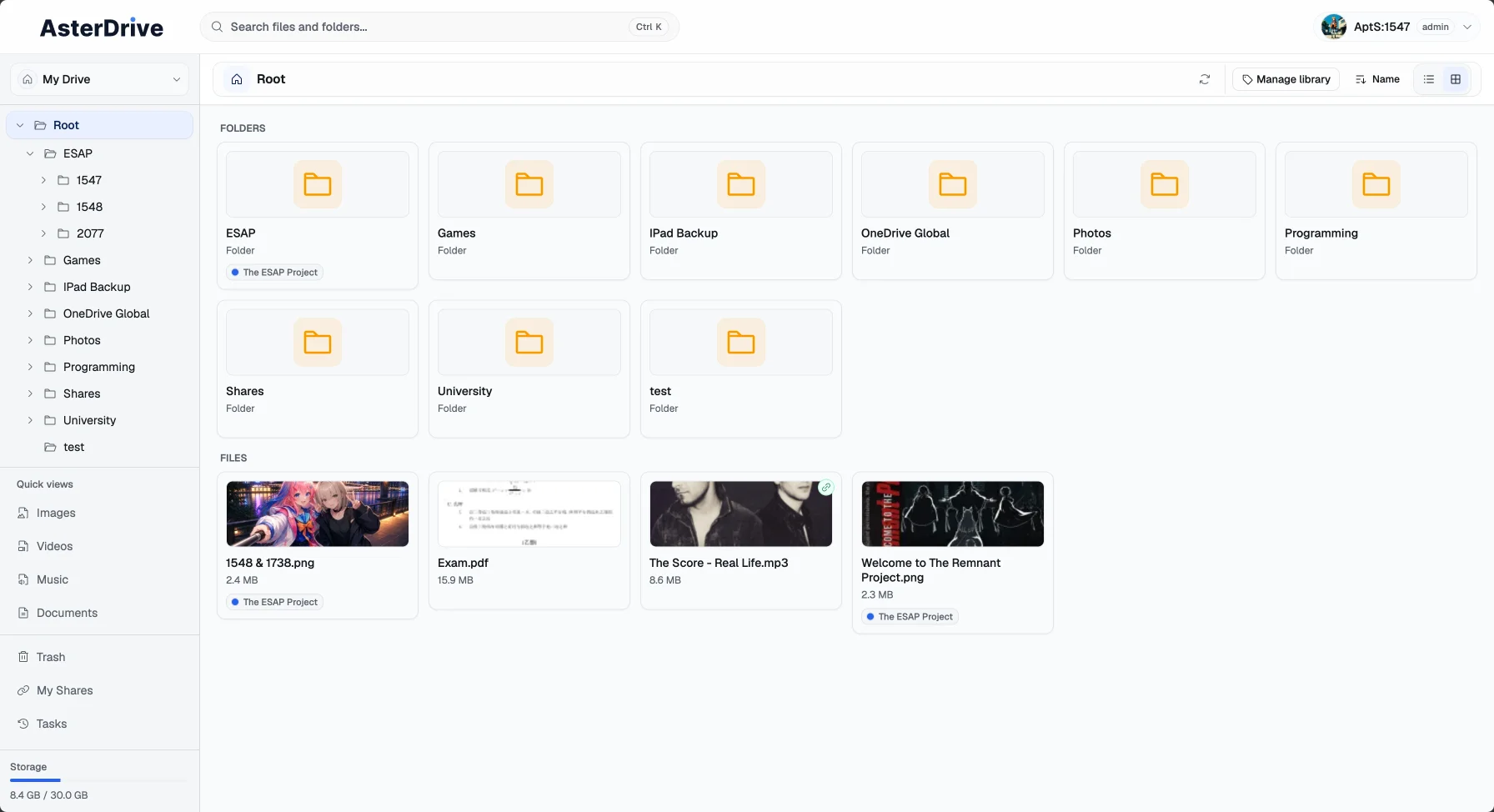
What is AsterDrive?
AsterDrive is an MIT-licensed self-hosted file service for people who want control over where files live and how they move through the system. It is built around the core drive workflow: upload reliably, organize folders, recover mistakes, share access, connect WebDAV clients, open Office files through WOPI-compatible services, and route objects to the right storage backend.
It is not trying to become a full private-cloud suite. AsterDrive focuses on file infrastructure: storage policies, large-file upload paths, team and personal workspaces, sharing, version history, WebDAV, WOPI, auditability, and deployment/operations tooling.
The current v0.2.x line is an early stable release. It is usable for personal and small-team deployments, but still evolving quickly.
Where it fits
AsterDrive is a good fit when you want:
- a single self-hosted service with embedded frontend assets
- SQLite out of the box, with optional PostgreSQL / MySQL later
- local filesystem, S3-compatible object storage, or remote AsterDrive follower-node storage
- upload strategies for both small files and large objects: direct, resumable chunked, S3 presigned, and S3 multipart
- personal and team workspaces with quotas, shares, trash, tasks, audit logs, and storage policy groups
- WebDAV access with independent accounts and scoped root folders
- Office preview/editing through external WOPI services such as OnlyOffice or Collabora
- a codebase that is meant to be read, modified, and deployed without a plugin marketplace or enterprise stack
AsterDrive is probably not the right first choice when you need:
- a complete collaboration suite with calendars, contacts, chat, mail, and an app ecosystem
- mature native desktop and mobile sync clients today
- an ultra-minimal web UI over a single server directory
- multi-primary clustering, automatic failover, or enterprise compliance guarantees
- a vendor-managed SaaS where someone else owns the deployment and data responsibility
Design focus
- File safety first - trash, version history, locks, quota checks, and cleanup tasks are part of the core workflow, not decorative extras.
- Storage control - policies can route uploads to local storage, S3-compatible storage, or remote follower nodes by user, team, and file size.
- Large-file paths - the backend negotiates direct uploads, chunked uploads, S3 presigned uploads, and S3 multipart uploads based on policy and object size.
- Interoperability without sprawl - WebDAV and WOPI cover practical client and Office workflows without turning the project into an all-in-one cloud suite.
- Operations built in - health checks, runtime configuration, audit logs, background tasks, storage tests,
doctor, and migration commands are first-class features. - Hackable core - Rust backend, React frontend, SeaORM migrations, explicit error codes, API docs, and clear service/repository boundaries.
Quick start
Run with Docker
For a local HTTP trial, prepare a writable data directory and start the official image:
mkdir -p ./data
sudo chown -R 10001:10001 ./data

docker run -d \
  --name asterdrive \
  -p 3000:3000 \
  -e ASTER__SERVER__HOST=0.0.0.0 \
  -e ASTER__AUTH__BOOTSTRAP_INSECURE_COOKIES=true \
  -e "ASTER__DATABASE__URL=sqlite:///data/asterdrive.db?mode=rwc" \
  -v "$(pwd)/data:/data" \
  ghcr.io/apts-1547/asterdrive:latest
Open:
http://127.0.0.1:3000
The first registered user becomes admin.
ASTER__AUTH__BOOTSTRAP_INSECURE_COOKIES=true is only for local or internal HTTP testing. For production, put AsterDrive behind HTTPS and keep secure cookies enabled.
You can also use the included Compose file:
mkdir -p ./data
sudo chown -R 10001:10001 ./data
docker compose up -d
See docs/deployment/docker.md for the full Docker guide.
Run from source
git clone https://github.com/AptS-1547/AsterDrive.git
cd AsterDrive

cd frontend-panel
bun install
bun run build
cd ..

cargo run
On first startup, AsterDrive will automatically:
- generate
data/config.tomlunder the current working directory if it does not exist - create the default SQLite database when using the default database URL
- run all database migrations
- create the default local storage policy and default policy group
- initialize built-in runtime configuration items in
system_config
Production notes
- Do not expose
:3000directly to the public Internet. Put AsterDrive behind a reverse proxy that handles HTTPS, upload limits, WebDAV/WOPI passthrough, and security headers. - Configure public site URLs before relying on share links, WebDAV URLs, mail links, or WOPI callbacks.
- Run
./aster_drive doctorafter deployment and upgrades. The default SQLite search acceleration expectsFTS5 + trigram tokenizersupport. - Plan backups for the database, uploaded blobs, config, and any external object-storage credentials. Start with
docs/deployment/backup.md. - If you enable WOPI, test real
docx,xlsx, andpptxfiles through the final public URL and confirm that edits save back into AsterDrive.
Core capabilities
File management
- folders, breadcrumbs, list/grid views, search, multi-select, and batch operations
- file upload, folder upload, download, rename, move, copy, delete, restore, and purge
- archive download, online archive compression/extraction, and background task progress
- thumbnails, browser-native previews, read-only ZIP/7z archive manifest previews, and configurable external preview apps
- Monaco-based text editing, lock awareness, version history, restore, and version deletion
Workspaces and sharing
- personal workspace plus team workspaces
- independent files, shares, trash, tasks, quotas, audit records, and policy groups per workspace
- public file and folder shares at
/s/:token - optional share password, expiration time, download limits, open/download counters, and direct links
- shared-folder browsing with child-file download, preview, and thumbnail access
Access and editing
- HttpOnly cookie auth plus Bearer JWT for API clients
- first-user setup, registration controls, activation, password reset, and email-change confirmation
- WebDAV accounts with independent passwords, scoped root folders, database-backed locks, custom properties, and a small DeltaV subset
- WOPI launch sessions and file endpoints for Office preview/editing through external WOPI hosts
- optional Passkey / WebAuthn registration and login endpoints
Storage and delivery
- local storage, S3-compatible storage, and remote follower-node storage policies
- policy groups that route uploads by user, team, and file size
- optional local-only blob deduplication using SHA-256 and reference counting
- S3 upload/download strategies:
relay_stream,presigned, and multipart uploads - remote-node upload/download strategies:
relay_streamandpresigned - streaming upload/download paths where the selected strategy allows it
Administration and operations
- admin overview, users, teams, storage policies, policy groups, remote nodes, shares, tasks, locks, runtime settings, and audit logs
- schema-driven runtime configuration stored in
system_config - health endpoints:
/health,/health/ready, optional/health/memory, and optional/health/metrics - storage policy and remote-node connection tests
- background task records for archive jobs, thumbnail generation, mail dispatch, cleanup, and runtime tasks
- periodic cleanup for uploads, trash, locks, audit logs, teams, WOPI sessions, and orphaned blobs
- Swagger UI in debug builds with the
openapifeature, plus static OpenAPI export
Roadmap
v0.2.x: operational maturity
The v0.2.x line focuses on making AsterDrive easier to operate in real deployments: storage migration, scoped access, background workflows, safer error semantics, and remote-node deployment flexibility.
- storage-policy blob migration tasks
- team-scoped WebDAV accounts
- offline HTTP/HTTPS import tasks with SSRF protection
- broader archive preview and extraction support
- email verification login
- error-code taxonomy cleanup
- deployment and operations documentation
- reverse-connection support for follower nodes behind NAT
v0.3: organization and extensibility
The v0.3 line focuses on richer workspace organization and the foundation for controlled integrations.
- tags for files and folders
- tag-based filtering in file lists and search
- WASM/Extism plugin design and spike
- capability-based plugin permissions
- event subscriptions and webhook-style automation
- file actions and plugin-provided admin settings
Documentation
- Getting started
- User guide
- Teams and permissions
- Sharing and public access
- Preview and WOPI
- Storage backends
- Remote follower storage
- Docker deployment
- Production checklist
- Backup and restore
- Operations CLI
- Developer docs
- Architecture
- API overview
Development
Requirements
- Rust
1.94.0+ - Bun
- Node.js
24+for the current Docker frontend build stage
Common commands
# Backend
cargo run
cargo check
cargo test
cargo test --features openapi --test generate_openapi

# Frontend
cd frontend-panel
bun install
bun run dev
bun run build
bun run check
Notes
- Type checking uses
tsgo, nottsc - Linting uses
biome, not ESLint - TypeScript
enumis not allowed; useas constobjects - Type-only imports must use
import type
Project structure
src/                    Rust backend
migration/              SeaORM migrations
frontend-panel/         React admin/file panel
docs/                   Deployment and end-user documentation
developer-docs/         API, architecture, testing, and internal positioning docs
tests/                  Integration tests
License
MIT - Copyright (c) 2026 AptS-1547