
🎧 Audible EPUB3 Maker
Generate audiobooks from plain EPUB files in EPUB3 Media Overlays format using high-quality TTS (Text-to-Speech) engines like Azure and Kokoro, now with an intuitive Web GUI.
You can read or listen to the generated EPUB using any ebook reader that supports EPUB 3 Media Overlays, such as Thorium Reader. The generated MP3 files can also be played with any standard audio player.
✨ Features
- Convert plain EPUB books into audiobooks compliant with EPUB 3 Media Overlays specification.
- Supports TTS engines:
- Azure TTS (high-quality cloud service)
- Kokoro-82M (offline open-source model, currently supports English text alignment only)
- Automatic sentence segmentation and force alignment
- Parallel multi-process generation
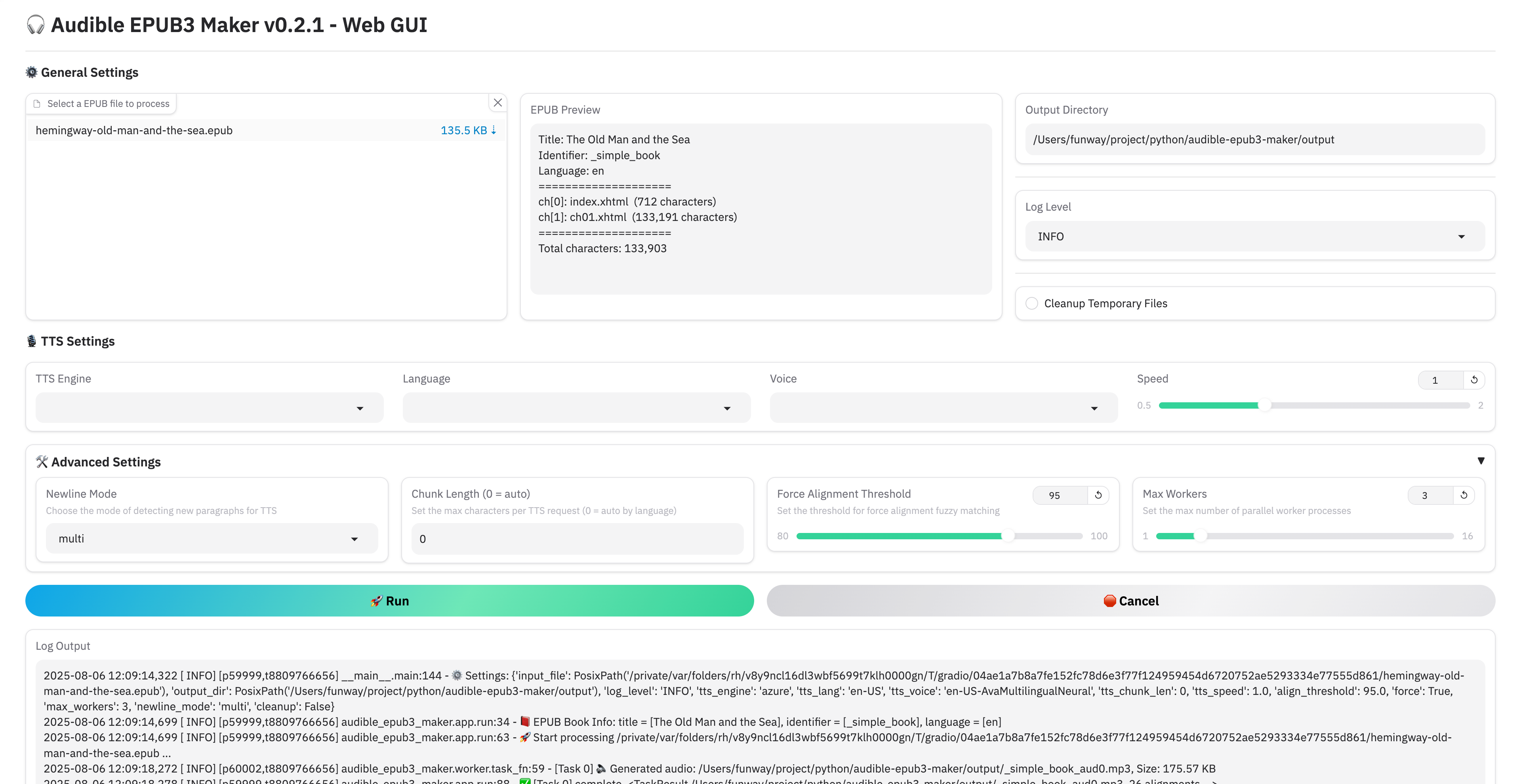
- Gradio-based Web GUI for easy interaction without command line
- Docker-ready architecture for easy deployment
🛠 Installation
⚙️ From Source
1. git clone & pip install
git clone https://github.com/funway/audible-epub3-maker.git
cd audible-epub3-maker
pip install -r requirements.txt
2. TTS Engine Configuration
Depending on the engine you plan to use, follow the steps below:
-
Azure:
- You must configure the following two environment variables:
AZURE_TTS_KEY=your_azure_speech_key AZURE_TTS_REGION=your_speech_region - You can define them:
- In a
.envfile in the project root (recommended) - Or
exportthem manually in your shell or.bashrc/.zshrcfile:export AZURE_TTS_KEY=your_azure_speech_key export AZURE_TTS_REGION=your_speech_region
- In a
- How to get Microsoft Azure Text-to-Speech API key
- You must configure the following two environment variables:
-
Kokoro:
- No environment configuration is required.
- The model file will automatically download on first use.
🐳 From Docker
We provide pre-built Docker images hosted at:
-
Docker Hub:
funway/audible-epub3-maker -
GitHub Container Registry (GHCR):
ghcr.io/funway/audible-epub3-maker
The image includes all dependencies and runs the Web GUI by default.
Using docker-compose
A sample configuration file docker-compose.example.yml is included in the repository:
services:
  aem-web:
    image: ghcr.io/funway/audible-epub3-maker
    ports:
      - "7860:7860"
    volumes:
      - ./output:/app/output
    environment:
      - AZURE_TTS_KEY=your_azure_speech_key
      - AZURE_TTS_REGION=your_speech_region
    restart: unless-stopped
Using docker CLI
docker pull ghcr.io/funway/audible-epub3-maker

docker run -d \
    -p 7860:7860 \
    -v ./output:/app/output \
    -e AZURE_TTS_KEY=your_azure_speech_key \
    -e AZURE_TTS_REGION=your_speech_region \
    ghcr.io/funway/audible-epub3-maker
💡 Notes
-
Using Azure TTS? Make sure you set the
AZURE_TTS_KEYandAZURE_TTS_REGIONenvironment variables before starting the container. -
Using Kokoro TTS? Keep an eye on your system’s memory usage — the model runs locally and can consume several GB of RAM. On low-memory systems, this may cause OOM (out-of-memory) errors.
🚀 Usage
🖥️ CLI
python main.py <input_file.epub> [options]
Required:
input_file: The path to the source EPUB file.
Optional arguments:
| Option | Description | Default |
|---|---|---|
-d, --output_dir |
Output directory | <input_file_stem>_audible |
-o, --output_filename |
Generated EPUB filename | original input filename |
--title_suffix |
Suffix appended to the OPF dc:title |
empty |
--log_level |
Logging level (DEBUG, INFO, WARNING, ERROR, CRITICAL) | INFO |
--tts_engine |
TTS engine (azure or kokoro) |
azure |
--tts_lang |
Language code | azure → en-US; kokoro → first supported |
--tts_voice |
Voice name | azure → en-US-AvaMultilingualNeural; kokoro → first voice for language |
--tts_speed |
Playback speed (e.g., 1.0 = normal) | 1.0 |
--tts_chunk_len |
Max chars per TTS chunk | auto |
--newline_mode |
How to detect paragraph breaks from newlines (none, single, multi) |
multi |
-m, --max_workers |
Number of worker processes | 3 |
--align_threshold |
Force alignment fuzzy match threshold (0–100) | 95.0 |
-f, --force |
Force all prompts (non-interactive mode) | false |
--cleanup |
Remove temp files (.mp3) after generation | false |
Example
python main.py mybook.epub \
    --tts_engine azure \
    --tts_lang zh-CN \
    --tts_voice zh-CN-XiaoxiaoNeural \
    -d ./output_dir \
    -m 4 \
    --log_level DEBUG
🌐 Web GUI
python web_gui.py
Optional arguments:
| Argument | Description | Default |
|---|---|---|
--host |
Host to bind the Gradio web server | 127.0.0.1 |
--port |
Port to bind the Gradio web server | 7860 |
Then open your browser and interact with the friendly interface!
💾 Output
*.mp3: Generated audio for each chapter*.epub: A new EPUB file with embedded mp3 audio and synchronized smil overlays
📄 License
This project is licensed under the MIT License.
🚗 TODO
- Add CPU/GPU selection for offline TTS models (note: pip install on amd64 arch defaults to pull a 4GB NVIDIA library ("▔□▔) )
- Support more TTS models
- Implement voice preview and cost estimation for commercial models
- Integrate WhisperX for audio-text alignment in TTS models without native word boundary output