

Aut_Sci_Write
Autonomous Scientific Writer
A modular Claude Code Skills suite for the full academic research lifecycle










English
Aut_Sci_Write is a modular collection of AI Agent Skills that automates the entire academic research and writing lifecycle — from literature discovery and deep PDF analysis to figure extraction, review writing, and professional PPT generation.
Install once, use anywhere. Just talk to AI Agent naturally — the skills activate automatically based on what you say.
✨ What It Does
| Skill | Description | Example Trigger |
|---|---|---|
sci-search |
Search arXiv + PubMed + Web of Science + Elsevier +Springer + Semantic Scholar + OpenAlex simultaneously with JCR tier & impact factor data | /sci-search Find high-IF papers on perovskite solar cells |
sci-download |
Download paper PDFs with intelligent DOI routing across 8 sources: Elsevier, Springer, IEEE, arXiv, Unpaywall, Semantic Scholar, PubMed Central, CNKI | /sci-download Download 10.1038/s41586-023-06600-9 |
sci-extract |
Extract core insights, experimental parameters, and conclusions from PDFs | /sci-extract Analyze the key findings of paper.pdf |
sci-figure |
Auto-detect and crop figures from PDFs at 600 DPI, with subfigure splitting | /sci-figure Extract Figure 3c from this paper |
sci-review |
Draft literature reviews and professional peer-review rebuttals (NeurIPS/ICLR standard) | /sci-figure Write a literature review on GNNs for drug discovery |
sci-zotero |
Sync Zotero library, add citations by DOI/ISBN/PMID, fetch open-access PDFs | /sci-zotero Connect to my Zotero database |
sci-ppt |
Generate professional academic PPTX from paper PDFs or structured text, with LaTeX formula rendering | /sci-zotero Turn this paper into a seminar presentation |
sci-html |
Convert PDFs, Markdown, outlines, or summaries into interactive academic HTML slide decks and browser reports. | /sci-html Turn this paper into an interactive HTML report |
🔌 API
| Data Source | API Endpoint | Auth |
|---|---|---|
| Web of Science | https://developer.clarivate.com/apis/wos |
WOS_API_KEY |
| Springer (Meta) | https://dev.springernature.com/#api |
SPRINGER_API_KEY |
| Springer (OA) | https://dev.springernature.com/#api |
SPRINGER_OA_API_KEY |
| Scopus (Elsevier) | https://api.elsevier.com/content/search/scopus |
SCOPUS_API_KEY |
| Semantic Scholar | https://www.semanticscholar.org/product/api |
Optional |
| PubMed (E-utilities) | https://pmc.ncbi.nlm.nih.gov/tools/developers/ |
Optional NCBI_API_KEY |
| Zotero | https://www.zotero.org/settings/keys |
ZOTERO_API_KEY |
🚀 Installation
Prerequisites
Before installation, make sure the following environments are available:
- Python 3.10+: required for Python-based skills such as
sci-search,sci-extract,sci-figure,sci-review, andsci-ppt - Node.js 18+: required for
npx skills add ...installation and CLI-based skill registration - pip: used to install Python dependencies from
requirements.txt
Then choose one of the following methods:
Method 1: Claude Code Plugin (Recommended)
No prerequisites needed — the plugin system handles everything.
# Add the marketplace (one-time)
/plugin marketplace add ShZhao27208/Aut_Sci_Write

# Install the plugin
/plugin install academic-skills@shuozhao
Update to latest version:
/plugin update academic-skills@shuozhao
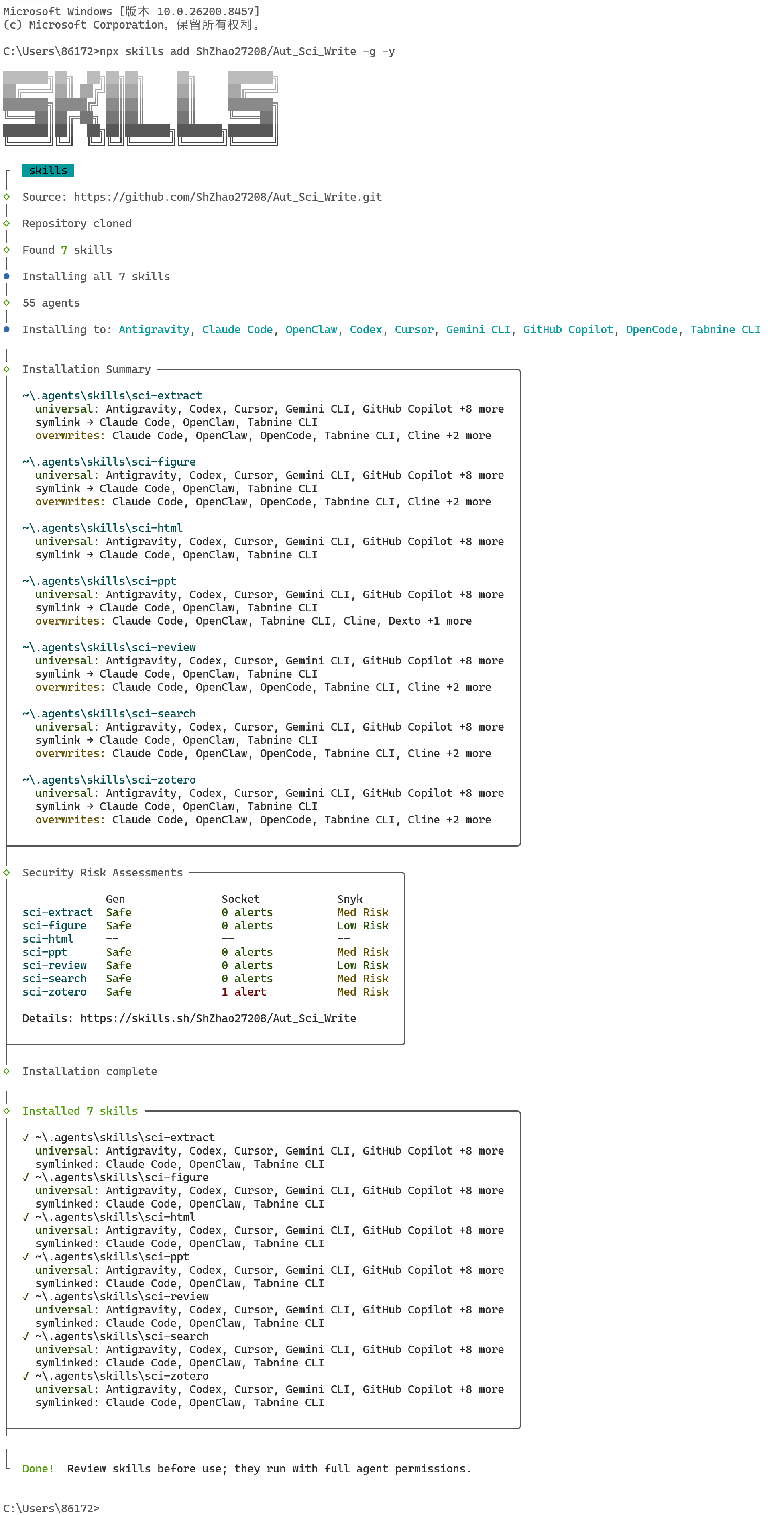
Method 2: npx CLI
One-line install (Recommended — installs all 8 skills globally):
npx skills add ShZhao27208/Aut_Sci_Write -g -y
Update to latest version:
npx skills add ShZhao27208/Aut_Sci_Write -g -y
After npx install, you still need Python dependencies for the skills to run:
pip install -r requirements.txt
Method 3: Manual Install (Download/Clone to local)
git clone https://github.com/ShZhao27208/Aut_Sci_Write.git
cd Aut_Sci_Write
npx skills add . -g -y
pip install -r requirements.txt
Method 4: Docker (Isolated Environment)
Requires: Docker — no Python/Node.js needed locally.
git clone https://github.com/ShZhao27208/Aut_Sci_Write.git
cd Aut_Sci_Write
docker-compose build
docker-compose up -d
See DOCKER.md for detailed Docker deployment guide.
⚠️ Troubleshooting: PromptScript error
If you see errors like
✗ sci-extract → PromptScript: PromptScript does not support global skill installationafter a recentskillsCLI update, don't worry — the installation has already completed successfully. This error only affects PromptScript (an unsupported target platform) and does not impact Claude Code or other AI agents.To avoid this message, simply remove the
-gflag:npx skills add ShZhao27208/Aut_Sci_Write -yOr for local installs:
npx skills add . -y
⚙️ Configuration
On first use, any skill will automatically create ~/.aut_sci_write/.env with a template of all supported keys. Open it and fill in the ones you need:
# ~/.aut_sci_write/.env — unified config for all skills

# For sci-zotero (optional)
ZOTERO_API_KEY=your_personal_api_key
ZOTERO_USER_ID=your_numeric_user_id

# For sci-search — Web of Science (optional but recommended)
# Apply for a free key at: https://developer.clarivate.com/apis/wos-starter
WOS_API_KEY=your_wos_api_key

# For sci-ppt PDF workflow (choose one)
ANTHROPIC_API_KEY=sk-ant-...    # Claude API
MOONSHOT_API_KEY=sk-...         # Moonshot API

# For sci-figure subfigure OCR (optional, Windows example)
TESSERACT_CMD="C:\Program Files\Tesseract-OCR\tesseract.exe"
All skills share this single .env file — fill a key once, every skill that needs it will read from here. Do not commit or publish this file.
💬 Usage Examples
Once installed, just type naturally in AI Agent — no commands to memorize:
# Literature search
"/sci-search Search for recent papers on solid-state electrolytes for lithium batteries"

# Paper download
"/sci-download Download the PDF for DOI 10.1038/s41586-023-06600-9"

# Deep paper analysis
"/sci-extract Extract the core findings and experimental parameters from paper.pdf"

# Figure extraction
"/sci-figure Extract Figure 3 from paper.pdf and split subfigures a, b, c"

# Literature review
"/sci-review Write a literature review on graph neural networks in drug discovery"

# Rebuttal writing
"/sci-review Help me respond to Reviewer 2's comment about missing baselines"

# Zotero sync
"/sci-zotero List the paper items from my Zotero 'Materials' collection"

# PPT generation
"/sci-ppt Convert paper.pdf into a group meeting presentation, save as seminar.pptx"

# HTML report generation
"/sci-html Convert paper.pdf into an interactive browser-based academic report"
📁 Repository Structure
Aut_Sci_Write/
├── skills/
│   ├── _shared/        # Unified env config module (env_config.py)
│   ├── sci-search/     # Literature search with journal metrics (7 sources)
│   ├── sci-download/   # Paper PDF download with intelligent DOI routing (8 sources)
│   ├── sci-extract/    # Paper analysis and structured insight extraction
│   ├── sci-figure/     # PDF figure and subfigure extraction
│   ├── sci-review/     # Literature review and rebuttal writing
│   ├── sci-ppt/        # Academic PPTX generation
│   ├── sci-html/       # Interactive HTML reports and browser slide decks
│   └── sci-zotero/     # Zotero library integration
├── scripts/
│   ├── extract_core_insights.py  # Compatibility wrapper for sci-extract CLI
│   ├── zotero.py                 # Compatibility wrapper for sci-zotero CLI
│   └── journal_db.json           # Journal metrics database (independently updatable)
├── examples/                 # Sample outputs (PDF + Markdown + PPT)
├── docs/                     # GitHub Pages site
├── skills-cli.js       # Local skill discovery helper
└── requirements.txt    # Shared Python dependencies
🤝 Contributing
Contributions welcome! Priority areas:
- Add journal metrics to
scripts/journal_db.json - Add writing templates to
skills/sci-review/templates/ - Add new PPT slide types to
skills/Aut_Sci_PPt/src/aut_sci_ppt/templates/ - Post problems you encounter when using it to
issue
中文说明
Aut_Sci_Write 是一套专为科研工作者设计的 AI Agent Skills 技能包,将科研写作的各个环节自动化,覆盖从文献发现到成果输出的完整链路。
安装一次,随处可用。直接用自然语言和 AI Agent 对话,技能会根据你说的内容自动激活。
✨ 功能概览
| 技能 | 功能描述 | 触发词示例 |
|---|---|---|
sci-search |
arXiv + PubMed + Web of Science + Elsevier +Springer + Semantic Scholar + OpenAlex 七源检索,自动附加 JCR 分区和影响因子 | /sci-search 搜索钙钛矿太阳能电池最新论文 |
sci-download |
论文 PDF 智能下载,根据 DOI 前缀自动路由到 Elsevier、Springer、IEEE、arXiv、Unpaywall、Semantic Scholar、PubMed Central、知网 8 个数据源 | /sci-download 下载 10.1038/s41586-023-06600-9 |
sci-extract |
从 PDF 提取核心发现、实验参数、数值对比和主要结论 | /sci-extract 分析 paper.pdf 的核心结论 |
sci-figure |
自动检测并裁剪论文图片(600 DPI),支持复合图拆分为子图 | /sci-figure 提取论文第3张图的子图 |
sci-review |
文献综述写作 + 专业审稿回复,对标 NeurIPS/ICLR 标准 | /sci-review 帮我写图神经网络在药物发现中的综述 |
sci-zotero |
Zotero 文献库同步,支持 DOI/ISBN/PMID 添加引用,自动获取 PDF | /sci-zotero 连接我的zotero数据库 |
sci-ppt |
从论文 PDF 或结构化文本一键生成学术 PPT,支持 LaTeX 公式渲染 | /sci-ppt 把这篇文献做成组会汇报PPT |
sci-html |
将论文 PDF、Markdown、大纲或总结转换为可交互的 HTML 学术报告或浏览器幻灯片。 | /sci-html 把这篇论文做成网页版交互报告 |
🔌 API
| 数据源 | API 地址 | 认证方式 |
|---|---|---|
| Web of Science | https://developer.clarivate.com/apis/wos |
WOS_API_KEY |
| Springer (Meta) | https://dev.springernature.com/#api |
SPRINGER_API_KEY |
| Springer (OA) | https://dev.springernature.com/#api |
SPRINGER_OA_API_KEY |
| Scopus (Elsevier) | https://api.elsevier.com/content/search/scopus |
SCOPUS_API_KEY |
| Semantic Scholar | https://www.semanticscholar.org/product/api |
Optional |
| PubMed (E-utilities) | https://pmc.ncbi.nlm.nih.gov/tools/developers/ |
Optional NCBI_API_KEY |
| Zotero | https://www.zotero.org/settings/keys |
ZOTERO_API_KEY |
🚀 安装方法
安装前提
安装前请先确保本机已具备以下环境:
- Python 3.10 及以上:用于运行
sci-search、sci-extract、sci-figure、sci-review、sci-ppt等基于 Python 的技能 - Node.js 18 及以上:用于执行
npx skills add ...安装命令,以及完成 CLI 方式的技能注册 - pip:用于安装
requirements.txt中的 Python 依赖
随后选择以下 任一 方式安装:
方式 1:Claude Code 插件安装(推荐)
无需预装环境,插件系统自动处理依赖。
# 添加 marketplace(仅需一次)
/plugin marketplace add ShZhao27208/Aut_Sci_Write

# 安装插件
/plugin install academic-skills@shuozhao
更新到最新版本:
/plugin update academic-skills@shuozhao
方式 2:npx 命令安装
一行命令安装(推荐,将全部 8 个技能进行全局安装):
npx skills add ShZhao27208/Aut_Sci_Write -g -y
更新到最新版本(重新运行安装命令即可覆盖更新):
npx skills add ShZhao27208/Aut_Sci_Write -g -y
npx 安装后仍需安装 Python 依赖才能运行技能:
pip install -r requirements.txt
方式 3:手动安装(克隆/下载仓库到本地)
git clone https://github.com/ShZhao27208/Aut_Sci_Write.git
cd Aut_Sci_Write
npx skills add . -g -y
pip install -r requirements.txt
方式 4:Docker 安装(隔离环境)
需要:Docker — 本地无需 Python/Node.js。
git clone https://github.com/ShZhao27208/Aut_Sci_Write.git
cd Aut_Sci_Write
docker-compose build
docker-compose up -d
详细的 Docker 部署指南请参考 DOCKER.md。
⚠️ 常见问题:PromptScript 报错
如果安装后出现
✗ sci-extract → PromptScript: PromptScript does not support global skill installation等错误,无需担心,skills 已经安装成功。此错误仅影响 PromptScript(一个不支持全局安装的目标平台),不影响 Claude Code 或其他 AI Agent 的正常使用。如需消除此提示,去掉
-g参数即可:npx skills add ShZhao27208/Aut_Sci_Write -y或本地安装时:
npx skills add . -y
⚙️ 配置说明
首次使用任意技能时,会自动创建 ~/.aut_sci_write/.env 并写入所有支持的 API key 模板。打开该文件,按需填入:
# ~/.aut_sci_write/.env — 所有技能共用的统一配置文件

# sci-zotero 文献管理(可选)
ZOTERO_API_KEY=你的个人API密钥
ZOTERO_USER_ID=你的Zotero数字用户ID

# sci-search Web of Science 检索(可选,强烈推荐)
# 免费申请地址:https://developer.clarivate.com/apis/wos-starter
WOS_API_KEY=你的WoS_API密钥

# sci-ppt 论文工作流(选择其一)
ANTHROPIC_API_KEY=sk-ant-...    # Claude API
MOONSHOT_API_KEY=sk-...         # Moonshot API(国内推荐)

# sci-figure 子图 OCR 识别(可选)
# Windows 示例:
TESSERACT_CMD="C:\Program Files\Tesseract-OCR\tesseract.exe"
所有技能共享这一个 .env 文件 — 填写一次,所有需要该密钥的技能都会自动读取。请勿提交或公开此文件。
💬 使用示例
安装后直接在AI Agent 中用自然语言对话,无需记忆命令:
# 文献检索
"/sci-search 搜索关于锂离子电池固态电解质的高影响因子论文"

# 论文下载
"/sci-download 下载这篇论文 10.1038/s41586-023-06600-9"

# 深度论文解析
"/sci-extract 分析 paper.pdf 的核心发现,提取实验参数和主要结论"

# 图表提取
"/sci-figure 从 paper.pdf 中提取 Figure 3 并拆分子图 a、b、c"

# 文献综述
"/sci-review 帮我写一篇关于图神经网络在药物发现中应用的文献综述"

# 审稿回复
"/sci-review 帮我回复审稿人2关于缺少基线对比实验的意见"

# Zotero 同步
"/sci-zotero 列出我 Zotero 中 Materials 文件夹的文献条目"

# 生成 PPT
"/sci-ppt 把 paper.pdf 做成组会汇报PPT,输出到 seminar.pptx"

# 生成 HTML汇报
"/sci-html 将 paper.pdf 转换成交互式 HTML 学术报告"
📁 项目结构
Aut_Sci_Write/
├── skills/
│   ├── _shared/              # 统一环境配置模块 (env_config.py)
│   ├── sci-search/           # 文献检索与期刊指标(7 源)
│   ├── sci-download/         # 论文 PDF 智能下载(8 源)
│   ├── sci-extract/          # 文献核心内容提取
│   ├── sci-figure/           # 论文图表检测与裁剪
│   ├── sci-review/           # 综述写作与审稿回复
│   ├── sci-ppt/              # PPT 生成引擎(模板、布局、解析器)
│   ├── sci-html/             # html交互式报告生成
│   └── sci-zotero/           # Zotero 文献库集成
├── scripts/
│   ├── extract_core_insights.py  # sci-extract CLI 兼容包装
│   ├── zotero.py                 # sci-zotero CLI 兼容包装
│   └── journal_db.json       # 期刊指标数据库(可独立更新)
├── examples/                 # 示例输出(PDF + Markdown + PPT)
├── docs/                     # GitHub Pages 展示页
├── skills-cli.js             # 本地技能发现助手
└── requirements.txt
🤝 贡献指南
欢迎贡献!优先方向:
- 在
scripts/journal_db.json中补充期刊指标数据 - 在
skills/sci-review/templates/中添加新的写作模板 - 在
skills/Aut_Sci_PPt/src/aut_sci_ppt/templates/中新增 PPT 页面类型 - 在
issue中提出自己遇到的问题
📄 License
MIT License — see LICENSE