
Awesome Foundry Nextgen 







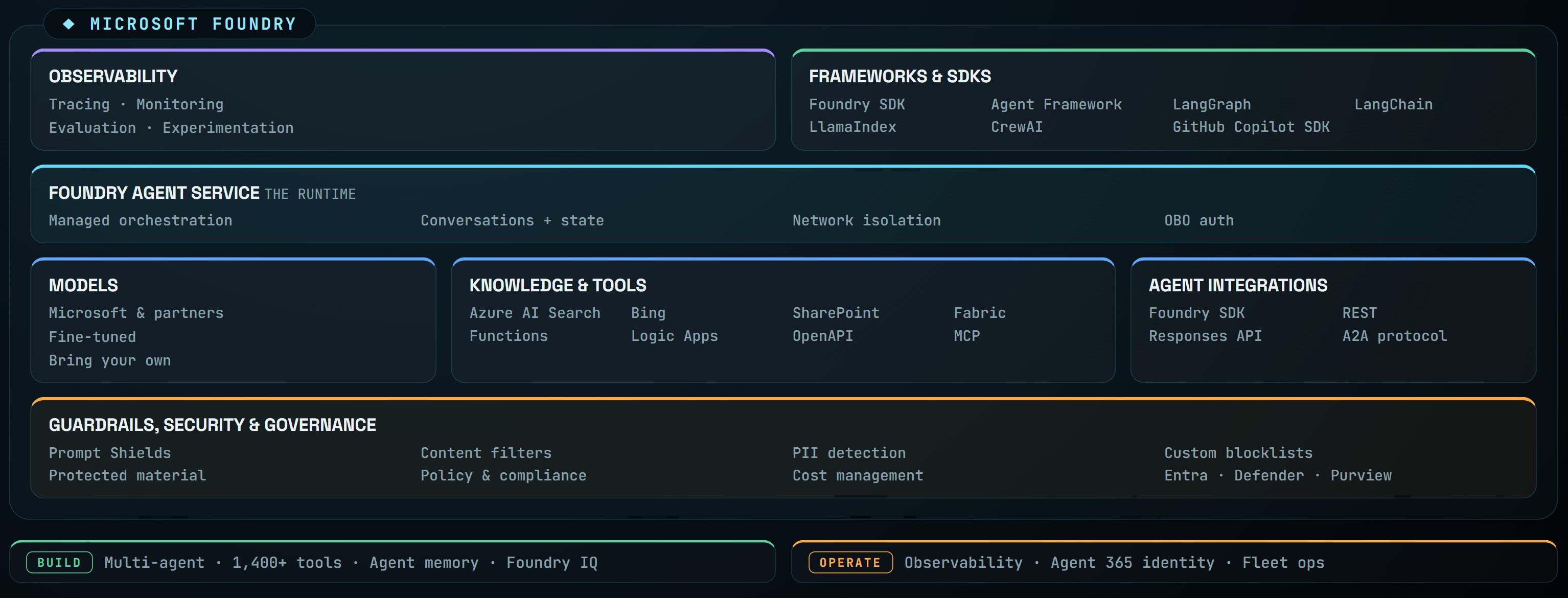
A hands-on lab series for Microsoft Foundry NextGen - Azure's unified PaaS for enterprise AI operations, model builders, and application development. Each lab demonstrates a specific Foundry pattern: provisioning, agents, hosted Copilot SDK agents, MCP tools, knowledge bases, fine-tuning, guardrails, red-teaming, observability, and more.
Foundry unifies agents, models, and tools under one Azure resource provider namespace with built-in tracing, monitoring, evaluations, and a single RBAC/networking/policy surface. These labs put that platform through its paces end-to-end.
Prerequisites
- Azure CLI v2.60+ - install
cognitiveservicesCLI extension -az extension add -n cognitiveservicesuvPython package manager - install- Signed in:
az login
Quick start
git clone https://github.com/corticalstack/awesome-foundry-nextgen.git
cd awesome-foundry-nextgen
cp .env.example .env             # then fill in your values
uv sync
uv run jupyter notebook
Auth is DefaultAzureCredential throughout - no admin keys in notebooks.
See .env.example for the full variable list.
Labs
Labs are numbered roughly in dependency order - start with the conceptual overviews (00-04), provision the platform (05-06), then pick whichever capability lab interests you. Most capability labs assume the multi-project spoke from the project pattern setup.
| # | Lab | What it covers |
|---|---|---|
| 00 | What is Foundry | High-level overview of Microsoft Foundry as a unified PaaS for enterprise AI. |
| 01 | Portal - Home | Tour of the Foundry (new) portal home, project switcher, and resource boundaries. |
| 02 | Portal - Discover | The Netflix-style catalog for models and agents across providers. |
| 03 | Portal - Build | Developer control plane for agents, models, workflows, fine-tunes, and playgrounds. Includes creating a project and deploying/testing models. |
| 04 | Control plane | Operating a fleet of agents - provisioning, regions, SDKs, costs, custom-agent registration, publishing, the VS Code extension. |
| 05 | Project pattern setup | Hub/spoke architecture with Bicep: deploy the core gateway, a single-project spoke, and a multi-project spoke. |
| 06 | Governance policy | Azure Policy that denies model deployments in spokes, forcing all traffic through the core APIM gateway. |
| 07 | Model inference | Inference paths behind APIM - Azure OpenAI vs Foundry project clients, chat/embeddings/responses, server-side router, deep-research, streaming. Includes a live GPT-4o to GPT-5 reasoning-model migration with its parameter, token, and API-surface gotchas. |
| 08 | Agents | Agent fundamentals across eleven sub-labs: versioned agents, code interpreter, hosted agents, memory, MCP (PMO + private banking), offline eval, live observability, human-in-the-loop, REST invocation, and a hosted Copilot SDK agent. |
| 09 | Content Understanding integration | Plumb Azure AI Content Understanding behind the core APIM with managed-identity backend auth. |
| 10 | Foundry IQ | Managed knowledge base end-to-end: provision Azure AI Search, ingest 3k arXiv NLP papers, build a KB, ground an agent. |
| 11 | Foundry IQ - multi-agent | Router + specialist pattern over three KBs (HR, Marketing, Products) using Microsoft Agent Framework WorkflowBuilder. |
| 12 | Foundry IQ - deep research | o3-deep-research agentic loop over the arxiv-nlp KB with cited synthesis by gpt-4.1-mini. |
| 13 | Guardrails | Three-layer guardrails (Prompt Shields, PII detection, custom blocklist) stacked on a bank customer-service agent. |
| 14 | Red teaming | Basic and advanced AI Red Teaming Agent (PyRIT) scans against a Foundry project. |
| 15 | Fine-tune | Knowledge distillation from a gpt-4.1-mini teacher to a Phi-4-mini student via Olive + PEFT (LoRA). |
Agents sub-labs
The agents lab is large enough to warrant its own breakdown:
| # | Sub-lab | What it covers |
|---|---|---|
| 08-01 | Versioned storytelling agent | Create a versioned agent and iterate on its definition. |
| 08-01b | Versioned Contoso wealth agent | Versioning applied to a domain-specific wealth-advisory agent. |
| 08-02 | Code interpreter tool | Attach the Code Interpreter tool to an agent. |
| 08-03 | Hosted agents | Deploy a hosted (containerised) agent backed by ACR. |
| 08-04 | Agent memory | Add Foundry agent memory for cross-turn context. |
| 08-05 | MCP - Contoso PMO | Custom MCP server with a tool catalog for a project-management scenario. |
| 08-05b | MCP - Contoso private banking | Second MCP scenario, intent-over-endpoint tool design. |
| 08-06 | Offline evaluation | Quality, agent-specific, and custom evaluators run against a test set. |
| 08-07 | Live observability | Tracing, real-time observability, and continuous evaluation in production. |
| 08-08 | Human in the loop | Pause an agent run for human approval before sensitive tool calls. |
| 08-09 | Invoke an agent over REST | Single-shot, multi-turn, and streaming invocation of a Foundry agent over the raw REST responses API. |
| 08-10 | Hosted Copilot SDK agent | Deploy a GitHub Copilot SDK agent as a Foundry hosted agent, with a BYOK Foundry model and an M365 license-analytics demo. |
| 08-10b | Hosted Copilot SDK agent on the 1:N multi account | A self-contained Copilot SDK agent on the shared multi-project account, pointed directly at the APIM gateway (api-key auth) for a reasoning model - no local model deployment, no Foundry connection. |
Repository layout
├── 00-what-is-foundry/ … 15-fine-tune/   # Lab content (notebooks + Bicep)
├── assets/                               # Shared images, data, prompts
├── docs/screenshots/                     # Portal/architecture screenshots
├── scripts/                              # Notebook builders, helpers
├── .env.example                          # Variable template
└── CONTRIBUTING.md                       # How to contribute
Contributing
Issues, lab additions, and fixes are very welcome - see CONTRIBUTING.md for branching, lab numbering, and PR checklist.