
Azure Bicep Cheat Sheet
Azure Bicep has become my preferred tool for writing infrastructure-as-code for Azure, thanks to its modularity and effortless adaptability. This repository serves as a handy cheat sheet, offering code snippets and references for Azure Bicep.
[!NOTE] Community contributions are welcome :-)! If you have content that you want to add, please add it to the cheat sheet using a pull request.

What is a cheat sheet?
A cheat sheet is a concise set of notes or a reference guide used for quick retrieval of essential information. It's often a single page that contains summaries, commands, formulas, or procedures that someone might need to reference frequently, especially when learning a new topic or skill.
What is Azure Bicep?
Azure Bicep is a domain-specific language (also known as DSL) designed by Microsoft for defining and deploying Azure resources in a declarative manner. It's the next generation of Azure Resource Manager (ARM) templates, offering a cleaner syntax, improved type safety, and better support for modularization. While ARM templates use JSON syntax, Bicep uses a more concise syntax that aims to make it easier for developers to author and maintain Azure deployments.
Topics
[!NOTE] Click the arrow next to a topic to expand its content.
Basics
Declarations of new and existing resources, variables, parameters and outputs, etcetera.
Create a resource
GitHub Copilot Prompt - Learn more on resource creation
how to define a resource in azure bicep
resource resourceName 'ResourceType@version' = {
  name: 'exampleResourceName'
  properties: {
    // resource properties here
  }
}
Create a child resource
GitHub Copilot Prompt - Learn more about creating child resources
Via name
resource resVnet 'Microsoft.Network/virtualNetworks@2022-01-01' = {
  name: 'my-vnet'
}

resource resChildSubnet 'Microsoft.Network/virtualNetworks/subnets@2022-01-01' = {
  name: '${resVnet}/my-subnet'
}
Via parent property
resource resVnet 'Microsoft.Network/virtualNetworks@2022-01-01' = {
  name: 'my-vnet'
}

resource resChildSubnet 'Microsoft.Network/virtualNetworks/subnets@2022-01-01' = {
  name: 'my-subnet'
  parent: resVnet
}
Via parent resource
resource resVnet 'Microsoft.Network/virtualNetworks@2022-01-01' = {
  name: 'my-vnet'

  resource resChildSubnet 'subnets' = {
    name: 'my-subnet'
  }
}
Reference to an existing resource
resource resKeyVaultRef 'Microsoft.KeyVault/vaults@2019-09-01' = existing {
  name: 'myExistingKeyVaultName'
}
Access a nested resource (::)
resource resVnet 'Microsoft.Network/virtualNetworks@2022-01-01' existing = {
  name: 'my-vnet'
  resource resChildSubnet 'subnets' existing = {
    name: 'my-subnet'
  }
}

// access child resource
output outChildSubnetId string = resVnet::resChildSubnet.id
Declare a variable
var varEnvironment = 'dev'
There is no need to declare a datatype for a variable, because the type is inferred from the value.
Declare a parameter
param parStorageAccountName string
param parLocation string = resourceGroup().location
Available datatypes are: string, bool, int, object, array and custom (user defined type).
Declare a secure parameter
@secure()
param parSecureParameter string
Declare an output
resource resPublicIp 'Microsoft.Network/publicIPAddresses@2023-02-01' ={
  name: parPublicIpName
  tags: parTags
  location: parLocation
  zones: parAvailabilityZones
  sku: parPublicIpSku
  properties: parPublicIpProperties
}

output outPublicIpId string = resPublicIp.id
output outMyString string = 'Hello!'
Available datatypes are: string, bool, int, object, array and custom (user defined type).
String interpolation
var varGreeting = 'Hello'
output outResult string = '${varGreeting} World'
Multi-line strings
var varMultiLineString = '''
  This is a
  Muli-line string
  variable.
'''
Modules
Split your deployment into smaller, reusable components.
Create a module
module modVirtualNetwork './network.bicep' = {
  name: 'networkModule'
  params: {
    parLocation: 'westeurope'
    parVnetName: 'my-vnet-name'
  }
}
Reference to a module using a bicep registry
module modBicepRegistryReference 'br/<bicep registry name>:<file path>:<tag>' = {
  name: 'deployment-name'
  params: {}
}
Conditions
Resource definitions based on conditions.
GitHub Copilot - Learn more about conditions
If condition
param parDeployResource bool

resource resDnsZone 'Microsoft.Network/dnszones@2018-05-01' = if (parDeployResource) {
  name: 'myZone'
  location: 'global'
}
Ternary if/else condition
param parEnvironment string

var varSku = parEnvironment == 'prod' ? 'premium' : 'standard'
Loops
Loop constructions.
GitHub Copilot - Learn more about loops
foreach using an array
param parStorageAccountNames array = [
  'storageaccount1'
  'storageaccount2'
  'storageaccount3'
]

resource resStorageAccounts 'Microsoft.Storage/storageAccounts@2021-04-01' = [for name in parStorageAccountNames: {
  name: name
  location: 'westeurope'
  kind: 'StorageV2'
  sku: {
    name: 'Standard_LRS'
  }
}]
foreach using an array of objects
param parStorageAccountNames array = [
  {
    name: 'storageaccount1'
    kind: 'StorageV2'
    sku: {
      name: 'Standard_LRS'
    }
  }
  {
    name: 'storageaccount2'
    kind: 'StorageV2'
    sku: {
      name: 'Standard_LRS'
    }
  }
]

resource resStorageAccounts 'Microsoft.Storage/storageAccounts@2021-04-01' = [for storageAccount in parStorageAccountNames: {
  name: storageAccount.name
  location: 'westeurope'
  kind: storageAccount.kind
  sku: {
    name: storageAccount.sku
  }
}]
Data manipulation
Functions used to manipulate data.
GitHub Copilot - Learn more about lambda functions
Example data
var varGroceryStore = [
  {
    productName: 'Icecream'
    productPrice: 2
    productCharacteristics: [
      'Vegan'
      'Seasonal'
    ]
  }
  {
    productName: 'Banana'
    productPrice: 4
    productCharacteristics: [
      'Bio'
    ]
  }
]
filter() function
output outProducts array = filter(varGroceryStore, item => item.productPrice >= 4)
returns
[
  {
    "productName": "Banana",
    "productPrice": 4,
    "productCharacteristics": [
      "Bio"
    ]
  }
]
map() function
output outDiscount array = map(range(0, length(varGroceryStore)), item => {
  productNumber: item
  productName: varGroceryStore[item].productName
  discountedPrice: 'The item ${varGroceryStore[item].productName} is on sale. Sale price: ${(varGroceryStore[item].productPrice / 2)}'
})
returns
[
  {
    "productNumber": 0,
    "productName": "Icecream",
    "discountedPrice": "The item Icecream is on sale. Sale price: 1"
  },
  {
    "productNumber": 1,
    "productName": "Banana",
    "discountedPrice": "The item Banana is on sale. Sale price: 2"
  }
]
sort() function
output outUsingSort array = sort(varGroceryStore, (a, b) => a.productPrice <= b.productPrice)
returns
[
  {
    "productName": "Icecream",
    "productPrice": 2,
    "productCharacteristics": [
      "Vegan"
      "Seasonal"
    ]
  },
  {
    "productName": "Banana",
    "productPrice": 4,
    "productCharacteristics": [
      "Bio"
    ]
  }
]
User Defined Types
Define custom complex data structures.
GitHub Copilot - Learn more on User Defined Types
Primitive types
// a string type with two allowed strings ('Standard_LRS' or 'Standard_GRS')
type skuType = 'Standard_LRS' | 'Standard_GRS'

// an integer type with one allowed value (1337)
type integerType = 1337

// an boolean type with one allowed value (true)
type booleanType = true

// Reference the type
param parMyStringType skuType
param parMyIntType integerType
param parMyBoolType booleanType
A custom type that enforced an array with a specific object structure
type arrayWithObjectsType = {
  name: string
  age: int
}[]

param parCustomArray arrayWithObjectsType = [
  {
    name: 'John'
    age: 30
  }
]
Optional properties in objects (using ?)
type arrayWithObjectsType = {
  name: string
  age: int
  hasChildren: bool?
  hasPets: bool?
}[]

param parCustomArray arrayWithObjectsType = [
  {
    name: 'John'
    age: 30
  }
  {
    name: 'Jane'
    age: 31
    hasPets: true
  }
  {
    name: 'Jack'
    age: 45
    hasChildren: true
    hasPets: true
  }
]
User Defined Functions
Define custom complex expressions.
GitHub Copilot - Learn more about User Defined Functions
User-defined function syntax
func <function-name> (<parameter-name> <data-type>) <return-type> => <expression>
Basic user-defined function
func funcSayHelloTo() string => 'Hello and welcome, John Doe'
User-defined function with parameters
func funcSayHelloTo(name string) string => 'Hello and welcome, ${name}'
With multiple parameters:
func funcPersonNameAndAge(name string, age int) string => 'My name is ${name} and my age is ${age}'
User-defined function return types
func funcReturnTypeArray() array => [1, 2, 3, 4, 5]
func funcReturnTypeObject() object => {name: 'John Doe', age: 31}
func funcReturnTypeInt() int => 1337
func funcReturnTypeBool(key string) bool => contains({}, key)
func funcReturnTypeUserDefinedType() customTypeUsedAsReturnType => {
  hello: 'world'
}

type customTypeUsedAsReturnType = {
  hello: string
}
Compile-time imports
Import and export() enable reuse of user-defined types variables, functions.
Supported in Bicep and Bicepparam files.
Supported in Bicep and Bicepparam files.
GitHub Copilot - learn more about compile-time imports
export() decorator (shared.bicep)
@export()
var region = 'we'

@export()
type tagsType = {
  Environment: 'Prod' | 'Dev' | 'QA' | 'Stage' | 'Test'
  CostCenter: string
  Owner: string
  BusinessUnit: string
  *: string
}
import statement
import { region, tagsType } from 'shared.bicep'

output outRegion string = region
output outTags tagsType = {
  Environment: 'Dev'
  CostCenter: '12345'
  BusinessUnit: 'IT'
  Owner: 'John Lokerse'
}
import statement with alias
using 'keyVault.bicep'
import { region as importRegion } from 'shared.bicep'

param parKeyVaultName = 'kv-${importRegion}-${uniqueString(importRegion)}'
import statement using a wildcard
import * as shared from 'shared.bicep'

output outRegion string = shared.region
output outTags shared.tagsType = {
  Environment: 'Dev'
  CostCenter: '12345'
  BusinessUnit: 'IT'
  Owner: 'John Lokerse'
}
Networking
CIDR functions to make subnetting easier.
GitHub Copilot - learn more about the networking functions
parseCidr() function
output outParseCidrInformation object = parseCidr('192.168.1.0/24')
returns
"outParseCidrInformation": {
  "type": "Object",
  "value": {
    "broadcast": "192.168.1.255",
    "cidr": 24,
    "firstUsable": "192.168.1.1",
    "lastUsable": "192.168.1.254",
    "netmask": "255.255.255.0",
    "network": "192.168.1.0"
  }
}
cidrSubnet() function
output outCidrSubnet string = cidrSubnet('192.168.1.0/24', 25, 0)
returns
"outCidrSubnet": {
  "type": "String",
  "value": "192.168.1.0/25"
}
cidrHost() function
output outCidrHost array = [for i in range(0, 10): cidrHost('192.168.1.0/24', i)]
returns
"outCidrHost": {
  "type": "Array",
  "value": [
    "192.168.1.1",
    "192.168.1.2",
    "192.168.1.3",
    "192.168.1.4",
    "192.168.1.5",
    "192.168.1.6",
    "192.168.1.7",
    "192.168.1.8",
    "192.168.1.9",
    "192.168.1.10"
  ]
}
Bicepconfig
Customize your Bicep development experience.
GitHub Copilot - Learn more about bicepconfig.json
Azure Container Registry configuration
{
  "moduleAliases": {
    "br": {
      "<bicep registry name>": {
        "registry": "<url to registry>",
        "modulePath": "<module path of the alias>"
      }
    }
  }
}
Dependencies
Implicit and explicit dependencies.
GitHub Copilot - learn more about dependencies
Implicit dependency using symbolic name
resource resNetworkSecurityGroup 'Microsoft.Network/networkSecurityGroups@2019-11-01' = {
  name: 'my-networkSecurityGroup'
  location: resourceGroup().location
}

resource nsgRule 'Microsoft.Network/networkSecurityGroups/securityRules@2019-11-01' = {
  name: '${resNetworkSecurityGroup}/AllowAllRule'
  properties: {
    // resource properties here
  }
}
Explicit dependency using dependsOn
resource resDnsZone 'Microsoft.Network/dnsZones@2018-05-01' = {
  name: 'contoso.com'
  location: 'global'
}

module modVirtualNetwork './network.bicep' = {
  name: 'networkModule'
  params: {
    parLocation: 'westeurope'
    parVnetName: 'my-vnet-name'
  }
  dependsOn: [
    resDnsZone
  ]
}
Deployment
Orchestration commands to deploy Azure Bicep to your Azure Environment.
Azure CLI
| Scope | Command |
|---|---|
| resourceGroup | az deployment group create --resource-group ResourceGroupName --template-file template.bicep --parameters parameters.bicepparam |
| subscription | az deployment sub create --location location --template-file template.bicep --parameters parameters.bicepparam |
| managementGroup | az deployment mg create --management-group-id ManagementGroupId --template-file template.bicep --parameters parameters.bicepparam |
| tenant | az deployment tenant create --location location --template-file template.bicep --parameters parameters.bicepparam |
Azure PowerShell
| Scope | Command |
|---|---|
| resourceGroup | New-AzResourceGroupDeployment -ResourceGroupName "ResourceGroupName" -TemplateFile "template.bicep" -TemplateParameterFile "parameters.bicepparam |
| subscription | New-AzDeployment -Location "Location" -TemplateFile "template.bicep" -TemplateParameterFile "parameters.bicepparam" |
| managementGroup | New-AzManagementGroupDeployment -ManagementGroupId "ManagementGroupId" -Location "location" -TemplateFile "template.bicep" -TemplateParameterFile "parameters.bicepparam" |
| tenant | New-AzTenantDeployment -Location "Location" -TemplateFile "template.bicep" -TemplateParameterFile "parameters.bicepparam" |
Target Scopes
Deployment scope definitions.
GitHub Copilot - Learn more about target scopes
Target scopes
The targetScope directive in Azure Bicep determines the level at which the Bicep template will be deployed within Azure. The default is targetScope = 'resourceGroup'.
Azure Bicep supports multiple levels of targetScope:
| Scope | Description |
|---|---|
| resourceGroup | The Bicep file is intended to be deployed at the Resource Group level. |
| subscription | The Bicep file targets a Subscription, allowing you to manage resources or configurations across an entire subscription. |
| managementGroup | For managing resources or configurations across multiple subscriptions under a specific Management Group. |
| tenant | The highest scope, targeting the entire Azure tenant. This is useful for certain global resources or policies. |
targetScope = 'resourceGroup'

resource resKeyVault 'Microsoft.KeyVault/vaults@2019-09-01' = {
  // key vault properties here
}
Use the scope property on modules to deploy on a different scope than the target scope:
// Uses the targetScope
module modStorageModule1 'storage.bicep' = {
  name: 'storageModule1'
}

// Uses the scope of the module
module modStorageModule2 'storage.bicep' = {
  name: 'storageModule2'
  scope: resourceGroup('other-subscription-id', 'other-resource-group-name')
  // module properties here
}
Azure Verified Modules
Microsoft building blocks for Azure Bicep right at your fingertips.
GitHub Copilot - Learn more about Azure Verified Modules
Azure Verified Modules reference
When you're writing Bicep, you can reference Azure Verified Modules (AVM) directly in your Bicep files. To get access to the IntelliSense prompt, you need the Azure Bicep VSCode extension installed. Additionally, to restore the Bicep modules successfully, make sure you have access to the Microsoft Container Registry at mcr.microsoft.com.
As an example, here is how to reference to an Azure Key Vault from the Microsoft Container Registry:
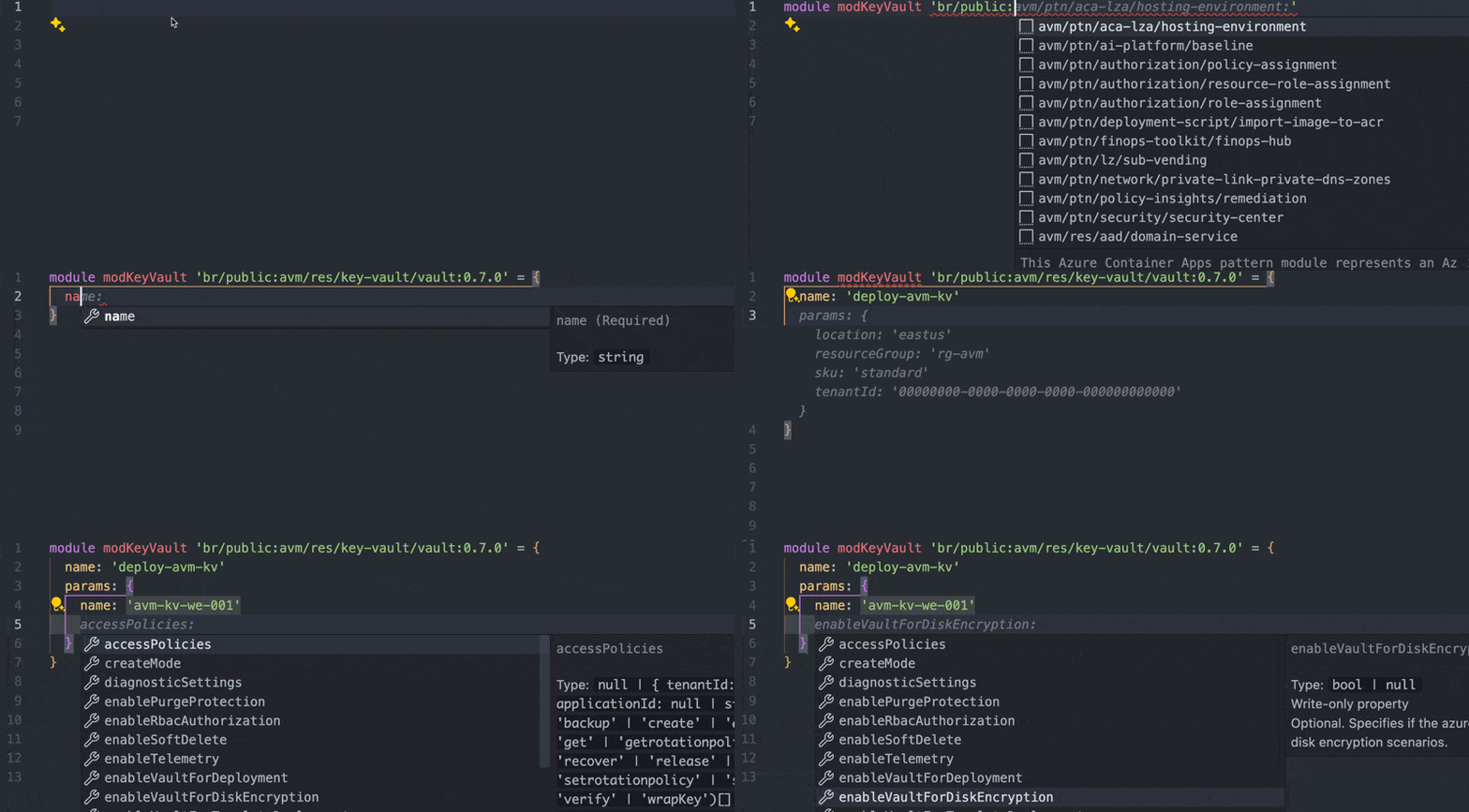
More information on Azure Verified Modules can be found here.