
Bazarr Bulk Sync
An optimized command-line tool for bulk syncing media subtitles in Bazarr.
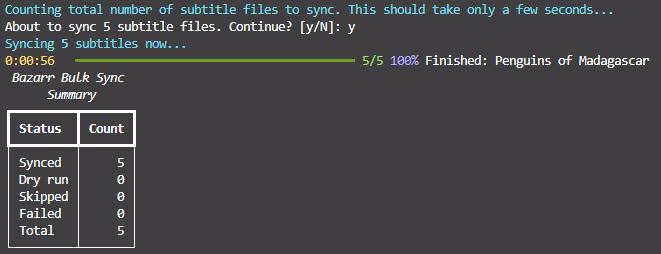
TLDR Sync Everything
You should have a config file in your current working directory. Set base_url and api_key to your Bazarr instance.
Docker
# Sync all subtitles interactively.
docker run --rm -it -v ./bazarrbulksync_config.yml:/app/bazarrbulksync/bazarrbulksync_config.yml wayhowma/bazarrbulksync:0.2.0 sync all

# Sync all subtitles detached.
docker run --rm -d -v ./bazarrbulksync_config.yml:/app/bazarrbulksync/bazarrbulksync_config.yml wayhowma/bazarrbulksync:0.2.0 sync all
Local Python
# Sync all subtitles interactively.
pip install bazarrbulksync==0.2.0
bazarrbulksync sync all --config ./bazarrbulksync_config.yml
More Information
CLI Usage
The CLI was created using Rich. You can view the descriptions of different commands/options by chaining commands with --help.
 Usage: bazarrbulksync sync all [OPTIONS]

 Sync without date/datetime restriction.

╭─ Options ──────────────────────────────────────────────────────────────────────────────────────────────────────────────────────────────────────────────────────────────────╮
│ --config               -c                     PATH                  Path to config file.                                                                                   │
│ --series-chunk-size                           INTEGER RANGE [x>=1]  Series fetched per Bazarr list API call.                                                               │
│ --movies-chunk-size                           INTEGER RANGE [x>=1]  Movies fetched per Bazarr list API call.                                                               │
│ --episodes-chunk-size                         INTEGER RANGE [x>=1]  Approximate episodes fetched per API call (approximate because we fetch all the episodes in an entire  │
│                                                                     series at a time).                                                                                     │
│ --series-ids                                  TEXT                  Comma-separated Sonarr series IDs to sync (all episodes from each series given will be synced).        │
│ --movie-ids                                   TEXT                  Comma-separated Radarr movie IDs to sync.                                                              │
│ --episode-ids                                 TEXT                  Comma-separated Sonarr episode IDs to sync.                                                            │
│ --media-type                                  [series|movies|all]   Which type of media to sync. [default: all]                                                            │
│ --language                                    TEXT                  Only sync subtitles with this code2 language.                                                          │
│ --forced                   --no-forced                              Override forced flag.                                                                                  │
│ --hi                       --no-hi                                  Override hearing-impaired flag.                                                                        │
│ --max-offset-seconds                          INTEGER RANGE [x>=1]  Maximum sync offset seconds.                                                                           │
│ --no-fix-framerate         --fix-framerate                          Toggle framerate fixing.                                                                               │
│ --gss                      --no-gss                                 Toggle usage of Golden-Section Search algorithm during syncing.                                        │
│ --reference                                   TEXT                  Sync reference track or subtitle path.                                                                 │
│ --dry-run                                                           Simulate work without calling sync.                                                                    │
│ --yes                  -y                                           Skip confirmation prompts.                                                                             │
│ --log                      --no-log                                 Turn file logging on or off for this run.                                                              │
│ --log-file                                    PATH                  Log file path for this run (implies logging on).                                                       │
│ --log-debug                --no-log-debug                           Verbose file log when a log file is used.                                                              │
│ --help                                                              Show this message and exit.                                                                            │
╰────────────────────────────────────────────────────────────────────────────────────────────────────────────────────────────────────────────────────────────────────────────╯
Examples
# Get the CLI help page.
docker run --rm -it wayhowma/bazarrbulksync:0.2.0 --help

# Get the sync command help page.
docker run --rm -it wayhowma/bazarrbulksync:0.2.0 sync --help

# Get the sync all command help page.
docker run --rm -it wayhowma/bazarrbulksync:0.2.0 sync all --help

# Get the sync before command help page.
docker run --rm -it wayhowma/bazarrbulksync:0.2.0 sync before --help
Configuration
Bazarr Bulk Sync reads a YAML config—see the sample layout. If you omit --config, it looks for ./bazarrbulksync/bazarrbulksync_config.yml first; if that file does not exist, it uses ./bazarrbulksync_config.yml in the current working directory. With the usual Docker volume layout, the nested path inside the container is /app/bazarrbulksync/bazarrbulksync_config.yml. Use --config to point anywhere else.
The defaults in that file are sensible starting points. The options that most affect sync behaviour are max_offset_seconds, no_fix_framerate, and gss, depending on your media and subtitles.
More Examples
Docker
# Syncs all episodes for the series with IDs 10, 20, and 50, and syncs the movie with an ID of 5.
docker run --rm -it -v ./bazarrbulksync_config.yml:/app/bazarrbulksync/bazarrbulksync_config.yml wayhowma/bazarrbulksync:0.2.0 sync all --series-ids 10,20,50 --movie-ids 5
# Syncs all movies whose latest sync is before 2026-03-01.
docker run --rm -it -v ./bazarrbulksync_config.yml:/app/bazarrbulksync/bazarrbulksync_config.yml wayhowma/bazarrbulksync:0.2.0 sync before 2026-03-01 --media-type movies
# Syncs all subtitles with debug logging to the local ./bazarrbulksync.log file.
# Create an empty host file first so Docker bind-mounts a file, not a directory.
touch ./bazarrbulksync.log
docker run --rm -it -v ./bazarrbulksync_config.yml:/app/bazarrbulksync/bazarrbulksync_config.yml -v ./bazarrbulksync.log:/app/bazarrbulksync/bazarrbulksync.log wayhowma/bazarrbulksync:0.2.0 sync all --log --log-debug
Local Python
# Syncs all episodes for the series with IDs 10, 20, and 50, and syncs the movie with an ID of 5.
bazarrbulksync sync all --config ./bazarrbulksync_config.yml --series-ids 10,20,50 --movie-ids 5
# Syncs all movies whose latest sync is before 2026-03-01.
bazarrbulksync sync before 2026-03-01 --config ./bazarrbulksync_config.yml --media-type movies
# Syncs all subtitles with debug logging to the local ./bazarrbulksync.log file.
bazarrbulksync sync all --config ./bazarrbulksync_config.yml --log-file ./bazarrbulksync.log --log-debug
Contributing
If you find any bugs, or think that another feature would be worth adding, please don't hesitate to open an issue or a pull request.