
BD TUI 🎯
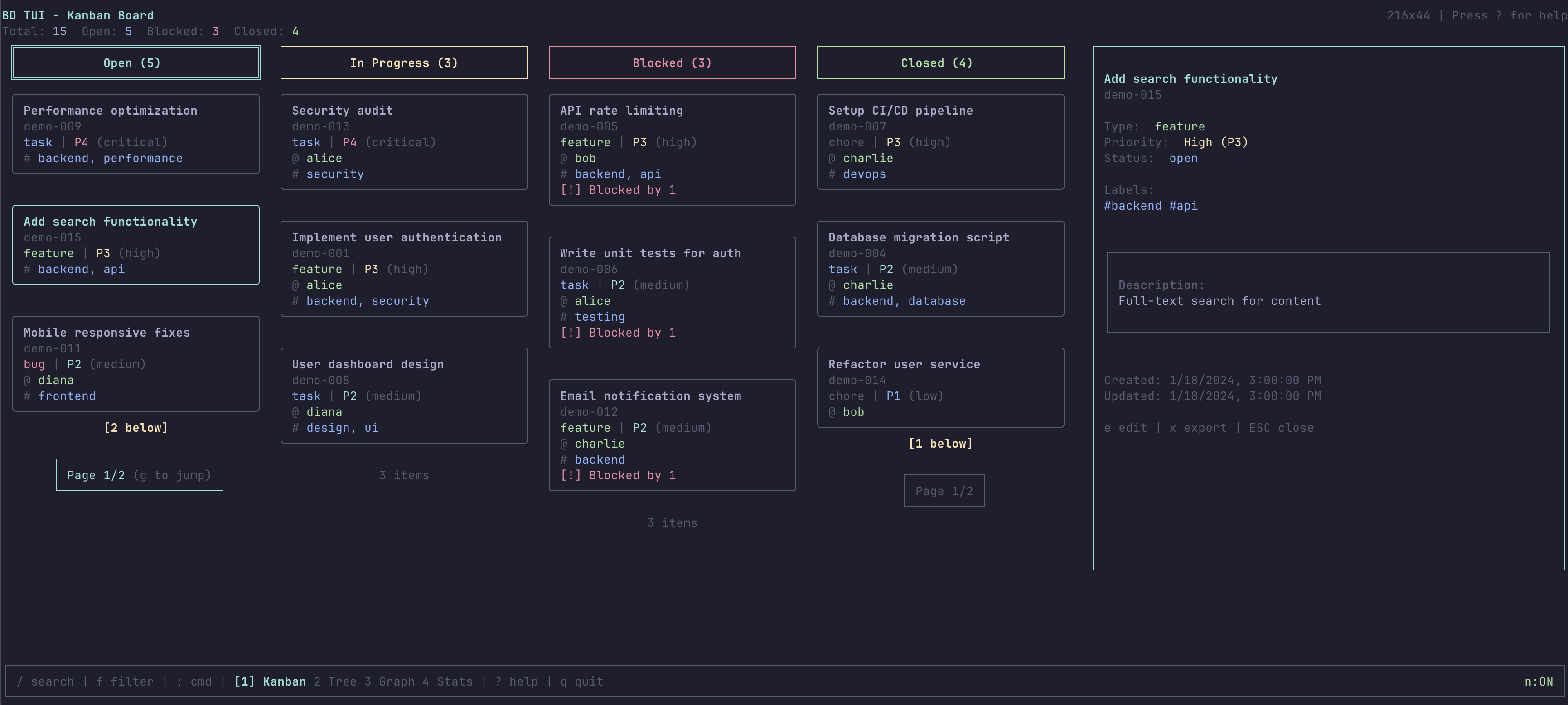
A beautiful, real-time Text User Interface (TUI) visualizer for the bd (beads) issue tracker.



✨ Features
📊 Multiple Visualizations
- Kanban Board - Classic 4-column view (Open, In Progress, Blocked, Closed)
- Tree View - Hierarchical parent-child relationships with interactive navigation
- Dependency Graph - ASCII art visualization of issue dependencies
- Statistics Dashboard - Comprehensive analytics with visual bar charts
🎨 Rich User Experience
- Real-time Updates - File watching with automatic refresh
- Search & Filter - Full-text search across title, description, and ID
- Custom Themes - 5 built-in color schemes (Default, Ocean, Forest, Sunset, Monochrome)
- Responsive Layout - Adapts to terminal size with smart column hiding
- Vim-style Navigation - hjkl keys supported alongside arrow keys
⚡ Issue Management
- Create Issues - Add new issues directly from the TUI
- Edit Issues - Modify any field (title, description, priority, status, assignee, labels)
- Export/Copy - Export issues in Markdown, JSON, or plain text format
- Desktop Notifications - Native OS notifications with custom icons for status changes
🎯 Smart Features
- Per-column Pagination - Independent scroll positions for each status column
- Detail Panel - View full issue details including all dependencies
- Blocked Status Detection - Automatically moves issues with blockers to "Blocked" column
- Keyboard-first - Every action accessible via keyboard shortcuts
🚀 Installation
Prerequisites
- Bun runtime (required)
- bd (beads) issue tracker
- A
.beads/directory withbeads.dbin your project
Homebrew (macOS)
The easiest way to install on macOS:
brew tap assimelha/tap
brew install bdui
To upgrade to the latest version:
brew upgrade bdui
Download Pre-built Binary
Download the latest release for your platform:
- macOS (ARM64):
bdui-macos-arm64 - macOS (x64):
bdui-macos-x64 - Linux (x64):
bdui-linux-x64 - Windows (x64):
bdui-windows-x64.exe
Make it executable (Unix systems):
chmod +x bdui-macos-arm64
./bdui-macos-arm64
Build from Source
# Clone the repository
git clone <repository-url>
cd bdui

# Install dependencies
bun install

# Run in development mode
bun run dev

# Or build single binary for your platform
bun run build
./bdui
Building for All Platforms
# Build for macOS (both ARM64 and x64)
bun run build:macos

# Build for Linux x64
bun run build:linux

# Build for Windows x64
bun run build:windows

# Build for all platforms
bun run build:all
Binaries will be created in the dist/ directory (~50-60 MB each, includes Bun runtime).
📖 Usage
Basic Usage
Navigate to a directory containing a .beads/ folder and run:
bdui
Or from the source directory:
bun run dev
The app will automatically discover the .beads/ directory by walking up the directory tree (like git).
Keyboard Shortcuts
Navigation
↑/↓ork/j- Move up/down (select issue)←/→orh/l- Move left/right (change column in Kanban view)EnterorSpace- Toggle detail panel
Views
1- Kanban board view (default)2- Tree view (hierarchical)3- Dependency graph4- Statistics dashboard
Actions
N(Shift+N) - Create new issuee- Edit selected issuex- Export/copy selected issuet- Change theme
Search & Filter
/- Open search (searches title, description, ID)f- Open filter panel (filter by assignee, tags, priority, status)c- Clear all filters and searchESC- Close search/filter/form panels
Other
r- Refresh data from databasen- Toggle notifications?- Show helpqorCtrl+C- Quit
🎨 Views
Kanban View (Default)
The main view shows issues organized in 4 columns:
- Open - New or ready-to-work issues
- In Progress - Currently being worked on
- Blocked - Issues waiting on dependencies
- Closed - Completed issues
Features:
- Color-coded priorities (P0-P4)
- Type indicators (epic, feature, bug, task, chore)
- Label tags
- Per-column pagination and selection
- Responsive layout (adapts to terminal size)
Tree View
Shows hierarchical parent-child relationships:
- Navigate with ↑/↓ or k/j
- Press Enter/Space to toggle details
- Press
eto edit selected issue - Visual tree structure with connection lines
- Depth-aware indentation
Dependency Graph
Visualizes issue dependencies:
- Issues organized by dependency levels
- Shows blocking relationships
- Navigate with ↑/↓ or k/j
- Color-coded by type and status
- Displays parent-child and blocking relationships
Statistics Dashboard
Comprehensive analytics:
- Status Distribution - Visual bar chart of issue statuses
- Priority Breakdown - Distribution across P0-P4
- Issue Type Distribution - Epic, feature, bug, task, chore counts
- Key Metrics - Completion rate, blocked rate, dependency count
- Top Assignees - Most active team members
- Top Labels - Most used labels
🔔 Notifications
BD TUI supports native desktop notifications for important events:
Notification Types
-
Task Completed ✅ - When an issue status changes to "closed"
- Green checkmark icon
- System sound (macOS)
- Shows issue ID and priority
-
Task Blocked 🚫 - When an issue becomes blocked
- Red prohibition icon
- Silent notification
- Shows number of blocking issues
Notification Icons
Custom icons are located in assets/icons/:
completed.png- Green circle with white checkmark (512x512)blocked.png- Red circle with prohibition symbol (512x512)
Platform support:
- macOS - Full support with custom icons in Notification Center
- Linux - Freedesktop.org notification spec
- Windows - Toast notifications
Toggle notifications with the n key. Current state is shown in the footer (🔔 ON / 🔕 OFF).
Testing Notifications
bun run test:notifications
✏️ Creating and Editing Issues
Create New Issue
Press N (Shift+N) to open the create issue form:
- Tab/Shift+Tab to navigate between fields
- Fill in: title, description, priority (P0-P4), type, assignee, labels
- Press Enter to submit
- ESC to cancel
Edit Existing Issue
Select any issue and press e to open the edit form:
- All fields pre-populated with current values
- Tab/Shift+Tab to navigate
- Use ↑/↓ to change priority and status
- Press Enter to save changes
- ESC to cancel
Changes are immediately written to the bd database and reflected in the UI.
📤 Exporting Issues
Press x on any selected issue to open the export dialog:
Format Options (←/→ to navigate)
- Markdown - Formatted markdown with headers and lists
- JSON - Complete issue data in JSON format
- Plain Text - Simple text format with clear structure
Action Options (↑/↓ to navigate)
- Copy to Clipboard - Copy formatted issue to system clipboard
- Export to File - Save to
{issue-id}.{extension}in current directory
Press Enter to execute. Works on macOS, Linux, and Windows.
🎨 Themes
BD TUI includes 5 built-in color schemes. Press t to open the theme selector:
Available Themes
- Default - Classic blue/cyan theme with high contrast
- Ocean - Blue and cyan tones for a calm, aquatic feel
- Forest - Green-focused theme inspired by nature
- Sunset - Warm magenta and yellow tones
- Monochrome - Clean grayscale theme for distraction-free work
Use ↑/↓ or k/j to browse themes. Each theme shows a live color preview. Press Enter to apply.
🔍 Search & Filter
Search (/)
- Full-text search across title, description, and issue ID
- Type to search incrementally
- ESC to close
Filter (f)
- Assignee - Filter by assigned person
- Tags - Filter by labels (multi-select)
- Priority - Filter by P0-P4
- Status - Filter by open/in_progress/blocked/closed
- Tab to cycle between filter types
- Space/Enter to toggle selections
- ESC to close
Clear Filters (c)
Removes all active search and filter criteria.
📊 Responsive Layout
Terminal Size Adaptation
- Wide (>160 cols): All 4 columns + detail panel
- Medium (80-160 cols): All 4 columns
- Narrow (40-80 cols): 2 columns
- Very narrow (<40 cols): 1 column
Minimum Requirements
- Width: 80 columns (recommended: 120+)
- Height: 24 rows (recommended: 30+)
- True color support recommended but not required
Terminal dimensions are shown in the header (e.g., "120x30").
🧪 Testing
Test with Sample Data
A test project with sample issues is included:
cd /tmp/bdui-test
bun run /path/to/bdui/src/index.tsx
The test project includes:
- 11 diverse issues (varied priorities, types, statuses)
- Multiple assignees (alice, bob, charlie, diana)
- Parent-child relationships (epic with children)
- Blocking dependencies
- Various labels and metadata
See /tmp/bdui-test/README.md for a complete feature walkthrough.
Manual Testing
# Test notifications
bun run test:notifications

# Run in development mode
bun run dev

# Test with your own bd project
cd /path/to/your/project
bun run /path/to/bdui/src/index.tsx
🏗️ Architecture
Technology Stack
- Runtime: Bun (native SQLite, faster than Node.js)
- UI Framework: Ink (React for CLIs)
- State Management: Zustand
- Database: SQLite (direct reads from bd's database via
bun:sqlite) - Notifications: node-notifier (cross-platform)
Data Flow
- Database Reading - Direct SQLite queries to
beads.db - File Watching - Debounced
fs.watchmonitoring with 100ms debounce - State Management - Zustand store with normalized data structure
- Real-time Updates - Pub/sub pattern for database changes
- Notifications - Status change detection with OS notifications
Project Structure
bdui/
├── src/
│   ├── components/       # React/Ink components
│   │   ├── App.tsx       # Main app with keyboard handling
│   │   ├── Board.tsx     # View router
│   │   ├── KanbanView/   # 4-column Kanban board
│   │   ├── TreeView.tsx  # Hierarchical tree view
│   │   ├── DependencyGraph.tsx
│   │   ├── StatsView.tsx
│   │   ├── CreateIssueForm.tsx
│   │   ├── EditIssueForm.tsx
│   │   ├── ExportDialog.tsx
│   │   ├── ThemeSelector.tsx
│   │   └── ...
│   ├── bd/               # bd integration
│   │   ├── parser.ts     # SQLite database reading
│   │   ├── watcher.ts    # File watching
│   │   └── commands.ts   # bd CLI integration
│   ├── state/            # State management
│   │   └── store.ts      # Zustand store
│   ├── themes/           # Theme definitions
│   │   └── themes.ts
│   ├── utils/            # Utilities
│   │   ├── notifications.ts
│   │   └── export.ts
│   ├── types.ts          # TypeScript types
│   └── index.tsx         # Entry point
├── assets/
│   └── icons/            # Notification icons
│       ├── completed.png
│       ├── blocked.png
│       └── README.md
├── CLAUDE.md             # Development documentation
├── package.json
└── README.md             # This file
🤝 Contributing
Contributions are welcome! This project uses bd (beads) for issue tracking.
Development Setup
# Clone repository
git clone <repository-url>
cd bdui

# Install dependencies
bun install

# Run in development mode
bun run dev
Code Guidelines
See CLAUDE.md for detailed architecture documentation and guidelines for:
- Adding new view modes
- Adding new filters
- Creating new components
- Modifying the data flow
📄 License
MIT License - See LICENSE file for details
🙏 Acknowledgments
- bd (beads) - The issue tracker that powers this TUI
- Ink - React for CLIs
- Bun - Fast JavaScript runtime
- Zustand - State management
- node-notifier - Cross-platform notifications
📞 Support
For issues, questions, or contributions:
- Check the documentation in
CLAUDE.md - Review existing bd issues in this repository
- Create a new bd issue with detailed information
Made with ❤️ for developers who love the command line