
BerryCode - The IDE Built for Bevy










English
The first IDE purpose-built for the Bevy game engine.
BerryCode is not a general-purpose editor with Bevy plugins bolted on — it's an IDE designed from the ground up for Bevy development. Built entirely in Rust with Bevy + bevy_egui + WGPU, it understands Bevy's ECS architecture, scene format, and development workflow natively.
Why not just use VS Code? VS Code treats Bevy as "just another Rust project." BerryCode treats Bevy as a first-class game engine — with a built-in Scene Editor, ECS Inspector, System Graph, and more. No extensions needed.
Demo
Screenshots
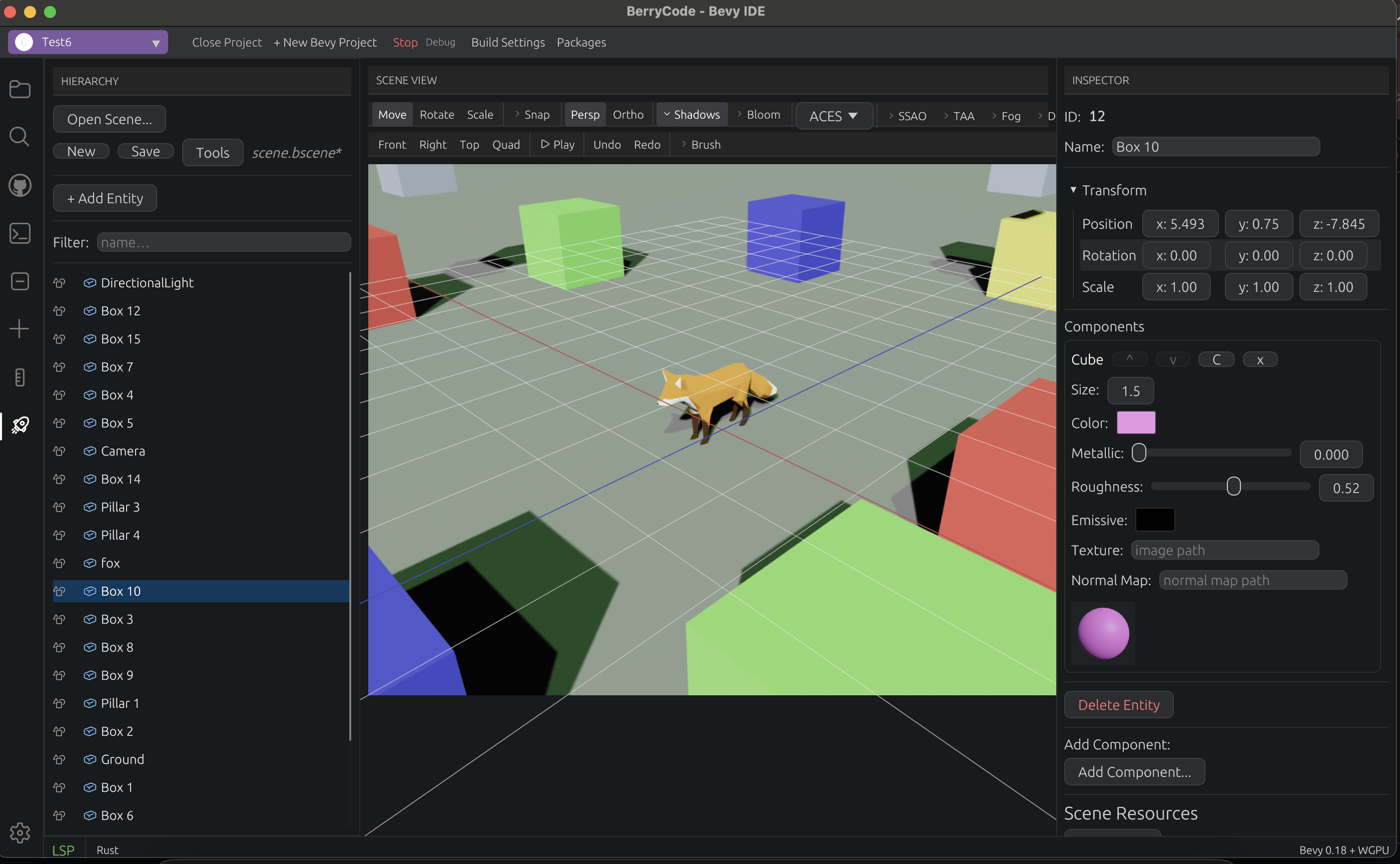
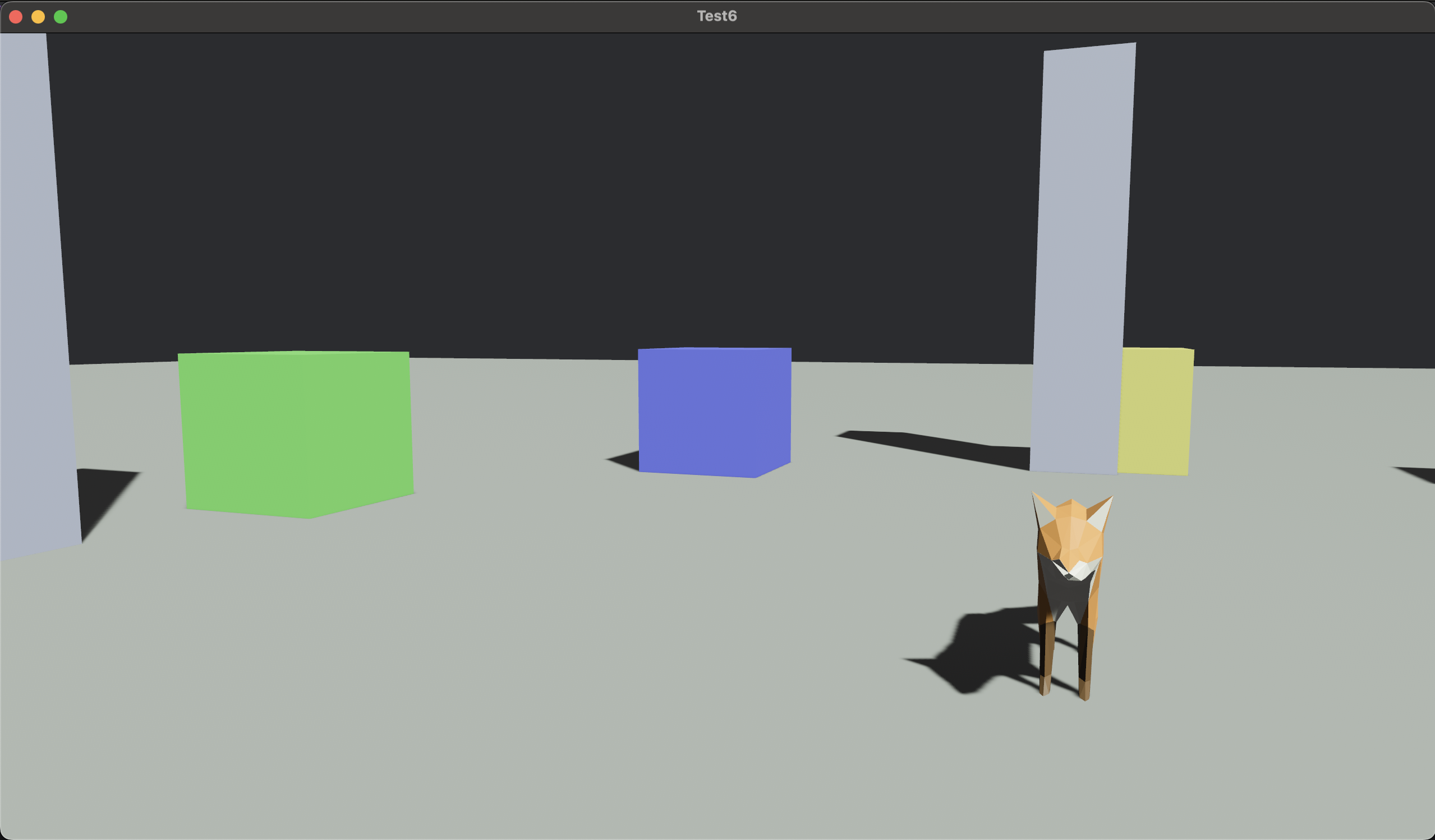
| Scene Editor | Game Runtime |
|---|---|
 |
 |
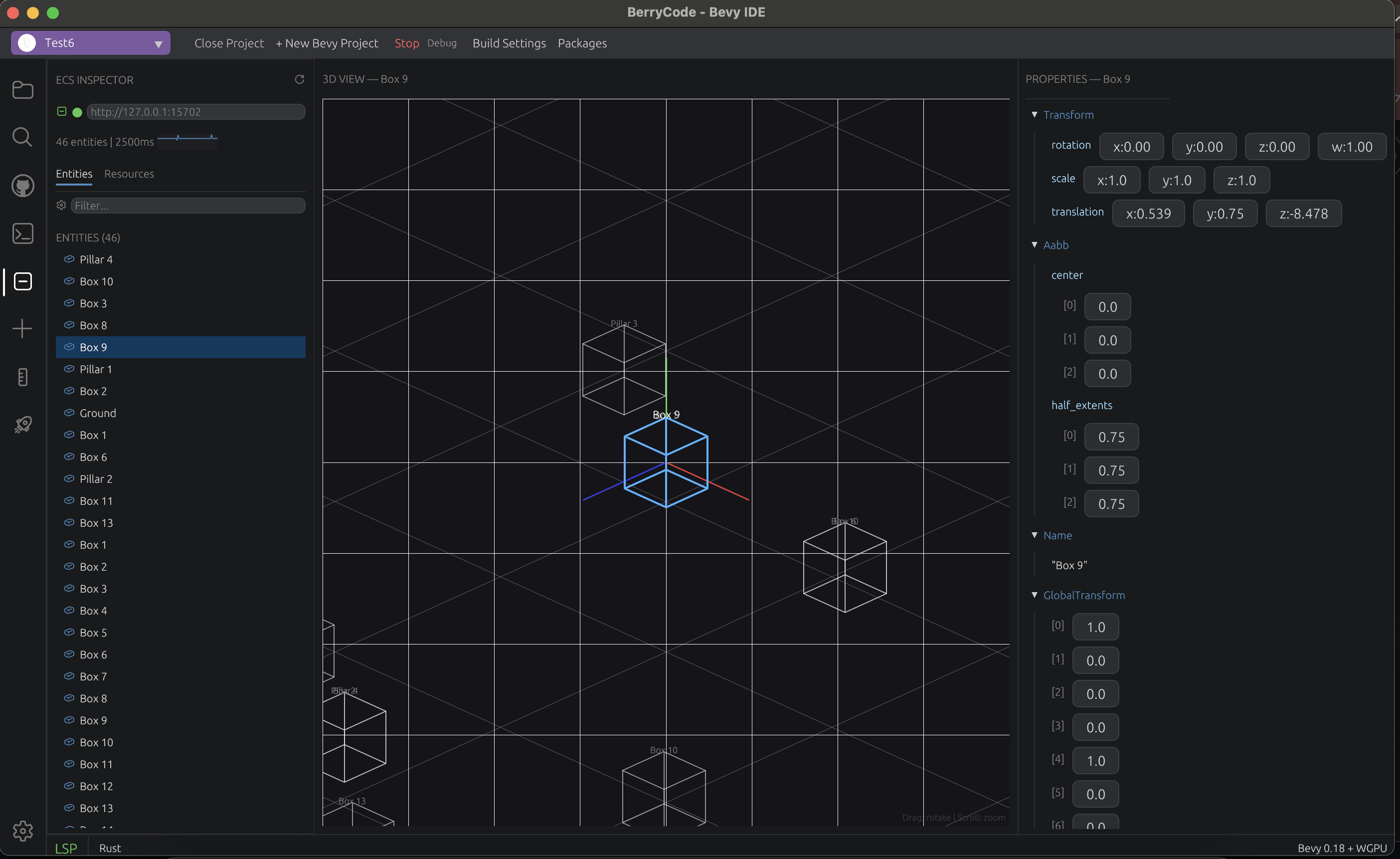
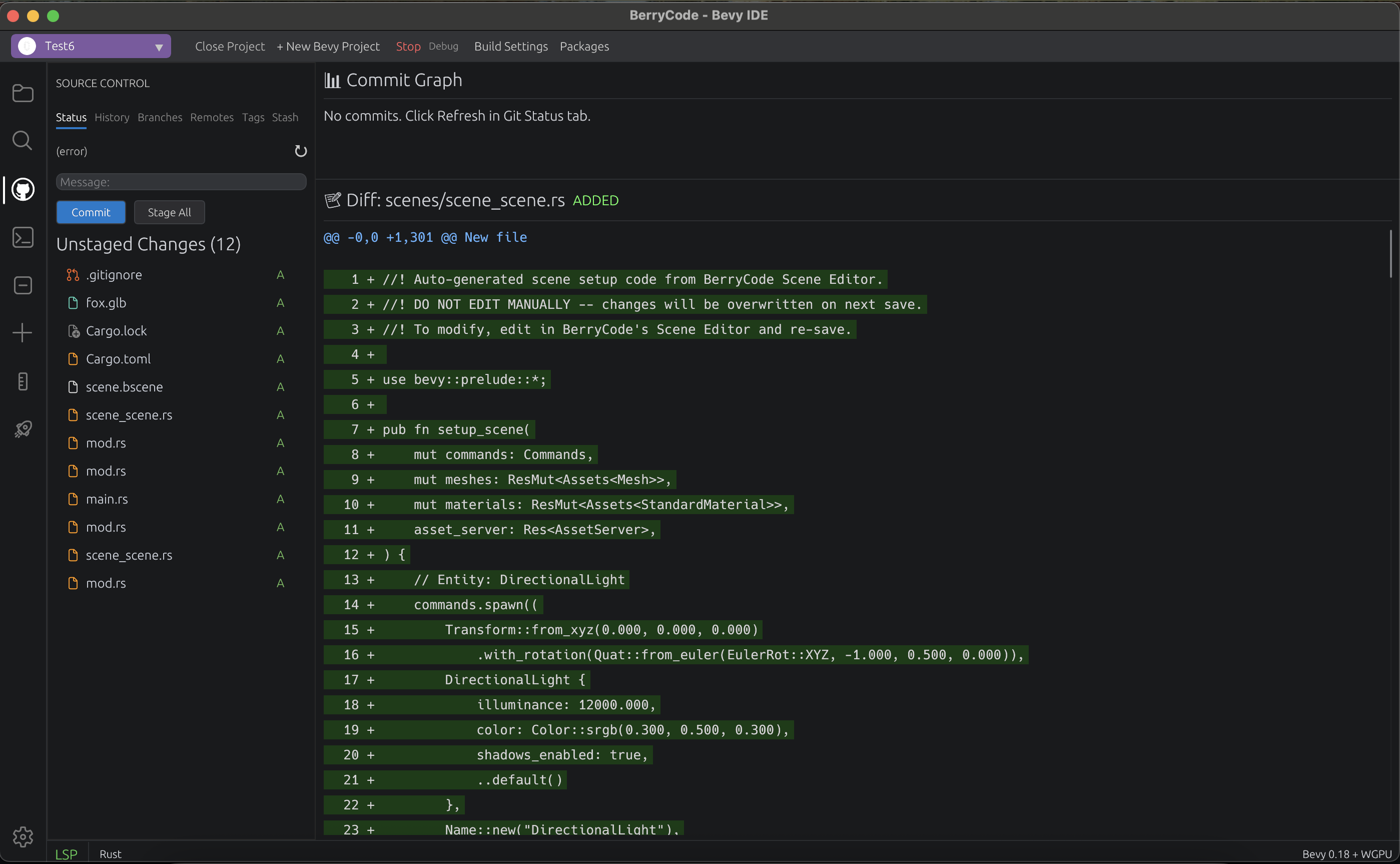
| ECS Inspector | Git Integration |
|---|---|
 |
 |
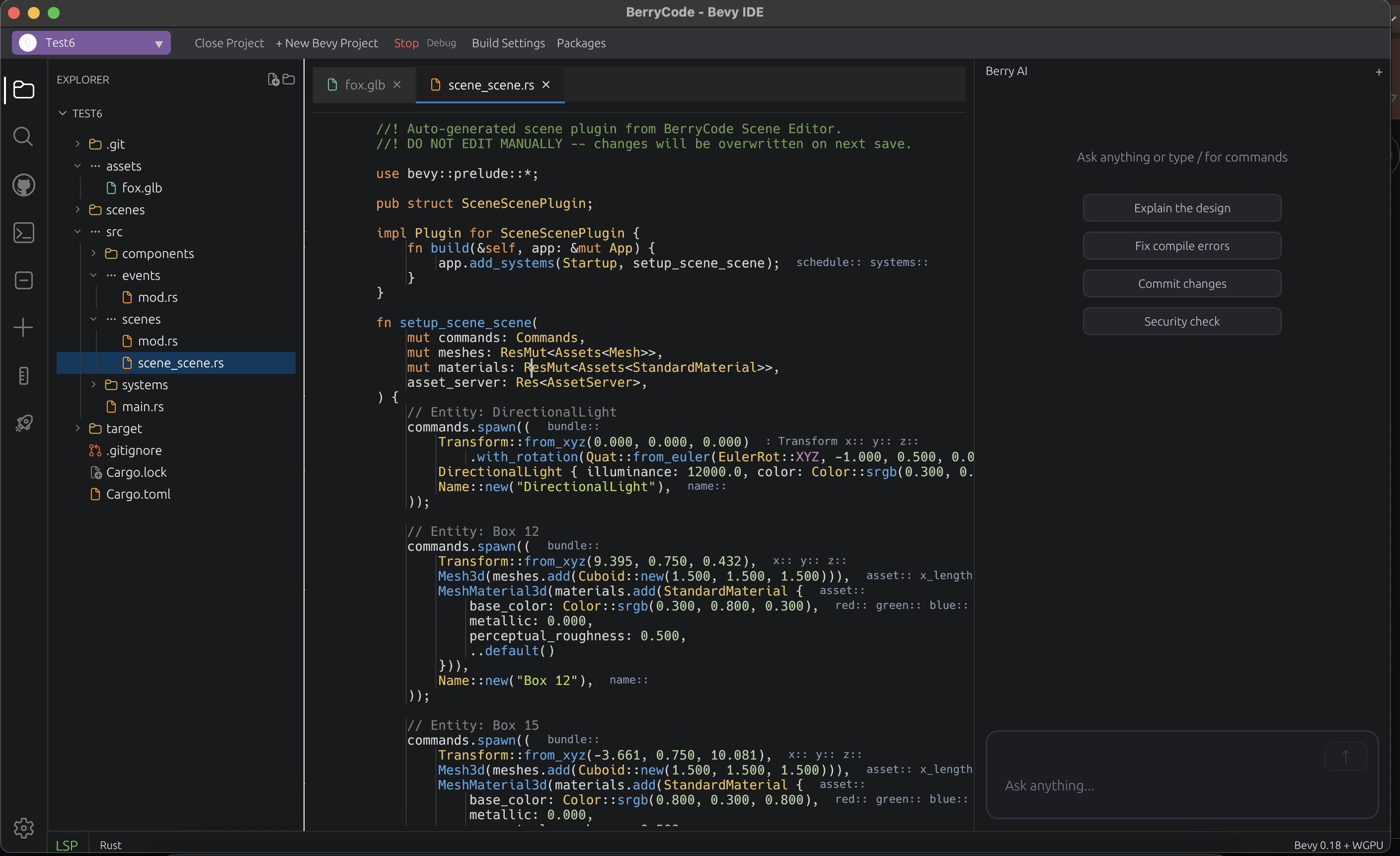
| Code Editor + AI Chat |
|---|
 |
What Makes BerryCode Different
| Feature | VS Code + Extensions | BerryCode |
|---|---|---|
| Scene editing | Text-only .scn.ron |
Visual 3D viewport with gizmos |
| ECS inspection | None | Live entity/component/resource browser |
| System ordering | None | Visual system dependency graph |
| Bevy events | println! debugging |
Real-time event monitor |
| Play in editor | Switch to terminal | Run with integrated console output |
| Bevy templates | Manually type boilerplate | One-click Component/System/Plugin generation |
| Plugin discovery | Search crates.io manually | Built-in Bevy plugin browser |
| Built with | Electron (web tech) | Bevy + WGPU (same stack as your game) |
Bevy-Native Tools
These tools understand Bevy's architecture — they're not generic wrappers.
Scene Editor (Unity-class)
- 3D viewport with translate/rotate/scale gizmos (
W/E/R) - VS Code-style panel headers and compact toolbar layout
- Entity hierarchy with file-tree-style rendering (Codicon icons, full-row selection, indent guides)
- Inspector with type-aware component editors (Vec3, Color, Handle, etc.)
- Prefab system — create, instantiate, override
- Multi-scene tabs with independent undo/redo
- Export to
.scn.ron(Bevy native) or.bscene(binary)
ECS Inspector
- Connect to a running Bevy app via BRP (Bevy Remote Protocol)
- Browse entities, components, and resources in real-time
- Filter and search by component type
- Auto-refresh with connection status indicator
System Graph
- Visualize system execution order and dependencies
- Identify bottlenecks and ordering issues
- Understand schedule topology at a glance
Event Monitor
- Real-time log of all Bevy events
- Filter by event type
- Inspect event payloads
Query Visualizer
- See which entities match a given query
- Performance metrics per query
- Optimization hints
State Editor
- View and manage Bevy
Statesenum variants - Manually trigger state transitions for testing
Bevy Templates
- Generate
Component,Resource,System,Plugin,Event,Stateboilerplate - Dynamic field/parameter input
- Insert directly at cursor position
Plugin Browser
- Search crates.io for Bevy-compatible plugins
- View metadata (version, downloads, description)
- One-click add to
Cargo.toml
Animation System
- Timeline editor with keyframe scrubbing
- Dopesheet for per-property keyframe editing
- Animator editor with clip selection and blend controls
Additional Scene Tools
- Visual Scripting (node-based, Blueprint-style)
- Shader Graph editor with live preview
- Material preview with PBR properties
- Terrain editor, Skeleton/Rig editor, Navmesh generator
- Physics simulator, Particle preview
Also a Full-Featured Code Editor
BerryCode isn't just Bevy tools — it's a complete Rust IDE.
- LSP — completions, hover, go-to-definition, references, diagnostics, format, rename, code actions, inlay hints, macro expansion
- Syntax highlighting — Rust, Python, JavaScript, C/C++, TOML, Markdown (Tree-sitter + Syntect)
- Vim mode — full modal editing (Normal, Insert, Visual, Command, Replace) with operators, text objects, registers, marks, dot repeat
- Terminal — iTerm2-class PTY emulator (VT100/xterm, ANSI 256 colors, 10K scrollback, multi-tab)
- Git — 6-tab panel (Status, History, Branches, Remotes, Tags, Stash) with commit graph and diff viewer
- Search — project-wide regex search with parallel execution (Rayon)
- Debugger — variables, call stack, watch expressions, breakpoints (DAP)
- AI Chat — integrated LLM assistant via gRPC
- Minimap, code folding, snippets, image/3D model preview, test runner
Local-first AI with Llama 3 (60 seconds)
BerryCode runs end-to-end on a local Llama 3 with no API keys, no rate limits, and no code leaving your machine. Useful for offline work, privacy-sensitive projects, and teaching kids to code without cloud dependencies.
# 1. Install Ollama and pull Llama 3.3
brew install ollama
ollama pull llama3.3

# 2. Run the Ollama server (background)
ollama serve
- Open BerryCode → Settings → AI Providers → Ollama (local) → click Use Llama 3 (local).
That's it. Chat sidebar, inline completions, and Autonomous (🤖 Agent) mode all run against the local model. BerryCode auto-injects a Llama-tuned Bevy 0.18 cheatsheet into the system prompt to compensate for the spots Llama gets wrong (Rust-vs-Python syntax slips, EventReader → MessageReader rename, tool-call envelope shape).
If you have a smaller machine, swap llama3.3 for llama3.1:8b in the Settings model field — same flow, lower memory.
Install
Pre-built binaries (recommended)
Grab the latest release artifact for your platform from the Releases page:
| Platform | Artifact |
|---|---|
| macOS (Apple Silicon + Intel) | BerryCode-<version>-macOS-universal.dmg |
| Linux (x86_64) | berrycode-<version>-linux-x86_64.tar.gz |
| Windows (x86_64) | berrycode-<version>-windows-x86_64.zip |
Releases are signed with Sigstore (.sig + .pem files alongside each archive). Windows ZIPs are additionally code-signed via SignPath so SmartScreen doesn't flag the binary.
Package managers
# macOS / Linux — Homebrew
brew install berrycode

# Windows — winget
winget install KyosukeIshizu1008.BerryCode

# Linux — Snap
sudo snap install berrycode

# Linux — Flatpak
flatpak install flathub dev.berrycode.BerryCode

# Cargo (any platform with Rust 1.75+)
cargo install berrycode
Build from source
git clone https://github.com/KyosukeIshizu1008/berryscode
cd berryscode
cargo run --bin berrycode               # debug
cargo build --release --bin berrycode   # release
AI features (chat, Native agent, Codex CLI / Claude Code fallbacks) are built into the binary — bring your own API key in Settings (Cmd+,) under the AI section.
Prerequisites: Rust 1.75+ | Linux: libx11-dev libasound2-dev libudev-dev libpipewire-0.3-dev
After cloning, enable the rustfmt pre-push hook so the Linux CI fmt check can't reject your push:
git config core.hooksPath .githooks
Roadmap
BerryCode ships in monthly releases. The big picture:
| Phase | Versions | What we're building |
|---|---|---|
| Editor | v0.4 – v0.7 | A solid Bevy IDE foundation (✅ shipped) |
| Runtime | v0.8 – v0.9 | Ship to mobile, then connect players online |
| Publishing | v0.10 – v0.12 | Game data, testing, store integration, i18n |
| Team scale | v1.0 | Multi-developer collaboration |
✅ Shipped (v0.4 → v0.7)
Highlights of what's already in the latest release:
- Editor core (v0.4): Rust LSP with completion details + signature help, IME preedit in the source editor, settings UI for keybindings & themes
- AI integration (v0.4.5): BYOK chat for Anthropic / OpenAI / Ollama, in-process Native agent (Responses-API tool-calling —
read_file/write_file/list_files/run_bash), Codex CLI / Claude Code as fallback,Cmd+Lchat sidebar, Approve / Reject diff cards,@fileattachments, 3-way merge guard, Bevy 0.18 cheatsheet injection - Bevy depth (v0.5): System Graph, animation blend tree, shader graph live-recompile preview, asset import (FBX / OBJ / glTF), plugin browser, hot reload for
.bsceneand shaders - Audio pipeline (v0.6): in-IDE waveform with scrubbing, event-driven editor (one-shots / loops / ducking / parameter layers), spatial audio with attenuation curves, music graph with stinger / vertical re-mix, SFX randomiser, hot reload
- Architecture → game (v0.7): DXF importer (LINE / LWPOLYLINE / 3DFACE / arcs), IFC MVP importer, layer-name → PBR colour with EN + JA vocabulary, Walkable Architecture template (FPS controller + AABB collider + day / dusk / night cycle)
See GitHub Releases for the full per-version breakdown.
🚧 Current focus: v0.8 — Ship to mobile
Bevy mobile development without the toolchain hell. Replace the cargo-mobile + Xcode + Android Studio + SDK juggling with a single integrated workflow.
Already in main:
- ✅ One-click iOS Simulator run via cargo-mobile2 — no Xcode juggling
- ✅ Toolchain detection — Xcode / Android SDK / NDK /
adb/ rustup targets / codesign identities, persisted to disk so cold starts skip the probe - ✅ Mobile run dispatch —
simctl boot/install/launch(iOS Sim),devicectl(iOS Device),adb install + am start + logcat(Android), all chained as one tracked subprocess that gets cleaned up on IDE quit - ✅ Unified log console — severity classifier handles
adb logcatpriorities, Apple unified-log markers, tracing keywords, and Bevy / Rust panic detection as a dedicated severity
v0.8.x roadmap:
- WiFi hot reload — mDNS-discovered TCP socket; asset edits flow to the running device build without rebuild
- iOS device probing —
xcrun devicectl list devicesso attached hardware shows up in the target dropdown (dispatch path is already wired) - Signing UI — pick certs from
security find-identity, attach provisioning profiles, manage Android keystores - One-click
rustup target addfrom the toolchain panel - Mobile-aware editor — touch input editor, safe-area / notch / orientation layouts, ASTC / ETC2 texture compression, mobile LOD presets
- Performance tooling — Metal frame capture / RenderDoc Android, frame-budget visualiser, battery-cost estimator, lifecycle test harness
- IPA / AAB build & sign inside the IDE, App Store Connect / Play Console upload helper, TestFlight QR generator
- VR/AR — Vision Pro / Quest builds reusing the v0.7 walkable scenes; pipeline becomes "CAD → walkthrough → headset" in one tool
🌉 Migration & interop (v0.8.x → v0.9, parallel track)
Bring your existing projects with you. BerryCode aims to be a bridge, not a wall.
- Godot project read-only viewer — open
project.godot, browse.tscnscene trees, syntax-highlight.gd/.csfiles. No automatic conversion — just side-by-side reading while you migrate at your own pace - Migration assistant — AI-suggested ECS scaffolding from Godot scene structure, side-by-side Godot ↔ Bevy code hints
- Unity project read (TBD) —
.unityYAML scenes,.cssyntax-highlighted, similar non-converting viewer - Jackdaw scene format interop — read scenes authored in the Bevy-native Jackdaw editor; edit code-side in BerryCode, scene-side in Jackdaw
Positioning: the editor that speaks your existing engine's files, even while you write new code in Bevy.
🔮 Future (v0.9 onwards)
| Version | Theme | Headline |
|---|---|---|
| v0.9 | Networking & multiplayer | First-class lightyear / bevy_replicon integration, N-client local launcher, server packaging (Fly.io / Railway / k8s) |
| v0.10 | Game data | DB inspector for SQLite / Postgres / Redis with ECS bridge, live save-file editing, schema diagrams |
| v0.10.5 | AI completion | Inline / Tab ghost-text, real 3-way merge, embedded Bevy doc RAG, ECS-aware completion (carryover from v0.4.5) |
| v0.11 | Testing & QA | Replay capture, AI playtest agent, visual regression, performance regression tracking |
| v0.12 | Publishing & i18n | Steam / itch / GOG / Epic upload, achievements, translation memory + AI-assisted i18n |
| v1.0 | Team scale | Multi-cursor CRDT collaborative editing, visual scripting → Rust codegen, plugin API freeze |
Beyond v1.0: WASM in-browser editing, cloud workspace sync.
See open issues for the current backlog and Discussions to suggest new directions.
Community
Join us on Discord for questions, feedback, and discussion.
Architecture
BerryCode runs on the same technology stack as your Bevy game:
| Layer | Technology |
|---|---|
| Engine | Bevy 0.18 |
| Rendering | WGPU (Metal / Vulkan / DX12) |
| UI | bevy_egui 0.39 + egui 0.33 |
| Text Buffer | Ropey (rope-based) |
| Syntax | Tree-sitter + Syntect |
| Terminal | portable-pty + VTE |
| Git | libgit2 |
| Search | Rayon + regex |
| LSP | lsp-types (native) |
| AI | gRPC (tonic + prost) |
| 3D Assets | gltf, tobj, image |
Platform Support
| Platform | Backend | Status |
|---|---|---|
| macOS | Metal | Supported |
| Linux | Vulkan / OpenGL | Supported |
| Windows | DirectX 12 | Supported |
日本語
Bevy ゲームエンジン専用に作られた、初めての IDE。
BerryCode は汎用エディタに Bevy プラグインを後付けしたものではありません。Bevy の ECS アーキテクチャ、シーンフォーマット、開発ワークフローをネイティブに理解する、Bevy 開発のためにゼロから設計された IDE です。Rust + Bevy + bevy_egui + WGPU で構築 — あなたのゲームと同じ技術スタック。
VS Code じゃダメなの? VS Code は Bevy を「ただの Rust プロジェクト」として扱います。BerryCode は Bevy をファーストクラスのゲームエンジンとして扱います — シーンエディタ、ECS インスペクター、システムグラフ等が組み込み済み。拡張機能は不要です。
デモ
スクリーンショット
| シーンエディタ | ゲーム実行 |
|---|---|
|
|
| ECS インスペクター | Git 統合 |
|---|---|
|
|
| コードエディタ + AI チャット |
|---|
|
BerryCode が他と違う点
| 機能 | VS Code + 拡張機能 | BerryCode |
|---|---|---|
| シーン編集 | テキストで .scn.ron |
ギズモ付き3Dビューポート |
| ECS 監視 | なし | ライブ エンティティ/コンポーネント/リソース ブラウザ |
| システム順序 | なし | ビジュアルシステム依存グラフ |
| Bevy イベント | println! デバッグ |
リアルタイムイベントモニター |
| エディタ内プレイ | ターミナルに切替 | 統合コンソール出力付きで実行 |
| Bevy テンプレート | 手動でボイラープレート入力 | ワンクリック Component/System/Plugin 生成 |
| プラグイン検索 | crates.io を手動検索 | 組み込み Bevy プラグインブラウザ |
| 構築技術 | Electron (Web技術) | Bevy + WGPU (ゲームと同じスタック) |
Bevy ネイティブツール
Bevy のアーキテクチャを理解した専用ツール群。
シーンエディタ (Unity クラス)
- 移動/回転/スケールギズモ付き3Dビューポート (
W/E/R) - VS Code 風パネルヘッダーとコンパクトなツールバーレイアウト
- ファイルツリー風のエンティティヒエラルキー (Codicon アイコン、フル幅選択、インデントガイド)
- 型対応コンポーネントエディタ付きインスペクター (Vec3, Color, Handle 等)
- プレハブシステム — 作成、インスタンス化、オーバーライド
- 独立した Undo/Redo 付きマルチシーンタブ
.scn.ron(Bevy ネイティブ) /.bscene(バイナリ) エクスポート
ECS インスペクター
- BRP (Bevy Remote Protocol) 経由で実行中の Bevy アプリに接続
- エンティティ、コンポーネント、リソースをリアルタイムに閲覧
- コンポーネント型でフィルター・検索
- 自動リフレッシュ + 接続ステータスインジケーター
システムグラフ
- システム実行順序と依存関係を可視化
- ボトルネックと順序問題の特定
イベントモニター
- 全 Bevy イベントのリアルタイムログ
- イベント型でフィルタリング
クエリビジュアライザー
- 指定クエリにマッチするエンティティの確認
- クエリごとのパフォーマンスメトリクス
ステートエディタ
- Bevy
Statesenum の表示・管理 - テスト用の手動ステート遷移
Bevy テンプレート
Component,Resource,System,Plugin,Event,Stateのボイラープレート生成- カーソル位置に直接挿入
プラグインブラウザ
- crates.io から Bevy 対応プラグインを検索
- ワンクリックで
Cargo.tomlに追加
アニメーションシステム
- キーフレーム付きタイムラインエディタ
- プロパティごとのドープシート
- クリップ選択・ブレンド付きアニメーターエディタ
その他のシーンツール
- ビジュアルスクリプト (ノードベース、Blueprint スタイル)
- ライブプレビュー付きシェーダーグラフエディタ
- PBR プロパティ付きマテリアルプレビュー
- テレインエディタ、スケルトン/リグエディタ、Navmesh ジェネレーター
- 物理シミュレーター、パーティクルプレビュー
フル機能のコードエディタでもある
Bevy ツールだけではなく、完全な Rust IDE。
- LSP — 補完、ホバー、定義ジャンプ、参照検索、診断、フォーマット、リネーム、コードアクション、インレイヒント、マクロ展開
- シンタックスハイライト — Rust, Python, JavaScript, C/C++, TOML, Markdown (Tree-sitter + Syntect)
- Vim モード — フルモーダル編集 (Normal, Insert, Visual, Command, Replace) + オペレータ、テキストオブジェクト、レジスタ、マーク、ドットリピート
- ターミナル — iTerm2 クラス PTY エミュレータ (VT100/xterm, ANSI 256色, 10K スクロールバック, マルチタブ)
- Git — 6タブパネル (Status, History, Branches, Remotes, Tags, Stash) + コミットグラフ、差分ビューアー
- 検索 — プロジェクト全体の正規表現検索 (Rayon 並列)
- デバッガー — 変数、コールスタック、ウォッチ、ブレークポイント (DAP)
- AI チャット — gRPC 経由の統合 LLM アシスタント
- ミニマップ、コード折りたたみ、スニペット、画像/3Dモデルプレビュー、テストランナー
インストール
ビルド済みバイナリ(推奨)
Releases ページから プラットフォーム別にダウンロード:
| プラットフォーム | アーティファクト |
|---|---|
| macOS (Apple Silicon + Intel) | BerryCode-<version>-macOS-universal.dmg |
| Linux (x86_64) | berrycode-<version>-linux-x86_64.tar.gz |
| Windows (x86_64) | berrycode-<version>-windows-x86_64.zip |
リリースは Sigstore で署名されています(.sig + .pem ファイルが各アーカイブに同梱)。Windows ZIP は SignPath によるコード署名も追加されているので SmartScreen が警告を出しません。
パッケージマネージャー
# macOS / Linux — Homebrew
brew install berrycode

# Windows — winget
winget install KyosukeIshizu1008.BerryCode

# Linux — Snap
sudo snap install berrycode

# Linux — Flatpak
flatpak install flathub dev.berrycode.BerryCode

# Cargo (Rust 1.75+ があればどのプラットフォームでも)
cargo install berrycode
ソースからビルド
git clone https://github.com/KyosukeIshizu1008/berryscode
cd berryscode
cargo run --bin berrycode               # デバッグビルド
cargo build --release --bin berrycode   # リリースビルド
AI 機能(チャット、Native エージェント、Codex CLI / Claude Code フォールバック)はバイナリに同梱済み — Settings (Cmd+,) の AI セクションで API キーを入力してください。
前提条件: Rust 1.75+ | Linux: libx11-dev libasound2-dev libudev-dev libpipewire-0.3-dev
ロードマップ
BerryCode は毎月リリースペースで開発中。全体像:
| フェーズ | バージョン | 内容 |
|---|---|---|
| エディタ | v0.4 – v0.7 | Bevy IDE の基盤(✅ リリース済) |
| ランタイム | v0.8 – v0.9 | モバイル → オンライン |
| 公開 | v0.10 – v0.12 | データ / テスト / ストア / 多言語 |
| チーム規模 | v1.0 | 複数人での共同開発 |
✅ リリース済み (v0.4 → v0.7)
最新リリースに含まれる主な機能:
- エディタコア (v0.4): Rust LSP の補完詳細 + シグネチャヘルプ、ソースエディタの IME preedit 表示、キーバインド・テーマ設定 UI
- AI 統合 (v0.4.5): Anthropic / OpenAI / Ollama 向け BYOK チャット、プロセス内 Native エージェント(Responses API tool-calling:
read_file/write_file/list_files/run_bash)、Codex CLI / Claude Code は fallback、Cmd+Lチャットサイドバー、Approve / Reject diff カード、@file添付、3-way merge ガード、Bevy 0.18 cheatsheet 注入 - Bevy 深耕 (v0.5): システムグラフ、アニメーションブレンドツリー、シェーダーグラフライブプレビュー、アセットインポート(FBX / OBJ / glTF)、プラグインブラウザ、
.bsceneとシェーダーのホットリロード - オーディオパイプライン (v0.6): IDE 内波形プレビュー + スクラブ再生、イベント駆動エディタ(ワンショット / ループ / ダッキング / パラメータレイヤ)、空間オーディオと減衰カーブ、ミュージックグラフ + スティンガー、SFX ランダマイザ、ホットリロード
- 建築 → ゲーム (v0.7): DXF インポータ(LINE / LWPOLYLINE / 3DFACE / 曲線テッセレート)、IFC MVP インポータ、レイヤ名 → PBR 色の英語 + 日本語語彙、Walkable Architecture テンプレート(FPS コントローラ + AABB コライダ + 昼 / 夕 / 夜サイクル)
詳細は GitHub Releases を参照。
🚧 現在の優先: v0.8 — モバイル出荷
Bevy のモバイル開発をツールチェーン地獄から解放。 cargo-mobile + Xcode + Android Studio + 各種 SDK の往復を、 1 つの統合ワークフローに置き換える。
main ブランチに着地済み:
- ✅ iOS Simulator ワンクリック起動(cargo-mobile2 経由)— Xcode を触らない
- ✅ ツールチェーン検出 — Xcode / Android SDK / NDK /
adb/ rustup target / codesign identities をプローブ、結果は永続化されコールド起動時はスキップ - ✅ モバイル run dispatch —
simctl boot/install/launch(iOS Sim)、devicectl(iOS Device)、adb install + am start + logcat(Android)を 1 つの追跡可能サブプロセスに連結、IDE 終了時に確実にクリーンアップ - ✅ 統合ログコンソール —
adb logcat優先度、Apple unified-log マーカー、tracing キーワード、Bevy / Rust パニック検出を独立した重要度として処理
v0.8.x ロードマップ:
- WiFi ホットリロード — mDNS で発見される TCP ソケットでアセット変更を再ビルド無しに動作中のデバイスへ流す
- iOS 実機プローブ —
xcrun devicectl list devicesで接続中の実機を target dropdown に表示(dispatch パスは既に通っている) - 署名 UI —
security find-identityから証明書選択、provisioning profile 紐付け、Android keystore 管理 -
rustup target addワンクリック — パネルから直接実行 - モバイル対応エディタ — タッチ入力ビジュアルエディタ、セーフエリア / ノッチ / 縦横回転対応、ASTC / ETC2 圧縮、モバイル LOD プリセット
- パフォーマンスツール — Metal frame capture / RenderDoc Android、フレーム予算可視化、バッテリー消費見積もり
- IPA / AAB ビルド・署名 を IDE 内で完結、App Store Connect / Play Console アップロード補助、TestFlight QR 生成
- VR / AR — v0.7 の walkable シーンを Vision Pro / Quest ビルドに流用、「CAD → ウォークスルー → ヘッドセット」が 1 ツールで完結
🌉 移行サポート & 相互運用 (v0.8.x → v0.9、並行トラック)
既存プロジェクトを連れて来られる。 BerryCode は壁ではなく橋を目指す。
- Godot プロジェクト読み取り専用ビューア —
project.godotを開く、.tscnシーンツリーを参照、.gd/.csをシンタックスハイライト。自動変換はしない — 移行作業中の参照ビューに徹する - 移行アシスタント — Godot シーン構造から Bevy ECS 設計を AI 提案、Godot ↔ Bevy のコード対応ヒントを横並び表示
- Unity プロジェクト読み取り (TBD) —
.unityYAML シーン、.csシンタックスハイライト、同じ「変換しない」ビュー - Jackdaw シーン形式の相互運用 — Bevy ネイティブの Jackdaw エディタで作ったシーンを読み込み、シーン編集は Jackdaw、コード編集は BerryCode
ポジショニング: 既存のエンジンのファイルを「読める」エディタ。Bevy で新しいコードを書きながら、古い資産も触れる。
🔮 これから (v0.9 以降)
| バージョン | テーマ | ヘッドライン |
|---|---|---|
| v0.9 | ネットワーク / マルチプレイヤー | lightyear / bevy_replicon 一級統合、N クライアントローカル起動、サーバーパッケージング(Fly.io / Railway / k8s) |
| v0.10 | ゲームデータ | SQLite / Postgres / Redis 向け DB インスペクタ、ECS ブリッジ、ライブセーブ編集、ER 図 |
| v0.10.5 | AI 補完 | インライン / Tab ゴーストテキスト、本物の 3-way merge、Bevy doc RAG、ECS 対応補完(v0.4.5 からの持ち越し) |
| v0.11 | テスト & QA | リプレイキャプチャ、AI プレイテストエージェント、ビジュアル回帰、パフォーマンス回帰追跡 |
| v0.12 | 公開 & 多言語化 | Steam / itch / GOG / Epic アップロード、実績、翻訳メモリ + AI 補助多言語化 |
| v1.0 | チーム規模 | マルチカーソル CRDT 共同編集、ビジュアルスクリプト → Rust コード生成、プラグイン API 凍結 |
v1.0 以降: ブラウザ内編集用 WASM ビルド、ワークスペースのクラウド同期。
現在のバックログは open issues、 新規アイデアは Discussions を参照。
コミュニティ
Discord で質問・フィードバック・議論ができます。
アーキテクチャ
BerryCode はあなたの Bevy ゲームと同じ技術スタックで動きます:
| レイヤー | 技術 |
|---|---|
| エンジン | Bevy 0.18 |
| レンダリング | WGPU (Metal / Vulkan / DX12) |
| UI | bevy_egui 0.39 + egui 0.33 |
| テキストバッファ | Ropey (ロープ構造) |
| シンタックス | Tree-sitter + Syntect |
| ターミナル | portable-pty + VTE |
| Git | libgit2 |
| 検索 | Rayon + regex |
| LSP | lsp-types (ネイティブ) |
| AI | gRPC (tonic + prost) |
| 3D アセット | gltf, tobj, image |
プラットフォーム対応
| プラットフォーム | バックエンド | ステータス |
|---|---|---|
| macOS | Metal | 対応済み |
| Linux | Vulkan / OpenGL | 対応済み |
| Windows | DirectX 12 | 対応済み |
License
MIT