
ESP32-S3 Secure Credentials & Keyboard Input Dongle (USB HID)
🆕 Latest Release – v2.1.0
BLE connectivity improvements, support for additional ESP32-S3 boards (including no-display variants), and a restructured keyboard layout system to make localization easier.
See CHANGELOG.md for full details.
Overview
This project started as a quick prototype of a tool that makes it easier to send credentials from a mobile credentials vault app to a PC or device without having to type them manually. It has since evolved to include companion clients (BluKeyborg) for Android, iOS, and Linux, allowing the dongle to be used as a secure keyboard or controller across platforms.
It works as a USB HID keyboard emulator running on ESP32-S3–based dongles and boards. The dongle receives keystrokes over Bluetooth and then "types" them on the connected host machine.
⚠️ Disclaimer: This project is experimental. While basic testing has been done, bugs or quirks are likely. Contributions and improvements are welcome.
🔧 Installation & First-Time Setup
Quick overview:
- Download the firmware for your specific board / dongle
- Flash the firmware to the device
- Complete the initial device setup
- Pair and provision the dongle with the BluKeyborg app
For first-time setup and provisioning, see: SETUP.md
Supported Clients
The Blue Keyboard dongle can be used with multiple companion clients across platforms. Below is a list of currently supported and in-progress clients, along with their repositories.
📱 Mobile Clients
-
BluKeyborg (Android)
Android companion app and primary driver for the dongle.
Handles BLE pairing, provisioning, mTLS sessions, layout management, and text/key sending.
👉 https://github.com/larrylart/blukeyborg-android -
BluKeyborg (iOS) (pending first public release)
iOS companion app and driver for the dongle.
Currently under development; first release pending additional testing and edge-case review.
👉 https://github.com/larrylart/blukeyborg-ios
🖥️ Desktop / CLI Clients
- Linux Command-Line Client
Minimal CLI client for Linux, useful for testing, scripting, and development.
👉 https://github.com/larrylart/blue_keyboard/tree/main/apps/linux
🔐 Password Manager Integrations (Related Repositories)
-
KeePassDX (AIDL Integration Fork)
Experimental fork of KeePassDX implementing a clean AIDL-based output interface,
allowing external HID providers (like BluKeyborg or InputStick-style devices)
to integrate without embedding device-specific logic.
👉 https://github.com/larrylart/KeePassDX -
KeePassDX-kb (Legacy Integration Fork)
Original KeePassDX fork with direct Blue Keyboard integration.
Worked with v1 firmware; this approach is no longer actively maintained. 👉 https://github.com/larrylart/KeePassDX-kb -
KeePassium – Works via the native iOS Share Sheet using BluKeyborg (iOS)
Hardware
Blue Keyboard / BluKeyborg runs on a range of ESP32-S3 USB dongles and boards, both with and without displays.
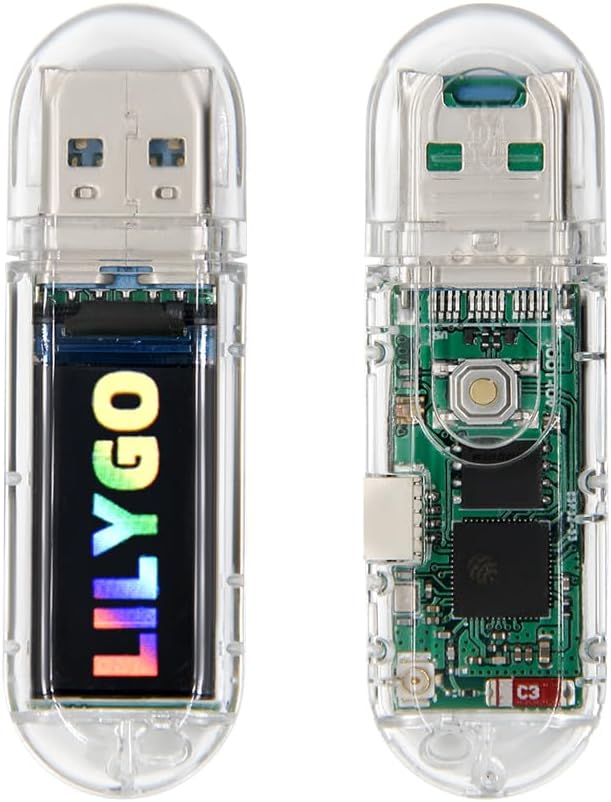
The primary reference and development platform is the LilyGO S3 T-Dongle (with screen), but other ESP32-S3 boards are also supported.
For the complete, up-to-date list of supported hardware (including no-display and USB-C variants), see: HARDWARE_SUPPORTED.md
How It Works
A high-level overview of the BLE → mTLS → USB HID pipeline is available here: HOW_IT_WORKS.md
Security
This project uses a layered security model (BLE bonding + application-level mTLS).
For details on the threat model, AppKey onboarding, and the mTLS protocol: SECURITY_OVERVIEW.md
Development
Build instructions and development notes: DEVELOPMENT_HOWTO.md
Roadmap / To Do
- More testing is required
- additional fine-tuning for BLE / mTLS handshake timing (target <1s connect time)
- a more complete implementation for various keyboard layouts
- macro support
- optional mouse support
- option to turn off LED / screen