
⌘ BotCommander
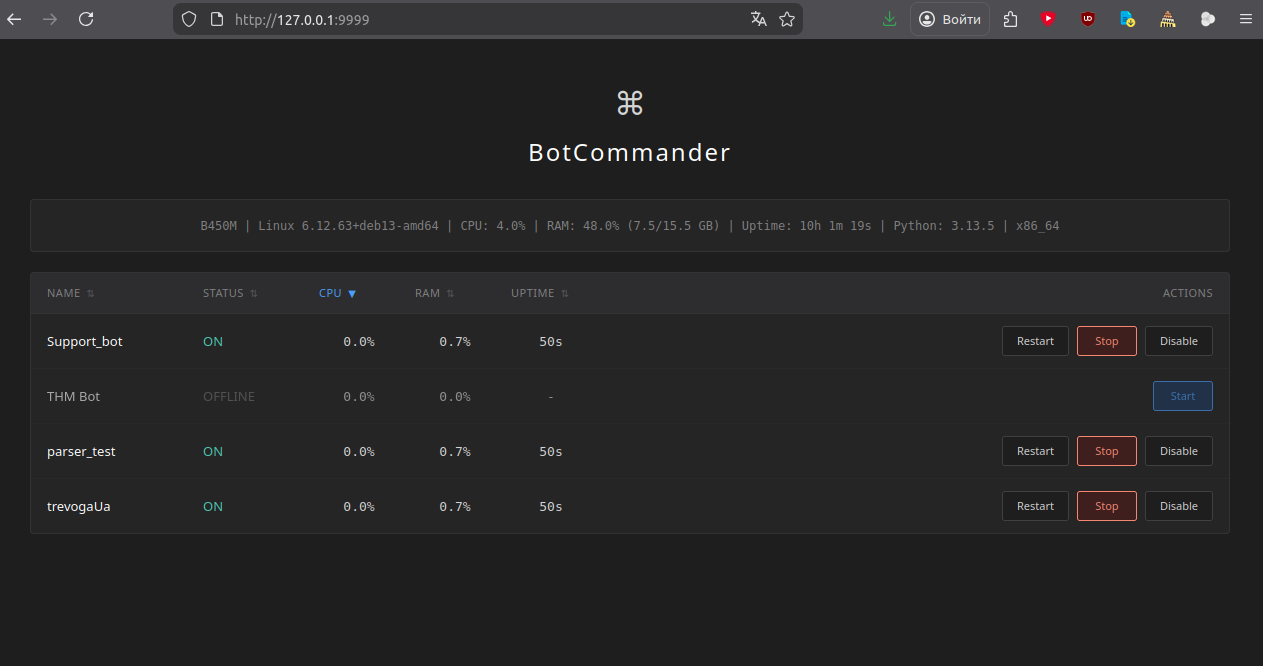
BotCommander is a simple and user-friendly web interface for managing multiple Python bots. Each bot is isolated in its own directory with a virtual environment (venv). The interface displays status, CPU/RAM usage, uptime, and allows you to start, stop, restart, and disable bots.
🛠 Features
Web interface built on Flask
Automatic startup of all bots on launch
Monitor CPU, memory, and uptime for each bot
Bot management: start, stop, restart, disable
Display system information (CPU, RAM, uptime, OS, etc.)
BotCommander doesn't use Docker because Python's virtual environments (venv) provide sufficient isolation for managing bots — it's lighter, faster, and doesn't waste resources on container overhead.
☑ Running BotCommander
#Install dependencies:
pip install flask psutil

#Launch the interface:
python3 main.py

Open in your browser: http://localhost:9999
⬡ Adding a New Bot
#Create bot directory
mkdir -p bot/mybot
cd bot/mybot


#Create virtual environment
python3 -m venv venv
source venv/bin/activate

#Install dependencies
pip install <required_dependencies>

#Create bot entry point
nano main.py
△ Important: Each bot must have a main.py file and a venv/ virtual environment. Bots are launched with: source venv/bin/activate && python3 main.py