
Bucketwise Planner




Multi-user budgeting app implementing Scott Pape's Barefoot Investor methodology. Fortnightly budgeting with bucket allocations (60/10/10/20), automated debt snowball payoff, transaction tracking, and optional AI financial advisor.
🙏 Acknowledgments
This project implements the budgeting methodology created by Scott Pape in his book The Barefoot Investor. The bucket-based allocation strategy (60% Daily Expenses, 10% Splurge, 10% Smile, 20% Fire Extinguisher) and debt snowball method are core principles from his work, which has helped millions of people take control of their finances.
Learn more: www.barefootinvestor.com
This is a community-driven open-source implementation, not affiliated with or endorsed by Scott Pape or The Barefoot Investor.
🎯 Features
Core Functionality
- Fortnightly Budgeting: Budget cycles aligned with income (biweekly paychecks)
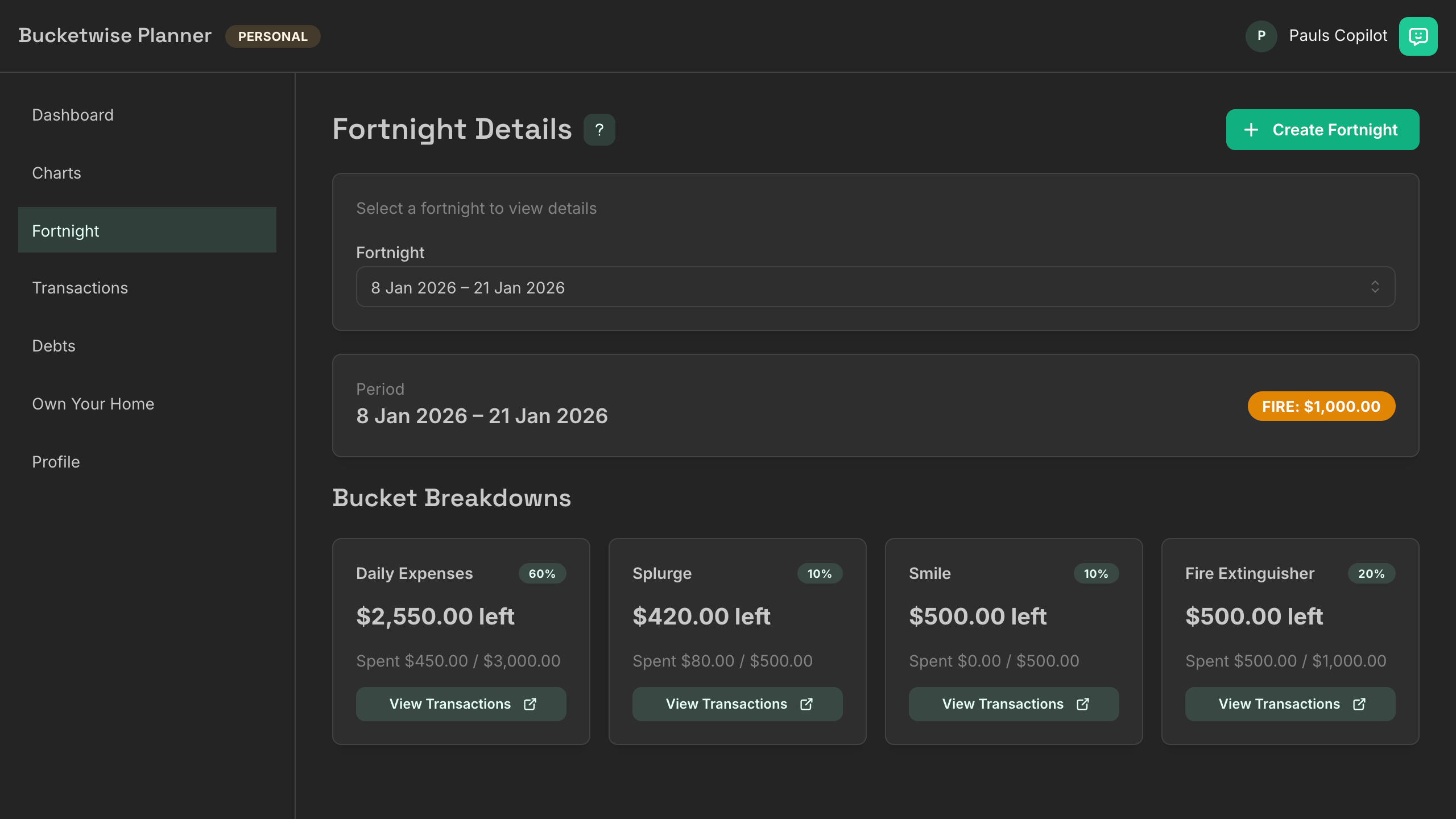
- Bucket Allocations: 60% Daily Expenses, 10% Splurge, 10% Smile, 20% Fire Extinguisher
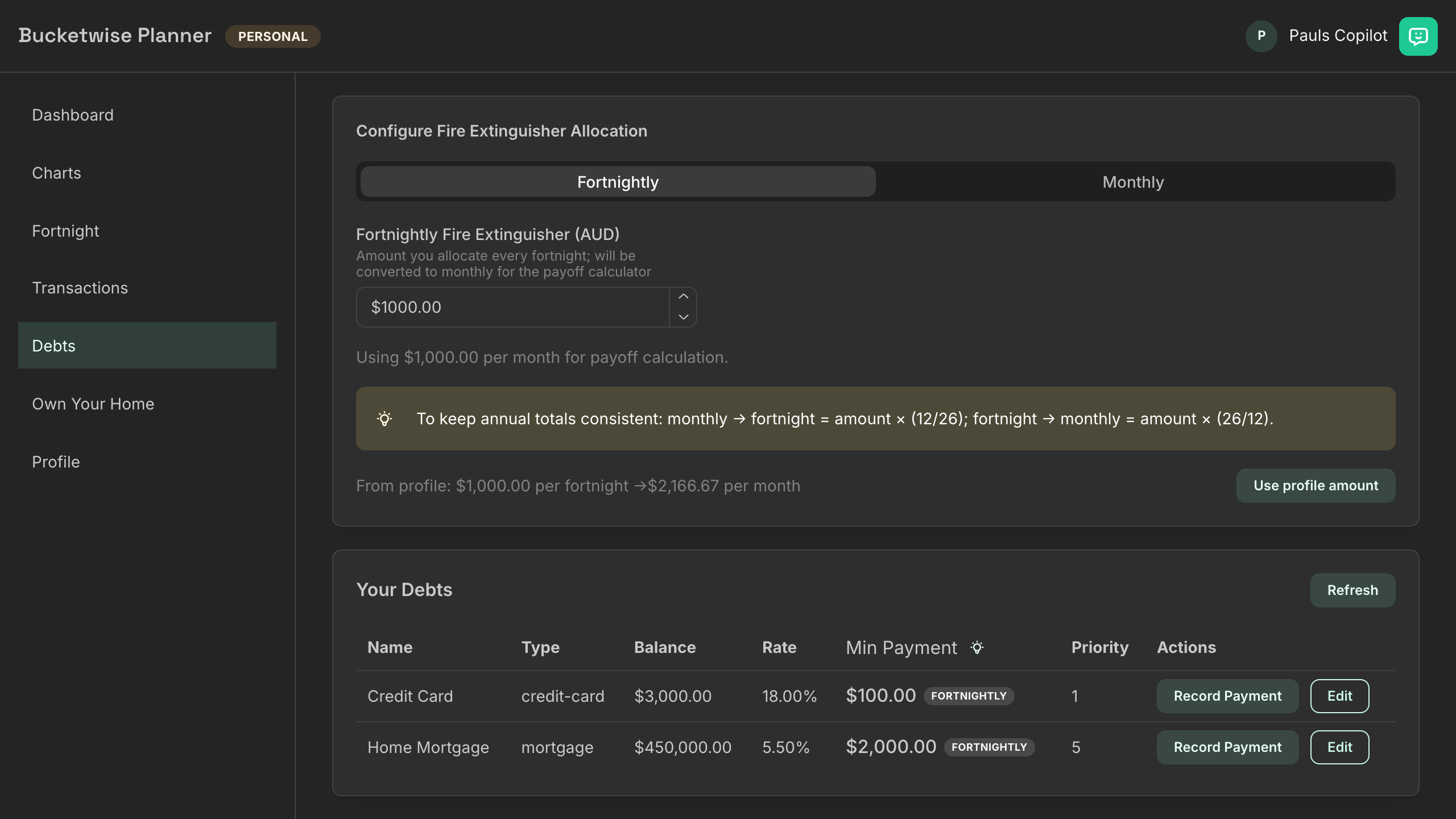
- Debt Snowball: Prioritize debts, automated payoff timeline with fortnightly cadence
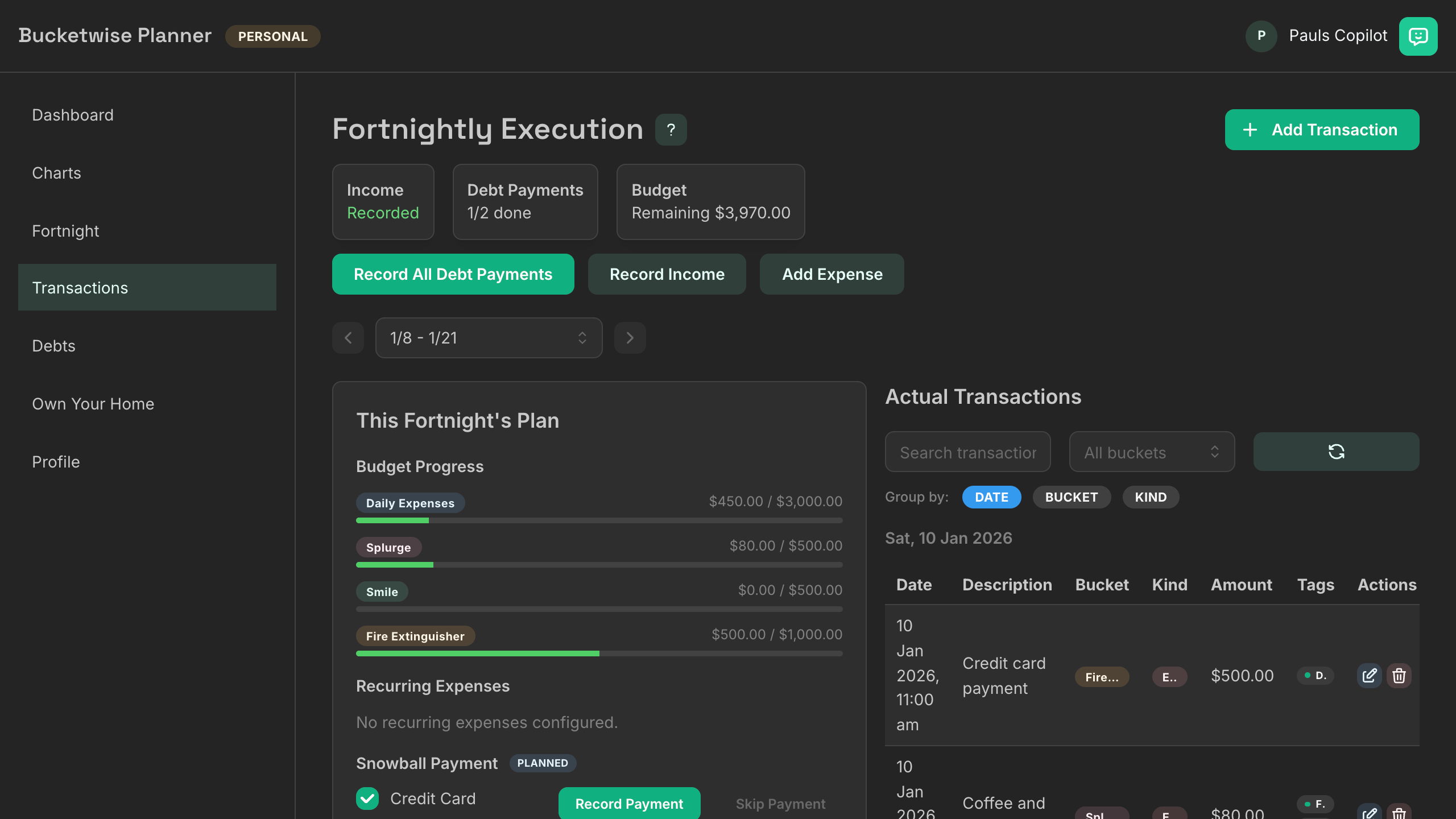
- Transaction Tracking: Record income, expenses, debt payments with bucket assignments
- Payoff Planning: Visual timeline showing when each debt will be paid off
- Multi-User: JWT-based signup/login (one instance = multiple users)
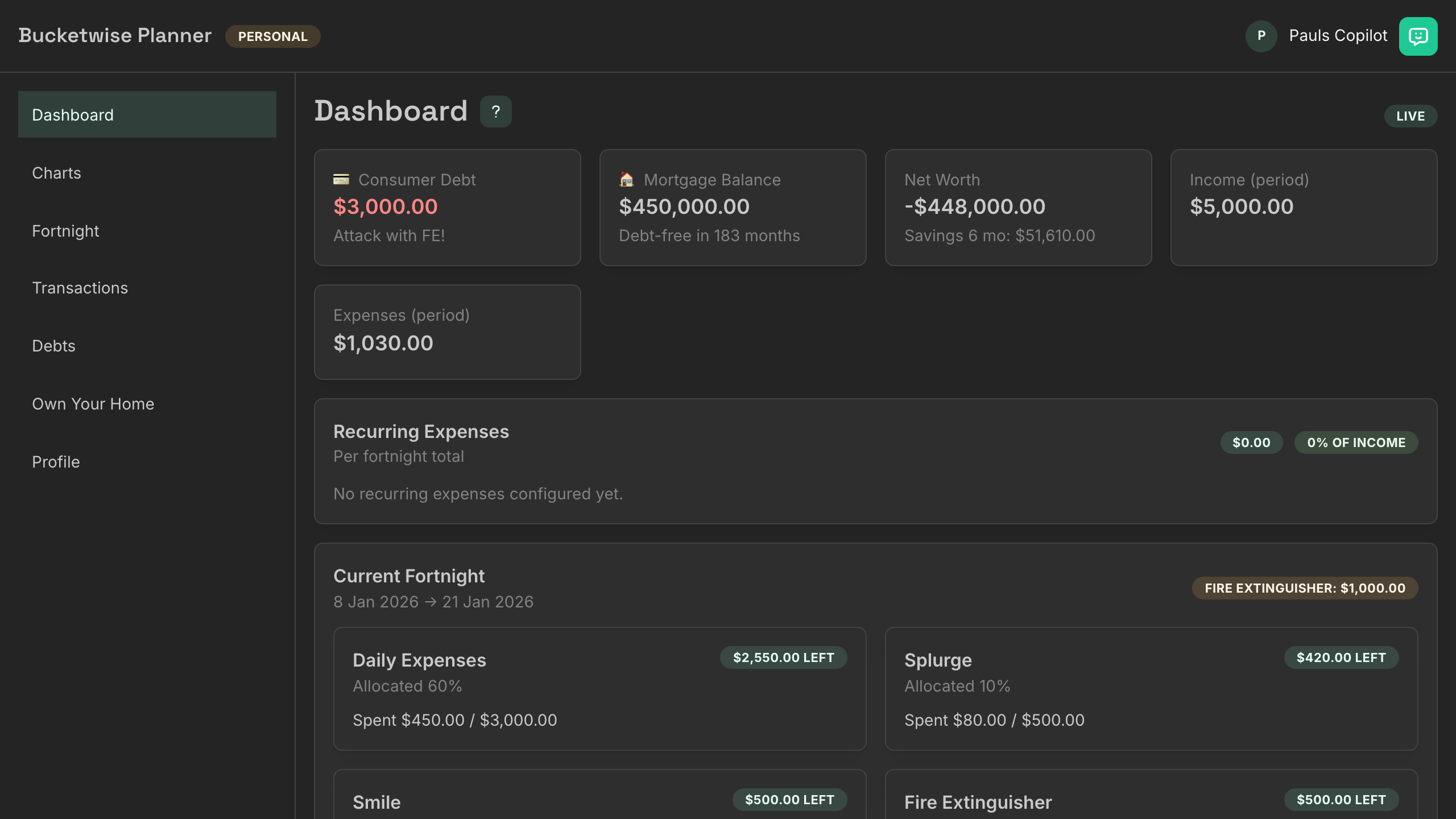
- Dashboard: Quick overview of current fortnight, debt summary, and projections
Optional AI Advisor 🤖
- Financial Guidance: Personalized advice based on your live budget
- Barefoot-Aligned: Trained on debt snowball and bucket methodology principles
- Privacy-Focused: No chat history stored (ephemeral context only)
- Disabled by Default: Requires optional Google API key to enable
- Access: Teal chat bubble (top-right) or press
⌘/
🏗️ Architecture
Backend
- Framework: Node.js + Express v5 + TypeScript (ESM)
- Database: PostgreSQL via node-postgres
- Architecture: Domain-Driven Design (DDD) with clean layers
- Domain Layer: Pure business logic (Money, Debt, Fortnight, Allocation)
- Application Layer: Use cases, DTOs, Zod schemas
- Infrastructure Layer: PostgreSQL repositories, in-memory adapters
- Presentation Layer: HTTP controllers, middleware, routes
- Optional AI: Google Gen AI SDK (
@google/genaiv1.34.0) with Gemini 2.5 Flash (disabled by default) - Testing: Vitest (99+ passing tests)
Frontend
- Framework: React 18 + Vite 7 + TypeScript
- UI Library: Mantine v8.3.10 (dark theme, navy/slate + teal/amber)
- State: Type-safe API client, minimal local state
- Components: Reusable UI (Selectors, Help system, ChatWidget, Badges, States)
- Accessibility: Keyboard shortcuts, tooltips, dark mode
Self-Hosted, Multi-Tenant Per Instance
- Each deployment is independent (no centralized cloud)
- Multiple users per instance via JWT authentication
- No SaaS dependency — full data ownership
📸 Screenshots
Dashboard
Fortnights View
Debts Management
Transactions Tracking
🚀 Quick Start
Docker Compose (Recommended)
Docker Hub releases:
slsadmin/bucketwise-planner-backendslsadmin/bucketwise-planner-frontend
Release images are published from semver tags such as v0.4.7, producing matching Docker tags such as 0.4.7.
Example docker-compose.yml (Postgres + backend + frontend):
services:
  postgres:
    image: postgres:14-alpine
    environment:
      POSTGRES_DB: bucketwise
      POSTGRES_USER: bucketwise
      POSTGRES_PASSWORD: your-secure-password
    volumes:
      - postgres_data:/var/lib/postgresql/data
    restart: unless-stopped
    healthcheck:
      test: ['CMD', 'pg_isready', '-U', 'bucketwise', '-d', 'bucketwise']
      interval: 20s
      timeout: 10s
      retries: 5
      start_period: 30s

  backend:
    build:
      context: .
      dockerfile: backend/Dockerfile
    image: bucketwise-planner-backend:local
    environment:
      NODE_ENV: production
      PORT: 3000
      # Storage method will default to in-memory if postgres is not set here
      STORAGE_METHOD: postgres
      # Use provided PG_CONNECTION_STRING, or default to local postgres service
      PG_CONNECTION_STRING: ${PG_CONNECTION_STRING:-postgresql://bucketwise:your-secure-password@postgres:5432/bucketwise}
      JWT_SECRET: your-jwt-secret-min-32-chars
      ADMIN_SECRET: your-admin-secret-min-32-chars
      AI_ENABLED: false
      # GEMINI_API_KEY: your-optional-ai-key
    ports:
      - '3000:3000'
    depends_on:
      postgres:
        condition: service_healthy
    restart: unless-stopped

  frontend:
    build:
      context: .
      dockerfile: frontend/Dockerfile
    image: bucketwise-planner-frontend:local
    depends_on:
      - backend
    ports:
      - '5555:80'
    restart: unless-stopped
    healthcheck:
      test: ['CMD', 'curl', '-f', 'http://localhost:80']
      interval: 30s
      timeout: 10s
      retries: 3

volumes:
  postgres_data:
Quick commands:
# Clone and start
git clone https://github.com/solid-logic-studios/bucketwise-planner.git
cd bucketwise-planner
cp .env.example .env
# Edit .env with your secrets (JWT_SECRET, ADMIN_SECRET, etc.)
docker compose up -d

# Access at http://localhost:5555
# First time: Click "Sign Up" to create your account
[!TIP] Generate secure secrets with:
openssl rand -base64 32
[!NOTE]
DB_SCHEMA_MODEdefaults toauto, which keeps the current self-hosted behavior of applying schema setup and pending SQL migrations on backend startup. Managed environments such as CasaOS can setDB_SCHEMA_MODE=manualto prevent routine restarts from making schema changes.
Full deployment guide: docs/SELF_HOSTING.md
Support And Guides
- Installation and self-hosting: docs/SELF_HOSTING.md
- Upgrade notes: docs/UPGRADING.md
- Architecture overview: docs/ARCHITECTURE.md
- FAQ: docs/FAQ.md
- Optional AI setup: docs/AI_ADVISOR.md
- Releases: Releases
- Community questions and ideas: Discussions
Local Development
# Install dependencies
pnpm install

# Set up environment files
cp backend/.env.example backend/.env
cp frontend/.env.example frontend/.env
# Edit with your database credentials

# Terminal 1: Backend
cd backend && pnpm dev  # http://localhost:3000

# Terminal 2: Frontend
cd frontend && pnpm dev  # http://localhost:5173
Development setup details: CONTRIBUTING.md
Local Database Setup (PostgreSQL)
Bucketwise Planner uses PostgreSQL. For local development without Docker, set up a local database and run the schema initializer.
Mac (Homebrew):
# Install and start Postgres 14
brew install postgresql@14
brew services start postgresql@14

# Create database and user
createdb budgetwise
psql -d budgetwise <<'SQL'
CREATE USER budgetwise WITH PASSWORD 'your-secure-password';
GRANT ALL PRIVILEGES ON DATABASE budgetwise TO budgetwise;
SQL

# Set backend/.env
cat > backend/.env <<'ENV'
PG_CONNECTION_STRING=postgresql://budgetwise:your-secure-password@localhost:5432/budgetwise
JWT_SECRET=replace-with-openssl-rand-base64-32
ADMIN_SECRET=replace-with-openssl-rand-base64-32
AI_ENABLED=false
ENV

# Apply schema (tables, indexes, columns)
cd backend && pnpm run db:ensure-schema

# Backfill timezone-aware fortnight bounds (if upgrading from <= 0.4.0)
psql "$PG_CONNECTION_STRING" < backend/migrations/003-backfill-fortnight-timezone-bounds.sql
# or run the helper script:
pnpm --filter backend db:backfill-fortnight-bounds

# Migration 004 (if upgrading from <= 0.4.3): promotes user_id to primary key in budget_profiles
# This runs automatically on startup — back up your database first if you have profile data
psql "$PG_CONNECTION_STRING" < backend/migrations/004-budget-profiles-user-id-primary-key.sql
Linux (apt-based):
sudo apt update && sudo apt install -y postgresql postgresql-contrib
sudo systemctl enable --now postgresql

# Create database and user
sudo -u postgres createdb budgetwise
sudo -u postgres psql <<'SQL'
CREATE USER budgetwise WITH PASSWORD 'your-secure-password';
GRANT ALL PRIVILEGES ON DATABASE budgetwise TO budgetwise;
SQL

# Set backend/.env
cat > backend/.env <<'ENV'
PG_CONNECTION_STRING=postgresql://budgetwise:your-secure-password@localhost:5432/budgetwise
JWT_SECRET=replace-with-openssl-rand-base64-32
ADMIN_SECRET=replace-with-openssl-rand-base64-32
AI_ENABLED=false
ENV

# Apply schema
cd backend && pnpm run db:ensure-schema

# Backfill timezone-aware fortnight bounds (if upgrading from <= 0.4.0)
psql "$PG_CONNECTION_STRING" < backend/migrations/003-backfill-fortnight-timezone-bounds.sql
# or run the helper script:
pnpm --filter backend db:backfill-fortnight-bounds

# Migration 004 (if upgrading from <= 0.4.3): promotes user_id to primary key in budget_profiles
# This runs automatically on startup — back up your database first if you have profile data
psql "$PG_CONNECTION_STRING" < backend/migrations/004-budget-profiles-user-id-primary-key.sql
Notes:
- You can alternatively use the Docker Compose
postgresservice in the Quick Start. - The schema initializer reads
PG_CONNECTION_STRINGfrombackend/.envand creates all required tables. - Regenerate strong secrets with:
openssl rand -base64 32.
🔧 Configuration
Required Environment Variables
| Variable | Purpose | Example |
|---|---|---|
PG_CONNECTION_STRING |
PostgreSQL database | postgresql://user:pass@localhost:5432/budgetwise |
JWT_SECRET |
Session token secret (min 32 chars) | Generate with: openssl rand -base64 32 |
ADMIN_SECRET |
Admin operations secret (min 32 chars) | Generate with: openssl rand -base64 32 |
Optional Environment Variables
| Variable | Purpose | Default |
|---|---|---|
GEMINI_API_KEY |
Google AI key (for chat feature) | (disabled) |
GEMINI_MODEL |
Gemini model override | gemini-2.5-flash |
AI_ENABLED |
Enable AI advisor | false |
VITE_API_BASE |
Frontend API endpoint | http://localhost:3000 |
STORAGE_METHOD |
Storage method for data | postgres (recommended) or memory |
See .env.example files for all configuration options.
Enabling AI Advisor
- Get free key from Google AI Studio
- Set
GEMINI_API_KEYin backend.env - Set
AI_ENABLED=true - Optional: if your key works with
gemini-flash-latestbut chat still fails, setGEMINI_MODEL=gemini-flash-latest - Reload backend configuration
Docker Compose:
docker compose up -d --force-recreate backendManual backend: restartpnpm dev - Chat bubble appears in top-right header
Full guide: docs/AI_ADVISOR.md
📚 Documentation
- docs/SELF_HOSTING.md — Deployment, configuration, reverse proxy, troubleshooting
- docs/ARCHITECTURE.md — System design, DDD patterns, tech stack
- docs/AI_ADVISOR.md — Optional AI feature setup and usage
- docs/FAQ.md — Common questions and answers
- CONTRIBUTING.md — Development setup, code style, testing
- backend/README.md — Backend-specific docs
- frontend/README.md — Frontend-specific docs
🧪 Testing
- 99+ passing tests (Vitest framework)
- Unit tests: Domain entities, value objects, use cases
- Integration tests: API endpoints with test database
- Coverage: Maintained >80% for critical paths
cd backend
pnpm test           # Run tests
pnpm test:watch    # Watch mode
pnpm test:coverage # Coverage report
💻 Development Commands
Backend
cd backend
pnpm dev              # Start dev server (http://localhost:3000)
pnpm test             # Run tests
pnpm test:watch      # Watch mode
pnpm test:coverage   # Coverage report
pnpm exec tsc --noEmit  # Type check
Frontend
cd frontend
pnpm dev              # Start Vite dev server (http://localhost:5173)
pnpm build            # Build for production
pnpm preview          # Preview production build
pnpm exec tsc --noEmit  # Type check
Workspace (Root)
pnpm install          # Install all dependencies
pnpm exec tsc --noEmit  # Type check all packages
🔑 Core Features Explained
Bucket Allocations (60/10/10/20)
Based on Scott Pape's Barefoot Investor methodology:
- Daily Expenses (60%) — Essential bills, groceries, transport, utilities
- Splurge (10%) — Guilt-free wants, entertainment, occasional treats
- Smile (10%) — Long-term dreams and goals (holidays, car upgrade, dream purchase)
- Fire Extinguisher (20%) — Initially for debt payoff, then emergency fund, then wealth building
Percentages are customizable in your profile for your unique situation.
Debt Snowball Method
- List debts with priority (1 = pay off first)
- Make minimum payments on all debts except priority 1
- Apply Fire Extinguisher to priority 1 debt (the "snowball")
- When paid off, roll that amount to priority 2
- Repeat until debt-free
- Result: Accelerating progress due to compounding effect
The app automatically calculates your payoff timeline in fortnights (2-week periods).
Fortnightly Budgeting
- Aligned with income: Most people earn biweekly (fortnightly)
- Not monthly: Monthly budgets don't match paycheck cycles
- Flexible: Create as many fortnights as you need
- Trackable: See spent vs remaining per bucket each fortnight
- Accurate dates: Local YYYY-MM-DD stored with UTC bounds to prevent timezone issues
🎨 Design & UX
- Dark theme with navy/slate base + teal/amber accents
- Responsive design — Works on desktop, tablet, mobile
- Accessibility: Keyboard shortcuts (
⌘/for help), tooltips, ARIA labels - Help system: Searchable help content with cross-page navigation
- Consistent patterns: Loading states, error alerts, empty states
- Date safety: Timezone normalization prevents off-by-one-day bugs
📊 Tech Stack
Backend
- Runtime: Node.js 18+ (ESM modules)
- Framework: Express v5
- Language: TypeScript (strict mode)
- Database: PostgreSQL with node-postgres
- Validation: Zod schemas
- Optional AI: Google Gen AI SDK with Gemini 2.5 Flash
- Testing: Vitest
Frontend
- Framework: React 18
- Build Tool: Vite 7
- Language: TypeScript (strict mode)
- UI Library: Mantine v8.3.10 with custom dark theme
- Icons: Tabler Icons React
Deployment
- Containerization: Docker + Docker Compose
- Recommended Proxy: Nginx or Caddy (TLS termination)
🤝 Contributing
We welcome contributions! See CONTRIBUTING.md for:
- Local development setup
- Code style and standards
- Testing requirements
- Pull request process
- Commit message conventions
All contributions help improve Bucketwise Planner for everyone!
📄 License
MIT License — Free for personal and commercial use. See LICENSE for details.
🆘 Support & Community
- 📖 Documentation: docs/, README files
- 💬 Questions: GitHub Discussions
- 🐛 Bug Reports: GitHub Issues
- 🆘 Help: SUPPORT.md and docs/FAQ.md
🌟 Roadmap
Check docs/FEATURE_WISHLIST.md for planned features and community ideas.
Contributions welcome! Help make Bucketwise Planner better.
Built with ❤️ using Domain-Driven Design, SOLID principles, and Scott Pape's Barefoot Investor methodology