
Budgie Clipboard Manager



A clipboard manager applet that can help you to store and manage clipboard content. Made with ♥️ for budgie desktop.
FEATURES
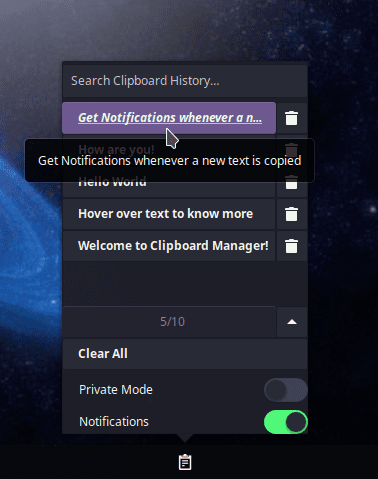
- Clipboard history management
- Save up to 100 Clips
- Private mode
- Remove any clip you want
- Searchable history
- Clear all option
- Autosave History
- Notification support
- Customizable Applet
- Restore Defaults Option
- Automatically paste selected clip to active window
Direct Install
For Debian/ Ubuntu based Distro
$ sudo add-apt-repository ppa:ubuntubudgie/backports

$ sudo apt install budgie-clipboard-applet
NOTE : If you are using Ubuntu Budgie then you can directly install the applet from welcome screen.
For Arch based Distro (using AUR)
$ yay -S budgie-clipboard-applet
Dependencies
These dependencies are required if you want to Build From Source
For Solus
$ sudo eopkg it budgie-desktop-devel vala -c system.devel xdotool
For Debian/ Ubuntu based Distro
$ sudo apt install budgie-core-dev meson valac xdotool
For Arch based Distro
$ sudo pacman -S budgie-desktop xdotool
NOTE : xdotool is optional and is used for pasting text in active window.
Building from source
Download the zip & then run from the extracted repo's folder:
$ meson --buildtype plain build --prefix=/usr --libdir=/usr/lib

$ sudo ninja -C build install
NOTE : You can also update the applet by following the above 2 step process
Other Info
If you want to reinstall the applet, then run this from the extracted repo's folder:
$ sudo ninja -C build install
Likewise the applet can be uninstalled by using
$ sudo ninja -C build uninstall
Debug the applet
$ budgie-panel --replace &!