

Cactus Tunnel
🌵 A charming TCP tunnel over WebSocket and Browser.






Cactus Tunnel is a TCP tunnel tool over WebSocket and Browser. It can help you open a TCP tunnel to another side of the world through the browser in an extremely restricted environment, just like a cactus under the scorching sun absorbing nutrients in the endless desert. If you are a thirsty geek focused on finding new hydration, don't miss it.
Like this charming tool? Give it a star or sponsor me!
I will respect your crucial support and say THANK YOU!

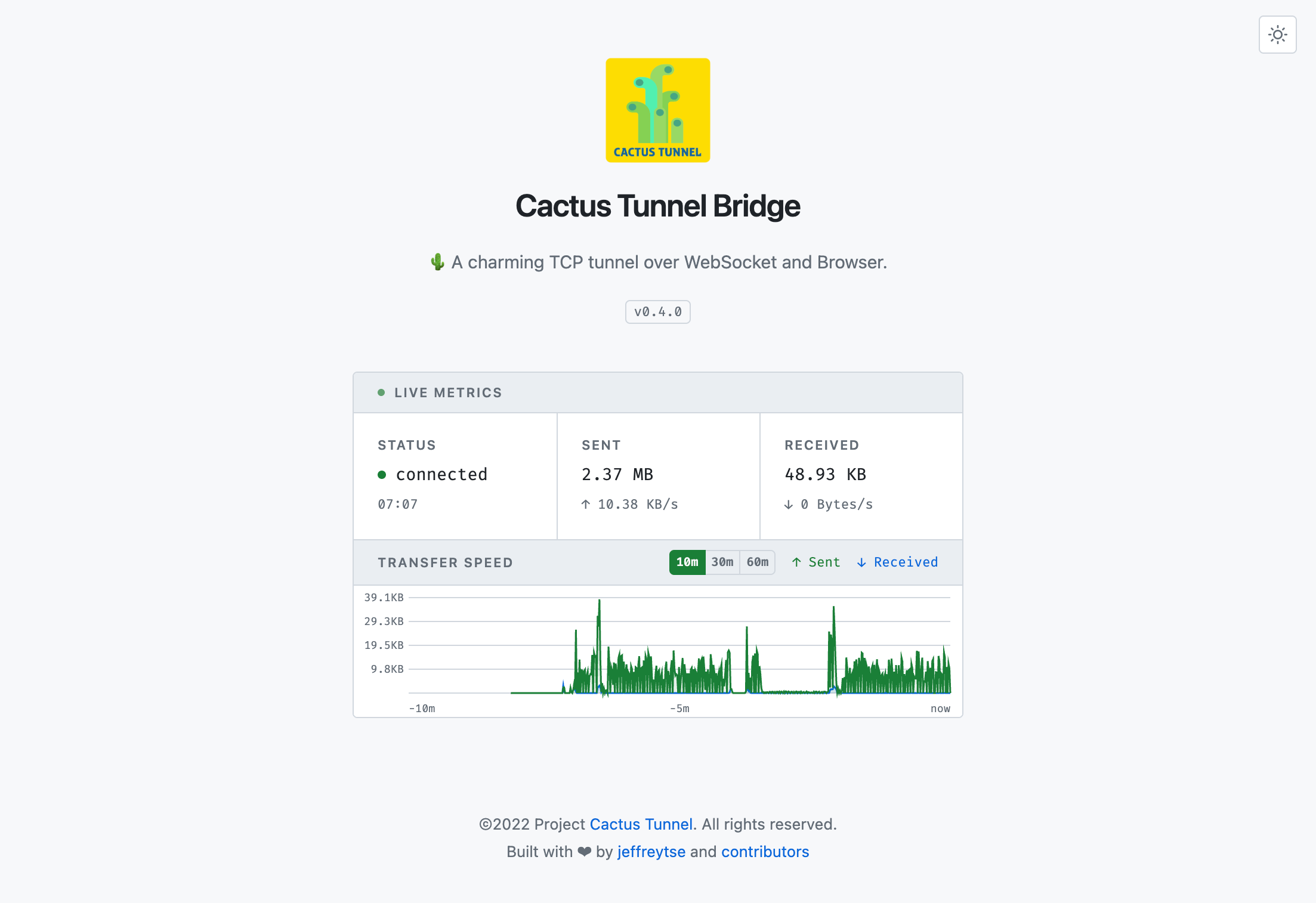
Bridge Mode Web UI
In bridge mode, cactus-tunnel opens a live dashboard in your browser that acts as the WebSocket relay and displays real-time transfer metrics.
Requirements
- Node.js >= 22
Installation
Install from npm:
npm install -g cactus-tunnel
Usage
cactus-tunnel help
Usage: cactus-tunnel [options] [command]

TCP tunnel over websocket and browser

Options:
  -V, --version                       output the version number
  -h, --help                          display help for command

Commands:
  client [options] <server> <target>  runs cactus-tunnel in client mode
  server [options]                    runs cactus-tunnel in server mode
  help [command]                      display help for command
For the full CLI reference including all flags, defaults, and environment variables, see docs/manual.md.
Tunnel Server
cactus-tunnel server
Listens on 0.0.0.0:7800 by default.
$ cactus-tunnel help server

Usage: cactus-tunnel server [options]

runs cactus-tunnel in server mode

Options:
  -p, --port <port>         tunnel server listening port (default: 7800)
  -h, --hostname <address>  tunnel server listening hostname (default: "0.0.0.0")
  -v, --verbose             enable verbose output
  --help                    display help for command
Tunnel Client
$ cactus-tunnel help client

Usage: cactus-tunnel client [options] <server> <target>

runs cactus-tunnel in client mode

Arguments:
  server                            tunnel server url, empty is bridge mode, e.g.
                                    ws://your-tunnel-server:7800
  target                            tunnel target url, e.g. your-linux-ssh-server:22

Options:
  -p, --port <port>                 tunnel client listening port (default: 7700)
  -h, --hostname <address>          tunnel client listening hostname (default: "127.0.0.1")
  -b, --bridge-mode                 enable tunnel bridge mode
  -nb, --no-browser                 disable auto open browser when in bridge mode
  -bp, --bridge-port <port>         tunnel bridge listening port (default: 7900)
  -bh, --bridge-hostname <address>  tunnel bridge listening hostname (default: "0.0.0.0")
  -v, --verbose                     enable verbose output
  --help                            display help for command
Request External API Services
Start a tunnel client in bridge mode:
cactus-tunnel client -b ws://<your-tunnel-server>:7800 ip-api.com:80
This starts a local server at localhost:7700, opens the bridge UI in the
browser, and tunnels traffic to ip-api.com:80 via the tunnel server.
curl http://localhost:7700/json/8.8.8.8
When you connect to port 7700, it auto-connects through the tunnel server
to ip-api.com:80. Response from the IP API lookup service:
$ curl http://localhost:7700/json/8.8.8.8 | jq
{
  "status": "success",
  "country": "United States",
  "countryCode": "US",
  "region": "VA",
  "regionName": "Virginia",
  "city": "Ashburn",
  "zip": "20149",
  "lat": 39.03,
  "lon": -77.5,
  "timezone": "America/New_York",
  "isp": "Google LLC",
  "org": "Google Public DNS",
  "as": "AS15169 Google LLC",
  "query": "8.8.8.8"
}
SSH SOCKS5 Proxy
Start a tunnel client in bridge mode:
cactus-tunnel client -b ws://<your-tunnel-server>:7800 <your-ssh-server>:22
Open an SSH SOCKS5 proxy through the tunnel:
ssh -p 7700 -D 3128 -C -N <your-username>@localhost
-D 3128: open a SOCKS5 proxy on local port3128-C: compress data in the tunnel, save bandwidth-N: do not execute remote commands, useful for just forwarding ports
Configure your system or browser to use localhost:3128 as a SOCKS5 proxy.
Import the Package
import cactusTunnel from "cactus-tunnel";

const server = new cactusTunnel.Server({
  listen: {
    port: 7800,
    hostname: "0.0.0.0",
  },
  logger: {
    silent: false,
  },
});

console.info("server listening at: http://0.0.0.0:7800");
Development
Install dependencies:
npm install
Build and run tests:
npm test
Run the CLI from the built output:
npm run start:cli help
Edit source files under src/, bin/, and tests/. Rebuild with npm run build to pick up changes.
Contributing
Issues and Pull Requests are greatly appreciated. If you've never contributed to an open source project before I'm more than happy to walk you through how to create a pull request.
Start by opening an issue describing the problem you'd like to resolve and we'll go from there.
Credits
- express - Fast, unopinionated, minimalist web framework for node.
- websocket-stream - WebSockets with the node stream API.
- pump - Pipe streams together and close all of them if one of them closes.
- winston - A logger for just about everything.
License
This theme is licensed under the MIT license © Jeffrey Tse.