Home
Softono
chitra

chitra

Open source Apache-2.0 Python
234
Stars
37
Forks
1
Issues
5
Watchers
2 months
Last Commit

About chitra

# chitra [![CodeFactor](https://www.codefactor.io/repository/github/gradsflow/chitra/badge)](https://www.codefactor.io/repository/github/gradsflow/chitra) [![Coverage](https://sonarcloud.io/api/project_badges/measure?project=aniketmaurya_chitra&metric=coverage)](https://sonarcloud.io/dashboard?id=aniketmaurya_chitra) ![GitHub issues](https://img.shields.io/github/issues/aniketmaurya/chitra?style=flat) [![Documentation Status](https://readthedocs.org/projects/chitra/badge/?version=latest)](https://chitra.readthedocs.io/en/latest/?badge=latest) ## What is chitra? **chitra** (**चित्र**) is a multi-functional library for full-stack Deep Learning. It simplifies Model Building, API development, and Model Deployment. ### Components arch Load Image from Internet url, filepath or `numpy` array and plot Bounding Boxes on the images easily. Model Training and Explainable AI. Easily create UI for Machine Learning models or Rest API backend that can be deployed for serving ML Models in Production. ### 📌 Highlights: - [New] [Auto Dockerization of Models](https://chitra.readthedocs.io/en/latest/source/cli/builder/builder-create/) 🐳 - [New] [Framework Agnostic Model Serving & Interactive UI prototype app](https://chitra.readthedocs.io/en/latest/source/api/serve/model_server/) ✨🌟 - [New] [Data Visualization, Bounding Box Visualization](https://chitra.readthedocs.io/en/latest/source/api/image/chitra-class/) 🐶🎨 - Model interpretation using GradCAM/GradCAM++ with no extra code 🔥 - Faster data loading without any boilerplate 🤺 - Progressive resizing of images 🎨 - Rapid experiments with different models using `chitra.trainer` module 🚀 ### 🚘 Implementation Roadmap - One click deployment to `serverless` platform. > If you have more use case please [**raise an issue/PR**](https://github.com/aniketmaurya/chitra/issues/new/choose) with the feature you want. > If you want to contribute, feel free to raise a PR. It doesn't need to be perfect. > We will help you get there. ## 📀 Installation [![Downloads](https://pepy.tech/badge/chitra)](https://pepy.tech/project/chitra) [![Downloads](https://pepy.tech/badge/chitra/month)](https://pepy.tech/project/chitra) ![GitHub License](https://img.shields.io/github/license/aniketmaurya/chitra?style=flat) ### Using pip (recommended) 1. Minimum installation `pip install -U chitra` 1. Full Installation `pip install -U 'chitra[all]'` 1. Install for Training `pip install -U 'chitra[nn]'` 1. Install for Serving `pip install -U 'chitra[serve]'` ### From source ``` pip install git+https://github.com/aniketmaurya/chitra@master ``` Or, ``` git clone https://github.com/aniketmaurya/chitra.git cd chitra pip install . ``` ## 🧑‍💻 Usage ### Loading data for image classification Chitra `dataloader` and `datagenerator` modules for loading data. `dataloader` is a minimal dataloader that returns `tf.data.Dataset` object. `datagenerator` provides flexibility to users on how they want to load and manipulate the data. ```python import numpy as np import chitra from chitra.dataloader import Clf import matplotlib.pyplot as plt clf_dl = Clf() data = clf_dl.from_folder(cat_dog_path, target_shape=(224, 224)) clf_dl.show_batch(8, figsize=(8, 8)) ``` ![Show Batch](https://raw.githubusercontent.com/aniketmaurya/chitra/master/docs/assets/images/output_3_1.png) ## Image datagenerator Dataset class provides the flexibility to load image dataset by updating components of the class. Components of Dataset class are: - image file generator - resizer - label generator - image loader These components can be updated with custom function by the user according to their dataset structure. For example the Tiny Imagenet dataset is organized as- ``` train_folder/ .....folder1/ .....file.txt .....folder2/ .....image1.jpg .....image2.jpg . . . ......imageN.jpg ``` The inbuilt file generator search for images on the `folder1`, now we can just update the `image file generator` and rest of the functionality will remain same. **Dataset also support progressive resizing of images.** ### Updating component ```python from chitra.datagenerator import Dataset ds = Dataset(data_path) # it will load the folders and NOT images ds.filenames[:3] ```
Output No item present in the image size list ['/Users/aniket/Pictures/data/tiny-imagenet-200/train/n02795169/n02795169_boxes.txt', '/Users/aniket/Pictures/data/tiny-imagenet-200/train/n02795169/images', '/Users/aniket/Pictures/data/tiny-imagenet-200/train/n02769748/images']
```python def load_files(path): return glob(f'{path}/*/images/*') def get_label(path): return path.split('/')[-3] ds.update_component('get_filenames', load_files) ds.filenames[:3] ```
Output get_filenames updated with No item present in the image size list ['/Users/aniket/Pictures/data/tiny-imagenet-200/train/n02795169/images/n02795169_369.JPEG', '/Users/aniket/Pictures/data/tiny-imagenet-200/train/n02795169/images/n02795169_386.JPEG', '/Users/aniket/Pictures/data/tiny-imagenet-200/train/n02795169/images/n02795169_105.JPEG']
### Progressive resizing > It is the technique to sequentially resize all the images while training the CNNs on smaller to bigger image sizes. Progressive Resizing is described briefly in his terrific fastai course, “Practical Deep Learning for Coders”. A great way to use this technique is to train a model with smaller image size say 64x64, then use the weights of this model to train another model on images of size 128x128 and so on. Each larger-scale model incorporates the previous smaller-scale model layers and weights in its architecture. ~[KDnuggets](https://www.kdnuggets.com/2019/05/boost-your-image-classification-model.html) ```python image_sz_list = [(28, 28), (32, 32), (64, 64)] ds = Dataset(data_path, image_size=image_sz_list) ds.update_component('get_filenames', load_files) ds.update_component('get_label', get_label) # first call to generator for img, label in ds.generator(): print('first call to generator:', img.shape) break # seconds call to generator for img, label in ds.generator(): print('seconds call to generator:', img.shape) break # third call to generator for img, label in ds.generator(): print('third call to generator:', img.shape) break ```
Output get_filenames updated with get_label updated with first call to generator: (28, 28, 3) seconds call to generator: (32, 32, 3) third call to generator: (64, 64, 3)
### tf.data support Creating a `tf.data` dataloader was never as easy as this one liner. It converts the Python generator into `tf.data.Dataset` for a faster data loading, prefetching, caching and everything provided by tf.data. ```python image_sz_list = [(28, 28), (32, 32), (64, 64)] ds = Dataset(data_path, image_size=image_sz_list) ds.update_component('get_filenames', load_files) ds.update_component('get_label', get_label) dl = ds.get_tf_dataset() for e in dl.take(1): print(e[0].shape) for e in dl.take(1): print(e[0].shape) for e in dl.take(1): print(e[0].shape) ```
Output get_filenames updated with get_label updated with (28, 28, 3) (32, 32, 3) (64, 64, 3)
## Trainer The Trainer class inherits from `tf.keras.Model`, it contains everything that is required for training. It exposes trainer.cyclic_fit method which trains the model using Cyclic Learning rate discovered by [Leslie Smith](https://arxiv.org/abs/1506.01186). ```python from chitra.trainer import Trainer, create_cnn from chitra.datagenerator import Dataset ds = Dataset(cat_dog_path, image_size=(224, 224)) model = create_cnn('mobilenetv2', num_classes=2, name='Cat_Dog_Model') trainer = Trainer(ds, model) # trainer.summary() ``` ```python trainer.compile2(batch_size=8, optimizer=tf.keras.optimizers.SGD(1e-3, momentum=0.9, nesterov=True), lr_range=(1e-6, 1e-3), loss='binary_crossentropy', metrics=['binary_accuracy']) trainer.cyclic_fit(epochs=5, batch_size=8, lr_range=(0.00001, 0.0001), ) ```
Training Loop... cyclic learning rate already set! Epoch 1/5 1/1 [==============================] - 0s 14ms/step - loss: 6.4702 - binary_accuracy: 0.2500 Epoch 2/5 Returning the last set size which is: (224, 224) 1/1 [==============================] - 0s 965us/step - loss: 5.9033 - binary_accuracy: 0.5000 Epoch 3/5 Returning the last set size which is: (224, 224) 1/1 [==============================] - 0s 977us/step - loss: 5.9233 - binary_accuracy: 0.5000 Epoch 4/5 Returning the last set size which is: (224, 224) 1/1 [==============================] - 0s 979us/step - loss: 2.1408 - binary_accuracy: 0.7500 Epoch 5/5 Returning the last set size which is: (224, 224) 1/1 [==============================] - 0s 982us/step - loss: 1.9062 - binary_accuracy: 0.8750
## ✨ Model Interpretability It is important to understand what is going inside the model. Techniques like GradCam and Saliency Maps can visualize what the Network is learning. `trainer` module has InterpretModel class which creates GradCam and GradCam++ visualization with almost no additional code. ```python from chitra.trainer import InterpretModel trainer = Trainer(ds, create_cnn('mobilenetv2', num_classes=1000, keras_applications=False)) model_interpret = InterpretModel(True, trainer) image = ds[1][0].numpy().astype('uint8') image = Image.fromarray(image) model_interpret(image) print(IMAGENET_LABELS[285]) ``` Returning the last set size which is: (224, 224) index: 282 Egyptian Mau ![png](https://raw.githubusercontent.com/aniketmaurya/chitra/master/docs/assets/images/output_22_1.png) ## 🎨 Data Visualization ### Image annotation Bounding Box creation is based on top of `imgaug` library. ```python from chitra.image import Chitra import matplotlib.pyplot as plt bbox = [70, 25, 190, 210] label = 'Dog' image = Chitra(image_path, bboxes=bbox, labels=label) plt.imshow(image.draw_boxes()) ``` ![png](https://raw.githubusercontent.com/aniketmaurya/chitra/master/docs/assets/images/preview-bounding-box.png) See [Play with Images](https://chitra.readthedocs.io/en/latest/examples/chitra-class/chitra-class.html) for detailed example! ## 🚀 Model Serving (Framework Agnostic) Chitra can Create Rest API or Interactive UI app for Any Learning Model - ML, DL, Image Classification, NLP, Tensorflow, PyTorch or SKLearn. It provides `chitra.serve.GradioApp` for building Interactive UI app for ML/DL models and `chitra.serve.API` for building Rest API endpoint. ```python from chitra.serve import create_api from chitra.trainer import create_cnn model = create_cnn('mobilenetv2', num_classes=2) create_api(model, run=True, api_type='image-classification') ```
API Docs Preview ![Preview Model Server](https://raw.githubusercontent.com/aniketmaurya/chitra/master/docs/examples/model-server/preview.png)
See [Example Section](https://chitra.readthedocs.io/en/latest/source/api/serve/model_server/) for detailed explanation! ## 🛠 Utility Limit GPU memory or enable dynamic GPU memory growth for Tensorflow. ```python from chitra.utility.tf_utils import limit_gpu, gpu_dynamic_mem_growth # limit the amount of GPU required for your training limit_gpu(gpu_id=0, memory_limit=1024 * 2) ``` No GPU:0 found in your system! ```python gpu_dynamic_mem_growth() ``` No GPU found on the machine! ## 🤗 Contribute Contributions of any kind are welcome. Please check the [**Contributing Guidelines**](https://github.com/aniketmaurya/chitra/blob/master/CONTRIBUTING.md) before contributing. ## Code Of Conduct We pledge to act and interact in ways that contribute to an open, welcoming, diverse, inclusive, and healthy community. Read full [**Contributor Covenant Code of Conduct**](https://github.com/aniketmaurya/chitra/blob/master/CODE_OF_CONDUCT.md) ## Acknowledgement *chitra* is built with help of awesome libraries like [Tensorflow 2.x](https://github.com/tensorflow/tensorflow), [imgaug](https://github.com/aleju/imgaug), [FastAPI](https://github.com/tiangolo/fastapi) and [Gradio](https://gradio.app).

Platforms

Web Self-hosted

Languages

Python

chitra

CodeFactor Coverage GitHub issues Documentation Status

What is chitra?

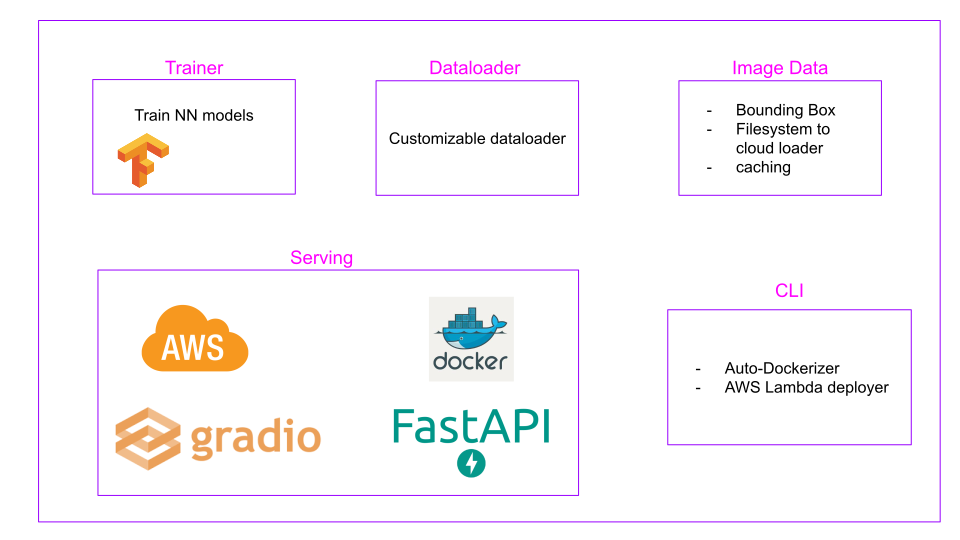
chitra (चित्र) is a multi-functional library for full-stack Deep Learning. It simplifies Model Building, API development, and Model Deployment.

Components
arch

Load Image from Internet url, filepath or numpy array and plot Bounding Boxes on the images easily. Model Training and Explainable AI. Easily create UI for Machine Learning models or Rest API backend that can be deployed for serving ML Models in Production.

📌 Highlights:

🚘 Implementation Roadmap

  • One click deployment to serverless platform.

If you have more use case please raise an issue/PR with the feature you want. If you want to contribute, feel free to raise a PR. It doesn't need to be perfect. We will help you get there.

📀 Installation

Downloads Downloads GitHub License

Using pip (recommended)

  1. Minimum installation pip install -U chitra

  2. Full Installation pip install -U 'chitra[all]'

  3. Install for Training pip install -U 'chitra[nn]'

  4. Install for Serving pip install -U 'chitra[serve]'

From source

pip install git+https://github.com/aniketmaurya/chitra@master

Or,

git clone https://github.com/aniketmaurya/chitra.git
cd chitra
pip install .

🧑‍💻 Usage

Loading data for image classification

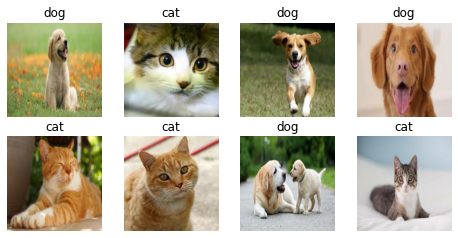
Chitra dataloader and datagenerator modules for loading data. dataloader is a minimal dataloader that returns tf.data.Dataset object. datagenerator provides flexibility to users on how they want to load and manipulate the data.

import numpy as np
import chitra
from chitra.dataloader import Clf
import matplotlib.pyplot as plt


clf_dl = Clf()
data = clf_dl.from_folder(cat_dog_path, target_shape=(224, 224))
clf_dl.show_batch(8, figsize=(8, 8))
Show Batch

Image datagenerator

Dataset class provides the flexibility to load image dataset by updating components of the class.

Components of Dataset class are:

  • image file generator
  • resizer
  • label generator
  • image loader

These components can be updated with custom function by the user according to their dataset structure. For example the Tiny Imagenet dataset is organized as-

train_folder/
.....folder1/
    .....file.txt
    .....folder2/
           .....image1.jpg
           .....image2.jpg
                     .
                     .
                     .
           ......imageN.jpg

The inbuilt file generator search for images on the folder1, now we can just update the image file generator and rest of the functionality will remain same.

Dataset also support progressive resizing of images.

Updating component

from chitra.datagenerator import Dataset

ds = Dataset(data_path)
# it will load the folders and NOT images
ds.filenames[:3]
Output
No item present in the image size list

['/Users/aniket/Pictures/data/tiny-imagenet-200/train/n02795169/n02795169_boxes.txt',
 '/Users/aniket/Pictures/data/tiny-imagenet-200/train/n02795169/images',
 '/Users/aniket/Pictures/data/tiny-imagenet-200/train/n02769748/images']
def load_files(path):
    return glob(f'{path}/*/images/*')


def get_label(path):
    return path.split('/')[-3]


ds.update_component('get_filenames', load_files)
ds.filenames[:3]
Output
get_filenames updated with <function load_files at 0x7fad6916d0e0>
No item present in the image size list

['/Users/aniket/Pictures/data/tiny-imagenet-200/train/n02795169/images/n02795169_369.JPEG',
 '/Users/aniket/Pictures/data/tiny-imagenet-200/train/n02795169/images/n02795169_386.JPEG',
 '/Users/aniket/Pictures/data/tiny-imagenet-200/train/n02795169/images/n02795169_105.JPEG']

Progressive resizing

It is the technique to sequentially resize all the images while training the CNNs on smaller to bigger image sizes. Progressive Resizing is described briefly in his terrific fastai course, “Practical Deep Learning for Coders”. A great way to use this technique is to train a model with smaller image size say 64x64, then use the weights of this model to train another model on images of size 128x128 and so on. Each larger-scale model incorporates the previous smaller-scale model layers and weights in its architecture. ~KDnuggets

image_sz_list = [(28, 28), (32, 32), (64, 64)]

ds = Dataset(data_path, image_size=image_sz_list)
ds.update_component('get_filenames', load_files)
ds.update_component('get_label', get_label)

# first call to generator
for img, label in ds.generator():
    print('first call to generator:', img.shape)
    break

# seconds call to generator
for img, label in ds.generator():
    print('seconds call to generator:', img.shape)
    break

# third call to generator
for img, label in ds.generator():
    print('third call to generator:', img.shape)
    break
Output
get_filenames updated with <function load_files at 0x7fad6916d0e0>
get_label updated with <function get_label at 0x7fad6916d8c0>

first call to generator: (28, 28, 3)
seconds call to generator: (32, 32, 3)
third call to generator: (64, 64, 3)

tf.data support

Creating a tf.data dataloader was never as easy as this one liner. It converts the Python generator into tf.data.Dataset for a faster data loading, prefetching, caching and everything provided by tf.data.

image_sz_list = [(28, 28), (32, 32), (64, 64)]

ds = Dataset(data_path, image_size=image_sz_list)
ds.update_component('get_filenames', load_files)
ds.update_component('get_label', get_label)

dl = ds.get_tf_dataset()

for e in dl.take(1):
    print(e[0].shape)

for e in dl.take(1):
    print(e[0].shape)

for e in dl.take(1):
    print(e[0].shape)
Output
get_filenames updated with <function load_files at 0x7fad6916d0e0>
get_label updated with <detn get_label at 0x7fad6916d8c0>
(28, 28, 3)
(32, 32, 3)
(64, 64, 3)

Trainer

The Trainer class inherits from tf.keras.Model, it contains everything that is required for training. It exposes trainer.cyclic_fit method which trains the model using Cyclic Learning rate discovered by Leslie Smith.

from chitra.trainer import Trainer, create_cnn
from chitra.datagenerator import Dataset


ds = Dataset(cat_dog_path, image_size=(224, 224))
model = create_cnn('mobilenetv2', num_classes=2, name='Cat_Dog_Model')
trainer = Trainer(ds, model)
# trainer.summary()
trainer.compile2(batch_size=8,
    optimizer=tf.keras.optimizers.SGD(1e-3, momentum=0.9, nesterov=True),
    lr_range=(1e-6, 1e-3),
    loss='binary_crossentropy',
    metrics=['binary_accuracy'])

trainer.cyclic_fit(epochs=5,
    batch_size=8,
    lr_range=(0.00001, 0.0001),
)
Training Loop... cyclic learning rate already set!
Epoch 1/5
1/1 [==============================] - 0s 14ms/step - loss: 6.4702 - binary_accuracy: 0.2500
Epoch 2/5
Returning the last set size which is: (224, 224)
1/1 [==============================] - 0s 965us/step - loss: 5.9033 - binary_accuracy: 0.5000
Epoch 3/5
Returning the last set size which is: (224, 224)
1/1 [==============================] - 0s 977us/step - loss: 5.9233 - binary_accuracy: 0.5000
Epoch 4/5
Returning the last set size which is: (224, 224)
1/1 [==============================] - 0s 979us/step - loss: 2.1408 - binary_accuracy: 0.7500
Epoch 5/5
Returning the last set size which is: (224, 224)
1/1 [==============================] - 0s 982us/step - loss: 1.9062 - binary_accuracy: 0.8750

<tensorflow.python.keras.callbacks.History at 0x7f8b1c3f2410>

✨ Model Interpretability

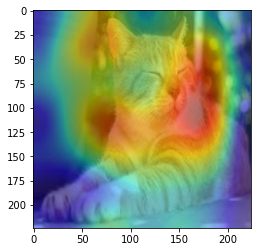
It is important to understand what is going inside the model. Techniques like GradCam and Saliency Maps can visualize what the Network is learning. trainer module has InterpretModel class which creates GradCam and GradCam++ visualization with almost no additional code.

from chitra.trainer import InterpretModel

trainer = Trainer(ds, create_cnn('mobilenetv2', num_classes=1000, keras_applications=False))
model_interpret = InterpretModel(True, trainer)

image = ds[1][0].numpy().astype('uint8')
image = Image.fromarray(image)
model_interpret(image)
print(IMAGENET_LABELS[285])
Returning the last set size which is: (224, 224)
index: 282
Egyptian Mau
png

🎨 Data Visualization

Image annotation

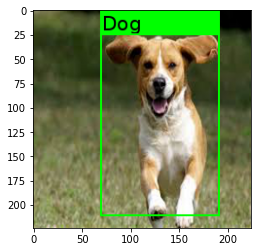
Bounding Box creation is based on top of imgaug library.

from chitra.image import Chitra
import matplotlib.pyplot as plt

bbox = [70, 25, 190, 210]
label = 'Dog'

image = Chitra(image_path, bboxes=bbox, labels=label)
plt.imshow(image.draw_boxes())
png

See Play with Images for detailed example!

🚀 Model Serving (Framework Agnostic)

Chitra can Create Rest API or Interactive UI app for Any Learning Model - ML, DL, Image Classification, NLP, Tensorflow, PyTorch or SKLearn. It provides chitra.serve.GradioApp for building Interactive UI app for ML/DL models and chitra.serve.API for building Rest API endpoint.

from chitra.serve import create_api
from chitra.trainer import create_cnn

model = create_cnn('mobilenetv2', num_classes=2)
create_api(model, run=True, api_type='image-classification')
API Docs Preview
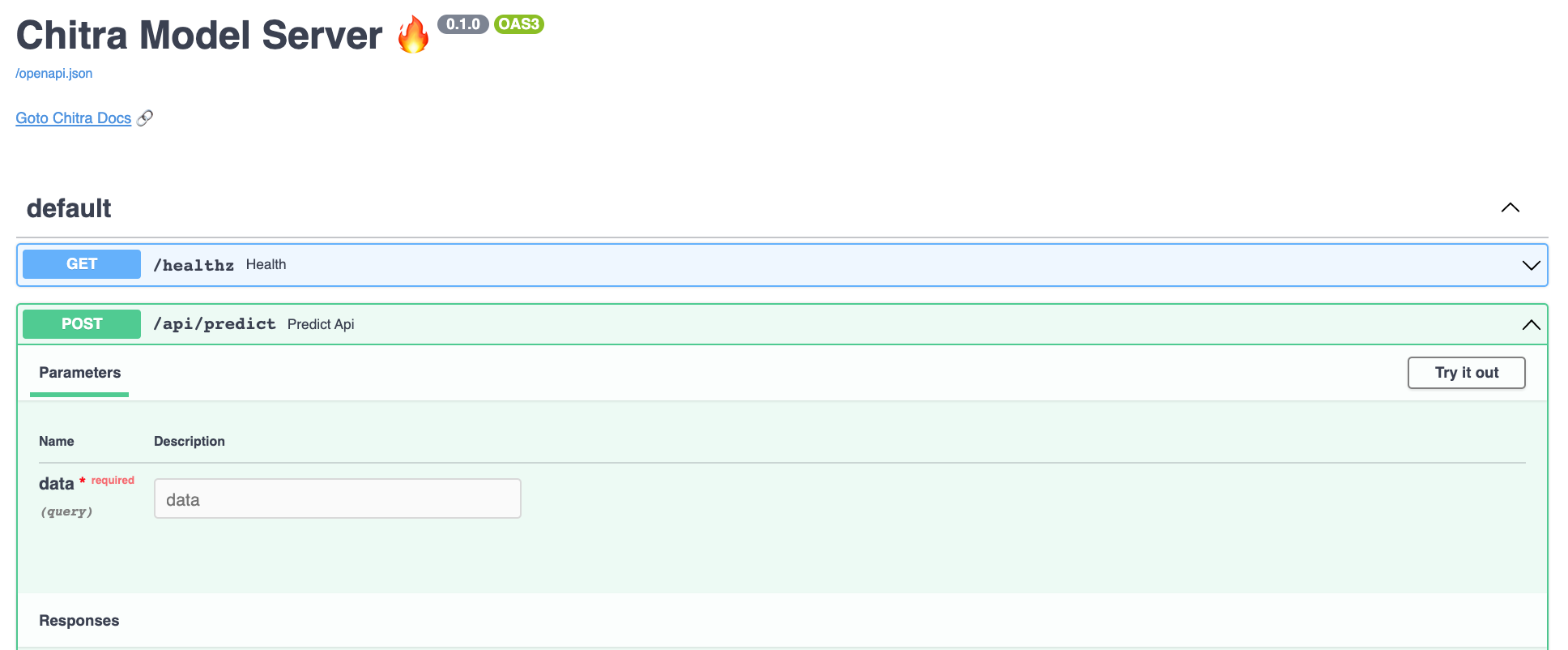
Preview Model Server

See Example Section for detailed explanation!

🛠 Utility

Limit GPU memory or enable dynamic GPU memory growth for Tensorflow.

from chitra.utility.tf_utils import limit_gpu, gpu_dynamic_mem_growth

# limit the amount of GPU required for your training
limit_gpu(gpu_id=0, memory_limit=1024 * 2)
No GPU:0 found in your system!
gpu_dynamic_mem_growth()
No GPU found on the machine!

🤗 Contribute

Contributions of any kind are welcome. Please check the Contributing Guidelines before contributing.

Code Of Conduct

We pledge to act and interact in ways that contribute to an open, welcoming, diverse, inclusive, and healthy community.

Read full Contributor Covenant Code of Conduct

Acknowledgement

chitra is built with help of awesome libraries like Tensorflow 2.x, imgaug, FastAPI and Gradio.