
LGP Evals CI/CD Pipeline 🚀
Agent built in LangGraph OSS. It includes:
- unit, integration, e2e tests
- offline evaluations with OpenEvals and LangSmith
- preview and prod agent deployments using LangGraph Platform control plane API
🛠️ Prerequisites
- uv - Fast Python package installer and resolver
🚀 Quick Start
1. Install Dependencies
First, ensure you have uv installed. Then run:
uv sync
This will create a virtual environment and install all project dependencies.
2. Environment Configuration
Copy the example environment file and configure your variables:
cp .env.example .env
Edit the .env file and add your required environment variables.
3. Run LangGraph Studio
Start the LangGraph development server to visualize your agent:
uv run langgraph dev
This will start the LangGraph Studio interface where you can interact with and debug your text-to-SQL agent.
📁 Project Structure
text2sql-agent/
├── agents/           # Agent implementations
├── examples/         # Usage examples
├── helpers/          # Utility functions
└── langgraph.json    # LangGraph configuration
🔧 Development
- Virtual Environment: Managed by
uv- no need to manually activate - Dependencies: All managed through
pyproject.tomlanduv.lock - Environment Variables: Configure in
.envfile
🧪 Testing
Run all tests:
uv run pytest tests/
Run specific test categories:
-
Unit tests (single nodes and utilities):
uv run pytest -m single_node uv run pytest -m utils -
Integration tests:
uv run pytest -m integration -
Offline evaluations (agent performance evaluation):
uv run pytest -m evaluator
GitHub Actions Environment Setup
If you enable the GitHub Actions workflow, make sure to set the following environment variable in your repository secrets:
OPENAI_API_KEY: Your OpenAI API keyLANGSMITH_API_KEY: Your LangSmith API keyLANGSMITH_TRACING=true: Enable LangSmith tracing
The workflow will automatically run tests and evaluations on pull requests and pushes to main/develop branches
🚀 Deployment Options
This project supports multiple deployment methods beyond the automated GitHub Actions CI/CD pipeline. Here are the different ways you can deploy your LangGraph agent:
Prerequisites for Manual Deployment
Before deploying your agent, ensure you have:
- LangGraph Graph: Your agent implementation (e.g.,
./agents/simple_text2sql.py:agent) - Dependencies: Either
requirements.txtorpyproject.tomlwith all required packages - Configuration:
langgraph.jsonfile specifying:- Path to your agent graph
- Dependencies location
- Environment variables
- Python version
Example langgraph.json:
{
    "graphs": {
        "simple_text2sql": "./agents/simple_text2sql.py:agent"
    },
    "env": ".env",
    "python_version": "3.11",
    "dependencies": ["."],
    "image_distro": "wolfi"
}
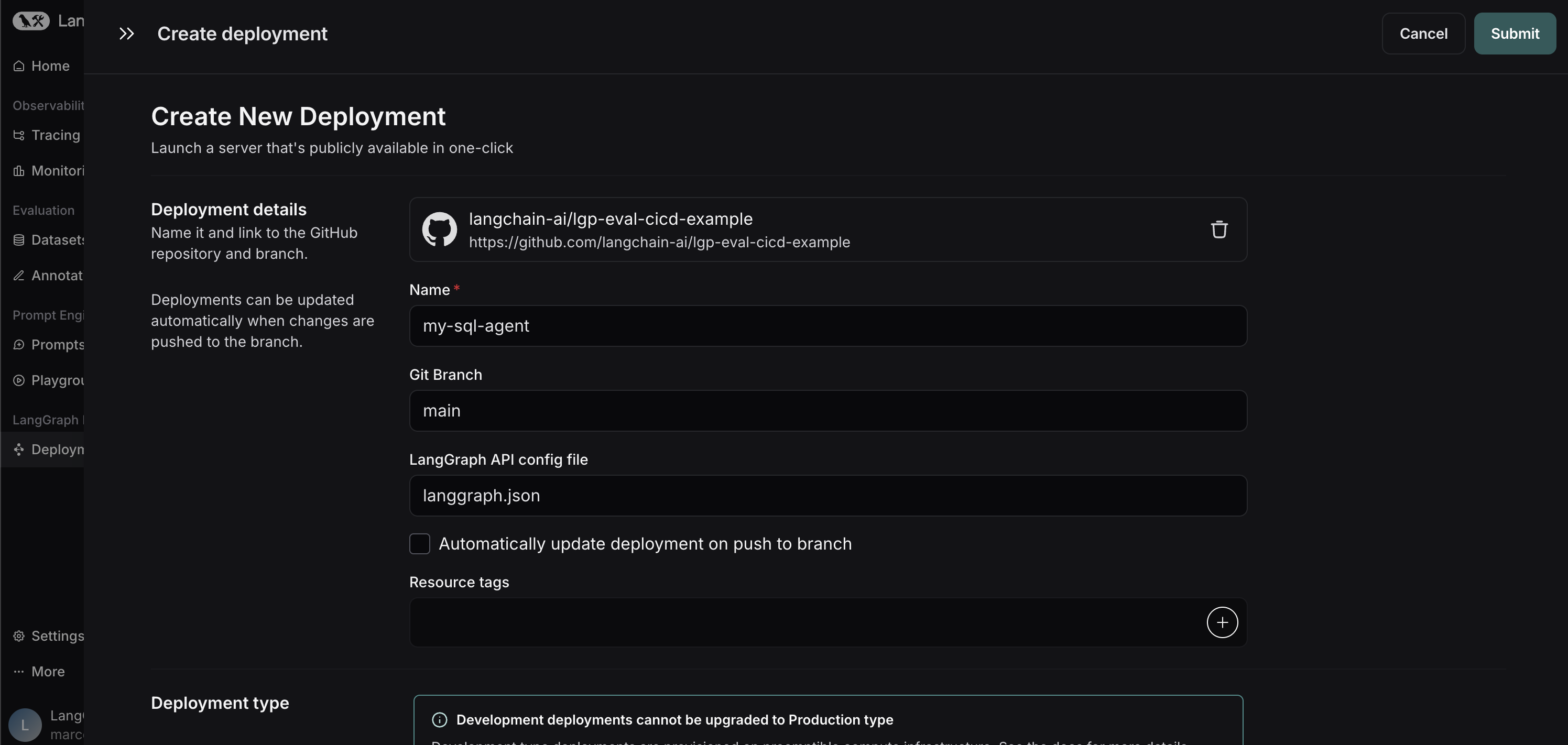
Method 1: LangSmith Deployment UI (Cloud Only)
Deploy your agent using the LangSmith deployment interface for cloud deployments:
- Go to your LangSmith dashboard
- Navigate to the Deployments section
- Connect your GitHub repository and specify the agent path
Benefits:
- Simple UI-based deployment
- Direct integration with your GitHub repository
- No manual Docker image management required
Method 2: Build Docker Image with LangGraph CLI
Build a Docker image directly using the LangGraph CLI:
# Build Docker image
uv run langgraph build -t my-agent:latest

# Push to your container registry
docker push my-agent:latest
You can push to any container registry (Docker Hub, AWS ECR, Azure ACR, Google GCR, etc.) that your deployment environment has access to.
Deployment Options:
- Cloud LangSmith: Use the Control Plane API to create deployments from your container registry
- Self-Hosted/Hybrid LangSmith: Choose between LangSmith UI or Control Plane API
See the LangGraph CLI build documentation for more details.
Local Development & Testing
First, test your agent locally using LangGraph Studio:
# Start local development server with LangGraph Studio
uv run langgraph dev
This will:
- Spin up a local server with LangGraph Studio
- Allow you to visualize and interact with your graph
- Validate that your agent works correctly before deployment
💡 Tip: If your graph works in LangGraph Studio, deployment to LangGraph Platform will likely succeed.
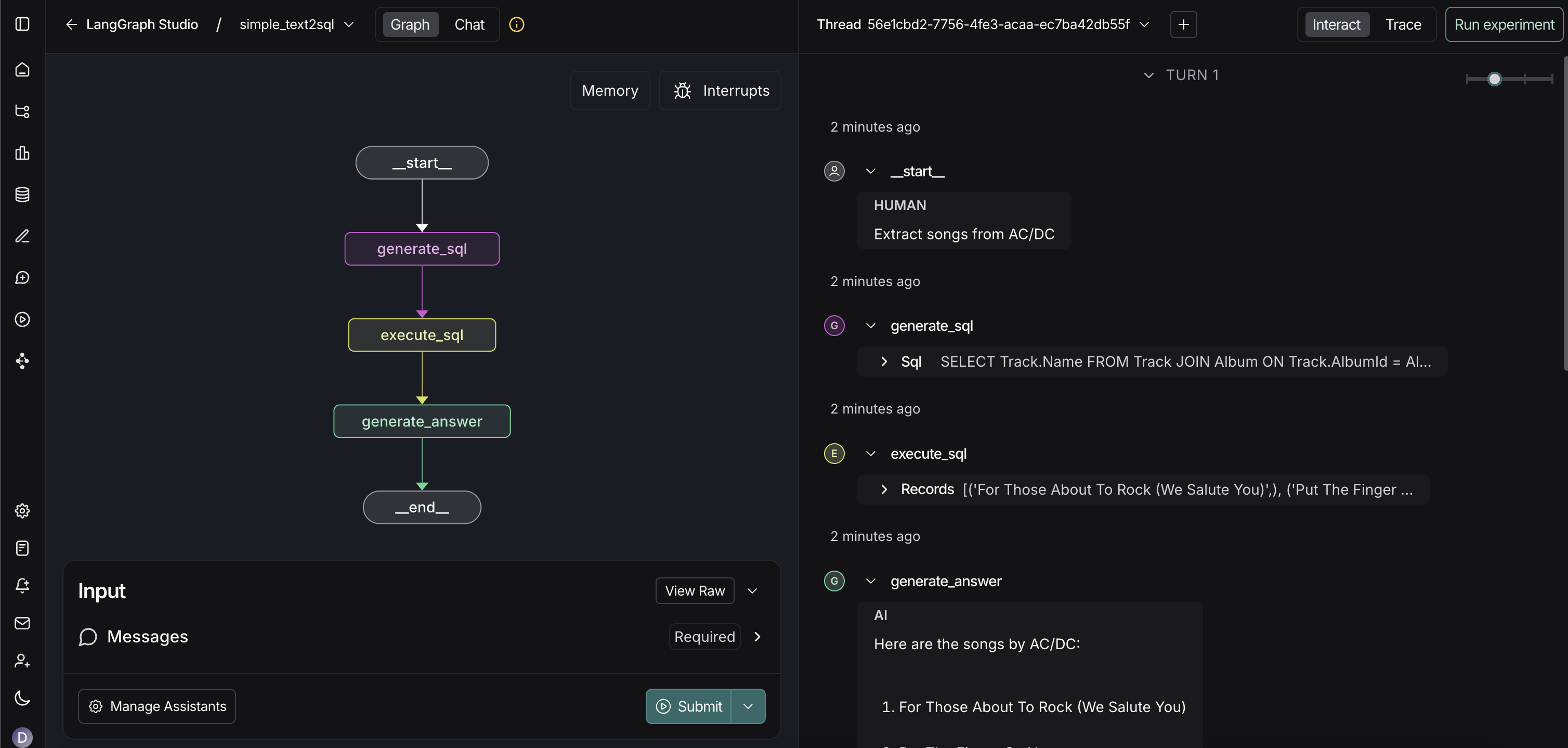
See the LangGraph CLI documentation for more details.
Deploy to LangSmith
Cloud Deployment
Deploy using the LangSmith deployment UI or the Control Plane API:
- UI Method: Connect your GitHub repository directly in the LangSmith UI
- API Method: Use the Control Plane API to create deployments from your container registry (required for Docker images)
Self-Hosted/Hybrid Deployment
For self-hosted LangSmith instances:
- Ensure your Kubernetes cluster has access to your container registry
- Build and push your Docker image to your container registry
- Choose your deployment method:
- LangSmith UI: Create a new deployment and specify your image URI (e.g.,
docker.io/username/my-agent:latest) - Control Plane API: Use the API to create deployments from your container registry
- LangSmith UI: Create a new deployment and specify your image URI (e.g.,
Note: Self-hosted deployments don't distinguish between development/production types, but you can use tags to organize them.
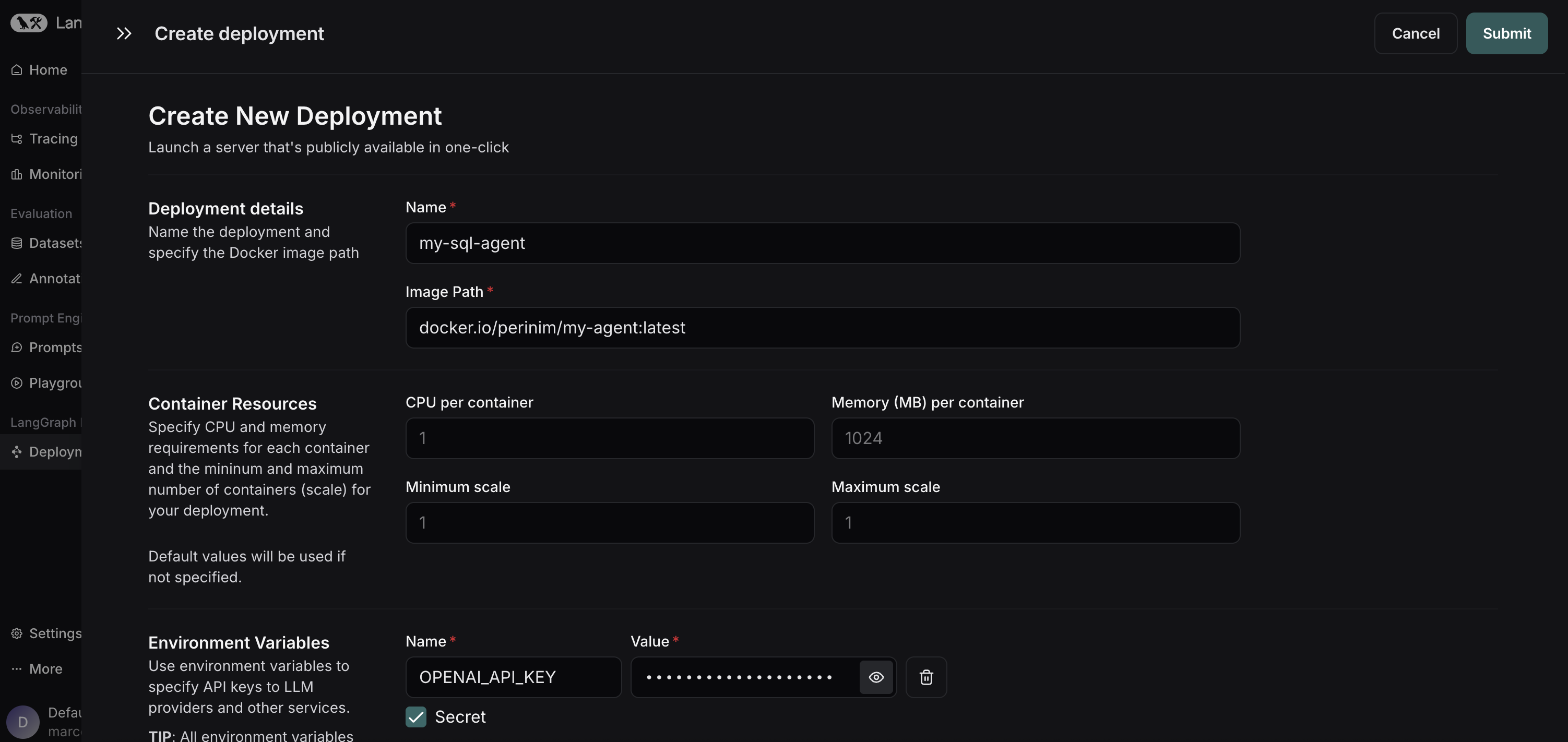
See the self-hosted full platform deployment guide for detailed setup instructions.
Connect to Your Deployed Agent
Once your agent is deployed, you can connect to it using several methods:
- LangGraph SDK: Use the LangGraph SDK for programmatic integration
- RemoteGraph: Connect using RemoteGraph for remote graph connections (to use your graph in other graphs)
- REST API: Use HTTP-based interactions with your deployed agent
- LangGraph Studio: Access the visual interface for testing and debugging
Environment Configuration
Database & Cache Configuration
By default, LangGraph Platform creates PostgreSQL and Redis instances for you. To use external services:
# Set environment variables for external services
export POSTGRES_URI_CUSTOM="postgresql://user:pass@host:5432/db"
export REDIS_URI_CUSTOM="redis://host:6379/0"
See the environment variables documentation for more details.
Required Environment Variables
Remember to add all necessary environment variables to your deployment, including any API keys required by your specific agent implementation.
Deployment Flow
graph TD
    A[Agent Implementation] --> B[langgraph.json + dependencies]
    B --> C[Test Locally with langgraph dev]
    C --> D{Errors?}
    D -->|Yes| E[Fix Issues]
    E --> C
    D -->|No| F[Choose LangSmith Instance]

    F --> G[Cloud LangSmith]
    F --> H[Self-Hosted/Hybrid LangSmith]

    subgraph "Cloud LangSmith"
        G --> I[Method 1: Connect GitHub Repo in UI]
        G --> J[Method 2: Docker Image]
        I --> K[Deploy via LangSmith UI]
        J --> L[Build Docker Image langgraph build]
        L --> M[Push to Container Registry]
        M --> N[Deploy via Control Plane API]
    end

    subgraph "Self-Hosted/Hybrid LangSmith"
        H --> S[Build Docker Image langgraph build]
        S --> T[Push to Container Registry]
        T --> U{Deploy via?}
        U -->|UI| V[Specify Image URI in UI]
        U -->|API| W[Use Control Plane API]
        V --> X[Deploy via LangSmith UI]
        W --> Y[Deploy via Control Plane API]
    end

    K --> AA[Agent Ready for Use]
    N --> AA
    X --> AA
    Y --> AA

    AA --> BB{Connect via?}
    BB -->|LangGraph SDK| CC[Use LangGraph SDK]
    BB -->|RemoteGraph| DD[Use RemoteGraph]
    BB -->|REST API| EE[Use REST API]
    BB -->|LangGraph Studio UI| FF[Use LangGraph Studio UI]
Deployment Best Practices
- Test Locally First: Always use
langgraph devto validate your agent - Version Your Images: Use semantic versioning for your Docker images
- Monitor Deployments: Use LangSmith tracing to monitor agent performance
- Environment Separation: Use different image tags for different environments
- Resource Limits: Set appropriate CPU/memory limits for your deployments
🔄 CI/CD Pipeline
Now that we have an understanding of how deployments work, let's deep dive into the specific CI/CD pipeline for this project. This automated pipeline ensures quality and reliability through multiple testing layers and evaluations, providing a robust framework for continuous integration and deployment.
The pipeline is designed to automatically handle the entire lifecycle from code changes to production deployment, incorporating comprehensive testing, evaluation, and deployment strategies that align with the deployment methods we've covered above.
GitHub Actions Workflow
The CI/CD pipeline is implemented through GitHub Actions workflows that automatically trigger on code changes and pull requests:
New LGP Revision Workflow

If we already have an existing deployment, this workflow will run the new LangGraph Platform revision process. This ensures that any updates to the agent are properly deployed and integrated into the existing infrastructure.
Testing and Evaluation Workflow
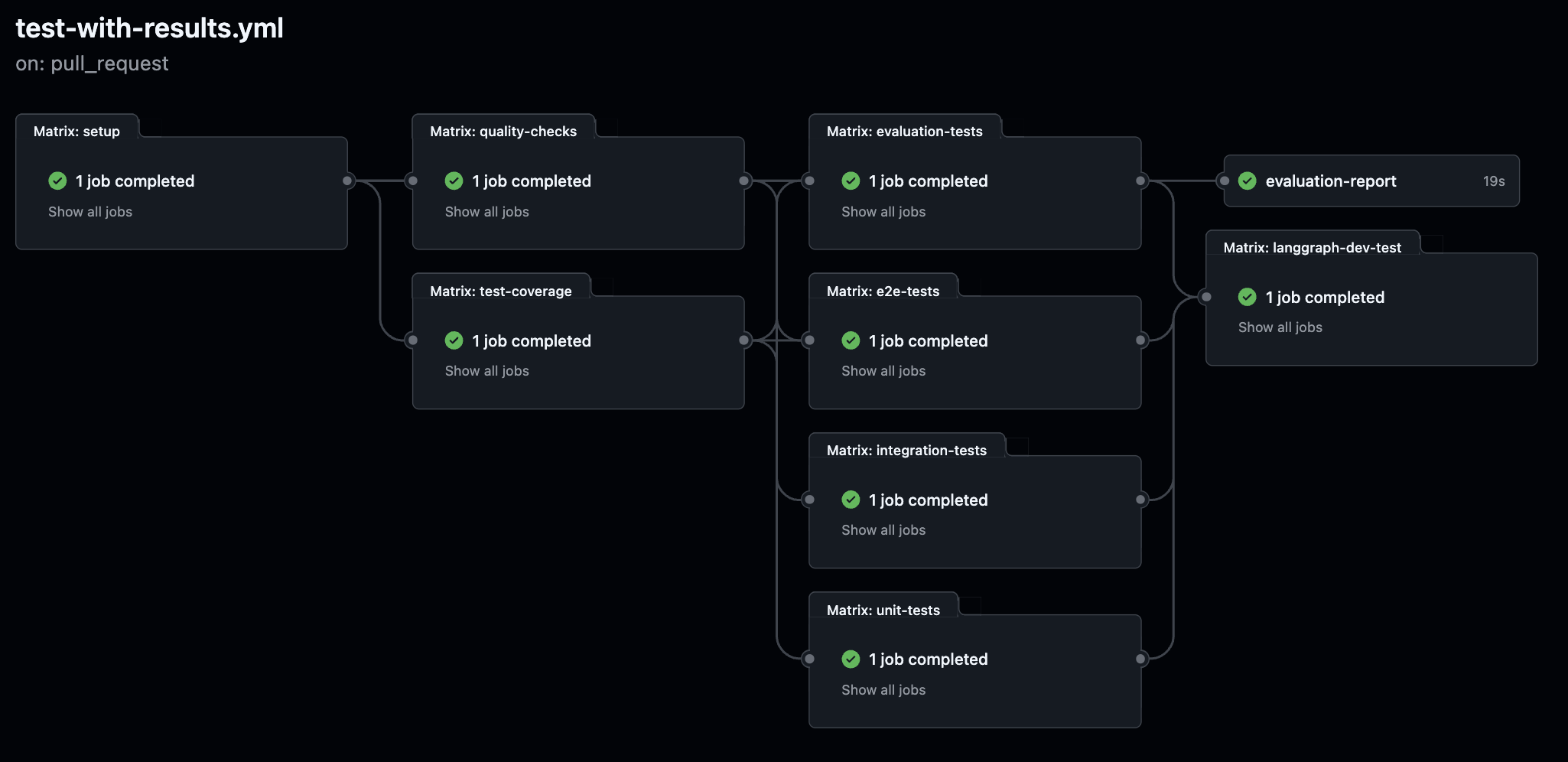
In addition to the more traditional testing phases (unit tests, integration tests, end-to-end tests, etc.), we have added offline evaluations and LangGraph dev server testing because we want to test the quality of our agent. These evaluations provide comprehensive assessment of the agent's performance using real-world scenarios and data.
New LangGraph Dev Server Test:
- Runs AFTER all other tests pass (unit, integration, e2e, offline evaluations)
- Starts a local LangGraph dev server on port 2024
- Tests the
/okhealth endpoint to ensure server is healthy - Validates JSON response
{"ok": true} - Tests LangGraph Studio interface accessibility
- Ensures the agent works in a real server environment before deployment
- Final quality gate before any deployment proceeds
graph TD
    A1[Code or Graph Change] --> B1[Trigger CI Pipeline]
    A2[Prompt Commit in PromptHub] --> B1
    A3[Online Evaluation Alert] --> B1
    A4[PR Opened] --> B1

    subgraph "Testing"
        B1 --> C1[Run Unit Tests]
        B1 --> C2[Run Integration Tests]
        B1 --> C3[Run End to End Tests]
        B1 --> C4[Run Offline Evaluations]

        C4 --> D1[Evaluate with OpenEvals or AgentEvals]
        C4 --> D2[Assertions: Hard and Soft]

        C1 --> E1[Run LangGraph Dev Server Test]
        C2 --> E1
        C3 --> E1
        D1 --> E1
        D2 --> E1
    end

    E1 --> F1[Push to Staging Deployment - Deploy to LangSmith as Development Type]

    F1 --> G1[Run Online Evaluations on Live Data]
    G1 --> H1[Attach Scores to Traces]

    H1 --> I1[If Quality Below Threshold]
    I1 --> J1[Send to Annotation Queue]
    I1 --> J2[Trigger Alert via Webhook]
    I1 --> J3[Push Trace to Golden Dataset]

    F1 --> K1[Promote to Production if All Pass - Deploy to LangSmith Production]

    J2 --> L1[Slack or PagerDuty Notification]

    subgraph Manual Review
        J1 --> M1[Human Labeling]
        M1 --> J3
    end
Pipeline Stages
- Trigger Sources: Code changes, graph modifications, prompt updates, or online evaluation alerts
- Testing Layers: Unit tests for individual nodes, integration tests, end-to-end graph testing, and LangGraph dev server testing
- Evaluation: Offline evaluations using OpenEvals/AgentEvals with hard and soft assertions
- Quality Gates: Preview deployments only proceed if all tests pass successfully
- Staging: Deployment to staging environment for live data testing
- Production: Promotion to production if all quality thresholds are met
- Monitoring: Continuous monitoring with alerts and manual review processes
Preview Deployment Improvements
Smart Preview Deployment:
- Waits for Tests: Preview deployments only run after all tests pass successfully
- Quality Gate: No wasted deployments on failing code
- Cost Optimization: Only deploy working code to preview environments
- Faster Feedback: Tests run in parallel, deployment waits for success
📚 Examples
Check out the examples/ directory for usage examples and demonstrations of the text-to-SQL agent capabilities.
🤝 Contributing
- Fork the repository
- Create a feature branch
- Make your changes
- Submit a pull request
📄 License
This project is licensed under the MIT License - see the LICENSE file for details