
[[https://gitlab.com/vindarel/cl-torrents][file:https://gitlab.com/vindarel/cl-torrents/badges/master/pipeline.svg]]
This is a little app to search for torrents on popular trackers and to open them with a local or a remote client.
It comes as:
-
a lisp library,
-
a command line interface,
-
a terminal readline interface,
-
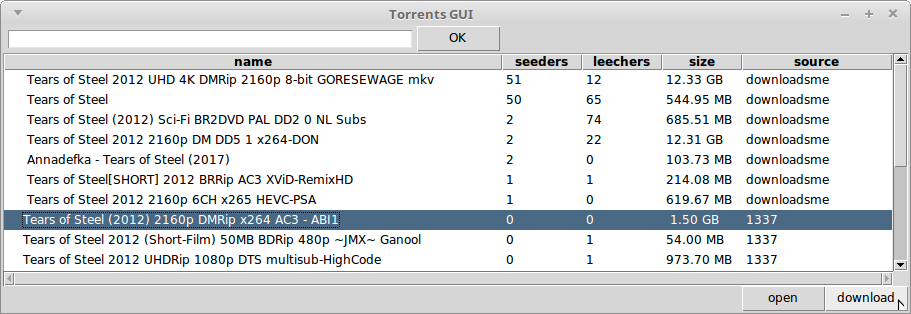
a simple GUI.
-
The [[https://github.com/vindarel/cl-torrents-web][Web UI]] works too.
We currently scrape [[http://1337x.to][1337x.to]] (since v0.9), [[https://www.torrentdownloads.me][torrentdownloads.me]] (v0.10) and [[https://torrent-paradise.ml][torrents-paradise]] (v0.11) and present the results sorted by seeders.
Download for GNU/Linux 64 bits: see [[https://gitlab.com/vindarel/cl-torrents/tags][Releases]] (/23MB, self-contained executable/).
NOTE: torrents-paradise has a rich collection, a simple website as in KISS, it works on IPFS and has it offers an API… frankly, I want to use its web service and click on its adds.
#+html:
#+html:
#+html:
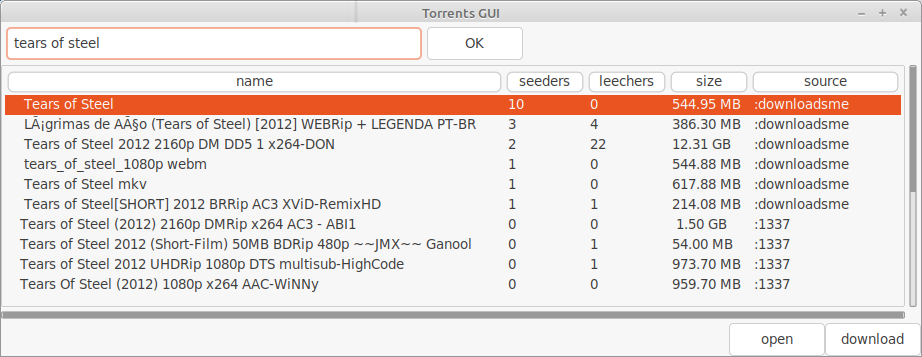
With the new default Yaru theme (and [[https://lisp-journey.gitlab.io/blog/pretty-gui-in-common-lisp-with-nodgui-tk-themes/][there are more]]):
#+html:
** Installation
The library is on Quicklisp (february 2019) and [[http://ultralisp.org/][Ultralisp]].
: (ql:quickload "torrents") : (torrents:search-torrents "tears of steel")
Note: the master branch needs [[https://github.com/libre-man/cl-transmission/][cl-transmission]] which was added to the Quicklisp distribution of december, 2019.
See the download link of the binary above. It is a self-contained executable for GNU/Linux 64-bits. You do /not/ need to install a Lisp implementation. It's a 23MB binary.
To build the readline app, do:
: make build
To build the Tk GUI:
: make build-gui
then run
: ./torrents --help : ./torrents-tk &
Troubleshooting
The Tk GUI needs [[https://notabug.org/cage/nodgui/][nodgui]] newer than march, 2019.
If a search doesn't work with a =CRYPTO_num_locks= error message:
#+BEGIN_EXPORT ascii
./torrents matrix searching '(matrix)' on 1337... no results. error: The alien function "CRYPTO_num_locks" is undefined. searching '(matrix)' on DOWNLOADSME... no results. error: The alien function "CRYPTO_num_locks" is undefined. #+END_EXPORT
You might need to upgrade your OpenSSL version. See [[https://gitlab.com/vindarel/cl-torrents/issues/5][this issue]].
** Usage
We can use this little app both in a Lisp REPL (Slime) and in a terminal, as a command line tool or from its embedded interactive prompt.
Results are cached in =~/.cl-torrents/cache/=. Delete this directory if you want new results.
*** Lisp REPL
Search for torrents:
#+BEGIN_SRC text (use-package :torrents) (search-torrents "matrix") [...] 6: The Matrix Revolutions (2003) BRRip [Dual Audio] [Hindi+Eng] 5: Matrix (1999)Blu-Ray 720p Dublado PT-BR - mo93438 4: The Matrix Trilogy (1999-2003) BDRip 1080p Dual Audio [ Hind 3: The Matrix Trilogy (1999-2003) BluRay BDRip 1080p AC3 2: The Matrix Trilogy (1999-2003) + Extras 1080p BluRay x264 Du 1: The Matrix Reloaded (2003) FullHD, Dual Audio: English + Spa 0: Matrix FRENCH DVDRIP 1999 COOL #+END_SRC
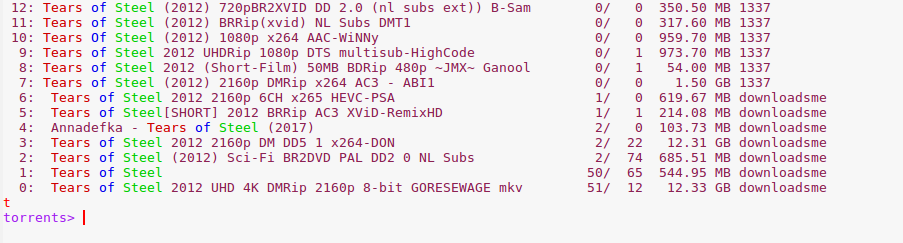
To help finding the most relevant results (the website sometimes is a bit relaxed with our search terms), each keyword is printed in a different color:
#+html:
(you need to enable ansi colors in Slime, see [[https://github.com/enriquefernandez/slime-repl-ansi-color][slime-repl-ansi-color]]. Disable this feature with =(setf cl-ansi-text:enabled nil)=)
We get a magnet link with:
#+BEGIN_SRC lisp (magnet 0) ;; "magnet:?xt=urn:btih:40eca43690cf1b99b0a4d485ebf4855d20b0bac5" #+END_SRC
We can open it with a torrent client (transmission-gtk by default):
#+BEGIN_SRC lisp (download 0) #+END_SRC
Download it with a remote client (only transmission-remote so far):
you need settings, see below. TODO #+BEGIN_SRC lisp ;; in ~/.config/torrents.lisp (setf remote-client-url "my.url.without.port") (setf remote-client-username "transmission") (setf remote-client-password "password") ;; port is 9091 by default. #+END_SRC
#+BEGIN_SRC lisp (remote-download 0) #+END_SRC
And voilà :)
We may add more features, eventually. Our goal is rather to write a tutorial to show you diverse Common Lisp topics.
**** Parameters
=cache-p=: if nil, don't use the cache system.
*** Command line
Use the options given below,
#+BEGIN_SRC text $ torrents -h CL-torrents. Usage:
Available options: -d, --details print more details (like the torrent's url) -h, --help print this help text -i, --interactive enter an interactive repl -m, --magnet ARG get the magnet link of the given search result. -n, --nb ARG set the maximum number of results to print. -o, --open INDEX download with a torrent client (transmission-gtk by default) -v, --version print the version #+END_SRC
Example: below we search for "matrix…", we display only 1 result and we get the magnet link of the first result.
: $ torrents -n 1 matrix french 1999 cool -m 0
#+html:

*** Readline interface
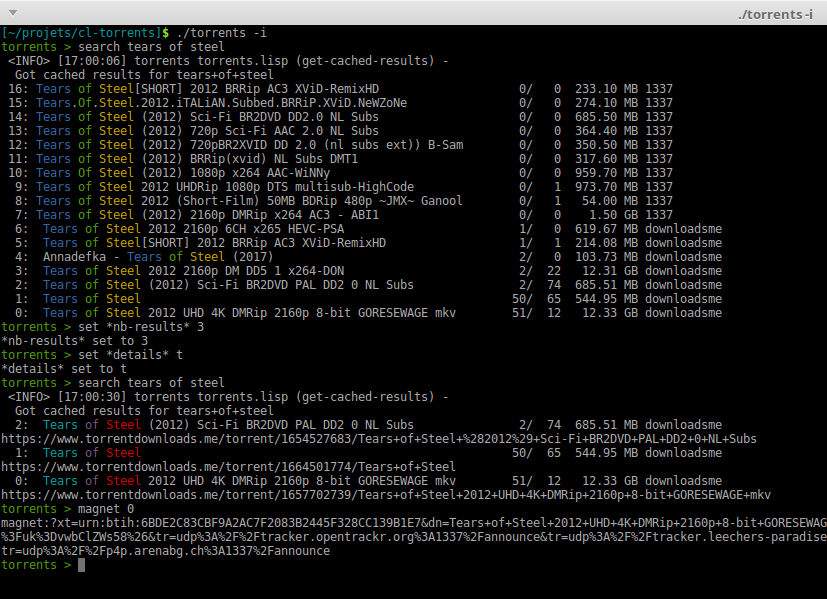
Start it with =torrents -i=.
See the =help= and the help of each command.
The available commands are (use the auto-completion):
- =search=: search for torrents, print the results sorted by number of seeders.
- =magnet =, where /i/ is a result index,
- =open= or =firefox =: open the given torrent page in a web browser
- =download =: open a magnet link with a torrent client (transmission-gtk by default)
- =filter
=: show results that have this text in their title. This reduces the tab-completion of ids for all commands. - =highlight= (and =unhighlight=): highlight the given words in yellow, for this session.
- =url =
- =nb-results= =n= to set the number of results to print to /n/
- =details=: toggle the display of details
- =quit= (or =C-c=)
And the available settings to change with =set= are (use =set='s autocompletion):
- =details=: if true, print more details below each row (like the url). Defaults to false.
- =nb-results=: how many results to print. Defaults to 20.
- =browser=: the browser name to use to open urls. Defaults to Firefox.
- =torrent-client=: the desktop torrent client name. Defaults to Transmission.
- =cache-p=: if true (the default), use the cached results.
You can also set them in a configuration file.
Note that we are in a regular [[https://tiswww.case.edu/php/chet/readline/readline.html#SEC9][readline]] interface, so the usual keybindings and options are available. For example, Readline obeys the =~/.inputrc= startup file. You can change the way the TAB key does completion:
: TAB: menu-complete
if you add this, the first press on TAB will insert the first completion candidate (VS listing all the choices, and requiring a second keypress). For cl-torrents, it is convenient because we can enter the first result quickly: I typically do =search foo= then =download TAB=.
Note: I found out that =C-x C-r= re-reads the inputrc file, so you can try without quitting cl-torrents.
#+html:
*** Configuration files (in development)
=cl-torrents= will  read two configuration files.  An ini-style one,
and a lispy one.
**** Ini-style config
First, it will search for a =~.torrents.conf= file
from =~/.config/.torrents.conf= and  =~/.torrents.conf=.  The last
one takes precedence.

For example, those are the default values:
#+BEGIN_SRC conf [default] scrapers = 1337 DOWNLOADSME browser = firefox nb-results = 20 cache-p = true # use the cache system. #+END_SRC
Moreover, you can set parameters related to the repl:
#+BEGIN_SRC text [default]
again, default values:
confirm-exit = true # ask with a yes/no prompt before quiting the app. verbose = false history = true # use the repl history. write-history = true # read the history, but don't write to it. #+END_SRC
You can set them for all replic-based apps in =~/.replic.conf=, or override them in =.torrents.conf=.
/Note: we only use a "default" profile for now./
**** Lisp init file
If the file =~/.torrents.lisp= exists, it will be loaded after the =.conf= one and before the command line arguments.
The option =--no-userinit= prevents it from loading.
You can write whatever you want there, it is just a lisp file that will be =load='ed at startup.
/Note/: what we will eventually do then is to expose cl-torrents' mechanism via hooks.
**** Extending the app, creating commands
One thing you can do is define additional commands to be found at the repl. We do so by following [[https://github.com/vindarel/replic/][replic]]'s mechanism:
- define functions inside the =torrents.user= package
- define the completion choices for some functions
- =export= the functions you want to see turned into commands. =cl-torrents=, with the help of the =replic= library, will automatically turn them into commands available at the application prompt.
You can copy the example below in =~/.torrents.lisp= and re-run =torrents -i= to try this out.
#+BEGIN_SRC lisp (in-package :torrents.user)
(defparameter names '()
"List of names (string) given to hello. Will be autocompleted by goodbye.")
(defun hello (name)
"Takes only one argument. Adds the given name to the global
*names* global variable, used to complete arguments of goodbye. "
(format t "hello a&" name)
(push name names))
(defun goodbye (name)
"Says goodbye to name, where name should be completed from what was given to hello."
(format t "goodbye a&" name))
;; Custom completion for goodbye: (replic.completion:add-completion "goodbye" (lambda () names))
;; and export the two functions to find them as commands. (export '(hello goodbye)) #+END_SRC
** Ideas, todos
- cache (on files) v0.3
- CI
- use a local copy of TPB
- build with ECL. Used [[https://hub.docker.com/r/daewok/lisp-devel/][the lisp-devel]] docker image. Result: a 52Mo executable with a runtime error.
- open an url
- download the torrent file
- ini config file, to parse with [[https://common-lisp.net/project/py-configparser/][py-configparser]]
- add torrent to a local torrent client
- add the torrent to a remote transmission client, with [[https://github.com/libre-man/cl-transmission/][cl-transmission]]. v0.12
- self-contained web app ([[https://lispcookbook.github.io/cl-cookbook/scripting.html][doc]]). POC: [[https://github.com/vindarel/cl-torrents-web][cl-torrents-web]].
- interactive prompt, with completion of commands.
** Release notes
[[https://gitlab.com/vindarel/cl-torrents/tags][https://gitlab.com/vindarel/cl-torrents/tags]]
*** WIP
- added: a simple Tk GUI (search, open in browser, download with torrent desktop client).
*** v0.12
- june, 2021: added [[https://torrent-paradise.ml][torrents-paradise]] API.
*** v0.11
- november, 2019: added connection to transmission-remote
- added rarbg scraper (needs new tests)
- june, 2019: changed the location of the lisp init file from
=
/.torrents.lisp= to =/.config/torrents.lisp=. - added: a =filter= command, to only display results whose title contains a given string. It reduces the TAB-completion of ids (but doesn't constrain it).
- added: all functions can now TAB-complete the list of ids.
- added: scrape and display torrents' size.
- fixed =-d= cli arg.
- added: load =~/.torrents.lisp=, create new commands from the =torrents.user= package.
- added the ability to read an ini-like config file, =~/.torrents.conf=. All exported variables from the =:torrent= package can be overriden. They are written without earmuffs: #+BEGIN_SRC lisp :nb-results :browser :torrent-client :cache-p #+END_SRC gives #+BEGIN_SRC text
~/.torrents.conf
those are the defaults.
[default] nb-results = 20 browser = firefox torrent-client = firefox cache-p = true #+END_SRC See more on replic. (all parameters need more tests)
- added missing =-o= option to download with a torrent client (transmission-gtk).
- =cl-torrents.conf= configuration file:
- choose the list of scrapers.
- =download= command (open magnet link with transmission by default).
- use the [[https://github.com/vindarel/replic/][replic]] library to build the repl, the commands and their completions.
- -> new builtin =highlight= and =unhighlight= commands,
- -> better error handling (don't exit the repl on an error).
- fix cli usage without a keyword search, print help.
*** v0.10
- added [[https://www.torrentdownloads.me][torrentdownloads.me]] scraper.
- new parameter, =cache-p=: if nil, don't use the cache.
*** v0.9
- added [[http://1337x.to][1337x.to]] scraper.
- removed piratebay.to, katcr.co, torrent.cd, they're down :/
*** v0.8
- added a readline-based repl with some commands: =search=, =magnet=, =open=, with their completion. See =help=. Built with [[https://github.com/mrkkrp/cl-readline][cl-readline]], but might use [[https://github.com/vindarel/replic][replic]] anytime soon.
*** v0.7
- fix cache not created by binary
- create cache in =~/.cl-torrents/cache/=
- Dev
Clone cl-torrents in =~/quicklisp/local-projects=,
now you can =(ql:quickload :torrents)=.
We use our [[https://github.com/vindarel/replic/][replic]] library to automatically build the readline repl.
Unit tests:
: make test
End-to-end tests (checking that the websites respond and our scrapers still work):
: make test-end2end
Try the Ltk GUI: load =gui-tk.lisp= and run =(main)=.
-
Resources
Don't miss these good resources:
- http://lisp-lang.org/
- [[Https://github.com/CodyReichert/awesome-cl][Awesome-cl]]
- [[https://lispcookbook.github.io/cl-cookbook/][the Common Lisp Cookbook]]
- http://quickdocs.org/
- (my) [[https://lisp-journey.gitlab.io/][lisp-journey]]: introductory posts, lists of resources, selection of screencasts.
** Tutorial
update, 2021: this tutorial is one of the first things I wrote when discovering CL and it probably bitrot a bit. I'd recommend the Cookbook now as I ported most of its useful content there.
Writing a little web scraper like this one is not difficult. However, I had to spend some time to find out the right libraries and resources. It is also not trivial at first to start a Lisp project. So the first thing we did is write a tutorial. It is a mix of hopefully useful stuff:
-
web scraping,
-
async web scraping,
-
trying out things at the REPL,
-
where to find documentation,
-
creating and loading a project,
-
basic data structures and gotchas,
-
some useful libraries,
-
unit tests, with mocks, running tests from the shell, continuous integration,
-
parsing command line arguments, creating executables, continuous delivery,
-
basics of error handling,
-
...
It will eventually tackle more topics and features (more settings, working with a local copy of TPB…) but in the meanwhile, read
the [[https://vindarel.github.io/cl-torrents/tutorial.html][tutorial]] !
It was built with https://github.com/fniessen/org-html-themes.
** Bypassing ISP blocking
Some Internet Service Providers block access to torrent sites, as it's the case in France. They currently don't block the HTTP version of torrents-paradise, but that one works on IPFS anyways. You can bypass them by using other DNS servers than your ISP's.
Here's how to do it on Ubuntu: https://doc.ubuntu-fr.org/dns (french)
You can use [[https://www.opennic.org/][OpenNIC]] addresses or again the ones of the [[https://www.fdn.fr/actions/dns/][French Data Network]] association.
- Licence
MIT.