
🤖 Class CI/CD — PM2 · Docker · GitHub Actions · VPS
Khóa học thực hành xây dựng pipeline CI/CD hoàn chỉnh từ đầu —
từ tự động hóa deploy bằng PM2 đến containerize với Docker và nhận thông báo qua Telegram.





📋 Mục lục
- Giới thiệu
- Kiến trúc Pipeline
- Tech Stack
- Cấu trúc dự án
- Yêu cầu
- Hướng dẫn cài đặt
- Chạy với Docker
- API Endpoint
- Liên hệ
🎯 Giới thiệu
Dự án này là tài liệu học thực hành về CI/CD (Continuous Integration / Continuous Deployment). Bạn sẽ được học cách:
- Thiết lập self-hosted GitHub Actions runner trên VPS
- Tự động deploy ứng dụng Node.js bằng PM2
- Containerize ứng dụng với Docker và Docker Compose
- Nhận thông báo deploy qua Telegram Bot
- Quản lý biến môi trường an toàn bằng GitHub Secrets
🏗 Kiến trúc Pipeline
Ba luồng CI/CD được trình bày trong khóa học:
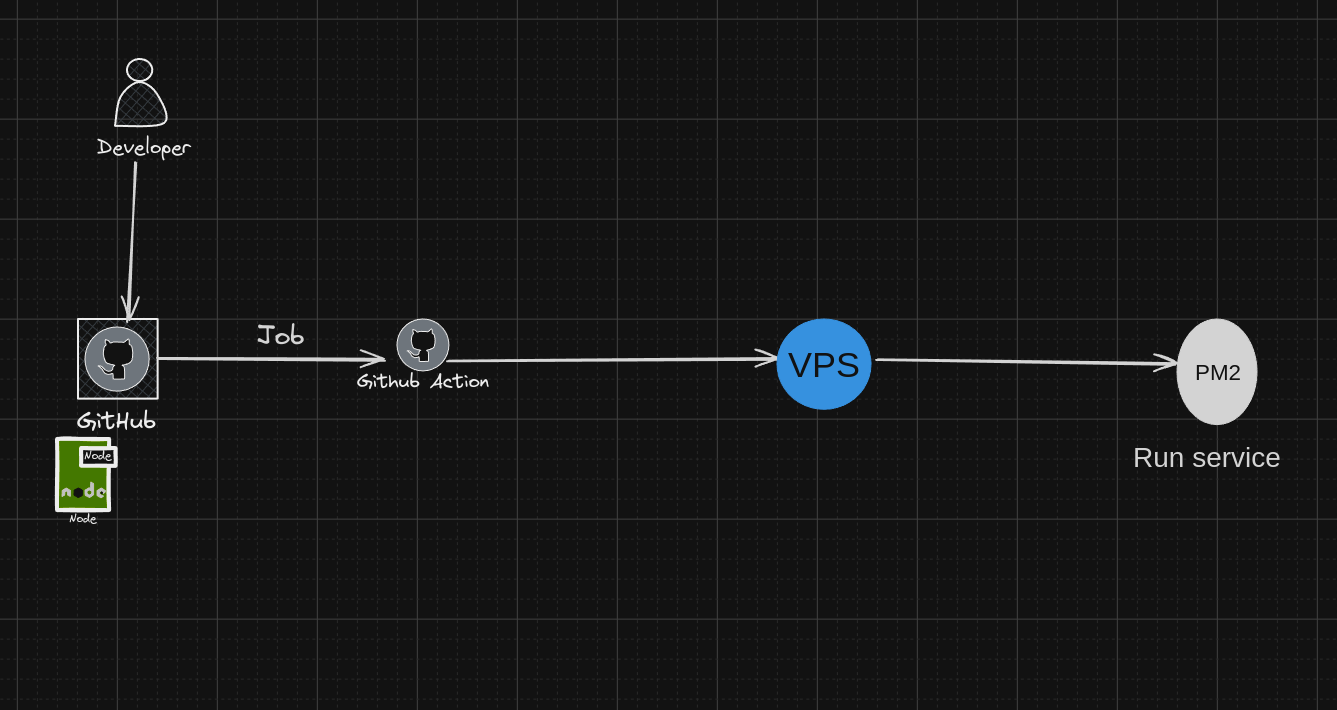
1. CI/CD với PM2
Push Code → GitHub Actions → SSH vào VPS → Pull Code → PM2 Restart
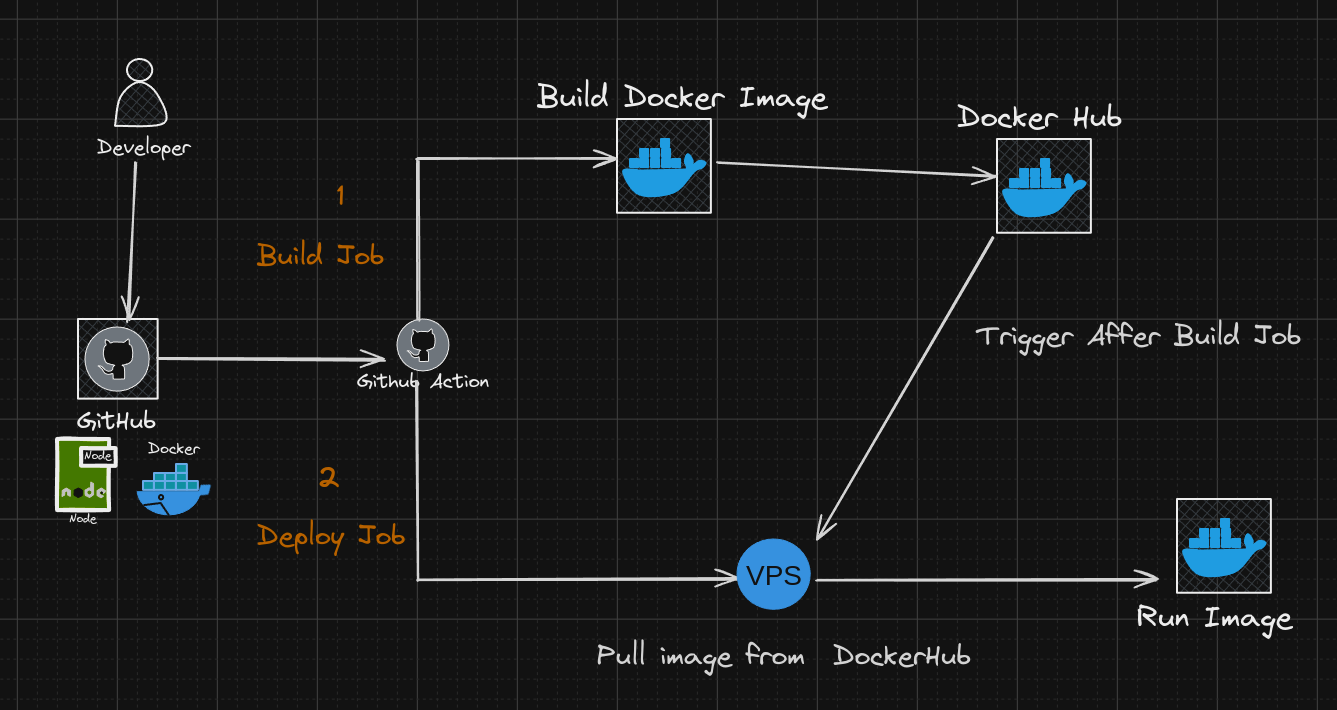
2. CI/CD với Docker
Push Code → GitHub Actions → Build Docker Image → Push Registry → VPS Pull & Run
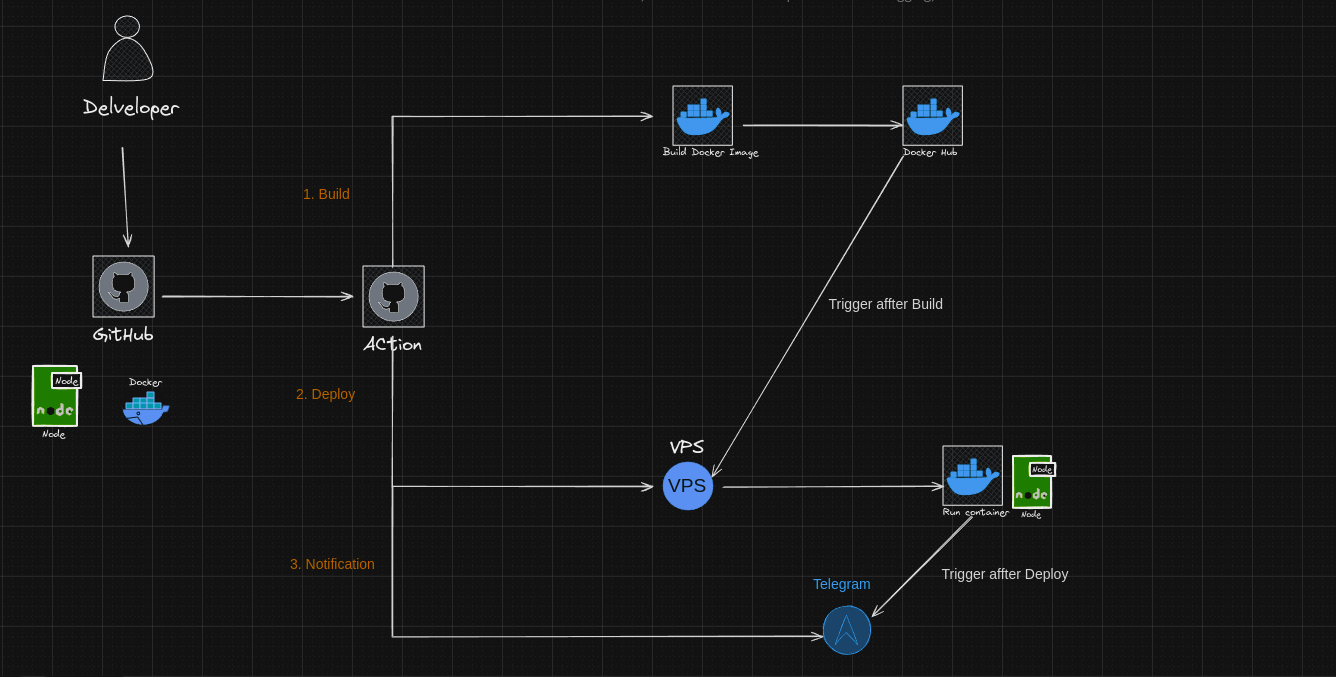
3. CI/CD với Docker + Telegram Notification
Push Code → GitHub Actions → Build & Deploy Docker → Telegram Bot thông báo kết quả
🛠 Tech Stack
| Công nghệ | Mục đích |
|---|---|
| Node.js 20 | Runtime ứng dụng |
| Express.js | HTTP framework |
| Docker / Docker Compose | Containerization |
| PM2 | Process manager trên VPS |
| GitHub Actions | CI/CD pipeline |
| Self-hosted Runner | Deploy lên VPS thực tế |
| Telegram Bot API | Thông báo deploy |
| dotenv | Quản lý biến môi trường |
📁 Cấu trúc dự án
Class_CI-CD/
├── .github/
│   ├── workflows/
│   │   └── cicd-workflow.yml     # GitHub Actions workflow
│   └── scripts/                  # Helper scripts
├── assets/
│   ├── diagram.png               # Sơ đồ CI/CD với Docker
│   ├── diagram1.png              # Sơ đồ CI/CD với PM2
│   └── diagram3.png              # Sơ đồ CI/CD với Docker + Telegram
├── Dockerfile                    # Build image Node.js 20 Alpine
├── docker-compose.yml            # Cấu hình multi-container
├── makefile                      # Lệnh Docker tiện dụng
├── server.js                     # Ứng dụng Express chính
├── package.json
├── CI-CD.md                      # Hướng dẫn thiết lập chi tiết
└── DIAGRAM.md                    # Tài liệu sơ đồ kiến trúc
✅ Yêu cầu
- Node.js >= 20
- Docker & Docker Compose
- VPS (Ubuntu/Debian) với SSH access
- Tài khoản GitHub (để cấu hình Actions & Secrets)
- PM2 (cài global:
npm install -g pm2)
🚀 Hướng dẫn cài đặt
1. Clone repository
git clone [email protected]:fdhhhdjd/Class_CI-CD.git
cd Class_CI-CD
2. Cài đặt dependencies
npm install
3. Tạo file .env
PORT=5000
4. Chạy với PM2 (development)
pm2 start server.js --name=class_cicd
pm2 save
pm2 startup
5. Thiết lập Self-hosted Runner trên VPS
# Tạo thư mục runner
mkdir actions-runner && cd actions-runner

# Cấu hình runner (lấy token từ repo Settings > Actions > Runners)
./config.sh --url https://github.com/fdhhhdjd/Class_CI-CD --token <YOUR_TOKEN>

# Chạy runner như service
./svc.sh install
./svc.sh start
6. Cấu hình GitHub Secrets
Vào Settings → Secrets and variables → Actions, thêm các secret:
| Secret | Mô tả |
|---|---|
SSH_PRIVATE_KEY |
Private key để SSH vào VPS |
VPS_HOST |
IP hoặc domain của VPS |
VPS_USER |
Username SSH |
TELEGRAM_TOKEN |
Token Telegram Bot |
TELEGRAM_CHAT_ID |
Chat ID nhận thông báo |
🐳 Chạy với Docker
# Build và start container
make run-build

# Dừng container
make run-down
Hoặc dùng Docker Compose trực tiếp:
docker-compose up -d --build
docker-compose down
Health check tự động ping
GET /ci-cdmỗi 60 giây để đảm bảo container hoạt động ổn định.
📡 API Endpoint
| Method | Endpoint | Mô tả |
|---|---|---|
GET |
/ci-cd |
Health check — kiểm tra server hoạt động |
Response mẫu:
{
  "status": 200,
  "message": "CI-CD By Nguyen Tien Tai Ok 🤖"
}
📞 Liên hệ
Có thắc mắc hoặc muốn học thêm về Web, AI Automation, Interview?
| Kênh | Thông tin |
|---|---|
| [email protected] | |
| 📱 Zalo / Hotline | 0798 805 741 |
| 🌐 Website | codewebkhongkho.com |
Made with ❤️ by Nguyen Tien Tai