
CCC
Start the next while Claude builds the first.
One local dashboard for every Claude Code, Codex, Cursor, Antigravity, and Kilo Code session on your Mac. Spawn in parallel, ship in parallel.
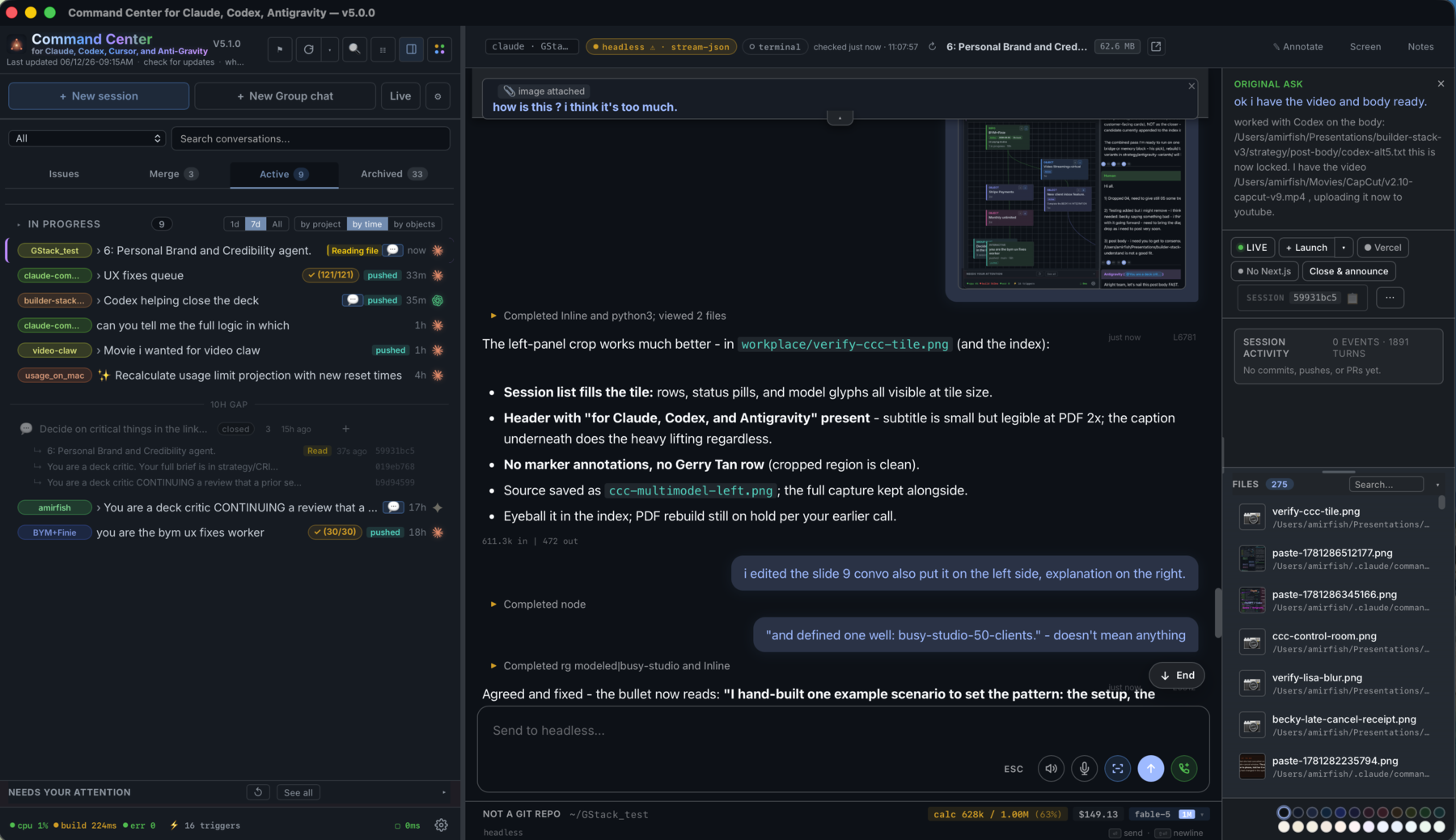
Install with curl:
curl -fsSL https://raw.githubusercontent.com/amirfish1/claude-command-center/main/scripts/install.sh | CCC_FROM=readme bash
With Homebrew:
brew tap amirfish1/ccc
brew install ccc
ccc
Or download the macOS DMG and drag CCC.app to Applications:
github.com/amirfish1/claude-command-center/releases/latest
Try the read-only demo first: ccc.amirfish.ai/demo (or amirfish1.github.io/claude-command-center/demo) - full kanban with seeded fake data, no install required.
CCC latches onto every Claude Code, Codex, Cursor, Antigravity, and Kilo Code session on your Mac — terminal sessions, headless processes, and sessions you spawned from the dashboard. It treats each agent's on-disk state as the source of truth, so nothing slips through. Spawn the next task while the first is still building. Switch between projects without losing context. Ship multiple things at once.
See the engine support matrix below for what's first-class vs. partial per engine — spawn works across all supported engines, transcript ingestion and UX parity vary.
Recent
- 2026-06-03 — v4.6.0 — Major performance pass: the dashboard idles instead of pinning a CPU core, group-chat opens ~40× faster, long conversations open near-instantly (windowed load + scroll-up to load earlier), and Codex sessions with screenshots no longer stall on multi-MB images. New CCC self-health readout in the footer.
- 2026-05-21 — v4.0.0 — Antigravity (Google DeepMind) joins the dashboard as a first-class engine alongside Claude Code and Codex.
- 2026-05-21 — Drag any conversation row outside the window to pop it into a focused side pane, with 24 per-conversation accent colors.
- 2026-05-19 — Template gallery mechanism for reusable new-session prompts, driven by
static/templates.json. (#46) - 2026-05-19 — VS Code extension v0.1.0 published — spawn a session from the active workspace folder. (#52)
- 2026-05-19 — One-command
curl | bashinstaller;git clonedemoted to a "From source" section. (#58) - 2026-05-19 — Static GitHub Pages demo with seeded mock data (no install required). (#49)
- 2026-05-18 — Local macOS
saytext-to-speech button on conversations.
If you install it, I'd love to hear how. Drop a ⭐, open an issue with what worked or what broke, or just say hi. This is a one-person project built around a specific workflow. Outside feedback is the only way I know how widely it lands. @amirfish1
Why this exists
Most Claude Code orchestration tools are opinionated wrappers. They want to
own execution. You launch agents through them, and in return you get a
dashboard. That's fine until it isn't. The moment you open a terminal,
claude --resume something, and iterate on it by hand, you're outside the
tool's universe. The dashboard can't see it. The work you just did doesn't
show up on the kanban, against the issue, in the review queue.
This goes the other way. It treats Claude Code's on-disk state as the
source of truth: ~/.claude/projects/*.jsonl transcripts, the
~/.claude/sessions/<pid>.json live registry, and per-tool-call sidecar
files written by two hooks we install into ~/.claude/settings.json. If
Claude Code is running anywhere on your machine, it shows up here. If you
close the dashboard, your sessions keep running. If you open a terminal and
iterate by hand, the card updates.
The dashboard also knows how to spawn headless sessions (via
claude -p --input-format stream-json) and resume dormant ones on demand,
but those are additive. The thing it's built around is attaching to work
that already exists.
Quickstart
Try the demo: ccc.amirfish.ai/demo — read-only kanban with seeded fake data, no install required.
Requirements: macOS, Python 3, and Claude Code installed.
Optional: gh for GitHub integration, vercel for deploy status.
curl — clones into ~/.ccc/claude-command-center and runs in foreground. Re-running does a git pull.
curl -fsSL https://raw.githubusercontent.com/amirfish1/claude-command-center/main/scripts/install.sh | CCC_FROM=readme bash
Homebrew — installs into the Cellar, puts ccc on PATH, pins a brew-managed Python. Upgrade via brew upgrade ccc.
brew tap amirfish1/ccc
brew install ccc
ccc                              # foreground
brew services start ccc          # or run as a brew-managed background service
DMG — drag CCC.app to Applications, double-click to launch. Under the hood this runs the same install.sh (clones into ~/.ccc/claude-command-center and asks whether to install the launchd service). First launch shows the macOS "unidentified developer" prompt — right-click CCC.app → Open → Open. Only required once. Download from the latest release.
If you'd rather clone first and run the script directly, pass the channel as a flag instead: ./scripts/install.sh --from=readme.
From source
git clone https://github.com/amirfish1/claude-command-center
cd claude-command-center

# Try it. Runs in the foreground until Ctrl-C / terminal close
./run.sh

# Keep it. Install as a per-user launchd agent that starts now and at login
./run.sh --install-service
Open http://localhost:8090, then pick a repo from the repo dropdown before starting repo-scoped actions.
--install-service writes ~/Library/LaunchAgents/com.github.claude-command-center.plist
and registers it in your per-user launchd domain so CCC starts immediately,
restarts if it exits, and starts again at macOS login. It bakes in whatever
PORT / CCC_* env vars were set when you ran it. Re-run it to update config;
check with ./run.sh --service-status; remove with ./run.sh --uninstall-service.
Service logs go to ~/.claude/command-center/logs/service.{out,err}.log.
Normal CCC app updates keep using the same checkout path; re-run
./run.sh --install-service only when you want to change baked-in env vars or
pick up a release that changes the launchd plist itself.
First launch (foreground or service) copies two hook scripts into
~/.claude/command-center/hooks/ and registers them in
~/.claude/settings.json. After that, every Claude Code session on your
machine (terminal, headless, or dashboard-spawned) writes sidecar state
the UI uses for the kanban.
Core concepts
┌─────────────┐   writes   ┌────────────────────────────────┐
│ any claude  │ ─────────> │ ~/.claude/projects/*.jsonl     │
│ process     │            │ ~/.claude/sessions/<pid>.json  │
│ anywhere on │            │ ~/.claude/command-center/          │
│ your mac    │            │   live-state/<sid>.json        │
└─────────────┘            └──────────────┬─────────────────┘
                                          │  reads
                                          v
                              ┌───────────────────────┐
                              │ server.py (stdlib)    │
                              │ :8090                 │
                              └───────────┬───────────┘
                                          │
                                          v
                              ┌───────────────────────┐
                              │ static/index.html     │
                              │ kanban + detail pane  │
                              └───────────────────────┘
- Session: any Claude Code transcript on disk, alive or dormant.
- Attach: the server reads Claude's own files + sidecar state the installed hooks write after every tool call. Nothing to configure per-session.
- Columns: Backlog → Planning → Working → Review → In Testing → Verified / Inactive / Archived. Columns are derived from session state (live? commits? pushed? sidecar activity?), overridable by drag.
- Backlog: open GitHub issues +
TODO.mdentries, surfaced as cards next to your active sessions so everything lives on one board.
Engine support
CCC was built around Claude Code first; Codex, Cursor, Antigravity, and Kilo Code support followed. Spawn-from-dashboard works for all five. The rest varies:
| Engine | Spawn (headless from UI) | Resume (terminal inject / headless resume) | Transcript ingestion | Per-session model picker |
|---|---|---|---|---|
| Claude Code | yes | yes (both) | yes — first-class JSONL (~/.claude/projects/*.jsonl) |
yes — UI picker, incl. 1M-context toggle |
| Codex | yes | yes (both) | partial — Codex JSONL parsed, broader parity tracked in #57 | yes — UI picker via per-session override; default from CCC_CODEX_MODEL |
| Cursor | yes — headless via cursor-agent |
yes — follow-ups route through cursor-agent --resume |
partial — Cursor agent transcripts parsed from ~/.cursor/projects/ |
yes — UI/default model picker; default from CCC_CURSOR_MODEL |
| Antigravity | yes — headless via agy print mode |
yes — follow-ups route through AGY CLI or the running app's language-server RPC | yes — JSONL transcripts from ~/.gemini/antigravity/brain/ |
auto-detected from transcript metadata |
| Kilo Code | yes — headless via kilo run --auto |
no — fire-and-forget headless run, no resume wiring yet | yes — reads Kilo's SQLite store (~/.local/share/kilo/kilo.db); externally-launched sessions appear on the board |
yes — UI/default model picker; default from CCC_KILO_MODEL |
Note on Cursor IDE integration: While CCC spawns Cursor agents headlessly via the CLI, the Desktop IDE manages UI state internally using a highly-nested, proprietary Protobuf Merkle tree in store.db. Full "two-way chat sync" into the IDE is unsupported due to the extreme risk of workspace corruption. Instead, CCC performs a metadata integration: CLI sessions are injected into the IDE sidebar as bookmarks (with correct titles and timestamps) so you don't lose track of them, but they cannot be interacted with natively inside the IDE window. Use the CCC dashboard for full history.
If you'd like to see an engine bumped from "partial" to first-class, open an issue — it's mostly adapter work, the ingestion layer is engine-agnostic.
Features
- Multi-engine orchestration: spawn, resume, and review Claude Code, Codex, Cursor, Antigravity, and Kilo Code sessions from one dashboard. See the engine support matrix for per-engine parity.
- ACP adapter (optional): expose CCC over the Agent Client Protocol so editors and ACP clients (VS Code, JetBrains, Zed, and agents like Hermes) can drive Claude Code sessions over JSON-RPC stdio. Runs as a separate process (
python3 ccc_acp.py); install with theacpextra. The core server stays stdlib-only. - Kanban across every session, with drag-drop between columns, rubber-band multi-select, and per-column tinting.
- Split conversations: drag any sidebar session onto the right or bottom edge of the open conversation to view two transcripts side-by-side, each with its own input bar. Closes back to single-pane with a click; collapses automatically below 900px.
- GitHub integration: start a session from an issue with one click
(auto-adds
claude-in-progresslabel + self-assigns). Verify closes the issue with a commit-SHA comment. Drag to Archived closes as "not planned". Issue body + comments render inside the dashboard (no iframe; GitHub blocks that). - Attach to existing sessions: terminal
claudeprocesses show up automatically. Jump-to-terminal focuses them by TTY; rename/color the tab via Claude's own slash commands. - Open in Claude Desktop (macOS): third destination button beside
Jump/Launch in the conversation toolbar; resumes the current CLI
session inside the Claude Desktop app via the
claude://resumedeep link. - Headless spawn with follow-up: launch
claude -psessions from the dashboard and keep talking to them via an in-browser input bar (no terminal needed, stdin pipe stays open). - Resume-on-demand: injecting into a dormant session auto-spawns a
headless
claude --resumeto deliver the message. - Auto-fix deploys: optionally polls Vercel, spawns a
/fix-deploysession on new production ERRORs (deduped by commit SHA). - AI-assisted titles: click ✨ on any card to regenerate its title
via
claude -p(Haiku by default). Used for cleaning up auto-generated session slugs.
Orchestration skill
CCC ships a Claude Code skill (ccc-orchestration) that lets one Claude
session spawn, inject into, and synchronously ask sibling sessions over
plain HTTP. On startup the server copies the skill to
~/.claude/skills/ccc-orchestration/SKILL.md (set
CCC_SKIP_SKILL_INSTALL=1 to opt out) and writes its base URL to
~/.claude/command-center/port.txt so the skill can discover the running
instance without hardcoding a port.
Spawn calls pass repo_path (or cwd) plus optional
engine: "claude" | "codex" | "cursor" | "antigravity" | "kilo" to /api/sessions/spawn;
omitted engine/model values use the server-side defaults from the dashboard.
Legacy engine: "gemini" maps to Antigravity. Successful spawns return
spawn_id, engine, repo_path, cwd, and session_id when the native
engine has emitted one; callers can poll /api/sessions/spawned if
session_id_pending is true.
Once installed, a Claude session can run e.g.:
CCC_URL="$(cat ~/.claude/command-center/port.txt)"
REPO_PATH="$(pwd -P)"
curl -s "$CCC_URL/api/sessions?repo_path=$(python3 -c 'import urllib.parse,sys; print(urllib.parse.quote(sys.argv[1]))' "$REPO_PATH")"

curl -s -X POST "$CCC_URL/api/ask" \
  -H "Content-Type: application/json" \
  -d '{"session_id": "<uuid>", "text": "What is 2+2?", "timeout_ms": 30000}'
# -> {"ok": true, "text": "4", "cost_usd": ..., "duration_ms": ..., "num_turns": 1}
Use this for persistent peer sessions (a marketing assistant, a deploy
babysitter) that should survive past the current turn and show up on the
kanban, not for one-shot internal subtasks (the built-in Task tool is
better for those).
Cookbook
Recipes for wiring your own app into CCC — each with a copy-paste prompt you can hand to Claude Code so it implements the integration for you:
- Annotate → UX-fixes queue — click an element in your running app, type a note, and it becomes a numbered work item a Claude session claims and fixes.
- In-app bug report widget → GitHub issue — a floating "Report an issue" button that screenshots the page and opens a fully-contextualized GitHub issue, plus a customer-facing status view derived live from GitHub labels.
Architecture
Two files: a single Python file (stdlib-only HTTP server) and a single HTML
file (vanilla JS, no framework, no build). State lives in JSON sidecar
files under ~/.claude/command-center/, all human-readable, all rewriteable
by hand.
The server has no background workers. Every API request scans Claude's session directories, merges in sidecar state, enriches with cached GitHub issue data, and returns a flat list. The client classifies into columns using rules like "has_push → Review", "live + sidecar_has_writes → Working".
Hooks are the only invasive thing. On first run the server copies
hooks/post-tool-use.py and hooks/stop.py to ~/.claude/command-center/hooks/
and merges entries into ~/.claude/settings.json. After that, Claude Code
fires them after every tool invocation, each hook writes a tiny JSON file
under live-state/, and the server reads those to answer "is this session
actually doing something right now or is it idle waiting for input?".
For more depth: docs/architecture.md,
docs/session-attach.md.
Configuration
| Env var | Default | Purpose |
|---|---|---|
PORT |
8090 |
HTTP port |
CCC_CLAUDE_BIN |
(auto) | Absolute path to the Claude Code CLI when a launchd service cannot see your shell PATH. Set it before ./run.sh --install-service to bake it into the agent. |
CCC_CURSOR_BIN |
(auto) | Absolute path to cursor-agent if it is not on the service PATH. |
CCC_CURSOR_MODEL |
auto |
Default model for Cursor spawns/resumes when no dashboard or API model override is set. |
CCC_KILO_BIN |
(auto) | Absolute path to the Kilo Code CLI (kilo) if it is not on the service PATH. |
CCC_KILO_MODEL |
kilo/stepfun/step-3.7-flash:free |
Default model for Kilo spawns when no dashboard or API model override is set. |
CCC_BIND_HOST |
127.0.0.1 |
Interface to bind. Set to 0.0.0.0 to expose on the LAN. No auth, see SECURITY.md |
CCC_ALLOWED_ORIGIN |
(empty) | Comma-separated origins (e.g. http://my-mac.tailnet.ts.net:8090) added to the same-origin POST allowlist. Use with CCC_BIND_HOST=0.0.0.0 to reach the UI from another device on a trusted network (Tailscale / VPN). No auth, see SECURITY.md |
CCC_TRUST_TAILNET |
(off) | When set (1/true/yes/on), CCC shells out to tailscale status --json at startup and adds the local node's MagicDNS hostname + Tailscale IPs to the allowlist automatically. Same trust caveat as CCC_ALLOWED_ORIGIN. |
CCC_TITLE_STRIP |
(empty) | Comma-separated prefixes to strip from GitHub issue titles (e.g. ACME,FOO strips [ACME ...] and [FOO ...]) |
CCC_ORG_PATTERNS |
(empty) | Multi-tenant org-tagger. Format: Label1:pat1a|pat1b;Label2:pat2. Each issue body is scanned and tagged with the first matching label so the UI can group backlog by org. |
VERCEL_PROJECT |
(unset) | Vercel project name. Leave empty to disable deploy polling. |
CCC_TELEMETRY_DISABLED |
(unset) | Set to 1 to hard-disable the anonymous opt-in daily ping at the process level. Telemetry is off by default — the env var is the corporate / CI kill switch that also hides the consent banner. Full contract: docs/telemetry.md. |
The CCC_BIND_HOST, CCC_ALLOWED_ORIGIN, and CCC_TRUST_TAILNET knobs can also be set in ~/.claude/command-center/network.json so they survive shell restarts, or flipped from the Network access… entry in the sidebar settings popover. Env vars always win, useful for CI / one-shot overrides. The same security caveats apply: every trusted origin can run commands as you.
Roadmap
Shipped
- Kanban over all live + dormant Claude Code, Codex, Cursor, Antigravity, and Kilo Code sessions
- GitHub issue → session → verify → close pipeline
- Headless spawn with stdin-pipe follow-up
- Resume-on-demand
- Auto-fix-deploy (Vercel)
- AI title regeneration
- Cursor — session cards, transcript ingestion, headless spawn/resume via
cursor-agent - Antigravity (Google DeepMind) — full session view, transcript ingestion, headless resume via AGY CLI or app RPC
- Kilo Code — headless spawn via
kilo run --auto, engine selector + model picker, and read-only ingestion of externally-launched sessions from Kilo's SQLite store - ACP adapter — drive Claude Code sessions over the Agent Client Protocol (
ccc_acp.py, optional)
Not yet
- First-class parity for Codex. Spawn works, but transcript ingestion and UX polish lag behind Claude Code — see the engine support matrix and #57.
- Kilo Code resume / follow-up. Spawn and read-only ingestion both work (externally-launched sessions appear on the board and open with full transcripts); injecting follow-up turns into a Kilo session is not wired yet.
- More agent runtimes (Aider, OpenCode, etc.). The ingestion layer is engine-agnostic; adapters just don't exist yet.
- Code split.
server.pyandindex.htmlare each one huge file on purpose, so you can read the whole product in an afternoon. That tradeoff bends eventually; it hasn't yet.
Out of scope
- Linux / Windows. The macOS-specific AppleScript glue is why attach and jump-to-terminal work end-to-end. Porting means stubbing those out.
- Multi-user / network-exposed mode. This is a local dev tool. If you're looking at it on a remote host, something has gone wrong.
- Electron / native wrap. Browser is the UI on purpose.
Contributing
See CONTRIBUTING.md.
License
MIT © 2026 Amir Fish
Acknowledgments
Built on top of Claude Code.
The gh CLI and Vercel CLI are optional integrations but do most of the
heavy lifting where they're used.