
Cliccy
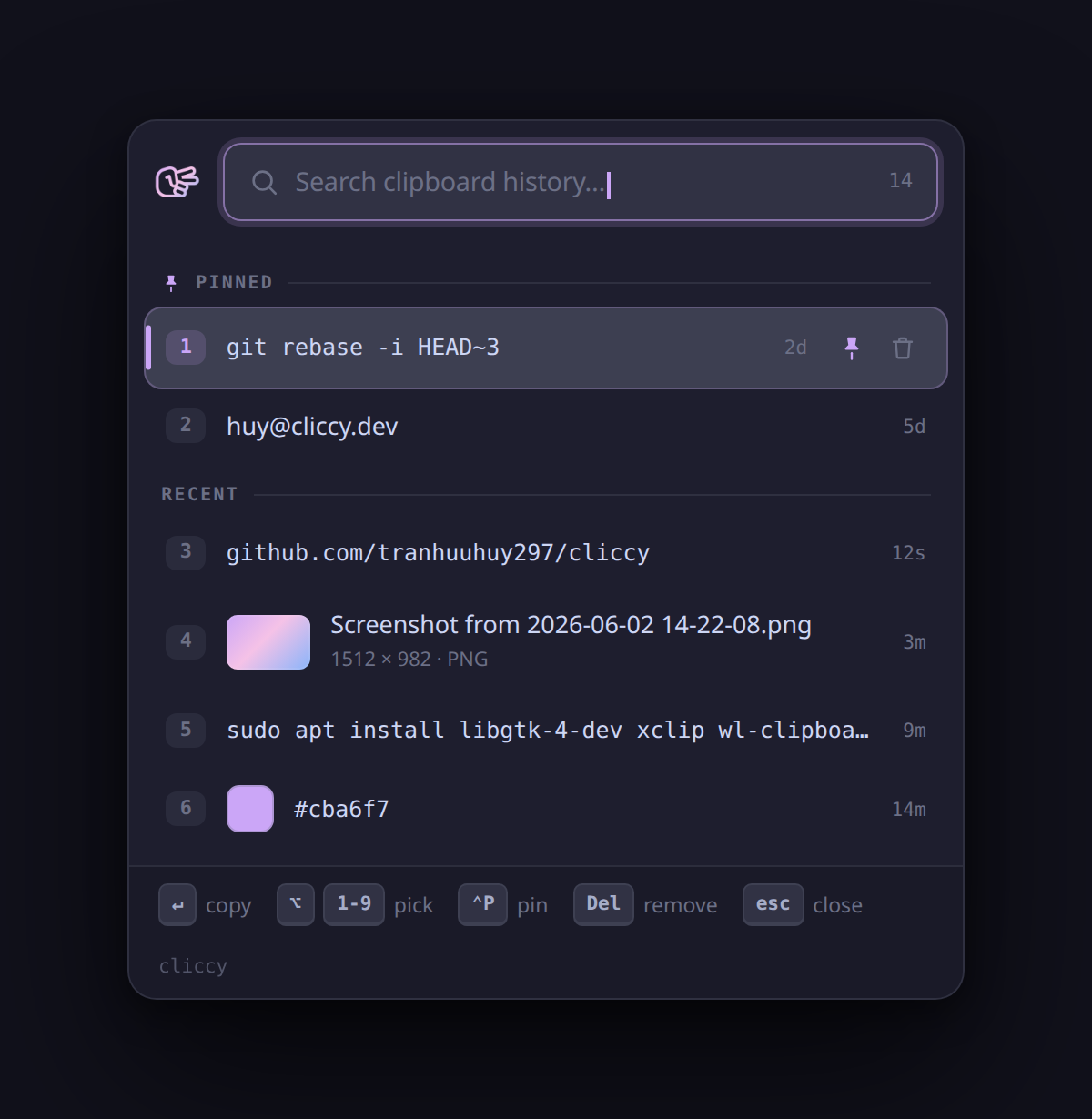
Lightweight Maccy-style clipboard history for Linux — type-to-search popup for text & images. Built with Rust + GTK4. Works on X11 and Wayland.
Demo
Features
- Resident daemon that records what you copy — text and PNG images
- Fast type-to-search popup with full keyboard control (image thumbnails inline)
- Preview the full content of a clipped entry —
Spaceon the selected row or hover it with the pointer opens a side panel: the complete text, or the full image (scaled to fit, with its dimensions and size) for image rows - Pin snippets (
Ctrl+P, never expire); delete one (Delete) or clear all (cliccy clear) - SQLite-backed, capped at 20 unpinned entries (pinned never expire)
- Top-bar tray icon: left-click to open, right-click for open / clear-history / quit. The popup is a normal window (it shows a dock entry while open) so GNOME maps and focuses it reliably every time
- Single small binary, dark Catppuccin theme
Requirements
- Rust (stable) + Cargo, and GTK4 headers
- Clipboard CLI tools:
xclip(primary) andwl-clipboard(pure-Wayland fallback) - SQLite is bundled.
- Tray icon needs a StatusNotifier host — GNOME's AppIndicator extension, which
Ubuntu 22.04+ enables by default. Without it the icon just won't appear; the
hotkey popup is unaffected. (No extra apt packages —
ksniis pure Rust.)
# Debian/Ubuntu
sudo apt install libgtk-4-dev xclip wl-clipboard
# Fedora
sudo dnf install gtk4-devel
Install
One line — downloads the prebuilt binary, then sets up the GNOME hotkey + autostart (no checkout, no compile):
curl -fsSL https://raw.githubusercontent.com/tranhuuhuy297/cliccy/main/install.sh | bash
Append -s -- '<Super>V' to pick your own hotkey. From a checkout:
./install.sh                 # install + hotkey + autostart
./install.sh '<Super>V'      # optional: choose your own hotkey
Installs to ~/.local/bin/cliccy, registers a GNOME shortcut (default
Ctrl+Alt+V), adds a login autostart entry, and launches the daemon. Ensure
~/.local/bin is on your PATH.
The prebuilt binary is built on Ubuntu 22.04 (GTK 4.6) and works on x86_64
Linux with GTK4 installed. The installer builds from source automatically
when there's no prebuilt for your arch, the download fails, or you're running
from a local checkout. Force a source build with CLICCY_FROM_SOURCE=1.
Manual build:
cargo build --release
./target/release/cliccy daemon &     # background monitor
./target/release/cliccy toggle       # open/close the popup
Uninstall
One line — stops the daemon, drops the hotkey, removes the binary, autostart entry, and icon:
curl -fsSL https://raw.githubusercontent.com/tranhuuhuy297/cliccy/main/uninstall.sh | bash
Append -s -- --purge to also wipe clipboard history. From a checkout:
./uninstall.sh (or ./uninstall.sh --purge).
Usage
| Command | Description |
|---|---|
cliccy / cliccy daemon |
Run the resident monitor + popup (default) |
cliccy toggle |
Show/hide the popup (bind a global hotkey to this) |
cliccy show / hide |
Force the popup open / closed |
cliccy clear |
Delete all unpinned history |
cliccy install-hotkey |
Register a GNOME shortcut (default <Control><Alt>V) |
cliccy uninstall-hotkey |
Remove the GNOME shortcut |
In the popup: type to filter, ↑/↓ to move, Enter/click to copy & close,
Space to preview the full content of the selected row — text (long entries are
clipped to … in the list) or the full image for image rows; hovering a row
opens the same side panel with the pointer —
Alt+1…9 to quick-pick a row, Ctrl+P to pin/unpin, Delete to remove, Esc
to close (or to dismiss the preview).
Change your hotkey
Already installed and just want a different key? Re-register the binding — no reinstall needed. It overwrites the existing shortcut in place:
cliccy install-hotkey '<Super>v'   # set a new hotkey (Super+V)
cliccy install-hotkey              # back to the default Ctrl+Alt+v
cliccy uninstall-hotkey            # remove it entirely
Use a lowercase letter (v, not V) — GNOME reads an uppercase letter as
also requiring Shift. On non-GNOME desktops (KDE, Sway, Hyprland…), edit your
compositor's keyboard shortcut to run cliccy toggle instead.
How it works
A single cliccy process is the GApplication primary instance (the daemon). It
watches the clipboard event-driven via X11 XFIXES and stores changes in
~/.local/share/cliccy/history.db. cliccy toggle is forwarded by GApplication
to the running daemon to show/hide the popup.
On GNOME/Wayland, polling the clipboard either steals focus (wl-paste) or
stutters (xclip every tick). Instead, Cliccy listens for XFIXES "selection
owner changed" events that Mutter raises via its XWayland clipboard bridge, so it
reads only when the clipboard actually changes — no timer, no jitter. The popup
renders under XWayland (GDK_BACKEND=x11) as a normal keep-above window, which
GNOME maps and focuses reliably (a utility/skip-taskbar window is treated as an
auxiliary of a main window the popup doesn't have, so Mutter sometimes never
surfaces it). The trade-off is a dock entry while the popup is open. If X is
unavailable it falls back to wl-clipboard polling.
Non-GNOME desktops
install-hotkey only supports GNOME. On KDE, Sway, Hyprland, etc., bind your
compositor's shortcut to run cliccy toggle.
License
MIT