
clipboardwire
Cross-platform clipboard sync over WebSocket. One small Rust binary. Runs on Linux + Windows + MacOS. LAN/VPN-first.



Copy on one machine, paste on another. Text, images and files. No cloud account, no SaaS, no JVM — just a 7 MiB static binary that runs as a tray icon and shuttles clipboard contents between your trusted devices over an encrypted WebSocket.
It started as a Rust rewrite of the ClipCascade server (which is Java/Spring), but the wire protocol, threat model, and operational shape were redesigned for a single-user / personal-use deployment on a LAN or VPN.
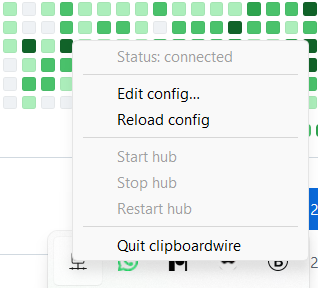 Right-click menu: live status, hub controls, quick config access. |
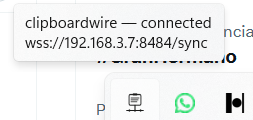 Hover tooltip: current state + the server it's pointed at. |
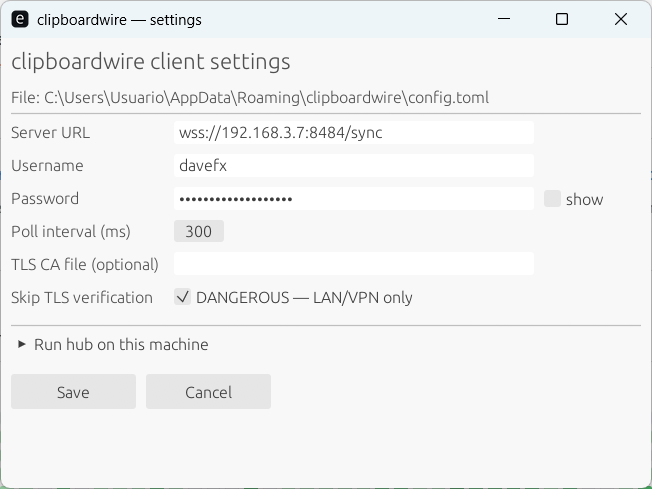 Settings dialog: a GUI for the config TOML, no editor required. |
|
What you get
- One binary, three modes.
clipboardwire(or any ofconnect/host/serve) — the right mode is the default depending on how you launched it. - System-tray app with live connection status (Connecting / Connected / Disconnected — retrying in N s), a Settings GUI, and Start/Stop/Restart controls for the embedded hub. Runs on Linux (X11 + Wayland via GTK + libayatana-appindicator), Windows, and macOS (menu-bar app, no Dock entry).
- File sync via the clipboard. Ctrl+C a file (or several) in
Nautilus / Explorer / Finder on one machine; Ctrl+V on another
pastes them out of
~/Downloads/clipboardwire/. Multi-file selections arrive as a single clipboard set after a brief debounce on the receiver. There's also aclipboardwire send <FILE>CLI for scripted transfers. - Auto-TLS by default. First time the hub starts it generates a
self-signed cert under
~/.config/clipboardwire/(or the platform equivalent) with sensible SANs and logs the SHA-256 fingerprint. Clients pin it viatls_ca_fileor skip verification withtls_insecure = trueon a trusted network. - Embedded-hub mode. Your always-on workstation can both be the
relay and a clipboard participant — no separate
serveinstall needed. - Native packages.
.deb,.rpm, and.msion every release. The deb ships a systemd unit (for headless server use) and a.desktopentry (so the app shows up in GNOME's Settings → Apps and the launcher). - Tests, not vibes. Tier-1 smoke tests, Linux DBus-driven menu interaction tests, Windows UI-Automation tray-discovery tests, egui_kittest UI tests for the Settings dialog, an integration test that proves the singleton-lock catches duplicate launches. CI runs all of them on Linux and Windows on every push.
Install
Linux (deb)
curl -LO https://github.com/davefx/clipboardwire/releases/latest/download/clipboardwire_0.5.2-1_amd64.deb
sudo apt install ./clipboardwire_0.5.2-1_amd64.deb
clipboardwire   # opens the tray; first run pops the Settings dialog
Linux (rpm)
curl -LO https://github.com/davefx/clipboardwire/releases/latest/download/clipboardwire-0.5.2-1.x86_64.rpm
sudo dnf install ./clipboardwire-0.5.2-1.x86_64.rpm
Windows
Download clipboardwire-0.5.2-x86_64.msi from the
latest release
and double-click it. The installer creates a Start Menu shortcut, a Desktop
shortcut, and registers a HKCU\Run entry so the tray comes up at login.
macOS
brew install --cask davefx/clipboardwire/clipboardwire
That uses the davefx/homebrew-clipboardwire
tap and downloads clipboardwire-macos-universal.dmg from the latest
release. brew upgrade --cask clipboardwire picks up new releases.
Or grab the DMG directly:
curl -LO https://github.com/davefx/clipboardwire/releases/latest/download/clipboardwire-macos-universal.dmg
hdiutil attach clipboardwire-macos-universal.dmg
cp -R "/Volumes/clipboardwire/clipboardwire.app" /Applications/
hdiutil detach "/Volumes/clipboardwire"
open /Applications/clipboardwire.app
The binary is unsigned, so the first launch shows a "cannot verify developer" warning. Open System Settings → Privacy & Security, scroll to the bottom, and click Open Anyway. clipboardwire lives in the menu bar (LSUIElement) — no Dock icon.
Cargo (any platform with Rust 1.89+)
cargo install --git https://github.com/davefx/clipboardwire --locked clipboardwire
You'll need the GTK / libayatana-appindicator dev headers on Linux. See Building from source.
Quick start (one machine hosts, others connect)
On the machine that should run the relay:
- Launch
clipboardwire. On first run the Settings dialog opens. - Fill in Server URL (
wss://<this-host>:8484/sync), a username, a password. - Expand Run hub on this machine, tick Run hub when the tray starts,
re-enter the same username/password for the hub auth, and choose a bind
address (default
0.0.0.0:8484). - Save. The tray menu now shows Status: connecting… then Status: connected.
On each other device:
- Install + launch. Settings dialog opens.
- Fill in the same Server URL + username + password from above. Leave the hub section unticked.
- For the self-signed cert: either copy the host's
~/.config/clipboardwire/self-signed.crtover to the same path on the client and settls_ca_fileinconfig.toml, or — only on a trusted network — tick Skip TLS verification. - Save. Tray should show Status: connected.
Now copy on one device and paste on another.
Configuration
The client config lives at:
- Linux:
~/.config/clipboardwire/config.toml - macOS:
~/Library/Application Support/clipboardwire/config.toml - Windows:
%APPDATA%\clipboardwire\config.toml
The Settings GUI covers every field, but the underlying TOML is small and hand-editable:
server = "wss://nas.lan:8484/sync"
user = "alice"
password = "hunter2"
poll_ms = 300
# tls_ca_file = "/path/to/self-signed.crt"  # pin a specific cert
# tls_insecure = true                       # LAN/VPN only

# Optional: bring up a hub server in this same process. Other devices
# on your network connect to <bind>; the local client routes over
# loopback automatically.
[hub]
enabled = true
bind = "0.0.0.0:8484"
user = "alice"
password = "hunter2"
# tls_disabled = true     # serve plain ws:// instead of auto-gen TLS
clipboardwire serve reads the same TOML's [hub] section, so a
headless NAS install only needs one file.
How it works
+--------------+         wss://         +--------------+         wss://         +--------------+
|              | <--------------------> |              | <--------------------> |              |
|  client A    |   (one TCP conn)       |   the hub    |   (one TCP conn)       |  client B    |
|  (tray + arb) |  Basic auth + JSON     | (in-memory   |  Basic auth + JSON     |  (tray + arb) |
|              |                        |  fan-out)    |                        |              |
+--------------+                        +--------------+                        +--------------+
        ^                                                                              ^
        |                                                                              |
   local clipboard                                                              local clipboard
   (arboard)                                                                    (arboard)
- The hub is a tokio + axum WebSocket relay. Each connected client gets a UUID; when one client publishes a clip frame, the hub broadcasts to every other client and caches it as the "last clip" so late joiners get the current value in their welcome frame.
- Each client runs a polling thread on top of arboard to detect local clipboard changes, a tokio WebSocket task for the wire, and a supervisor that bridges them with echo-loop suppression.
- The tray owns the main thread for the OS event loop (tao)
while tokio runs on worker threads. The Settings dialog is a separate
clipboardwire settingssubprocess that uses eframe/egui so the two event loops don't fight.
The wire protocol is documented in PROTOCOL.md. The implementation plan and trade-offs are in ARCHITECTURE.md.
Threat model
The α model assumed by the code:
- Trusted: your devices, the hub host (operator, RAM, disk).
- Untrusted: the network path between devices and the hub. TLS via
rustlsis what protects clipboard contents in transit. The hub auto-generates a self-signed cert on first run; clients have to either pin it (tls_ca_file) or — only on a trusted network — settls_insecure = true. - Out of scope: denial-of-service, side channels on the client devices, end-to-end encryption from one client to another (the hub sees clipboard plaintext).
- Not for: clipboard sync over the public internet to untrusted infrastructure. The right upgrade path for that is E2EE with TOFU device pairing — see PROTOCOL.md §4 for the sketch.
If you find a vulnerability, see SECURITY.md.
Building from source
You need Rust 1.89 or newer. Linux additionally needs the GTK + libayatana-appindicator + libxdo development headers (for the tray icon):
# Debian / Ubuntu
sudo apt install libgtk-3-dev libayatana-appindicator3-dev libxdo-dev

# Fedora / RHEL
sudo dnf install gtk3-devel libayatana-appindicator-gtk3-devel libxdo-devel

# Then:
cargo build --release -p clipboardwire
./target/release/clipboardwire
Test suite:
cargo test --workspace                                  # unit + integration
xvfb-run -a cargo test --workspace -- --ignored        # tray + DBus + UIA
Status & roadmap
Currently shipping: v0.5.2 — see CHANGELOG.md.
v0.4 shipped the big v0.4 roadmap items: file sync via the clipboard
(Linux X11, Windows CF_HDROP, macOS NSPasteboardTypeFileURL), tray
icon status overlay, "Pin from server" button in the Settings dialog,
macOS .app / .dmg packaging, and a Homebrew tap.
Still on the list for later patches:
- Native Wayland file-clipboard via
wl_data_device(Xwayland already covers most setups, so the urgency is low). - A "stop hub at quit" semantics polish so the embedded hub task doesn't outlive the tray if the system shutdowns it via signal.
- End-to-end encryption between peers — for a deployment shape where the hub is on hardware you don't trust (the current threat model assumes the hub is in the trust boundary).
Contributing
Issues and PRs welcome on GitHub.
The codebase is a workspace: core/ is the library (protocol, hub, client
transport, clipboard adapter), cli/ is the binary (tray, settings, CLI
plumbing). Tests are the contract — please add one for any non-trivial
change. Run cargo fmt --all -- --check and cargo clippy --workspace --all-targets -- -D warnings before sending.