

CNLLM - Chinese LLM Adapter


Why CNLLM?
CNLLM Python SDK 为中文大模型提供了一个统一的 OpenAI 兼容接口层与一套标准化的参数规则和响应格式规范。
通过 CNLLM,开发者可以无障碍地在 OpenAI 生态内的 langchain、LlamaIndex、AutoGen、Haystack、DeepEval 等主流大模型应用框架中使用中文大模型;尤其在需要多模型协作的开发和应用场景中,使用 CNLLM 可显著减少适配解析、功能实现及维护工程量,并有效降低 AI agent 开发中的 Token 消耗。
- 统一接口 - 一套接口和参数调用不同中文大模型,返回 OpenAI API 标准响应
- 参数验证 - 对所有参数进行验证和明确反馈,尤其是厂商原生参数,并支持参数处理行为控制 (
drop_params) - 流式响应 - 通过
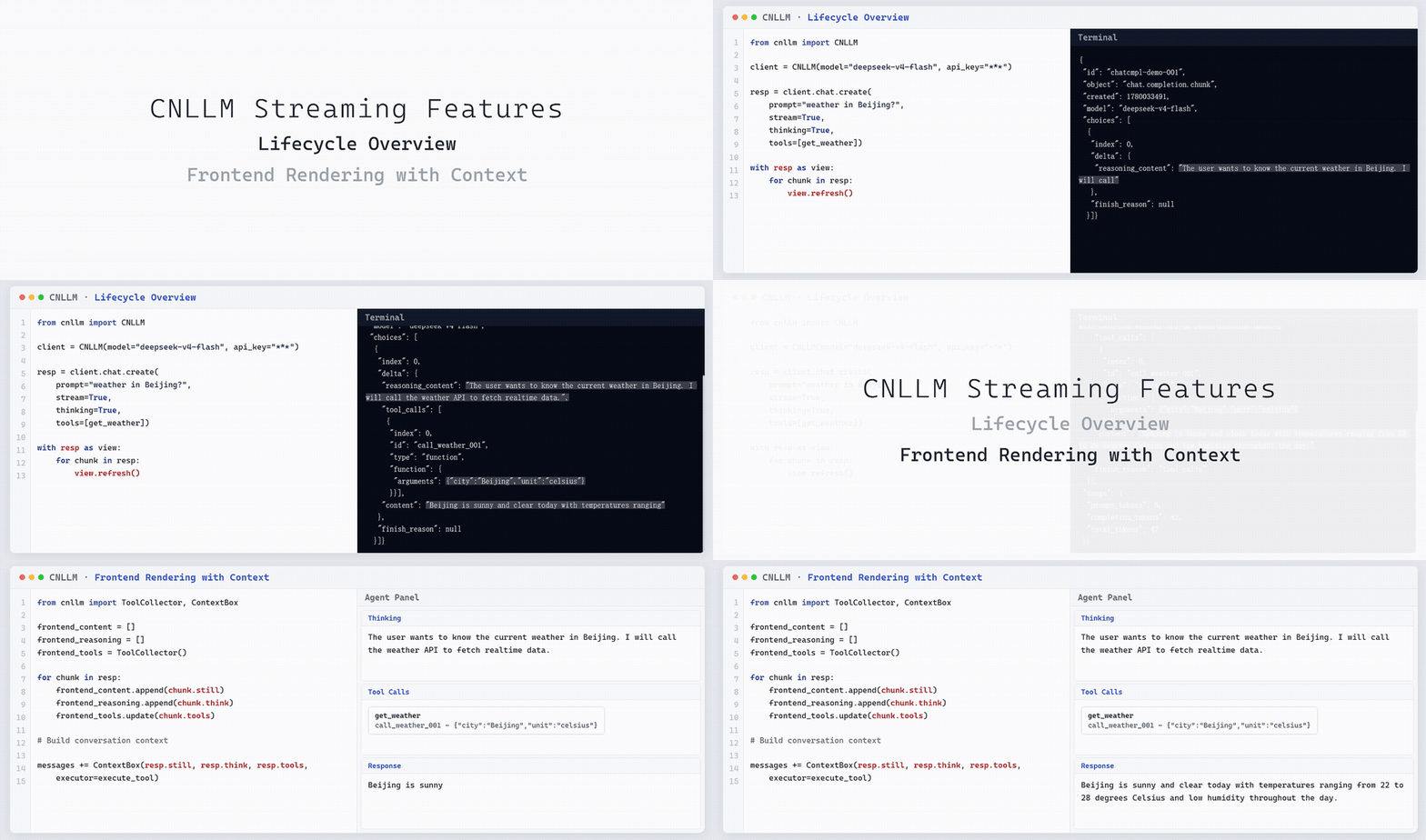
repr()进行流式生命周期监测,以及通过.still/.think/.tools属性访问增量字段自动累积 - 批量能力 - 支持批量任务中单个请求的独立配置,并提供实时批量进度统计 (
.status),可配置的失败策略 (stop_on_error) 和内存管理 (keep).
演示:流式生命周期视图与增量提取/自动累积:
开发者招募
欢迎开发者共同参与 CNLLM 的发展,创建 Pull Request 前请先提交 Issue 说明问题并讨论您的解决方案。
或在以下邮箱联系我们:[email protected]
| 方向 | 说明 |
|---|---|
| 🌐 新厂商适配 | 接入更多中文大模型(如阿里千问、百度文心一言、腾讯混元等) |
| 🔗 框架适配 | 深化与 LlamaIndex、LiteLLM 等框架的集成 |
| 🐛 能力扩展 | 多模态功能的适配框架开发 |
| 📖 文档完善 | 补充使用案例、优化开发指南 |
| 💡 功能建议 | 提出您的想法与需求 |
项目开发文档:
更新日志
v0.9.3 (2026-05-29)
- ✨ 上下文构建工具
- 新增
ContextBox类,一行代码自动格式化模型回复、推理过程、工具调用消息,并加入messages上下文列表。 - 支持
executor参数,用于自定义工具执行器函数。
- 新增
- ✨ LangChain 集成
LangChainRunnable(BaseChatModel)中新增支持bind_tools()/with_structured_output()方法- 新增
LangChainEmbeddings:适配langchain_core.embeddings.Embeddings,支持embed_documents()/embed_query()
支持的模型
Chat Completions 支持:
- DeepSeek
deepseek-chat、deepseek-reasoner、deepseek-v4-pro、deepseek-v4-flash
- KIMI (Moonshot AI)
kimi-k2.6、kimi-k2.5、moonshot-v1-128k(moonshot-v1)、moonshot-v1-8k、moonshot-v1-32k、moonshot-v1-vision-preview
- 豆包 Doubao
doubao-seed-2-0-pro-260215(doubao-seed-2-0-pro)、doubao-seed-2-0-mini-260215(doubao-seed-2-0-mini)、doubao-seed-2-0-lite-260215(doubao-seed-2-0-lite)、doubao-seed-2-0-code-preview-260215(doubao-seed-2-0-code)、doubao-seed-1-8-251228(doubao-seed-1-8)、doubao-seed-1-6-251015(doubao-seed-1-6)、doubao-seed-1-6-flash-250828(doubao-seed-1-6-flash)、doubao-seed-1-6-vision-250815(doubao-seed-1-6-vision)、doubao-1-5-vision-pro-32k-250115(doubao-1-5-vision-pro)、doubao-seed-1-5-lite-32k-250115(doubao-seed-1-5-lite)、doubao-seed-1-5-pro-32k-250115(doubao-seed-1-5-pro-32k)、doubao-seed-1-5-pro-256k-250115(doubao-seed-1-5-pro)
- 智谱 GLM
glm-4.6、glm-4.7、glm-4.7-flash、glm-4.7-flashx、glm-5、glm-5-turbo、glm-5.1、glm-4.5、glm-4.5-x、glm-4.5-air、glm-4.5-airx、glm-4.5-flash、glm-5v-turbo、glm-4.5v、glm-4.6v、glm-4.6v-flash
- 小米 mimo
mimo-v2-pro、mimo-v2-omni、mimo-v2-flash、mimo-v2.5-pro、mimo-v2.5
- MiniMax
MiniMax-M2、MiniMax-M2.1、MiniMax-M2.5、MiniMax-M2.5-highspeed、MiniMax-M2.7、MiniMax-M2.7-highspeed
- 千问 Qwen
qwen3.6-max-preview、qwen3.6-plus、qwen3.6-flash、qwen3.5-plus、qwen3.5-flash、qwen3.5-397b-a17b、qwen3.5-122b-a10b、qwen3.5-27b、qwen3.5-35b-a3b
- 百度千帆 Baidu
ernie-5.1、ernie-5.0、ernie-5.0-thinking-perview、ernie-4.5-8k-preview、ernie-4.5-turbo-128k(ernie-4.5-turbo)、ernie-4.5-turbo-32k、ernie-4.5-turbo-vl、ernie-4.5-turbo-vl-32k、ernie-4.5-0.3b、ernie-speed-pro-128k(ernie-speed-pro)、ernie-lite-pro-128k(ernie-lite-pro)、ernie-x1.1、ernie-x1-turbo-32k(ernie-x1-turbo)
- 腾讯混元 Hunyuan
hy3-preview、hunyuan-2.0-thinking-20251109(hunyuan-2.0-thinking)、hunyuan-2.0-instruct-20251111(hunyuan-2.0-instruct)
Embeddings 支持:
- GLM:
embedding-2、embedding-3、embedding-3-pro - 千问 Qwen:
text-embedding-v4、text-embedding-v3、text-embedding-v2、text-embedding-v1 - 百度千帆 Baidu:
embedding-v1、bge-large-zh、bge-large-en
1. 快速开始
1.1 安装
1.1.1 作为 Agent Skill 安装 (推荐)
CNLLM 遵循 Claude Skills 规范提供标准 Agent Skill。
安装 Skill:
npx skills add kanchengw/cnllm-skill
📖 完整文档和示例,请访问 CNLLM Skill 仓库: https://github.com/kanchengw/cnllm-skill
1.1.2 SDK 安装
pip install cnllm
1.2 客户端初始化
1.2.1 同步客户端
from cnllm import CNLLM

client = CNLLM(model="minimax-m2.7", api_key="your_api_key")
resp = client.chat.create(...)
1.2.2 异步客户端
异步客户端需要通过 await 调用,流式响应通过 async for 迭代:
from cnllm import asyncCNLLM
import asyncio

async def main():
    client = asyncCNLLM(
        model="minimax-m2.7", api_key="your_api_key")
    resp = await client.chat.create(...)
    print(resp)

asyncio.run(main())
1.3 上下文管理
支持两种上下文管理方式:
- 持久化会话 会在多个调用之间保持会话状态,适合需要维护上下文的应用场景
- 临时会话 单次会话,不保持会话状态,自动关闭会话。
持久化会话:
client = CNLLM(
    model="minimax-m2.7", api_key="your_api_key")
resp = client.chat.create(...)
client.close()                         # 手动关闭,异步客户端使用client.aclose()
临时会话:
with CNLLM(
    model="deepseek-chat", api_key="your_api_key") as client:
    resp = client.chat.create(...)     # 自动关闭会话
2. 调用场景
所有方式支持同步客户端以及异步客户端下的调用:
| 类型 | 场景 | 方法 | 返回类型 |
|---|---|---|---|
| chat completions | 非流式单条 | chat.create() |
Dict |
| 流式单条 | chat.create(stream=True) |
Iterator[Dict] |
|
| 非流式批量 | chat.batch() |
BatchResponse |
|
| 流式批量 | chat.batch(stream=True) |
Iterator[Dict] |
|
| 混合流式批量 | chat.batch(requests=[{"stream": True}, {"stream": False}]) |
BatchResponse |
|
| embeddings | Embeddings 单条 | embeddings.create() |
Dict |
| Embeddings 批量 | embeddings.batch() |
EmbeddingResponse |
2.1 chat completions 单条调用
支持三种输入方式,最简一行代码,一个参数:
极简调用:
不支持除字符串外的其他参数(流式调用可在客户端配置 stream=True 参数)。
resp = client("用一句话介绍自己")
标准调用:
resp = client.chat.create(prompt="用一句话介绍自己", stream=True)
完整调用:
resp = client.chat.create(
    messages=[
        {"role": "user", "content": "用一句话介绍自己"},
        {"role": "assistant", "content": "我是一个智能助手"},
        {"role": "user", "content": "你好"},
        ]
)
2.1.1 非流式调用
resp = client.chat.create(
    messages=[{"role": "user", "content": "用一句话介绍自己"}],
)
2.1.2 流式调用
流式响应提供两个访问层,分别面向不同的使用场景:
from cnllm import ToolCollector

resp = client.chat.create(
    prompt="用一句话介绍自己",
    stream=True,
    thinking=True,
    tools=tools,
)

# ── 迭代中:chunk.* 返回逐帧增量,适合前端实时渲染/流式过程监控 ──
with resp as view:   # 逐 chunk 合并的完整视图
    for chunk in resp:
        frontend_content.append(chunk.still)    # delta.content,逐字增量
        frontend_reasoning.append(chunk.think)  # delta.reasoning_content,逐字增量
        frontend_tools.update(chunk.tools)      # delta.tool_calls,逐 index 归并
        view.refresh()                          # 实时刷新视图

# ── 流结束后:resp.* 返回完整累积结果,适合取最终值 ──
print(resp.still)   # 完整的模型回复文本
print(resp.think)   # 完整的推理过程
print(resp.tools)   # 完整的工具调用
print(resp)         # 完整合并的 OpenAI dict
2.1.3 响应访问
非流式 / 流式通用(stream=False 时可直接访问;stream=True 时建议流结束后访问):
| 访问方式 | 返回内容 | 返回格式 | 返回示例 |
|---|---|---|---|
resp |
OpenAI 标准响应 | Dict / Iterator[Dict] |
非流式为完整 dict /流式为 chunk 列表 |
resp.still |
模型回复文本(content) |
str |
"你好,我是..." |
resp.think |
推理过程(reasoning_content) |
str |
"推理内容..." |
resp.tools |
工具调用(tool_calls) |
List[Dict] |
[] |
resp.raw |
模型原始响应 | Dict / List[Dict] |
非流式为完整 dict /流式为 chunks 列表 |
流式专属(仅 stream=True 时在迭代中访问,返回逐 chunk 增量):
| 访问方式 | 返回内容 | 返回格式 | 返回示例 |
|---|---|---|---|
chunk.still |
当前 chunk 的 delta.content 增量 |
str |
"你", "好" |
chunk.think |
当前 chunk 的 delta.reasoning_content 增量 |
str |
"思考", "过程" |
chunk.tools |
当前 chunk 的 delta.tool_calls 增量 |
List[Dict] |
[] |
with resp as view |
逐 chunk 合并的完整视图 (实时刷新) | LiveDict 上下文管理器 |
{实时视图} |
2.1.4 对话上下文构建
ContextBox 将包含了完整上下文内容的 resp.still / resp.think / resp.tools 自动格式化为下一轮对话的 messages 列表。
,
from cnllm import ContextBox

# 构建 assistant 消息(think + still 自动拼接,tool_calls 自动附着)
messages += ContextBox(resp.still, resp.think)

# 或在工具调用场景下,传入 executor 自动执行并追加 tool 结果
def execute_weather_tool(tc):
    """tc: {"id": "call_xxx", "function": {"name": "get_weather", "arguments": "..."}}"""
    args = json.loads(tc["function"]["arguments"])
    return json.dumps(get_weather(args["location"]))

messages += ContextBox(resp.still, resp.think, resp.tools,
                       executor=execute_weather_tool)
# → 自动产出:
#   {"role": "assistant", "content": "think...\n\nstill...", "tool_calls": resp.tools}
#   {"role": "tool", "tool_call_id": "call_xxx", "content": "工具执行结果"}
2.2 chat completions 批量调用
可通过 prompt 和 messages 参数输入并快速配置全局参数,也可以通过 requests 参数为单个请求进行独立配置。
prompt 参数:
resp = client.chat.batch(
    prompt=["你好", "今天天气怎么样", "你是谁"],
    stream=True
)
messages 参数:
resp = client.chat.batch(
    messages=[
        [{"role": "user", "content": "北京天气怎么样"},
         {"role": "assistant", "content": "北京天气晴朗"},
         {"role": "user", "content": "那上海呢"}],
        [{"role": "user", "content": "上海天气怎么样"}],
    ],
    tools=[get_weather]
)
requests 参数:
对批请求中的单个请求进行独立配置,全局参数在单个请求未配置时被继承,支持使用requests.messages参数管理上下文。
resp = client.chat.batch(
    requests=[
        {"prompt": "北京天气怎么样", "tools": [get_weather], "stream": True},  # 继承全局参数中配置的 thinking 参数
        {"prompt": "1+1等于多少", "tools": [calc], "thinking": False},  # 不继承任何全局参数
        {"prompt": "广州天气怎么样", "model": "deepseek-chat", "api_key": "key"}  # 继承全局参数中配置的 tools 和 thinking 参数
    ],
    # 全局参数(per-request 未配置时继承使用):
    tools=[default_tool],
    thinking=True,
    max_concurrent=2  # 最大并发数:batch 层级参数,不被单个请求继承
)
2.2.1 chat completions 批量响应结构
BatchResponse 外层结构,其中 results[request_id] 字段下的每条响应为 OpenAI 标准流式/非流式响应结构:
{
    "status": {"elapsed": "3.42s", "success_count": 2, "fail_count": 1, "total": 3},  # 统计信息
    "usage": {"prompt_tokens": 5, "total_tokens": 5},     # 批处理的总用量信息
    "errors": {"request_2": "error message"},             # 所有失败请求的 request_id 和错误信息映射
    "results": {"request_0": {...}, "request_1": {...}},  # 所有成功请求的 request_id 和标准响应映射
    "think": {"request_0": "...", "request_1": "..."},
    "still": {"request_0": "...", "request_1": "..."},
    "tools": {"request_0": {...}, "request_1": {...}},
    "raw": {"request_0": {...}, "request_1": {...}}
}
2.2.2 chat completions 批量响应访问
终端实时观测:
resp = client.chat.batch(
    prompt=["你好", "今天天气怎么样", "你是谁"],
    stream=True,
)

with resp as view:   # 实时刷新的元数据视图
    for r in resp:
        view.refresh()
迭代中实时增量(流式批量/混合流式批量可用):
# chunk.* 返回逐帧增量,request_id 自动分流
for chunk in resp:
    rid = chunk["request_id"]
    frontend_still[rid].append(chunk.still)
    frontend_think[rid].append(chunk.think)
流结束后取全量:
print(resp.still)   # {"request_0": "你好", "request_1": "...", "request_2": "..."}
print(resp.think)   # {"request_0": "推理...", "request_1": "..."}
print(resp.tools)   # {"request_0": [{"function": {"name": "get_weather", ...}}]}
print(resp)   # 元数据视图完整迭代后的结果
通用访问字段:
| 访问方式 | 返回内容 | 返回格式 | 返回示例 |
|---|---|---|---|
resp.status |
实时统计 | Dict |
{"success_count":2,"elapsed":"3.42s"} |
resp.usage |
Token 用量 | Dict[str, int] |
{"total_tokens":150} |
resp.errors |
失败请求信息 | Dict[str, str] |
{"request_0": "error"} |
resp.results |
标准响应 | Dict[str, Dict] |
{"request_0": {...}} |
resp.still |
所有请求的回复 | Dict[str, str] |
{"request_0": "你好", "request_1": "..."} |
resp.think |
所有请求的推理 | Dict[str, str] |
{"request_0": "推理..."} |
resp.tools |
所有请求的工具调用 | Dict[str, List[Dict]] |
{"request_0": [{"function": {...}}]} |
with resp as view |
元数据视图(实时刷新) | LiveBatchDict 上下文管理器 |
{"status": {...}, "usage": {...}} |
流式 / 混合流式批量(在迭代中访问,返回批量任务中流式请求的逐 chunk 增量):
| 访问方式 | 返回内容 | 返回格式 | 返回示例 |
|---|---|---|---|
chunk.still |
当前 chunk 增量 | str |
"你" |
chunk.think |
当前 chunk 推理增量 | str |
"思考" |
chunk.tools |
当前 chunk 的 delta.tool_calls 增量 |
List[Dict] |
[] |
to_dict(): 将响应转换为字典,保留指定字段,未在 keep 声明的字段若保留会产生警告:
resp.to_dict()  # 默认:保留 still/think/tools 字段 + 元数据 (status/usage)
resp.to_dict(errors=True, results=True)  # 保留 results/errors 字段 + 元数据 (status/usage)
2.3 Embeddings 调用
支持同步/异步 Embeddings 调用,支持进度回调、自定义请求 ID 、遇错停止等高级功能,支持配置并发控制、批量大小。
2.3.1 单条调用
resp = client.embeddings.create(input="Hello world")
print(resp.vectors)  # 嵌入向量结果
2.3.2 Embeddings 批量调用
resp = client.embeddings.batch(
    input=["Hello", "world", "你好"]
)
2.3.3 Embeddings 批量响应结构
BatchEmbeddingResponse 外层结构,其中 results[request_id] 字段下每条响应为 OpenAI 标准 Embeddings 响应结构:
{
    "status": {"elapsed": "3.35s", "success_count": 1, "fail_count": 1, "total": 2},
    "batch_info": {"batch_size": 2, "batch_count": 2, "dimension": 1024},
    "usage": {"prompt_tokens": 5, "total_tokens": 5},
    "results": {"request_0": {...}, "request_1": {...}}
    "errors": {"request_2": "error message"},
    "vectors": {"request_0": [...]}    # 所有成功请求的 request_id 和嵌入向量映射
}
2.3.4 Embeddings 批量响应访问
resp = client.embeddings.batch(
    input=["你好", "今天天气怎么样", "你是谁"]
)
访问字段:
| 访问方式 | 返回内容 | 返回格式 | 返回示例 |
|---|---|---|---|
resp.status |
实时统计 | Dict |
{"total":2,"elapsed":"3.42s"} |
resp.usage |
Token 用量 | Dict[str, int] |
{"total_tokens":10} |
resp.batch_info |
批量信息 | Dict |
{"batch_size":2,"batch_count":3,"dimension":1024} |
resp.errors |
失败请求信息 | Dict[str, str] |
{"request_0":"error"} |
resp.results |
标准响应 | Dict[str, Dict] |
{"request_0": {...}} |
resp.vectors |
嵌入向量表示 | Dict[str, List[float]] |
{"request_0":[0.1,0.2,...]} |
with resp as view |
元数据视图(实时刷新) | LiveEmbeddingDict 上下文管理器 |
{"status": {...}, "usage": {...}, "batch_info": {...}} |
to_dict(): 将响应转换为字典,保留指定字段,未在 keep 声明的字段若保留会产生警告:
resp.to_dict()               # 默认:保留 vectors 字段 + 元数据 (status/usage/batch_info)
resp.to_dict(results=True)   # 保留 results 字段 + 元数据 (status/usage/batch_info)
2.4 批量调用控制参数
批量调用支持重试策略、并发控制参数配置:
| 参数 | 类型 | 默认值 | 说明 |
|---|---|---|---|
batch_size |
int |
动态计算 | 批处理大小,仅 Embeddings 调用支持配置 |
max_concurrent |
int |
12/3 |
最大并发数,Embeddings 默认12,Chat completions 默认3 |
rps |
float |
10/2 |
每秒请求数,Embeddings 默认10,Chat completions 默认2 |
timeout |
int |
30 | 单请求超时(秒) |
max_retries |
int |
3 | 最大重试次数 |
retry_delay |
float |
1.0 | 重试延迟(秒) |
batch_size: 仅支持批量 Embeddings 调用时配置,默认根据请求数量自适应计算,不建议手动配置。
2.5 批量调用高级功能
批量 chat completions/Embeddings 调用都支持进度回调、自定义请求 ID 、遇错停止、字段存储控制、未知参数处理策略。
2.5.1 自定义请求 ID
通过 custom_ids 参数为批量请求指定自定义 ID,批量响应中会替换原 request_id。
resp = client.embeddings.batch(
    input=["文本1", "文本2", "文本3"],
    custom_ids=["doc_001", "doc_002", "doc_003"]
)

resp.results["doc_001"]          # 获取 doc_001 的响应
resp.think["doc_002"]            # 获取 doc_002 的推理内容
2.5.2 进度回调
回调会在每个请求完成时被调用,可以用于:
- 实时显示处理进度
- 记录已完成的任务
- 动态调整后续任务
- ...
def on_complete(request_id, status):          # 回调函数示例,支持自定义
    print(f"[{request_id}] {status}")

resp = client.chat.batch(
    requests,
    callbacks=[on_complete]
)
2.5.3 遇错停止
当批量请求遭遇第一个错误时,会立即抛出异常并中断后续任务,若批量请求中存在成功请求,则同时返回批量对象,其中包含已处理的请求结果,可被正常访问:
resp = client.embeddings.batch(
    input=requests,
    stop_on_error=True
)
# 错误信息: {request_id}请求失败,失败原因:{error}

# 若批量请求中存在成功请求,则可正常访问批量对象:
resp.status
resp.vectors
2.5.4 字段存储控制
批量调用(Chat / Embeddings)在 for 循环中可以访问所有字段,迭代结束后,会自动释放部分冗余字段以节省内存。
keep 参数用于指定哪些字段在迭代后需要保留:
默认行为(不指定 keep 参数时):
| 调用类型 | 默认保留 | 迭代后自动释放 |
|---|---|---|
client.chat.batch() |
still/think/tools和元数据 |
results/errors/raw |
client.embeddings.batch() |
vectors和元数据 |
results/errors |
说明:
keep=[]时,迭代结束后释放所有字段,仅保留元数据;keep=["*"]时,迭代结束后所有字段都会被保留。chat.batch()中,元数据字段包括status/usage;embeddings.batch()中,元数据字段包括status/usage/batch_info。
使用方式:
resp = client.embeddings.batch(
    input=["文本1", "文本2", "文本3"],
    keep=["vectors"]         # 迭代结束后仅保留 vectors 字段
)
for _ in resp:
    print(resp.results)      # 迭代中可访问任意字段,request by request 实时累积

resp.vectors["request_0"]    # 迭代后可访问
resp.results["request_0"]    # 迭代后不可访问,返回警告
也可在客户端初始化时设置全局默认值:
client = CNLLM(..., keep=["vectors"])
2.5.5 未知参数处理策略
通过 drop_params 控制实际调用时,客户端持有的不适配调用方式的参数和其他未知参数的处理行为,默认策略为 warn 警告模式。
| 策略 | 配置 | 行为 |
|---|---|---|
| 警告模式(默认) | drop_params="warn" |
打印警告日志,参数被丢弃,请求继续 |
| 严格模式 | drop_params="strict" |
抛出 TypeError,请求终止 |
| 静默忽略模式 | drop_params="ignore" |
静默丢弃未知参数,不产生任何日志 |
说明:
- 进行批量调用时,若全局参数中包含未知参数,
drop_params="strict"直接抛出异常,不实际启动批量任务; - 若批量任务中的单个请求包含未知参数,
drop_params="strict"直接将该请求归入errors字段,不实际执行该请求,并继续执行后续的批量任务。
3. CNLLM 标准响应格式
CNLLM 单条请求的流式、非流式、 Embeddings 响应格式,完全对齐 OpenAI 标准结构。
3.1 非流式响应格式
{
    "id": "chatcmpl-xxx",
    "object": "chat.completion",
    "created": 1234567890,
    "model": "minimax-m2.7",
    "choices": [{
        "index": 0,
        "message": {
            "role": "assistant",
            "content": "你好,我是 MiniMax-M2.7...",
            "reasoning_content": "推理过程内容..."    # 模型推理过程,若有
            "tool_calls": [{                        # 工具调用,若有
                "id": "call_xxx",
                "type": "function",
                "function": {"name": "get_weather", "arguments": "{\"location\":\"北京\"}"}
            }]
        },
        "finish_reason": "stop"
    }],
    "usage": {
        "prompt_tokens": 10,
        "completion_tokens": 20,
        "total_tokens": 30,
        "prompt_tokens_details": {
            "cached_tokens": 0
        },
        "completion_tokens_details": {
            "reasoning_tokens": 0
        }
    }
}
3.2 流式响应格式
{'id': 'chatcmpl-xxx', 'object': 'chat.completion.chunk', 'created': 1234567890, 'model': 'minimax-m2.7', 'choices': [{'index': 0, 'delta': {'role': 'assistant'}, 'finish_reason': None}]}

# reasoning_content chunks (模型推理过程,若有):
{'id': 'chatcmpl-xxx', 'object': 'chat.completion.chunk', 'created': 1234567890, 'model': 'minimax-m2.7', 'choices': [{'index': 0, 'delta': {'reasoning_content': '推理..'}, 'finish_reason': None}]}

# tool_calls chunks (工具调用,若有):
{'id': 'chatcmpl-xxx', 'object': 'chat.completion.chunk', 'created': 1234567890, 'model': 'minimax-m2.7', 'choices': [{'index': 0, 'delta': {'tool_calls': [{'index': 0, 'id': 'call_xxx', 'type': 'function', 'function': {'name': 'get_weather', 'arguments': '...'}}]}, 'finish_reason': None}]}

{'id': 'chatcmpl-xxx', 'object': 'chat.completion.chunk', 'created': 1234567890, 'model': 'minimax-m2.7', 'choices': [{'index': 0, 'delta': {'content': '你好...'}, 'finish_reason': None}]}

# ... chunks

{'id': 'chatcmpl-xxx', 'object': 'chat.completion.chunk', 'created': 1234567890, 'model': 'minimax-m2.7', 'choices': [{'index': 0, 'delta': {}, 'finish_reason': 'stop'}], 'usage': {'prompt_tokens': 10, 'completion_tokens': 20, 'total_tokens': 30}}
3.3 Embeddings 响应格式
{
    "object": "list",
    "data": [{
        "object": "embedding",
        "embedding": [0.1, 0.2, ...],
        "index": 0
    }],
    "model": "embedding-2",
    "usage": {
        "prompt_tokens": 5,
        "total_tokens": 5
    }
}
4. CNLLM 统一接口参数
除下表中作特殊说明的参数,其他参数都接受在客户端初始化和调用入口配置,调用入口处的配置会覆盖客户端初始化的配置。
4.1 CNLLM 请求参数
CNLLM 请求参数与OpenAI 标准参数基本一致,覆盖范围基于国内厂商情况稍有扩展,未覆盖的参数则使用厂商命名并进行透传。
注:并非所有支持模型都支持全部请求参数,请参考厂商官方文档确认,或配置 drop_params="ignore" 以忽略不支持的参数。
4.1.1 基础参数
| 参数 | 类型 | 默认值 | 说明 |
|---|---|---|---|
model |
str |
- | 模型名称,模型名见支持的模型 |
api_key |
str |
- | API 密钥 |
base_url |
str |
自动适配 | 可自定义 API 地址 |
messages |
list[dict]/list[list[dict]] |
- | chat() 输入参数,支持上下文管理/图片识别(仅支持调用入口配置) |
prompt |
str/list[str] |
- | chat() 输入参数(仅支持调用入口配置) |
requests |
list[dict] |
- | chat.batch() 输入参数,支持对批量请求中 per-request 独立配置(仅支持调用入口配置) |
input |
str/list[str] |
- | embeddings() 输入参数(仅支持调用入口配置) |
stream |
bool |
False |
流式响应 |
thinking ¹ |
bool/dict |
由模型端口决定,默认多为 False |
思考模式,支持 True/False,部分模型支持 "auto" |
tools |
list |
- | 工具/函数定义列表 |
¹ thinking 映射:
- GLM、DeepSeek、Baidu、Hunyuan、Xiaomi、Kimi:
True→{"type": "enabled"},False→{"type": "disabled"} - Doubao:
True→"enabled",False→"disabled","auto"→"auto" - Qwen:
True→enable_thinking: true,False→enable_thinking: false
4.1.2 高级参数
| 参数 | 类型 | 默认值 | 说明 |
|---|---|---|---|
temperature |
float |
由模型端口决定 | 生成随机性 |
max_completion_tokens |
int |
由模型端口决定 | 最大生成 token 数(包含思维链) |
max_tokens |
int |
由模型端口决定 | 最大生成 token 数(不包含思维链) |
top_p |
float |
由模型端口决定 | 核采样阈值 |
stop |
str/list |
- | 停止序列 |
reasoning_effort |
str |
由模型端口决定 | 推理深度控制 |
tool_choice |
str/dict |
- | 工具选择策略 |
response_format |
dict |
由模型端口决定,默认多为 {"type": "text"} |
响应格式 |
n |
int |
1 |
生成候选数 |
presence_penalty |
float |
- | 存在惩罚 |
frequency_penalty |
float |
- | 频率惩罚 |
logit_bias |
dict |
- | Token 级别偏差 |
user ¹ |
str |
- | 用户标识 |
seed |
int |
- | 随机种子,相同 seed 可复现结果 |
stream_options |
dict |
- | 流式输出配置,如 {"include_usage": true} |
logprobs |
bool |
False |
是否返回输出 Token 的对数概率 |
top_logprobs |
int |
0 |
每个位置返回概率最高的候选 Token 个数 |
¹ user 映射:
- GLM:
user→user_id
4.1.3 厂商透传参数
4.1.1/4.1.2 中未覆盖的其他模型支持的参数,CNLLM 会透传到模型端口。
| 厂商 | 透传参数 |
|---|---|
| KIMI | prompt_cache_key, safety_identifier, stream_options |
| Doubao | service_tier, stream_options |
| GLM | do_sample, request_id, tool_stream, dimensions |
| MiniMax | stream_options(原生接口),group_id(原生接口) |
| 千问Qwen | enable_thinking, preserve_thinking, thinking_budget, top_k, repetition_penalty, vl_high_resolution_images, enable_code_interpreter, enable_search, search_options, parallel_tool_calls, dimensions |
| 百度千帆Baidu | enable_thinking, thinking_budget, thinking_strategy, penalty_score, repetition_penalty, parallel_tool_calls, web_search, metadata |
4.2 SDK 控制参数
CNLLM 内部定义的参数,控制内部执行的行为或策略,不向 API 端口传输。
4.2.1 通用参数
| 参数 | 类型 | 默认值 | 说明 |
|---|---|---|---|
timeout |
int |
60 |
请求超时(秒) |
max_retries |
int |
3 |
最大重试次数 |
retry_delay |
float |
1.0 |
重试延迟(秒) |
fallback_models¹ |
dict |
- | 备用模型(仅支持客户端初始化配置),见下方说明 |
drop_params |
str |
"warn" |
见 未知参数处理策略 |
¹fallback_models 模型降级策略:
备用模型仅支持客户端初始化时配置,若 model 未成功响应,将顺序尝试传入的fallback_models,对应用的稳健性有要求,建议配置此项,并配置 drop_params="ignore" 避免参数支持性的影响。
fallback_models = {
    "deepseek-chat": {
        "api_key": "ds-key-456",     # 必填
        "base_url": "https://api.deepseek.com/v1",
    },
    "qwen-plus": {
        "api_key": "my-key",         # 不配置 base_url 时,使用默认 URL
    },
}
说明:
- 调用入口处再次指定
model会覆盖客户端配置的主模型,当调用入口的model失败时,仍会尝试fallback_models chat.batch()中按 per-req 尝试 fallback- 不可重试的错误(模型不存在、参数缺失、内容过滤)会直接抛出,不触发 fallback
- 全部模型失败时抛出
FallbackError,聚合所有失败信息
4.2.2 批量方法参数
仅对 chat.batch() 和 embeddings.batch() 调用生效:
| 参数 | 类型 | 默认值 | 说明 |
|---|---|---|---|
max_concurrent |
int |
Chat: 3 / Embeddings: 12 |
最大并发数 |
rps |
float |
Chat: 2 / Embeddings: 10 |
每秒请求数限制 |
batch_size |
int |
动态计算 | 批处理大小,仅 Embeddings 支持 |
stop_on_error |
bool |
False |
遇错时停止后续请求,返回已处理结果 |
callbacks |
list |
- | 进度回调函数列表 |
custom_ids |
list[str] |
- | 自定义请求 ID 列表 |
keep |
set/list |
见 字段存储控制 | 迭代后保留的数据字段 |
5. 框架集成
5.1. LangChainRunnable实现
LangChainRunnable 继承 BaseChatModel,原生支持 (a)invoke/(a)stream/(a)batch 及 bind_tools/with_structured_output 。
from cnllm import CNLLM
from cnllm.core.framework import LangChainRunnable, LangChainEmbeddings
from langchain_core.prompts import ChatPromptTemplate
from langchain_core.tools import tool
from pydantic import BaseModel, Field
import asyncio

# 创建 CNLLM 客户端
client = CNLLM(model="deepseek-chat", api_key="your_key")

# 创建 Runnable 实例
runnable = LangChainRunnable(client)

prompt = ChatPromptTemplate.from_messages([
    ("system", "你是一个热心的智能助手"),
    ("human", "{input}")
])

# 构建 LangChain chain
chain = prompt | runnable

# 同步调用 invoke/stream/batch
resp = chain.invoke({"input": "2+2等于几?"})
print(resp.content)

for chunk in chain.stream({"input": "数到5"}):
    print(chunk.content, end="", flush=True)

resp = chain.batch([{"input": "Hello"}, {"input": "How are you?"}])
for r in resp:
    print(r.content)

# bind_tools — 工具调用
@tool
def get_weather(city: str) -> str:
    """获取指定城市的天气"""
    return "晴天 20°C"

llm_with_tools = runnable.bind_tools([get_weather])
resp = llm_with_tools.invoke("北京天气")
print(resp.content)

# with_structured_output — 结构化输出
# deepseek-v4 系列需配置 thinking=False ,以接收 with_structured_output() 中包含的 tool_choice 参数;其他模型/厂商无此限制
class Person(BaseModel):
    name: str = Field(description="姓名")
    age: int = Field(description="年龄")

structured = runnable.with_structured_output(Person)
result = structured.invoke("张三28岁")
print(result) # → Person(name="张三", age=28)

# LangChainEmbeddings — 嵌入向量
embeddings = LangChainEmbeddings(client)
vectors = embeddings.embed_documents(["你好", "世界"])
query_vec = embeddings.embed_query("查询")

# 异步调用 ainvoke/astream/abatch
async def main():
    async with client:
        resp = await chain.ainvoke({"input": "2+2等于几?"})
        print(resp.content)

        async for chunk in chain.astream({"input": "数到5"}):
            print(chunk.content, end="", flush=True)

        results = await chain.abatch([{"input": "A"}, {"input": "B"}])
        for r in results:
            print(r.content)

asyncio.run(main())
5.2. LlamaIndex — 响应消费
CNLLM 的响应可直接构造 LlamaIndex 的 ChatMessage:
from cnllm import CNLLM
from llama_index.core.llms import ChatMessage, MessageRole

client = CNLLM(model="deepseek-chat", api_key="your_key")
resp = client.chat.create(prompt="用一句话介绍自己")

msg = ChatMessage(role=MessageRole.ASSISTANT, content=resp.still)
print(msg.content)
5.3. AutoGen — LLM 后端
CNLLM 通过 OpenAI 兼容接口与 AutoGen 配合:
from cnllm import CNLLM
from autogen_agentchat.messages import TextMessage

client = CNLLM(model="deepseek-chat", api_key="your_key")
resp = client.chat.create(prompt="1+1=?")

msg = TextMessage(content=resp.still, source="assistant")
print(msg.content)
5.4. Haystack — Document 与 ChatMessage
CNLLM 的 embedding 注入 Haystack Document,chat 输出构造 ChatMessage:
from cnllm import CNLLM
from haystack import Document
from haystack.dataclasses import ChatMessage

client = CNLLM(model="deepseek-chat", api_key="your_key")

# embedding → Document
text = "CNLLM 是一个中文大模型适配器"
resp = client.embeddings.create(input=text)
doc = Document(content=text, embedding=resp.vectors)
print(f"向量维度: {len(doc.embedding)}")

# chat → ChatMessage
resp = client.chat.create(prompt="1+1=?")
msg = ChatMessage.from_assistant(resp.still)
print(msg.text)
5.5. DeepEval — 评估测试
CNLLM 的输出用于 DeepEval 评估:
from cnllm import CNLLM
from deepeval.test_case import LLMTestCase

client = CNLLM(model="deepseek-chat", api_key="your_key")
resp = client.chat.create(messages=[{"role": "user", "content": "1+1=?"}])

test_case = LLMTestCase(
    input="1+1=?", actual_output=resp.still, expected_output="2",
)
print(test_case.actual_output)
许可证
Apache License 2.0 - 详见 LICENSE 文件
联系方式
- GitHub Issues: https://github.com/kanchengw/cnllm/issues
- 作者邮箱:[email protected]