
ComfyUI Upscaler TensorRT ⚡




This project provides a Tensorrt implementation for fast image upscaling using models inside ComfyUI (2-4x faster)
Last tested: 07 June 2026 (ComfyUI v0.23.0 | Torch 2.12.0 | Python 3.12.3 | L40S | CUDA 13.0 | Ubuntu 24.04)
⭐ Support
If you like my projects and wish to see updates and new features, please consider supporting me. It helps a lot!











⏱️ Performance
Note: The following results were benchmarked on FP16 engines inside ComfyUI, using 100 identical frames
| Device | Model | Input Resolution (WxH) | Output Resolution (WxH) | FPS |
|---|---|---|---|---|
| RTX5090 | 4x-UltraSharp | 512 x 512 | 2048 x 2048 | 12.7 |
| RTX5090 | 4x-UltraSharp | 1280 x 1280 | 5120 x 5120 | 2.0 |
| RTX4090 | 4x-UltraSharp | 512 x 512 | 2048 x 2048 | 6.7 |
| RTX4090 | 4x-UltraSharp | 1280 x 1280 | 5120 x 5120 | 1.1 |
| RTX3060 | 4x-UltraSharp | 512 x 512 | 2048 x 2048 | 2.2 |
| RTX3060 | 4x-UltraSharp | 1280 x 1280 | 5120 x 5120 | 0.35 |
🚀 Installation
- Install via the manager
- Or, navigate to the
/ComfyUI/custom_nodesdirectory
git clone https://github.com/yuvraj108c/ComfyUI-Upscaler-Tensorrt.git
cd ./ComfyUI-Upscaler-Tensorrt
pip install -r requirements.txt
Optionally, you can install and use TensorRT-RTX
pip install tensorrt-rtx
🛠️ Supported Models
-
These upscaler models have been tested to work with Tensorrt. Onnx are available here
-
The exported tensorrt models support dynamic image resolutions from 256x256 to 1280x1280 px (e.g 960x540, 512x512, 1280x720 etc).
☀️ Usage
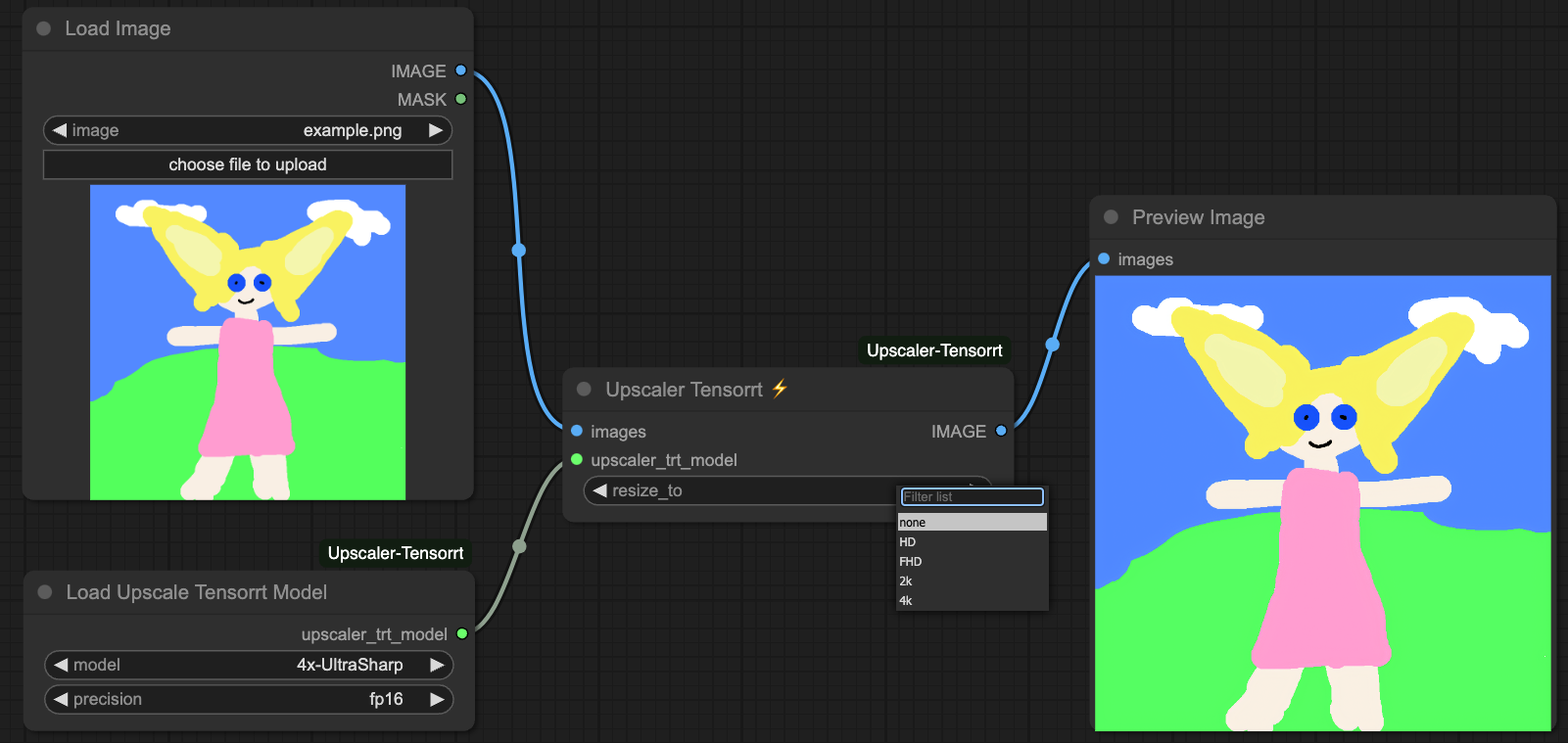
- Load example workflow
- Choose the appropriate model from the dropdown
- The tensorrt engine will be built automatically
- Load an image of resolution between 256-1280px
- Set
resize_toto resize the upscaled images to fixed or custom resolutions
🔧 Custom Models
- To export other ESRGAN models, you'll have to build the onnx model first, using export_onnx.py
- Place the onnx model in
/ComfyUI/models/onnx/YOUR_MODEL.onnx - Then, add your model to this list load_upscaler_config.json
- Finally, run the same workflow and choose your model
- If you've tested another working tensorrt model, let me know to add it officially to this node
🚨 Updates
07 June 2026
- Add support for TensorRT-RTX (PR#82 by @tangalbert919)
- Add support for 1x/2x/any-x models
12 January 2026
- Add more resizing scale factors
- Add custom resolution resizing
27 August 2025
- Support 4x-UltraSharpV2_Lite, 4x_UniversalUpscalerV2-Neutral_115000_swaG, 4x-ClearRealityV1
- Load models from config PR#57 by @NeoAnthropocene
30 April 2025
- Merge https://github.com/yuvraj108c/ComfyUI-Upscaler-Tensorrt/pull/48 by @BiiirdPrograms to fix soft-lock by raising an error when input image dimensions unsupported
4 March 2025 (breaking)
- Automatic tensorrt engines are built from the workflow itself, to simplify the process for non-technical people
- Separate model loading and tensorrt processing into different nodes
- Optimise post processing
- Update onnx export script
⚠️ Known issues
- If you upgrade tensorrt version, you'll have to rebuild the engines
- Only models with ESRGAN architecture are currently working
- High ram usage when exporting
.pthto.onnx
🤖 Environment tested
- Ubuntu 24.04, Debian 12
- Windows 11
👏 Credits
License
Creative Commons Attribution-NonCommercial-ShareAlike 4.0 International (CC BY-NC-SA 4.0)