
Context Encoders: Feature Learning by Inpainting
CVPR 2016
[Project Website] [Imagenet Results]
Sample results on held-out images:
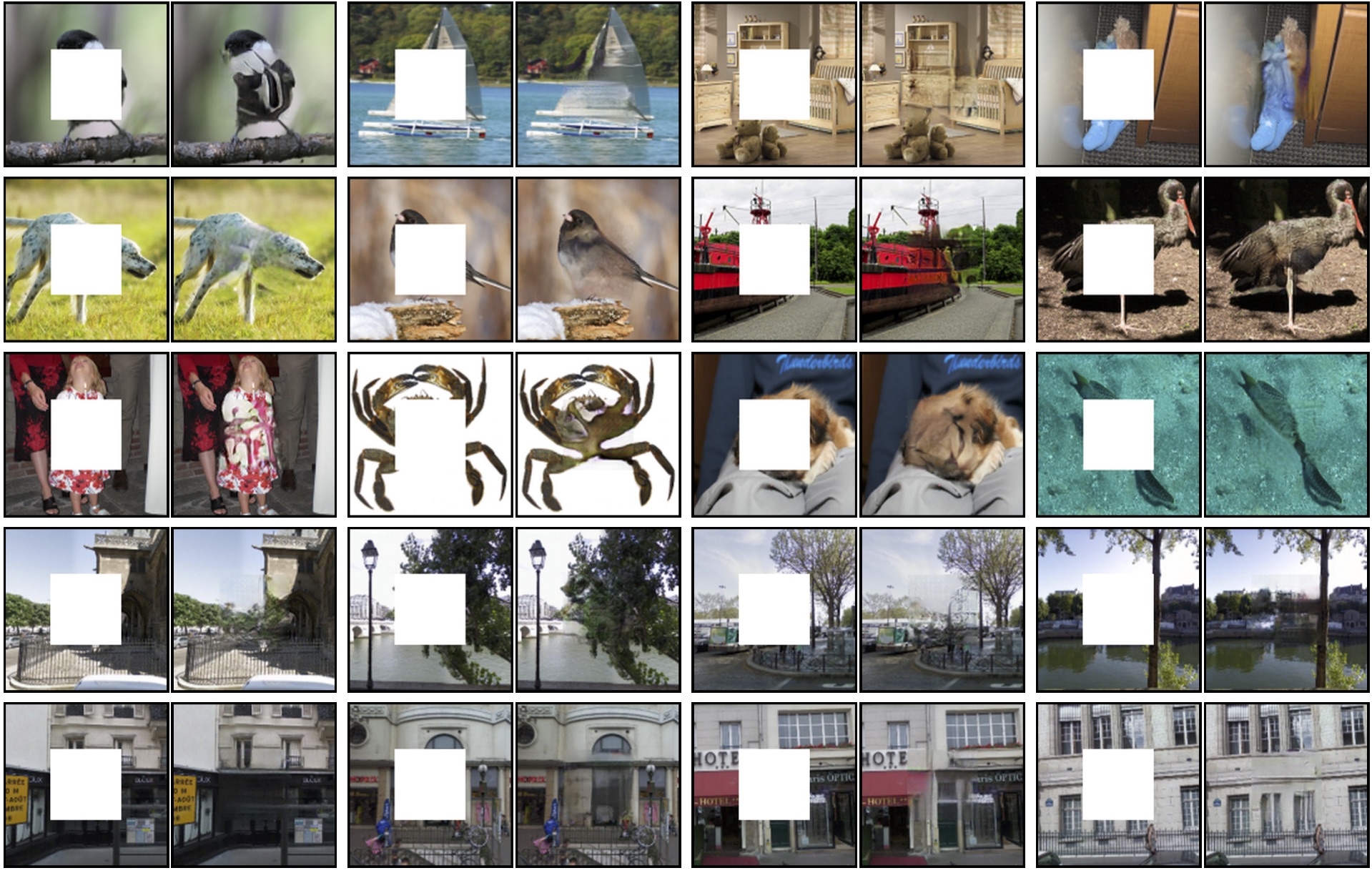
This is the training code for our CVPR 2016 paper on Context Encoders for learning deep feature representation in an unsupervised manner by image inpainting. Context Encoders are trained jointly with reconstruction and adversarial loss. This repo contains quick demo, training/testing code for center region inpainting and training/testing code for arbitray random region inpainting. This code is adapted from an initial fork of Soumith's DCGAN implementation. Scroll down to try out a quick demo or train your own inpainting models!
If you find Context Encoders useful in your research, please cite:
@inproceedings{pathakCVPR16context,
    Author = {Pathak, Deepak and Kr\"ahenb\"uhl, Philipp and Donahue, Jeff and Darrell, Trevor and Efros, Alexei},
    Title = {Context Encoders: Feature Learning by Inpainting},
    Booktitle = {Computer Vision and Pattern Recognition ({CVPR})},
    Year = {2016}
}
Contents
- Semantic Inpainting Demo
- Train Context Encoders
- Download Features Caffemodel
- TensorFlow Implementation
- Project Website
- Download Dataset
1) Semantic Inpainting Demo
-
Install Torch: http://torch.ch/docs/getting-started.html#_
-
Clone the repository
git clone https://github.com/pathak22/context-encoder.git
- Demo
cd context-encoder
bash ./models/scripts/download_inpaintCenter_models.sh
# This will populate the `./models/` folder with trained models.

net=models/inpaintCenter/paris_inpaintCenter.t7 name=paris_result imDir=images/paris overlapPred=4 manualSeed=222 batchSize=21 gpu=1 th demo.lua
net=models/inpaintCenter/imagenet_inpaintCenter.t7 name=imagenet_result imDir=images/imagenet overlapPred=4 manualSeed=222 batchSize=21 gpu=1 th demo.lua
net=models/inpaintCenter/paris_inpaintCenter.t7 name=ucberkeley_result imDir=images/ucberkeley overlapPred=4 manualSeed=222 batchSize=4 gpu=1 th demo.lua
# Note: If you are running on cpu, use gpu=0
# Note: samples given in ./images/* are held-out images
2) Train Context Encoders
If you could successfully run the above demo, run following steps to train your own context encoder model for image inpainting.
- [Optional] Install Display Package as follows. If you don't want to install it, then set
display=0intrain.lua.
luarocks install https://raw.githubusercontent.com/szym/display/master/display-scm-0.rockspec
cd ~
th -ldisplay.start 8000
# if working on server machine create tunnel: ssh -f -L 8000:localhost:8000 -N server_address.com
# on client side, open in browser: http://localhost:8000/
- Make the dataset folder.
mkdir -p /path_to_wherever_you_want/mydataset/train/images/
# put all training images inside mydataset/train/images/
mkdir -p /path_to_wherever_you_want/mydataset/val/images/
# put all val images inside mydataset/val/images/
cd context-encoder/
ln -sf /path_to_wherever_you_want/mydataset dataset
- Train the model
# For training center region inpainting model, run:
DATA_ROOT=dataset/train display_id=11 name=inpaintCenter overlapPred=4 wtl2=0.999 nBottleneck=4000 niter=500 loadSize=350 fineSize=128 gpu=1 th train.lua

# For training random region inpainting model, run:
DATA_ROOT=dataset/train display_id=11 name=inpaintRandomNoOverlap useOverlapPred=0 wtl2=0.999 nBottleneck=4000 niter=500 loadSize=350 fineSize=128 gpu=1 th train_random.lua
# or use fineSize=64 to train to generate 64x64 sized image (results are better):
DATA_ROOT=dataset/train display_id=11 name=inpaintRandomNoOverlap useOverlapPred=0 wtl2=0.999 nBottleneck=4000 niter=500 loadSize=350 fineSize=64 gpu=1 th train_random.lua
- Test the model
# For training center region inpainting model, run:
DATA_ROOT=dataset/val net=checkpoints/inpaintCenter_500_net_G.t7 name=test_patch overlapPred=4 manualSeed=222 batchSize=30 loadSize=350 gpu=1 th test.lua
DATA_ROOT=dataset/val net=checkpoints/inpaintCenter_500_net_G.t7 name=test_full overlapPred=4 manualSeed=222 batchSize=30 loadSize=129 gpu=1 th test.lua

# For testing random region inpainting model, run (with fineSize=64 or 124, same as training):
DATA_ROOT=dataset/val net=checkpoints/inpaintRandomNoOverlap_500_net_G.t7 name=test_patch_random useOverlapPred=0 manualSeed=222 batchSize=30 loadSize=350 gpu=1 th test_random.lua
DATA_ROOT=dataset/val net=checkpoints/inpaintRandomNoOverlap_500_net_G.t7 name=test_full_random useOverlapPred=0 manualSeed=222 batchSize=30 loadSize=129 gpu=1 th test_random.lua
3) Download Features Caffemodel
Features for context encoder trained with reconstruction loss.
4) TensorFlow Implementation
Checkout the TensorFlow implementation of our paper by Taeksoo here. However, it does not implement full functionalities of our paper.
5) Project Website
Click here.
6) Paris Street-View Dataset
Please email me if you need the dataset and I will share a private link with you. I can't post the public link to this dataset due to the policy restrictions from Google Street View.