

Convoker
Type an app name, press Enter, all its windows come to you.
Per-app window control, app launcher, and workspace management for macOS.
Download • Features • Shortcuts • Install
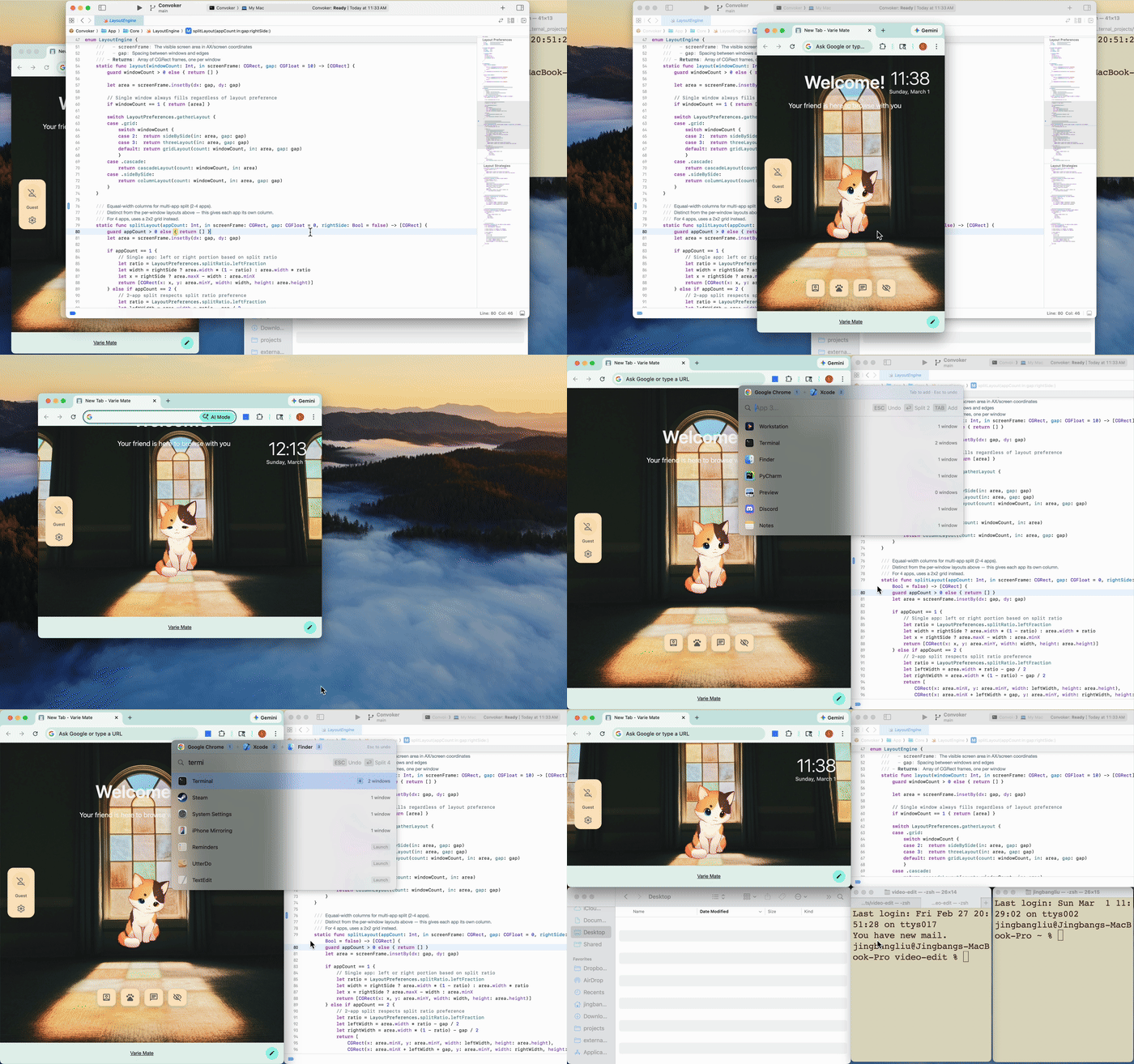
Quick Start
- Launch Convoker — it lives in your menu bar
- Press Cmd+Shift+X to open the command palette
- Type an app name → Enter to gather its windows
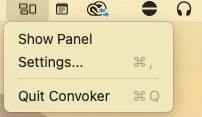
Right-click the menu bar icon for Settings (change hotkey) or to quit.
The Problem
You have 6 Safari windows scattered across 3 monitors. Or Terminal sessions everywhere. You want them here, on this screen, right now.
Existing tools snap individual windows. Convoker operates on all windows of an app at once. No other tool does this.
Features
Gather — Bring all windows of an app to your current screen, arranged in a smart grid.
Focus — Activate an app and hide everything else. Zero clutter, zero rearranging.
Split — Pin one app, pick another, get instant side-by-side (or 3-way, or 4-way).
Workspaces — Save your app arrangement as a named workspace. Type the name, press Enter — apps launch, windows arrange, distractions hide. Works across multiple monitors.
Launch — App not running? Convoker launches it and arranges its windows automatically.
Layout options — Grid (default), cascade, side-by-side, or columns.
Keyboard Shortcuts
Press Cmd+Shift+X to open the palette, then:
| Shortcut | Action |
|---|---|
| Enter | Gather all windows to current screen |
| Shift+Enter | Gather + maximize |
| Cmd+Enter | Focus (activate + hide all others) |
| Tab | Pin app for split (up to 4 apps) |
| Tab, then Enter | Split pinned apps side-by-side |
| Cmd+Shift+S or type "save" | Save current layout as a workspace |
| Escape | Dismiss (or unpin last) |
| Arrow keys | Navigate the app list |
The hotkey is configurable in Settings (tray icon > Settings).
Install
Download (recommended)
- Download the latest
.dmgfrom Releases - Drag Convoker.app to
/Applications - Launch Convoker — grant Accessibility permission when prompted
- Look for the Convoker icon in your menu bar, then press Cmd+Shift+X
Build from source
git clone https://github.com/varie-ai/convoker.git
cd convoker/Convoker
./build.sh run
Requires Xcode 15+ and macOS 14+.
Requirements
- macOS 14 (Sonoma) or later
- Accessibility permission — required to discover and move windows
How It Works
Convoker uses the macOS Accessibility API (AXUIElement) to enumerate and reposition windows. It's a menu bar app with a floating command palette (like Spotlight). No background processes, no daemons, no config files.
The search uses fuse-swift for fuzzy matching and KeyboardShortcuts for the global hotkey.
FAQ
Why not use Rectangle / Magnet / BetterSnapTool? Those are great for snapping individual windows. Convoker targets all windows of a specific app — a different workflow entirely. They complement each other.
Why not use yabai / AeroSpace? Tiling window managers are always-on and manage every window. Convoker is on-demand — it only acts when you ask, and never rearranges anything automatically.
Does it work with Stage Manager? Yes. Convoker doesn't interfere with Stage Manager, but it works best with Stage Manager disabled.
Will it work on Apple Silicon and Intel? Yes. It's a universal binary.
License
Credits
Built by Varie.AI with Claude Code.