
💫 Cosmic-UI
](https://github.com/neovim/neovim)


🚀 Stellar Features
Warning: Under heavy development
Cosmic-UI is a simple wrapper around specific vim functionality. Built in order to provide a quick and easy way to create a Cosmic UI experience with Neovim!
- Rename floating popup & file change notification
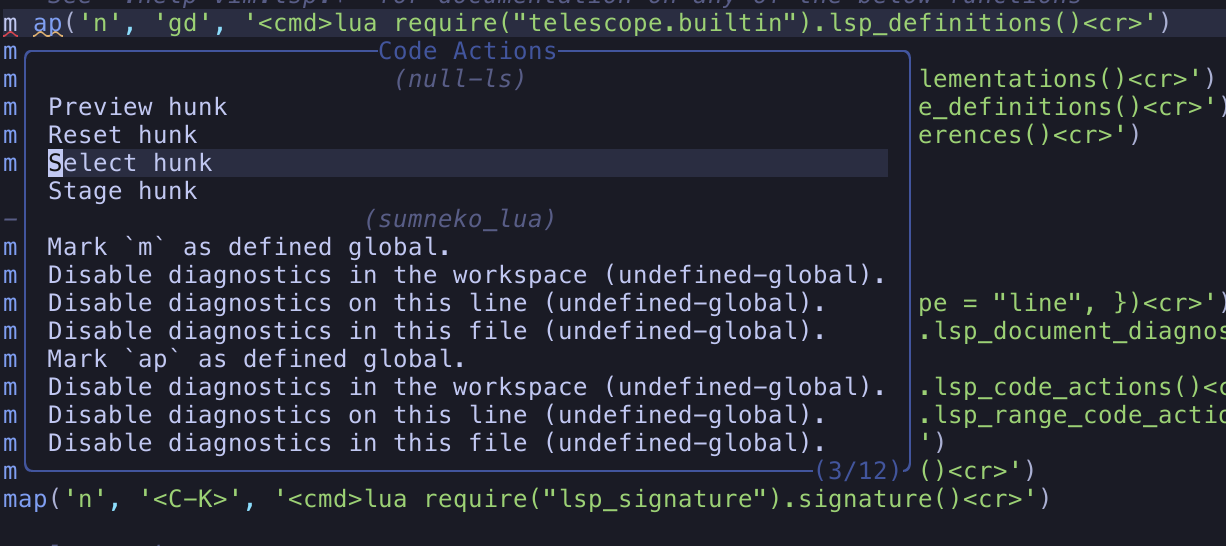
- Code action panel with grouped, ordered results
- Formatter panel for LSP + Conform.nvim toggles and formatting
📷 Screenshots
Code Actions
Rename Floating Popup

🛠 Installation
  vim.pack.add({
    'https://github.com/nvim-lua/plenary.nvim',
    'https://github.com/nvim-tree/nvim-web-devicons',
    'https://github.com/CosmicNvim/cosmic-ui',
  })

  require('cosmic-ui').setup({
    rename = {},
    codeactions = {},
    formatters = {},
  })
vim.pack is still experimental in Neovim's official docs and may not be available in every local build yet.
After installation, open :help cosmic-ui for the in-editor help page.
⚙️ Configuration
Call setup() before using any module. Calling module APIs before setup will warn and no-op.
Modules are enabled only when their key is present as a table in setup.
You may override any of the settings below by passing a config object to .setup:
{
  notify_title = "CosmicUI",

  rename = {
    enabled = true, -- optional (defaults to true when table exists)
    border = {
      highlight = 'FloatBorder',
      style = nil, -- falls back to vim.o.winborder
      title = 'Rename',
      title_align = 'left',
      title_hl = 'FloatBorder',
    },
    prompt = '> ',
    prompt_hl = 'Comment',
  },

  codeactions = {
    enabled = true, -- optional (defaults to true when table exists)
    min_width = nil,
    border = {
      bottom_hl = 'FloatBorder',
      highlight = 'FloatBorder',
      style = nil, -- falls back to vim.o.winborder
      title = 'Code Actions',
      title_align = 'center',
      title_hl = 'FloatBorder',
    },
  },

  formatters = {
    enabled = true, -- optional (defaults to true when table exists)
  },
}
Notes:
- Missing module key means disabled.
enabled = falsedisables a module.- Unknown setup keys are ignored with a warning.
code_actionsis not a supported key; usecodeactions.
📚 Module Docs
Use :help cosmic-ui inside Neovim, and use the Markdown docs below when you
want to browse the repository on GitHub.
Neovim help:
:help cosmic-ui:help cosmic-ui.setup:help cosmic-ui.rename:help cosmic-ui.codeactions:help cosmic-ui.formatters
Optional commands:
:CosmicRename:CosmicCodeActions:CosmicFormatters:CosmicFormat
Feature modules
rename: Cursor-local rename input that dispatches LSP rename requests.
Docs:docs/rename.mdcodeactions: Aggregates LSP code actions for cursor/range and executes the selected action.
Docs:docs/codeactions.mdformatters: Toggle and run Conform/LSP formatting with buffer/global scope control and per-item overrides.
Docs:docs/formatters.md
Core modules
cosmic-uiroot module (setup + lazy feature loading):docs/cosmic-ui.mdconfig(merged options + setup/module gating):docs/config.mdutils(shared helpers + logger):docs/utils.md
✨ Usage
Setup
local CosmicUI = require("cosmic-ui")

CosmicUI.setup({
  rename = {},
  codeactions = {},
  formatters = {},
})
Rename
vim.keymap.set("n", "gn", function()
  require("cosmic-ui").rename.open()
end, { silent = true, desc = "Rename" })
Optional command: :CosmicRename
Codeactions
vim.keymap.set("n", "<leader>ga", function()
  require("cosmic-ui").codeactions.open()
end, { silent = true, desc = "Code actions" })

vim.keymap.set("v", "<leader>ga", function()
  require("cosmic-ui").codeactions.range()
end, { silent = true, desc = "Range code actions" })
Optional command: :CosmicCodeActions
Formatters
vim.keymap.set("n", "<leader>gf", function()
  require("cosmic-ui").formatters.open()
end, { silent = true, desc = "Toggle formatters (buffer)" })

vim.keymap.set("n", "<leader>gF", function()
  require("cosmic-ui").formatters.open({ scope = "global" })
end, { silent = true, desc = "Toggle formatters (global)" })

vim.keymap.set("n", "<leader>fm", function()
  require("cosmic-ui").formatters.format()
end, { silent = true, desc = "Format buffer" })
Optional commands:
:CosmicFormatters:CosmicFormat
Formatting behavior:
- If Conform.nvim is installed and conform backend is enabled,
format()uses Conform. - If Conform.nvim is unavailable (or conform backend is disabled),
format()falls back to LSP when LSP backend is enabled. - When Conform is used, LSP backend toggle controls Conform LSP usage (
lsp_formatis clamped to"never"when LSP is disabled). - When LSP is enabled, Conform mode precedence is:
opts.conform.lsp_format> filetype-specific Conform mode > global Conform mode >"never". - Fallback visibility is shown globally and per-LSP in the formatter UI, and exposed via
formatters.status().
More usage examples:
- Rename:
docs/rename.md - Codeactions:
docs/codeactions.md - Formatters:
docs/formatters.md