
Cut-It-Out
A lightweight, cross-platform video editor focused on quick and simple cuts. Perfect for removing unwanted sections from video recordings, lectures, or any other video content.
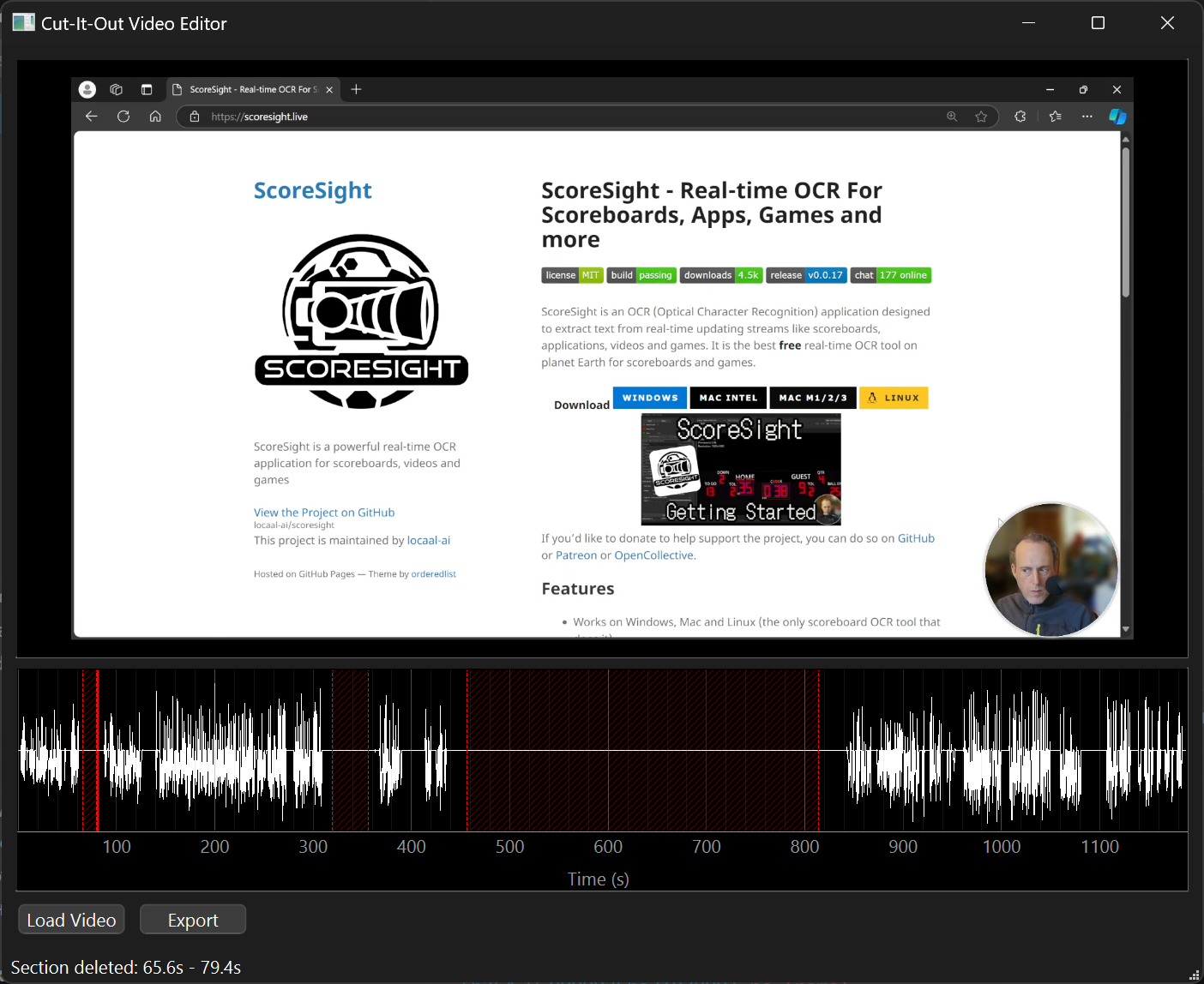
Features
- 🎥 Simple, intuitive video cutting interface
- 🌊 Audio waveform visualization for precise cuts
- ⌨️ Keyboard shortcuts for efficient editing
- 🎯 Frame-accurate cutting
- 🔄 Non-destructive editing
- 💻 Cross-platform (Windows, macOS, Linux)
Requirements
- Python 3.7 or higher
- VLC media player
- FFmpeg
System-specific Requirements
Windows
- VLC media player (64-bit version if using 64-bit Python)
- FFmpeg added to system PATH
macOS
brew install vlc ffmpeg
Linux (Ubuntu/Debian)
sudo apt-get install vlc ffmpeg python3-dev
Installation
- Clone the repository:
git clone https://github.com/yourusername/cut-it-out.git
cd cut-it-out
- Create and activate a virtual environment:
python -m venv venv
# Windows
venv\Scripts\activate
# macOS/Linux
source venv/bin/activate
- Install dependencies:
pip install -r requirements.txt
Running the Application
From the project directory:
python main.py
Usage
- Click "Load Video" to open your video file
- Click on the timeline to set start point (green marker)
- Click again to set end point (red marker)
- Use keyboard shortcuts for precise control:
ESC: Remove last markerDELETE: Remove selected sectionSPACE: Play/Pause←/→: Step frame by frame
- Click "Export" to save your edited video
Project Structure
cut-it-out/
├── main.py                 # Application entry point
├── components/
│   ├── video_player.py     # Video playback component
│   ├── unified_timeline.py # Timeline with waveform
│   └── progress_dialog.py  # Loading progress feedback
├── utils/
│   ├── audio_processor.py  # Audio waveform extraction
│   ├── video_processor.py  # Video processing utilities
│   └── async_worker.py     # Async loading handler
└── requirements.txt        # Python dependencies
Dependencies
PySide6>=6.4.0
python-vlc>=3.0.18122
pyqtgraph>=0.13.1
numpy>=1.21.0
pydub>=0.25.1
Known Issues
- VLC media player must be installed and match Python architecture (32/64-bit)
- Some video codecs might require additional system codecs
- On Windows, FFmpeg must be properly added to system PATH
Contributing
Contributions are welcome! Please feel free to submit a Pull Request.
License
This project is licensed under the MIT License - see the LICENSE file for details.