
CV Hub





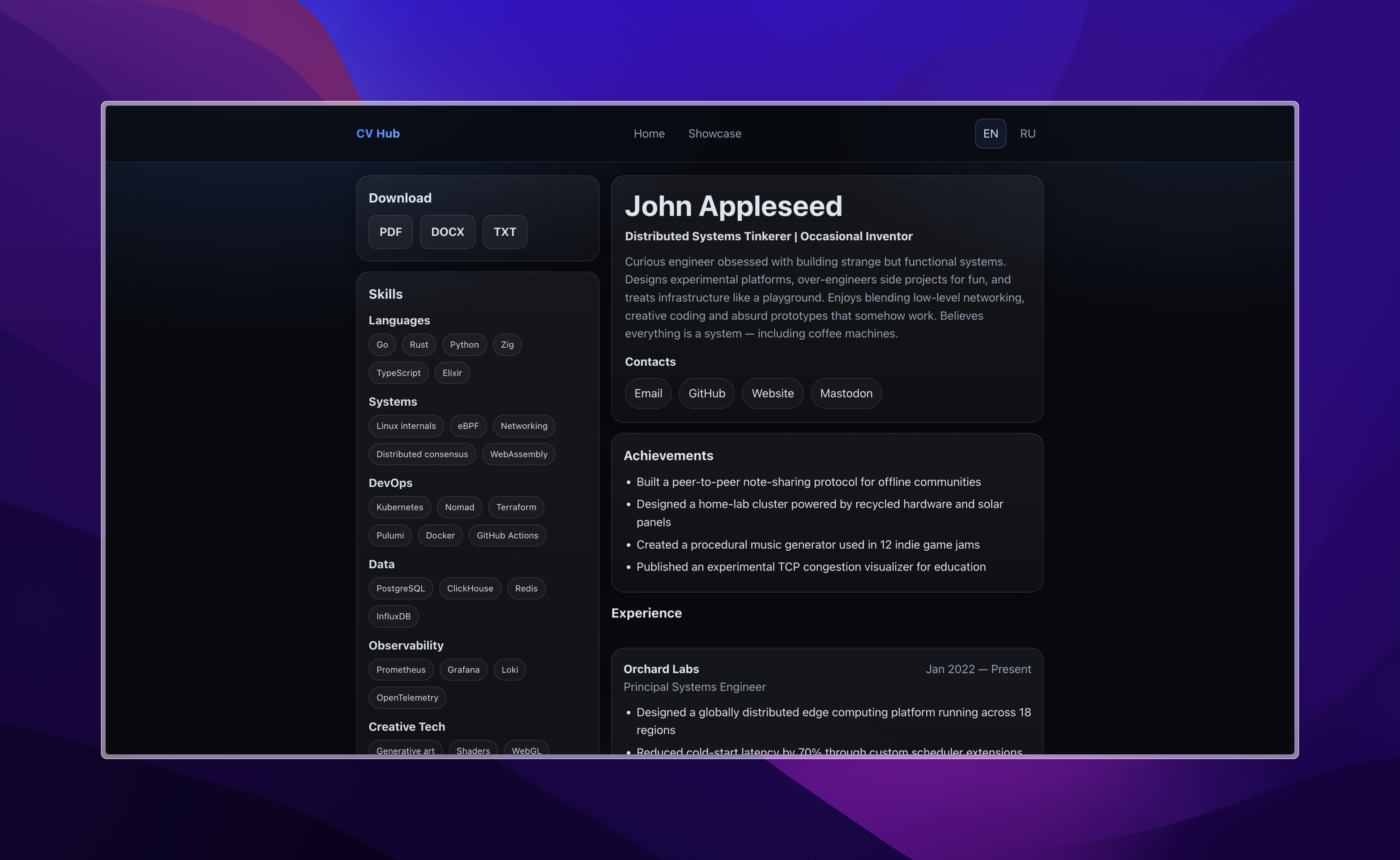
Your personal site, CV, and project portfolio — from one YAML file.
🌐 Live demo: https://keegooroomie.github.io/cv_hub/




⚡ Get your site live in 5 minutes
git clone https://github.com/YOUR_ACCOUNT/cv_hub.git
cd cv_hub
npm install && npm run dev
Open http://localhost:4321. Edit src/content/cv/en.yaml. Push — site deploys automatically.
Already have a resume? Paste it into Claude or ChatGPT with the prompt from
docs/LLM-CONTEXT.mdand get ready YAML in seconds.
What you get
One YAML file generates everything:
| 🌐 Live website | Clean personal site with CV, projects, and case studies |
| 📄 PDF / DOCX / TXT | Auto-generated resume files for every profile and language |
| 🎭 Multiple profiles | DevOps, GameDev, Fullstack — different CV versions, one source |
| 🌍 Multi-language | EN, RU, or any language — switcher included |
| 📁 Case studies | Per-project deep-dive pages with text, images, architecture |
| 🎨 Themes | 4 built-in themes, switchable via URL |
No duplicated resumes. No platform lock-in. No visual builders.
Why CV Hub
You probably maintain:
- A PDF resume (two versions, at least)
- A LinkedIn profile
- A portfolio on Notion, Tilda, or some other platform
- A DOCX somewhere on your desktop
They all drift out of sync.
CV Hub replaces all of them with a single YAML file and a deterministic pipeline. Edit once — everything updates. Same source generates your DevOps CV, your GameDev CV, and your portfolio site simultaneously.
How to edit your data
All data lives in src/content/:
src/content/
  cv/
    en.yaml            ← base CV in English
    ru.yaml            ← base CV in Russian
    en_devops.yaml     ← DevOps delta (optional)
    ru_devops.yaml     ← DevOps delta in Russian (optional)
  profiles/
    profiles.yml       ← profile registry (optional)
  languages/
    languages.yml      ← language config
  showcase/
    projects.yaml      ← projects list
  changelog/
    changelog.yaml     ← version history
  i18n/
    translations.yaml  ← UI strings
For full YAML structure reference — see docs/INFO.md.
Multi-profile system
CV Hub supports multiple role-specific CV versions from a single base YAML.
src/content/cv/en.yaml— your full base CVsrc/content/cv/en_devops.yaml— delta with only the fields that changesrc/scripts/merge.mjsmerges them intopublic/cv/en_devops.yaml- The site generates
/devopswith the merged result
See docs/INFO.md for merge rules and delta file format.
Showcase and Case Studies
Project cards
Add projects to src/content/showcase/projects.yaml. Each card supports metrics, media gallery, stack tags, archive toggle, and links.
See docs/examples/example_project.yaml for a full annotated example.
Case study pages
For any project you want a deep-dive page, create a YAML file:
public/media/projects/{slug}/{slug_underscored}_{lang}.yaml
Example: public/media/projects/cv-hub/cv_hub_en.yaml → /showcase/cv-hub/en
The page is generated automatically. No code changes needed.
Case study content is built from blocks — text, image, divider. All fields are optional. See docs/examples/example_cs.yaml for all block types.
To link a project card to its case study:
links:
  - label: Case Study
    url: /showcase/cv-hub    # no /cv_hub/ prefix — base is added automatically
    type: product
Language configuration
# src/content/languages/languages.yml
default: "ru"
languages:
  - id: "ru"
    label: "RU"
  - id: "en"
    label: "EN"
Add any language — create {lang}.yaml, add UI strings to translations.yaml, and it appears in the language switcher automatically.
How to fill in your data
Option A — Edit YAML directly
Open src/content/cv/en.yaml and fill in your data.
See docs/INFO.md for the full field reference.
Option B — Import from JSON Resume
npm run resume:import -- docs/cv_en.json en
npm run resume:import:all
Option C — Generate via LLM
Feed your resume (PDF, DOCX, plain text) to Claude or ChatGPT with the prompt from docs/llm-context.md. The document also contains full project context for AI tools — feed it before making any code changes.
Customization
All styles live in src/styles/global.css. Token-based — edit only the :root block to restyle:
:root {
  --bg: #070a10;
  --accent: #3b82f6;
  --text: rgba(233, 238, 247, 0.96);
}
Themes
| File | Description |
|---|---|
frosted.css |
Dark glass, muted tones |
light.css |
Light background, dark text |
nordic.css |
Nord-inspired, cold blue-grey |
peachy.css |
Warm peach, light background |
Preview any theme live via URL:
https://YOUR_ACCOUNT.github.io/cv_hub/?theme=peachy
Backgrounds
4 interchangeable backgrounds — swap in one line in Layout.astro:

| Component | Type | Description |
|---|---|---|
AnimatedBackground |
CSS-only | Glowing blur orbs, theme-aware, zero JS |
GalaxyBackground |
Canvas | Spiral galaxy with mouse parallax |
PlayStationWaves |
Canvas | XMB-style filled sine waves, time-of-day hue |
WaveLines |
Canvas | XMB-style glowing stroke lines |
Full props reference → docs/BKG_INFO.md
How to deploy
1. Enable GitHub Pages
Settings → Pages → Source: GitHub Actions
2. Push your changes
git add .
git commit -m "update cv data"
git push
Your site will be live at https://YOUR_ACCOUNT.github.io/cv_hub/
The deploy workflow runs automatically on every push to main. BASE_URL and siteUrl are resolved dynamically from GITHUB_REPOSITORY — forks work out of the box without config changes.
Resume file generation
npm run build
Build order:
cv:build— merge YAMLs →public/cv/resume:generate— DOCX + TXTresume:pdf— PDF via Playwrightastro build— static site
Output: public/downloads/resume_{lang}[_{spec}].{pdf|docx|txt}
CLI reference
npm run dev                  # start local dev server
npm run build                # full build: merge → generate → pdf → astro
npm run cv:build             # merge base + spec YAMLs → public/cv/
npm run resume:generate      # generate DOCX + TXT for all profiles
npm run resume:pdf           # generate PDF for all profiles via Playwright
npm run resume:import        # convert JSON Resume → YAML (single file)
npm run resume:import:all    # convert both cv_en.json and cv_ru.json
npm run resume:linkedin      # parse LinkedIn PDF export → YAML (best-effort)
Project structure
src/
  content/
    cv/                    # CV data (base + deltas)
    profiles/profiles.yml
    languages/languages.yml
    i18n/translations.yaml
    showcase/projects.yaml
    changelog/changelog.yaml
  pages/
    index.astro            # default profile + default lang
    [...slug].astro        # all other profile × lang combos
    showcase/
      index.astro          # default lang
      [...rest].astro      # non-default langs + case study pages
    changelog.astro
  components/
    Layout.astro
    HomePage.astro
    ProjectCard.astro
    ProjectPage.astro      # case study page template
    blocks/                # TextBlock, ImageBlock, DividerBlock
    AnimatedBackground.astro
    GalaxyBackground.astro
    PlayStationWaves.astro
    WaveLines.astro
  scripts/
    merge.mjs
    t.ts
    resume-export-pdf.mjs
    resume-import-json.mjs
  styles/
    global.css
    themes/

public/
  cv/                      # merged YAMLs (generated)
  downloads/               # resume files (generated)
  media/projects/          # project assets + case study YAMLs
  themes/

.github/
  scripts/generate-resume.js
  workflows/deploy.yml

docs/
  INFO.md                  # data structure + field reference
  ENGINEERING.md           # architecture decisions
  BKG_INFO.md              # AnimatedBackground docs
  llm-context.md           # full project context for AI tools
  examples/
    example_cv.yaml
    example_cv.json
    example_project.yaml
    example_cs.yaml        # all case study block types
Tech stack
- Astro — static site generator
- YAML — single source of truth
- docx — DOCX generation
- Playwright — PDF generation
- GitHub Pages — deployment
- GitHub Actions — CI/CD
Documentation
| File | Description |
|---|---|
| INFO.md | YAML field reference, routing, i18n, profiles, case studies |
| ENGINEERING.md | Architecture decisions, system design, trade-offs |
LLM-CONTEXT.md |
Full project context for AI tools (Claude, ChatGPT, Cursor) |
| BKG_INFO.md | All background components — props, tuning, previews |
⭐ If this is useful
⭐ Star this repo if you want to stop rewriting your resume every time you apply
🍴 Fork it — your site will be live in minutes
🐛 Found a bug or have an idea? Open an issue
License
Source code: MIT Content (resume data): © Author