

CW-OVP
- Preview
- Introduction
- Tech Stack
- Feature
- System Structure
- Getting started
- Minimum Requirements for Production
- Roadmap
- Deploy
- Webhook
Preview


Introduction
EN
OVP(online video platform) mean that online transcoding, packaging and hosting service with video file upload to online storage or cloud system.
Internet speed was increase and many internet user prefer to streaming service for Mobile, web, OTT than service from over-the-air television networks.
but streaming service use OVP or solution for start streaming service with Mobile, web, OTT(over the top).
such as OVP and some solution require many spend money for streaming service.
Famous OVP business company is brightcove.com, mux.com, dacast.com, vimeo.com, Dacast.com, Amazon elastic transcoding and Wowza solution.
CW-OVP project will commit helping for who want ready for streaming service.
This is why CW-OVP project was built.
KO
OVP(online video platform)란
온라인 저장소 또는 클라우드에 비디오 파일을 업로드하여 트랜스코딩과 페키징 처리후 호스팅 서비스를 제공함을 말한다.
인터넷 속도의 발달과 사용자들의 요구로 많은 스트리밍 서비스가 생겨나고 있고, 기존의 방송사들도 흐름에 따라 Mobile, web, OTT(over the top) 셋탑기기의 스트리밍 서비스를 제공하기 위해서 OVP(online video platform)이나 솔류션을 많이 사용하고 있다.
대표적인 해외 OVP는 brightcove.com, mux.com, dacast.com, vimeo.com, Dacast.com, Amazon elastic transcoding 등 서비스들이 존재하며 솔류션으로는 Wowza가 존재한다.
이에 CW-OVP 프로젝트를 오픈소스로 개발하여 기업이나 단체, 개인에 도움이 되고자 한다.
Tech Stack
| what use | description |
|---|---|
| FFMPEG | video transcoding, packaging |
| h.264 | Codec |
| HLS | Protocol |
| Ruby on Rails | web framework, websocket(action cable) |
| Redis | queue, pub/sub |
| Sidekiq | background job, queue |
| Postresql | database |
| Docker, docker-compose | install environment |
| Docker Swarm | Clustering |
| Kubernetes | Clustering |
- you can choose Docker swarm or Kubernetes(kops or EKS) for Clustering
Feature
- Clustering ffmpeg worker with sidekiq on Docker swarm or Kubernetes
- Transcoding, Packaging with ffmpeg for HLS
- Generated multiple m3u8 for Adaptive Streaming
- Extract 10 random Thumbnail images during video packaging
- AWS S3 for stored video, thumbnail assets
- AWS Cloudfront for CDN
- Real time base on web UI with websocket(Action Cable), ruby on rails
- Open source (GPL-2.0 License) and Free, but need hardware…
System Structure
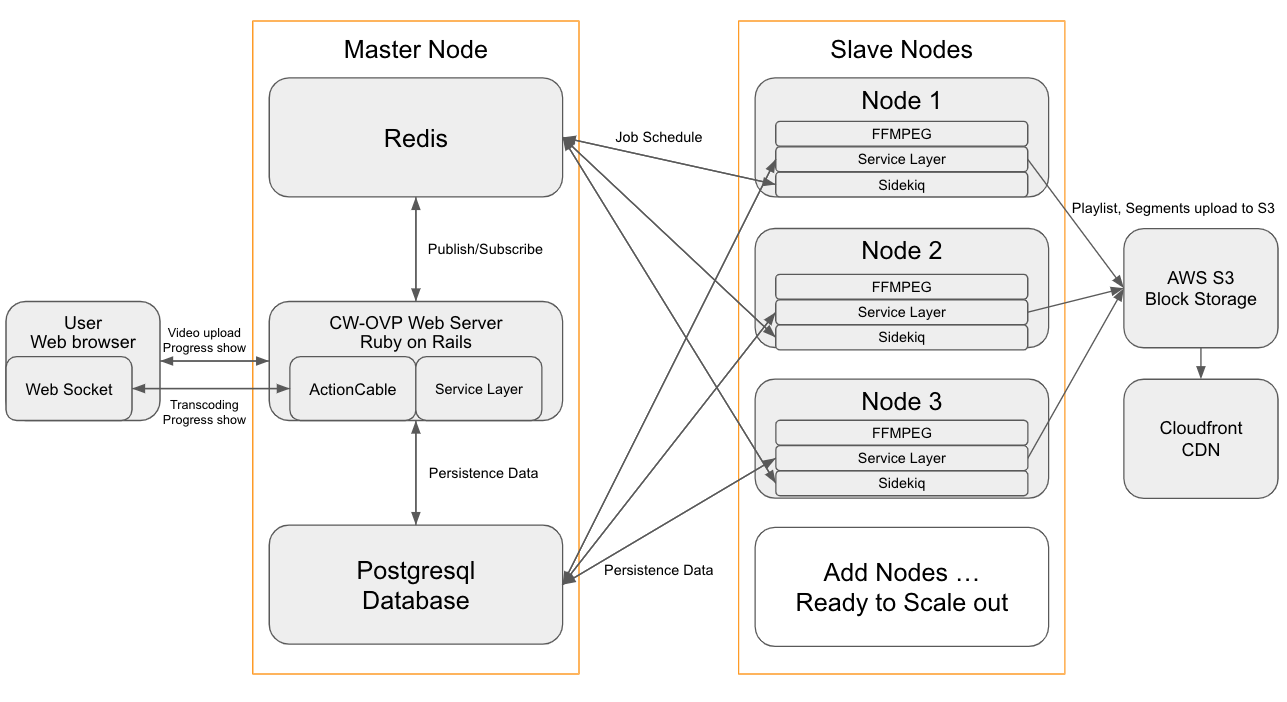
- If your node for database that got fault or something wrong, You can lost persistent in database. that's why I recommend AWS RDS for postgresql.
Getting started
Storage config
- AWS S3 Storage
- How to make s3 bucket for AWS_ACCESS_KEY_ID, AWS_SECRET_ACCESS_KEY
- How to make cloudfront url for AWS_CLOUDFRONT_DOMAIN
- Update
.env.dev.s3file for s3, cloudfront- open
.env.dev.s3 - add below of code and update each value
AWS_ACCESS_KEY_ID=[Change key id] AWS_SECRET_ACCESS_KEY=[Change access key] REGION=[Change region (us-west-1 or us-west-2 or us-east-1...)] BUCKET=[Change bucket] CDN_BUCKET=[Change cdn bucket] AWS_CLOUDFRONT_DOMAIN=[Change cdn domain] - Check config
docker-compose --env-file .env.dev.s3 config
- open
- ignore changed
.env.dev.s3file whengit commitgit update-index --assume-unchanged .env.dev.s3
How To Run Development mode with Docker-compose
- Download source
git clone https://github.com/x1wins/CW-OVP.gitcd ./CW-OVP
- Build and Run
docker-compose --env-file .env.dev.s3 up --build -ddocker-compose run --no-deps web bundle exec rails webpacker:installdocker-compose --env-file .env.dev.s3 restart webdocker-compose run --no-deps web bundle exec rake db:createdocker-compose run --no-deps web bundle exec rake db:migratedocker-compose run --no-deps web bundle exec rake db:create RAILS_ENV=testdocker-compose run --no-deps web bundle exec rake db:migrate RAILS_ENV=test
- Restart for updated code
git fetch origin developgit reset --hard origin/develop- Restart web, sidekiq
docker-compose --env-file .env.dev.s3 restart web
docker-compose --env-file .env.dev.s3 restart sidekiq
- Unit testing with rspec
docker-compose run --no-deps web bundle exec rspec --format documentation - Console
docker-compose run --no-deps web bundle exec rails console - Troubleshooting
- when I got bundle error such as
minemagic- Log of minemagic gem error
Step 10/16 : RUN bundle install ---> Running in 578d62fab6ac Fetching gem metadata from https://rubygems.org/............ You have requested: mimemagic ~> 0.4.1 The bundle currently has mimemagic locked at 0.3.5. Try running `bundle update mimemagic` If you are updating multiple gems in your Gemfile at once, try passing them all to `bundle update` ERROR: Service 'web' failed to build: The command '/bin/sh -c bundle install' returned a non-zero code: 7 The command "docker-compose build" failed and exited with 1 during . Your build has been stopped. - Solution
docker-compose run --no-deps web bundle update mimemagic
- Log of minemagic gem error
- Keep latest gem for defense vulnerability
docker-compose run --no-deps web bundle update docker-compose run --no-deps web yarn upgrade --latest - no space left on device
- https://www.changwoo.org/[email protected]/2021-02-12/write-myapp-tmp-redis-appendonly-aof-9ff1127366
- Log
% docker-compose --env-file .env.dev.s3 up --build Building web Step 1/16 : FROM ruby:2.6.3 ---> 8fe6e1f7b421 Step 2/16 : RUN curl -sL https://deb.nodesource.com/setup_12.x | bash - && curl -sS https://dl.yarnpkg.com/debian/pubkey.gpg | apt-key add - && echo "deb https://dl.yarnpkg.com/debian/ stable main" | tee /etc/apt/sources.list.d/yarn.list && apt-get update && apt-get install -qq -y build-essential nodejs yarn vim libpq-dev postgresql-client ffmpeg ---> Using cache ---> 14eb2f07d9e5 Step 3/16 : RUN apt-get update && apt-get install -y python3 python3-pip python3-setuptools groff less && pip3 install --upgrade pip && apt-get clean ---> Using cache ---> c57e46926299 Step 4/16 : RUN pip3 --no-cache-dir install --upgrade awscli ---> Using cache ---> 7e8e641bfc90 Step 5/16 : RUN mkdir /myapp ---> Using cache ---> a0a39c82945a Step 6/16 : RUN mkdir /storage ---> Using cache ---> 66348ad31ef0 Step 7/16 : WORKDIR /myapp ---> Using cache ---> 47b601075951 Step 8/16 : COPY . /myapp ERROR: Service 'web' failed to build : Error processing tar file(exit status 1): write /myapp/tmp/storage/og/op/ogopd3w9xnrwq0b6kqf8beh726xu: no space left on device - Solution
% docker system prune
WARNING! This will remove:
  - all stopped containers
  - all networks not used by at least one container
  - all dangling images
  - all dangling build cache

Are you sure you want to continue? [y/N] y
- when I got bundle error such as
How To Run Development mode without docker
Sample video file download
- http://distribution.bbb3d.renderfarming.net/video/mp4/bbb_sunflower_1080p_30fps_normal.mp4
- https://filesamples.com/samples/video/avi/sample_1920x1080.avi
- https://filesamples.com/samples/video/ts/sample_1920x1080.ts
- https://filesamples.com/samples/video/mp4/sample_1920x1080.mp4
- https://filesamples.com/samples/video/mkv/sample_1920x1080.mkv
- https://filesamples.com/samples/video/mov/sample_1920x1080.mov
Minimum Requirements for Production
- Required AWS S3 for Storage
- Required AWS Cloudfront for CDN
- Server Spec
- CPU
- 8 or more Cpu per server (c5.2xlarge on aws ec2)
- Disk
- more 10 Gb
- if you will upload heavy video or more 10Gb, need more space
- Memory
- more 2Gb
- Number of Server
- master : 1 or more
- slave : 2 or more
- CPU