
CYarp
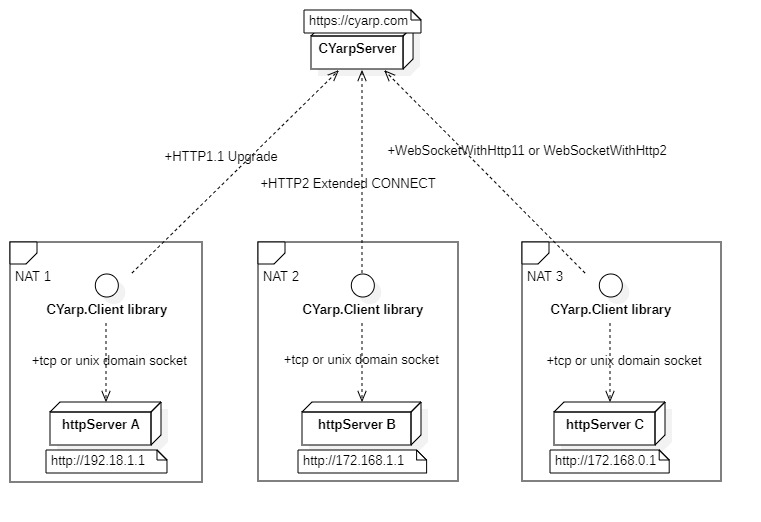
CYarp is a reverse-proxy toolkit that helps you expose multiple local HTTP servers behind NAT or a firewall to the internet. It currently supports four connection methods: HTTP/1.1 Upgrade, HTTP/2 Extended CONNECT, WebSocket, and WebSocket over HTTP/2.
Features
- Uses the high-performance Kestrel server
- Uses the high-performance YARP for HTTP forwarding
- Designed as middleware for ASP.NET Core
- Open server-client interaction protocol
- Provides .NET and C/C++ client libraries
Network structure
Apache Bench
Nginx, CYarp, and frp_0.56.0 were deployed concurrently on an Intel(R) Xeon(R) CPU E5-2650 v2 @ 2.60GHz running CentOS Linux 7 (Core). The ab load-testing tool ran on a different machine in the LAN. Tests are shown in the tables below; each row lists the test in the order presented.
ab -c 1 -n 10000
| Product | Requests per second | Rps Ratio | P95 | P99 |
|---|---|---|---|---|
| ab->nginx | 1539.22 | 1.00 | 1 | 1 |
| ab->cyarp->nginx | 700.31 | 0.45 | 2 | 2 |
| ab->frp->nginx | 593.76 | 0.39 | 2 | 2 |
ab -c 10 -n 50000
| Product | Requests per second | Rps Ratio | P95 | P99 |
|---|---|---|---|---|
| ab->nginx | 9915.55 | 1.00 | 3 | 4 |
| ab->cyarp->nginx | 9563.64 | 0.96 | 1 | 2 |
| ab->frp->nginx | 5980.79 | 0.60 | 3 | 4 |
ab -c 20 -n 100000
| Product | Requests per second | Rps Ratio | P95 | P99 |
|---|---|---|---|---|
| ab->nginx | 11948.84 | 1.00 | 4 | 7 |
| ab->cyarp->nginx | 12542.54 | 1.05 | 3 | 3 |
| ab->frp->nginx | 6238.09 | 0.52 | 5 | 7 |
ab -c 50 -n 200000
| Product | Requests per second | Rps Ratio | P95 | P99 |
|---|---|---|---|---|
| ab->nginx | 12801.34 | 1.00 | 6 | 12 |
| ab->cyarp->nginx | 13472.69 | 1.05 | 6 | 7 |
| ab->frp->nginx | 5675.19 | 0.44 | 20 | 49 |
ab -c 100 -n 500000
| Product | Requests per second | Rps Ratio | P95 | P99 |
|---|---|---|---|---|
| ab->nginx | 14088.43 | 1.00 | 10 | 17 |
| ab->cyarp->nginx | 14216.45 | 1.01 | 10 | 12 |
| ab->frp->nginx | 6504.36 | 0.46 | 20 | 49 |
Demo and experience
- Run the
Host/CYarpServerproject - Run the
Host/CYarpClientproject - When Postman requests
http://localhost, the response is401(authorization failed) - In Postman, add an Authorization header, select Bearer Token, and use the following test token
test token
eyJhbGciOiJSUzI1NiIsInR5cCI6IkpXVCJ9.eyJodHRwOi8vc2NoZW1hcy5taWNyb3NvZnQuY29tL3dzLzIwMDgvMDYvaWRlbnRpdHkvY2xhaW1zL3JvbGUiOiJNb2JpbGUiLCJodHRwOi8vc2NoZW1hcy54bWxzb2FwLm9yZy93cy8yMDA1LzA1L2lkZW50aXR5L2NsYWltcy9zaWQiOiJNb2JpbGUwMDEiLCJDbGllbnRJZCI6IkNsaWVudDAwMSIsImlhdCI6MTcxMDgxNjQ1MiwibmJmIjoxNzEwODE2NDUyLCJleHAiOjI3MTA5MDI4NTJ9.aC-9pVDvyhXsUub-wzZVttfc34wMtFrARDlUj3BYNFhy3Axr0U93CV_QFUP-m6DYI6gK0HkxUr6xlkWwItIFzvS95TsoMXOARVXlVQEP18_wQRQ0G3WRMmNJ_uElJ4uIcrha_Dr4e0cp38olHdABQgOXZgUNHFAHCY3rqtn6-gyTaTu6qAgoj2imi4tsOYFF_OPrCNkRoJavubzDTTXRB95cGz5kxzTSDdWCuIaktNsWN7WDK864VKyVgwca6ueQJogidvES_x26TZuLF6VNhYEkM6UjUZtT8WiD3nBhi2_dVS7BODMLfSyiFa68k1NK50DDfnYgiFU6Clb24Ra-2A
Development Guide
Server side
The CYarp.Server package is implemented as an HTTP middleware for ASP.NET Core. By default it relies on the Authentication middleware to validate IClient connections. Register and configure it like this:
builder.Services.AddAuthentication(<DefaultScheme>).AddYourScheme();
builder.Services.AddCYarp().Configure(cyarp=>{ ... });

var app = builder.Build();
app.UseCYarp(); // Add CYarp middleware to the pipeline
app.UseAuthentication();
app.UseAuthorization();

app.MapCYarp<YourClientIdProvider>().RequireAuthorization(p => { ... }); // Handle CYarp client connections
app.MapControllers();
app.Run();
Authentication and authorization for IClient connections can be skipped using the following configuration:
builder.Services.AddCYarp().Configure(cyarp=>{ ... });

var app = builder.Build();
app.UseCYarp(); // Add CYarp middleware to the pipeline

app.MapCYarp<YourClientIdProvider>(); // Handle CYarp client connections
app.MapControllers();
app.Run();
Finally, handle HTTP forwarding in a controller or endpoint handler.
// Verify requester's authorization; this example requires the 'Mobile' role
[Authorize(Roles = "Mobile")]
public class CYarpController : ControllerBase
{
    private static readonly string clientIdClaimType = "ClientId";

    /// <summary>
    /// Handle CYarp requests.
    /// Core operation: obtain the clientId from the request context, then retrieve the corresponding IClient from IClientViewer and forward the HttpContext.
    /// </summary>
    /// <param name="clientViewer"></param>
    /// <returns></returns>
    [Route("/{**cyarp}")]
    public async Task InvokeAsync([FromServices] IClientViewer clientViewer)
    {
        var clientId = this.User.FindFirstValue(clientIdClaimType);
        if (clientId != null && clientViewer.TryGetValue(clientId, out var client))
        {
            this.Request.Headers.Remove(HeaderNames.Authorization);
            await client.ForwardHttpAsync(this.HttpContext);
        }
        else
        {
            this.Response.StatusCode = StatusCodes.Status502BadGateway;
        }
    }
}
Client side
Using the CYarp.Client package, you can implement a .NET client as follows:
var options = this.clientOptions.CurrentValue;
using var client = new CYarpClient(options);
await client.TransportAsync(stoppingToken);
For C and C++ clients, you can AOT compile the CYarp.Client project source into a native shared library exported from C. The Host/CYarpClient.Native project is a C/C++ client demo. Run Host/CYarpServer first as the server.
The following commands show how to produce a native shared library via AOT compilation for the CYarp.Client project:
| Platform and architecture | command |
|---|---|
| win-x64 | dotnet publish -c Release /p:PublishAot=true -r win-x64 |
| win-x86 | dotnet publish -c Release /p:PublishAot=true -r win-x86 |
| linux-x64 | dotnet publish -c Release /p:PublishAot=true -r linux-x64 |
| linux-arm64 | dotnet publish -c Release /p:PublishAot=true -r linux-arm64 |
| linux-arm | dotnet publish -c Release /p:PublishAot=true -r linux-arm |
| linux-musl-x64 | dotnet publish -c Release /p:PublishAot=true -r linux-musl-x64 |
| linux-musl-arm64 | dotnet publish -c Release /p:PublishAot=true -r linux-musl-arm64 |
| linux-musl-arm | dotnet publish -c Release /p:PublishAot=true -r linux-musl-arm |
CYarp protocol
Interaction process
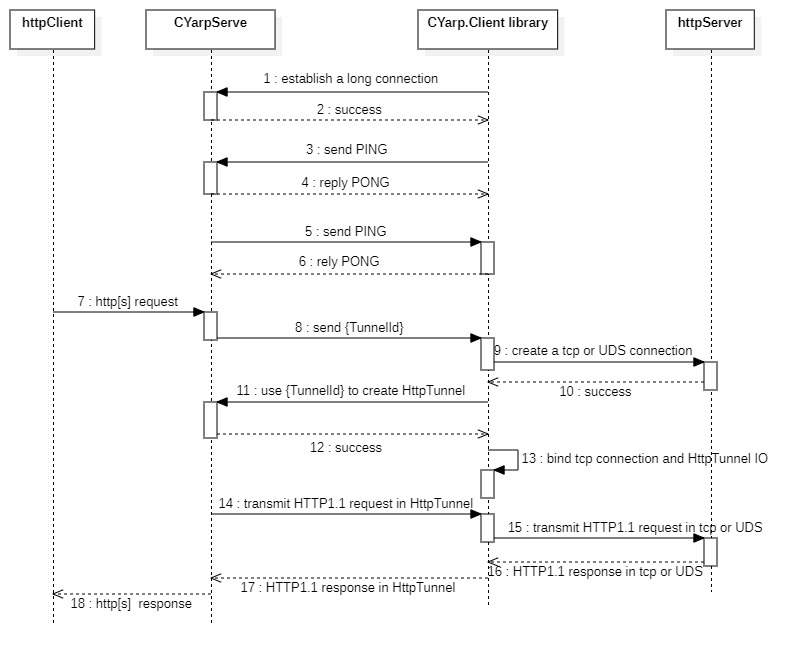
Establish a long connection
by HTTP/1.1
Client initiates the following request
Get /cyarp HTTP/1.1
Connection: Upgrade
Host: {host}
Upgrade: CYarp
Authorization:{Client identity information}
CYarp-TargetUri: {Access Uri of target httpServer}
If the server authentication passes, it will respond with a 101 status code; if identity authentication fails, it will respond with a 401 status code. The response may also include a Set-Cookie header.
HTTP/1.1 101 Switching Protocols
Connection: Upgrade
Set-Cookie: <load balancer cookie>
At this point, the TCP-based long connection is established. The stream that follows the connection must implement the behaviors shown in the table below. {tunnelId} is a 36-character GUID string, for example c0248b3a-171c-1e9c-e75c-188daf5e773f.
| Sender | Content | Intention | Receiver's actions |
|---|---|---|---|
| Client | PING\r\n |
Detect server survival | Reply PONG\r\n |
| Server | PING\r\n |
Detect client survival | Reply PONG\r\n |
| Server | {tunnelId}\r\n |
Let the Client to create a new HttpTunnel to the Server | Create HttpTunnel using {tunnelId} |
by HTTP/2
Client initiates the following request
:authority = {host}
:method = CONNECT
:protocol = CYarp
:scheme = https
:path = /cyarp
authorization = {Client identity information}
cyarp-targeturi = {Access Uri of target httpServer}
If the server authentication passes, it will respond with a 200 status code; if identity authentication fails, it will respond with a 401 status code. The response may also include a set-cookie header.
:status = 200
set-cookie = <load balancer cookie>
At this point, the HTTP/2 long connection is established. The stream that follows the connection must implement the behaviors shown in the table below. {tunnelId} is a 36-character GUID string, for example c0248b3a-171c-1e9c-e75c-188daf5e773f.
| Sender | Content | Intention | Receiver's actions |
|---|---|---|---|
| Client | PING\r\n |
Detect server survival | Reply PONG\r\n |
| Server | PING\r\n |
Detect client survival | Reply PONG\r\n |
| Server | {tunnelId}\r\n |
Let the Client to create a new HttpTunnel to the Server | Create HttpTunnel using {tunnelId} |
by WebSocket
WebSocket connections require the following request headers and must target the /cyarp path. After the connection is established, multiple binary frames are used to carry CYarp stream data.
| HeaderName | HeaderValue |
|---|---|
| Authorization | Client identity information |
| CYarp-TargetUri | Access Uri of target httpServer |
| Sec-WebSocket-Protocol | CYarp |
Creation of HttpTunnel
by HTTP/1.1
Client sends the following request
Get /cyarp/{tunnelId} HTTP/1.1
Host: {host}
Connection: Upgrade
Upgrade: CYarp
Cookie: <if a Set-Cookie header is present>
If the server verifies {tunnelId} it will respond with a 101 status code; if verification fails, it will respond with a 401 status code. The response may also include a Set-Cookie header.
HTTP/1.1 101 Switching Protocols
Connection: Upgrade
Set-Cookie: <load balancer cookie>
At this point, the HttpTunnel over TCP has been created. The server will send an HTTP/1.1 request to the client and receive the client's HTTP/1.1 response over the same stream.
by HTTP/2
Client sends the following request
:authority = {host}
:method = CONNECT
:protocol = CYarp
:scheme = https
:path = /cyarp/{tunnelId}
cookie = <if a Set-Cookie header is present>
If the server verifies {tunnelId} it will respond with a 200 status code; if verification fails, it will respond with a 401 status code. The response may also include a set-cookie header.
:status = 200
set-cookie = <load balancer cookie>
At this point, the HttpTunnel over HTTP/2 has been created. The server will send an HTTP/1.1 request to the client and receive the client's HTTP/1.1 response over the same stream.
by WebSocket
WebSocket connections to /cyarp/{tunnelId} use binary frames to carry CYarp stream data. The request must include the following header:
| HeaderName | HeaderValue |
|---|---|
| Sec-WebSocket-Protocol | CYarp |
Security
When the server uses HTTPS, the following components are protected by TLS:
- The long-connection establishment and its subsequent stream
- The HttpTunnel creation process and its subsequent stream
If the TargetUri of the HTTP server is also HTTPS, the traffic within the HttpTunnel will be TLS-over-TLS.