

The Vim plugin for D2 files.
Table of Contents
Install
Using vim-plug
Plug 'terrastruct/d2-vim'
Using lazy.nvim
{
  "terrastruct/d2-vim",
  ft = { "d2" },
}
Features
Syntax Highlighting
This plugin provides basic syntax highlighting for D2 files. However, for Neovim users, we recommend using the Tree-sitter parser for more accurate syntax highlighting:
It is well-tested and maintained (thank you @ravsii).
The plugin standalone will still be used as a fallback for regular Vim users or when Tree-sitter is not available.
ASCII Preview
Requirements: D2 version 0.7.1 or higher is required for ASCII features.
Render D2 diagrams as ASCII text for quick preview without leaving Vim. This feature provides a live preview of your diagrams in text format, perfect for:
- Quick previews without external tools
- Working in terminal environments
- Sharing diagrams in text-only contexts
- Understanding diagram structure while editing
The ASCII preview opens in a vertical split pane and automatically updates when you save your D2 file.
Demos
Preview: Open a .d2 file, press <Leader>d2 to open up preview pane, upon save, the ascii
re-renders.

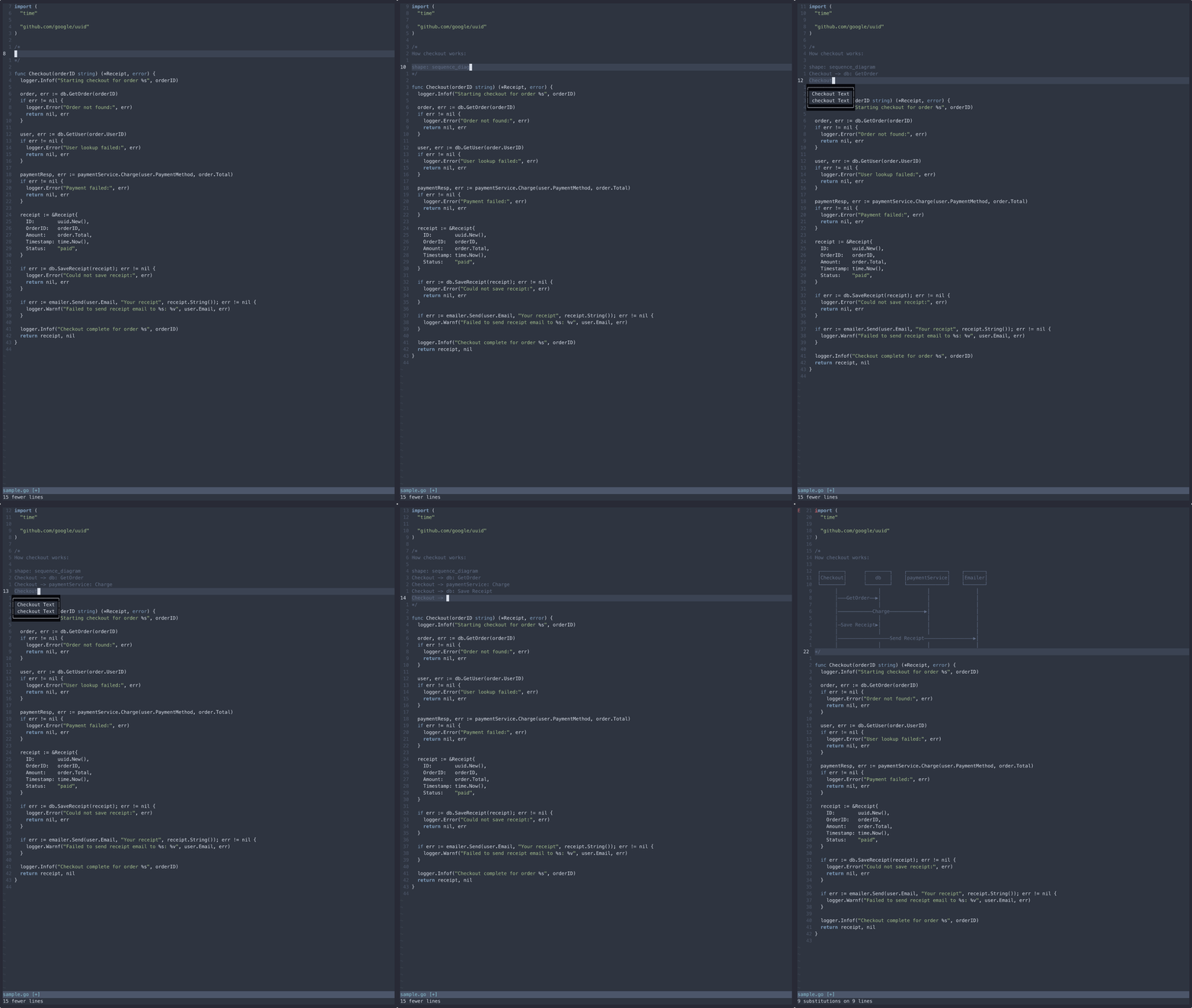
Replace: Open any file (here we have a Go file), comment some d2 code, select it in visual mode, press <Leader>rd2 to replace the d2 code with an ASCII diagram.
Configuration
" Enable/disable auto ASCII render on save (default: 1)
let g:d2_ascii_autorender = 1

" Customize the ASCII render command (default: "d2")
let g:d2_ascii_command = "d2"

" Set preview window width for vertical split (default: half screen)
let g:d2_ascii_preview_width = &columns / 2

" Set ASCII mode: "extended" (Unicode) or "standard" (basic ASCII)
let g:d2_ascii_mode = "extended"
ASCII Modes
Extended Mode (default): Uses Unicode box-drawing characters for cleaner, more readable output:
┌─────────────┐     ┌──────────────┐
│    user     │────▶│   server     │
└─────────────┘     └──────────────┘
Standard Mode: Uses basic ASCII characters for maximum compatibility:
+-------------+     +--------------+
|    user     |---->|   server     |
+-------------+     +--------------+
Commands
:D2Preview- Render current buffer as ASCII in preview window:D2PreviewToggle- Toggle ASCII preview window on/off:D2PreviewUpdate- Update existing preview window with current content:D2PreviewCopy- Copy ASCII preview content to clipboard and yank register:D2PreviewSelection- Render selected text as ASCII (works in any file):D2ReplaceSelection- Replace selected D2 code with ASCII render (works in any file):D2AsciiToggle- Toggle automatic ASCII rendering on save
Keybindings
<Leader>d2- Render selected text as ASCII (visual mode, any file)<Leader>d2- Render entire buffer as ASCII (normal mode, D2 files only)<Leader>rd2- Replace selected D2 code with ASCII render (visual mode, any file)<Leader>yd2- Copy ASCII preview content to clipboard and yank register (normal mode, any file)
Auto-formatting
D2 files are automatically formatted on save using d2 fmt. This can be configured:
" Enable/disable auto format on save (default: 1)
let g:d2_fmt_autosave = 1

" Customize the format command (default: "d2 fmt")
let g:d2_fmt_command = "d2 fmt"

" Fail silently when formatting fails (default: 0)
let g:d2_fmt_fail_silently = 0
Commands:
:D2Fmt- Format current buffer:D2FmtToggle- Toggle auto format on save
Validation
D2 files can be validated using d2 validate. This can be configured:
" Enable/disable auto validate on save (default: 0)
let g:d2_validate_autosave = 0

" Customize the validate command (default: "d2 validate")
let g:d2_validate_command = "d2 validate"

" Use quickfix or locationlist for errors (default: "quickfix")
let g:d2_list_type = "quickfix"

" Fail silently when validation fails (default: 0)
let g:d2_validate_fail_silently = 0
Commands:
:D2Validate- Validate current buffer:D2ValidateToggle- Toggle auto validate on save
Playground
Open D2 files in the online playground at play.d2lang.com. This is useful for an ad-hoc way of sharing your d2 diagram with someone.
" Customize the play command (default: "d2 play")
let g:d2_play_command = "d2 play"

" Set the theme ID (default: 0)
let g:d2_play_theme = 0

" Enable sketch mode (default: 0)
let g:d2_play_sketch = 0
Commands:
:D2Play- Open current buffer in D2 playground
Documentation
See :help d2-vim or ./doc/d2.txt for options and additional documentation.