





Databao Agent
Talk to your data in plain English.
Ask questions → Get answers (Text, SQL, and interactive visual insights).
Website • Quickstart • Docs • Discord
🏆 Ranked #1 in the DBT track of the Spider 2.0 Text2SQL benchmark
What is Databao Agent?
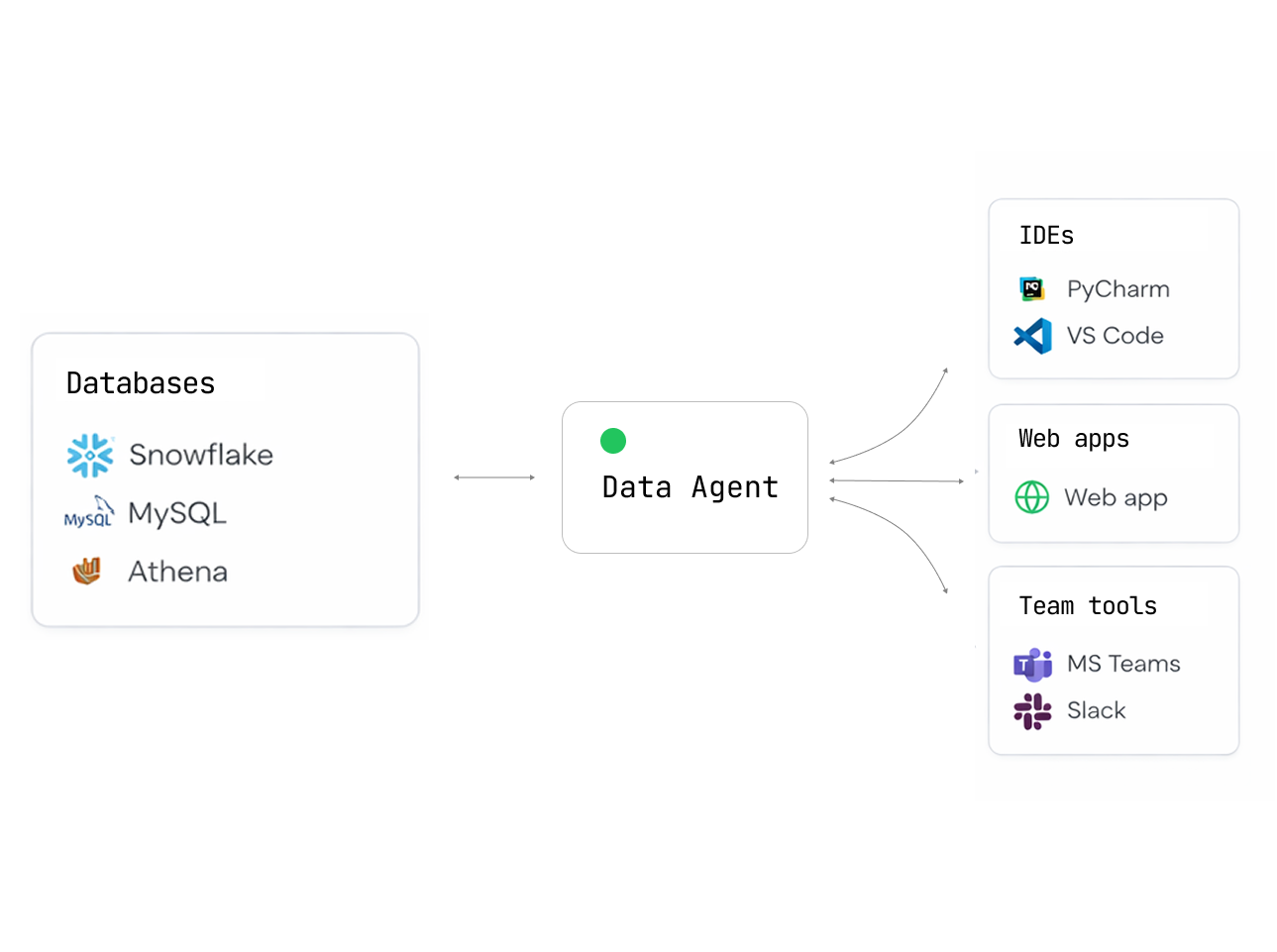
Databao Agent is an open-source AI agent that lets you query your data sources using natural language.
Simply ask:
- "Show me all German shows"
- "Plot revenue by month"
- "Which customers churned last quarter?"
Get back tables, charts, and explanations — no SQL or code needed.
Why choose Databao Agent?
| Feature | What it means for you |
|---|---|
| Interactive outputs | Tables you can sort/filter and charts you can zoom/hover (Vega-Lite) |
| Simple, Pythonic API | thread.ask("question").df()just works |
| Python-native | Fits perfectly into existing data science and exploratory workflows |
| Natural language | Ask questions about your data just like asking a colleague |
| Broad DB support | PostgreSQL, MySQL, SQLite, DuckDB... anything SQLAlchemy supports |
| Auto-generated charts | Get Vega-Lite visualizations without writing plotting code |
| Local first | Use Ollama or LM Studio — your data never leaves your machine |
| Cloud LLM ready | Built-in support for OpenAI, Anthropic, and OpenAI-compatible APIs |
| Conversational | Maintains context for follow-up questions and iterative analysis |
Installation
pip install databao-agent
Supported data sources
- BigQuery
- dbt
- DuckDB
- MySQL
- Pandas DataFrame
- PostgreSQL
- Snowflake
- SQLite
For PostgreSQL, MySQL, and SQLite, pass a SQLAlchemy Engine to add_db(). For DuckDB, pass DuckDBPyConnection.
Quickstart
1. Create a database connection (SQLAlchemy)
import os
from sqlalchemy import create_engine

user = os.environ.get("DATABASE_USER")
password = os.environ.get("DATABASE_PASSWORD")
host = os.environ.get("DATABASE_HOST")
database = os.environ.get("DATABASE_NAME")

engine = create_engine(
   f"postgresql://{user}:{password}@{host}/{database}"
)
2. Create a Databao agent and register sources
import databao.agent as bao

# Option A - Local: install and run any compatible local LLM
# For list of compatible models, see "Local Models" below
# llm_config = bao.LLMConfig(name="ollama:gpt-oss:20b", temperature=0)

# Option B - Cloud (requires an API key, e.g. OPENAI_API_KEY)
llm_config = bao.LLMConfig(name="gpt-4o-mini", temperature=0)

# Add your database to the agent
domain = bao.domain()
domain.add_db(engine)

agent = bao.agent(domain, name="demo", llm_config=llm_config)
3. Ask questions and materialize results
# Start a conversational thread
thread = agent.thread()

# Ask a question and get a DataFrame
df = thread.ask("list all german shows").df()
print(df.head())

# Get a textual answer
print(thread.text())

# Generate a visualization (Vega-Lite under the hood)
plot = thread.plot("bar chart of shows by country")
print(plot.code)  # access generated plot code if needed
Environment variables
Specify your API keys in the environment variables:
| Variable | Description |
|---|---|
OPENAI_API_KEY |
Required for OpenAI models or OpenAI-compatible APIs |
ANTHROPIC_API_KEY |
Required for Anthropic models |
Optional for local/OpenAI-compatible servers:
| Variable | Description |
|---|---|
OPENAI_BASE_URL |
Custom endpoint (aka api_base_url in code) |
OLLAMA_HOST |
Ollama server address (e.g., 127.0.0.1:11434) |
Optional for tracing:
| Variable | Description |
|---|---|
LANGSMITH_TRACING |
Set to true to enable LangSmith tracing (default: false) |
LANGCHAIN_PROJECT |
LangSmith project name for organizing traces |
LANGCHAIN_API_KEY |
API key from smith.langchain.com |
Local Models
Databao agent works great with local LLMs — your data never leaves your machine.
Ollama
-
Install Ollama for your OS and make sure it’s running
-
Use a
bao.LLMConfigwithnameof the form"ollama:<model_name>":llm_config = bao.LLMConfig(name="ollama:gpt-oss:20b", temperature=0)The model will be downloaded automatically if it doesn't exist. Or run
ollama pull <model_name>to download manually.
OpenAI-compatible servers
You can use any OpenAI-compatible server by setting api_base_url in the bao.LLMConfig.
For an example, see examples/configs/qwen3-8b-oai.yaml.
Compatible servers:
- LM Studio: macOS-friendly, supports OpenAI Responses API
- Ollama:
OLLAMA_HOST=127.0.0.1:8080 ollama serve - llama.cpp:
llama-server - vLLM
Alternatives
How does Databao agent compare to other agentic data tools?
| Tool | Open source | Local LLMs | SQL + DataFrames | Multiple sources | Interactive output |
|---|---|---|---|---|---|
| Databao | ✅ | ✅ Native Ollama | ✅ Both | ✅ Multiple sources | ✅ Tables + charts |
| PandasAI | ✅ | ✅ Ollama/LM Studio | ✅ Both | ❌ One source | ❌ Static |
| Chat2DB | ✅ | ✅ Custom LLM, SQL only | ❌ One DB | ✅ Dashboards | |
| Vanna | ✅ | ✅ Ollama | SQL only | ❌ One DB | ✅ Plotly |
Development
Installation (using uv)
Clone this repo and run:
# Install dependencies
uv sync

# Optionally include example extras (notebooks, dotenv)
uv sync --extra examples
We recommend using the same version of uv as GitHub Actions:
uv self update 0.9.5
Makefile targets
# Lint and static checks (pre-commit on all files)
make check

# Run tests (loads .env if present)
make test
Direct commands
uv run pytest -v
uv run pre-commit run --all-files
Tests
The test suite uses pytest. Some tests require API keys and are marked with @pytest.mark.apikey.
# Run all tests
uv run pytest -v

# Run only tests that do NOT require API keys
uv run pytest -v -m "not apikey"
Contributing
We love contributions! Here’s how you can help:
- ⭐ Star this repo — it helps others find us!
- 🐛 Found a bug? Open an issue
- 💡 Have an idea? We’re all ears — create a feature request
- 👍 Upvote issues you care about — helps us prioritize
- 🔧 Submit a PR
- 📝 Improve docs — typos, examples, tutorials — everything helps!
New to open source? No worries! We’re friendly and happy to help you get started.
License
Apache 2.0 — use it however you want. See the LICENSE file for details.
Like Databao? Give us a ⭐! It will help to distribute the technology.