
 DBConvert Streams
Database IDE + migration + real-time CDC — in one workflow.
Query data,
move it,
keep it in sync,
and let your AI assistant see it all
without switching between tools.
If this looks useful, consider giving it a ⭐
Why this exists
Most setups look like this:
- a DB client for queries
- scripts or tools for migration
- a separate CDC pipeline
It works, but it's fragmented.
DBConvert Streams combines these into one workspace.
What it feels like
Think of it as:
DBeaver / DataGrip
- migration tool
- CDC
but without switching tools every time
Example
Run queries across databases and files:
SELECT *
FROM read_parquet('orders.parquet') o
JOIN postgres.public.customers c
  ON o.customer_id = c.id
LIMIT 10;
Then use the same query as a data source — and stream it anywhere.
What you can do
- explore databases, files, and S3
- run SQL across multiple sources
- move data between systems
- keep it in sync with CDC
- connect Claude, Cursor, or Copilot — the AI reads your live schemas, data, and streams (read-only, via MCP)
All in the same workflow.
Note: This is the public home of DBConvert Streams — example configurations, documentation, issue tracking, and release notes. The product itself is proprietary.
Quick Start
Runs anywhere — your laptop, a VPS, or your own infra. No cloud dependency, no vendor lock-in.
Desktop App
Download for Windows, macOS, or Linux — no account required.
Self-Hosted (Docker)
Deploy on any machine with Docker — a local server, a VPS (DigitalOcean, Hetzner, AWS EC2, etc.), or your own infrastructure:
curl -fsSL https://dbconvert.nyc3.digitaloceanspaces.com/downloads/streams/latest/docker-install.sh | sh
What is DBConvert Streams?
DBConvert Streams is a database IDE with built-in migration and real-time CDC.
Browse databases, local files, and S3 storage. Edit data directly. Run federated SQL queries that join tables across different database engines — no intermediate exports needed.
Key Features
In practice, it comes down to this:
Database IDE & Workspace (Free)
- Data Explorer — Browse databases, files, and S3 in one place
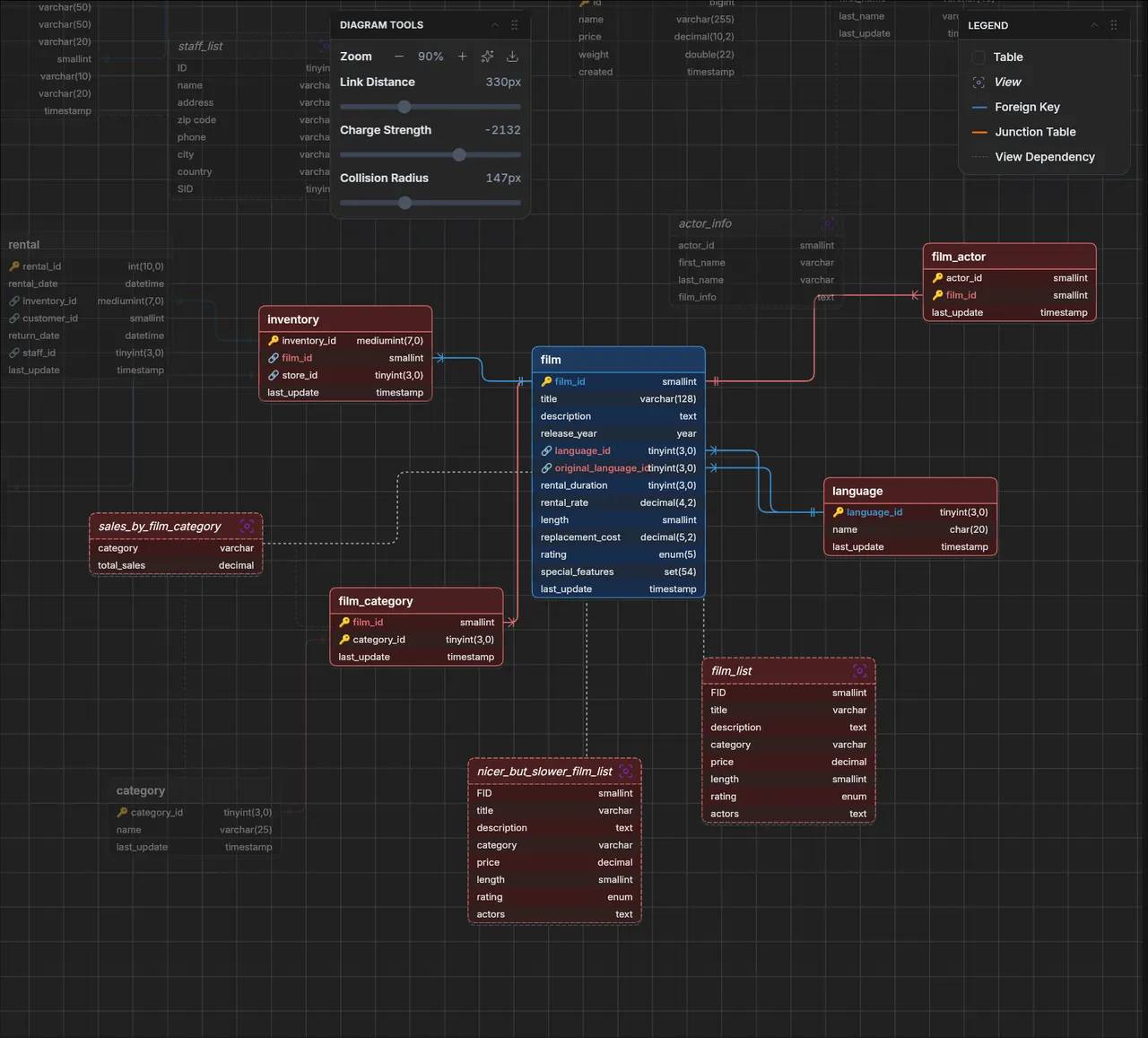
- ER Diagrams — Visualize database relationships
- Schema Comparison — Compare schemas and data across databases
- Schema Navigation — Persistent state and search across connections
Federated SQL
- Execute SQL queries across multiple databases and file sources simultaneously
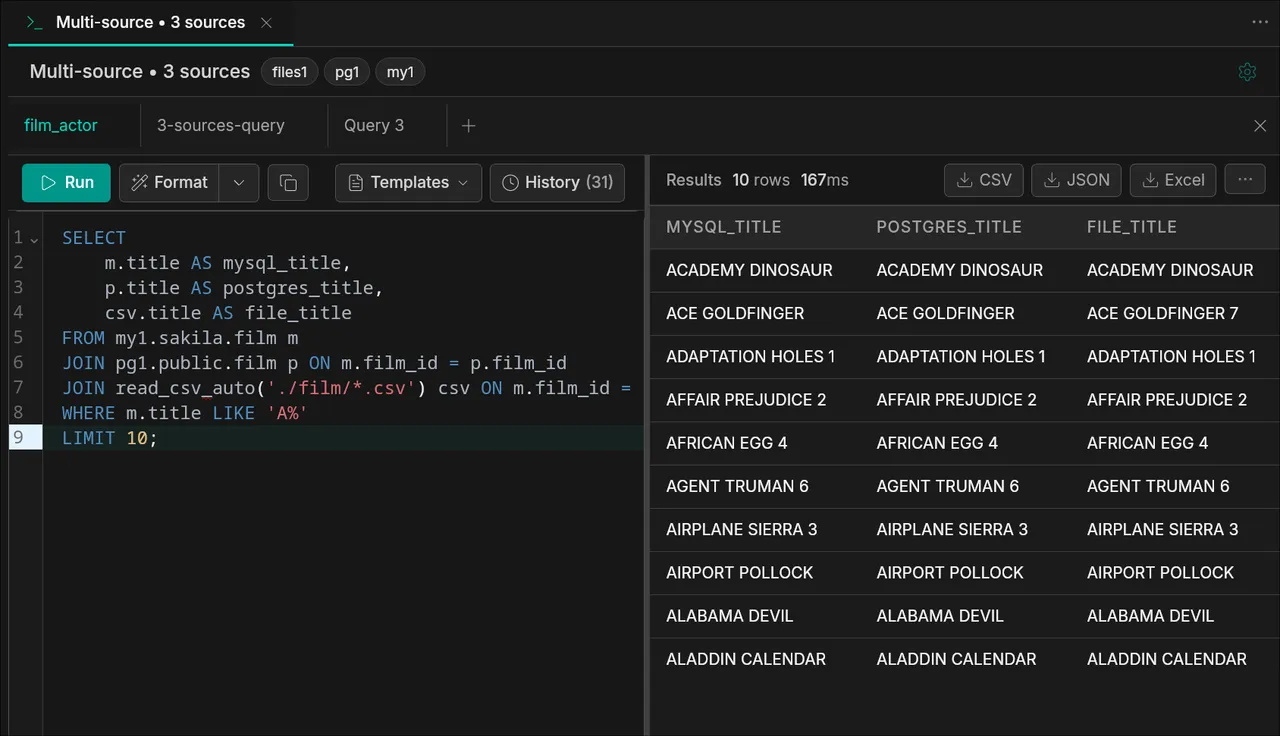
- Join live PostgreSQL and MySQL tables using connection aliases
- Query CSV, JSON, Parquet files and S3 storage alongside databases
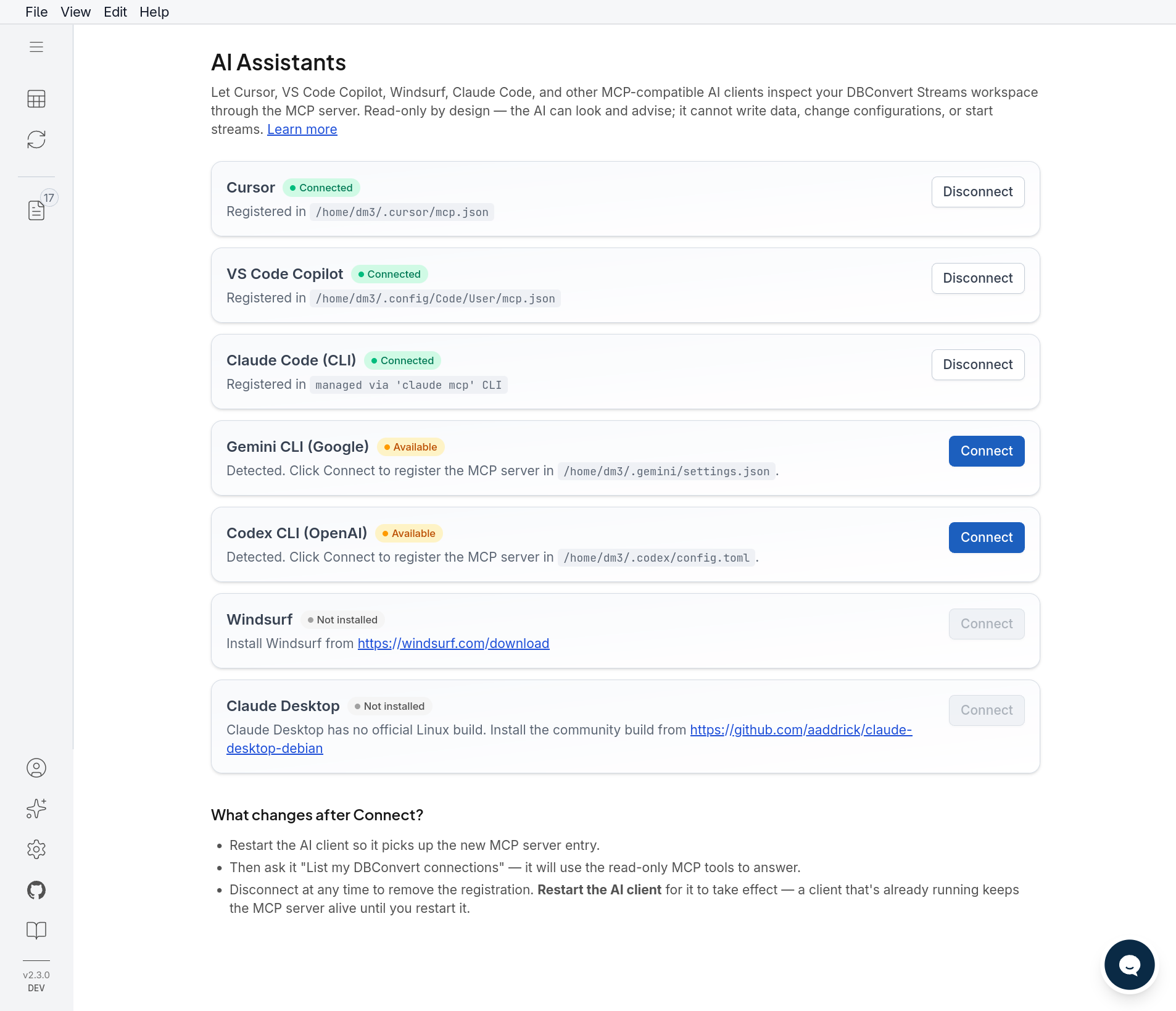
AI Assistants via MCP — new in 2.4
- Built-in MCP server: Claude, Cursor, VS Code Copilot, Windsurf, Gemini CLI, and Codex read live schemas, data, and stream state — no more pasting DDL into chat
- 26 read-only tools: describe tables, run read-only SQL, federated queries, stream diagnostics, file & S3 browsing
- One-click setup from the ✨ AI Assistants panel; Docker deployments expose
/mcpover HTTP(S) - Read-only by design: only
SELECTpasses the server-side filter — the AI can look and advise, never write
Data Migration (Load Mode)
Rapidly move large datasets between databases with automatic schema conversion and validation.
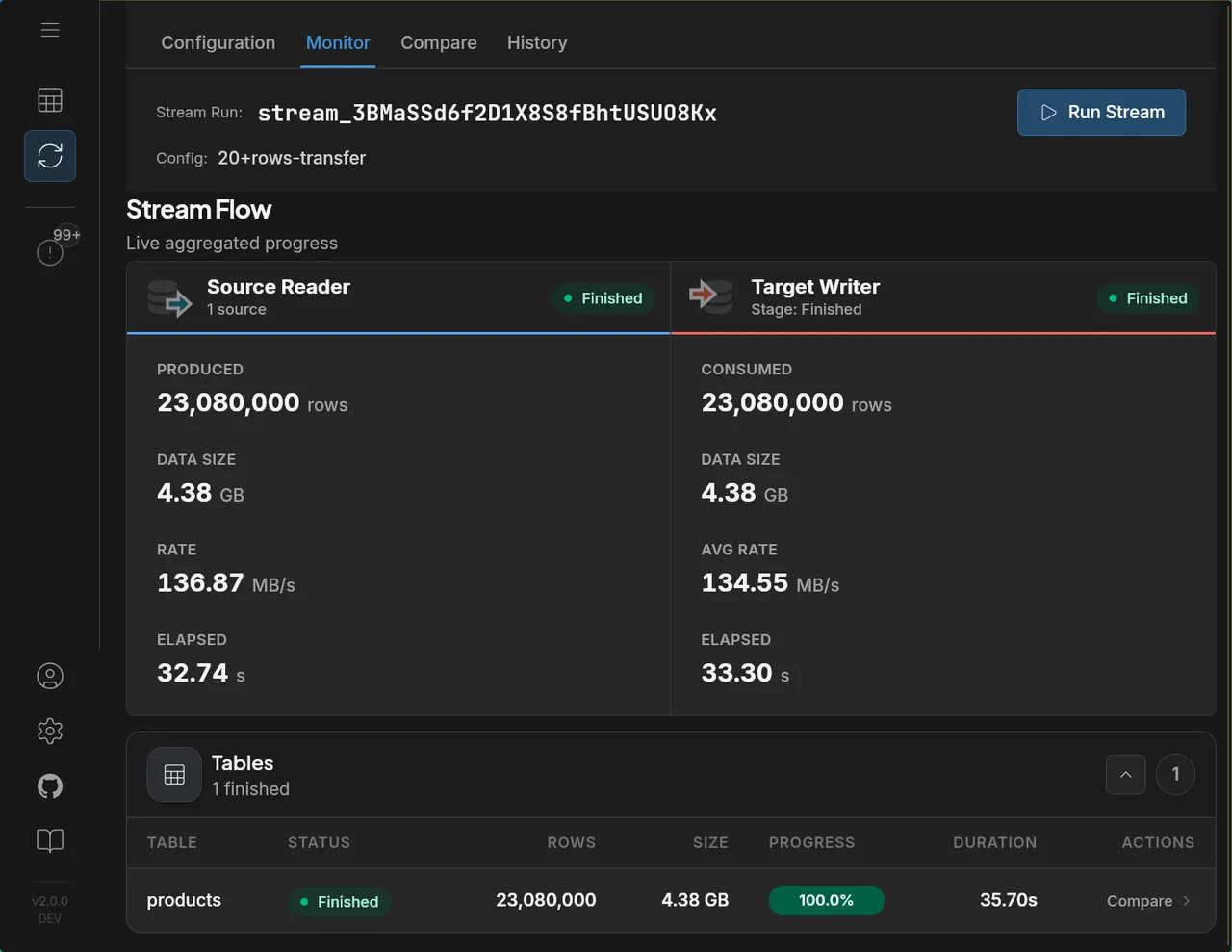
Performance: 23 million rows (4.38 GB) migrated from MySQL to Parquet in 35.7 seconds at 136 MB/s.
Real-time CDC (Change Data Capture)
Stream INSERT, UPDATE, and DELETE operations from source to target in real-time with minimal latency. Supports CDC to databases, files, and S3 storage.
When this is probably not for you
- you need 100+ connectors (SaaS, APIs, etc.)
- you already run Kafka pipelines at scale
- you need complex ETL / transformations
Screenshots
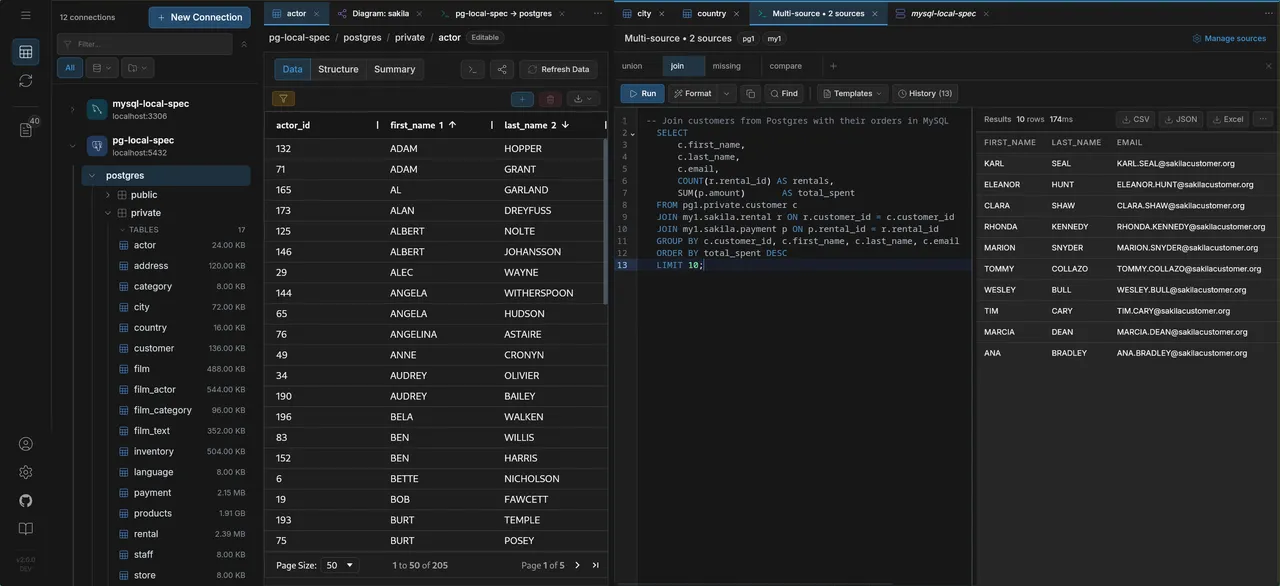
Data Explorer
Browse schemas, view and edit data across multiple database connections with a unified tree navigation:
Federated SQL
Join tables across MySQL, PostgreSQL, and file sources (CSV, Parquet) in a single query:
ER Diagrams
Visualize database relationships with interactive entity-relationship diagrams:
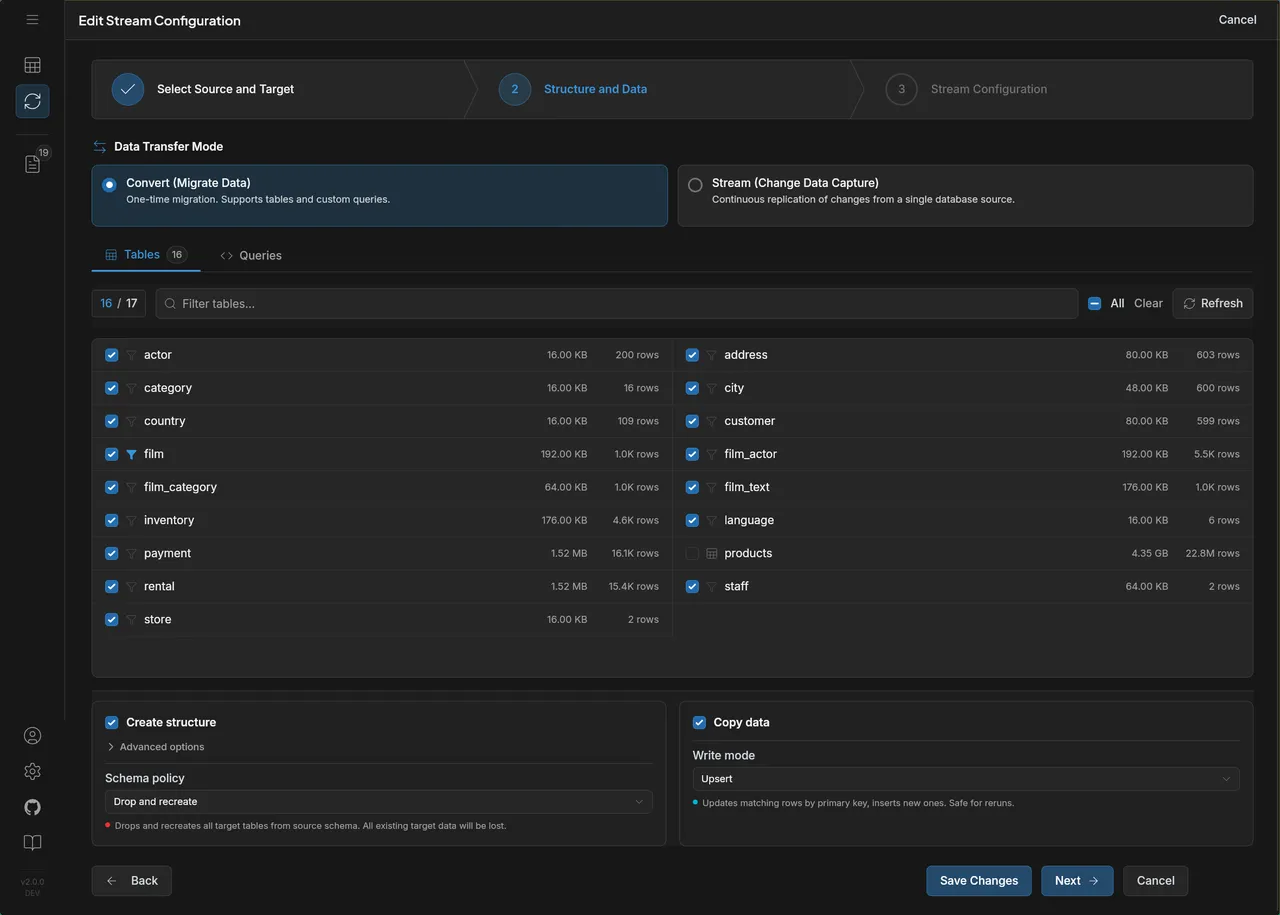
Stream Configuration
Configure data migration and CDC streams with table selection, custom queries, and transfer settings:
Stream Monitoring
Track data streams with real-time metrics — rows, data size, transfer rates, and per-table progress:
AI Assistants
Connect your AI client with one click — it reads the same workspace you see, read-only:
Supported Sources & Targets
Sources
- MySQL / MariaDB / Percona
- PostgreSQL / CockroachDB
- Amazon RDS, Aurora, Google Cloud SQL, Azure Database
- Local files (CSV, JSONL, Parquet)
- S3-compatible storage (AWS S3, MinIO, DigitalOcean Spaces, Wasabi)
Targets
- MySQL / PostgreSQL
- Snowflake
- CSV / JSONL / Parquet (local files)
- Amazon S3 / MinIO / S3-compatible storage
- Google Cloud Storage (GCS)
- Azure Blob Storage
Deployment Options
Run it anywhere — no cloud account required, no vendor lock-in.
| Method | Description |
|---|---|
| Desktop | Windows, macOS, Linux — local setup, no account required |
| Self-hosted | Docker / Docker Compose on any machine — local server, VPS, or your own infra |
Pricing
The Database IDE is free forever. For data migration and CDC streaming, see pricing details.
Examples
Most people never touch the API. The UI covers connections, table selection, federated SQL, stream configuration, and monitoring end-to-end. The
curlexamples below are for users who want to script deployments, wire DBConvert Streams into CI/CD, or drive it from another service — not a required workflow.
Connections are managed separately and stream configs reference them by ID. Here are typical workflows via the API.
1. Create connections
# Create a MySQL source connection
curl -X POST http://localhost:8020/api/v1/connections \
  -H "Content-Type: application/json" \
  -d '{
    "name": "mysql-source",
    "type": "mysql",
    "host": "localhost",
    "port": 3306,
    "username": "root",
    "password": "password"
  }'

# Create a PostgreSQL target connection
curl -X POST http://localhost:8020/api/v1/connections \
  -H "Content-Type: application/json" \
  -d '{
    "name": "pg-target",
    "type": "postgresql",
    "host": "localhost",
    "port": 5432,
    "username": "postgres",
    "password": "password"
  }'
2. MySQL → PostgreSQL (load)
One-time migration with table selection:
{
  "name": "mysql-to-postgres-migration",
  "mode": "load",
  "source": {
    "connections": [{
      "connectionId": "<mysql-connection-id>",
      "database": "sakila",
      "tables": [
        { "name": "actor" },
        { "name": "film" },
        { "name": "customer" }
      ]
    }]
  },
  "target": {
    "id": "<pg-connection-id>",
    "spec": {
      "db": {
        "database": "target_db",
        "schema": "public",
        "schemaPolicy": "drop_and_recreate"
      }
    }
  }
}
3. MySQL → PostgreSQL (CDC)
Real-time replication capturing inserts, updates, and deletes:
{
  "name": "mysql-to-postgres-cdc",
  "mode": "cdc",
  "source": {
    "connections": [{
      "connectionId": "<mysql-connection-id>",
      "database": "sakila",
      "tables": [
        { "name": "actor" },
        { "name": "film" }
      ]
    }],
    "options": {
      "operations": ["insert", "update", "delete"]
    }
  },
  "target": {
    "id": "<pg-connection-id>",
    "spec": {
      "db": {
        "database": "target_db",
        "writeMode": "upsert"
      }
    }
  }
}
4. PostgreSQL → S3 Parquet (load)
Export database tables to Parquet files on S3:
{
  "name": "pg-to-s3-parquet",
  "mode": "load",
  "source": {
    "connections": [{
      "connectionId": "<pg-connection-id>",
      "database": "analytics",
      "tables": [
        { "name": "orders" },
        { "name": "customers" }
      ]
    }]
  },
  "target": {
    "id": "<s3-connection-id>",
    "spec": {
      "s3": {
        "fileFormat": "parquet",
        "upload": {
          "bucket": "my-data-lake",
          "prefix": "exports/"
        }
      }
    }
  }
}
5. Multi-source federated query (load)
Join data from MySQL and PostgreSQL into one target:
{
  "name": "federated-migration",
  "mode": "load",
  "source": {
    "connections": [
      {
        "alias": "my1",
        "connectionId": "<mysql-connection-id>",
        "database": "sakila"
      },
      {
        "alias": "pg1",
        "connectionId": "<pg-connection-id>",
        "database": "dvdrental"
      }
    ]
  },
  "target": {
    "id": "<target-connection-id>",
    "spec": {
      "db": { "database": "warehouse" }
    }
  }
}
6. Start a stream
curl -X POST http://localhost:8020/api/v1/stream-configs/<config-id>/start
7. Monitor progress
curl http://localhost:8020/api/v1/streams/<stream-id>/stats
See the full API documentation for all endpoints and options. Standalone stream-config files live in
examples/api/, and reproducible benchmarks (including a side-by-side vs Debezium) are inexamples/benchmarks/.
Learn More
Feedback and Support
Have questions or feedback? Use Discussions or open an Issue.