
Delx Wellness
Open-source MCP connectors for wearables, recovery, training and nutrition.
Give your AI agent your sleep, HRV, workouts and food — all local-first, all read-only.







What is this? A registry of 15 open-source MCP servers that turn your wearables, nutrition, room air quality, menstrual cycle, continuous glucose and smart mattress into context any AI agent can read — with zero data ever leaving your machine.
⭐ If this helps your agent workflow, star this hub.
Stars make the connector map easier for AI builders to find, and this is the canonical repo for the Delx Wellness ecosystem.
Start here
| Goal | Use this | Command |
|---|---|---|
| Install the whole wellness stack for Hermes | delx-wellness-hermes |
npx -y delx-wellness-hermes setup |
| Install the whole wellness stack for OpenClaw | delx-wellness-openclaw |
npx -y delx-wellness-openclaw setup |
| Track food, barcode scans, hydration and meal summaries | wellness-nourish |
npx -y wellness-nourish doctor |
| Add recovery, strain, sleep and HRV | whoop-mcp |
npx -y whoop-mcp-unofficial setup |
| Add Body Battery, sleep, stress and training readiness | garminmcp |
npx -y garmin-mcp-unofficial setup --auth |
| Copy runnable agent templates | delx-agent-workbench |
Use the Hermes, OpenClaw, Claude Desktop or Codex examples |
| Browse the human-friendly site | delx-wellness-site |
wellness.delx.ai |
Agents should start with agent_manifest, connection_status or capabilities when a connector exposes them. Humans should start with the Hermes or OpenClaw profile packs when they want the whole stack installed as one local-first wellness agent.
For the public thesis behind this stack, read Why local-first wellness agents need MCP.
✨ The 15 connectors
 whoop-mcp-unofficialRecovery · HRV · Sleep · Strain 

|
 oura-mcp-unofficialReadiness · Sleep · Activity · HRV 

|
 garmin-mcp-unofficialBody Battery · Training Readiness · HRV 

|
 strava-mcp-unofficialActivities · Streams · Routes · Segments 

|
 fitbit-mcp-unofficialActivity · Sleep · Heart · HRV 

|
 withings-mcp-unofficialBody Measures · Sleep · Activity · Heart 

|
 apple-health-mcp-unofficialLocal export · Activity · Sleep · HRV · Workouts 

|
 samsung-health-mcp-unofficialGalaxy Watch export · Sleep · HRV · Workouts 

|
 polar-mcp-unofficialNightly Recharge · Training Load · PPI / HRV 

|
 google-health-mcp-unofficialGoogle Health API v4 · Fitbit migration · Rollups 

|
 wellness-nourishFood search · Barcodes · Intake · Hydration · Local 

|
 wellness-airAirGradient · AQI · PM2.5 · CO₂ · Room quality 

|
 wellness-cycle-coachMenstrual phase · Nutrition · Training · Stateless 

|
 wellness-cgm-mcpDexcom · Glucose · TIR · GMI · Meal response 

|
More connectors coming — follow on X for releases. |
Each connector is a standalone npm package. Install one or all fifteen — they coexist and the agent reconciles overlapping signals (WHOOP, Garmin, Apple Health, Samsung Health and Google Health all reporting sleep, etc.).
🚀 Quick Start — one command for the whole stack
The fastest path is a profile pack. One command creates a local-first wellness profile with onboarding, skills, MCP presets and setup checks for all 15 connectors:
npx -y delx-wellness-hermes setup
hermes -p delx-wellness
For OpenClaw:
npx -y delx-wellness-openclaw setup
openclaw --profile delx-wellness agent --local --message "Open Delx Wellness onboarding"
That's it. The setup wizard walks you through choosing which providers to wire up, checks the local Nourish preset (no OAuth required), and prints the next commands for model setup and per-provider auth.
📦
delx-wellness-hermesanddelx-wellness-openclaware the first runtime-native profile packs — they preconfigure everything below so you don't have to glue 11 MCP configs by hand.
| Runtime | Profile pack | Repository | Page |
|---|---|---|---|
| Hermes | Delx Wellness for Hermes | delx-wellness-hermes |
wellness.delx.ai/hermes |
| OpenClaw | Delx Wellness for OpenClaw | delx-wellness-openclaw |
wellness.delx.ai/openclaw |
🔌 Or wire connectors individually
Each connector is a standalone npm package with its own guided setup CLI — use this path when you want to drop a single provider into Claude Desktop, Cursor, ChatGPT Desktop or any other MCP client.
npx -y whoop-mcp-unofficial         setup && npx -y whoop-mcp-unofficial         auth
npx -y oura-mcp-unofficial          setup && npx -y oura-mcp-unofficial          auth
npx -y garmin-mcp-unofficial        setup && npx -y garmin-mcp-unofficial        auth --install-helper
npx -y strava-mcp-unofficial        setup && npx -y strava-mcp-unofficial        auth
npx -y fitbit-mcp-unofficial        setup && npx -y fitbit-mcp-unofficial        auth
npx -y google-health-mcp-unofficial setup && npx -y google-health-mcp-unofficial auth
npx -y withings-mcp-unofficial      setup && npx -y withings-mcp-unofficial      auth
npx -y apple-health-mcp-unofficial  setup --export-path /path/to/export.zip
npx -y samsung-health-mcp-unofficial setup --export-path /path/to/SamsungHealth
npx -y polar-mcp-unofficial         setup && npx -y polar-mcp-unofficial         auth
npx -y wellness-nourish             manifest
After setup, run npx -y <package> onboarding on any connector once — the answers persist to ~/.delx-wellness/profile.json and every other connector reads them automatically.
Then drop one of the client config examples into your AI client:
| Client | Config | Notes |
|---|---|---|
| Claude Desktop | examples/claude-desktop.json |
Drop into claude_desktop_config.json |
| Claude Code | examples/claude-code.md |
Add with claude mcp add-json |
| Codex | examples/codex.toml |
Paste into ~/.codex/config.toml or add with codex mcp add |
| Cursor | examples/cursor.json |
Drop into Cursor's MCP settings |
| Windsurf | examples/windsurf.json |
Same shape as Cursor |
| Hermes | examples/hermes.md |
YAML + skill files (or use the profile pack above) |
| OpenClaw | examples/openclaw.md |
OpenClaw mcp.servers config (or use the profile pack above) |
| Goose | USING_WITH_GOOSE.md |
Block's MCP-native agent — goose configure or paste into config.yaml |
| Generic / ChatGPT | examples/generic-mcp.md |
Standard mcpServers shape |
👤 Shared local profile — one onboarding for all 15 connectors
As of v0.4.0 every connector reads and writes the same local profile at ~/.delx-wellness/profile.json (mode 0600). Onboarding once tells your agent your name, gender, age, height, weight, goals, devices, training level, dietary patterns, language, units and reply style — and all 15 connectors instantly use it for personalized summaries, coaching and unit conversion.
Pick any connector and run its onboarding flow:
npx -y whoop-mcp-unofficial    onboarding
npx -y wellness-nourish        onboarding pt-BR
npx -y garmin-mcp-unofficial   onboarding
Or call the MCP tools from inside your agent:
| Tool | What it does |
|---|---|
<vendor>_onboarding |
Returns the 11-question flow (EN or pt-BR) the agent walks through with the user |
<vendor>_profile_get |
Reads ~/.delx-wellness/profile.json — returns the structured profile + a friendly summary |
<vendor>_profile_update |
Patches the profile (gated on explicit_user_intent: true) |
Privacy contract:
- 🏠 Single canonical path —
~/.delx-wellness/profile.json, owned by your user, never uploaded. - 🔒 Secret-blocking write filter — the schema rejects fields matching
oauth | token | secret | password | cookie | refresh | api[_-]?key | sessionso the profile can never accidentally hold a credential. - 🧱 Vendored library, not an external dependency — each connector ships its own copy of the profile-store code. No central package to install, no npm dependency graph creep.
- 🔁 Auto-migration — on first read, the store imports any existing profile from
~/.hermes/profiles/delx-wellness/wellness-profile.jsonor~/.openclaw-delx-wellness/workspace/wellness-profile.jsonso Hermes and OpenClaw users keep their existing answers. - ✋ Write intent gate — profile updates require
explicit_user_intent: true. Agents that try to write without it get aUSER_ACTION_REQUIREDresponse.
Schema:
delx-wellness/lib/profile-store.tsis the canonical source. Every connector vendors a byte-for-byte copy so the ecosystem stays self-contained.
🏗️ How it fits together
flowchart LR
    subgraph A[" Your AI Agent "]
      direction LR
      Claude[Claude]
      Cursor[Cursor]
      Hermes[Hermes]
      OpenClaw[OpenClaw]
      ChatGPT[ChatGPT Desktop]
    end

    subgraph L[" Local on your machine "]
      direction TB
      MCP[profile pack<br/>or standalone MCP configs]
      W[whoop-mcp]
      O[oura-mcp]
      G[garmin-mcp]
      S[strava-mcp]
      F[fitbit-mcp]
      GH[google-health-mcp]
      Wi[withings-mcp]
      AH[apple-health-mcp]
      SH[samsung-health-mcp]
      P[polar-mcp]
      N[nourish]
    end

    subgraph P2[" Provider APIs "]
      direction TB
      WHOOP[WHOOP API]
      OURA[Oura API]
      GARMIN[Garmin Connect]
      STRAVA[Strava API]
      FITBIT[Fitbit API]
      GOOGLE[Google Health API]
      WITHINGS[Withings API]
      AHE[Apple Health export.zip]
      SHE[Samsung Health CSV export]
      POLAR[Polar Accesslink]
      LOCAL[Local food DB]
    end

    A --> MCP
    MCP --> W & O & G & S & F & GH & Wi & AH & SH & P & N
    W --> WHOOP
    O --> OURA
    G --> GARMIN
    S --> STRAVA
    F --> FITBIT
    GH --> GOOGLE
    Wi --> WITHINGS
    AH --> AHE
    SH --> SHE
    P --> POLAR
    N --> LOCAL

    style L fill:#0F172A,stroke:#0EA5A3,color:#fff
    style A fill:#0F172A,stroke:#10B981,color:#fff
    style P2 fill:#0F172A,stroke:#7C3AED,color:#fff
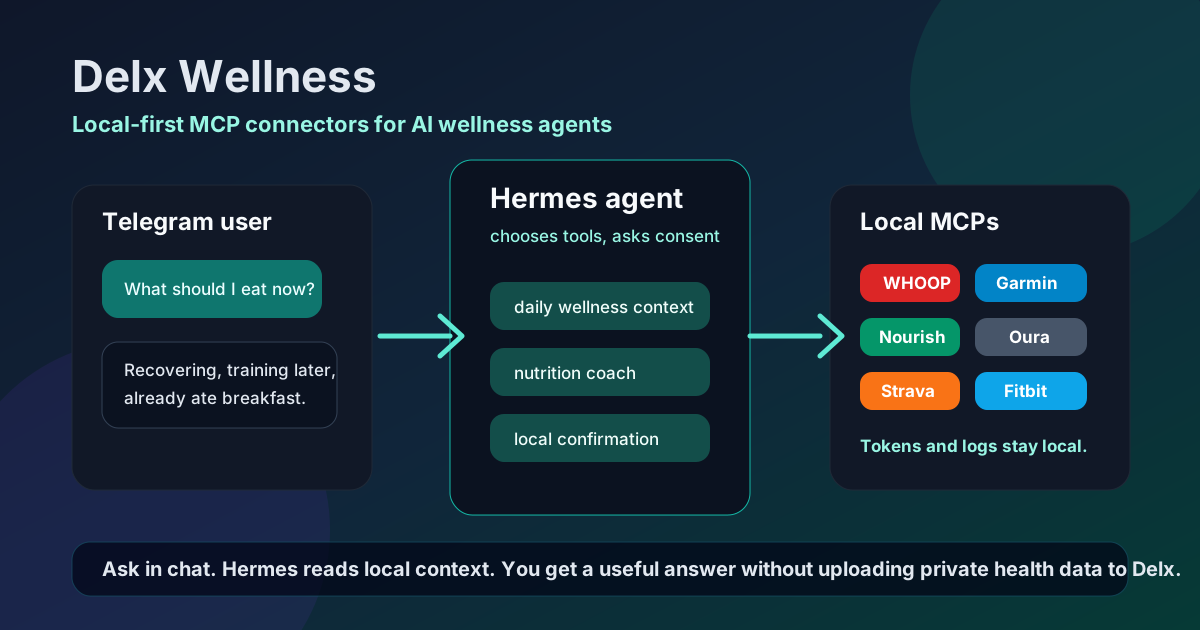
One agent → one local profile → fifteen connectors → your provider data. Tokens never leave your machine.
🧭 Which connector should I install first?
Have a WHOOP?              → start with whoop-mcp        (recovery, HRV, sleep, strain)
Have a Garmin?             → start with garminmcp        (Body Battery, training readiness, HRV)
Have an Oura?              → start with ouramcp          (readiness, sleep, activity, HRV)
Have Withings devices?     → start with withingsmcp      (body measures, sleep, activity, heart)
Have an Apple Health export?→ add apple-health-mcp       (local export activity, sleep, HRV, workouts)
Have a Galaxy Watch export? → add samsung-health-mcp     (local CSV activity, sleep, HRV, workouts)
Have a Polar device?       → start with polarmcp         (Nightly Recharge, training load, PPI/HRV)
Run/ride/swim a lot?       → add strava-mcp              (activities, streams, routes)
Just bought a Fitbit?      → add fitbitmcp               (activity, sleep, heart, HRV)
Migrating Fitbit to Google?→ add google-health-mcp       (Google Health API v4, rollups, reconciled streams)
Tracking food?             → add wellness-nourish        (food search, barcode lookup, intake, hydration)
Multiple devices?          → install several. Each is independent and read-only.
The connectors are designed to coexist. When two providers cover the same signal (e.g. WHOOP and Garmin both report sleep), each tool returns provider-tagged data and your agent reconciles them.
💡 Why local-first?
Your wearable data is the most personal context an agent can have — sleep stages, heart rhythm, recovery scores, what you ate. Sending all of that through a hosted vault you don't control is the wrong default.
Delx Wellness flips it:
- 🔒 Tokens stay on your machine. OAuth completes locally; refresh tokens live in your OS keychain or a
~/.configfile you own. - 📖 Read-only by design. Every connector is read-only. There is no "write to your Apple Health" tool, no surprise side effects.
- 🧱 Standalone packages. Each connector is a separate npm package with a clear scope. Audit one without auditing nine.
- 🤝 Vendor-neutral. You can mix providers, swap one out, or remove all of them without anything breaking on a hosted side.
- 🌐 No phone-home. No analytics, no telemetry, no usage reporting baked into the connectors themselves.
The hosted commercial layer (token vault, billing, rate limits) may stay private — but the connectors that touch your data are open source, on this registry, forever.
📊 Open-source boundary
| Layer | Public | Notes |
|---|---|---|
| Local provider connectors | ✅ | 11 individual MCP servers (WHOOP · Strava · Fitbit · Google Health · Garmin · Oura · Withings · Apple Health · Samsung Health · Polar · Nourish) |
| Hermes profile pack | ✅ | delx-wellness-hermes — one-command setup |
| Connector registry & docs | ✅ | This repository |
| Normalized schemas | ✅ | Stable shared shapes for cross-provider tools — schemas/ |
| Hosted hub API | ⏳ | May remain private during product-market fit |
| Token vault, billing, rate limits | ⏳ | Sensitive commercial and security surface |
| Real user health data | ❌ | Never committed to GitHub |
Tiers and trust levels are defined in docs/connector-quality-standard.md. Machine-readable catalog: registry.json.
📚 Reference docs
- Connector quality standard — release and trust checklist
- Registry validation — what the
context_readyCI validator enforces and how to extend it - Provider status — current matrix and risks
- Privacy model — local-first privacy boundary and hosted-hub considerations
- Normalized schema — shared cross-provider wellness snapshot shape
- Growth playbook and MCP directory submissions — ecosystem ops
⚠️ What this is not
- Not a medical device.
- Not medical advice, diagnosis, treatment or emergency support.
- Not a promise that every future hosted product will be open source.
- Not a place for real user health exports, OAuth tokens, API secrets or private deployment files.
🧭 Direction
The practical near-term path:
- Keep provider MCPs independently installable.
- Use this repository as the public connector registry and documentation hub.
- Define shared normalized schemas before building cross-provider tools.
- Keep hosted/commercial infrastructure private until the product direction is proven.
👤 Built by
David Batista — founder of Delx, building protocol layers for autonomous AI agents.
Follow on X: @delx369 · Site: wellness.delx.ai
📧 Contact & Support
- 📨 [email protected] — general questions, integration help, partnerships
- 🐛 Bug reports / feature requests — GitHub Issues
- 🐦 Updates — @delx369 on X
- 🌐 Site — wellness.delx.ai
📜 License
MIT — see LICENSE.
Delx Wellness is an open-source project. WHOOP, Oura, Garmin, Strava, Fitbit, Google Health, Withings, Apple Health, Samsung Health and Polar are trademarks of their respective owners. None of the connectors in this registry are affiliated with, endorsed by, or supported by those companies.