
Deploy Lite



A lightweight, automated Platform as a Service (PaaS) designed to mimic the core deployment pipeline of platforms like Vercel. Deploy-Lite allows developers to link their GitHub repositories, automatically build frontend applications in isolated environments, and securely store the compiled assets for serving.
Developed by: 0xp-g
Features
- Automated CI/CD Pipeline: Listens to GitHub push events via secure webhooks (HMAC SHA-256 verification) to trigger automatic deployments.
- Asynchronous Build Engine: Utilizes Celery and Redis to handle repository cloning and building without blocking the main API.
- Isolated Container Builds: Dynamically spins up ephemeral Docker containers (e.g.,
node:18-alpine) based on the project framework (React, Next.js, Vue, Static HTML) to execute build commands safely. - S3-Compatible Artifact Storage: Automatically extracts build outputs and uploads them to a self-hosted MinIO object storage bucket.
- Fully Containerized Environment: The entire infrastructure (API, Task Queue, Database, Storage) runs seamlessly via Docker Compose.
Architecture & Tech Stack
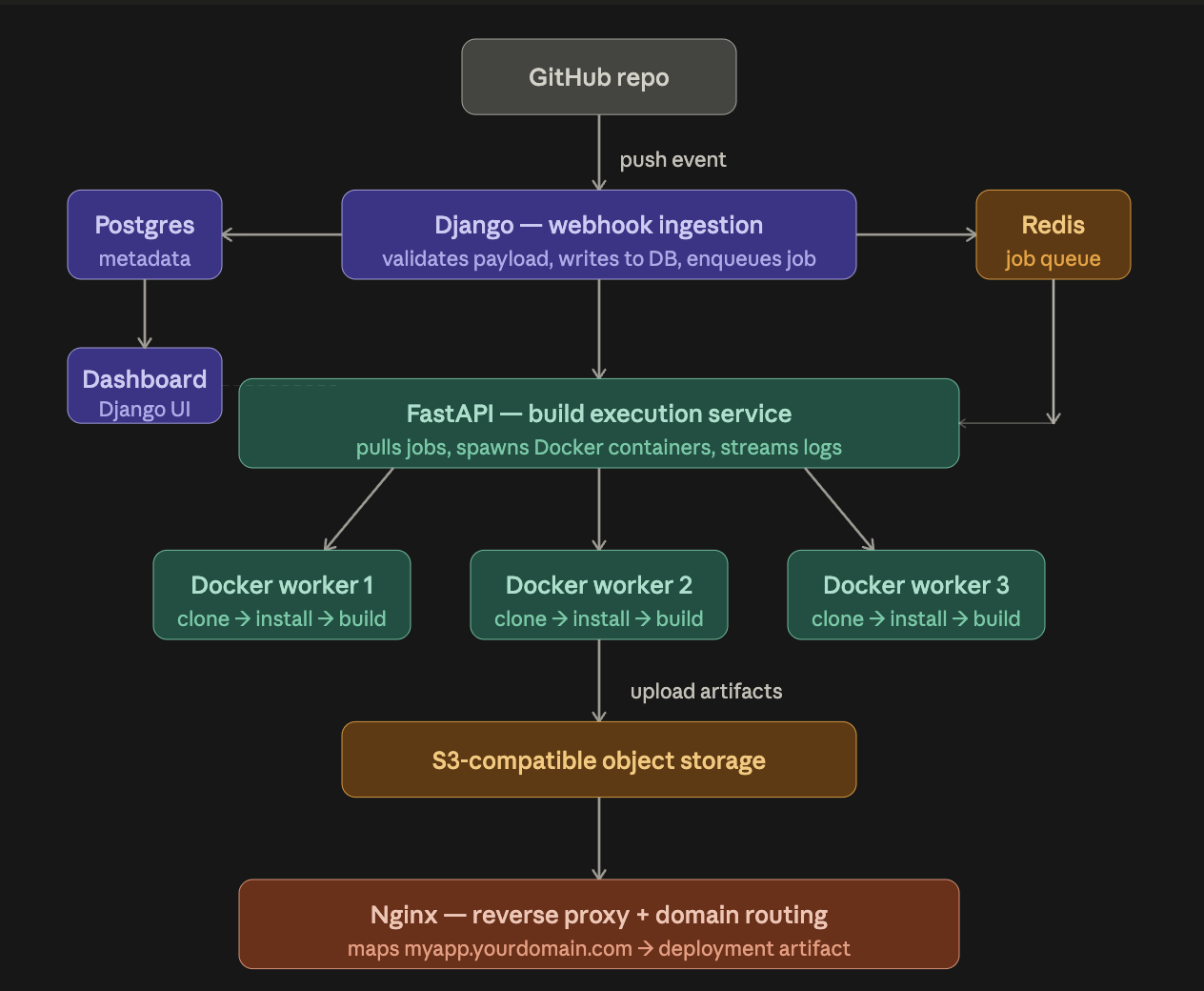
- Backend API: Django, Django REST Framework, Python 3.11
- Database: PostgreSQL
- Message Broker & Cache: Redis
- Task Queue: Celery (with Docker socket mounting for container orchestration)
- Object Storage: MinIO (S3-compatible)
- Containerization: Docker & Docker Compose
How It Works (The Pipeline)
- Push & Trigger: A developer pushes code to their linked GitHub repository. GitHub fires a webhook payload to the Django backend.
- Queueing: The backend verifies the webhook signature and dispatches a build task to the Celery queue via Redis.
- Cloning & Isolation: A Celery worker picks up the task, clones the repository into a temporary directory using
GitPython, and selects the appropriate base Docker image. - Building: The worker uses the Docker SDK to spin up a temporary container, mounting the cloned code and executing the user's defined build command (e.g.,
npm run build). - Storage: Upon successful compilation, the worker extracts the specified
output_dirand uploads the static assets directly to MinIO, categorized by the unique Deployment ID.
Getting Started
Prerequisites
- Docker and Docker Compose installed on your host machine.
- A GitHub repository to deploy (and a GitHub Webhook secret configured).
1. Environment Setup
Create a .env file in the root directory (alongside docker-compose.yml) with the following variables:
# Django Settings
DJANGO_SECRET_KEY=your_super_secret_key
DJANGO_DEBUG=True
DJANGO_ALLOWED_HOSTS=localhost,127.0.0.0

# Database Settings
POSTGRES_DB=minivercel
POSTGRES_USER=postgres
POSTGRES_PASSWORD=postgres
DATABASE_URL=postgres://postgres:postgres@postgres:5432/minivercel

# Redis & Celery
REDIS_URL=redis://redis:6379/0
CELERY_BROKER_URL=redis://redis:6379/1
CELERY_RESULT_BACKEND=redis://redis:6379/2

# MinIO Settings
MINIO_ENDPOINT=minio:9000
MINIO_ACCESS_KEY=minioadmin
MINIO_SECRET_KEY=minioadmin
MINIO_BUCKET=deployments
MINIO_PUBLIC_URL=http://localhost:9000

# GitHub Integration
GITHUB_WEBHOOK_SECRET=your_github_webhook_secret

# Routing
BASE_DOMAIN=localhost
2. Bootstrapping the Infrastructure
Start all services (PostgreSQL, Redis, MinIO, Django API, Celery Worker, and Nginx) using Docker Compose:
docker-compose up --build -d
3. Accessing the Services
- Django Backend / API:
http://localhost:8000 - MinIO Console:
http://localhost:9001(Use yourMINIO_ACCESS_KEYandMINIO_SECRET_KEYto log in) - Nginx Reverse Proxy:
http://localhost:80
Roadmap / Current Status
This project is currently 90% complete.
Completed:
- Django REST API and User Authentication
- GitHub Webhook secure verification
- Asynchronous Celery build pipeline
- Docker-in-Docker isolated container execution
- Artifact uploading to MinIO S3 bucket
Pending (The Final 10%):
- Dynamic Nginx Routing: Configuring Nginx and OpenResty (or a custom reverse proxy) to intercept wildcard subdomain requests (e.g.,
myapp.localhost) and dynamically fetch and serve the corresponding index files directly from the MinIO storage bucket. - Real-time build log streaming to the frontend via WebSockets (Django Channels).