
Deploying an end-to-end keyword spotting model into cloud server using Flask and Docker with CI/CD pipeline


This project promulgates a pipeline that trains an end-to-end keyword spotting model using input audio files, tracks experiments by logging the model artifacts, parameters and metrics, build them as a web application followed by dockerizing them into a container and deploys the application containing trained model artifacts as a docker container into the cloud server with CI/CD integration, automated tests and releases.
Author
Languages and Tools








Keyword Spotter in Heroku - Demo
Link: Will be updated. Please check the Disclaimer below the screenshot for more !!!
 |
|---|
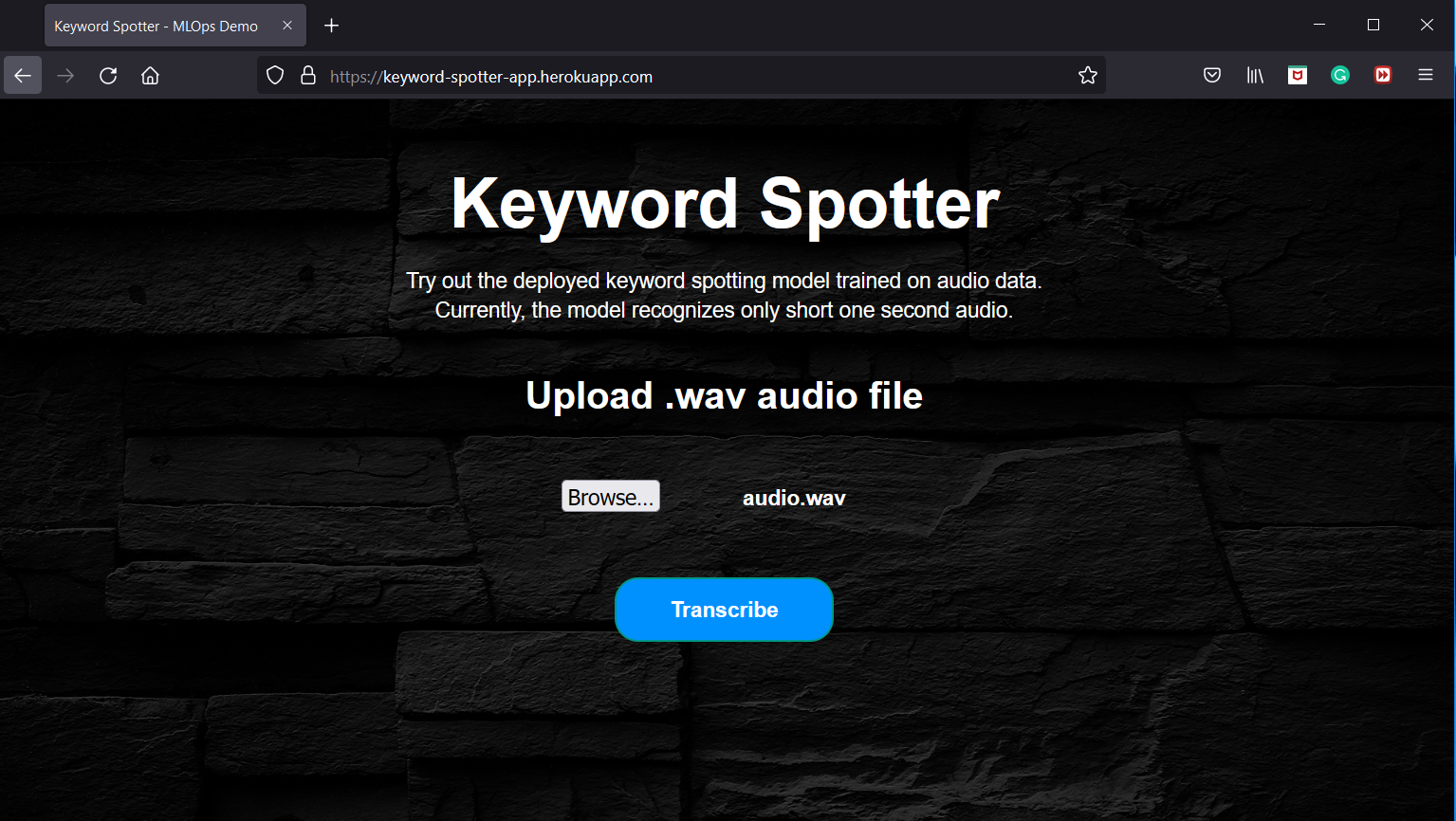
| Figure 1a: App demo - Audio input to app for predicting keyword from trained model artifact |
 |
|---|
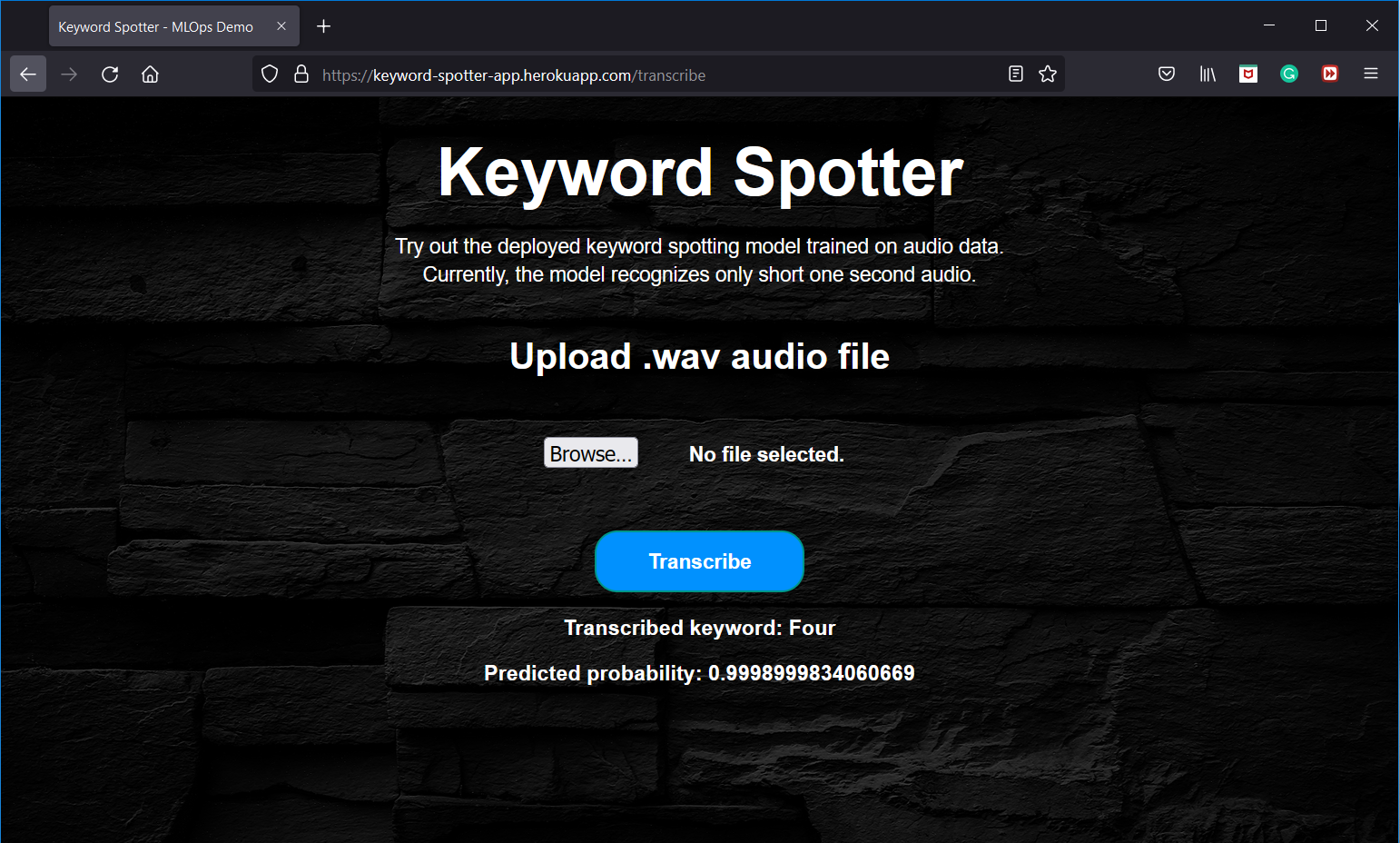
| Figure 1b: App demo - Predicted keyword with probability |
Disclaimer:
1. This app is just a demo and not for realtime usage. The main objective is to get ML models into production in terms of deployment and CI/CD, from MLOps paradigm.
2. Additionally, due to some technical issues in the Heroku backend, the app currently crashes, so the Heroku app link is not provided as of now. It will be updated once the issues are solved and when the app is up and running.
Directory structure
├── .github
│    └── workflows
│        ├── deploy.yaml
│        ├── release.yaml
│        └── tests.yaml
├── app.py
├── artifacts
│   └── 2
│       └── asr_model_1.3
│           ├── meta.yaml
│           ├── metrics
│           ├── model_artifacts
│           │   ├── model
│           │   │   ├── conda.yaml
│           │   │   ├── data
│           │   │   │   ├── keras_module.txt
│           │   │   │   ├── model
│           │   │   │   │   ├── keras_metadata.pb
│           │   │   │   │   ├── saved_model.pb
│           │   │   │   │   └── variables
│           │   │   │   └── save_format.txt
│           │   │   ├── MLmodel
│           │   │   ├── python_env.yaml
│           │   │   └── requirements.txt
│           │   └── model_summary.txt
│           ├── params
│           └── tags
├── config_dir
│   ├── configType.py
│   ├── config.yaml
├── dataset
│   ├── test
│   └── train
├── Dockerfile
├── images
├── poetry.lock
├── pyproject.toml
├── README.md
├── src
│   ├── data.py
│   ├── exception_handler.py
│   ├── experiment_tracking.py
│   ├── inference.py
│   ├── __init__.py
│   ├── main.py
│   ├── model.py
│   └── train.py
├── static
│   ├── bg.jpg
│   └── page.css
├── templates
│   └── page.html
└── tests
    ├── __init__.py
    └── test_kws_spotter.py
Motivation
Deep learning/Machine learning or AI (in short) is the current hot topic which has its application in most of the fields and it's demand is increasing day-by-day. But at this point, the sad truth is - Only very less percentage of ML/DL models makes into production. That's when MLOps comes into the picture.
The major challenges with ML during development are:
- Development, training and deployment environment can be different leading to dependency hassles.
- Whenever input data changes, its becomes more tedious to reproduce the experiment.
- Experiment tracking and analyzing can mostly be difficult and challenging.
- Core ML code turn out to be spaghetti jungle which introduces lot of
boilerplatecodes.
MLOps is a budding field that productionalize ML models. ML/DL being a core research field, still misses out the deployment paradigm which includes design principles, patterns, testing, code styles etc. This restricts the domain to be used in the production environment efficiently. To nullify this, MLOps integrates DevOps principles into ML domain and serves as an intersection point of Machine learning, Datascience and DevOps.
Description
The project is a concoction of research (audio signal processing, keyword spotting, ASR), development (audio data processing, deep neural network training, evaluation) and deployment (building model artifacts, web app development, docker, cloud PaaS) by integrating CI/CD pipelines with automated releases and tests.
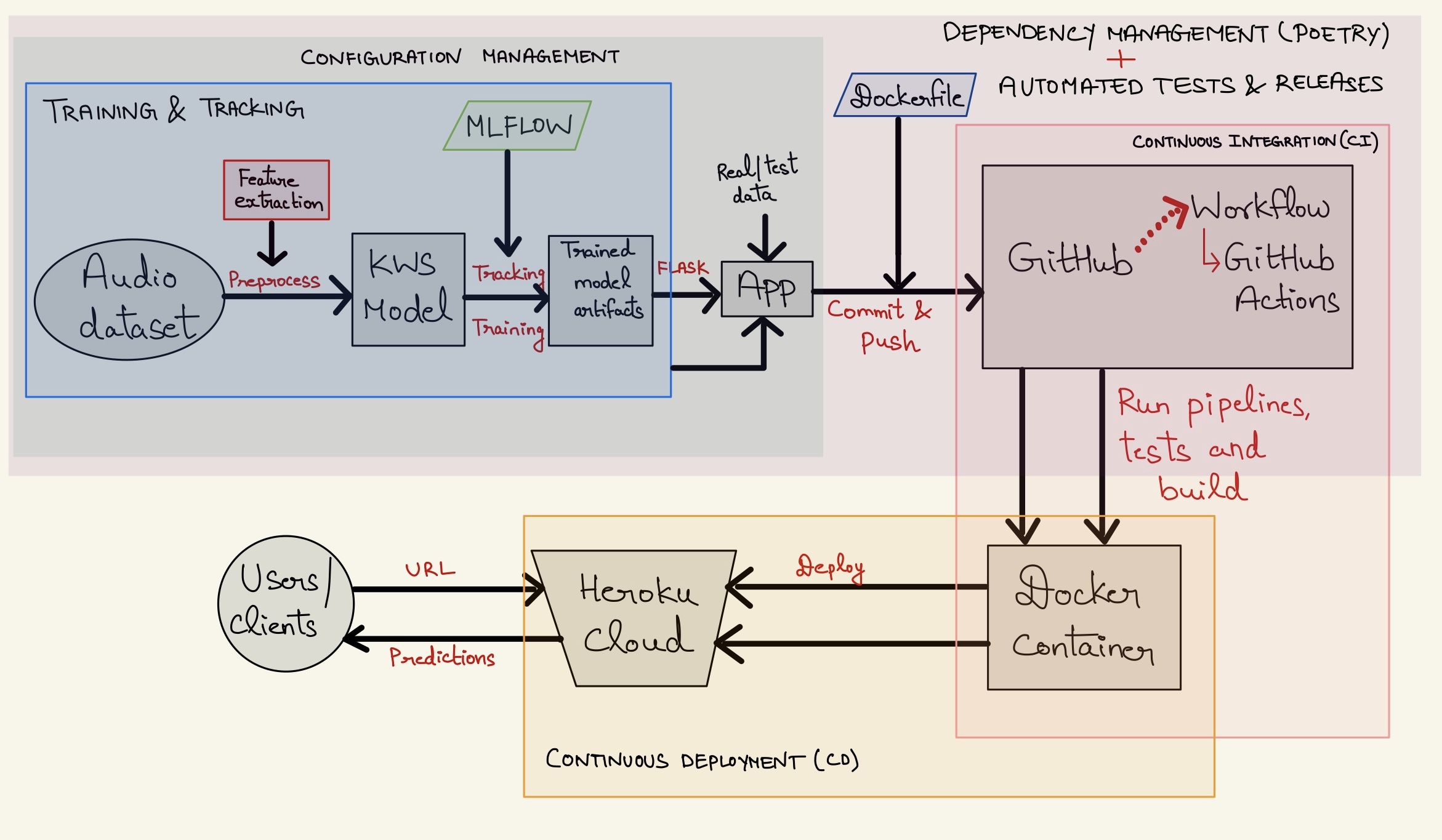 |
|---|
| Figure 2: Project Workflow - Deployment with CI/CD |
Technical facets
-
Managing dependencies and packaging using
Poetryacross the application. -
Handling and maintaining configurations across the application using
Hydra. -
Training a deep end-to-end
CNN-LSTMneural network onGoogle Speech command datasetusingTensorflowto detect keywords or short one-second utterances. -
Tracking the entire model training using
MLflowfrom whichtrained model artifacts, metrics and parameters are logged. -
Building a web app using
Flask APIthat provides an intuitive interface to make predictions from the trained model using real audio data. -
Writing test cases to perform unit tests using
Pytest. -
Writing a
dockerfile and pushing it along with other application files including source code, artifacts etc. to theGitHubrepository. -
Automating
CI/CD Pipelineas follows:- Initialize
GitHub Actionsworkflows for CI. This will automatically trigger the pipeline whenever it tracks a new commit to the repository. - Automated tests are perfomed using
Pytestafter every commit to themainbranch. - Run the pipeline which builds the entire application along with the model to the docker image and then containerize into a
docker container. - A new release will be created automatically when tags are pushed to the repository using
release.yaml - Deploy the docker container into
Heroku cloud serverthat hosts the particular application. - The user can access the app via
URL. The app facilitates to upload an input shortaudio .wav file, in which the predicted keyword is returned from the model along with the probability and displayed as a result in the app UI/webpage.
- Initialize
-
The above points are only a technical gist of the entire application. More detailed explanation about each facet is described in the pipeline section below.
Pipeline
Keyword Spotting (KWS) is the task of detecting a particular keyword from speech. Current voice-based devices such as Amazon Alexa, Google Home etc. first detect the predefined keywords (wakewords) from the speech locally on the device. When such keywords are detected, a full scale automatic speech recognizer is triggered on the cloud for further recognition of entire speech and processing. Traditional approaches for KWS are based on Hidden Markov Models with sequence search algorithms. The advancements in deep learning and increased data availability replaced them with deep learning based approaches as state-of-the-art.
Dependency Management - Poetry
Poetry is a tool for dependency management and packaging in Python. It facilitates to declare the libraries in which the project is dependent on and manages (install/update) them efficiently without much hassles. In short, it is an all-in-one tool to manage Python packages. It allows to seperate the global dependencies and dev-dependencies without cluttering.
pyproject.toml holds all the information necessary to manage the packages. All the global dependencies are defined in [tool.poetry.dependencies] and dev-dependencies like pytest, flake8 in [tool.poetry.dev-dependencies] which makes it easier to be used for development and production. poetry.lock facilitates to use the exact same versions of the dependencies.
Pro-Tip to install dependencies using poetry
When the project needs multiple packages,
- One way is, to install ony by one manually using:
poetry add
- But, it is very tedious and manual process to do that way. So, to install multiple dependencies from
requirements.txt(conventional way), use the following command:
$cat requirements.txt | xargs poetry add
Note:
In the repo, requirements.txt is not added. If needed, please define all your packages in it and run the command above. Finally, poetry will install all your packages from requirements file.
Configuration Management
Every application or project comprises of multiple configuration settings. The most easy and obvious way is, defining all configurations in config.py or config.json file. But, it is always important to keep scalability and reusability in mind when writing code or developing an application. A good practice to do so, is using configuration managers to serve this purpose. One such config manager used in this project is Hydra. Hydra is an open-source python framework that facilitates in creating a hierarchical configuration dynamically by means of composition and overriding them through config files and storing them. In this project, config_dir holds all the project configurations and they are defined in config.yaml. Please feel free to make necessary changes to the paths and parameters, based on the requirement.
Audio Data (speech signals) processing & Feature extraction
Signal processing is the process of transforming and extracting relevant information from the speech signal in an efficient way. Here, every audio will be represented as vectors constituting the amplitude of the sound wave in intervals of $1/16000$ of a second. Google Speech command dataset via kaggle is used for this project. It consists of $65,000$ one-second long utterances. In our case, the model will be trained on $25$ keywords or short words.
Firstly, the audio has to be embedded into the vector space which constitutes the features to learn. To facilitate that, Mel-Frequency Cepstral Coefficients (MFCC) is the most common widely used, feature extraction technique for audio data. MFCCs are derived using Fourier transform and log-Mel spectrogram. More detailed mathematical explanation can be found here. In order to extract these features, librosa is used. data.py contains the code for preprocessing audio and extracting features from them. It reads the audio file, compute MFCC and pad them for fixed-sized vector for all audio files as CNN cannot handle sequential data. In order to avoid any hassles in loading and processing plethora of audio files, it's a good practice to dump them to .npy arrays, which makes it easier for further usage.
Note: Due to large file size, the training data (.npy) files are uploaded to shared folder. Download it from here and make sure that, the downloaded files are placed in this directory. Test directory contains some sample audio files for local inferencing.
CNN-LSTM Model
The end-to-end model used in this project is deeply inspired from Deep Speech 2.0. Deep speech 2.0 is proposed for end-to-end ASR tasks which consists of set of 1D or 2D convolutional layers followed by set of recurrent or GRU layers and set of fully connected layers. The main advantage is, it uses batch normalization even in the recurrent layers. It uses CTC loss function to predict the most probable output label yielding very good performance.
The similar kind of model is developed for this work with some changes. It is an end-to-end model that accepts audio MFCC features as input and outputs label probabilities to recognize keywords. The usage of CTC loss function is feasible, only if the model size is very large in order to learn from a large dataset. Since this is a KWS task and considering the model and dataset size (small actually), the CTC loss function is replaced with categorical cross-entropy as it predicts the most probable keywords instead of entire long utterance.
CNN-LSTM model referenced from this paper has three 1D convolutional layers with maxpooling and batchnorm layers for each. The outputs of the convolutional layer is fed to LSTM layers (2 in total) which processes the entire frame. These LSTM layers has batchnorm layer too. Outputs of the LSTM layers are fed to the fully connected dense layer with softmax layer at the end. ReLu is the activation function for all layers. Dropout layers are added throughout the network for regularization. The model summary can be viewed from here. model.py defines the CNN-LSTM model with Tensorflow and Keras. The model training is defined in train.py.
Note: This project is not core research-centric. So the model with validation accuracy of 82% used, may not be the best optimized one achieving state-of-the-art performance as hyperparameter tuning is not performed. They are out of the scope of this project, as the main objective is to develop an end-to-end pipeline from data preparation till deployment via CI/CD pipelines (MLOps paradigm).
MLflow - Model tracking
MLflow is an open source platform for managing end-to-end machine learning lifecycle. It provides functionality to track, log, register and deploy models. But in this project, MLflow is only used for experiment tracking and logging model artifacts with metrics and parameters. The artifacts can be found in artifacts directory. The directory tree is:
─── artifacts
        └─── 2
             └─── asr_model_1.3
                    ├─── metrics
                    ├─── model_artifacts
                    │   └─── model
                    │       └─── data
                    │           └─── model
                    │               ├─── assets
                    │               └─── variables
                    ├─── params
                    └─── tags
experiment_tracking.py provides the definition of MLFlowTracker user-defined dataclass which handles the entire MLflow tracking responsibility. It is implemented with the interface ExperimentTracker(Protocol) with the flexibility to be used for any logging. The tracking, logging of model artifacts, parameters etc. are done by MLFlowTracker class. MLflow library provides an UI - mlflow ui through which all model experiments (runs) can be viewed. The model selection process is done by:
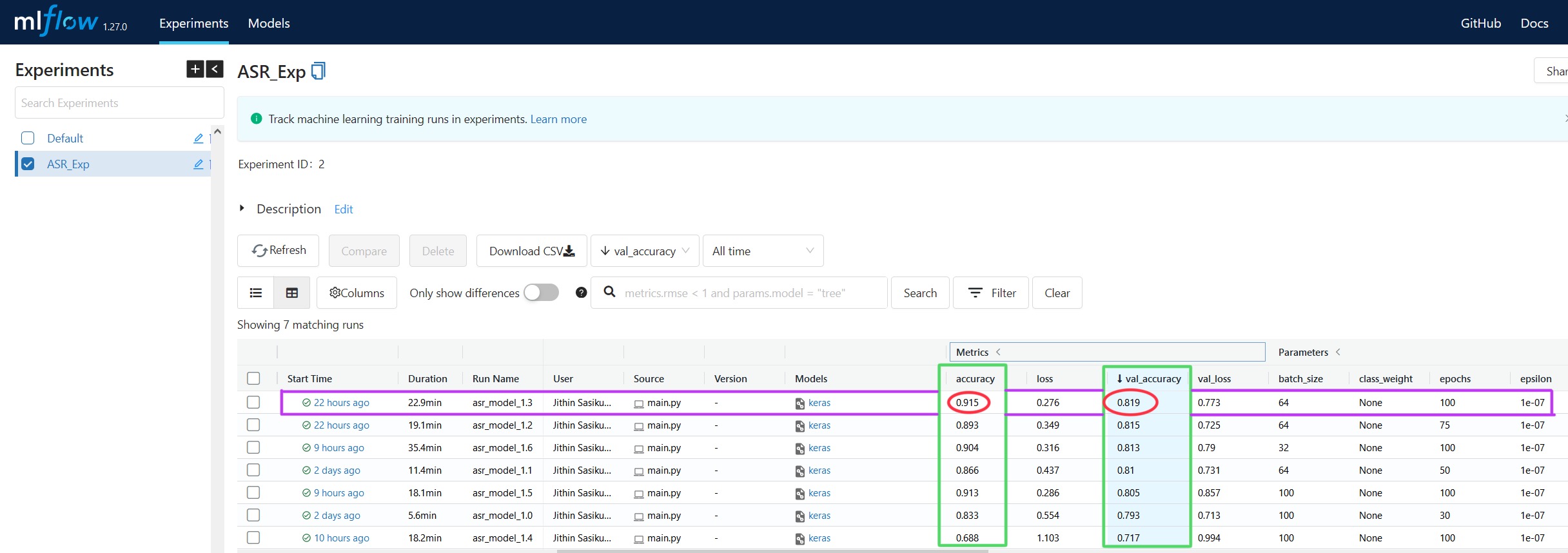 |
|---|
| Figure 3: Model selection via MLflow UI |
The aforementioned, same functionality is also implemented in the code as well. The function to select best model based on the resulting metric is implemented in find_best_model() method of MLFlowTracker.
Pytest
Pytest framework makes it easy to write small, readable tests, and can scale to support complex functional testing for applications and libraries. tests directory contains all the test cases defined. Currently, test cases are written only for some scenarios but more tests can also be added. For the automation part, please refer to GitHub Actions.
FLASK API
Flask is a micro web framework for creating APIs in Python. It is a simple yet powerful web framework with the ability to scale up to complex applications.
app.py creates a web application that wraps the trained model to be used for inferencing using real audio data by means of FLASK. It facilitates the application to run from a server which defines every routes and functions to perform. Instead of predicting from a script, it'll be more intuitive to predict from a GUI. The front-end is designed using HTML scripts from the templates directory and the page styles are defined in CSS in static directory. Flask deploys the application in the localhost by default, but let's deploy in the cloud server.
CI/CD Pipeline
Continuous Integration and Continuous Deployment (CI/CD) are the core practices in MLOps that are embraced from DevOps. CI is the process of automating the building and testing of code every time it is committed with version control (Git) and pushed to the same repository. CD is the process of automating the deployment of the application to the production environment. The tools and components used in this project for CI/CD are described below:
Docker
Now, the model artifacts are ready and are built into an web API, it's the time for deployment to host this application. To facilitate them a step further, docker would be a great tool. Docker eases the developers to package applications or software which can be easily reproduced on another machine. It uses containers to pack any applications with its dependencies to deploy in another environment. Generally, it is not a mandatory tool or step for deployment as it can also be done without dockers but they serve many purpose like portability, scalability, version control, no dependency hassles etc. Thus, docker is a great tool in the deployment cycle.
The main idea of using docker in this project is, to package and build a docker image from the FLASK application with necessary files and containerize them into a docker container which can be deployed in any server (in this case - Heroku cloud server). Dockerfile contains all the commands needed to build an image. The command to install external packages for any Debian or Ubuntu based systems are also added. The docker serves as a bridge in the CI/CD pipeline between the web app and cloud server.
GitHub Actions
GitHub Actions is a CI/CD platform which facilitates in automating the build, test, and deployment pipeline. Workflows can be created for building and testing every commit or pull request to the Git repository, or deploy merged pull requests to production. In our case, whenever the repository tracks a new commit, it triggers the CI/CD workflow pipeline.
./github/workflows defines the workflows that are needed to run the pipeline whenever triggered by an event. Three workflows are defined and used as follows:
deploy.yamlfor building, testing and deploying the application to the cloud.release.yamlautomatically creates a GitHub release whenever a tag is committed with version number and relevant release details. All the releases can be accessed from here.tests.yamlautomates all test cases defined in tests during every commit.
Heroku Cloud PaaS
Heroku is a container-based cloud Platform as a Service (PaaS) to deploy, manage, and scale modern apps. It accounts for the CD pipeline. As a result of CI, when docker container is build, CD deploys it into Heroku cloud which hosts the application and can be accessed via URL. In layman terms, the application is on the internet, up and running and can be accessed with website or URL. The command for Heroku is included in the Dockerfile itself.
As a result, the application will be deployed and the snapshot of application UI is depicted in the Demo section.
Run locally
Clone the project
git clone <repository_url>
Navigate to the project directory
cd <cloned_repository_name>
Install poetry. It also works with conda envs
pip install poetry
Install all dependencies using poetry
poetry install
Download .npy dataset from here. Make sure to put them in ./dataset/train/ directory. If not, it is fine to use a different directory but, make sure to specify the valid directory name or path in the config.yaml file.
Train the model
poetry run python src/main.py
The above script trains the model and logs the model artifacts in artifacts directory.
To run inference locally,
poetry run python src/inference.py
To run tests locally,
poetry run pytest
Use audio files from this test directory for local inferencing or download the full test-set from here.
Note: Assign necessary parameter variables and path in the config.yaml. If it throws any error, please ensure that valid PATH_NAMES and parameter values are used.
Additionally, to run locally via docker container , build image from Dockerfile and run the container using docker build and docker run commands. As this is not a docker tutorial, in-depth explanation about dockers is not given.
What's next?
- Implement data management pipeline for data extraction, validation, data version control etc.
- Use cloud storage services like
Amazon S3 bucketto store data, artifacts, predictions and so on. - Orchestrate the entire workflow or pipeline by means of orchestration tools like
Airflow, KubeFlow, Metaflow. As this is a small personal project with static dataset, the workflow can be created using normal function calls. But for large, scalable, real-time project, it is crucial and predominant to replace these with orchestration tools for real workflows. - Implement
Continuous Training (CT)pipeline along withCI/CD.
Feedback
If you have any feedback, please reach out to me at [email protected]
Bug / Issues
If you come across any bugs or issues related to code, model, implementation, results, application etc, please feel free to open a new issue here by describing your search query and expected result.
References
Paper - Convolutional Recurrent Neural Networks for Small-Footprint Keyword Spotting
Wkipedia - Mel Frequency Cepstral Coefficients