
Deploying AWS 3-Tier Webapp with Terraform, Docker, and GitHub Actions (CI/CD) Pipeline
Project Structure
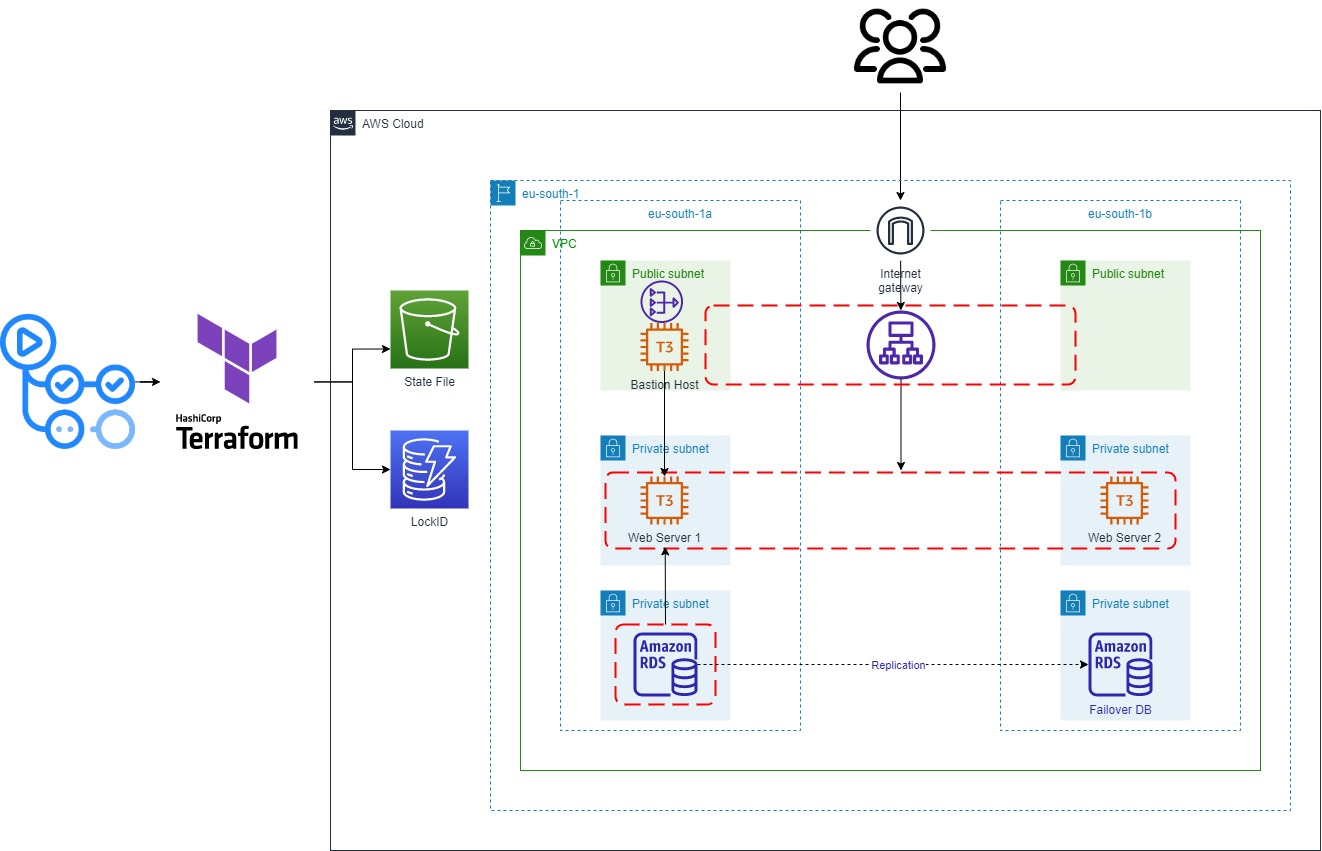
Project Description
- Dockerize a Flask app (Monty Hall Game) and push it to AWS Elastic Container Registry (ECR).
- Deploy AWS Infrastructure using Terraform modules.
- Provision EC2 Instances and pull latest Docker image and run it.
- Finally: You will have a container running flask app on 2 EC2 Instances behind Application Load Balancer.
Technologies Used in Detail:
- Terraform (IaC): To deploy AWS Infrastructure resources using Terraform modules.
- AWS Resources:
- VPC (2 Public Subnets, 4 Private Subnets, Elastic IP, Nat Gateway, Internet Gateway).
- 3 EC2 Instances (two for hosting the app and bastion host to ssh), and Application Load Balancer.
- RDS, and Elasticache.
- S3 and Dynamodb: to store state file and lock it.
- Security Groups.
- Docker: To dockerize my Flask application using a Dockerfile.
- GitHub Actions (CI/CD) Pipeline: To do these Jobs on every git push command, also manually triggered:
- Automate the Infrastructure building and destroying process.
- Provision the EC2 Instances (Install and configure Docker).
- Build, push docker image to AWS ECR, then pull and run docker container in the ec2 instance.
How to Try This Project:
- Clone This repo.
- Push it to GitHub or Fork the repo in the first place.
- Add GitHub Secrets from the settings of the repo.
  AWS_ACCESS_KEY_ID: ${{ secrets.AWS_ACCESS_KEY_ID }} # YOUR AWS User KeyID.
  AWS_SECRET_ACCESS_KEY: ${{ secrets.AWS_SECRET_ACCESS_KEY }} # YOUR AWS User Credentials.
  EC2_PRIVATE_SSH_KEY: ${{ secrets.AWS_EC2_SSH_PRIVATE_KEY }} # Used to ssh into EC2.
  EC2_PUBLIC_SSH_KEY: ${{ secrets.AWS_SSH_PUBLIC_KEY }} # Used to upload public key to aws.
To add AWS Credentials see the content of
~/.aws/configIf you didn't see anything Install AWS CLI then do this commandaws configureand provide your info here because you will use it in the future.
To add public and private SSH Keys use these commands
ssh-keygen # name = ssh_key_aws ,then enter enter
chmod 400 ssh_key_aws
cat ssh_key_aws # paste the content into GitHub Secrets EC2_PRIVATE_SSH_KEY
cat ssh_key_aws.pub # paste the content into GitHub Secrets EC2_PUBLIC_SSH_KEY
- Now you are ready to trigger the pipeline: Go to Actions tab and click on the name of the workflow
Build AWS Infrastructure and Deploy Dockerized Flask-App on it.then click on run work flow. - To see the website go to your aws account and click on your loadbalancer and open its public DNS.
- IMPORTANT: Destroy the resources after you finish because it will get pricy very fast.
How to Destroy AWS Resources:
- Run the GitHub Actions Workflow again (manually) and choose destroy when prompted to run the workflow.
- If that fails for any reason, go to your account and destroy every resource from there manually to not get a high bill.
To-Do List
- Provisoin EC2 Instances using Ansible.
- Send email to me using lambda once the terraform state file change.
Resources and Note
- GitHub Action Tutorial by Nana.
- GitHub Actions Docs.
- AWS three-tier Architecture by Tech with Lucy.
- Project Idea.
Note: I've build this project from many resources and couldn't memorize every source I got info from. I hope you benefit from this project. If you like this project, I appreciate you starring this repo.
Finally, feel free to fork the content and contact me on my LinkedIn account if you have any questions about this project.