
DeskPet
A pixel-art desk pet that reacts to Claude Code's sessions over BLE, running on the M5Stack Cardputer.
Community port of anthropics/claude-desktop-buddy from M5StickC Plus to M5 Cardputer — landscape UI, keyboard-first interaction, fresh pixel character.
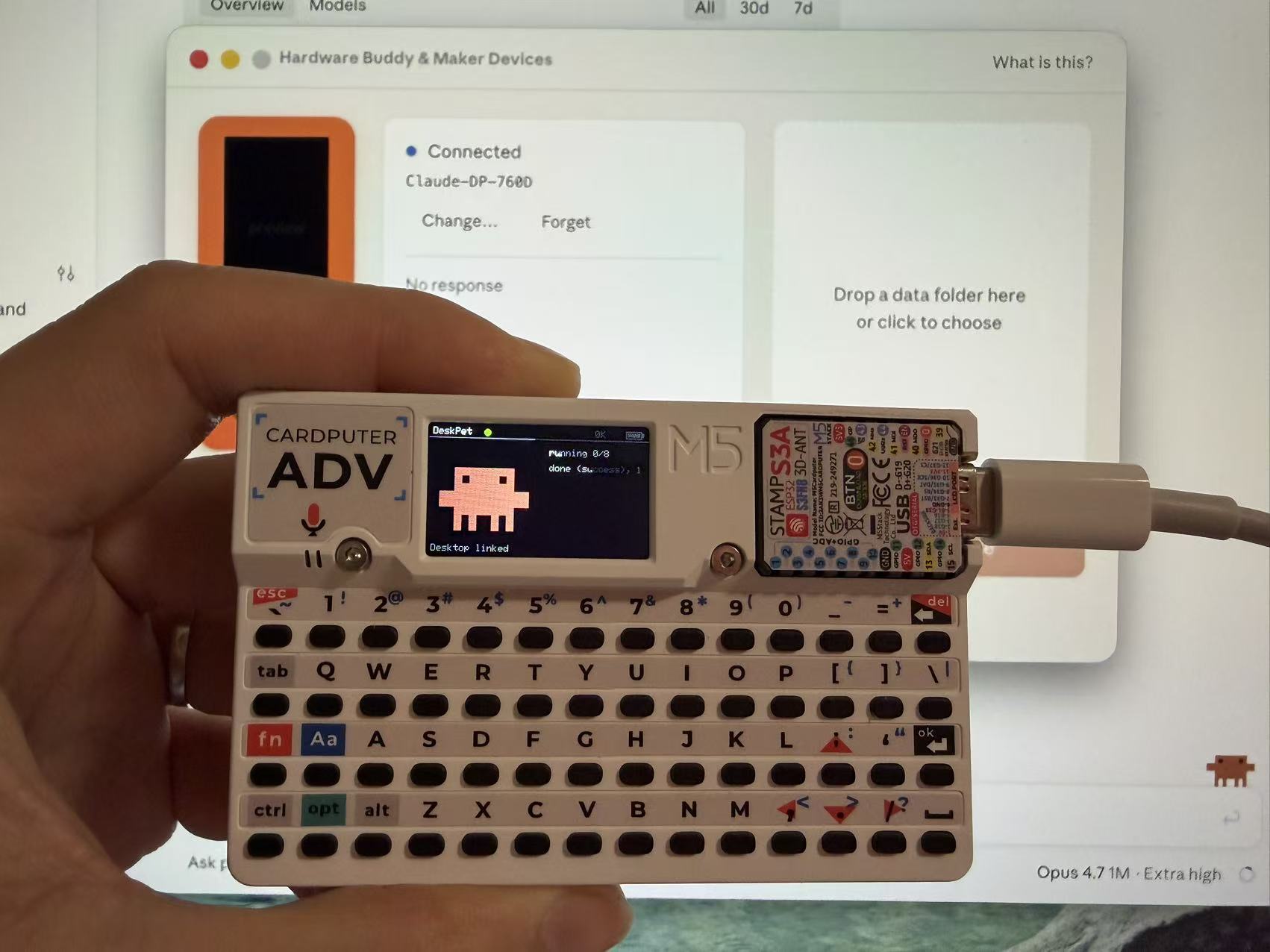
Home. Paired with Claude Desktop over BLE. The pixel pet breathes on the left while the right panel streams live session state — running task count, cumulative tokens, last activity message, and battery.
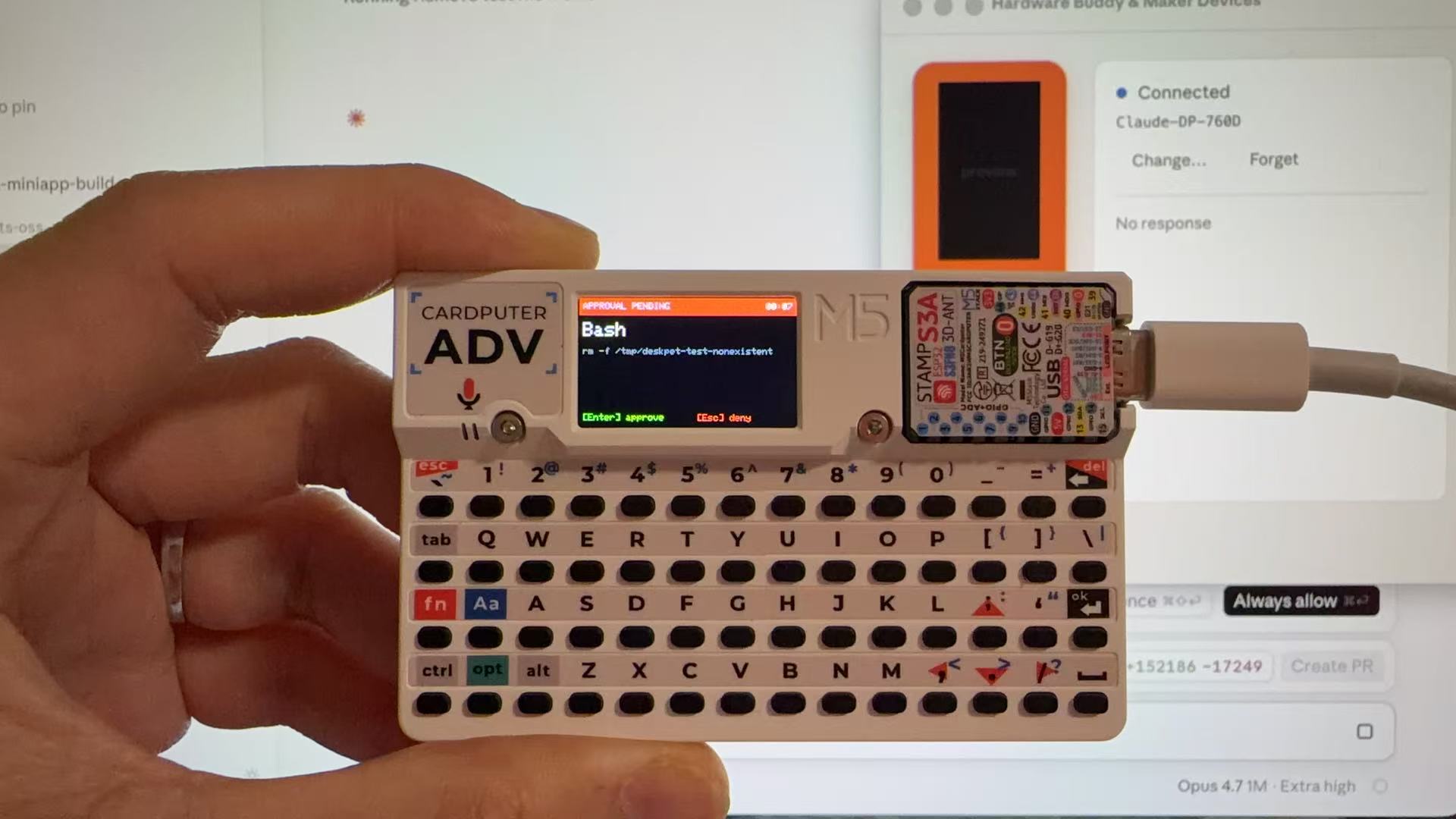
Approval pending. Claude Code wants to run rm -f /tmp/deskpet-test-nonexistent. The screen flips red, the LED pulses orange at 2 Hz, and a countdown starts. Press Enter on the Cardputer to approve or Esc to deny — the agent continues without you touching the laptop.
What it does
- Advertises as
Claude-DP-XXXXover BLE Nordic UART, discoverable from Claude Desktop's Hardware Buddy pairing pane - Reacts in real time to Claude Code's session state — idle, busy, approval-pending, celebrating — via seven animated pet states and a WS2812 LED
- Approves or denies permission prompts directly from the Cardputer keyboard (
Enter/Esc), so you don't have to interrupt flow on the laptop - Stays quiet — pet sleeps when there's no session, gentle cyan breathe when Claude is working, bright orange blink when attention is needed
Hardware
M5Stack Cardputer — ESP32-S3 with PSRAM, 1.14" 240×135 TFT, 56-key keyboard, WS2812 RGB LED, USB-C.
The BLE wire protocol itself is hardware-agnostic; see upstream REFERENCE.md if you want to port to another board.
Build & flash
Requires PlatformIO Core.
git clone [email protected]:bryant24hao/deskpet-firmware.git
cd deskpet-firmware
pio run -t upload
If the ESP32-S3 won't enter download mode: unplug USB, hold the G0 side button, plug USB back while holding, wait ~2s, then release G0. Retry pio run -t upload.
Pairing
- Open Claude Desktop → enable Developer Mode if it isn't already (in Help → Troubleshooting on older versions; newer builds expose the Hardware Buddy pane directly)
- Developer → Open Hardware Buddy…
- Click Connect, pick
Claude-DP-XXXXfrom the scan list - First connect asks for system Bluetooth permission; grant it
Once paired, the on-device status indicator turns green and heartbeat JSON starts flowing.
Keyboard
Everything runs on Cardputer's landmark keys — no Fn combos in the main flow.
| Key | Screen | Action |
|---|---|---|
Enter / ok |
Approval | Approve (equivalent to upstream's A button) |
Esc / Del |
Approval | Deny |
Tab |
any | Next screen |
M |
any | Open menu (Phase 3) |
Fn + R |
any | Factory reset (Phase 3) |
Pet states
| State | Trigger | Look |
|---|---|---|
sleep |
BLE link down | Closed eyes, drifting Z's |
idle |
Connected, no active session | Breathing, occasional blink |
busy |
Claude is generating | Fast bob, loading dots |
attention |
Permission prompt pending | Shake, wide eyes, blinking !, LED blinks orange |
celebrate |
Every 50K tokens milestone (Phase 3) | Jumping, confetti |
dizzy |
Keyboard mash ≥5 keys in 1s (Phase 3) | Wobble, X eyes |
heart |
Approved in < 5s | Eyes closed, rising hearts, LED green |
Project status
- ✅ Phase 1 — BLE skeleton (NUS on NimBLE, Claude-DP-XXXX pairing)
- ✅ Phase 2a — Heartbeat parsing, landscape UI, Enter/Esc approval loopback
- ✅ Phase 2b — Pixel pet (
clawdie), WS2812 LED, full seven-state persona machine - ⏳ Phase 3 — Three-level menu, NVS persistence, celebrate/dizzy triggers
- ⏳ Phase 4 — GIF character packs via folder-push, upstream species ports (capybara et al.)
- ⏳ Phase 5 — M5Burner release
Design doc: docs/deskpet-design.md.
License
MIT. Upstream-derived portions retain their original copyright (Anthropic PBC).
Trademark notice
Not affiliated with Anthropic. "Claude" and "Claude Code" are trademarks of Anthropic PBC. "Cardputer" is a trademark of M5Stack. DeskPet is an independent community project that communicates with Claude Desktop over its publicly-documented Hardware Buddy BLE API. The on-device pixel character (clawdie) is an original variant inspired by community retro mascots, not a reproduction of any specific Anthropic brand asset.