
DeskSlice
Remote control for the real Codex panel inside VS Code, designed for LAN use from a phone. The goal is low-latency streaming + input injection with manual calibration (no OCR, no UI re-implementation).
What It Solves
- Control the real Codex panel on your Windows host from your phone over LAN (video + mouse/keyboard), without re-building the UI.
- Quick manual calibration so clicks/typing land in the right places (plugin/chat/scroll rectangles).
- A mobile-first fullscreen UX with safety toggles (input lock, scroll overlay, etc.).
Motivation
This started as a pragmatic solution to a personal problem: long hours at a desk were causing me persistent pain and discomfort. I wanted a way to keep working while changing posture and reducing strain, and I’m sharing it in the hope it helps others do the same.
What It Does Not Try To Do
- Not a general-purpose remote desktop replacement (no multi-monitor “desktop manager”, file transfer, clipboard sync, etc.).
- No OCR, no element detection, no UI automation “magic”: calibration is manual and expected.
- Not hardened for hostile networks (the auth is intentionally simple; use only on trusted LAN/VPN).
Demo
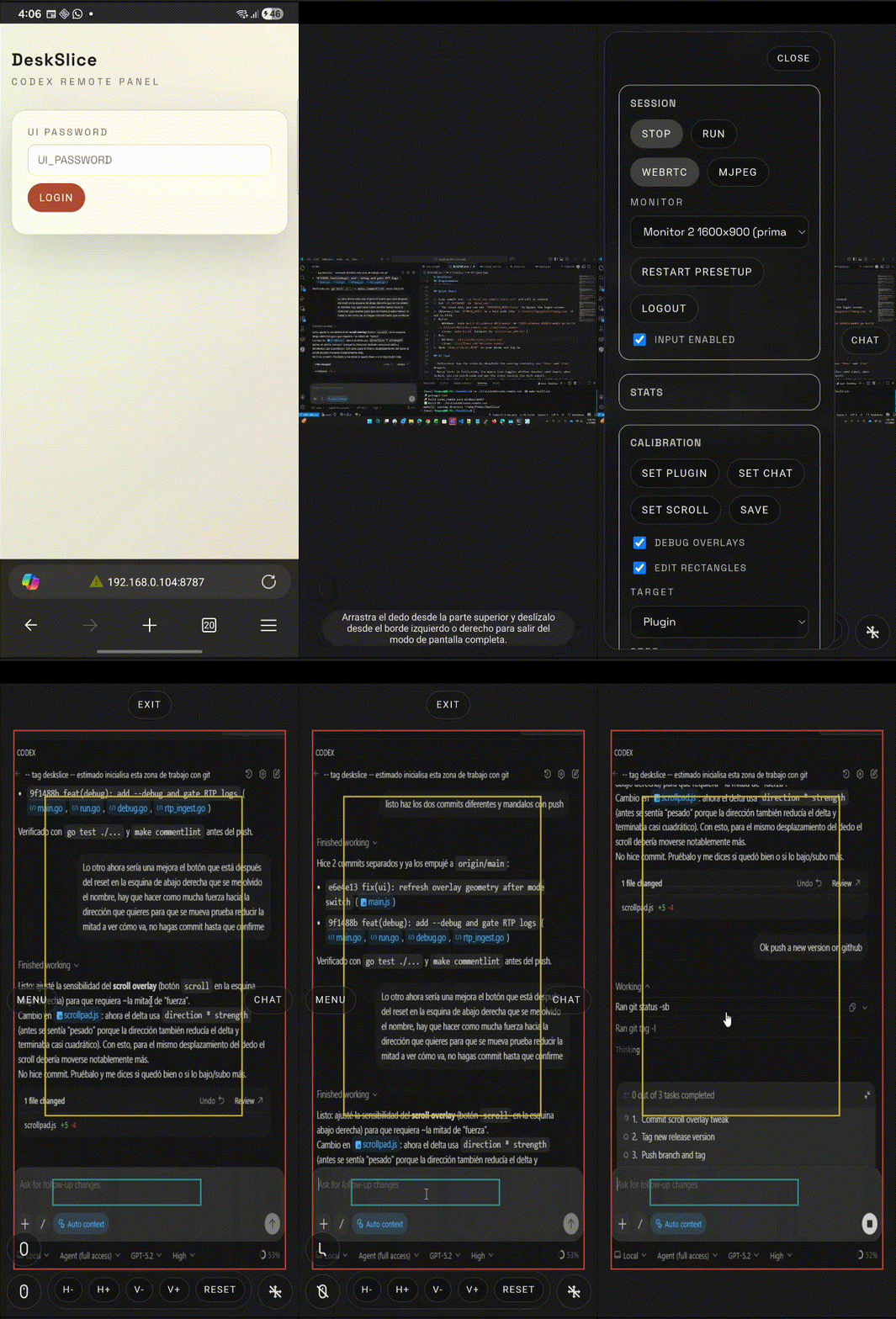
- Walkthrough video:
docs/how_to_use.webm - Screenshot (click to open the video):
Status
MVP scaffolding complete for Windows host. The full spec lives in TODO/TODO_0001.md.
Highlights
- WebRTC video stream (H264) of the Codex panel (low-latency, primary mode).
- MJPEG preview mode (fallback) with optional WebRTC switching.
- Touch input mapping (tap, drag-scroll, typing).
- Presetup mode to select monitor and trace plugin/chat/scroll rectangles.
- Run mode with a cropped stream to the Codex panel only.
- Simple password gate via
.env. - Fullscreen mobile UX with side drawers, scaling controls, and input/scroll toggles.
Requirements
- Windows 11 (host).
- Go 1.25+.
ffmpegavailable in PATH or configured viaFFMPEG_PATH(absolute path recommended on Windows).
Quick Start
- Copy sample env:
cp data/.env.sample data/.envand edit as needed. - Set
UI_PASSWORDindata/.env.- For local dev, you can set
PASSWORD_MODE=falseto bypass the login screen.
- For local dev, you can set
- (Windows) Set
FFMPEG_PATHto a full path likeC:\tools\ffmpeg\bin\ffmpeg.exeif not in PATH. - Build:
- Windows:
make build OS=windows ARCH=amd64orGOOS=windows GOARCH=amd64 go build -o dist/win64/codex_remote.exe ./cmd/codex_remote - Linux:
make build(outputs todist/linux_x86-64/)
- Windows:
- Run:
- Windows:
dist/win64/codex_remote.exe - Linux:
dist/linux_x86-64/codex_remote
- Windows:
- Open
http://<host>:8787on your phone and log in.
UI Tips
- Fullscreen: tap the video to show/hide the overlay controls; use
MenuandChatdrawers. - Mouse lock: in fullscreen, the mouse icon toggles whether touches send input; when locked, you can pinch-zoom and pan the video locally (no host input).
- Run mode safety: when
Runis active, the cursor is caged to the calibratedpluginrectangle to reduce accidental clicks outside the Codex panel; inStop/presetup it is unrestricted. - Scroll mode: in fullscreen, the scroll icon enables a joystick-style scroll overlay (horizontal + vertical).
- Post FX: adjust
ClarityandDenoisesliders (client-side CSS filters). Set both to0to disable. - Debug overlays: enable
Debug overlaysto see the calibrated rectangles over the stream. - Scaling:
H+/H-/V+/V-andResetadjust the fullscreen fit and are remembered per-host in your browser. - Performance presets:
Battery/Balanced/Crispapply MJPEG interval/quality at runtime (see/api/config).
Notes
- The server prefers
d3d11graband falls back togdigrabif unavailable. - The web client is plain HTML/CSS/JS under
internal/web/static/(no Node build). - Only one active viewer is supported; a new connection replaces the previous one.
- CI/CD: GitHub Actions builds on PR/push and can publish release artifacts when you push a tag like
v0.1.0. - The server runs one
ffmpegpipeline at a time:WebRTCrunsffmpeg: start ... -f rtp rtp://127.0.0.1:<port>(H264→RTP).MJPEGrunsffmpeg: preview ... -f rawvideo -and serves/mjpeg/desktop.- Default is
MJPEG; switch in the UI (Session →WebRTC) if you want lower latency.
- WebRTC is fully functional; if you hit device-specific browser quirks, MJPEG remains a good fallback.
- For MJPEG mode, the preview capture FPS is derived from
MJPEG_INTERVAL_MS(smaller interval = higher FPS and more CPU). - Runtime tuning:
POST /api/config(auth required) accepts{ "mjpegIntervalMs": <int>, "mjpegQuality": <int> }and applies it immediately when in MJPEG mode. - Reset:
POST /api/configwith{ "reset": true }restores MJPEG values loaded from.envat server startup. - Warning: the
Clearbutton sends destructive keystrokes (Select All + Delete) to the host; only use it when the chat rectangle is correctly calibrated and the cursor focus is on the intended input.
License
GPL-3.0-only. See LICENSE.
Roadmap
Possible future streaming modes (to reduce CPU usage and/or improve reliability vs MJPEG):
- HLS / LL-HLS (HTTP) for broad browser support (higher latency than WebRTC).
- MPEG-TS over WebSocket (JSMpeg-style) for low-latency browser playback (CPU-heavy client decode).
- RTSP for low-latency viewing via external apps (not browser-native).