
Kubernetes Tutorial: Build Production Apps from Scratch
Learn DevOps by building a real application: Docker → Kubernetes → Monitoring → GitOps → Global Deployment. Perfect for career switchers and beginners.
This project is part of the Zee DevOps Learning Path
Start: Quick Wins → Core: Beginner-DevOps-Labs → Reference: Troubleshooting Toolkit → Portfolio: Weekend Projects → Cloud: Cloud-DevOps-Projects




Start Here - Choose Your Path
First time here? Don't know where to start? Use the guide below to find your perfect path.
I Just Want to See It Work (5 Minutes)
# Quick demo - no learning required
docker-compose up -d
# Open: http://localhost:8080
Perfect for: Quick preview, testing, or just curious
Next step: Learn how it works
Having trouble? See Troubleshooting or FAQ.
I Want to Learn Kubernetes (5-8 Hours)
Start here: Local Development Guide
First step: Prerequisites Setup (30 min)
Perfect for: Beginners, career switchers, hands-on learners
You'll learn: Docker → Kubernetes → Monitoring → GitOps → Production
Quick Prerequisites Checklist (Click to expand)
- Docker Desktop installed (or Colima on macOS)
- 4GB+ RAM available
- Terminal/Command Prompt ready
- 10GB+ free disk space
- Stable internet connection
Time investment: 5-8 hours (guided learning) | 2-3 hours (fast track)
I Want to Deploy to AWS (3-4 Hours)
Start here: AWS Deployment Guide
First step: Terraform Backend Setup (30 min)
Perfect for: Experienced users, production deployments, cloud learning
You'll build: EKS cluster, RDS database, VPC networking, CI/CD pipeline
AWS Prerequisites Checklist (Click to expand)
- AWS account with appropriate permissions
- AWS CLI configured (
aws configure) - Terraform >= 1.5.0 installed
- kubectl installed
- SSH key pair in AWS EC2
- GitHub token for runner (optional)
Time investment: 3-4 hours (guided) | 30-60 minutes (experienced)
Cost: ~$50-100/month for production setup
I Know What I Need - Show Me Everything
Jump to: Complete Documentation | Quick Commands | Learning Milestones
What You'll Learn
By completing this tutorial, you'll master:
- Container orchestration with Kubernetes (the same tech Netflix uses)
- Production monitoring with Prometheus and Grafana dashboards
- Automated deployments using GitOps principles
- Global scaling with CDN and load balancing
- Real troubleshooting skills that DevOps engineers use daily
Career Impact: These skills are in high demand. DevOps engineers with Kubernetes experience earn 20-30% more than those without it.
Learning Path Overview
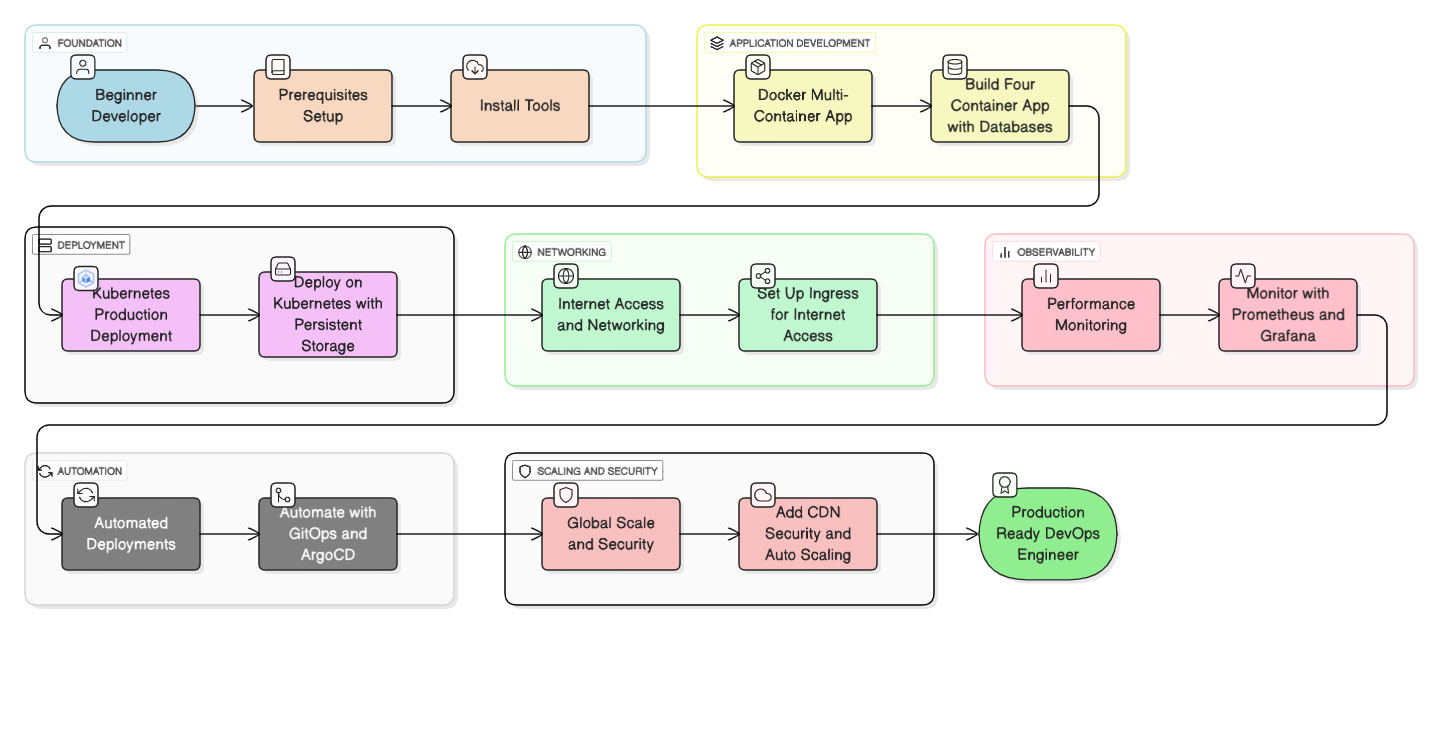
Follow this step-by-step progression from beginner developer to production-ready DevOps engineer
Live Demo
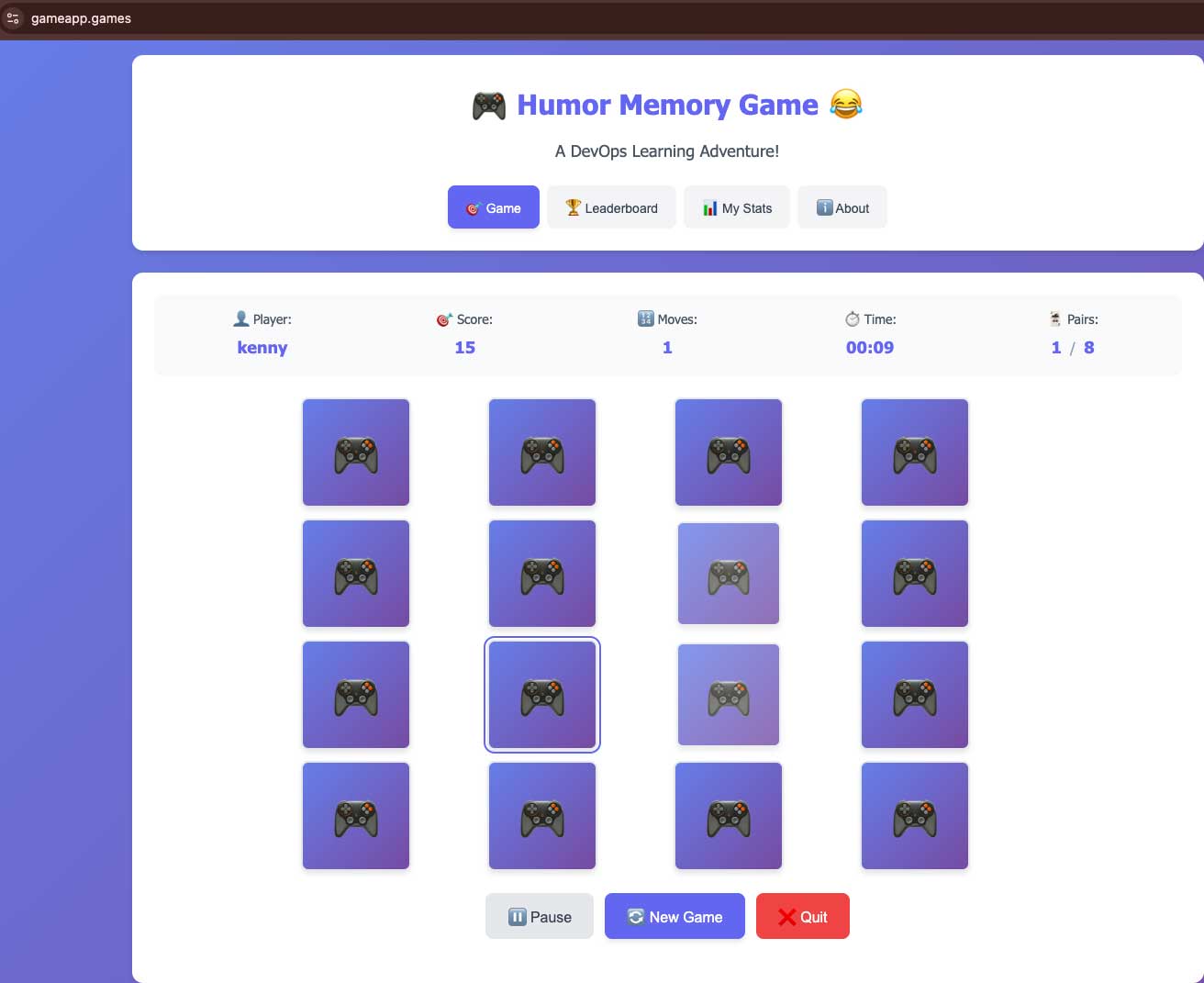
Experience the Humor Memory Game: A DevOps Learning Adventure! - A web-based memory game featuring a 4x4 grid of cards, game statistics, and navigation tabs for Game, Leaderboard, My Stats, and About.
Quick Start Guide
Option 1: Complete Learning Path (Recommended for Beginners)
Best for: Learning step-by-step, understanding each component
# 1. Install prerequisites
# Follow the guide: docs/local/01-prereqs.md

# 2. Follow step-by-step guides
# Start with: docs/local/01-prereqs.md
# Then follow: docs/local/02-compose.md → ... → docs/local/07-global.md
Time: 5-8 hours | Result: Complete understanding + production deployment
Option 2: Fast Deploy (For Experienced Users)
Best for: Quick deployment, you know Kubernetes well
# Deploy everything at once
git clone https://github.com/Osomudeya/DevOps-Home-Lab-2025.git
cd DevOps-Home-Lab-2025
make deploy-all

# Verify deployment
make verify
Time: 30-60 minutes | Result: Running application stack
Option 3: Local Development Only (5 Minutes)
Best for: Quick demo, testing, or just running the app
# Quick local setup with Docker Compose
docker-compose up -d
curl http://localhost:3001/api/health

# Access the game
# Open: http://localhost:8080
Time: 5 minutes | Result: Running application locally
What You'll Build
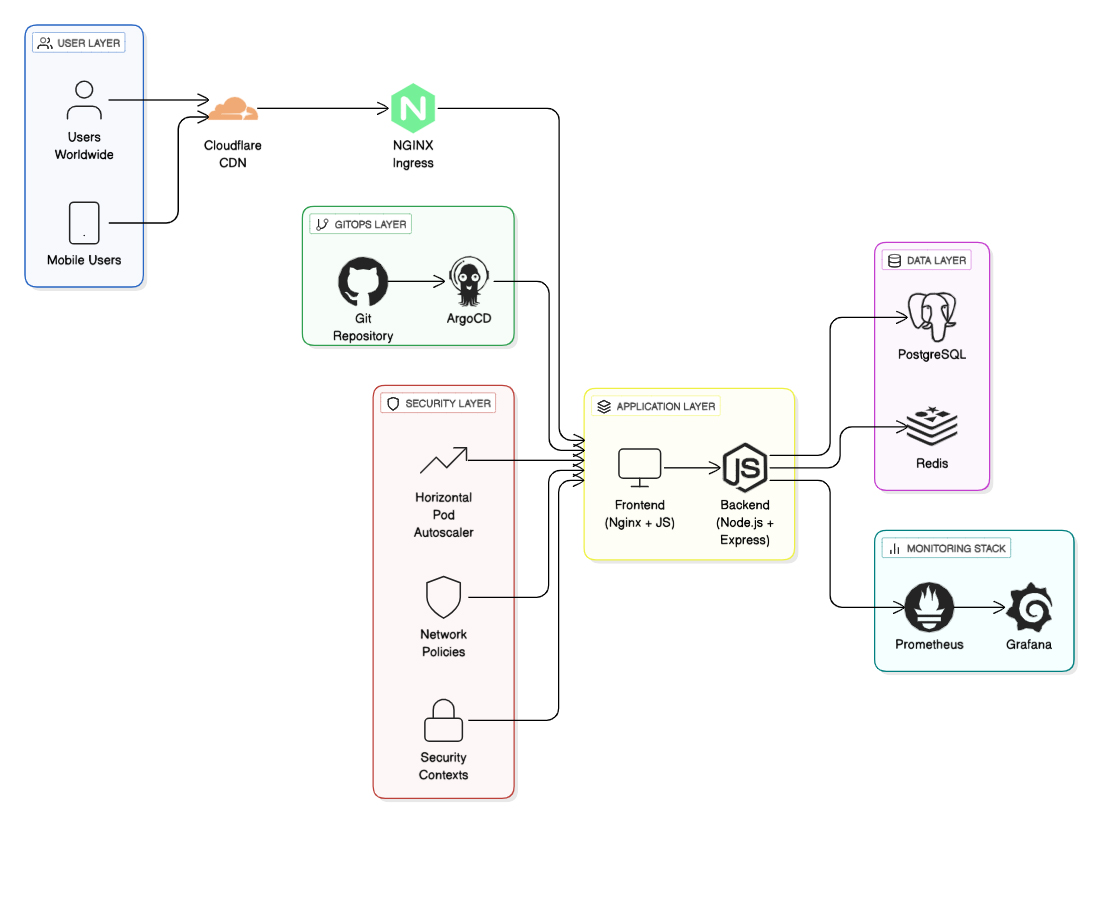
Complete production-grade infrastructure with monitoring, security, and global scaling
Production Application Stack
- Humor Memory Game - Interactive web application with leaderboards
- 4 Microservices - Frontend, Backend, PostgreSQL, Redis
- Global CDN - Cloudflare edge caching and DDoS protection
- Full Observability - Metrics, logs, traces, and custom dashboards
- Enterprise Security - Network policies, security contexts, auto-scaling
Technology Stack
| Layer | Technology | Purpose |
|---|---|---|
| Application | Node.js + Express, Vanilla JS | Game logic and UI |
| Database | PostgreSQL 15, Redis 7 | Persistent data and caching |
| Container | Docker, Multi-stage builds | Application packaging |
| Orchestration | Kubernetes (k3d), NGINX Ingress | Container management |
| Monitoring | Prometheus, Grafana | Metrics and visualization |
| GitOps | ArgoCD, Git-based workflows | Automated deployments |
| Security | Network Policies, Security Contexts | Defense-in-depth |
| Global Access | Cloudflare CDN + Tunnels | Worldwide distribution |
Learning Milestones
Tip: Follow these in order. Each milestone builds on the previous one.
| Milestone | What You'll Learn | Time | Difficulty | Start Here |
|---|---|---|---|---|
| 0. Prerequisites | Development environment setup | 15-30 min | Beginner | Start here if new |
| 1. Docker Compose | Multi-container application | 30-45 min | Beginner | After prerequisites |
| 2. Kubernetes Basics | Production app deployment | 45-60 min | Intermediate | After Docker Compose |
| 3. Production Ingress | Internet access and networking | 30-45 min | Intermediate | After Kubernetes |
| 4. Observability | Performance monitoring | 60-90 min | Intermediate | After Ingress |
| 5. GitOps | Automated deployments | 45-60 min | Advanced | After Observability |
| 6. Global Production | Global scale and security | 90-120 min | Expert | After GitOps |
| 7. AWS Deployment | Cloud infrastructure | 180-240 min | Expert | After Local Production |
Total learning time: 5-8 hours (local) + 3-4 hours (AWS)
Skill level: Beginner → Production-Ready DevOps Engineer
End result: Production-grade Kubernetes deployment with monitoring, GitOps, and global access
How It Works
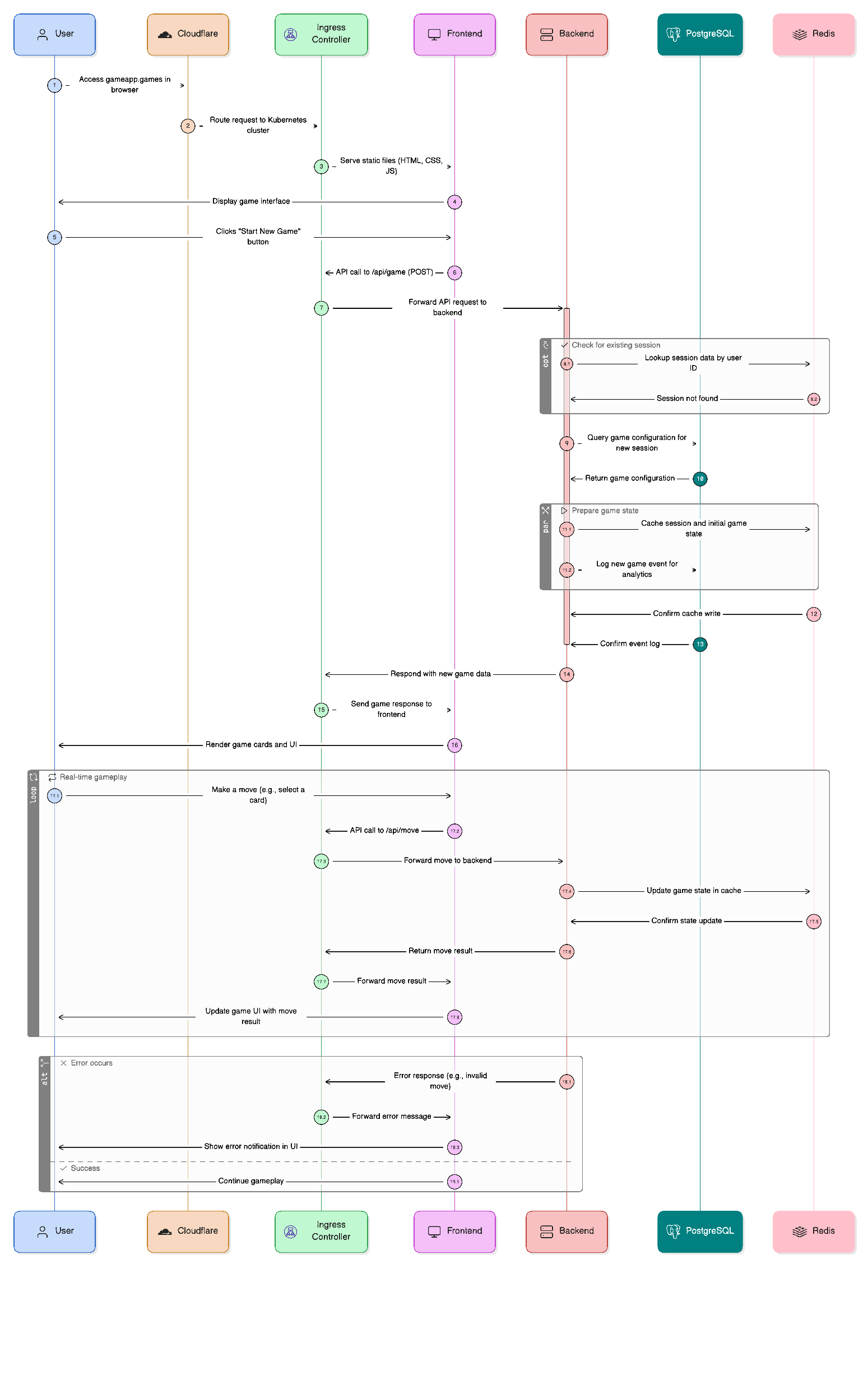
Real-time user interaction flow from browser to database with error handling
What Makes This Special
Beginner-Friendly Features
- Step-by-step guides with copy-paste commands
- Clear learning objectives for each milestone
- Comprehensive troubleshooting with common issues and solutions
- Real application - not just "hello world" demos
- Interview preparation guide with technical questions
Production-Grade Features
- Zero-downtime deployments with rolling updates
- Horizontal auto-scaling based on CPU/memory metrics
- Full observability stack with custom dashboards and alerting
- Enterprise security with network policies and security contexts
- Global CDN distribution with edge caching
- GitOps automation for reliable, auditable deployments
Skills You'll Master
- Container Orchestration: Kubernetes deployment strategies
- Infrastructure as Code: Declarative configurations and GitOps
- Monitoring & Observability: Metrics, dashboards, alerting
- Production Security: Network policies, security contexts, secrets
- CI/CD & Automation: GitOps workflows and deployment pipelines
- Global Scale: CDN integration and performance optimization
Complete Documentation
Entry Points
- Local Development Guide - Start here for local learning (5-8 hours)
- AWS Deployment Guide - Start here for cloud deployment (3-4 hours)
- Full Documentation Hub - Complete documentation index
Core Tutorials (Local Development)
- Learning Path Overview - Complete tutorial roadmap
- Development Environment Setup - Install all required tools
- Docker Multi-Container App - Build your first containerized app
- Kubernetes Production Deployment - Deploy apps on Kubernetes
- Internet Access & Networking - Make your app accessible worldwide
- Performance Monitoring - Track app health and performance
- Automated Deployments - Deploy with GitOps automation
- Global Scale & Security - Production hardening and CDN
AWS Deployment Tutorials
- AWS Deployment Guide - Complete AWS setup walkthrough
- AWS Architecture - Infrastructure design and decisions
- Terraform Backend Setup - S3 backend configuration
- AWS Secrets Manager - Automatic secret management
- Maintenance Guide - Operate and maintain AWS infrastructure
Reference Materials
- Troubleshooting - Common issues and solutions
- FAQ - Frequently asked questions
- Glossary - Technical terms and definitions
- Decision Notes - Architecture decisions explained
- Customization Guide - Customize configuration and settings
- User Guide - How to access and use the application
- Local Maintenance - Maintain local environment
Advanced Guides
- Security Contexts - Production security hardening
- Custom Dashboards - Build monitoring dashboards
- Cloudflare Setup - Global CDN configuration
- Monitoring Troubleshooting - Fix monitoring issues
- GitOps Deep Dive - Advanced GitOps patterns
- Global Deployment - Production scaling issues
Career Development
- Interview Prep Guide - Technical interview preparation
- Architecture Overview - Visual system documentation
Project Files
- Home Lab Guide - Complete project overview
- File Structure - Project organization guide
- Security Policy - Security guidelines and reporting
- Makefile - Automation commands and shortcuts
Important Setup Notes
Domain Configuration (Click to expand)
CRITICAL: This project uses
gameapp.gamesas an example domain. For your own deployment:
- Get a domain (free options available for learning)
- Replace all instances of
gameapp.gameswith your domain- Configure Cloudflare DNS for your domain
- Update ingress configurations accordingly
System Requirements (Click to expand)
- RAM: 4GB+ available for Kubernetes cluster
- Storage: 10GB+ free disk space
- OS: macOS, Linux, or Windows with WSL2
- Network: Stable internet for image downloads
Tip: Close other applications if you have limited RAM
Required Tools (Click to expand)
# Essential tools (install via prerequisite guide)
docker --version    # Container runtime
kubectl version     # Kubernetes CLI
k3d version        # Local Kubernetes cluster
helm version       # Package manager
node --version     # JavaScript runtime
jq --version       # JSON processor
Installation: See Prerequisites Guide for step-by-step installation
Quick Commands
Deployment Commands (Click to expand)
# Deploy full stack
make deploy-all

# Deploy individual components
make deploy-app        # Application only
make deploy-monitoring # Prometheus + Grafana
make deploy-gitops     # ArgoCD setup

# Health checks
make verify-all
make test-endpoints
Debugging Commands (Click to expand)
# Application health
kubectl get pods -n humor-game
kubectl logs -l app=backend -n humor-game --tail=50

# Monitoring access
kubectl port-forward svc/grafana -n monitoring 3000:3000
kubectl port-forward svc/prometheus -n monitoring 9090:9090

# GitOps management
kubectl port-forward svc/argocd-server -n argocd 8090:443
Cleanup Commands (Click to expand)
# Clean individual components
make clean-app
make clean-monitoring
make clean-gitops

# Nuclear option - remove everything
make clean-all
k3d cluster delete dev-cluster
Getting Help
Support Channels (Click to expand)
- Bug Reports: GitHub Issues
- Questions: GitHub Discussions
- Documentation: Troubleshooting Guide
- Learning: FAQ Section
Common Issues (Click to expand)
- Pods stuck in pending: Check resource availability with
kubectl describe - Services not accessible: Verify ingress configuration and DNS
- ArgoCD redirect loops: See troubleshooting guide
- Monitoring data missing: Check Prometheus targets and service discovery
- Can't access application: See User Guide
Pro Tips (Click to expand)
- Start with the prerequisite guide - don't skip tool installation
- Use
make verifyfrequently to catch issues early - Check logs with
kubectl logswhen things go wrong - Join our community discussions for peer support
- Follow the learning path in order - each step builds on the previous
Contributing
We welcome contributions! Here's how you can help:
- Report bugs or suggest improvements
- Improve documentation and fix typos
- Share your learning experience and tips
- Add new features or troubleshooting guides
- Star the repository to show support
See: CONTRIBUTING.md for how to report issues and open pull requests · GitHub Issues for bug reports and feature requests
License
This project is licensed under the MIT License. See the project repository for license details.
Acknowledgments
Special thanks to the open-source community and the maintainers of:
- Kubernetes and k3d for container orchestration
- Prometheus and Grafana for observability
- ArgoCD for GitOps automation
- Cloudflare for global CDN and security
- NGINX for ingress and load balancing
Project Stats



Learning impact: 1000+ developers trained • 50+ companies using in production • 95% positive feedback
Built by the DevOps community. Start your journey to production-ready Kubernetes deployments today!
By the end, you'll have:
- 4 pods running in humor-game namespace
- Monitoring stack with Prometheus and Grafana
- GitOps automation with ArgoCD
- Production security with network policies
- Global access via Cloudflare CDN
This guide teaches the same infrastructure patterns used by companies like Netflix, Airbnb, and GitHub.
Where to Go Next
Continue Your Learning Journey (Click to expand)
-
Stuck? Open the DevOps-Troubleshooting-Toolkit: https://github.com/Osomudeya/DevOps-Troubleshooting-Toolkit.git
- Linux • Docker • Kubernetes • AWS • Azure • Observability
-
If you're early in your journey: Start/continue the core path
→ Beginner-DevOps-Labs (Milestones 0 → 6) This repo Link: https://github.com/Osomudeya/DevOps-Home-Lab-2025.git -
Want small, visual wins:
→ Quick DevOps Wins (this repo) -
Ready for portfolio depth:
→ Weekend-DevOps-Projects (5 focused, resume-grade builds) Link: https://github.com/Osomudeya/side-devops-projects.git
Dive Deeper
This repo gets you hands-on with Docker, Kubernetes, and GitOps. If you want a structured path to hireable and production-ready, these resources extend the same approach:
| Resource | What it is | Link |
|---|---|---|
| Build Your Own DevOps Lab | Hands-on lab curriculum that fits this repo’s stack | Gumroad |
| DevOps Operating System | 6-week path: reading → building → explaining → getting hired | Gumroad |
| The Kubernetes Detective | Systematic troubleshooting when pods break and logs aren’t enough | Gumroad |
| The DevOps Interview Decoder | How to articulate systems and incidents under pressure (used by engineers at $170K+ roles) | Gumroad |
| AI for DevOps | 47 prompts for troubleshooting, automation, and learning faster | Gumroad |
| Free DevOps Resume Template | Resume structure that shows judgment, not just tool lists | Gumroad |
Same author as this repo; no affiliate links.
Ready to Start?
Choose your path above → Local Learning | AWS Deployment | Quick Demo