
Terraform for Dify on Google Cloud



[!NOTE]
- Dify v1.0.0 (and later) is supported now! Try it and give us feedbacks!!
- If you fail to install any plugin, try several times and succeed in many cases.
Overview
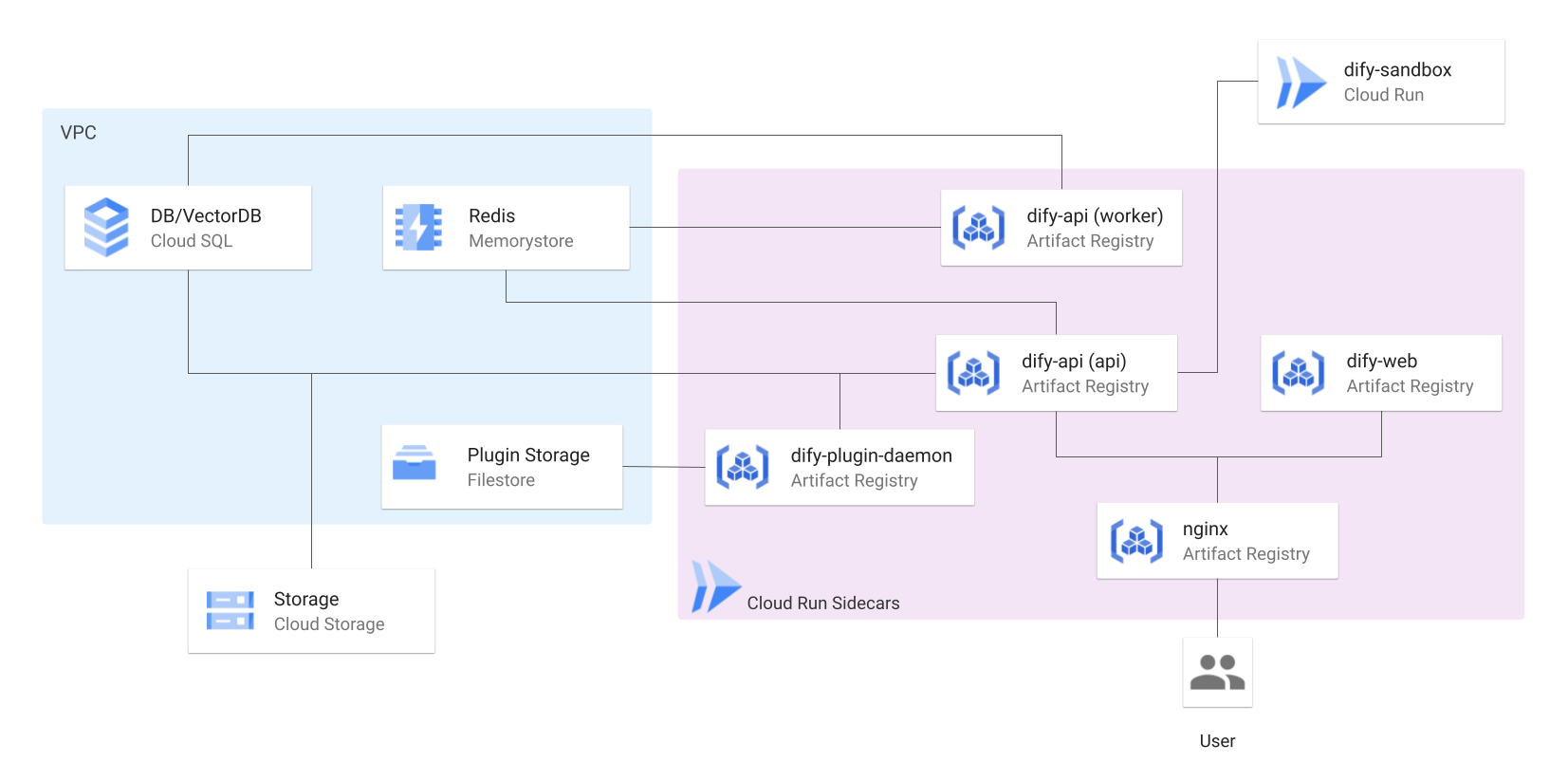
This repository allows you to automatically set up Google Cloud resources using Terraform and deploy Dify in a highly available configuration.
Features
- Serverless hosting
- Auto-scaling
- Data persistence
Prerequisites
- Google Cloud account
- Terraform installed
- gcloud CLI installed
Configuration
- Set environment-specific values in the
terraform/environments/dev/terraform.tfvarsfile.
[!WARNING] Security Alert: Handling
terraform.tfvarsTheterraform/environments/dev/terraform.tfvarsfile in this repository is a template only. Populate it locally with your actual configuration (project ID, secrets, secure password).Do NOT commit
terraform.tfvarscontaining sensitive data to Git. This poses a significant security risk.Add
*.tfvarsto your.gitignorefile immediately to prevent accidental commits. For secure secret management, use environment variables (TF_VAR_...) or tools like Google Secret Manager.
- Create a GCS bucket to manage Terraform state in advance, and replace "your-tfstate-bucket" in the
terraform/environments/dev/provider.tffile with the name of the created bucket.
Getting Started
-
Clone the repository:
git clone https://github.com/DeNA/dify-google-cloud-terraform.git -
Initialize Terraform:
cd terraform/environments/dev terraform init -
Make Artifact Registry repository:
terraform apply -target=module.registry -
Build & push container images:
cd ../../..
sh ./docker/cloudbuild.sh <your-project-id> <your-region>
You can also specify a version of the dify-api image.
sh ./docker/cloudbuild.sh <your-project-id> <your-region> <dify-api-version>If no version is specified, the latest version is used by default.
-
Terraform plan:
cd terraform/environments/dev terraform plan -
Terraform apply:
terraform apply
Cleanup
terraform destroy
Note: Cloud Storage, Cloud SQL, VPC, and VPC Peering cannot be deleted with the terraform destroy command. These are critical resources for data persistence. Access the console and carefully delete them. After that, use the terraform destroy command to ensure all resources have been deleted.
References
License
This software is licensed under the MIT License. See the LICENSE file for more details.